wheel HYUNDAI KONA 2022 Owner's Manual
[x] Cancel search | Manufacturer: HYUNDAI, Model Year: 2022, Model line: KONA, Model: HYUNDAI KONA 2022Pages: 579, PDF Size: 35.31 MB
Page 109 of 579
Instrument cluster
4-16
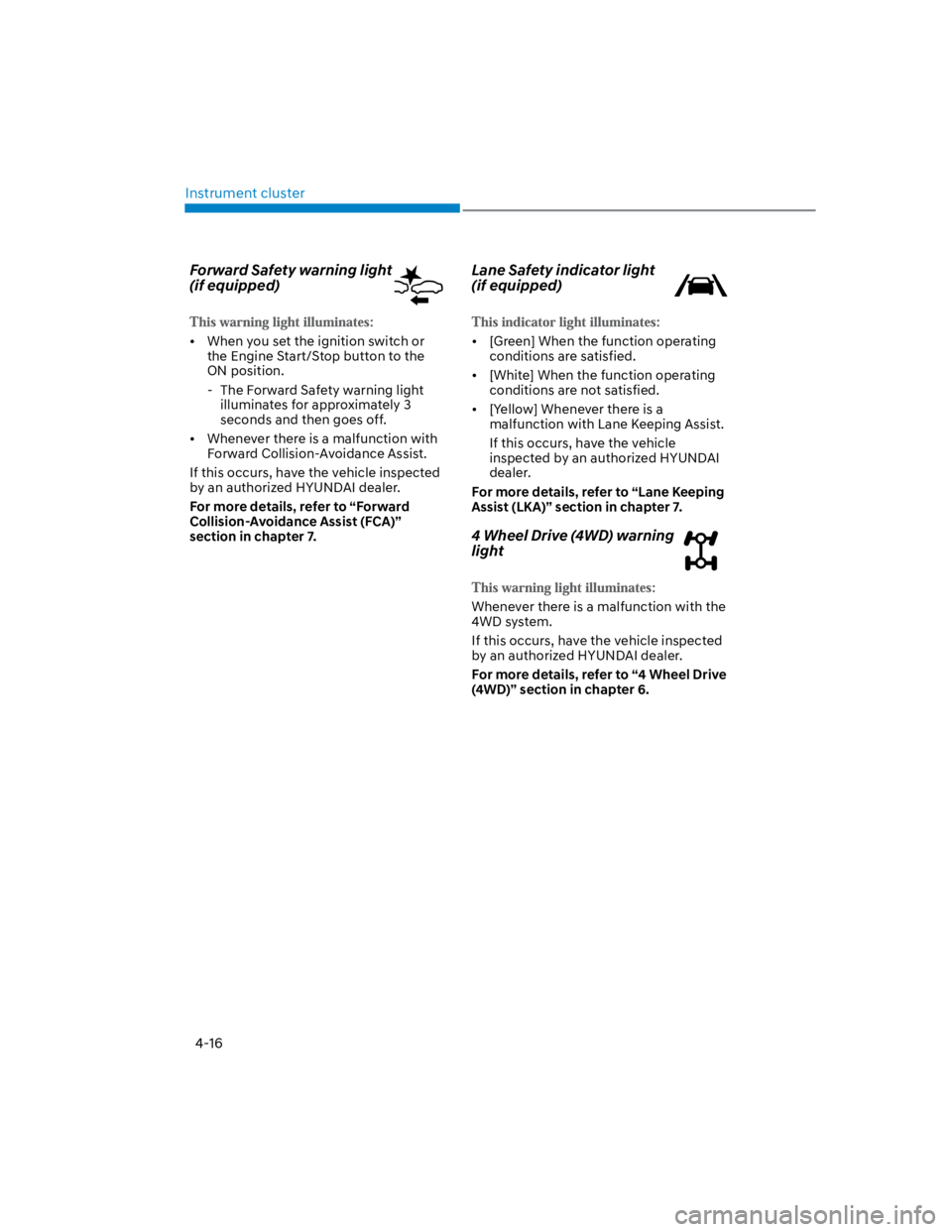
Forward Safety warning light
(if equipped)
When you set the ignition switch or
the Engine Start/Stop button to the
ON position.
- The Forward Safety warning light
illuminates for approximately 3
seconds and then goes off.
Whenever there is a malfunction with
Forward Collision-Avoidance Assist.
If this occurs, have the vehicle inspected
by an authorized HYUNDAI dealer.
For more details, refer to “Forward
Collision-Avoidance Assist (FCA)”
section in chapter 7.
Lane Safety indicator light
(if equipped)
[Green] When the function operating
conditions are satisfied.
[White] When the function operating
conditions are not satisfied.
[Yellow] Whenever there is a
malfunction with Lane Keeping Assist.
If this occurs, have the vehicle
inspected by an authorized HYUNDAI
dealer.
For more details, refer to “Lane Keeping
Assist (LKA)” section in chapter 7.
4 Wheel Drive (4WD) warning
light
Whenever there is a malfunction with the
4WD system.
If this occurs, have the vehicle inspected
by an authorized HYUNDAI dealer.
For more details, refer to “4 Wheel Drive
(4WD)” section in chapter 6.
Page 110 of 579
04
4-17
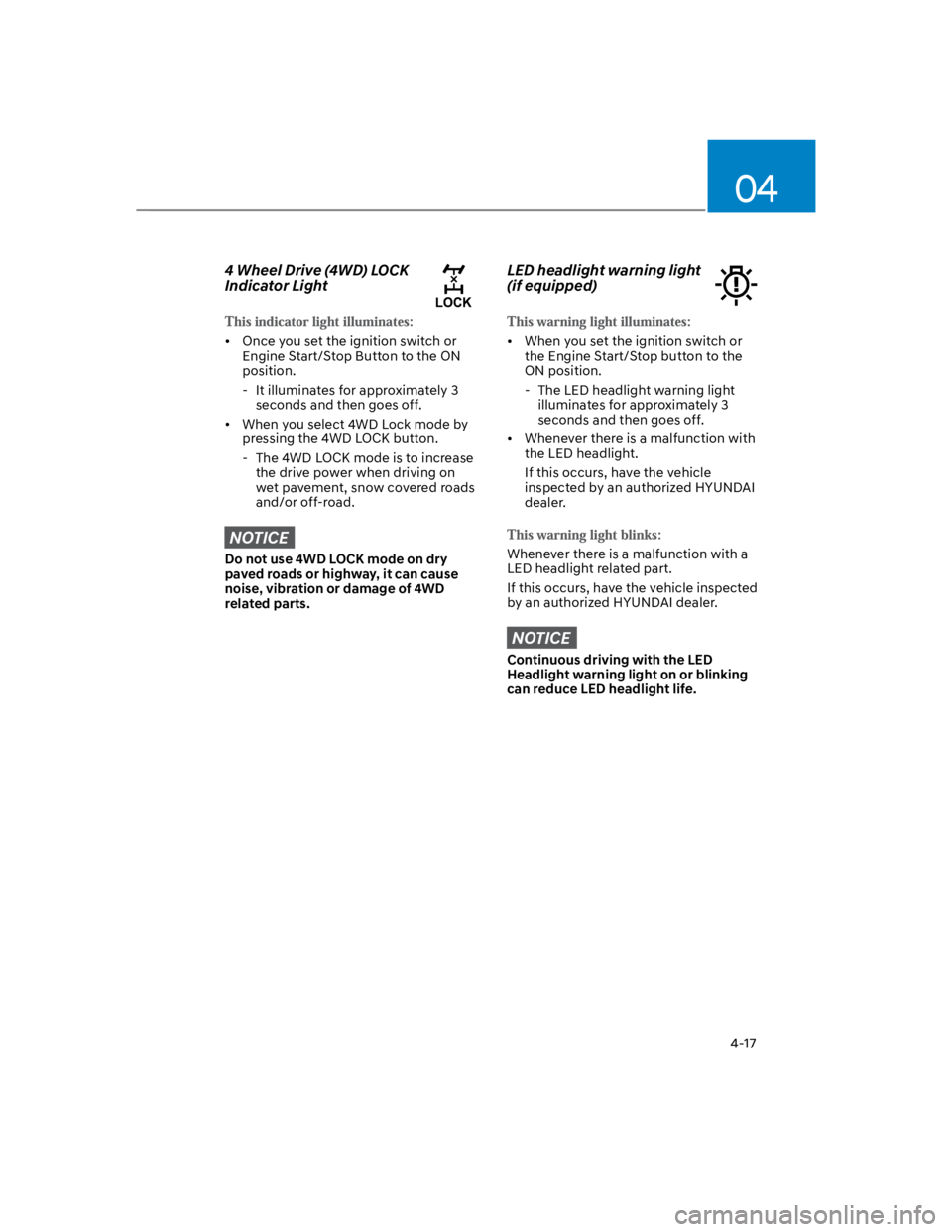
4 Wheel Drive (4WD) LOCK
Indicator Light
Once you set the ignition switch or
Engine Start/Stop Button to the ON
position.
- It illuminates for approximately 3
seconds and then goes off.
When you select 4WD Lock mode by
pressing the 4WD LOCK button.
- The 4WD LOCK mode is to increase
the drive power when driving on
wet pavement, snow covered roads
and/or off-road.
NOTICE
Do not use 4WD LOCK mode on dry
paved roads or highway, it can cause
noise, vibration or damage of 4WD
related parts.
LED headlight warning light
(if equipped)
When you set the ignition switch or
the Engine Start/Stop button to the
ON position.
- The LED headlight warning light
illuminates for approximately 3
seconds and then goes off.
Whenever there is a malfunction with
the LED headlight.
If this occurs, have the vehicle
inspected by an authorized HYUNDAI
dealer.
Whenever there is a malfunction with a
LED headlight related part.
If this occurs, have the vehicle inspected
by an authorized HYUNDAI dealer.
NOTICE
Continuous driving with the LED
Headlight warning light on or blinking
can reduce LED headlight life.
Page 115 of 579

Instrument cluster
4-22
LCD display messages
Shift to P (for smart key system and
dual clutch transmission)
This message is displayed if you try to
turn off the vehicle without the gear in
the P (Park) position.
If this occurs, the Engine Start/Stop
button turns to the ACC position.
Low key battery (for smart key
system)
This message is displayed if the battery
of the smart key is discharged while
changing the Engine Start/Stop button to
the OFF position.
Press START button while turning
wheel (for smart key system)
This message is displayed if the steering
wheel does not unlock normally when
the Engine Start/Stop button is pressed.
You should press the Engine Start/Stop
button while turning the steering wheel
right and left.
Steering wheel not locked
(for smart key system)
This message is displayed if the steering
wheel does not lock normally while the
Engine Start/Stop button is pressed to
the OFF position.
Press brake pedal to start engine (for
smart key system and dual clutch
transmission)
This message is displayed if the Engine
Start/Stop button changes to the ACC
position twice by pressing the button
repeatedly without depressing the brake
pedal.
You can start the vehicle by depressing
the brake pedal and then pressing the
Engine Start/Stop button.
Key not in vehicle (for smart key
system)
This message is displayed if the smart
key is not in the vehicle when you leave
the vehicle with the Engine Start/Stop
button in the ON or Start position.
Always turn off the engine before leaving
your vehicle.
Key not detected (for smart key
system)
This message is displayed if the smart
key is not detected when you press the
Engine Start/Stop button.
Press START button again (for smart
key system)
This message is displayed if you were
unable to start the vehicle when the
Engine Start/Stop button was pressed.
If this occurs, attempt to start the engine
by pressing the Engine Start/ Stop button
again.
If the warning message appears each
time you press the Engine Start/Stop
button, have the vehicle inspected by an
authorized HYUNDAI dealer.
Page 118 of 579
04
4-25
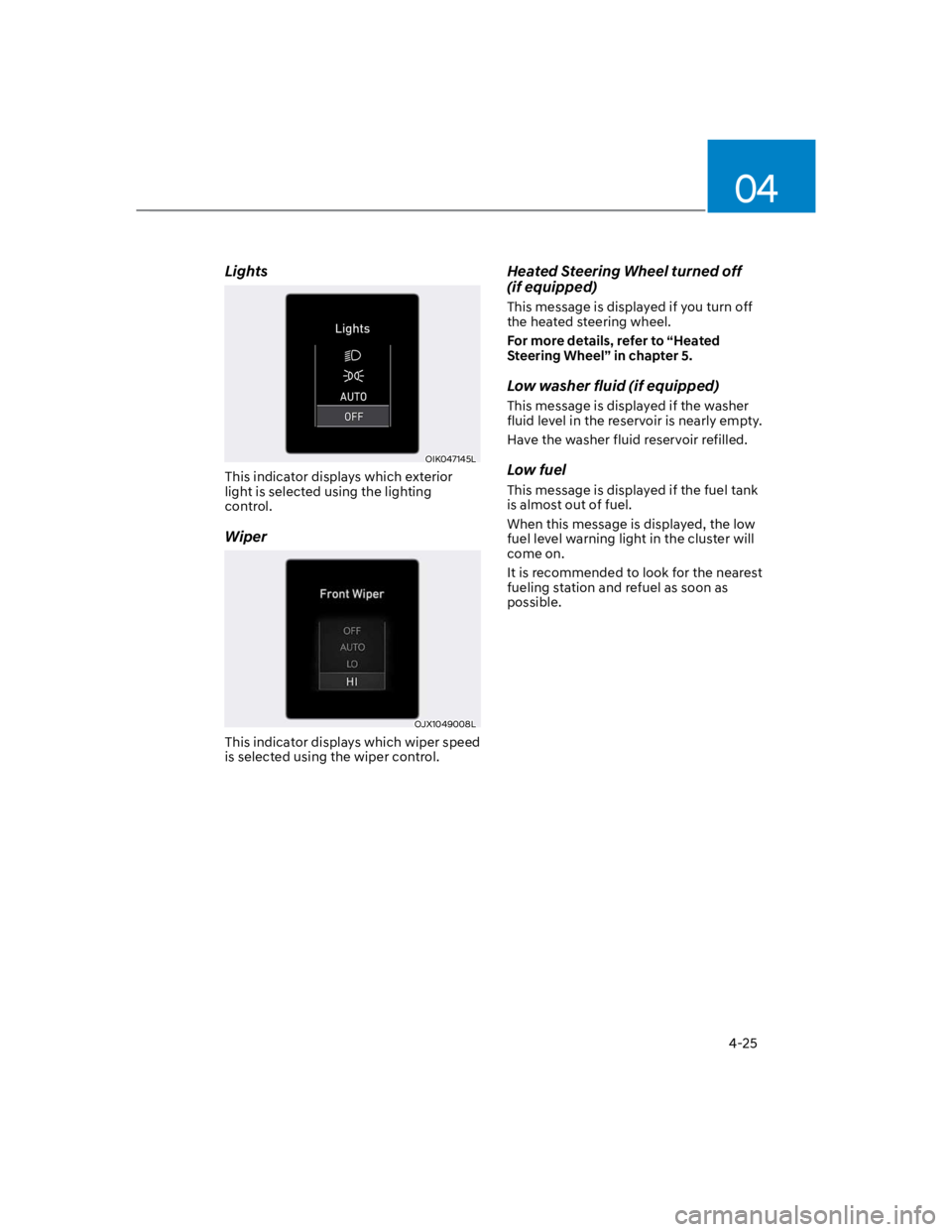
Lights
OIK047145L
This indicator displays which exterior
light is selected using the lighting
control.
Wiper
OJX1049008L
This indicator displays which wiper speed
is selected using the wiper control.
Heated Steering Wheel turned off
(if equipped)
This message is displayed if you turn off
the heated steering wheel.
For more details, refer to “Heated
Steering Wheel” in chapter 5.
Low washer fluid (if equipped)
This message is displayed if the washer
fluid level in the reservoir is nearly empty.
Have the washer fluid reservoir refilled.
Low fuel
This message is displayed if the fuel tank
is almost out of fuel.
When this message is displayed, the low
fuel level warning light in the cluster will
come on.
It is recommended to look for the nearest
fueling station and refuel as soon as
possible.
Page 122 of 579
04
4-29
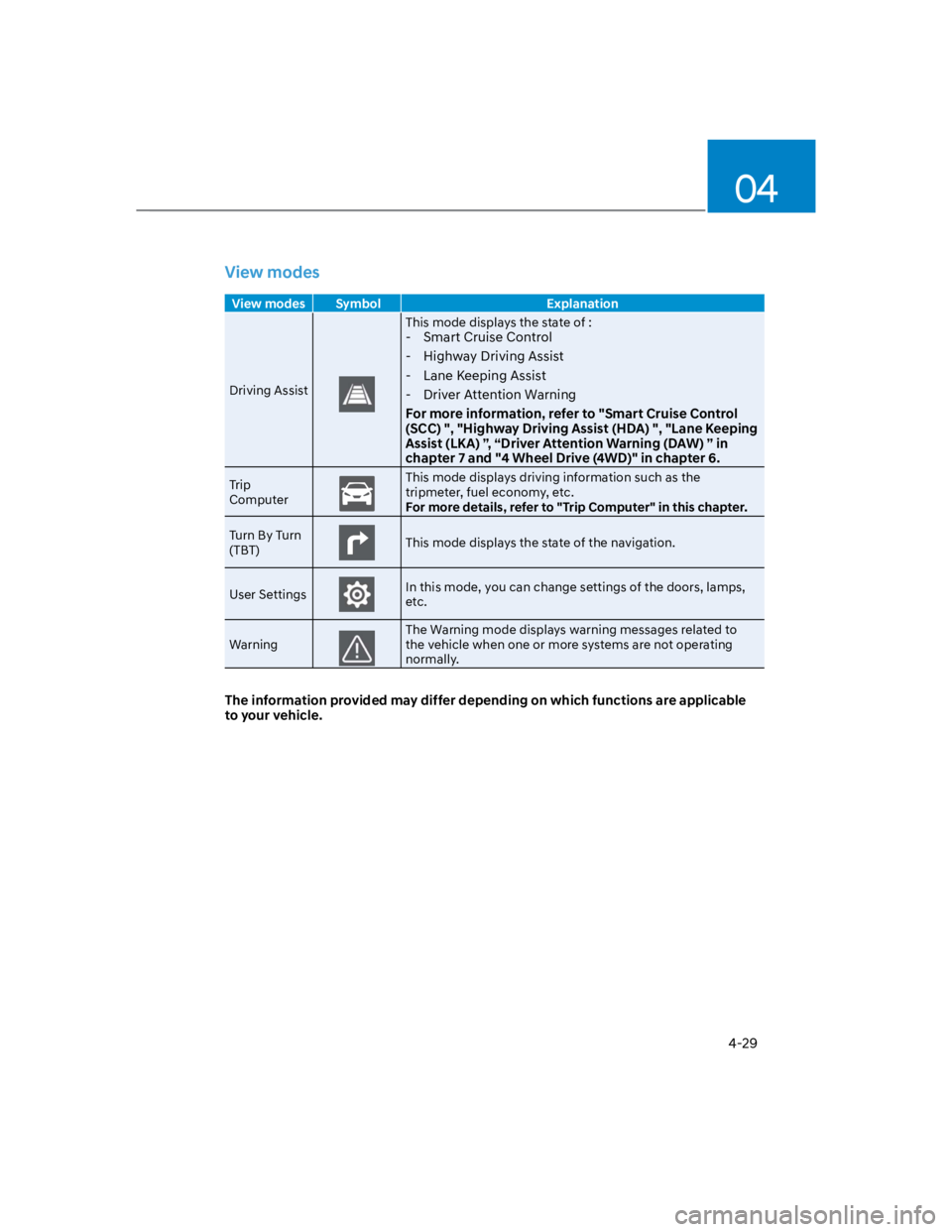
View modes
View modes Symbol Explanation
Driving Assist
This mode displays the state of :
- Smart Cruise Control
- Highway Driving Assist
- Lane Keeping Assist
- Driver Attention Warning
For more information, refer to "Smart Cruise Control
(SCC) ", "Highway Driving Assist (HDA) ", "Lane Keeping
Assist (LKA) ”, “Driver Attention Warning (DAW) ” in
chapter 7 and "4 Wheel Drive (4WD)" in chapter 6.
Trip
Computer
This mode displays driving information such as the
tripmeter, fuel economy, etc.
For more details, refer to "Trip Computer" in this chapter.
Turn By Turn
(TBT)This mode displays the state of the navigation.
User SettingsIn this mode, you can change settings of the doors, lamps,
etc.
Warning
The Warning mode displays warning messages related to
the vehicle when one or more systems are not operating
normally.
The information provided may differ depending on which functions are applicable
to your vehicle.
Page 124 of 579
04
4-31
OTM040024
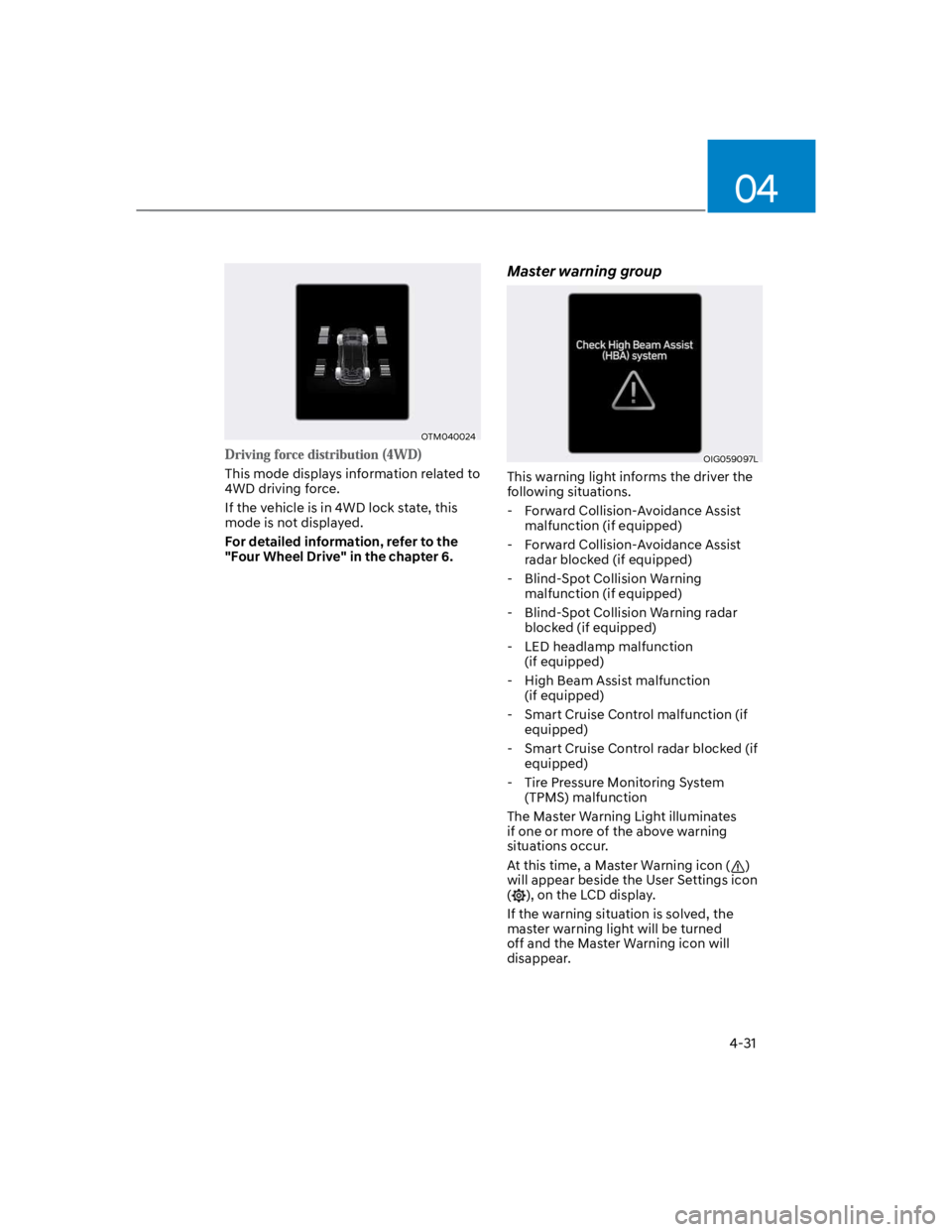
This mode displays information related to
4WD driving force.
If the vehicle is in 4WD lock state, this
mode is not displayed.
For detailed information, refer to the
"Four Wheel Drive" in the chapter 6.
Master warning group
OIG059097L
This warning light informs the driver the
following situations.
- Forward Collision-Avoidance Assist
malfunction (if equipped)
- Forward Collision-Avoidance Assist
radar blocked (if equipped)
- Blind-Spot Collision Warning
malfunction (if equipped)
- Blind-Spot Collision Warning radar
blocked (if equipped)
- LED headlamp malfunction
(if equipped)
- High Beam Assist malfunction
(if equipped)
- Smart Cruise Control malfunction (if
equipped)
- Smart Cruise Control radar blocked (if
equipped)
- Tire Pressure Monitoring System
(TPMS) malfunction
The Master Warning Light illuminates
if one or more of the above warning
situations occur.
At this time, a Master Warning icon ()
will appear beside the User Settings icon
(), on the LCD display.
If the warning situation is solved, the
master warning light will be turned
off and the Master Warning icon will
disappear.
Page 131 of 579
Instrument cluster
4-38
Trip computer (Type A)
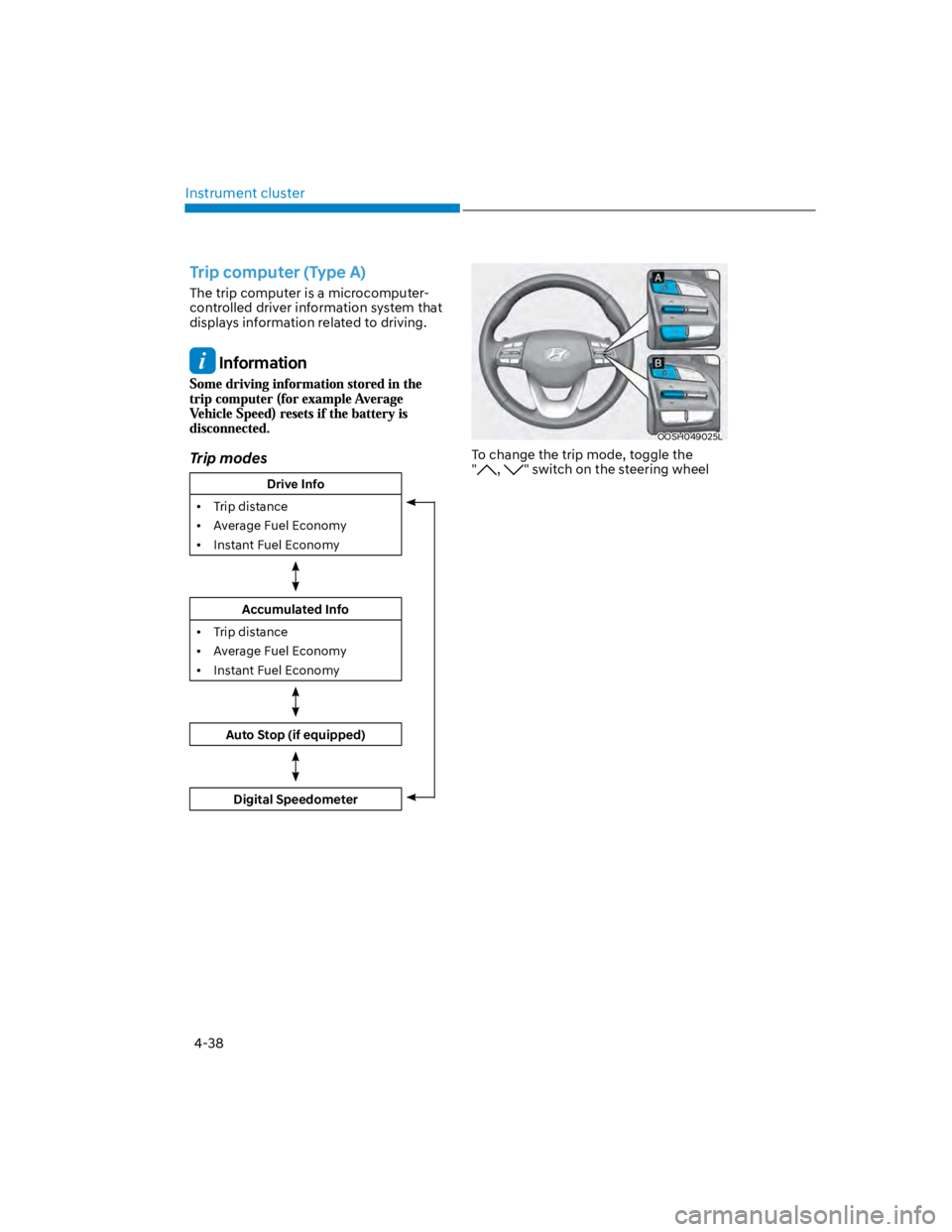
The trip computer is a microcomputer-
controlled driver information system that
displays information related to driving.
Information
Trip modes
Drive Info
Trip distance
Average Fuel Economy
Instant Fuel Economy
Accumulated Info
Trip distance
Average Fuel Economy
Instant Fuel Economy
Auto Stop (if equipped)
Digital Speedometer
OOSH049025L
To change the trip mode, toggle the
", " switch on the steering wheel
Page 132 of 579
04
4-39
OTMA040004
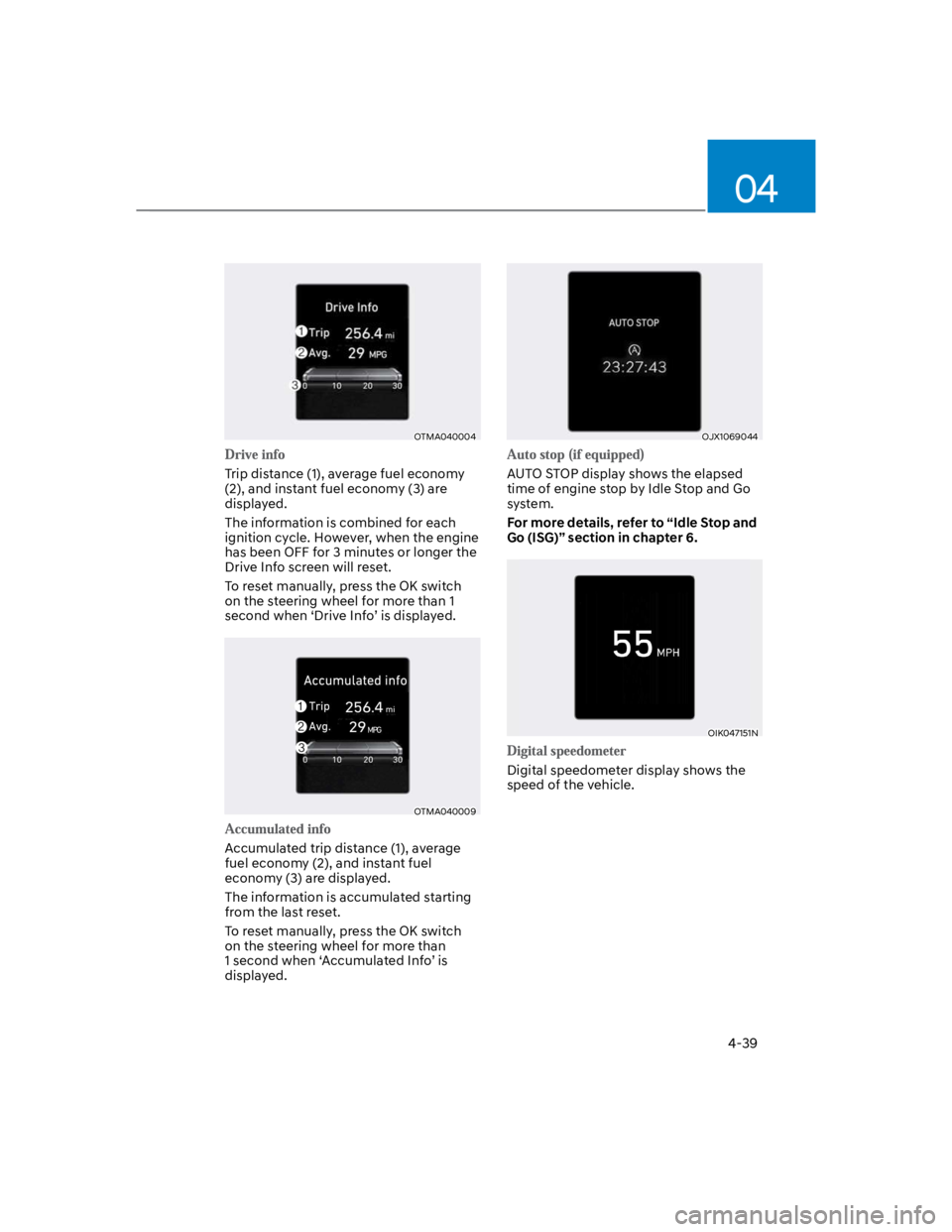
Trip distance (1), average fuel economy
(2), and instant fuel economy (3) are
displayed.
The information is combined for each
ignition cycle. However, when the engine
has been OFF for 3 minutes or longer the
Drive Info screen will reset.
To reset manually, press the OK switch
on the steering wheel for more than 1
second when ‘Drive Info’ is displayed.
OTMA040009
Accumulated trip distance (1), average
fuel economy (2), and instant fuel
economy (3) are displayed.
The information is accumulated starting
from the last reset.
To reset manually, press the OK switch
on the steering wheel for more than
1 second when ‘Accumulated Info’ is
displayed.
OJX1069044
AUTO STOP display shows the elapsed
time of engine stop by Idle Stop and Go
system.
For more details, refer to “Idle Stop and
Go (ISG)” section in chapter 6.
OIK047151N
Digital speedometer display shows the
speed of the vehicle.
Page 133 of 579
Instrument cluster
4-40
Trip computer (Type B)
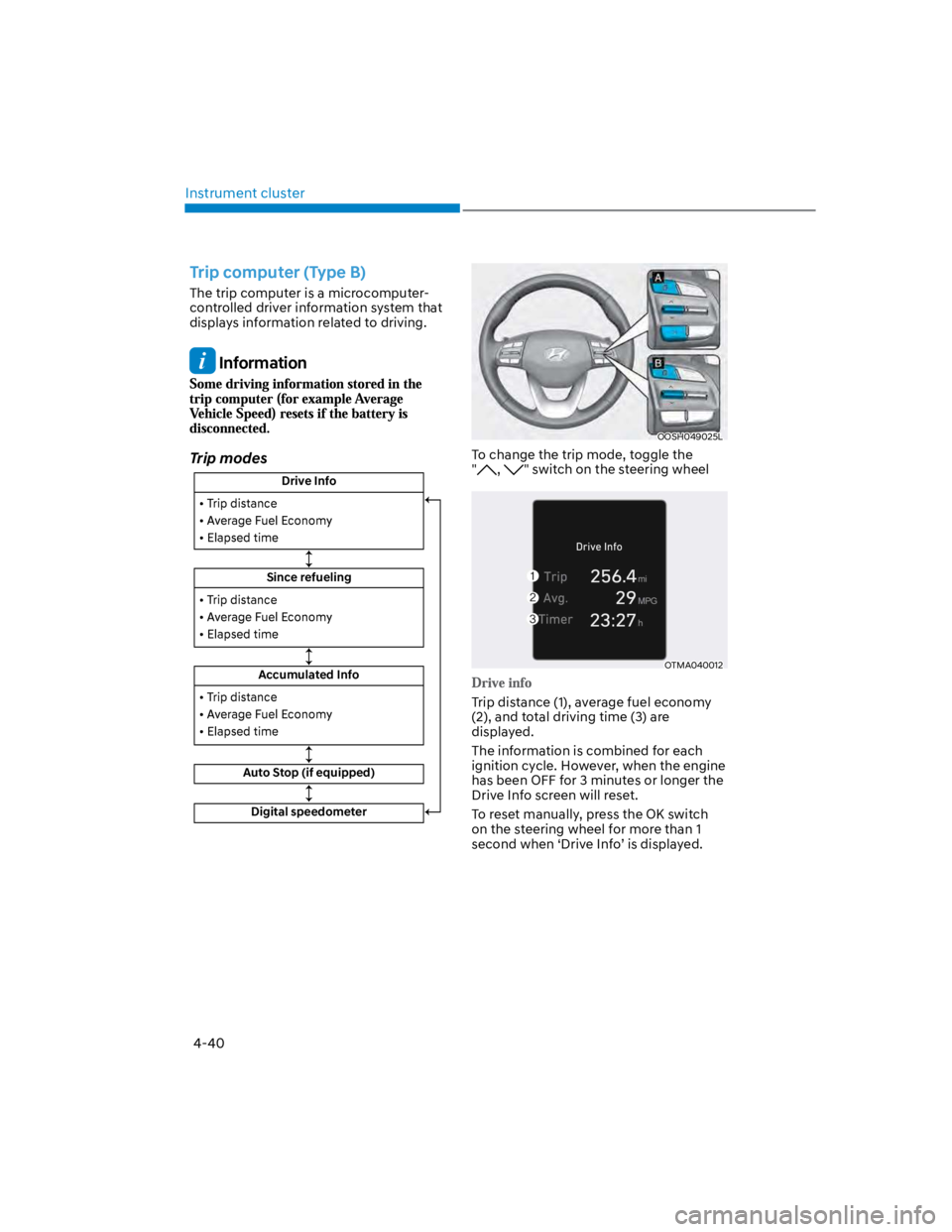
The trip computer is a microcomputer-
controlled driver information system that
displays information related to driving.
Information
Trip modes
Drive Info
Since refueling
Accumulated Info
Auto Stop (if equipped)
Digital speedometer
OOSH049025L
To change the trip mode, toggle the
", " switch on the steering wheel
OTMA040012
Trip distance (1), average fuel economy
(2), and total driving time (3) are
displayed.
The information is combined for each
ignition cycle. However, when the engine
has been OFF for 3 minutes or longer the
Drive Info screen will reset.
To reset manually, press the OK switch
on the steering wheel for more than 1
second when ‘Drive Info’ is displayed.
Page 134 of 579
04
4-41
OTMA040014
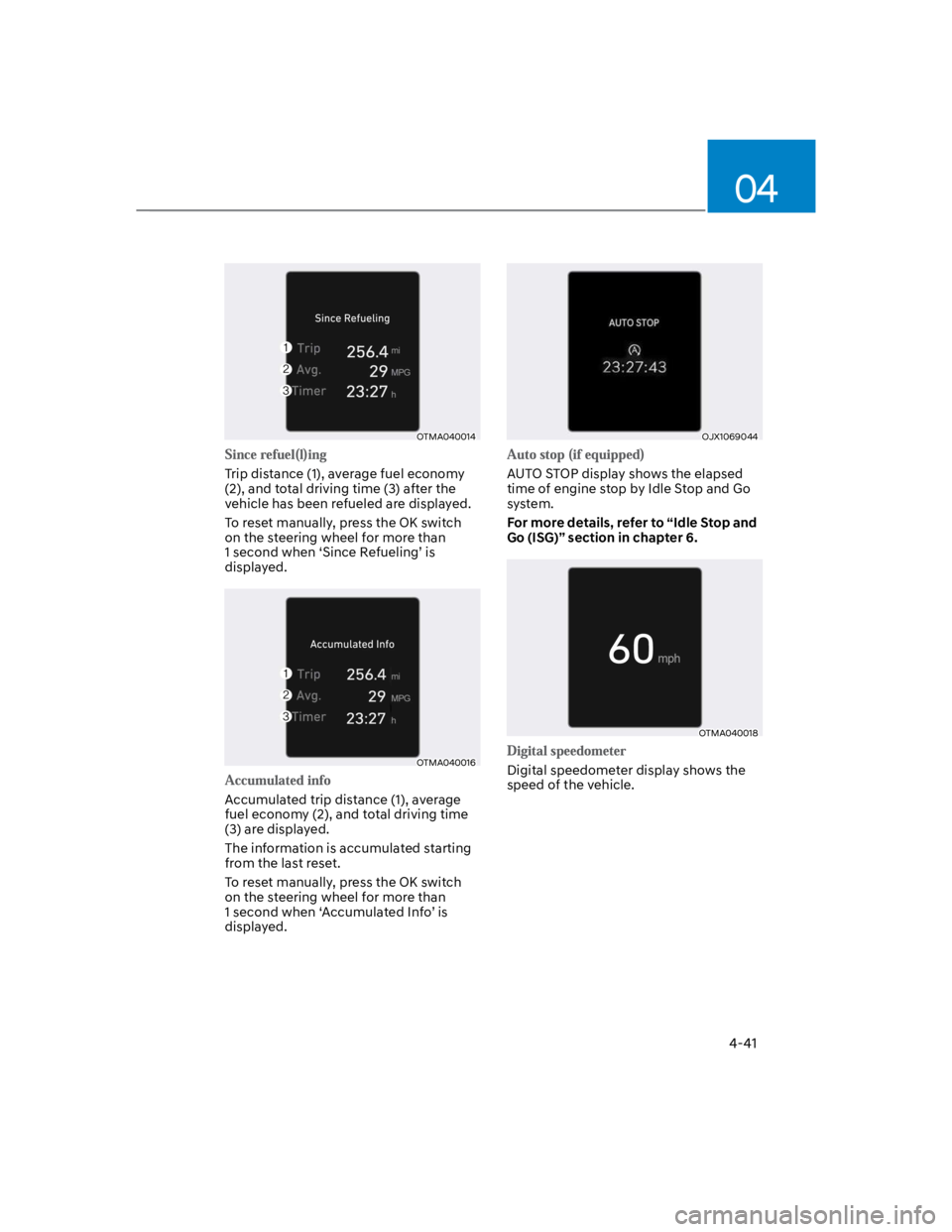
Trip distance (1), average fuel economy
(2), and total driving time (3) after the
vehicle has been refueled are displayed.
To reset manually, press the OK switch
on the steering wheel for more than
1 second when ‘Since Refueling’ is
displayed.
OTMA040016
Accumulated trip distance (1), average
fuel economy (2), and total driving time
(3) are displayed.
The information is accumulated starting
from the last reset.
To reset manually, press the OK switch
on the steering wheel for more than
1 second when ‘Accumulated Info’ is
displayed.
OJX1069044
AUTO STOP display shows the elapsed
time of engine stop by Idle Stop and Go
system.
For more details, refer to “Idle Stop and
Go (ISG)” section in chapter 6.
OTMA040018
Digital speedometer display shows the
speed of the vehicle.