Collision alert HYUNDAI KONA 2022 Owners Manual
[x] Cancel search | Manufacturer: HYUNDAI, Model Year: 2022, Model line: KONA, Model: HYUNDAI KONA 2022Pages: 579, PDF Size: 35.31 MB
Page 126 of 579
04
4-33
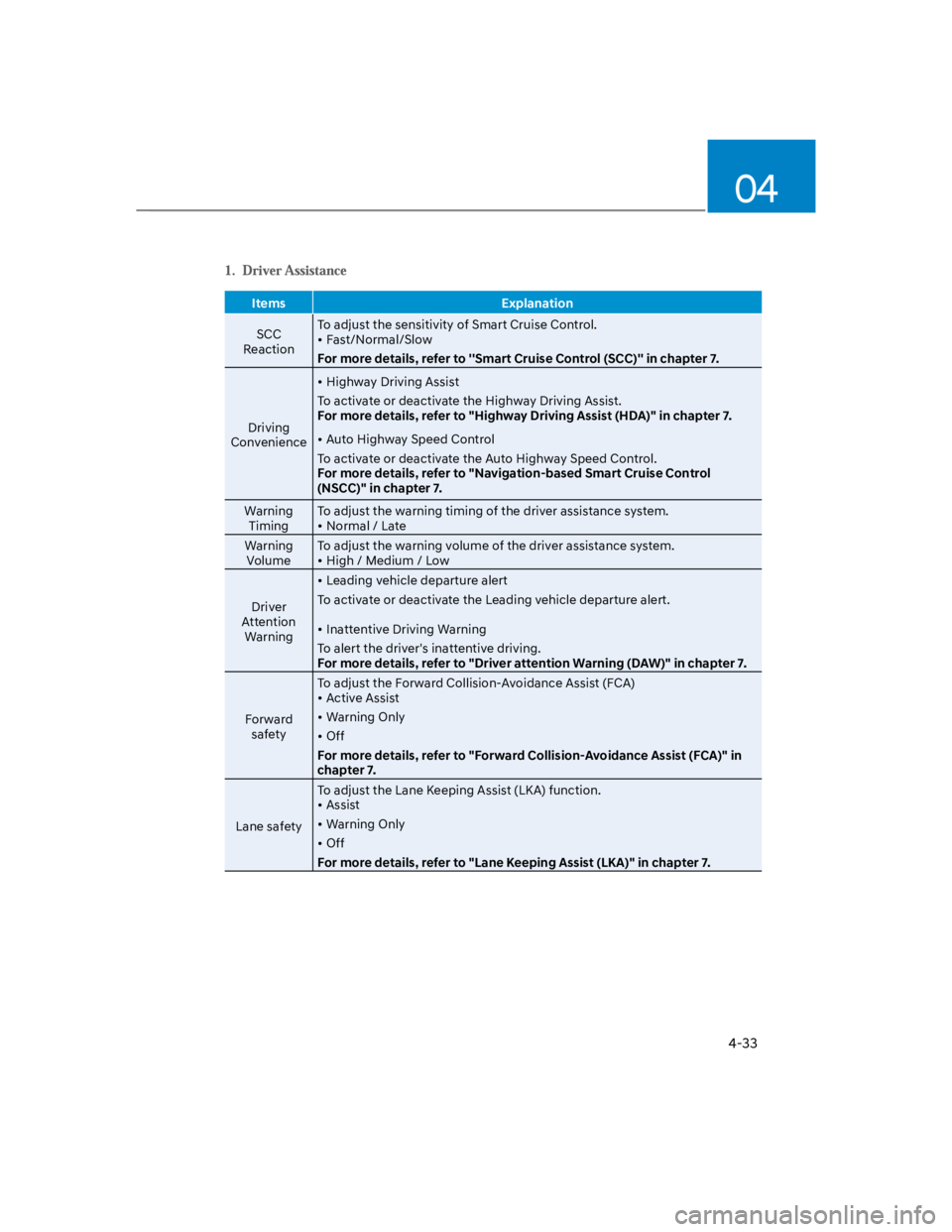
Items Explanation
SCC
Reaction
To adjust the sensitivity of Smart Cruise Control.
Fast/Normal/Slow
For more details, refer to ''Smart Cruise Control (SCC)'' in chapter 7.
Driving
Convenience
Highway Driving Assist
To activate or deactivate the Highway Driving Assist.
For more details, refer to "Highway Driving Assist (HDA)" in chapter 7.
Auto Highway Speed Control
To activate or deactivate the Auto Highway Speed Control.
For more details, refer to "Navigation-based Smart Cruise Control
(NSCC)" in chapter 7.
Warning
Timing
To adjust the warning timing of the driver assistance system.
Normal / Late
Warning
Volume
To adjust the warning volume of the driver assistance system.
High / Medium / Low
Driver
Attention
Warning
Leading vehicle departure alert
To activate or deactivate the Leading vehicle departure alert.
Inattentive Driving Warning
To alert the driver's inattentive driving.
For more details, refer to "Driver attention Warning (DAW)" in chapter 7.
Forward
safety
To adjust the Forward Collision-Avoidance Assist (FCA)
Active Assist
Warning Only
Off
For more details, refer to "Forward Collision-Avoidance Assist (FCA)" in
chapter 7.
Lane safety
To adjust the Lane Keeping Assist (LKA) function.
Assist
Warning Only
Off
For more details, refer to "Lane Keeping Assist (LKA)" in chapter 7.
Page 386 of 579
Driver assistance system
7-54
Basic function
Driver Attention Warning can help
determine the driver's attention level by
analyzing driving pattern, driving time,
etc. while vehicle is being driven. The
function will recommend a break when
certain level.
Leading Vehicle Departure Alert
function
Leading Vehicle Departure Alert function
will inform the driver when a detected
vehicle in front departs from a stop.
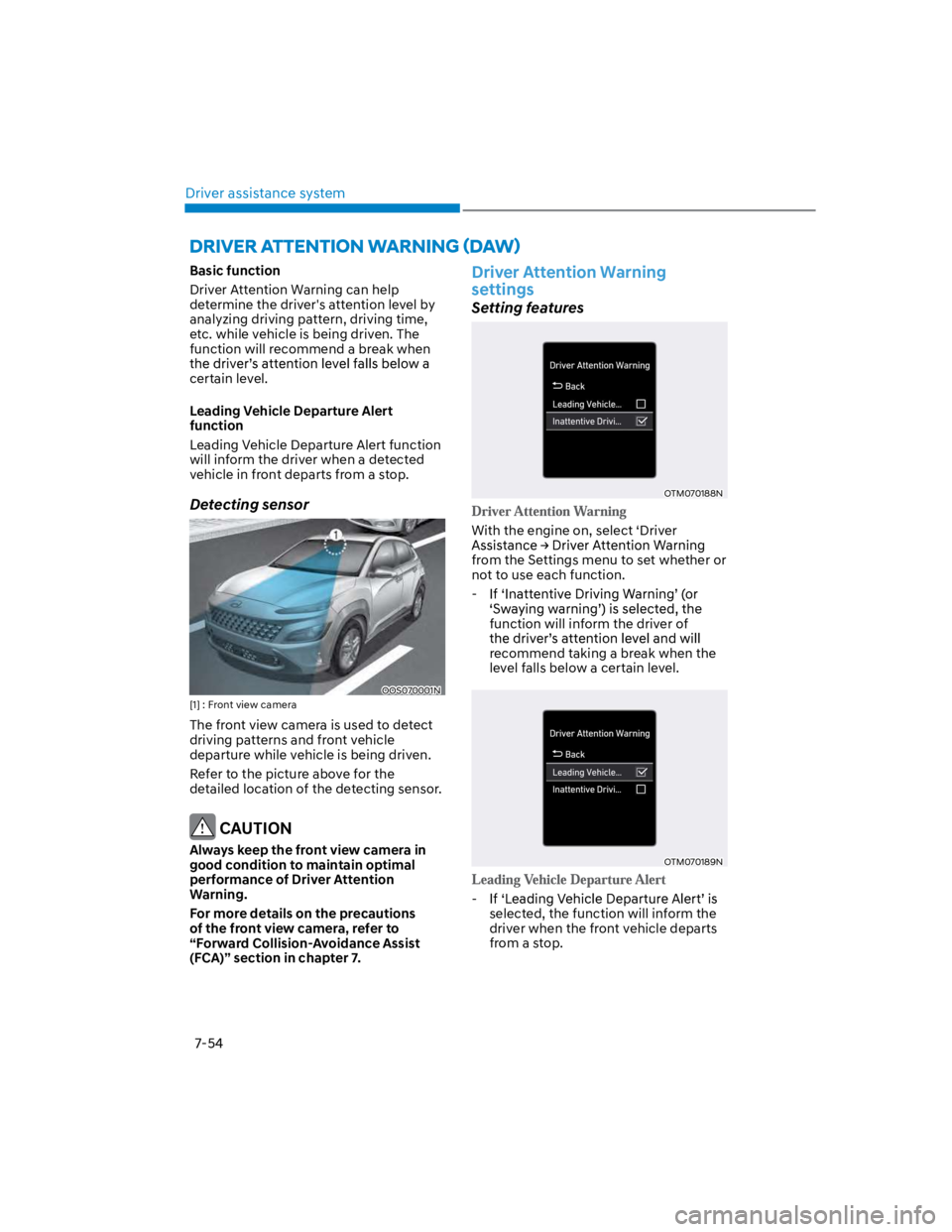
Detecting sensor
OOS070001N
[1] : Front view camera
The front view camera is used to detect
driving patterns and front vehicle
departure while vehicle is being driven.
Refer to the picture above for the
detailed location of the detecting sensor.
CAUTION
Always keep the front view camera in
good condition to maintain optimal
performance of Driver Attention
Warning.
For more details on the precautions
of the front view camera, refer to
“Forward Collision-Avoidance Assist
(FCA)” section in chapter 7.
Driver Attention Warning
settings
Setting features
OTM070188N
With the engine on, select ‘Driver
from the Settings menu to set whether or
not to use each function.
-
function will inform the driver of
recommend taking a break when the
level falls below a certain level.
OTM070189N
-
selected, the function will inform the
driver when the front vehicle departs
from a stop.
Page 391 of 579
07
7-59
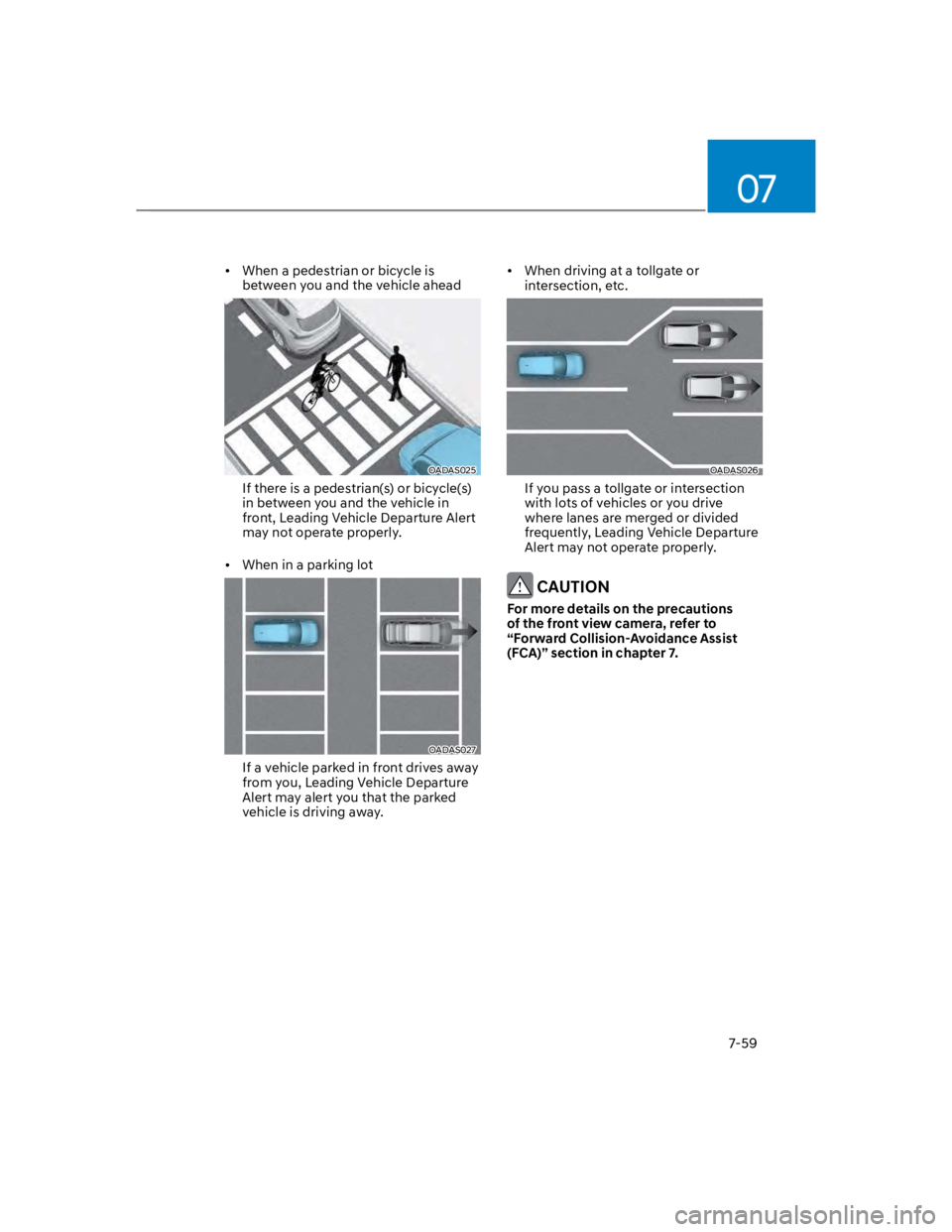
When a pedestrian or bicycle is
between you and the vehicle ahead
OADAS025
If there is a pedestrian(s) or bicycle(s)
in between you and the vehicle in
front, Leading Vehicle Departure Alert
may not operate properly.
When in a parking lot
OADAS027
If a vehicle parked in front drives away
from you, Leading Vehicle Departure
Alert may alert you that the parked
vehicle is driving away.
When driving at a tollgate or
intersection, etc.
OADAS026
If you pass a tollgate or intersection
with lots of vehicles or you drive
where lanes are merged or divided
frequently, Leading Vehicle Departure
Alert may not operate properly.
CAUTION
For more details on the precautions
of the front view camera, refer to
“Forward Collision-Avoidance Assist
(FCA)” section in chapter 7.