Forward collision avoidance HYUNDAI KONA 2022 Owners Manual
[x] Cancel search | Manufacturer: HYUNDAI, Model Year: 2022, Model line: KONA, Model: HYUNDAI KONA 2022Pages: 579, PDF Size: 35.31 MB
Page 109 of 579
Instrument cluster
4-16
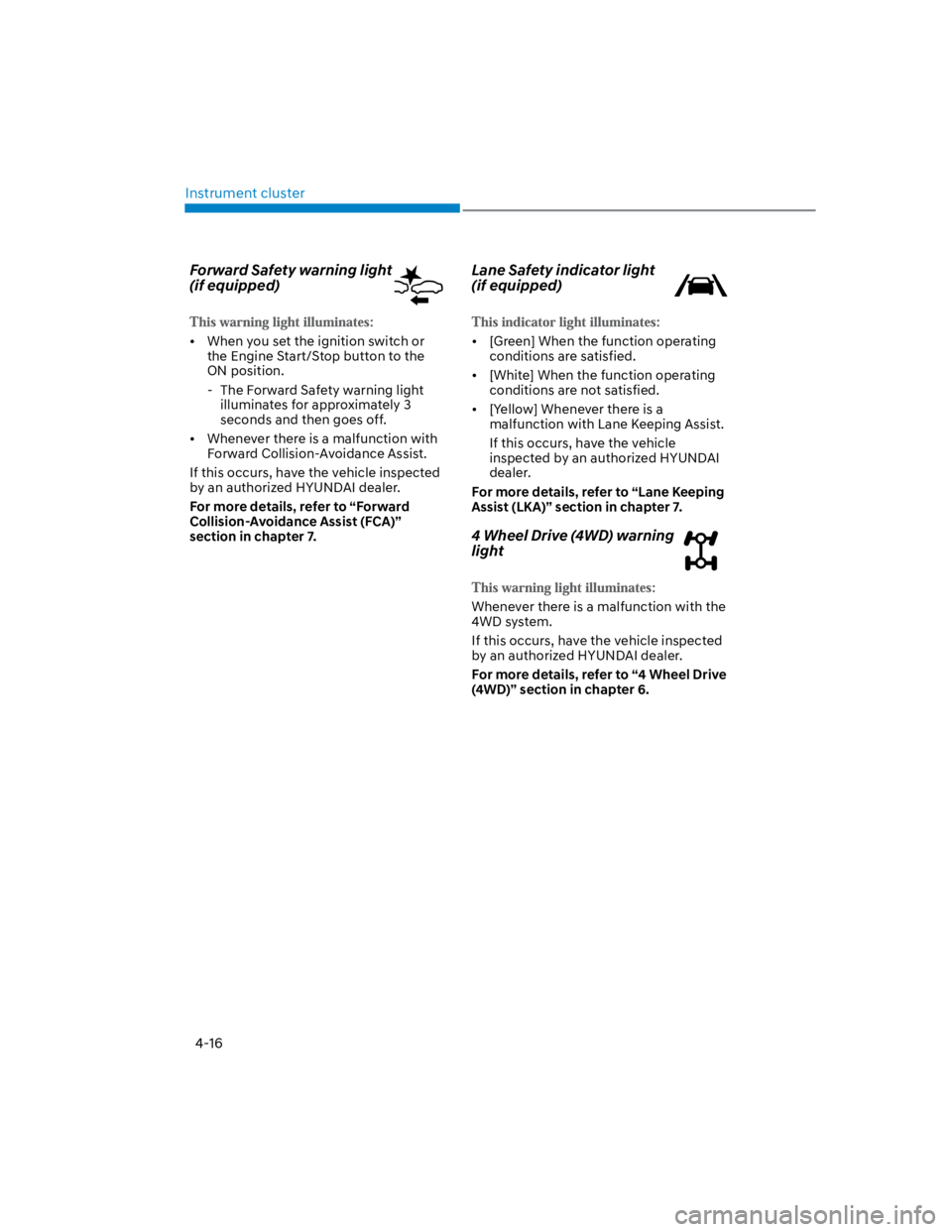
Forward Safety warning light
(if equipped)
When you set the ignition switch or
the Engine Start/Stop button to the
ON position.
- The Forward Safety warning light
illuminates for approximately 3
seconds and then goes off.
Whenever there is a malfunction with
Forward Collision-Avoidance Assist.
If this occurs, have the vehicle inspected
by an authorized HYUNDAI dealer.
For more details, refer to “Forward
Collision-Avoidance Assist (FCA)”
section in chapter 7.
Lane Safety indicator light
(if equipped)
[Green] When the function operating
conditions are satisfied.
[White] When the function operating
conditions are not satisfied.
[Yellow] Whenever there is a
malfunction with Lane Keeping Assist.
If this occurs, have the vehicle
inspected by an authorized HYUNDAI
dealer.
For more details, refer to “Lane Keeping
Assist (LKA)” section in chapter 7.
4 Wheel Drive (4WD) warning
light
Whenever there is a malfunction with the
4WD system.
If this occurs, have the vehicle inspected
by an authorized HYUNDAI dealer.
For more details, refer to “4 Wheel Drive
(4WD)” section in chapter 6.
Page 114 of 579
04
4-21
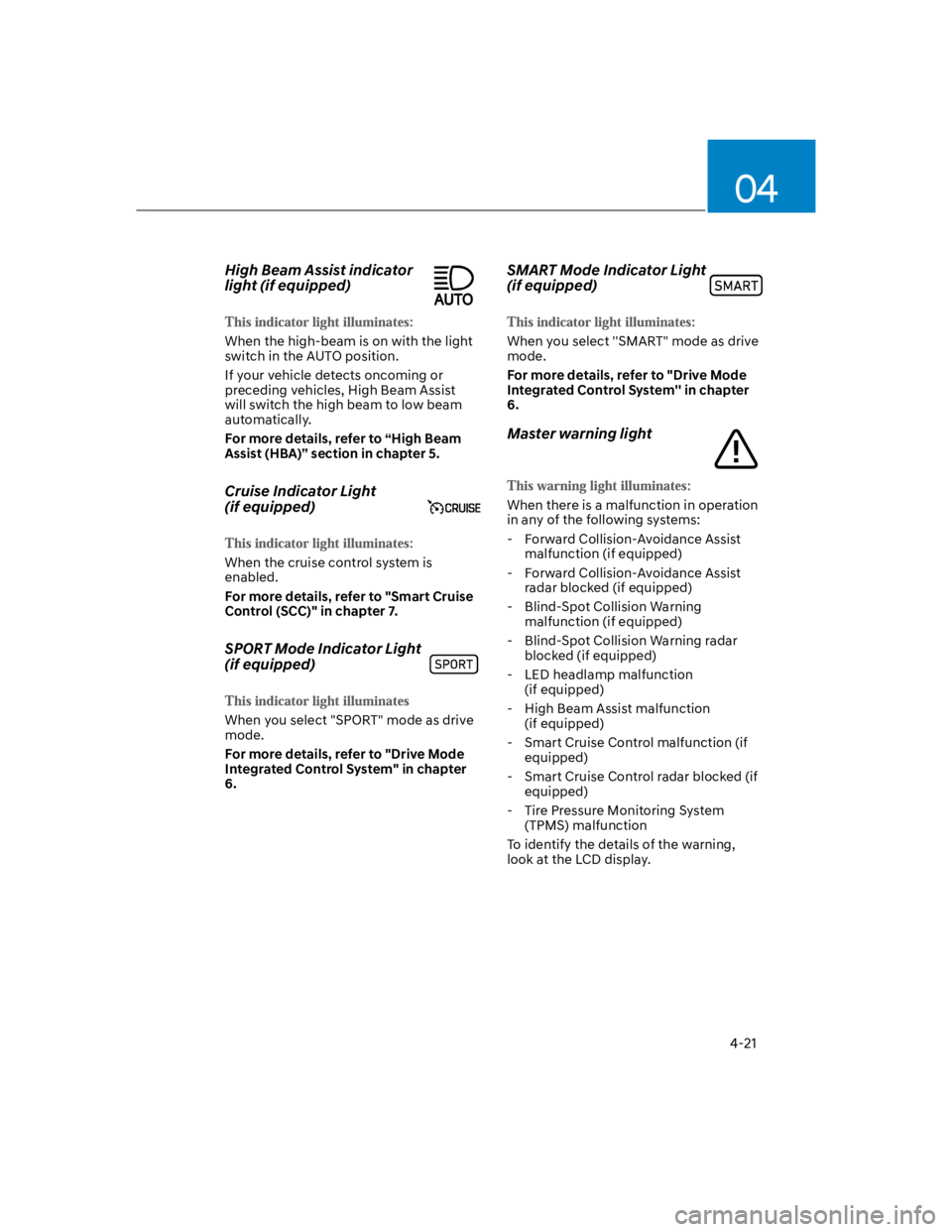
High Beam Assist indicator
light (if equipped)
When the high-beam is on with the light
switch in the AUTO position.
If your vehicle detects oncoming or
preceding vehicles, High Beam Assist
will switch the high beam to low beam
automatically.
For more details, refer to “High Beam
Assist (HBA)” section in chapter 5.
Cruise Indicator Light
(if equipped)
When the cruise control system is
enabled.
For more details, refer to "Smart Cruise
Control (SCC)" in chapter 7.
SPORT Mode Indicator Light
(if equipped)
When you select "SPORT" mode as drive
mode.
For more details, refer to "Drive Mode
Integrated Control System" in chapter
6.
SMART Mode Indicator Light
(if equipped)
When you select ''SMART" mode as drive
mode.
For more details, refer to "Drive Mode
Integrated Control System'' in chapter
6.
Master warning light
When there is a malfunction in operation
in any of the following systems:
- Forward Collision-Avoidance Assist
malfunction (if equipped)
- Forward Collision-Avoidance Assist
radar blocked (if equipped)
- Blind-Spot Collision Warning
malfunction (if equipped)
- Blind-Spot Collision Warning radar
blocked (if equipped)
- LED headlamp malfunction
(if equipped)
- High Beam Assist malfunction
(if equipped)
- Smart Cruise Control malfunction (if
equipped)
- Smart Cruise Control radar blocked (if
equipped)
- Tire Pressure Monitoring System
(TPMS) malfunction
To identify the details of the warning,
look at the LCD display.
Page 120 of 579

04
4-27
Check Forward Safety system
(if equipped)
This warning message is displayed
if there is a problem with Forward
Collision-Avoidance Assist. Have the
vehicle inspected by an authorized
HYUNDAI dealer.
For more details, refer to “Forward
Collision-Avoidance Assist (FCA)” in
chapter 6.
Check Lane Keeping Assist (LKA)
system (if equipped)
This warning message is displayed if
there is a problem with Lane Keeping
Assist. Have the vehicle inspected by an
authorized HYUNDAI dealer.
For more details, refer to “Lane Keeping
Assist (LKA)” in chapter 6.
Check Blind-Spot Safety system
(if equipped)
This warning message is displayed
if there is a problem with Blind-Spot
Collision Warning. Have the vehicle
inspected by an authorized HYUNDAI
dealer.
For more details, refer to “Blind-Spot
Collision -Avoidance Assist (BCA)” in
chapter 6.
Check Driver Attention Warning
system (if equipped)
This warning message is displayed if
there is a problem with Driver Attention
Warning. Have the vehicle inspected by
an authorized HYUNDAI dealer.
For more details, refer to “Driver
Attention Warning (DAW)” in chapter 6.
Check High Beam Assist (HBA)
system (if equipped)
This warning message is displayed if
there is a problem with the High Beam
Assist. Have the vehicle inspected by an
authorized HYUNDAI dealer.
For more details, refer to “High Beam
Assist (HBA)” in chapter 5.
Check Smart Cruise Control system
(if equipped)
This warning message is displayed if
there is a problem with Smart Cruise
Control. Have the vehicle inspected by
an authorized HYUNDAI dealer.
For more details, refer to “Smart Cruise
Control (SCC)” in chapter 6.
Page 124 of 579
04
4-31
OTM040024
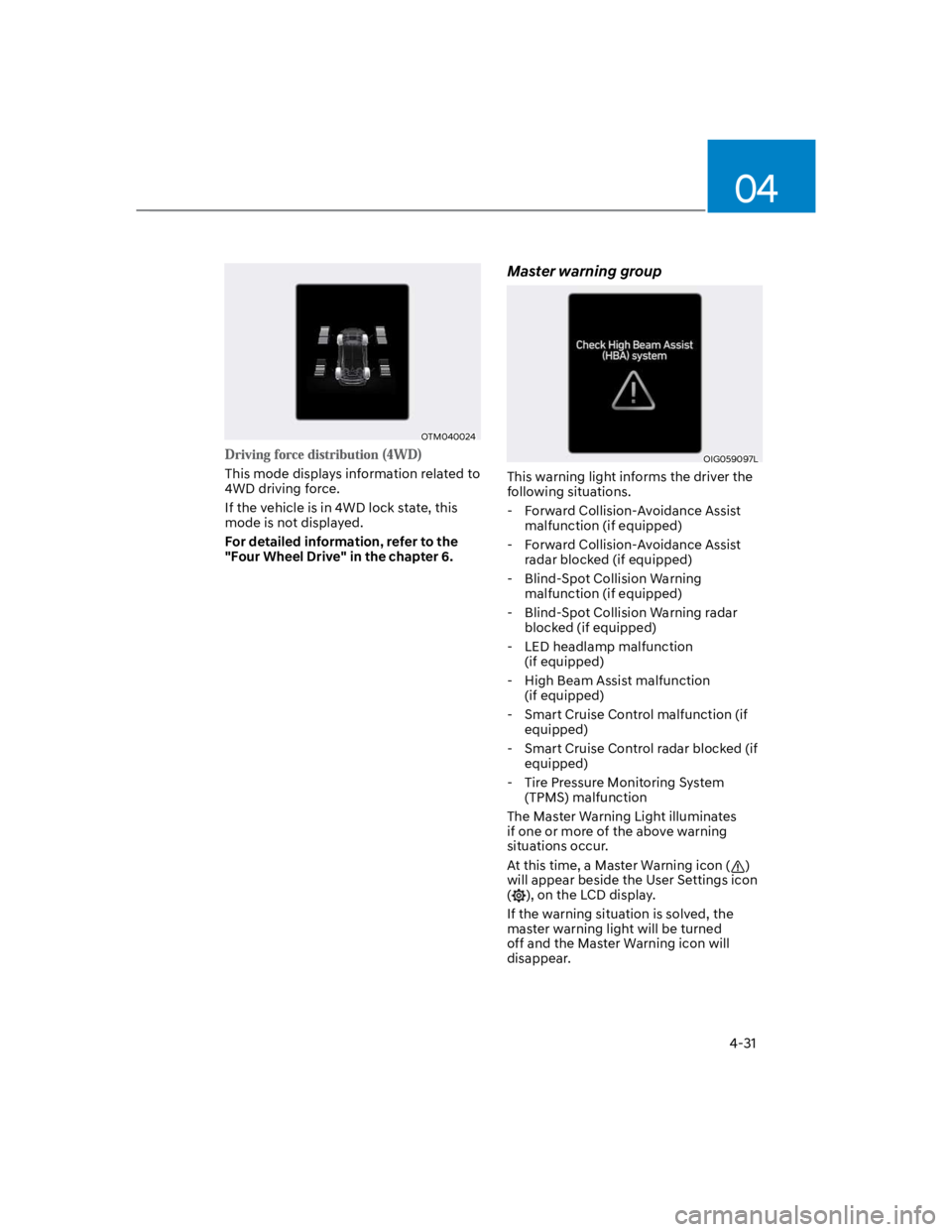
This mode displays information related to
4WD driving force.
If the vehicle is in 4WD lock state, this
mode is not displayed.
For detailed information, refer to the
"Four Wheel Drive" in the chapter 6.
Master warning group
OIG059097L
This warning light informs the driver the
following situations.
- Forward Collision-Avoidance Assist
malfunction (if equipped)
- Forward Collision-Avoidance Assist
radar blocked (if equipped)
- Blind-Spot Collision Warning
malfunction (if equipped)
- Blind-Spot Collision Warning radar
blocked (if equipped)
- LED headlamp malfunction
(if equipped)
- High Beam Assist malfunction
(if equipped)
- Smart Cruise Control malfunction (if
equipped)
- Smart Cruise Control radar blocked (if
equipped)
- Tire Pressure Monitoring System
(TPMS) malfunction
The Master Warning Light illuminates
if one or more of the above warning
situations occur.
At this time, a Master Warning icon ()
will appear beside the User Settings icon
(), on the LCD display.
If the warning situation is solved, the
master warning light will be turned
off and the Master Warning icon will
disappear.
Page 126 of 579
04
4-33
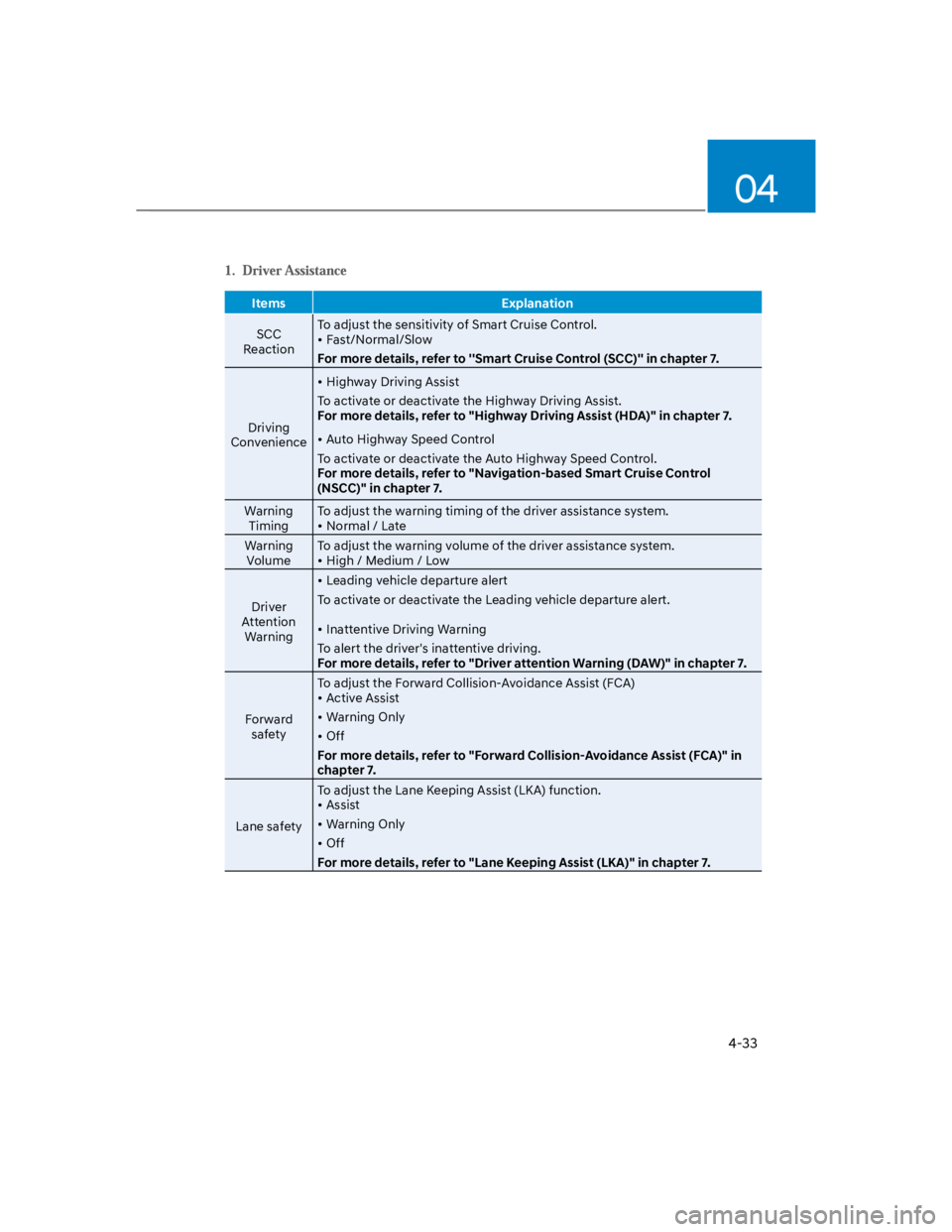
Items Explanation
SCC
Reaction
To adjust the sensitivity of Smart Cruise Control.
Fast/Normal/Slow
For more details, refer to ''Smart Cruise Control (SCC)'' in chapter 7.
Driving
Convenience
Highway Driving Assist
To activate or deactivate the Highway Driving Assist.
For more details, refer to "Highway Driving Assist (HDA)" in chapter 7.
Auto Highway Speed Control
To activate or deactivate the Auto Highway Speed Control.
For more details, refer to "Navigation-based Smart Cruise Control
(NSCC)" in chapter 7.
Warning
Timing
To adjust the warning timing of the driver assistance system.
Normal / Late
Warning
Volume
To adjust the warning volume of the driver assistance system.
High / Medium / Low
Driver
Attention
Warning
Leading vehicle departure alert
To activate or deactivate the Leading vehicle departure alert.
Inattentive Driving Warning
To alert the driver's inattentive driving.
For more details, refer to "Driver attention Warning (DAW)" in chapter 7.
Forward
safety
To adjust the Forward Collision-Avoidance Assist (FCA)
Active Assist
Warning Only
Off
For more details, refer to "Forward Collision-Avoidance Assist (FCA)" in
chapter 7.
Lane safety
To adjust the Lane Keeping Assist (LKA) function.
Assist
Warning Only
Off
For more details, refer to "Lane Keeping Assist (LKA)" in chapter 7.
Page 127 of 579
Instrument cluster
4-34
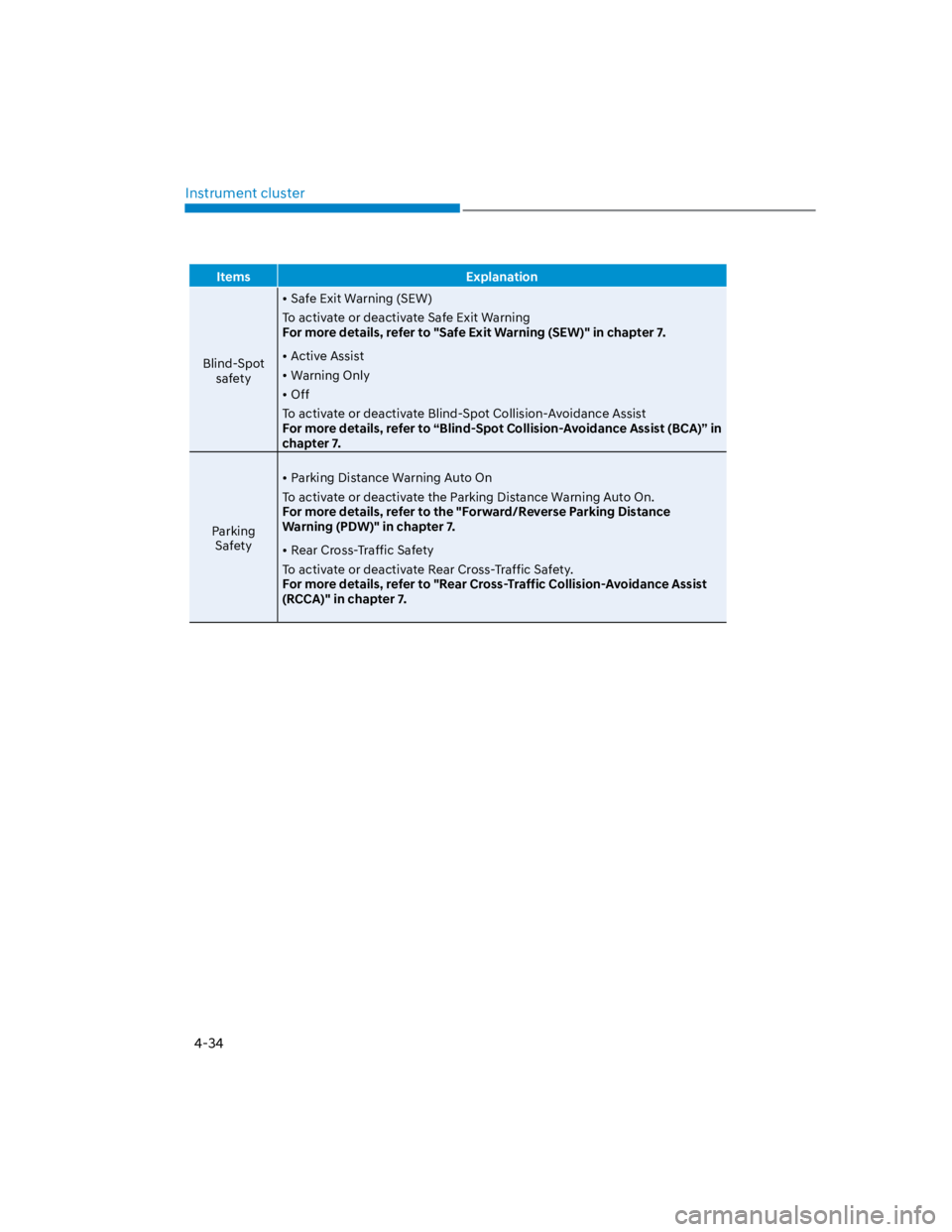
Items Explanation
Blind-Spot
safety
Safe Exit Warning (SEW)
To activate or deactivate Safe Exit Warning
For more details, refer to "Safe Exit Warning (SEW)" in chapter 7.
Active Assist
Warning Only
Off
To activate or deactivate Blind-Spot Collision-Avoidance Assist
For more details, refer to “Blind-Spot Collision-Avoidance Assist (BCA)” in
chapter 7.
Parking
Safety
Parking Distance Warning Auto On
To activate or deactivate the Parking Distance Warning Auto On.
For more details, refer to the "Forward/Reverse Parking Distance
Warning (PDW)" in chapter 7.
Rear Cross-Traffic Safety
To activate or deactivate Rear Cross-Traffic Safety.
For more details, refer to "Rear Cross-Traffic Collision-Avoidance Assist
(RCCA)" in chapter 7.
Page 208 of 579
Convenient features
5-74
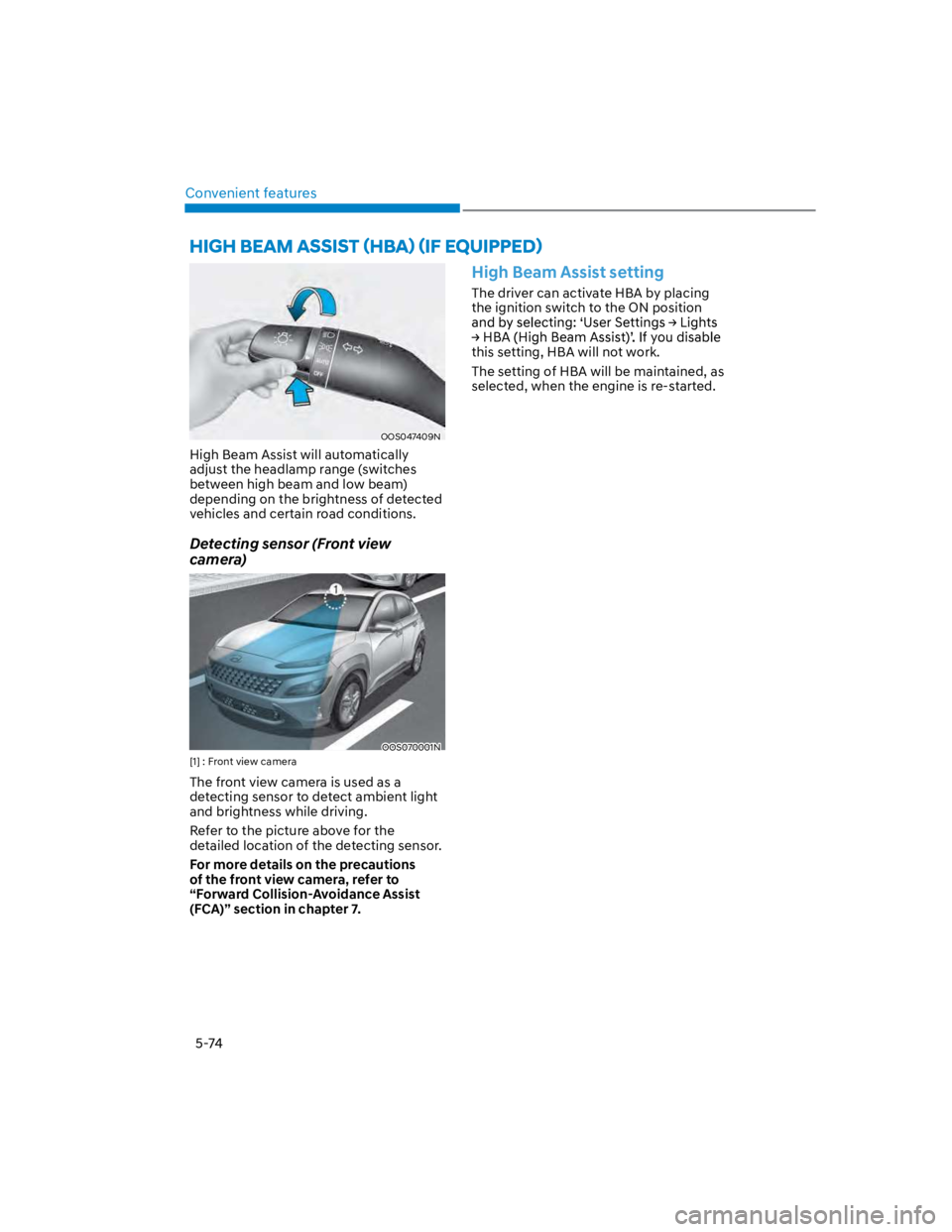
OOS047409N
High Beam Assist will automatically
adjust the headlamp range (switches
between high beam and low beam)
depending on the brightness of detected
vehicles and certain road conditions.
Detecting sensor (Front view
camera)
OOS070001N
[1] : Front view camera
The front view camera is used as a
detecting sensor to detect ambient light
and brightness while driving.
Refer to the picture above for the
detailed location of the detecting sensor.
For more details on the precautions
of the front view camera, refer to
“Forward Collision-Avoidance Assist
(FCA)” section in chapter 7.
High Beam Assist setting
The driver can activate HBA by placing
the ignition switch to the ON position
this setting, HBA will not work.
The setting of HBA will be maintained, as
selected, when the engine is re-started.
Page 333 of 579
7
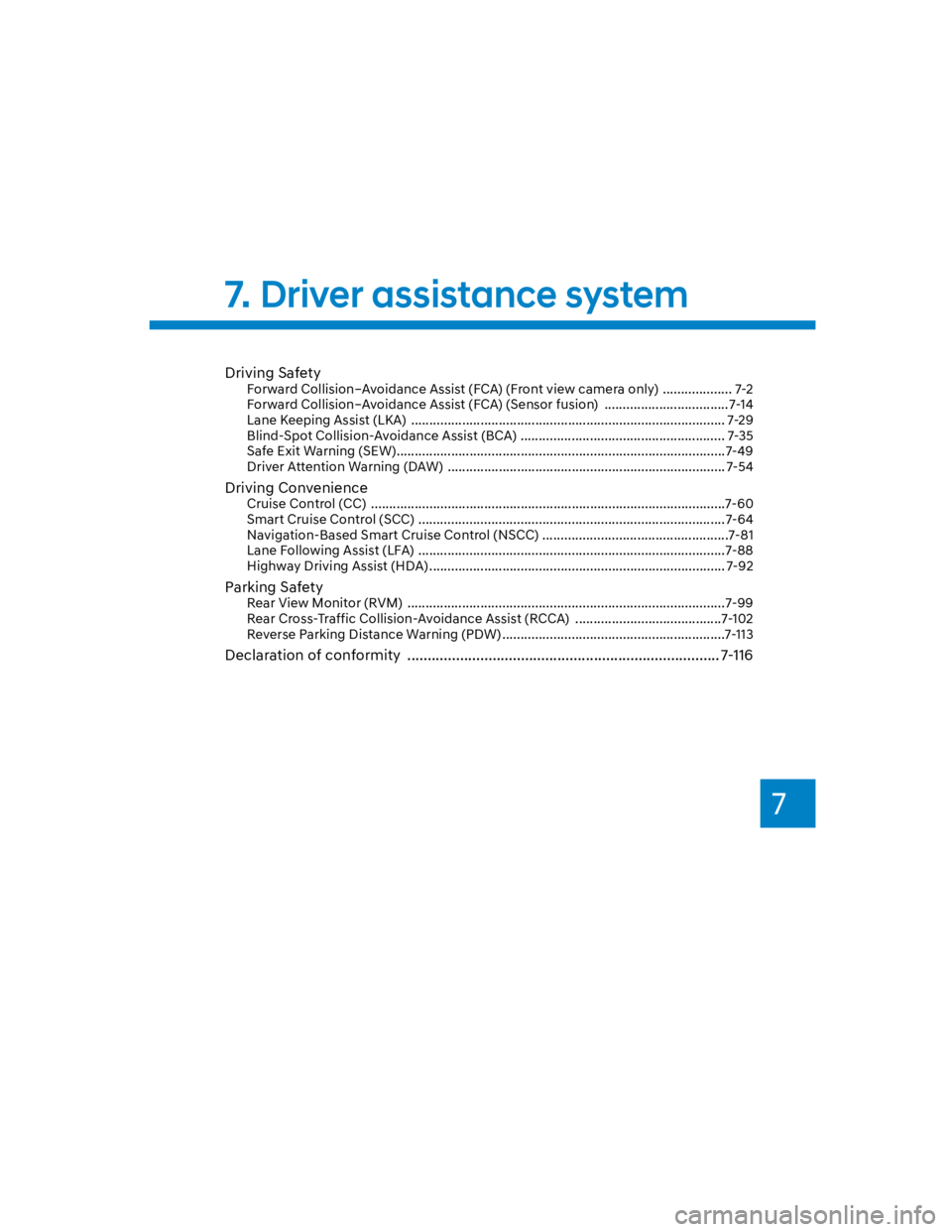
Driving Safety
Forward Collision–Avoidance Assist (FCA) (Front view camera only) ................... 7-2
Forward Collision–Avoidance Assist (FCA) (Sensor fusion) .................................. 7-14
Lane Keeping Assist (LKA) ...................................................................................... 7-29
Blind-Spot Collision-Avoidance Assist (BCA) ........................................................ 7-35
Safe Exit Warning (SEW) ..........................................................................................7-49
Driver Attention Warning (DAW) ............................................................................ 7-54
Driving Convenience
Cruise Control (CC) .................................................................................................7-60
Smart Cruise Control (SCC) ....................................................................................7-64
Navigation-Based Smart Cruise Control (NSCC) ...................................................7-81
Lane Following Assist (LFA) ....................................................................................7-88
Highway Driving Assist (HDA) ................................................................................. 7-92
Parking Safety
Rear View Monitor (RVM) .......................................................................................7-99
Rear Cross-Traffic Collision-Avoidance Assist (RCCA) ........................................7-102
Reverse Parking Distance Warning (PDW) .............................................................7-113
Declaration of conformity ............................................................................. 7-116
7. Driver assistance system
Page 334 of 579
Driver assistance system
7-2
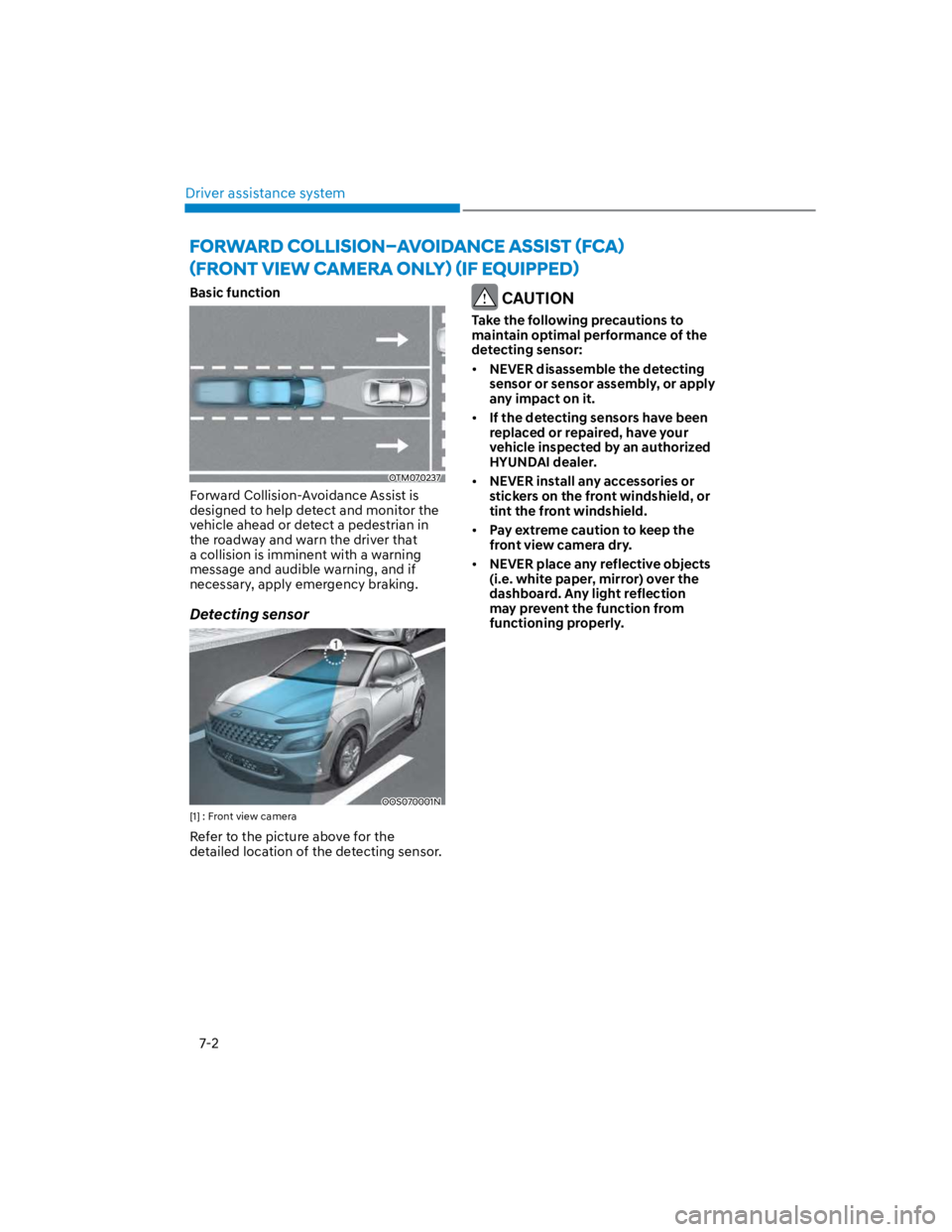
Basic function
OTM070237
Forward Collision-Avoidance Assist is
designed to help detect and monitor the
vehicle ahead or detect a pedestrian in
the roadway and warn the driver that
a collision is imminent with a warning
message and audible warning, and if
necessary, apply emergency braking.
Detecting sensor
OOS070001N
[1] : Front view camera
Refer to the picture above for the
detailed location of the detecting sensor.
CAUTION
Take the following precautions to
maintain optimal performance of the
detecting sensor:
NEVER disassemble the detecting
sensor or sensor assembly, or apply
any impact on it.
If the detecting sensors have been
replaced or repaired, have your
vehicle inspected by an authorized
HYUNDAI dealer.
NEVER install any accessories or
stickers on the front windshield, or
tint the front windshield.
Pay extreme caution to keep the
front view camera dry.
NEVER place any reflective objects
(i.e. white paper, mirror) over the
dashboard. Any light reflection
may prevent the function from
functioning properly.
Page 335 of 579
07
7-3
Forward Collision-Avoidance
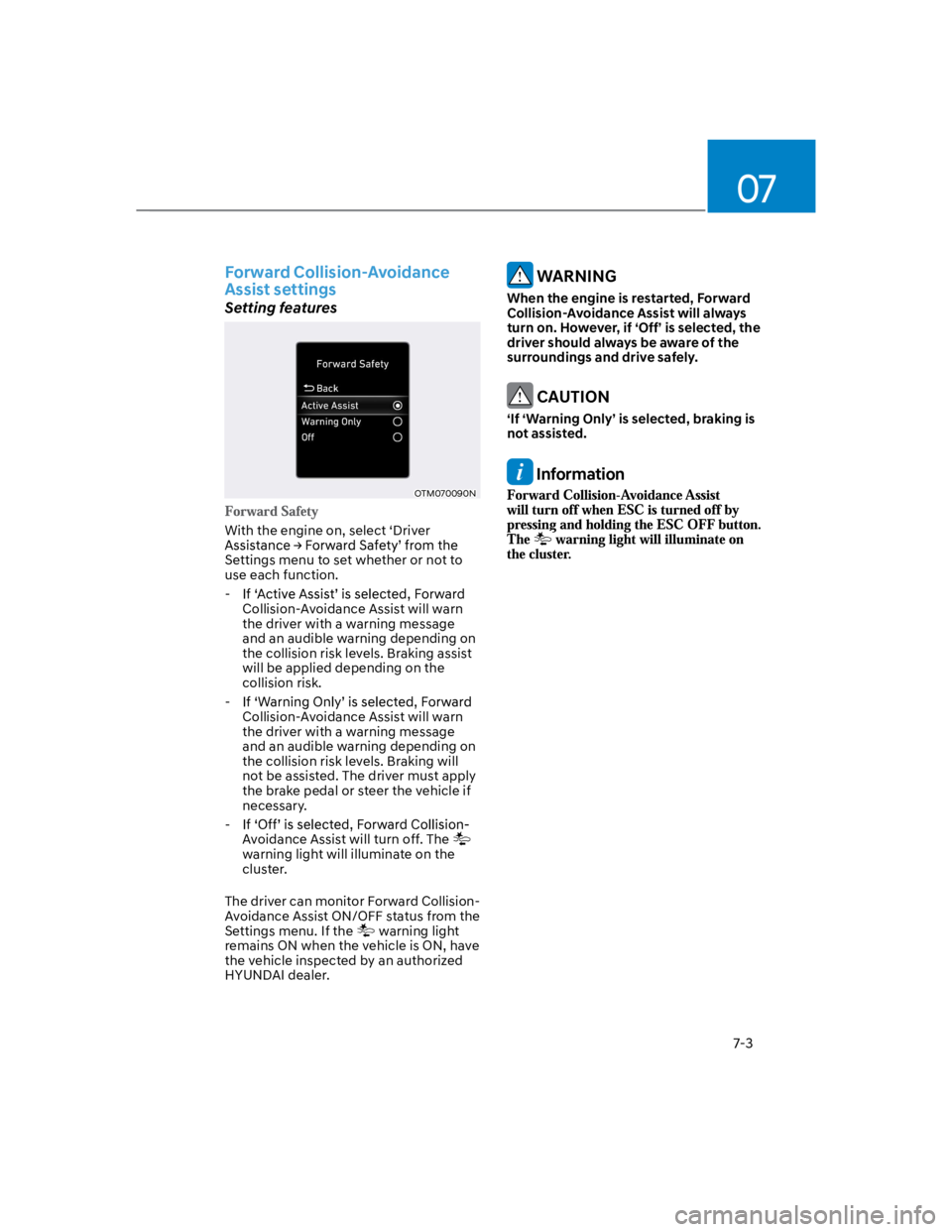
Assist settings
Setting features
OTM070090N
With the engine on, select ‘Driver
Settings menu to set whether or not to
use each function.
-
Collision-Avoidance Assist will warn
the driver with a warning message
and an audible warning depending on
the collision risk levels. Braking assist
will be applied depending on the
collision risk.
-
Collision-Avoidance Assist will warn
the driver with a warning message
and an audible warning depending on
the collision risk levels. Braking will
not be assisted. The driver must apply
the brake pedal or steer the vehicle if
necessary.
-
Avoidance Assist will turn off. The
warning light will illuminate on the
cluster.
The driver can monitor Forward Collision-
Avoidance Assist ON/OFF status from the
Settings menu. If the warning light
remains ON when the vehicle is ON, have
the vehicle inspected by an authorized
HYUNDAI dealer.
WARNING
When the engine is restarted, Forward
Collision-Avoidance Assist will always
turn on. However, if ‘Off’ is selected, the
driver should always be aware of the
surroundings and drive safely.
CAUTION
‘If ‘Warning Only’ is selected, braking is
not assisted.
Information