reverse HYUNDAI KONA 2022 Owners Manual
[x] Cancel search | Manufacturer: HYUNDAI, Model Year: 2022, Model line: KONA, Model: HYUNDAI KONA 2022Pages: 579, PDF Size: 35.31 MB
Page 17 of 579
2-4
Vehicle Information, Consumer Information and Reporting Safety Defects
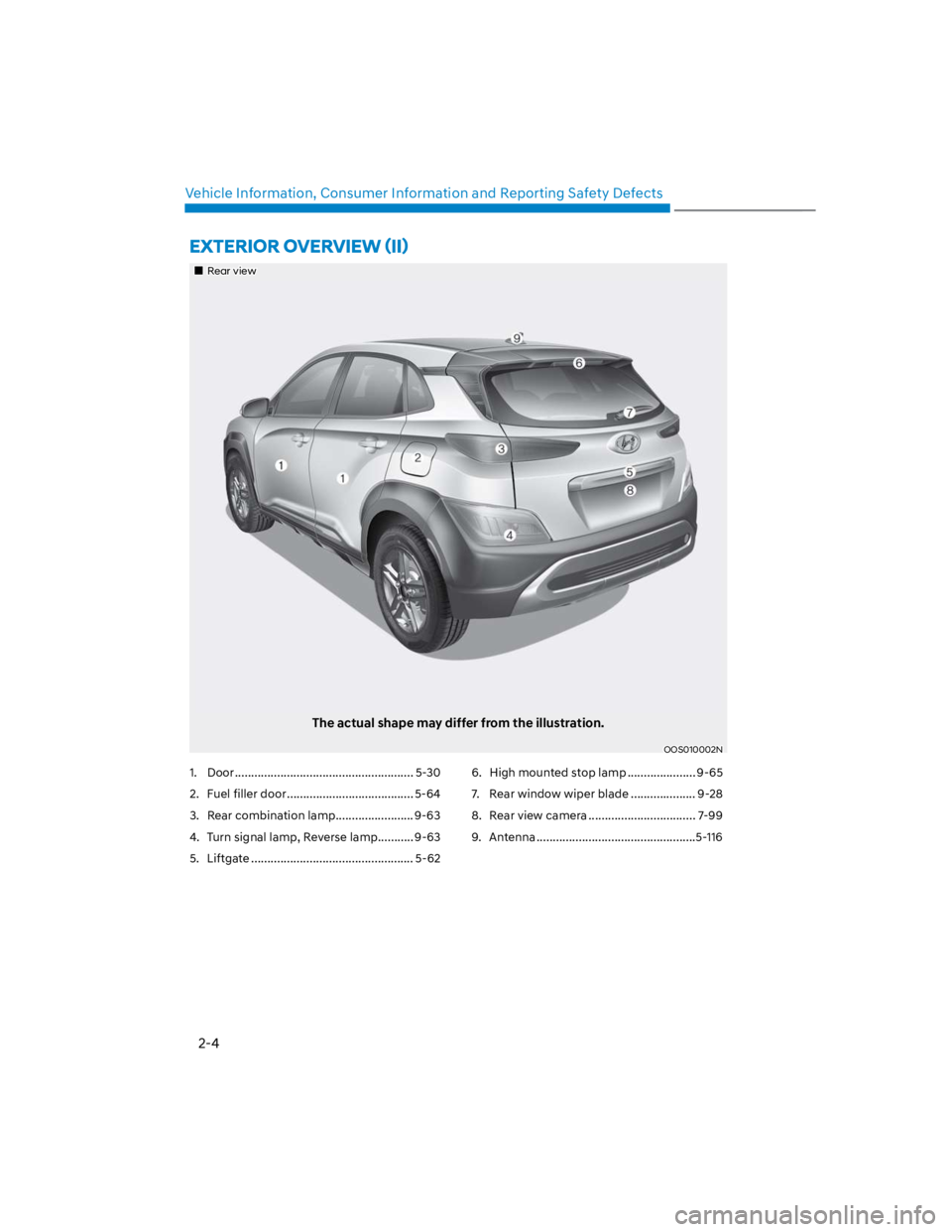
1. Door ....................................................... 5-30
2. Fuel filler door ....................................... 5-64
3. Rear combination lamp........................ 9-63
4. Turn signal lamp, Reverse lamp ........... 9-63
5. Liftgate .................................................. 5-62
6. High mounted stop lamp ..................... 9-65
7. Rear window wiper blade .................... 9-28
8. Rear view camera ................................. 7-99
9. Antenna .................................................5-116
Rear view
The actual shape may differ from the illustration.
OOS010002N
Page 18 of 579
2-5
02
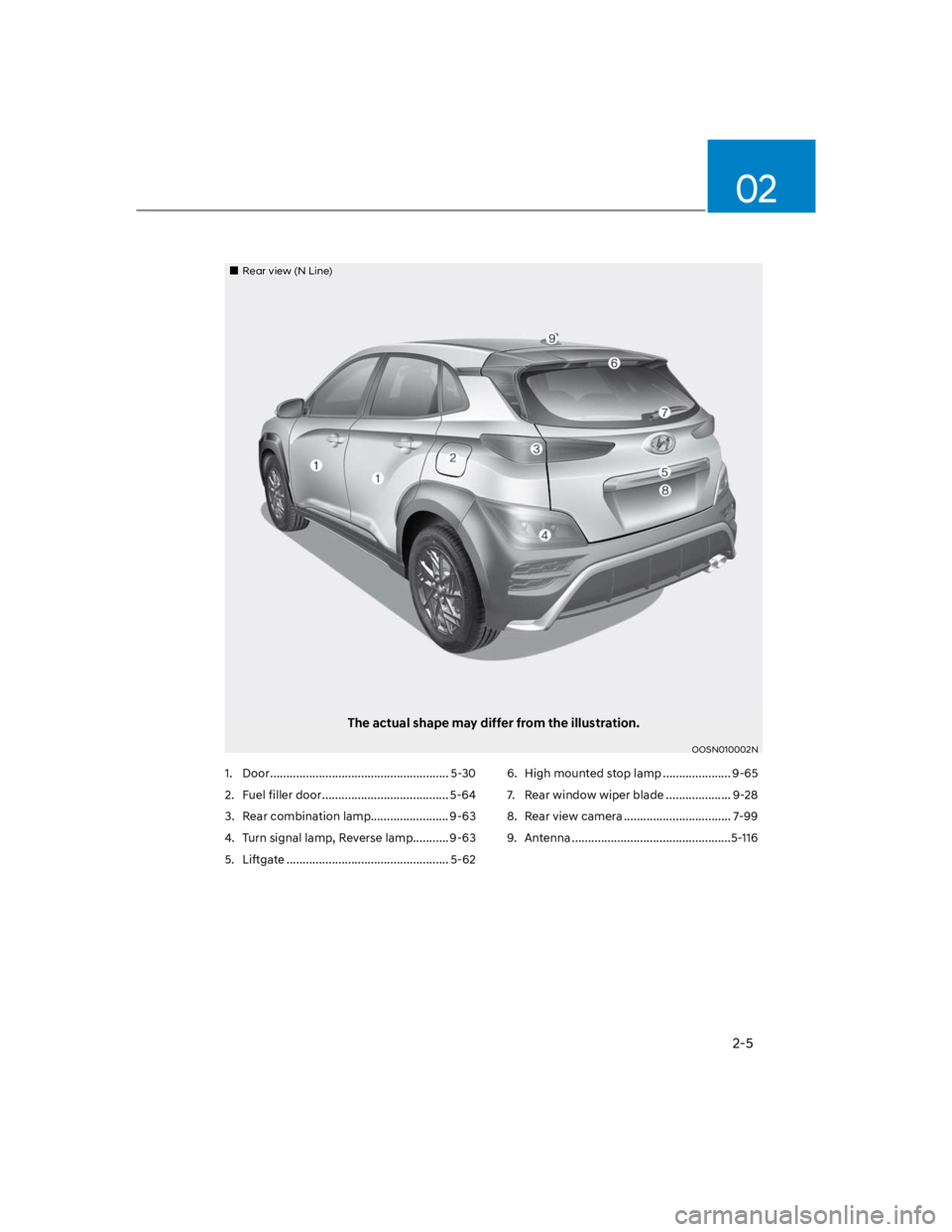
1. Door ....................................................... 5-30
2. Fuel filler door ....................................... 5-64
3. Rear combination lamp........................ 9-63
4. Turn signal lamp, Reverse lamp ........... 9-63
5. Liftgate .................................................. 5-62
6. High mounted stop lamp ..................... 9-65
7. Rear window wiper blade .................... 9-28
8. Rear view camera ................................. 7-99
9. Antenna .................................................5-116
Rear view (N Line)
The actual shape may differ from the illustration.
OOSN010002N
Page 23 of 579
Vehicle Information, Consumer Information and Reporting Safety Defects
2-10
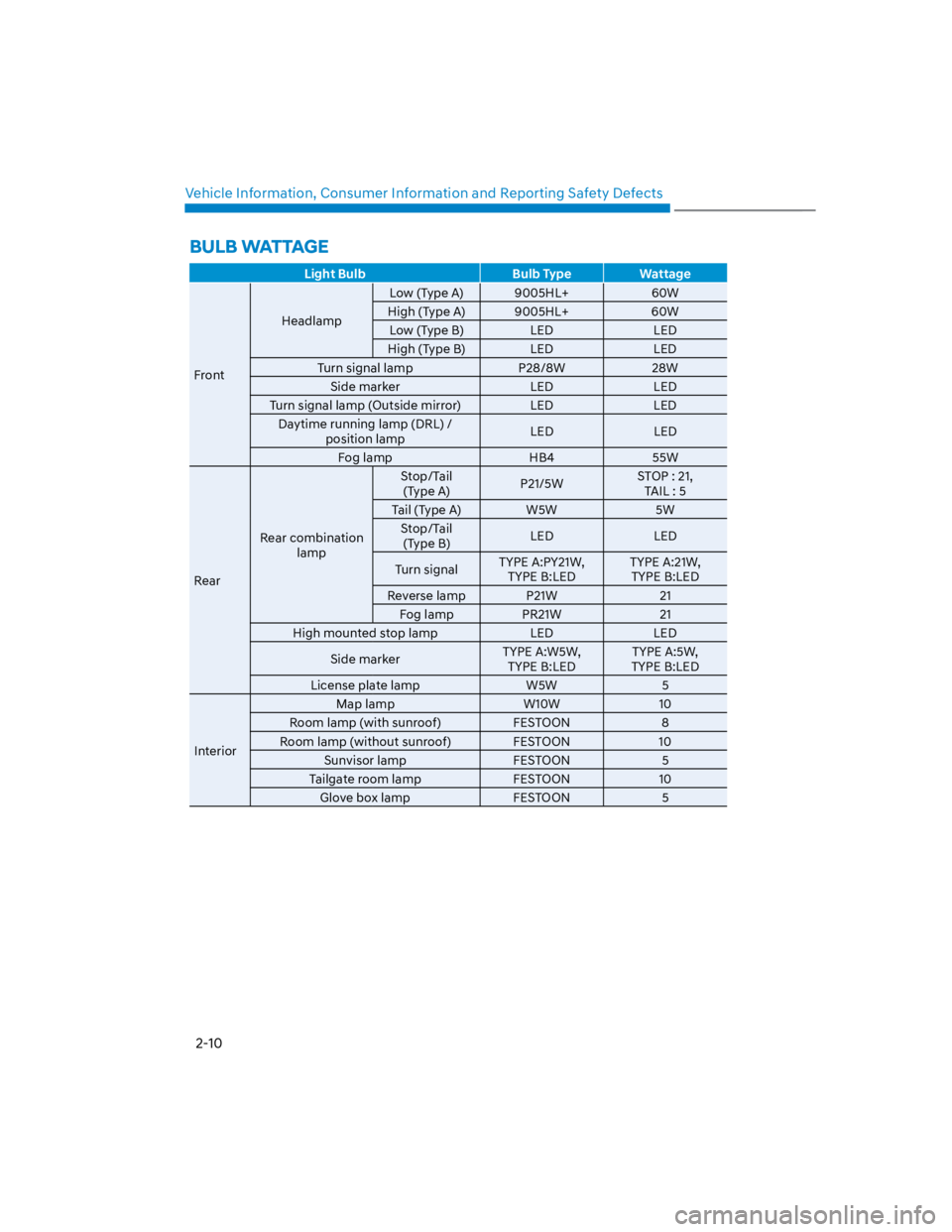
Light Bulb Bulb Type Wattage
Front
Headlamp
Low (Type A) 9005HL+ 60W
High (Type A) 9005HL+ 60W
Low (Type B) LED LED
High (Type B) LED LED
Turn signal lamp P28/8W 28W
Side marker LED LED
Turn signal lamp (Outside mirror) LED LED
Daytime running lamp (DRL) /
position lampLED LED
Fog lamp HB4 55W
Rear
Rear combination
lamp
Stop/Tail
(Type A)P21/5WSTOP : 21,
TAIL : 5
Tail (Type A) W5W 5W
Stop/Tail
(Type B)LED LED
Turn signalTYPE A:PY21W,
TYPE B:LED
TYPE A:21W,
TYPE B:LED
Reverse lamp P21W 21
Fog lamp PR21W 21
High mounted stop lamp LED LED
Side markerTYPE A:W5W,
TYPE B:LED
TYPE A:5W,
TYPE B:LED
License plate lamp W5W 5
Interior
Map lamp W10W 10
Room lamp (with sunroof) FESTOON 8
Room lamp (without sunroof) FESTOON 10
Sunvisor lamp FESTOON 5
Tailgate room lamp FESTOON 10
Glove box lamp FESTOON 5
BULB WATTAGE
Page 44 of 579
03
3-13
Head Restraints
The vehicle’s front and rear (second row
and/or third row) seats have adjustable
head restraints. The head restraints
provide comfort for passengers, but
more importantly they are designed to
help protect passengers from whiplash
and other neck and spinal injuries during
an accident, especially in a rear impact
collision.
WARNING
To help reduce the risk of serious
injury or death in an accident, take the
following precautions when adjusting
your head restraints:
Always properly adjust the head
restraints for all passengers BEFORE
starting the vehicle.
NEVER let anyone ride in a seat
with the head restraints removed or
reversed.
OLF034072N
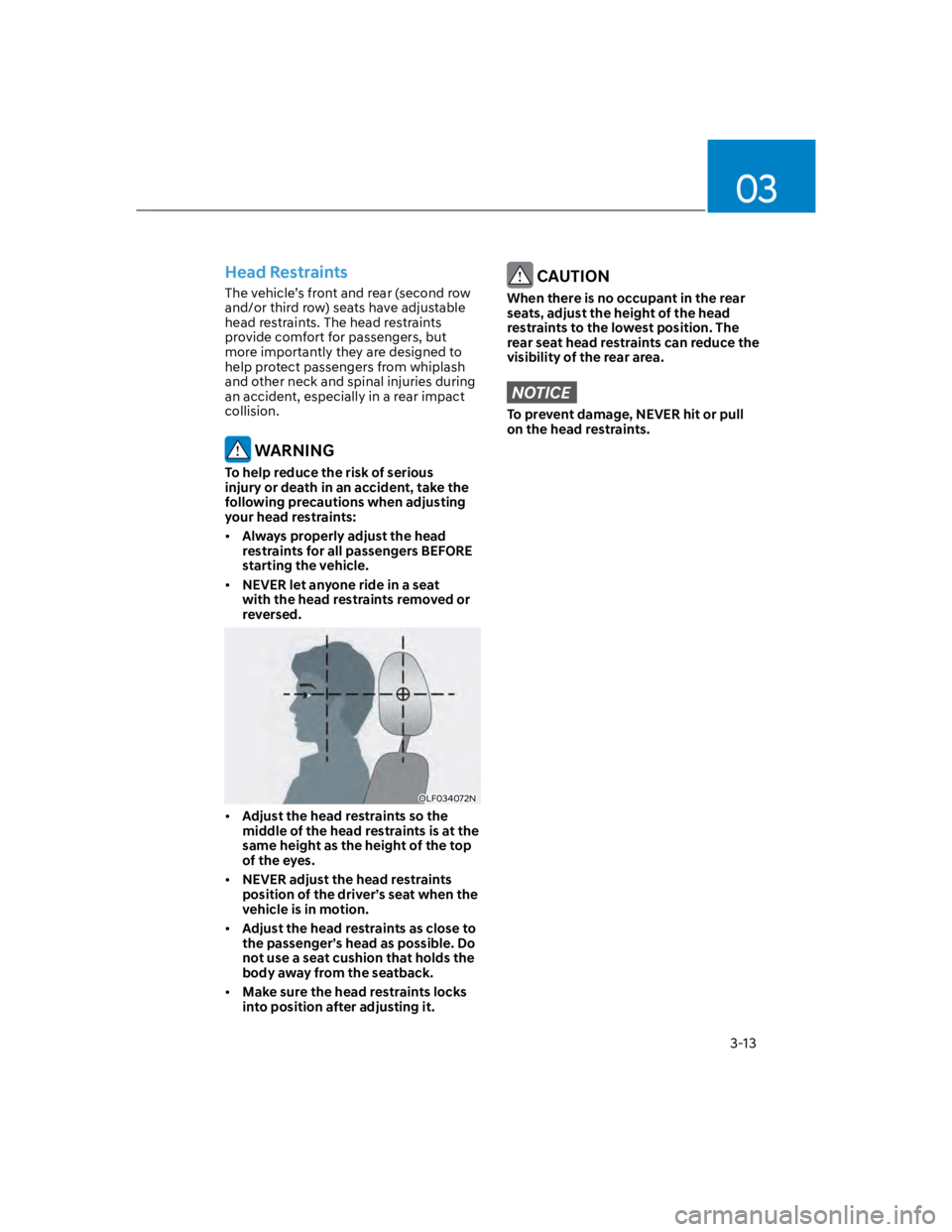
Adjust the head restraints so the
middle of the head restraints is at the
same height as the height of the top
of the eyes.
NEVER adjust the head restraints
position of the driver’s seat when the
vehicle is in motion.
Adjust the head restraints as close to
the passenger’s head as possible. Do
not use a seat cushion that holds the
body away from the seatback.
Make sure the head restraints locks
into position after adjusting it.
CAUTION
When there is no occupant in the rear
seats, adjust the height of the head
restraints to the lowest position. The
rear seat head restraints can reduce the
visibility of the rear area.
NOTICE
To prevent damage, NEVER hit or pull
on the head restraints.
Page 102 of 579
04
4-9
Transmission shift indicator
Intelligent variable transmission
(if equipped)
Type A
OTL045132
Type B
OCN7040013N
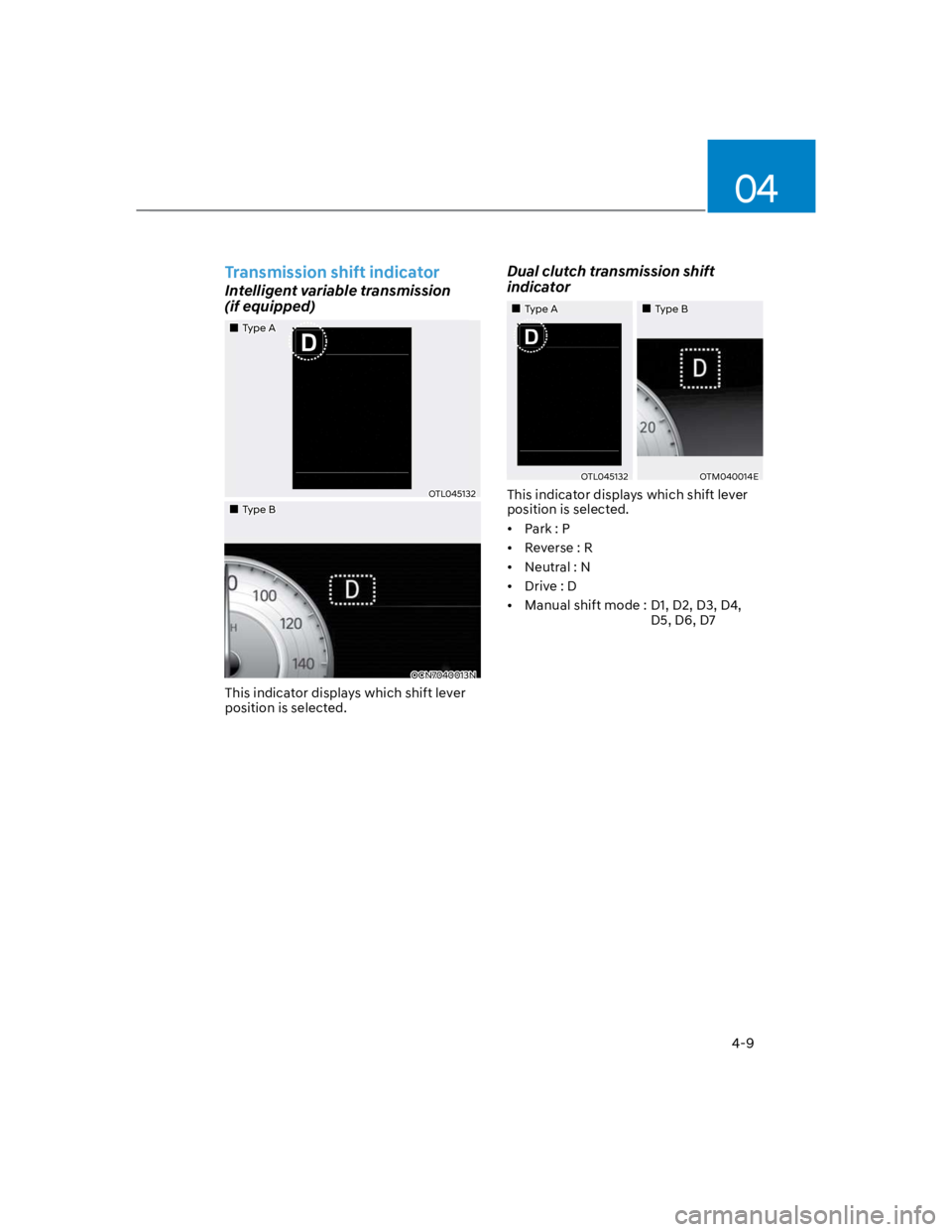
This indicator displays which shift lever
position is selected.
Dual clutch transmission shift
indicator
Type A Type B
OTL045132OTM040014E
This indicator displays which shift lever
position is selected.
Park : P
Reverse : R
Neutral : N
Drive : D
Manual shift mode : D1, D2, D3, D4,
D5, D6, D7
Page 127 of 579
Instrument cluster
4-34
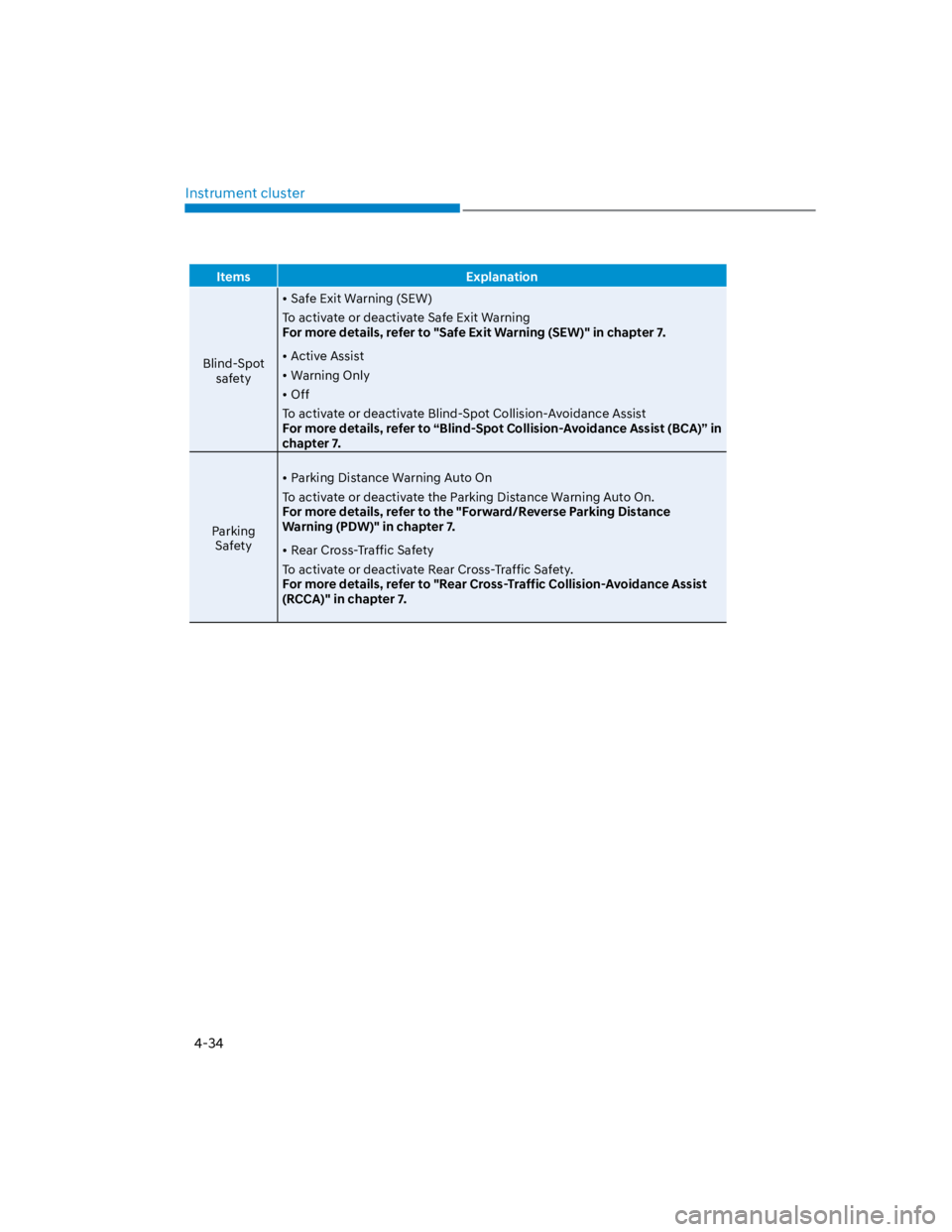
Items Explanation
Blind-Spot
safety
Safe Exit Warning (SEW)
To activate or deactivate Safe Exit Warning
For more details, refer to "Safe Exit Warning (SEW)" in chapter 7.
Active Assist
Warning Only
Off
To activate or deactivate Blind-Spot Collision-Avoidance Assist
For more details, refer to “Blind-Spot Collision-Avoidance Assist (BCA)” in
chapter 7.
Parking
Safety
Parking Distance Warning Auto On
To activate or deactivate the Parking Distance Warning Auto On.
For more details, refer to the "Forward/Reverse Parking Distance
Warning (PDW)" in chapter 7.
Rear Cross-Traffic Safety
To activate or deactivate Rear Cross-Traffic Safety.
For more details, refer to "Rear Cross-Traffic Collision-Avoidance Assist
(RCCA)" in chapter 7.
Page 129 of 579
Instrument cluster
4-36
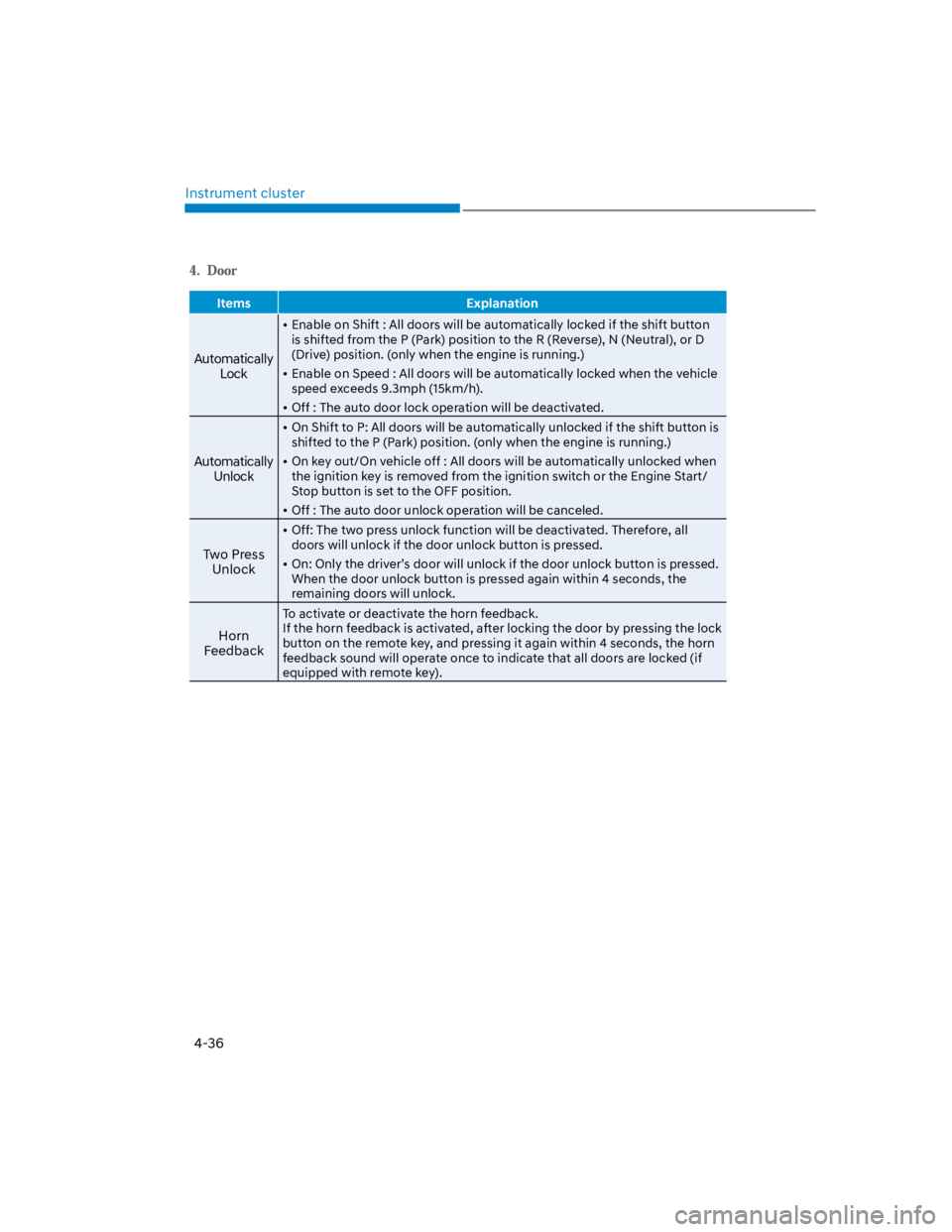
Items Explanation
Automatically
Lock
Enable on Shift : All doors will be automatically locked if the shift button
is shifted from the P (Park) position to the R (Reverse), N (Neutral), or D
(Drive) position. (only when the engine is running.)
Enable on Speed : All doors will be automatically locked when the vehicle
speed exceeds 9.3mph (15km/h).
Off : The auto door lock operation will be deactivated.
Automatically
Unlock
On Shift to P: All doors will be automatically unlocked if the shift button is
shifted to the P (Park) position. (only when the engine is running.)
On key out/On vehicle off : All doors will be automatically unlocked when
the ignition key is removed from the ignition switch or the Engine Start/
Stop button is set to the OFF position.
Off : The auto door unlock operation will be canceled.
Two Press
Unlock
Off: The two press unlock function will be deactivated. Therefore, all
doors will unlock if the door unlock button is pressed.
On: Only the driver’s door will unlock if the door unlock button is pressed.
When the door unlock button is pressed again within 4 seconds, the
remaining doors will unlock.
Horn
Feedback
To activate or deactivate the horn feedback.
If the horn feedback is activated, after locking the door by pressing the lock
button on the remote key, and pressing it again within 4 seconds, the horn
feedback sound will operate once to indicate that all doors are locked (if
equipped with remote key).
Page 175 of 579
05
5-41
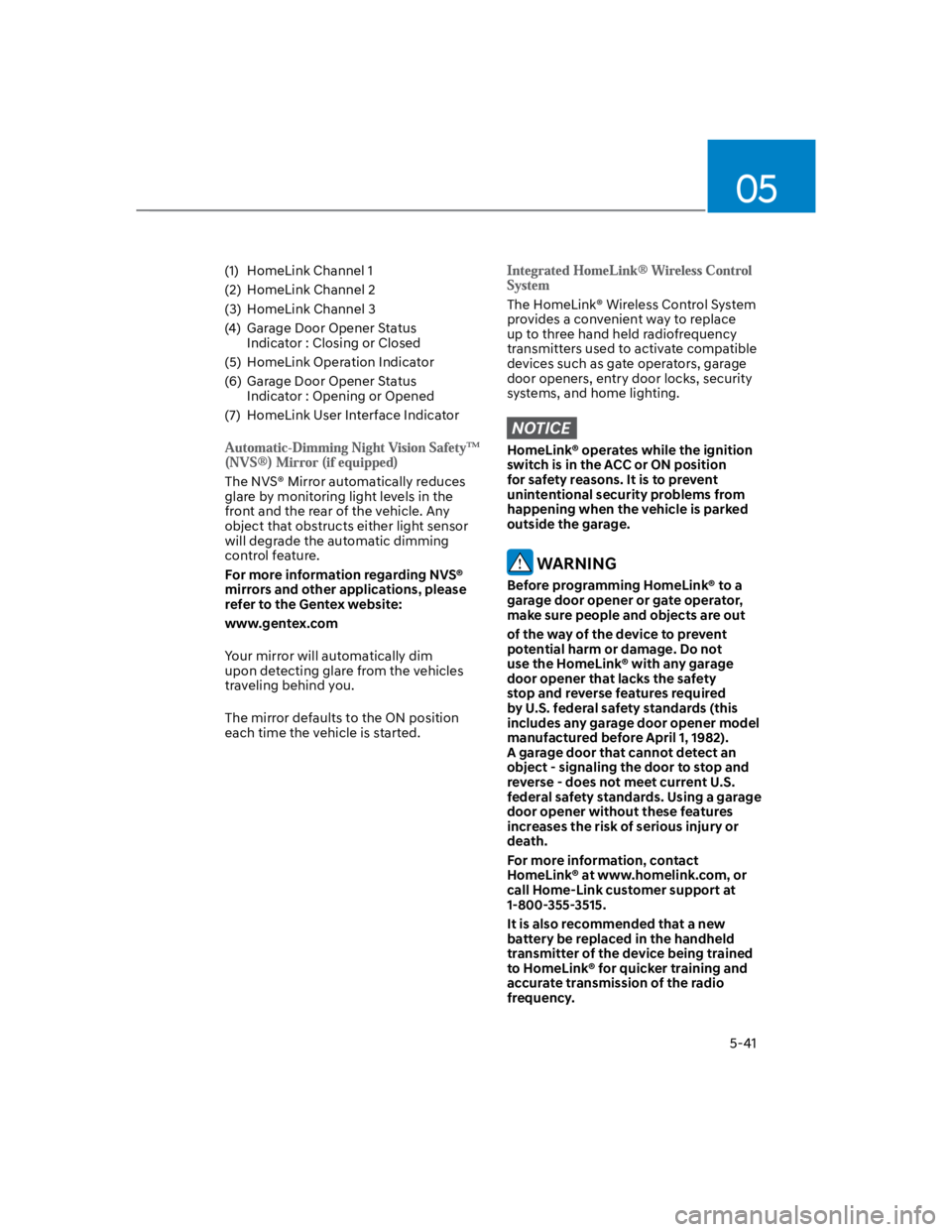
(1) HomeLink Channel 1
(2) HomeLink Channel 2
(3) HomeLink Channel 3
(4) Garage Door Opener Status
Indicator : Closing or Closed
(5) HomeLink Operation Indicator
(6) Garage Door Opener Status
Indicator : Opening or Opened
(7) HomeLink User Interface Indicator
The NVS® Mirror automatically reduces
glare by monitoring light levels in the
front and the rear of the vehicle. Any
object that obstructs either light sensor
will degrade the automatic dimming
control feature.
For more information regarding NVS®
mirrors and other applications, please
refer to the Gentex website:
www.gentex.com
Your mirror will automatically dim
upon detecting glare from the vehicles
traveling behind you.
The mirror defaults to the ON position
each time the vehicle is started.
The HomeLink® Wireless Control System
provides a convenient way to replace
up to three hand held radiofrequency
transmitters used to activate compatible
devices such as gate operators, garage
door openers, entry door locks, security
systems, and home lighting.
NOTICE
HomeLink® operates while the ignition
switch is in the ACC or ON position
for safety reasons. It is to prevent
unintentional security problems from
happening when the vehicle is parked
outside the garage.
WARNING
Before programming HomeLink® to a
garage door opener or gate operator,
make sure people and objects are out
of the way of the device to prevent
potential harm or damage. Do not
use the HomeLink® with any garage
door opener that lacks the safety
stop and reverse features required
by U.S. federal safety standards (this
includes any garage door opener model
manufactured before April 1, 1982).
A garage door that cannot detect an
object - signaling the door to stop and
reverse - does not meet current U.S.
federal safety standards. Using a garage
door opener without these features
increases the risk of serious injury or
death.
For more information, contact
HomeLink® at www.homelink.com, or
call Home-Link customer support at
1-800-355-3515.
It is also recommended that a new
battery be replaced in the handheld
transmitter of the device being trained
to HomeLink® for quicker training and
accurate transmission of the radio
frequency.
Page 189 of 579
05
5-55
Auto up/down window (if equipped)
Pressing or pulling up the power window
switch momentarily to the second
detent position (6) completely lowers or
lifts the window even when the switch
is released. To stop the window at the
desired position while the window is in
operation, pull up or press down and
release the switch.
Resetting the power windows
If the power windows do not operate
normally, the automatic power window
system must be reset as follows:
1. Press the ignition switch to the ON
position.
2. Close the window and continue
pulling up on the power window
switch for at least one second.
If the power windows do not operate
properly after resetting, have the system
checked by an authorized HYUNDAI
dealer.
Automatic reverse (if equipped)
OLF044032
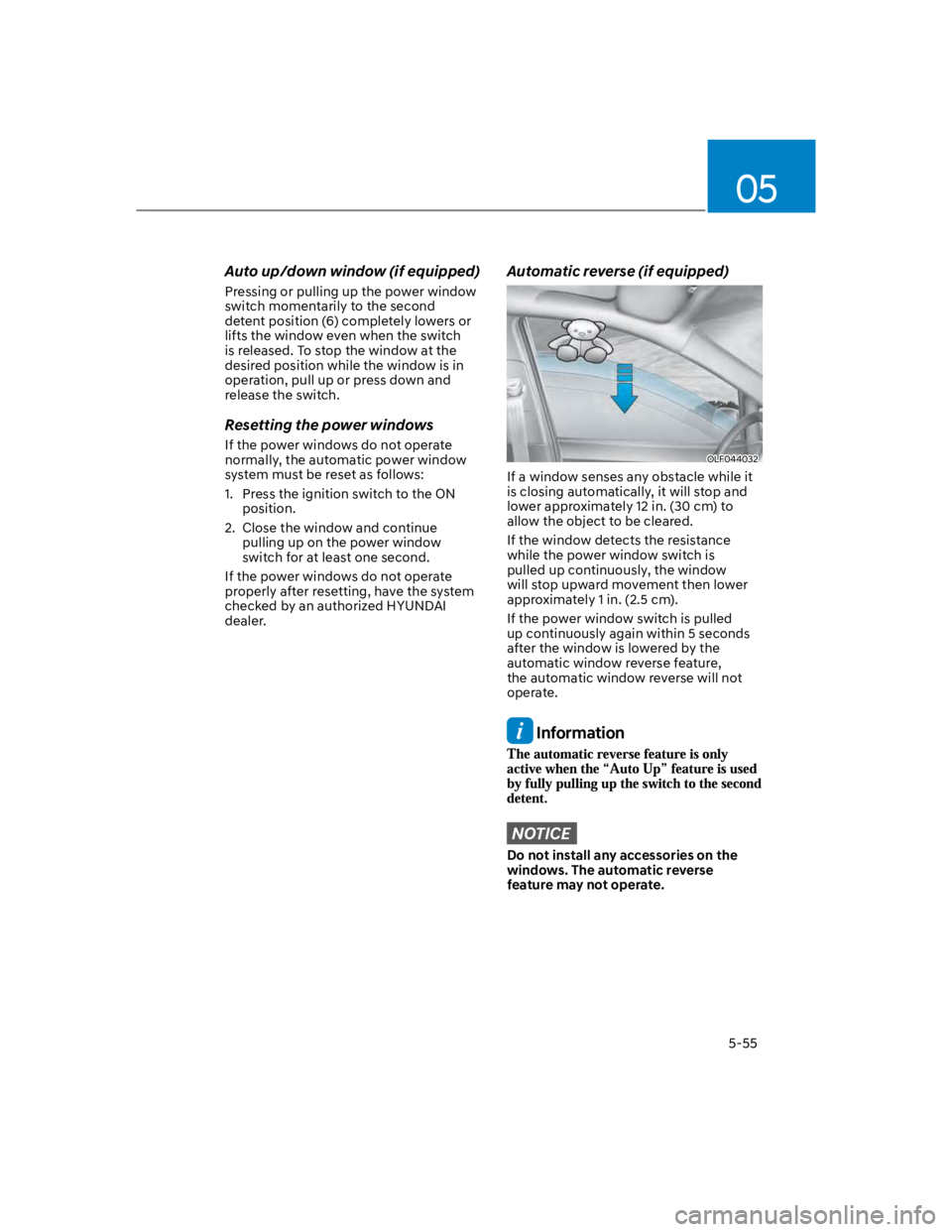
If a window senses any obstacle while it
is closing automatically, it will stop and
lower approximately 12 in. (30 cm) to
allow the object to be cleared.
If the window detects the resistance
while the power window switch is
pulled up continuously, the window
will stop upward movement then lower
approximately 1 in. (2.5 cm).
If the power window switch is pulled
up continuously again within 5 seconds
after the window is lowered by the
automatic window reverse feature,
the automatic window reverse will not
operate.
Information
NOTICE
Do not install any accessories on the
windows. The automatic reverse
feature may not operate.
Page 190 of 579
Convenient features
5-56
WARNING
Make sure body parts or other objects
are safely out of the way before closing
the windows to avoid injuries or vehicle
damage.
Objects less than 0.16 in (4 mm) in
diameter caught between the window
glass and the upper window channel
may not be detected by the automatic
reverse window and the window will
not stop and reverse direction.
Power window lock button
OOS047019
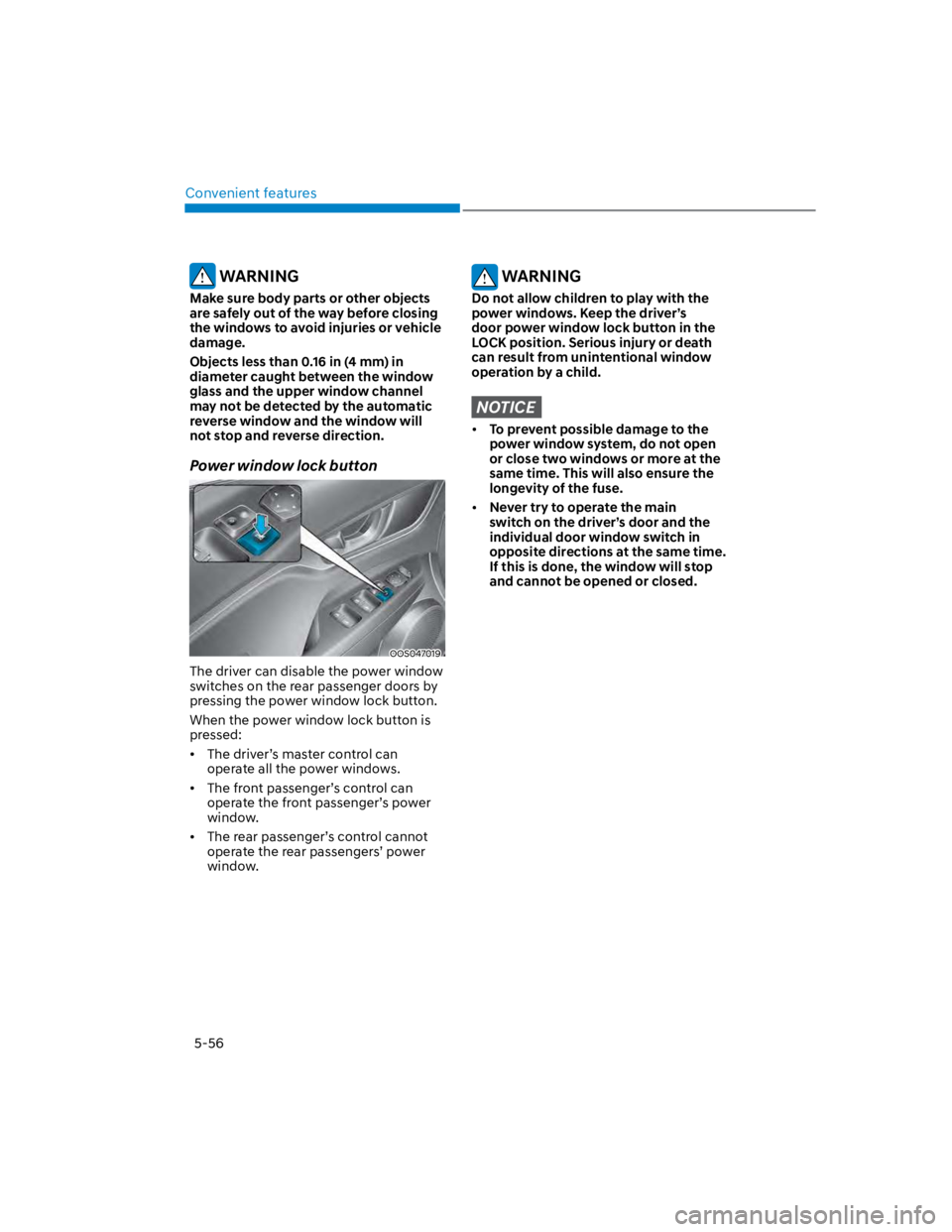
The driver can disable the power window
switches on the rear passenger doors by
pressing the power window lock button.
When the power window lock button is
pressed:
The driver’s master control can
operate all the power windows.
The front passenger’s control can
operate the front passenger’s power
window.
The rear passenger’s control cannot
operate the rear passengers’ power
window.
WARNING
Do not allow children to play with the
power windows. Keep the driver’s
door power window lock button in the
LOCK position. Serious injury or death
can result from unintentional window
operation by a child.
NOTICE
To prevent possible damage to the
power window system, do not open
or close two windows or more at the
same time. This will also ensure the
longevity of the fuse.
Never try to operate the main
switch on the driver’s door and the
individual door window switch in
opposite directions at the same time.
If this is done, the window will stop
and cannot be opened or closed.