radio Hyundai Matrix 2007 Owner's Guide
[x] Cancel search | Manufacturer: HYUNDAI, Model Year: 2007, Model line: Matrix, Model: Hyundai Matrix 2007Pages: 490, PDF Size: 12.81 MB
Page 137 of 490
1
FEATURES OF YOUR HYUNDAI
125
1
FEATURES OF YOUR HYUNDAI
125
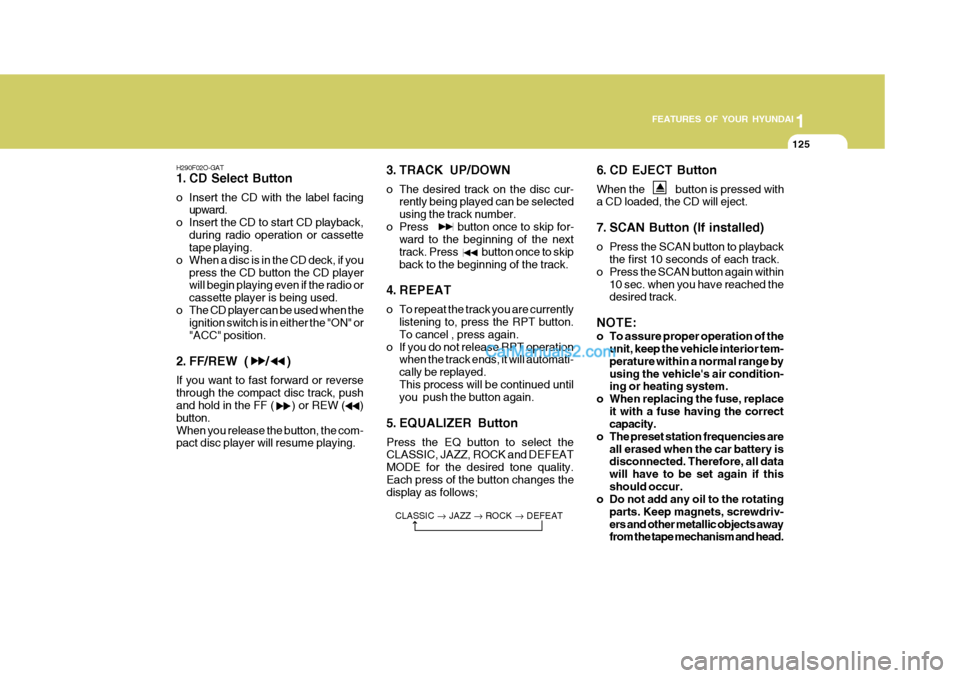
H290F02O-GAT
1. CD Select Button
o Insert the CD with the label facing upward.
o Insert the CD to start CD playback, during radio operation or cassette tape playing.
o When a disc is in the CD deck, if you
press the CD button the CD playerwill begin playing even if the radio or cassette player is being used.
o The CD player can be used when the ignition switch is in either the "ON" or"ACC" position.
2. FF/REW ( / ) If you want to fast forward or reverse through the compact disc track, push and hold in the FF ( ) or REW ( ) button.When you release the button, the com- pact disc player will resume playing. 3. TRACK UP/DOWN
o The desired track on the disc cur-
rently being played can be selected using the track number.
o Press button once to skip for- ward to the beginning of the nexttrack. Press button once to skipback to the beginning of the track.
4. REPEAT
o To repeat the track you are currently listening to, press the RPT button. To cancel , press again.
o If you do not release RPT operation when the track ends, it will automati- cally be replayed.This process will be continued until you push the button again.
5. EQUALIZER Button Press the EQ button to select the CLASSIC, JAZZ, ROCK and DEFEAT MODE for the desired tone quality.Each press of the button changes the display as follows; 6. CD EJECT Button When the button is pressed with a CD loaded, the CD will eject.
7. SCAN Button (If installed)
o Press the SCAN button to playback
the first 10 seconds of each track.
o Press the SCAN button again within
10 sec. when you have reached the desired track.
NOTE:
o To assure proper operation of the unit, keep the vehicle interior tem- perature within a normal range byusing the vehicle's air condition- ing or heating system.
o When replacing the fuse, replace it with a fuse having the correctcapacity.
o The preset station frequencies are all erased when the car battery isdisconnected. Therefore, all data will have to be set again if thisshould occur.
o Do not add any oil to the rotating
parts. Keep magnets, screwdriv-ers and other metallic objects away from the tape mechanism and head.
CLASSIC
JAZZ ROCK DEFEAT
Page 140 of 490

1FEATURES OF YOUR HYUNDAI
128
B290H03FC-GAT The CD auto changer is located under the front passenger seat.
o To use the CD auto changer.
1. Open the sliding lid of the CD auto changer.
2. To eject the compact disc maga-
zine, press the EJECT button lo- cated inside the CD auto changer.
3. Insert the discs into the maga-
zine.
4. Push the magazine into the CD
auto changer and close the sliding lid.
o The CD auto changer can be used when the ignition switch is in either "ON" or "ACC" position.
1. CD CHANGER Select Button When the CD changer magazine con- tains discs, press the CD/CDC button and the CD changer can be used evenif the radio or cassette player is being used. The Hyundai CD changer can hold up to eight discs. The disc numberwill be lit, and the track number, and elapsed time will be displayed. 2. DISC Select Button To select the CD you want, push to change the disc number. 3. TRACK UP/DOWN
o The desired track on the disc cur-
rently being played can be selected using the track number.
o Press once to skip forward to
the beginning of the next track.Press once to skip back to the beginning of the track.
4. FF/REW ( / ) If you want to fast forward or reverse through the compact disc track, pushand hold in the FF ( ) or REW ( ) button. When you release the button, the com-pact disc player will resume playing. 5. REPEAT
o To repeat the track you are currently
listening to, press the RPT button. To cancel , press again.
o If you do not release RPT operation
when the track ends, it will automati-cally be replayed. This process will be continued until you push the button again.
6. SCAN Button (If installed)
o Press the SCAN button to playback the first 10 seconds of each track.
o Press the SCAN button again within
10 sec. when you have reached the desired track.
7. EQ Button Press the EQ button to select the CLAS- SIC, JAZZ, ROCK and DEFEAT MODE for the desired tone quality. Each press of the button changes the display asfollows; CLASSIC JAZZ ROCK DEFEAT
TUNE
DISC
Page 150 of 490
2 DRIVING YOUR HYUNDAI
4
!
KEY POSITIONS
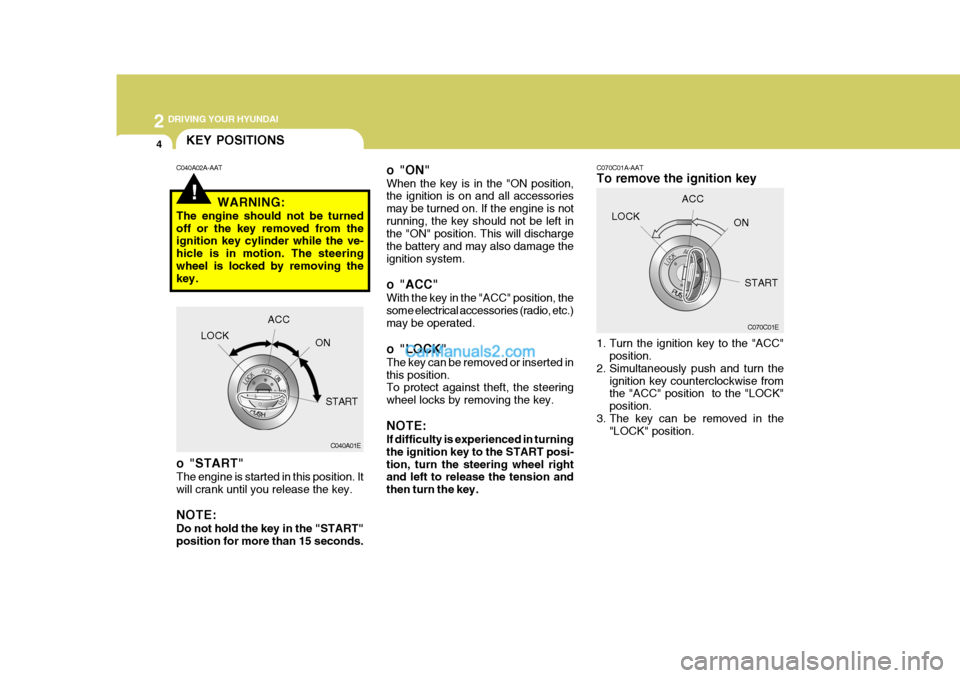
C070C01E
C070C01A-AAT To remove the ignition key
1. Turn the ignition key to the "ACC"
position.
2. Simultaneously push and turn the
ignition key counterclockwise from the "ACC" position to the "LOCK" position.
3. The key can be removed in the "LOCK" position.LOCK
ACC
ON
o "ON" When the key is in the "ON position, the ignition is on and all accessories may be turned on. If the engine is notrunning, the key should not be left in the "ON" position. This will discharge the battery and may also damage theignition system.
o "ACC" With the key in the "ACC" position, the some electrical accessories (radio, etc.) may be operated.
o "LOCK" The key can be removed or inserted in this position. To protect against theft, the steering wheel locks by removing the key. NOTE: If difficulty is experienced in turning the ignition key to the START posi-tion, turn the steering wheel right and left to release the tension and then turn the key.
C040A02A-AAT
C040A01E
LOCK
ACC
ON
START
WARNING:
The engine should not be turnedoff or the key removed from the ignition key cylinder while the ve- hicle is in motion. The steeringwheel is locked by removing the key.
o "START" The engine is started in this position. It will crank until you release the key. NOTE: Do not hold the key in the "START" position for more than 15 seconds. START
Page 233 of 490

6
DO-IT-YOURSELF MAINTENANCE
29
On the backside of the mult box, you
will find a list showing the circuits protected by each fuse. If any of your car's lights or other
electrical accessories stop working, ablown fuse could be the reason. If the fuse has burned out, you will see that the metal strip inside the fuse hasburned through. If you suspect a blown fuse, follow this procedure:
1. Turn off the ignition and all other switches.
2. Open the fuse box and examine
each fuse. Remove each fuse by pulling it toward you (a small "fuse puller" tool is contained in the fuse box to simplify this operation).
3. Be sure to check all other fuses even if you find one that appears tohave burned out. Good
G200B03Y
Burned out
CAUTION:
A burned-out fuse indicates thatthere is a problem in the electrical circuit. If you replace a fuse and it blows as soon as the accessory isturned on, the problem is serious and should be referred to a Hyundai dealer for diagnosis andrepair. Never replace a fuse with anything except a fuse with the same or a lower amperage rating.A higher capacity fuse could cause damage and create a fire hazard. NOTE: See page 6-39 for the fuse panel descriptions.
!
G200B01FC
4. Replace the blown fuse by pressing a new fuse of the same rating into place. The fuse should be a snug fit. If it is not, have the fuse clip repaired or replaced by a Hyundai dealer. If you do not have a sparefuse, you may be able to borrow a fuse of the same or lower rating from an accessory you can tempo-rarily get along without (the radio or cigarette lighter, for example). Al- ways remember to replace the bor-rowed fuse.
Page 266 of 490
10
INDEX
5
R Rear Fog Audible Warning Sound ..............................1-53
Rear Seat
Adjustable headrests . ............................................. 1-18
Adjusting seatback angle ....................................... 1-17
Adjusting seat forward and rearward .......................1-17
Arm Rest ................................................................ 1-68
Fold down ............................................................... 1-18
Rear Window Defroster Switch .................................. 1-63
Recommended Shift Points ......................................... 2-8 Removal of water from the fuel fiter .......................... 6-34
Replacing Light Bulbs ................................................ 6-36
Roof Rack ................................................................. 1-81
S Seat Belts 2-Point Static Type .............................................. 1-263-Point system ....................................................... 1-24
Adjustabl e height .................................................... 1-23
Adjusting your seat belt ................................. 1-25, 1-26
Care of seat belts ................................................... 1-23
Precautions ............................................................. 1-21
Seat Warmer ............................................................. 1-20
Spectacle Ca se ......................................................... 1-72
Speedometer ............................................................. 1-55
Starting Pr ocedures..................................................... 2-5
Steering Wheel
Free play ................................................................ 6-26
Tilt lever ................................................................. 1-82Stereo Radio Operation (H210, H220, H260, H280)
............................................ 1-102, 1-105, 1-110, 1-119
Stereo Sound System ............................................... 1-99
Sunroof ...................................................................... 1-68
Sunshade ................................................................... 1-68
Sun Visor ................................................................... 1-75
T Tail Gate .................................................................... 1-79
Tail Gate Wiper And Washer Switch ......................... 1-62
Tachometer ................................................................ 1-55
Theft Alarm System .................................................. 1-10
Tires
Balancing .................................................................. 8-5
Chains ...................................................................... 8-4
Changing a flat tire .................................................. 3-7
If you have a flat tire ............................................... 3-7
Information ............................................................... 8-3
Pressure ................................................................... 8-3
Replacement ............................................................ 8-6
Rotation .................................................................... 8-5
Snow tires ................................................................ 8-4
Spare tire ................................................................. 3-6
Traction ..................................................................... 8-5
Towing
A trailer (or vehicle) ................................................ 2-23
Emergency ............................................................. 3-14
If your car must be towed ...................................... 3-12
Page 273 of 490
F4
SA040A1-E SA050A1-E
TWO WAY RADIO INSTALLATION
This vehicle is fitted with electronically controlled fuel injection or other micro processor controlled equipment.It is possible for incorrectly installed two way radio equipment including mobile telephones to adversely affect these systems. Before radio equipment of this kind is installed, please contact your Hyundai authorisedrepairer for recommendation regarding the suitability of the particular radio equipment concerned and the recommended method of installation and equipment location. Incorrectly installed or unsuitable equipment which gives rise to incorrect functioningof or damage to electronic vehicle components will not fall within the scope of the vehicle manufacturers warranty.
CAUTION: MODIFICATIONS TO ORIGINAL VEHICLE SPECIFICATION
Modification to the original vehicle specification may invalidate the manufacturers warranty and may adversely affect the safety and durability of the vehicle. Components which are subject to modification or are added to the original vehiclespecification without the express approval of the manufacturer and result in conse- quential loss or damage are not covered by the vehicle manufacturers warranty.!
fcuk-0.p65 12/27/2006, 10:10 AM
4
Page 289 of 490

1CONTROLS AND EQUIPMENT
10
B070F02A-EAT Keyless Entry System (Not all models) Locking doors
1. Close all doors.
2. Push the "LOCK" button on the trans-mitter.
3. At the same time all doors lock, the
turn signal light will blink once toindicate that the system is armed.
Unlocking doors
1. Push the "UNLOCK" button on the transmitter.
2. At the same time all doors unlock,
the turn signal light will blink twice to indicate that the system is disarmed.
NOTE: The transmitter will not work if any of following occur:
- The ignition key is in ignition switch.
- You exceed the operating distance limit (10 m).
- The battery in the transmitter is
weak. B070E02HP-GAT Replacing the battery When the transmitter's battery becomes weak, it may take several pushes on the button to lock or unlock the doors,and the LED will not light. Replace the battery as soon as possible. Battery type : CR2032 Replacement instructions:
1. Separate the case with a blade screw-
driver as shown in the illustration.
MSO-0048-1
Screwdriver
- Other vehicles or objects may be
blocking the signal.
- The weather is extremely cold.
- The transmitter is close to a radio transmitter such as a radio station or an airport which can interfere with normal operation of the trans- mitter.
When the transmitter does not workcorrectly, open and close the doorwith the ignition key. If you have a problem with the transmitter, con- tact an authorized Hyundai Dealer. NOTE: Keep the transmitter away from wa- ter or any liquid. If the keyless entry system is inoperative due to expo-sure to water or liquids, it will not be covered by your manufacturer ve- hicle warranty.
fcuk-1.p65 12/27/2006, 10:11 AM
10
Page 371 of 490

1CONTROLS AND EQUIPMENT
92POLLEN FILTER (IN FRONT OF BLOWER UNIT)
B760A04FC-EAT
!
The pollen filter is located in front of the blower unit behind the glove box. It operates to decrease pollutants en- tering the car and to filter the air.To replace the pollen filter, refer to page 6-25. CAUTION:
o Replace the filter every 10,000 miles or once a year. If the car is being driven in severe conditionssuch as dusty, rough roads, more frequent air filter inspections and changes are required.
o When the air flow rate is suddenly decreased, it must be checked atan Hyundai authorised repairer.
B760A01E
Evaporator core Filter
Heater core
Outside air
Inside air Inside air
Blower fan
B750A02A-AAT How Car Audio Works AM and FM radio signals are broadcast from transmitter towers located around your city. They are intercepted by theradio antenna on your car. This signal is then received by the radio and sent to your car speakers.When a strong radio signal has reached your vehicle, the precise engineering of your audio system ensures high qualityreproduction. However, in some cases the signal coming to your vehicle is not strong and clear. This can be dueto factors such as the distance from the radio station, closeness of other strong radio stations or the presence of build-ings, bridges and other large obstruc- tions in the area.STEREO SOUND SYSTEM
Ionosphere
FM reception
B750A01L
fcuk-1.p65
12/27/2006, 10:13 AM
92
Page 372 of 490

1
CONTROLS AND EQUIPMENT
93
o Fading - As your car moves away from the radio station, the signal will weaken and sound will begin to fade. When this occurs, we suggest that you select another stronger station.
o Flutter/Static - Weak FM signals or large obstructions between the trans-mitter and your radio can disturb thesignal causing static or fluttering noises to occur. Reducing the treble level may lessen this effect until thedisturbance clears.
AM broadcasts can be received atgreater distances than FM broadcasts. This is because AM radio waves are transmitted at low frequency. Theselong, low frequency radio waves can follow the curvature of the earth rather than travelling straight out into the at-mosphere. In addition, they curve around obstructions so that they can provide better signal coverage.
FM broadcasts are transmitted at highfrequency and do not bend to follow the earth's surface. Because of this, FM broadcasts generally begin to fade at short distances from the station. Also, FM signals are easily affected by build-ings, mountains, or other obstructions. These can result in certain listening conditions which might lead you tobelieve a problem exists with your ra- dio. The following conditions are normal and do not indicate radio trouble:
AM reception
Ionosphere
B750A02L Mountains
Buildings Unobstructed
area
FM radio station
B750A03L
Obstructed area Iron bridgesB750A04L
fcuk-1.p65
12/27/2006, 10:13 AM
93
Page 373 of 490

1CONTROLS AND EQUIPMENT
94
o Station Swapping - As a FM signalweakens, another more powerful sig- nal near the same frequency may begin to play. This is because your radio is designed to lock onto the clearest signal. If this occurs, selectanother station with a stronger sig- nal.
o Multi-Path Cancellation - Radio sig- nals being received from several di-rections can cause distortion or flut- tering. This can be caused by adirect and a reflected signal from the same station, or by signals from two stations with close frequencies. Ifthis occurs, select another station until the condition has passed. B750B03Y-EAT Using a cellular phone or a two- way radio When a cellular phone is used inside the vehicle, noise may be produced from the audio equipment. This doesnot mean that something is wrong with the audio equipment. In such a case, use the cellular phone at a place as faras possible from the audio equipment.
!
CAUTION:
When using a communication sys- tem such as a mobile phone or aradio inside the vehicle, a separate external antenna must be fitted. When a mobile phone or a radio set isused with an internal antenna alone, it may interfere with the vehicle's electrical system and adversely affectsafe operation of the vehicle.
!WARNING:
Don't use a cellular phone whilst you are driving.
B750A05L
fcuk-1.p65 12/27/2006, 10:13 AM
94