remote control Hyundai Nexo 2019 User Guide
[x] Cancel search | Manufacturer: HYUNDAI, Model Year: 2019, Model line: Nexo, Model: Hyundai Nexo 2019Pages: 560, PDF Size: 24.2 MB
Page 224 of 560
3-137
Convenient features of your vehicle
3
(12) The steering, shifting gear anddrive assist are impossible
(13) The suspended status lasts for over 1 minute
(14) The driver continuously presses and releases the RSPA button
over 10 times
(15) The Traction Control System
(TCS) is activated while control-
ling the vehicle speed
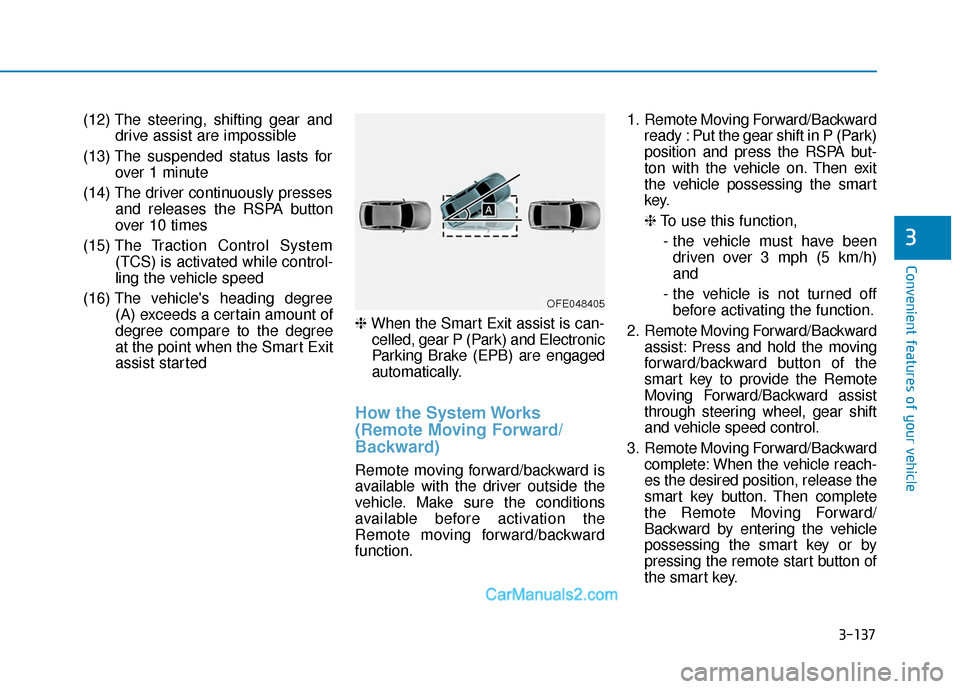
(16) The vehicle's heading degree (A) exceeds a certain amount of
degree compare to the degree
at the point when the Smart Exit
assist started ❈
When the Smart Exit assist is can-
celled, gear P (Park) and Electronic
Parking Brake (EPB) are engaged
automatically.
How the System Works
(Remote Moving Forward/
Backward)
Remote moving forward/backward is
available with the driver outside the
vehicle. Make sure the conditions
available before activation the
Remote moving forward/backward
function. 1. Remote Moving Forward/Backward
ready : Put the gear shift in P (Park)
position and press the RSPA but-
ton with the vehicle on. Then exit
the vehicle possessing the smart
key.
❈To use this function,
- the vehicle must have been driven over 3 mph (5 km/h)
and
- the vehicle is not turned off before activating the function.
2. Remote Moving Forward/Backward assist: Press and hold the moving
forward/backward button of the
smart key to provide the Remote
Moving Forward/Backward assist
through steering wheel, gear shift
and vehicle speed control.
3. Remote Moving Forward/Backward complete: When the vehicle reach-
es the desired position, release the
smart key button. Then complete
the Remote Moving Forward/
Backward by entering the vehicle
possessing the smart key or by
pressing the remote start button of
the smart key.
OFE048405
Page 226 of 560
3-139
Convenient features of your vehicle
3
❈You will hear frequent beep
sounds if the driver gets off the
vehicle after the Remote Moving
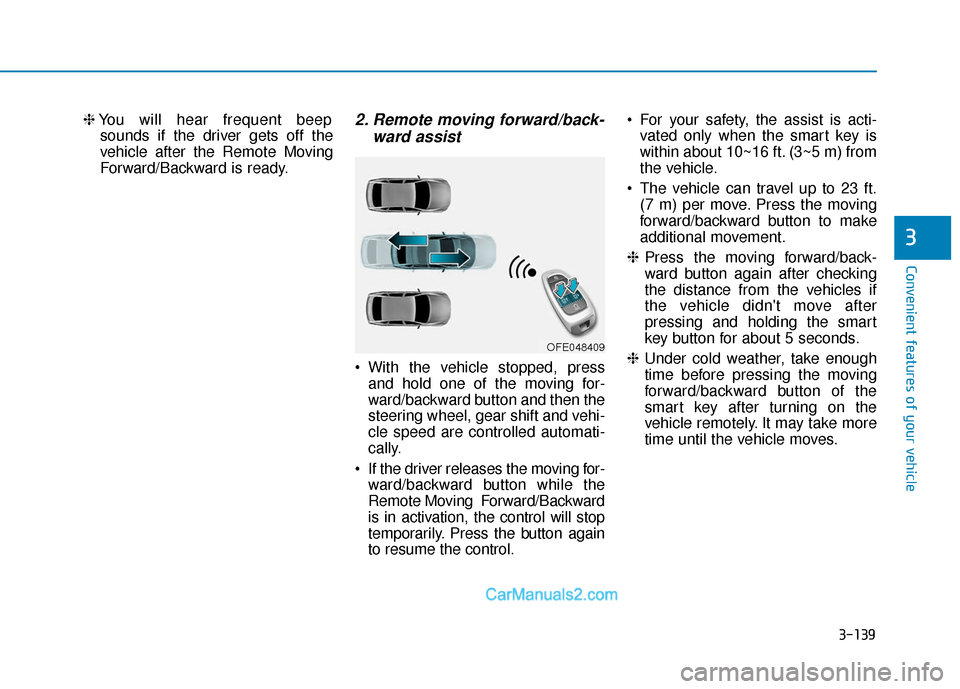
Forward/Backward is ready.2. Remote moving forward/back- ward assist
• With the vehicle stopped, press
and hold one of the moving for-
ward/backward button and then the
steering wheel, gear shift and vehi-
cle speed are controlled automati-
cally.
If the driver releases the moving for- ward/backward button while the
Remote Moving Forward/Backward
is in activation, the control will stop
temporarily. Press the button again
to resume the control. For your safety, the assist is acti-
vated only when the smart key is
within about 10~16 ft. (3~5 m) from
the vehicle.
The vehicle can travel up to 23 ft. (7 m) per move. Press the moving
forward/backward button to make
additional movement.
❈ Press the moving forward/back-
ward button again after checking
the distance from the vehicles if
the vehicle didn't move after
pressing and holding the smart
key button for about 5 seconds.
❈ Under cold weather, take enough
time before pressing the moving
forward/backward button of the
smart key after turning on the
vehicle remotely. It may take more
time until the vehicle moves.
OFE048409
Page 227 of 560
3-140
Convenient features of your vehicle
3. Remote moving forward/back-ward complete
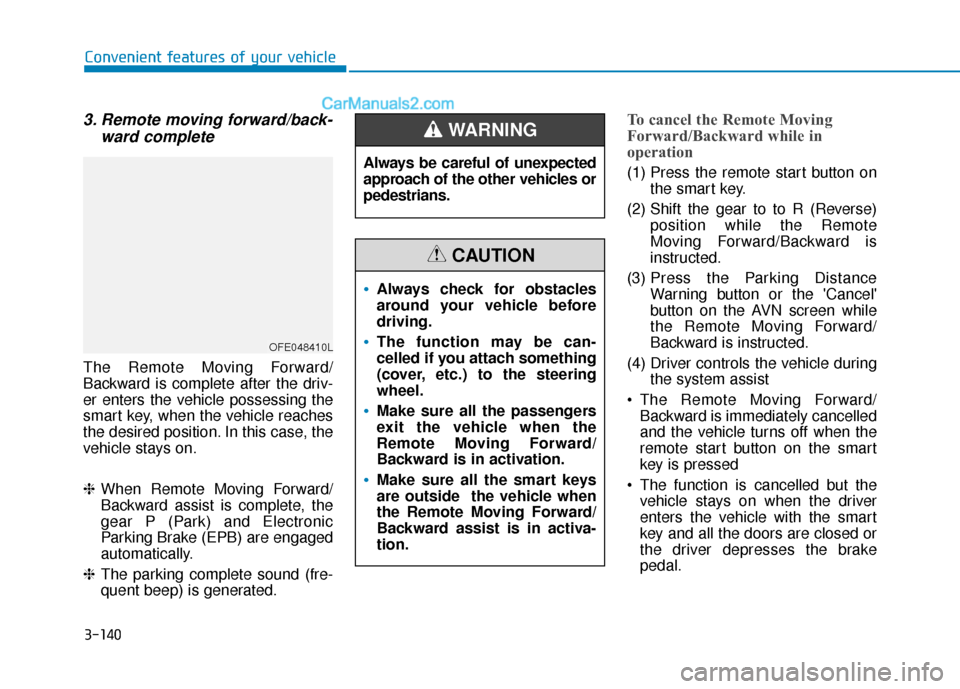
The Remote Moving Forward/
Backward is complete after the driv-
er enters the vehicle possessing the
smart key, when the vehicle reaches
the desired position. In this case, the
vehicle stays on.
❈When Remote Moving Forward/
Backward assist is complete, the
gear P (Park) and Electronic
Parking Brake (EPB) are engaged
automatically.
❈ The parking complete sound (fre-
quent beep) is generated.
To cancel the Remote Moving
Forward/Backward while in
operation
(1) Press the remote start button on
the smart key.
(2) Shift the gear to to R (Reverse) position while the Remote
Moving Forward/Backward is
instructed.
(3) Press the Parking Distance Warning button or the 'Cancel'
button on the AVN screen while
the Remote Moving Forward/
Backward is instructed.
(4) Driver controls the vehicle during the system assist
The Remote Moving Forward/ Backward is immediately cancelled
and the vehicle turns off when the
remote start button on the smart
key is pressed
The function is cancelled but the vehicle stays on when the driver
enters the vehicle with the smart
key and all the doors are closed or
the driver depresses the brake
pedal.
OFE048410L
Always be careful of unexpected
approach of the other vehicles or
pedestrians.
WARNING
Always check for obstacles
around your vehicle before
driving.
The function may be can-
celled if you attach something
(cover, etc.) to the steering
wheel.
Make sure all the passengers
exit the vehicle when the
Remote Moving Forward/
Backward is in activation.
Make sure all the smart keys
are outside the vehicle when
the Remote Moving Forward/
Backward assist is in activa-
tion.
CAUTION
Page 228 of 560
3-141
Convenient features of your vehicle
3
The Remote Moving Forward/
Backward assist will stop tem-
porarily when:
(1) An obstacle at the direction thevehicle is heading is detected.
(2) The door or liftgate is open.
(3) The moving forward/backward but- ton on the smart key is released.
(4) Multiple buttons on the smart key are pressed at the same time.
(5) The distance between the smart key and vehicle is over 13 ft. (4 m).
(6) A button on the other smart key is pressed.
(7) R ear Cross-Traffic Collision-
Avoidance Assist (RCCA) system
is activated while reversing.
(8) The vehicle moves 23 ft. (7m) (maximum travel distance per
move) with the Remote Moving
Forward/Backward while the
smart key is pressed.
❈ The vehicle stops when the Remote
Smart Parking assist will stop tem-
porarily and the Remote Smart
Parking assist will resume when the
above condition is cleared.
The Remote Moving Forward/
Backward assist is cancelled while
in operation when:
(1) The driver holds the steering
wheel while the steering wheel is
controlled
(2) The gear is shifted or the
Electronic Parking Brake (EPB) is
activated
(3) The hood opens
(4) The vehicle speed exceeds 3 mph (5 km/h)
(5) The vehicle accelerates suddenly
(6) The vehicle slips back while con- trolling the vehicle speed
(7) The wheel is stuck and the vehi- cle is unable to move
(8) Obstacles are at the front and back of the vehicle at the same
time
(9) About 3 minutes and 50 seconds have passed after the Remote
Moving Forward/Backward assist
(10) The gradient of the road exceeds
the range supported by Remote
Moving Forward/ Backward assist (11) The steering, shifting gear and
drive assist are impossible
(12) The suspended status lasts for over 1 minute
(13) The driver continuously presses and releases the smart key's
moving forward/backward but-
ton over 10 times
(14) The Traction Control System
(TCS) is activated while control-
ling the vehicle speed
(15) The smart key has failure
(16) The accelerator/brake pedal is depressed while all the doors
are closed
(17) The brake pedal is depressed while the driver's door is open
and the smart key is outside the
vehicle
(18) The vehicle travels more than 46 ft. (14 m) after the Remote
Moving Forward/Backward assist
is activated
(19) The smart key's remote start button is pressed
Page 232 of 560
3-145
Convenient features of your vehicle
3
Link with other Systems
Activation of other systems may be
restricted according to the circum-
stances while the RSPA system is in
activation. The systems linked to the
RSPA system are as follows:
1. Smart Cruise Control (SCC) sys-tem
(1) SCC system can be operated at the same time with the RSPA
system until the "Searching for
parking space" stage.
(2) The SCC system is deactivated when the RSPA system enters
the "Remote Smart Parking
assist" stage.
(3) After the RSPA system is com- plete or deactivated, the SCC
system maintains the deactiva-
tion status. 2. Auto Hold
(1)
The activated Auto Hold is
switched to deactivation status
when the RSPA system is activat-
ed.
(2) The Auto Hold button will not respond while the RSPA system
is in activation.
(3) After the RSPA system is com- plete or deactivated, the Auto
Hold will return to the state before
the RSPA system was activated. 3. Electronic Stability Control (ESC)
(1) Electronic Stability Control (ESC)
system switches from OFF to
activation status (ESC OFF but-
ton turns off) when the RSPA sys-
tem is activated.
(2) The ESC OFF button will not respond while the RSPA system
is in activation.
(3) The ABS/TCS/ESC system acti- vates while the RSPA is in activa-
tion.
(4) After the RSPA system is com- plete or deactivated, ESC main-
tains the ON status.
Page 265 of 560
4-3
Multimedia System
4
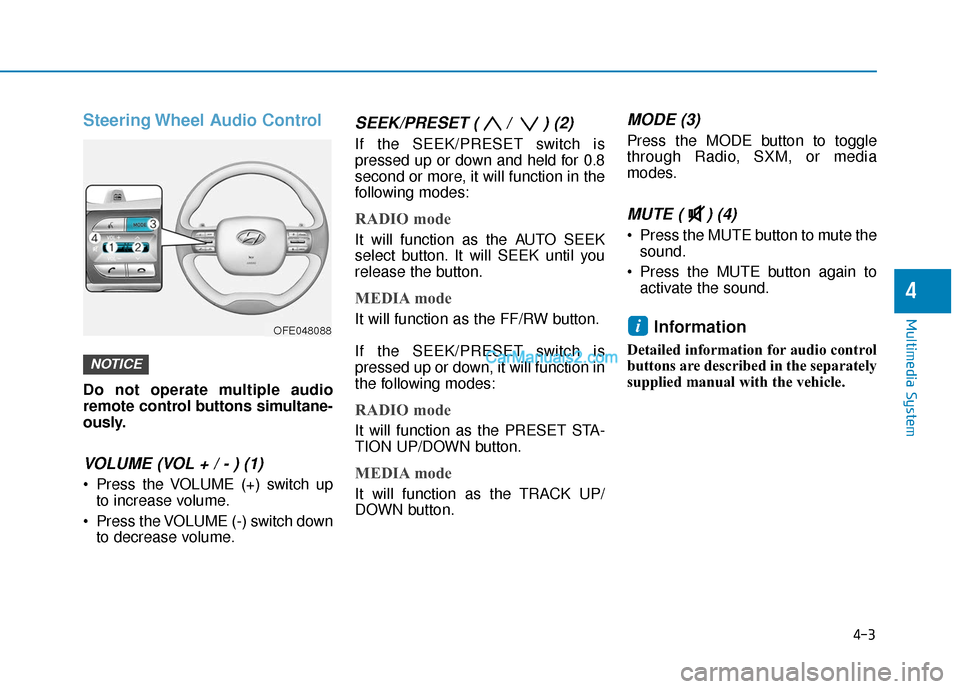
Steering Wheel Audio Control
Do not operate multiple audio
remote control buttons simultane-
ously.
VOLUME (VOL + / - ) (1)
Press the VOLUME (+) switch upto increase volume.
Press the VOLUME (-) switch down to decrease volume.
SEEK/PRESET ( / ) (2)
If the SEEK/PRESET switch is
pressed up or down and held for 0.8
second or more, it will function in the
following modes:
RADIO mode
It will function as the AUTO SEEK
select button. It will SEEK until you
release the button.
MEDIA mode
It will function as the FF/RW button.
If the SEEK/PRESET switch is
pressed up or down, it will function in
the following modes:
RADIO mode
It will function as the PRESET STA-
TION UP/DOWN button.
MEDIA mode
It will function as the TRACK UP/
DOWN button.
MODE (3)
Press the MODE button to toggle
through Radio, SXM, or media
modes.
MUTE ( ) (4)
Press the MUTE button to mute thesound.
Press the MUTE button again to activate the sound.
Information
Detailed information for audio control
buttons are described in the separately
supplied manual with the vehicle.
i
NOTICE
OFE048088
Page 474 of 560
7-50
Maintenance
Fuse NameFuse RatingProtected Component
MEMORY110APower Tail Gate Module, A/C Control Module, A/C Control Panel
MODULE110AICM Relay Box (Outside Mirror Folding/Unfolding Relay), A/V & Navigation Head Unit (Hazard Lamp Switch),
Shift Selection Switch (SBW), Auto Light & Photo Sensor, Driver/Passenger Power Outside Mirror,
Instrument Cluster
TAIL GATEOPEN10ATail Gate Relay
P/WINDOW RH25APower Window RH Relay
P/WINDOW LH25APower Window LH Relay, Driver Safety Window Module
P/SEAT DRV25ADriver Seat Manual Switch
MODULE47.5AIBU, Remote Control Smart Parking Assist Unit, VESS Unit, Electronic Parking Brake Switch,
Lane Keeping Assist Unit(Line), Blind-Spot Collision Warning Unit LH/RH, Crash Pad Switch,
PE Room Junction Block (Multipurpose Check Connector)
MODULE87.5AData Link Connector, Crash Pad Switch, Electro Chromic Mirror
S/HEATER RR20ARear Seat Heater
HEATED
MIRROR10ADriver/Passenger Power Outside Mirror, A/C Control Panel
S/HEATER FRT20AFront Air Ventilation/Seat Heater Seat Control Module
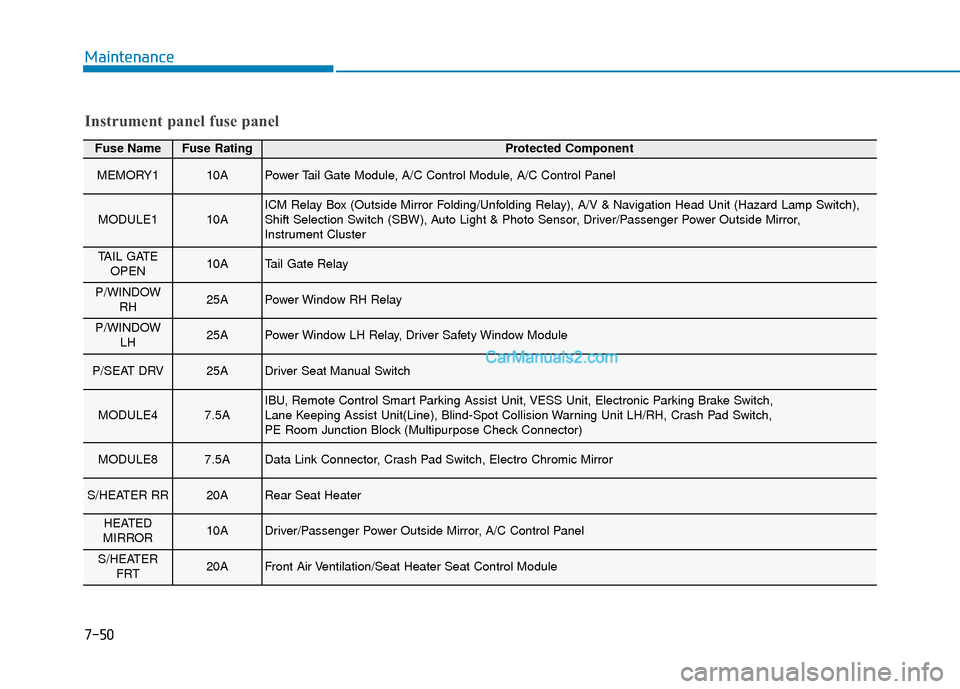
Instrument panel fuse panel
Page 557 of 560

I-8
Rear Seats .......................................................................2\
-10
Rear View Monitor .......................................................3-108
Rear Window Wiper and Washer..................................3-103
Recommended Lubricants and Capacities ........................8-6
Reducing the Risk of a Rollover ..................................5-121
Reduction Gear ...............................................................5-11Reduction Gear Operation ..........................................5-11
Parking........................................................................\
5-13
LCD Display Messages ..............................................5-13
Good Driving Practices ..............................................5-16
Refrigerant Label ..............................................................8-8
Remote Smart Parking Assist (RSPA) ..........................3-112 Operating Condition .................................................3-113
Non-operating Condition ..........................................3-114
Limitations of the System ........................................3-115
How the System Works (Smart Parking) .................3-119
How the System Works (Remote Smart Parking)....3-126
How the System Works (Smart Exit) .......................3-130
How the System Works (Remote Moving Forward/Backward) ..................3-137
Additional Instructions (Messages)..........................3-142
Turn signal Showing Vehicle Status while System in Activation ..........................................................3-143
Smart Key Showing Vehicle Status while System in Activation ..........................................................3-144
Link with other Systems ..........................................3-145
Reporting Safety Defects ................................................8-10
Roof Side Rails .............................................................3-175 Scheduled maintenance services.......................................7-7
Normal Maintenance Schedule ....................................7-8
Maintenance Under Severe Usage Conditions...........7-10
Seat Belt Restraint System .............................................2-24
Seat Belt Warning Light .................................................2-22
Seat Belts ........................................................................\
2-21 Seat Belt Safety Precautions ......................................2-21
Seat Belt Warning Light .............................................2-22
Seat Belt Restraint System .........................................2-24
Additional Seat Belt Safety Precautions ....................2-32
Care of Seat Belts .......................................................2-35
Seat Warmers and Air Ventilation Seats .........................2-17
Seats ........................................................................\
..........2-4 Safety Precautions ........................................................2-5
Front Seats ....................................................................2-6
Rear Seats ...................................................................2-10
Head Restraints ..........................................................2-13
Seat Warmers and Air Ventilation Seats.....................2-17
Side View Mirrors...........................................................3-31
Smart Cruise Control With Stop & Go System ..............5-98 Smart Cruise Control Switch .....................................5-99
To Adjust the Sensitivity of Smart Cruise Control ..5-100
To Convert to Cruise Control Mode ........................5-100
Smart Cruise Control Speed .....................................5-101
Index
S