sensor Hyundai Nexo 2019 Owner's Guide
[x] Cancel search | Manufacturer: HYUNDAI, Model Year: 2019, Model line: Nexo, Model: Hyundai Nexo 2019Pages: 560, PDF Size: 24.2 MB
Page 199 of 560
3-112
Convenient features of your vehicle
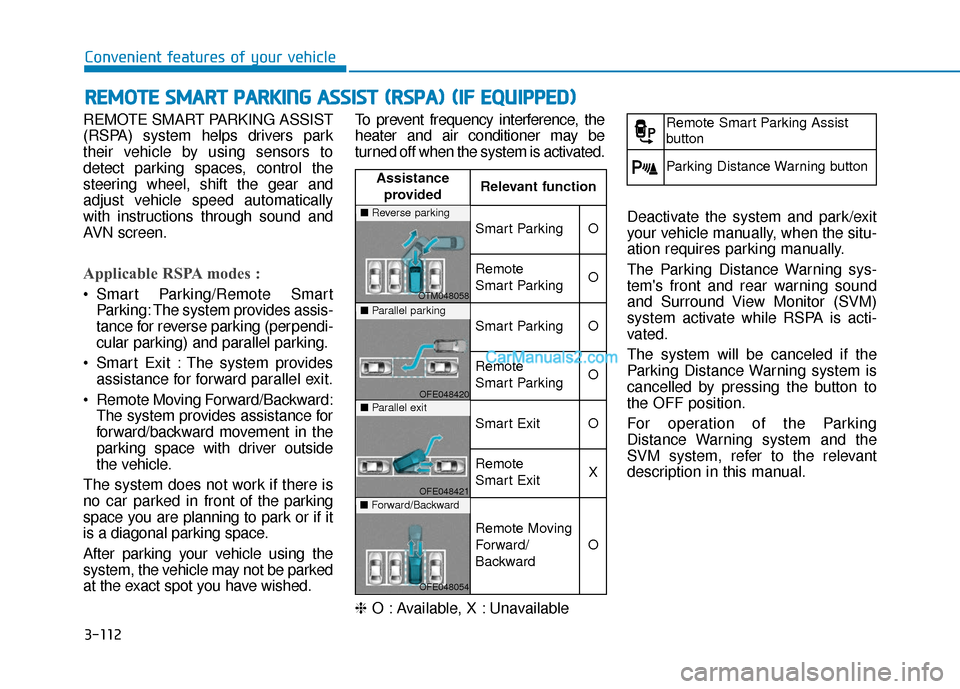
REMOTE SMART PARKING ASSIST
(RSPA) system helps drivers park
their vehicle by using sensors to
detect parking spaces, control the
steering wheel, shift the gear and
adjust vehicle speed automatically
with instructions through sound and
AVN screen.
Applicable RSPA modes :
Smart Parking/Remote Smart Parking: The system provides assis-
tance for reverse parking (perpendi-
cular parking) and parallel parking.
Smart Exit : The system provides assistance for forward parallel exit.
Remote Moving Forward/Backward: The system provides assistance for
forward/backward movement in the
parking space with driver outside
the vehicle.
The system does not work if there is
no car parked in front of the parking
space you are planning to park or if it
is a diagonal parking space.
After parking your vehicle using the
system, the vehicle may not be parked
at the exact spot you have wished. To prevent frequency interference, the
heater and air conditioner may be
turned off when the system is activated.
❈
O : Available, X : Unavailable Deactivate the system and park/exit
your vehicle manually, when the situ-
ation requires parking manually.
The Parking Distance Warning sys-
tem's front and rear warning sound
and Surround View Monitor (SVM)
system activate while RSPA is acti-
vated.
The system will be canceled if the
Parking Distance Warning system is
cancelled by pressing the button to
the OFF position.
For operation of the Parking
Distance Warning system and the
SVM system, refer to the relevant
description in this manual.
R R
E
EM
M O
OT
TE
E
S
S M
M A
AR
RT
T
P
P A
A R
RK
K I
IN
N G
G
A
A S
SS
SI
IS
S T
T
(
( R
R S
SP
P A
A )
)
(
( I
IF
F
E
E Q
Q U
UI
IP
P P
PE
ED
D )
)
Assistance
provided Relevant function
Smart ParkingO
Remote
Smart ParkingO
Smart ParkingO
Remote
Smart ParkingO
Smart ExitO
Remote
Smart ExitX
Remote Moving
Forward/
Backward
O
■
Reverse parking
OTM048058■Parallel parking
OFE048420■Parallel exit
OFE048421■Forward/Backward
OFE048054
Remote Smart Parking Assist
button
Parking Distance Warning button
Page 200 of 560
3-113
Convenient features of your vehicle
3
Operating Condition
Use the system when all the below
conditions are met.
When the parking space is astraight line
When there is a parked vehicle next to the space where you want
to park
When there is enough space to move the vehicle
When you choose "Confirm" on AVN booting.
The RSPA system should only
be considered as a supple-
mentary function. The driver
must check the front and rear
view for objects. The opera-
tional function of the system
can be affected by many fac-
tors and conditions of the sur-
roundings, so the responsibili-
ty rests always with the driver.
The system may not operate
normally if the vehicle needs
wheel alignment adjustment.
Have the vehicle checked by
an authorized HYUNDAI deal-
er.
If you use a different tire or
wheel size rather than the size
recommended by the HYUNDAI
dealer, the system may not
work properly. Always use the
same size tire and wheel.
WARNING
Do not use the system when
in drunken state.
The system may not operate
properly depending on the
surrounding environment and
other conditions.
The system may not recog-
nize the object too close to
the vehicle.
When operating the system,
be careful of the objects locat-
ed above or below the sensor
position. Such object may
damage the vehicle or other
objects.
Do not let children or other
person to use the smart key.
WARNING
Page 201 of 560
3-114
Convenient features of your vehicle
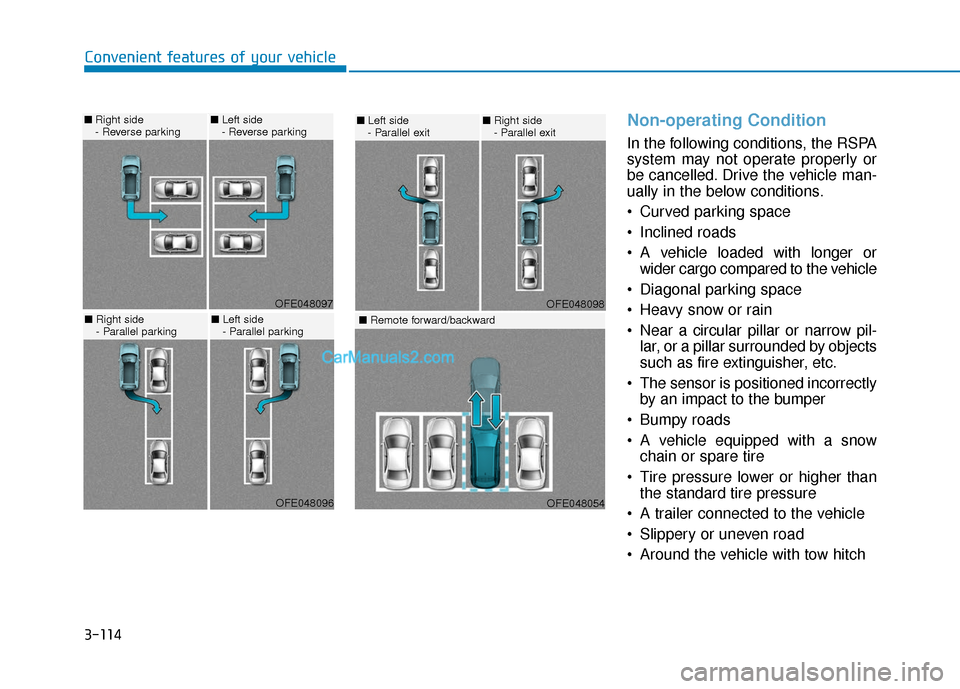
Non-operating Condition
In the following conditions, the RSPA
system may not operate properly or
be cancelled. Drive the vehicle man-
ually in the below conditions.
Curved parking space
Inclined roads
A vehicle loaded with longer orwider cargo compared to the vehicle
Diagonal parking space
Heavy snow or rain
Near a circular pillar or narrow pil- lar, or a pillar surrounded by objects
such as fire extinguisher, etc.
The sensor is positioned incorrectly by an impact to the bumper
Bumpy roads
A vehicle equipped with a snow chain or spare tire
Tire pressure lower or higher than the standard tire pressure
A trailer connected to the vehicle
Slippery or uneven road
Around the vehicle with tow hitch
OFE048098
■ Left side
- Parallel exit■Right side
- Parallel exit
OFE048054
■ Remote forward/backward
OFE048097
■Right side
- Reverse parking■Left side
- Reverse parking
OFE048096
■Right side
- Parallel parking■Left side
- Parallel parking
Page 202 of 560
3-115
Convenient features of your vehicle
3
Big vehicles such as buses ortrucks parked
Sensor covered with foreign mat- ter, such as snow or water
An obstacle such as a trash can, bicycle, shopping cart, etc. is near
Heavy wind
Wheel changed to an unauthorized size
A problem with the wheel alignment
Vehicle leaned severely to one side
Front or rear distance sensors are malfunction or not working properly.
(Refer to the Parking Distance
Warning system in chapter 3.)
requires battery replacementLimitations of the System
When the vehicle has beenparked/stopped for a long time in a
cold environment, the Remote
Moving Forward/Backward may be
delayed depending on the vehicle
condition when the vehicle is
turned on remotely.
The RSPA system may suddenly apply brake to avoid collision
against stationary or moving
object.
The system may be cancelled unexpectedly when a person or
animal passes by near the vehicle.
The performance of the system may be degraded and frequently
stop when driving in strong electric
field area.
Right after the parking place search complete and beep sound
is generated, the search complete
may be cancelled according to the
surrounding environment Even while the system is in activa-
tion, the vehicle may collide with
the object existing within the blind-
spot area of the sensor.
When there is any obstacle within the blind-spot area, drive out of the
parking space manually.
The system may not recognize the object that appears suddenly.
The system does not work if there is no car parked in front of the
parking space you are planning to
park.
Page 203 of 560
3-116
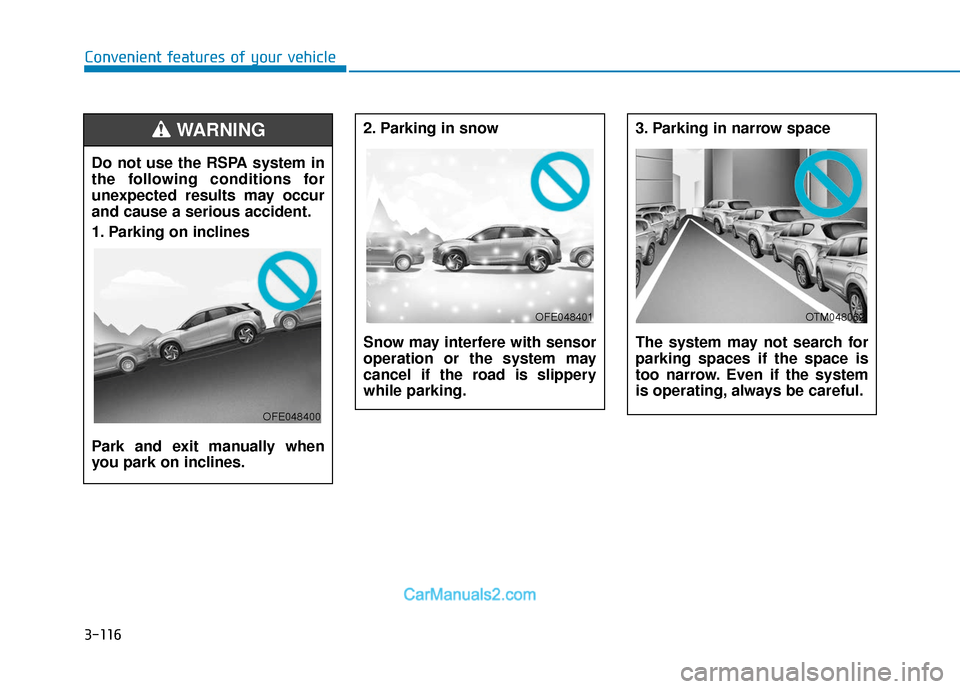
Convenient features of your vehicle2. Parking in snow
Snow may interfere with sensor
operation or the system may
cancel if the road is slippery
while parking.
3. Parking in narrow space
The system may not search for
parking spaces if the space is
too narrow. Even if the system
is operating, always be careful.
OFE048401OTM048062
Do not use the RSPA system in
the following conditions for
unexpected results may occur
and cause a serious accident.
1. Parking on inclines
Park and exit manually when
you park on inclines.
WARNING
OFE048400
Page 206 of 560
3-119
Convenient features of your vehicle
3
How the System Works
(Smart Parking)
Smart Parking is available with the
driver on board. Make sure the con-
ditions available before activating the
Smart parking function.
1. Select Smart Parking:Press the RSPA button with the
shift lever placed in D (Drive) or N
(Neutral) position.
❈However, the Smart Exit is
selected if you press the RSPA
button when the gear is in N
(Neutral) position after the initial
startup.
2. Search for parking space: Slowly move forward below 12 mph (20
km/h)
3. Search complete: Automatic search by sensor.
However, check the actual parking
environment before parking the
vehicle.
4. Select parking type: Reverse (left/right), parallel (left/right)
5. Operating instructions: Smart Parking/Remote Smart Parking 6. Smart Parking assist: Steering
wheel, gear shift and vehicle
speed control (reverse parking).
7. Parking complete: Smart Parking complete after reaching the park-
ing position
❈ After the parking is complete,
arrange the vehicle position manu-
ally, if necessary.
❈ You can use Smart Parking after
navigation or home screen display
on AVN (You cannot use Smart
Parking if you don't choose
"Confirm" on AVN booting)
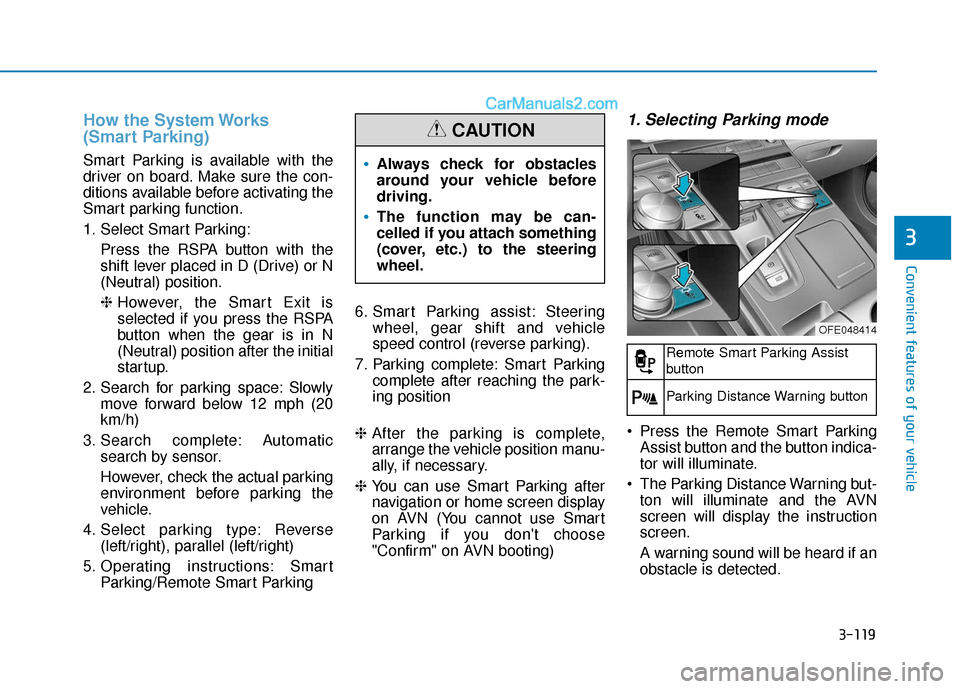
1. Selecting Parking mode
Press the Remote Smart Parking
Assist button and the button indica-
tor will illuminate.
The Parking Distance Warning but- ton will illuminate and the AVN
screen will display the instruction
screen.
A warning sound will be heard if an
obstacle is detected.
Always check for obstacles
around your vehicle before
driving.
The function may be can-
celled if you attach something
(cover, etc.) to the steering
wheel.
CAUTION
OFE048414
Remote Smart Parking Assist
button
Parking Distance Warning button
Page 208 of 560
3-121
Convenient features of your vehicle
3
When searching for a parking
space, the system may not be
able to find a parking space if
there is no vehicle parked, a
parking space is available
after driving by or a parking
space is available before driv-
ing by.
The system may not operate
normally in the following con-
ditions:
(1) When the sensors are
frozen
(2) When the sensors are dirty
(3) When it snows or rains
heavily
(4) When a pillar or object is near
(5) Parked vehicle is abnor- mally parked
In above cases, the system may
not search the parking space
although the parking space
exists. And the system may
search the parking space
although the parking space is
not proper to park.
CAUTION
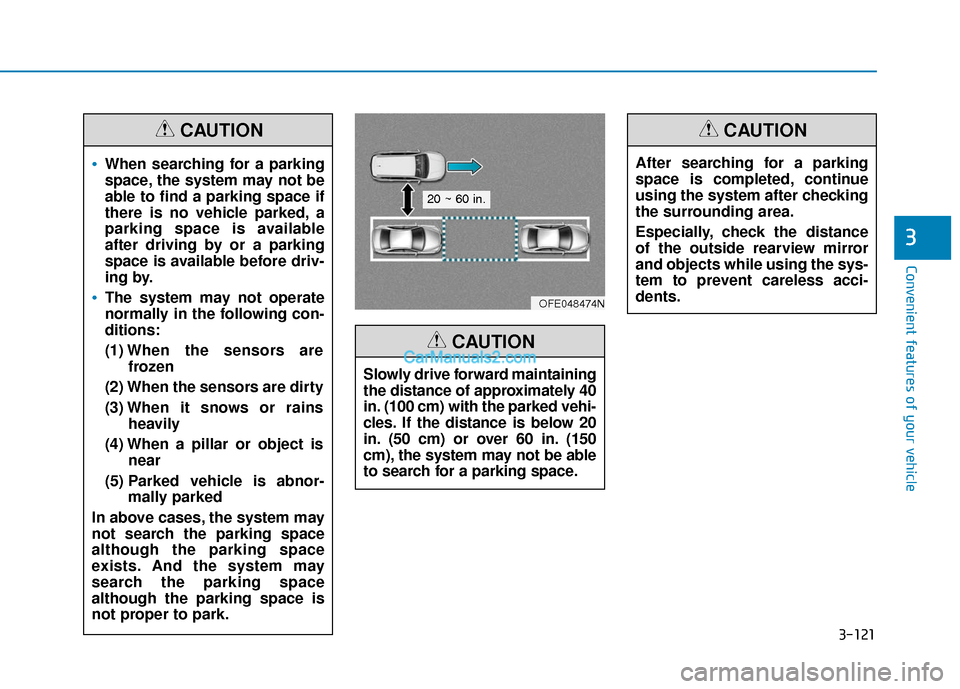
Slowly drive forward maintaining
the distance of approximately 40
in. (100 cm) with the parked vehi-
cles. If the distance is below 20
in. (50 cm) or over 60 in. (150
cm), the system may not be able
to search for a parking space.
CAUTION
After searching for a parking
space is completed, continue
using the system after checking
the surrounding area.
Especially, check the distance
of the outside rearview mirror
and objects while using the sys-
tem to prevent careless acci-
dents.
CAUTION
OFE048474N
20 ~ 60 in.
Page 213 of 560
3-126
Convenient features of your vehicle
The Smart Parking assist is can-
celled while in operation when:
(1) The driver holds the steering
wheel while the steering wheel is
controlled
(2) The gear is shifted or the
Electronic Parking Brake (EPB) is
activated
(3) The hood opens
(4) The v ehicle speed exceeds 3
mph (5 km/h)
(5) The vehicle accelerates suddenly
(6) The vehicle slips back while the vehicle speed is controlled
(7) The wheel is stuck and the vehi- cle is unable to move
(8) The obstacles are at the front and back of the vehicle at the same
time
(9) About 3 minutes and 50 seconds have passed after the Smart
Parking assist is activated
(10) The door opens while the driver’s seatbelt is unfastened
(11) The gradient of the road
exceeds the range supported by
the Smart Parking assist (12) The steering, shifting gear and
drive assist are impossible
(13) The suspended status lasts for over 1 minute
(14) The driver continuously presses and releases the RSPA button
over 10 times
(15) The vehicle is unable to enter the parking space while the
Smart Parking assist is in acti-
vation
(16) The Traction Control System
(TCS) is activated while the
vehicle speed is controlled
❈ When the Smart Parking assist is
cancelled, gear P (Park) and
Electronic Parking Brake (EPB)
are engaged automatically.
How the System Works
(Remote Smart Parking)
Remote smart Parking is available
with the driver outside the vehicle.
Make sure the conditions available
before activation the Remote smart
parking function. 1. Select Remote Smart Parking:
Press the RSPA button with the
shift lever placed in D (Drive) or N
(Neutral) position.
However, the Smart Exit is select-
ed if you press the RSPA button
when the vehicle is in N (Neutral)
position after the initial startup.
2. Search for parking space: Slowly move forward below 12 mph (20
km/h).
3. Search complete: Automatic search by sensor.
However, check the actual parking
environment before parking the
vehicle.
4. Select parking type: Reverse (left/right), parallel (left/right)
5. Operating instructions: Smart Parking/Remote Smart Parking
6. Remote Smart Parking assist: Steering wheel, gear shift and
vehicle speed control (reverse
parking)
7. Remote Smart Parking complete
Page 217 of 560
3-130
Convenient features of your vehicle
(12) The suspended status lasts for over 1 minute
(13) The driver continuously presses and releases the smart key’s
moving forward/backward but-
ton over 10 times
(14) The vehicle is unable to enter the parking space
(15) The Traction Control System
(TCS) is activated while control-
ling the vehicle speed
(16) The smart key has failure
(17) The accelerator/brake pedal is depressed while all the doors
are closed
(18) The brake pedal is depressed while the driver’s door is open
and the smart key is outside the
vehicle
(19) The theft alarm system is acti- vated
When the Remote Smart Parking assist is cancelled, gear P (Park)
and Electronic Parking Brake
(EPB) are engaged automatically.
After engaged, the vehicle is auto-
matically turned off. Frequent beep sounds will gener-
ate to alert the deactivation of the
Remote Smart Parking Assist.
How the System Works
(Smart Exit)
Smart exit is available with the driver
on board. Make sure the conditions
available before activation the Smart
parking function.
1. Select Smart Exit:
Press the RSPA button with the
shift lever placed in P (Park) or N
(Neutral) position without driving
the vehicle after the initial startup.
*N (Neutral): Press RSPA button
after starting the vehicle and with-
out driving the vehicle. The Smart
Exit is selected. Then the Parking
mode is automatically selected
after driving.
*P (Park): After driving the vehicle
press RSPA button and Remote
Moving Forward/Backward is
automatically selected.
2. Search for smart exit space: Automatic searching by sensor at
stop However, check the actual envi-
ronment before using Smart exit
function.
3. Select smart exit direction: Parallel (left/right)
4. Smart Exit assist: Steering wheel, gear shift and vehicle speed con-
trol (parallel exit)
5. Smart Exit complete
After the Smart Exit is complete,
make sure to check the surrounding
road conditions.
However, the Exit mode is activated
when below conditions are met:
The vehicle speed is kept under 3 mph (5 km/h) after the vehicle is
turned on.
The parallel parking by the Remote Smart Parking assist is complete.
Always be careful while exiting
for other vehicles or pedestrians.
WARNING
Page 219 of 560
3-132
Convenient features of your vehicle
2. Searching for smart exitspace
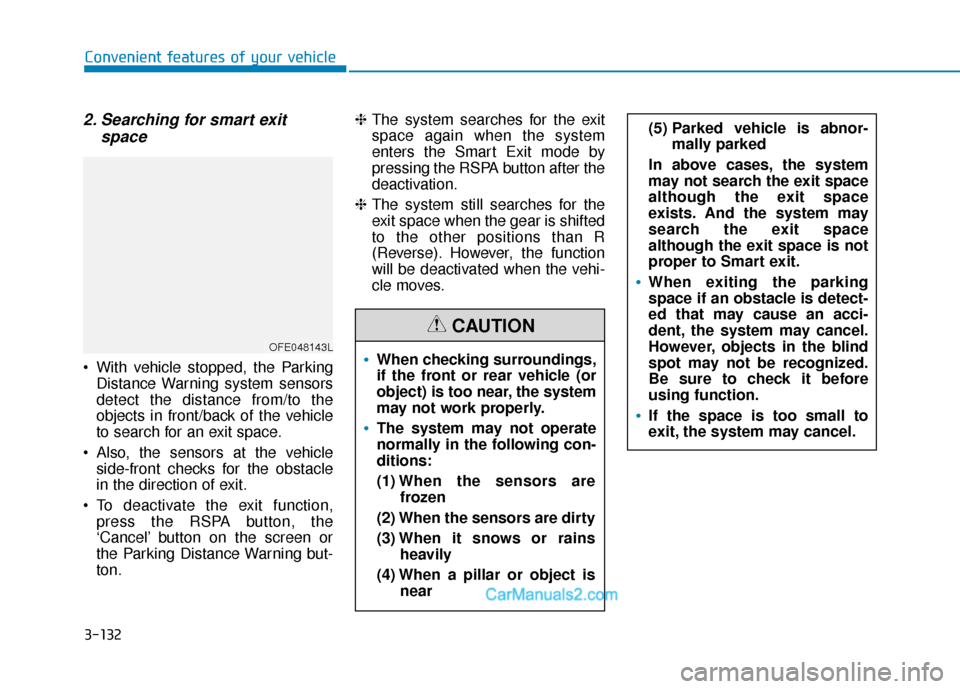
With vehicle stopped, the Parking
Distance Warning system sensors
detect the distance from/to the
objects in front/back of the vehicle
to search for an exit space.
Also, the sensors at the vehicle side-front checks for the obstacle
in the direction of exit.
To deactivate the exit function, press the RSPA button, the
‘Cancel’ button on the screen or
the Parking Distance Warning but-
ton. ❈
The system searches for the exit
space again when the system
enters the Smart Exit mode by
pressing the RSPA button after the
deactivation.
❈ The system still searches for the
exit space when the gear is shifted
to the other positions than R
(Reverse). However, the function
will be deactivated when the vehi-
cle moves.
OFE048143LWhen checking surroundings,
if the front or rear vehicle (or
object) is too near, the system
may not work properly.
The system may not operate
normally in the following con-
ditions:
(1) When the sensors are
frozen
(2) When the sensors are dirty
(3) When it snows or rains
heavily
(4) When a pillar or object is near
(5) Parked vehicle is abnor-mally parked
In above cases, the system
may not search the exit space
although the exit space
exists. And the system may
search the exit space
although the exit space is not
proper to Smart exit.
When exiting the parking
space if an obstacle is detect-
ed that may cause an acci-
dent, the system may cancel.
However, objects in the blind
spot may not be recognized.
Be sure to check it before
using function.
If the space is too small to
exit, the system may cancel.
CAUTION