audio HYUNDAI NEXO 2019 User Guide
[x] Cancel search | Manufacturer: HYUNDAI, Model Year: 2019, Model line: Nexo, Model: Hyundai Nexo 2019Pages: 561, PDF Size: 48.42 MB
Page 338 of 561
5-71
Driving your vehicle
5
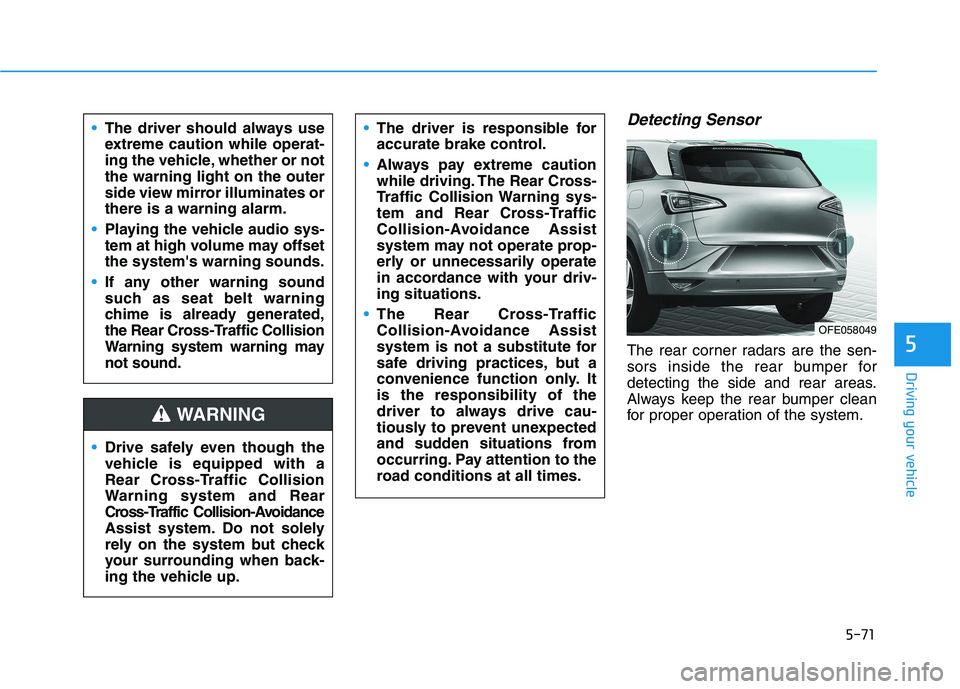
Detecting Sensor
The rear corner radars are the sen-
sors inside the rear bumper for
detecting the side and rear areas.
Always keep the rear bumper clean
for proper operation of the system. The driver should always use
extreme caution while operat-
ing the vehicle, whether or not
the warning light on the outer
side view mirror illuminates or
there is a warning alarm.
Playing the vehicle audio sys-
tem at high volume may offset
the system's warning sounds.
If any other warning sound
such as seat belt warning
chime is already generated,
the Rear Cross-Traffic Collision
Warning system warning may
not sound.
Drive safely even though the
vehicle is equipped with a
Rear Cross-Traffic Collision
Warning system and Rear
Cross-Traffic Collision-Avoidance
Assist system. Do not solely
rely on the system but check
your surrounding when back-
ing the vehicle up.
The driver is responsible for
accurate brake control.
Always pay extreme caution
while driving. The Rear Cross-
Traffic Collision Warning sys-
tem and Rear Cross-Traffic
Collision-Avoidance Assist
system may not operate prop-
erly or unnecessarily operate
in accordance with your driv-
ing situations.
The Rear Cross-Traffic
Collision-Avoidance Assist
system is not a substitute for
safe driving practices, but a
convenience function only. It
is the responsibility of the
driver to always drive cau-
tiously to prevent unexpected
and sudden situations from
occurring. Pay attention to the
road conditions at all times.
WARNING
OFE058049
Page 347 of 561
5-80
Driving your vehicle
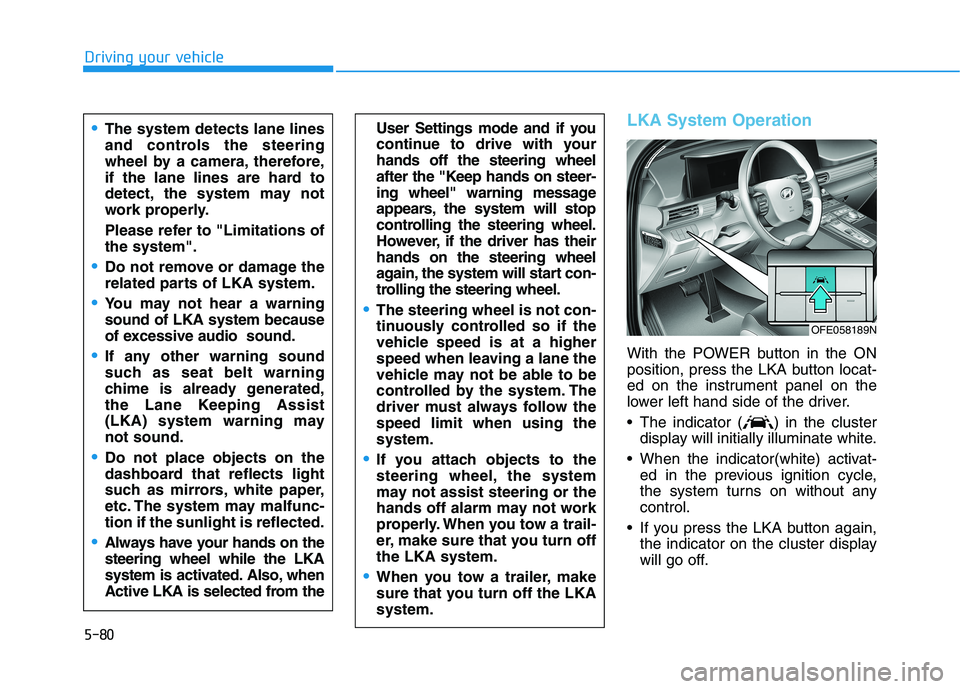
LKA System Operation
With the POWER button in the ON
position, press the LKA button locat-
ed on the instrument panel on the
lower left hand side of the driver.
The indicator ( ) in the cluster
display will initially illuminate white.
When the indicator(white) activat-
ed in the previous ignition cycle,
the system turns on without any
control.
If you press the LKA button again,
the indicator on the cluster display
will go off.
User Settings mode and if you
continue to drive with your
hands off the steering wheel
after the "Keep hands on steer-
ing wheel" warning message
appears, the system will stop
controlling the steering wheel.
However, if the driver has their
hands on the steering wheel
again, the system will start con-
trolling the steering wheel.
The steering wheel is not con-
tinuously controlled so if the
vehicle speed is at a higher
speed when leaving a lane the
vehicle may not be able to be
controlled by the system. The
driver must always follow the
speed limit when using the
system.
If you attach objects to the
steering wheel, the system
may not assist steering or the
hands off alarm may not work
properly. When you tow a trail-
er, make sure that you turn off
the LKA system.
When you tow a trailer, make
sure that you turn off the LKA
system.
The system detects lane lines
and controls the steering
wheel by a camera, therefore,
if the lane lines are hard to
detect, the system may not
work properly.
Please refer to "Limitations of
the system".
Do not remove or damage the
related parts of LKA system.
You may not hear a warning
sound of LKA system because
of excessive audio sound.
If any other warning sound
such as seat belt warning
chime is already generated,
the Lane Keeping Assist
(LKA) system warning may
not sound.
Do not place objects on the
dashboard that reflects light
such as mirrors, white paper,
etc. The system may malfunc-
tion if the sunlight is reflected.
Always have your hands on the
steering wheel while the LKA
system is activated. Also, when
Active LKA is selected from the
OFE058189N
Page 355 of 561
5-88
LFA operation
The driver can turn on the LFA sys-
tem with the vehicle on and by
selecting "Vehicle settings →Driver
assistance →Driving assist →LFA
(Lane Following Assist)" in the AVN
screen.
The set-up of the LFA system will be
maintained, as selected, when the
vehicle is restarted.
Driving your vehicle
The system detects lane
markers and controls the
steering wheel by a camera,
therefore, if the lane markers
are hard to detect, the system
may not work properly.
Please refer to "Limitations of
the system".
Do not remove or damage the
related parts of LFA system.
You may not hear a warning
sound of LFA system because
of excessive audio sound.
Do not place objects on the
dashboard that reflects light
such as mirrors, white paper,
etc. The system may malfunc-
tion if the sunlight is reflected.
Always have your hands on
the steering wheel while the
LFA system is activated. If you
continue to drive with your
hands off the steering wheel
after the "Keep hands on
steering wheel" warning mes-
sage appears, the system will
be turned off automatically.
However, if the driver has their
hands on the steering wheel
again, the system will start
controlling the steering wheel.
The steering wheel may not
be continuously controlled by
the system if the vehicle
speed is too high. The driver
must always follow the speed
limit when using the system.
If you attach objects to the
steering wheel, the system
may not assist steering nor-
mally or the hands off alarm
may not work properly.
When you tow a trailer, make
sure that you turn off the LFA
system.
Page 364 of 561
5-97
Driving your vehicle
5
The Driver Attention Warning sys-
tem utilizes the camera sensor on
the front windshield for its opera-
tion. To keep the camera sensor in
the best condition, you should
observe the followings:
Do not disassemble the camera
temporarily to tint the window or
to attach any types of coatings
and accessories. If you disas-
semble a camera and assemble
it again, take your vehicle to an
authorized HYUNDAI dealer and
have the system checked for cal-
ibration.
NEVER install any accessories
or stickers on the front wind-
shield, nor tint the front wind-
shield.
NEVER locate any reflective
objects (i.e. white paper, mirror)
over the dashboard. Any light
reflection may cause a malfunc-
tion of the Driver Attention Alert
(DAW) system.
Pay extreme caution to keep the
camera sensor out of water.
NOTICE
The Driver Attention Warning
(DAW) system may not properly
operate with limited alerting in
the following situations:
The lane detection perform-
ance is limited. (For more
details, refer to "Lane Keeping
Assist (LKA) system" in this
chapter.)
The vehicle is violently driven
or is abruptly turned for obsta-
cle avoidance (e.g. construc-
tion area, other vehicles, fallen
objects, bumpy road).
Forward drivability of the vehi-
cle is severely undermined
(possibly due to wide variation
in tire pressures, uneven tire
wear-out, toe-in/toe-out align-
ment).
The vehicle drives on a curvy
road.
The vehicle drives on a bumpy
road.
The vehicle drives through a
windy area.
The vehicle is controlled by the
following driving assist sys-
tems:
- Lane Keeping Assist (LKA)
system
- Forward Collision-Avoidance
Assist (FCA) system
- Smart Cruise Control (SCC)
system
- Lane Following Assist (LFA)
system
CAUTION
Playing the vehicle audio sys-
tem at high volume may offset
the Driver Attention Warning
(DAW) system warning sounds.
CAUTION
Page 374 of 561
5-107
Driving your vehicle
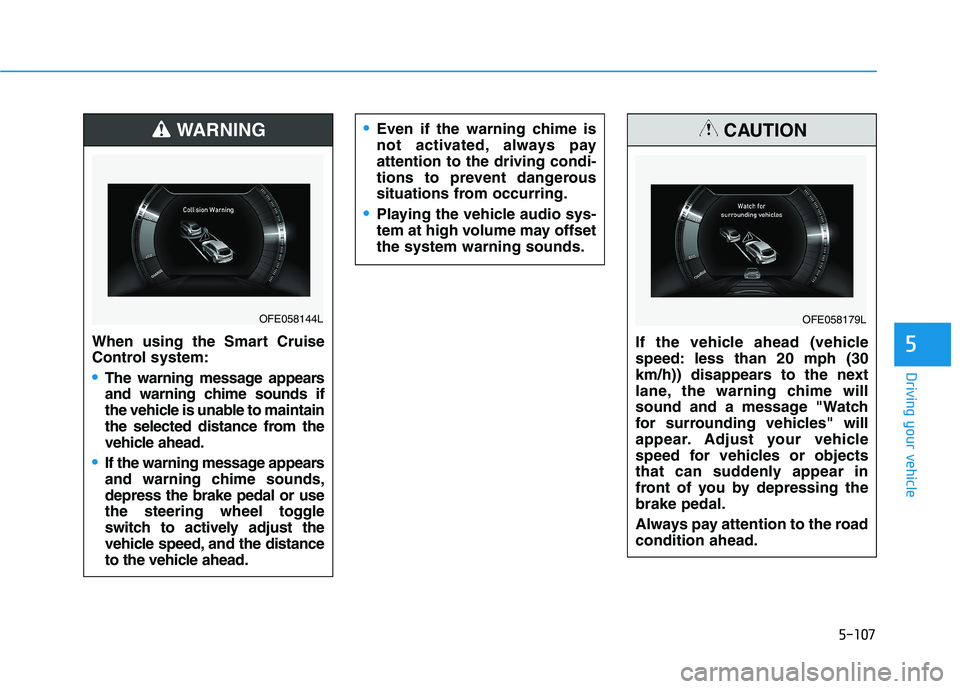
5When using the Smart Cruise
Control system:
The warning message appears
and warning chime sounds if
the vehicle is unable to maintain
the selected distance from the
vehicle ahead.
If the warning message appears
and warning chime sounds,
depress the brake pedal or use
the steering wheel toggle
switch to actively adjust the
vehicle speed, and the distance
to the vehicle ahead.
WARNING
OFE058144L
Even if the warning chime is
not activated, always pay
attention to the driving condi-
tions to prevent dangerous
situations from occurring.
Playing the vehicle audio sys-
tem at high volume may offset
the system warning sounds.
If the vehicle ahead (vehicle
speed: less than 20 mph (30
km/h)) disappears to the next
lane, the warning chime will
sound and a message "Watch
for surrounding vehicles" will
appear. Adjust your vehicle
speed for vehicles or objects
that can suddenly appear in
front of you by depressing the
brake pedal.
Always pay attention to the road
condition ahead.
CAUTION
OFE058179L
Page 404 of 561
6-6
What to do in an emergency
The following items may need to be
reset after the battery has been dis-
charged or the battery has been dis-
connected. See chapter 3 or 4 for:
Power Windows
Trip Computer
Climate Control System
Clock
Audio System
Sunroof
Driver Position Memory System
External power source using 12V
battery
The use of external power acces-
sories may reduce performance
and function of the vehicle.
Especially, the use of dash cam-
eras may shut off the power of the
vehicle prior to the dash camera's
automatic shut-down.
If the power of the vehicle is shut
off, start the vehicle as explained.
(refer to "Using the 12V Battery
Switch")
Jump Starting
In the event vehicle still does not
have a functional 12V battery (check
if interior lights will not turn on) then
you can try a jump start using a 12V
booster pack or jumper cables from
another vehicle's 12V battery
according to the following instruc-
tions.1. Position the vehicles close enough
that the jumper cables will reach,
but do not allow the vehicles to
touch.
2. Avoid fans or any moving parts in
the fuel cell power module com-
partment at all times, even when
the vehicles are turned off.
3. Turn off all electrical devices such
as radios, lights, air conditioning,
etc. Put the vehicles in P (Park)
and set the parking brake. Turn
both vehicles OFF.
NOTICE
Jump starting can be danger-
ous if done incorrectly. Follow
the jump starting procedure in
this section to avoid serious
injury or damage to your vehi-
cle. If in doubt about how to
properly jump start your vehi-
cle, we strongly recommend
that you have a service techni-
cian or towing service do it for
you.
CAUTION
Page 453 of 561
7-28
Maintenance
Battery recharging
By RESET button
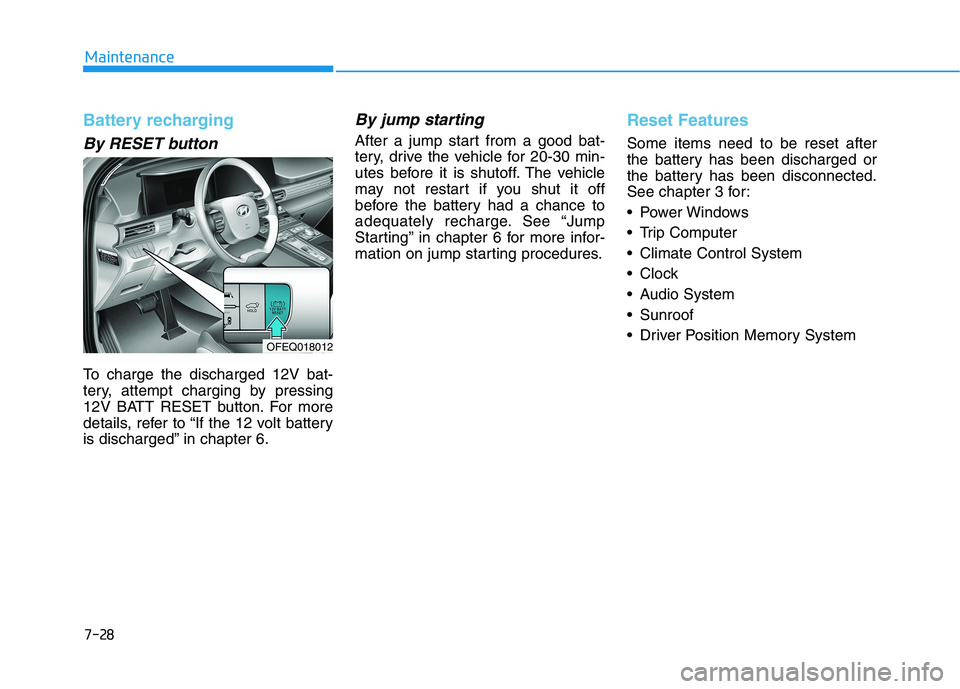
To charge the discharged 12V bat-
tery, attempt charging by pressing
12V BATT RESET button. For more
details, refer to “If the 12 volt battery
is discharged” in chapter 6.
By jump starting
After a jump start from a good bat-
tery, drive the vehicle for 20-30 min-
utes before it is shutoff. The vehicle
may not restart if you shut it off
before the battery had a chance to
adequately recharge. See “Jump
Starting” in chapter 6 for more infor-
mation on jump starting procedures.
Reset Features
Some items need to be reset after
the battery has been discharged or
the battery has been disconnected.
See chapter 3 for:
Power Windows
Trip Computer
Climate Control System
Clock
Audio System
Sunroof
Driver Position Memory System
OFEQ018012
Page 557 of 561
I-7
Lighting ...........................................................................3-89
Exterior Lights............................................................3-89
Welcome System ........................................................3-99
Luggage Net Holder .....................................................3-172
Maintenance services ........................................................7-4
Owner's Responsibility.................................................7-4
Owner Maintenance Precautions..................................7-4
Mirrors ............................................................................3-23
Inside Rearview Mirror ..............................................3-23
Side View Mirrors ......................................................3-31
Motor Number ..................................................................8-8
Multimedia system............................................................4-2
USB and iPod
®port .....................................................4-2
Antenna ........................................................................4-2
Steering wheel audio controls ......................................4-3
Bluetooth
®Wireless Technology..................................4-4
Audio/Video/Navigation system (AVN) ......................4-4
Non-Powered Liftgate.....................................................3-43Occupant Classification System (OCS)..........................2-58
Owner maintenance ..........................................................7-5
Owner maintenance schedule .......................................7-6
Paddle Shifter (Regenerative Braking Control) .............5-17
Parking Distance Warning (Reverse/Forward)
System .......................................................................3-105
Power Brakes ..................................................................5-18
Power Button ....................................................................5-6
POWER Button Positions ............................................5-7
Starting the Vehicle ......................................................5-9
Turning Off the Vehicle..............................................5-10
Power Liftgate.................................................................3-45
Power Outlet .................................................................3-166
Rear Cross-traffic Collision Warning (RCCW)/
Rear Cross-traffic Collision-avoidance Assist
(RCCA)........................................................................5-67
System Description ....................................................5-67
System Setting and Activation ...................................5-68
Warning and System Control .....................................5-69
Limitations of the System ..........................................5-73
I
Index
M
N
O
P
R