remote control HYUNDAI NEXO 2019 Owners Manual
[x] Cancel search | Manufacturer: HYUNDAI, Model Year: 2019, Model line: Nexo, Model: Hyundai Nexo 2019Pages: 561, PDF Size: 48.42 MB
Page 14 of 561
I IN
NS
ST
TR
RU
UM
ME
EN
NT
T
P
PA
AN
NE
EL
L
O
OV
VE
ER
RV
VI
IE
EW
W
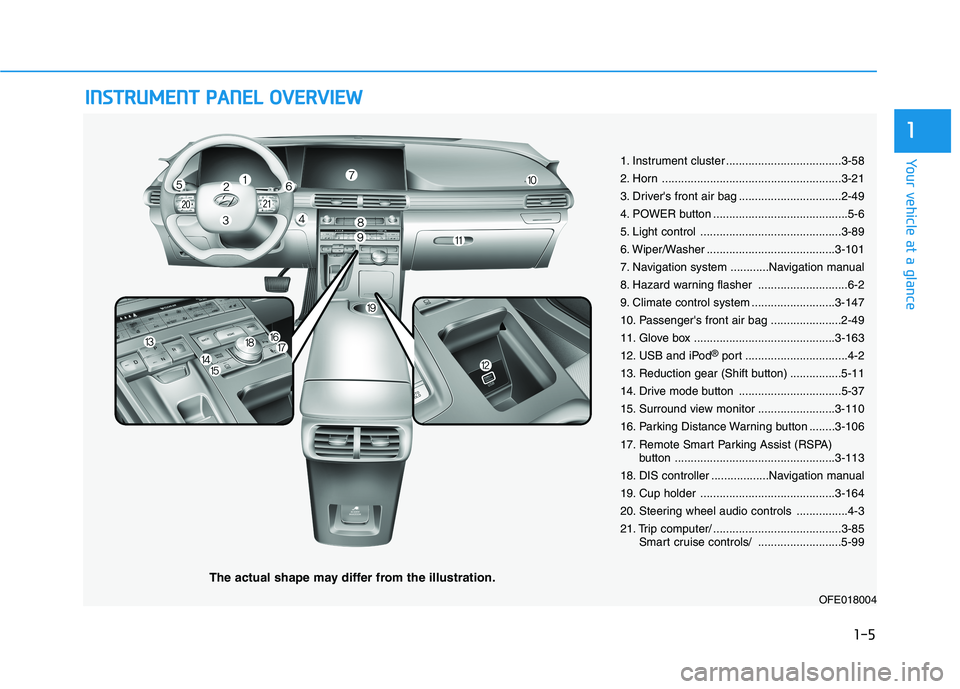
The actual shape may differ from the illustration.
1-5
Your vehicle at a glance
1
1. Instrument cluster ....................................3-58
2. Horn ........................................................3-21
3. Driver's front air bag ................................2-49
4. POWER button ..........................................5-6
5. Light control ............................................3-89
6. Wiper/Washer ........................................3-101
7. Navigation system ............Navigation manual
8. Hazard warning flasher ............................6-2
9. Climate control system ..........................3-147
10. Passenger's front air bag ......................2-49
11. Glove box ............................................3-163
12. USB and iPod
®port ................................4-2
13. Reduction gear (Shift button) ................5-11
14. Drive mode button ................................5-37
15. Surround view monitor ........................3-110
16. Parking Distance Warning button ........3-106
17. Remote Smart Parking Assist (RSPA)
button ..................................................3-113
18. DIS controller ..................Navigation manual
19. Cup holder ..........................................3-164
20. Steering wheel audio controls ................4-3
21. Trip computer/ ........................................3-85
Smart cruise controls/ ..........................5-99
OFE018004
Page 89 of 561
Driver Assist System .........................................3-105
Parking Distance Warning (Reverse/Forward)
System .............................................................................3-105
Rear View Monitor .......................................................3-109
Surround View Monitoring .........................................3-110
Remote Smart Parking Assist (RSPA) .............3-113
Operating Condition......................................................3-114
Non-operating Condition ............................................3-115
Limitations of the System...........................................3-116
How the System Works (Smart Parking) ................3-120
How the System Works (Remote Smart Parking)..3-127
How the System Works (Smart Exit) .......................3-131
How the System Works (Remote Moving Forward/
Backward) .......................................................................3-138
Additional Instructions (Messages) ..........................3-143
Turn signal Showing Vehicle Status while System
in Activation....................................................................3-144
Smart Key Showing Vehicle Status while System
in Activation....................................................................3-145
Link with other Systems .............................................3-146
Automatic Climate Control System ..................3-147
Automatic Temperature Control Mode ....................3-148
Manual Temperature Control Mode .........................3-148
System Operation .........................................................3-155
System Maintenance....................................................3-156
Windshield Defrosting and Defogging ............3-158
Auto Defogging System (Additional Feature with
Automatic Temperature Control System)................3-160
Rear Window Defroster ..............................................3-161
Climate Control Additional Features ...............3-162
Automatic Ventilation ...................................................3-162
Sunroof Inside Air Recirculation ...............................3-162
Storage Compartment .......................................3-163
Center Console Storage ..............................................3-163
Glove Box ........................................................................3-163
Interior Features ................................................3-164
Cup Holder ......................................................................3-164
Sunvisor ...........................................................................3-165
Power Outlet ..................................................................3-166
AC Inverter......................................................................3-167
USB Charger ...................................................................3-169
Wireless Cellular Phone Charging System..............3-169
Clock .................................................................................3-171
Coat Hook .......................................................................3-172
Floor Mat Anchor(s).....................................................3-172
Luggage Net Holder .....................................................3-173
Cargo Security Screen .................................................3-174
Exterior Features ...............................................3-176
Roof Side Rails ..............................................................3-176
3
Page 94 of 561
3-7
Convenient features of your vehicle
3
Remote Smart Parking Assist
(RSPA) (if equipped)
The Remote Smart Parking Assist
(RSPA) system helps the drivers
park their vehicle by using sensors to
measure parking spaces and control
the steering wheel, gear shift and
vehicle speed to semi-automatically
park the vehicle and provide instruc-
tion on the AVN screen to help
through parking.
The driver can activate the RSPA
system after measuring the parking
spaces or using the smart key.
It is also possible to move the vehicle
forward or backward using the but-
tons (5) on the smart key.
For more details, refer to "Remote
Smart Parking Assist (RSPA)" in this
chapter.
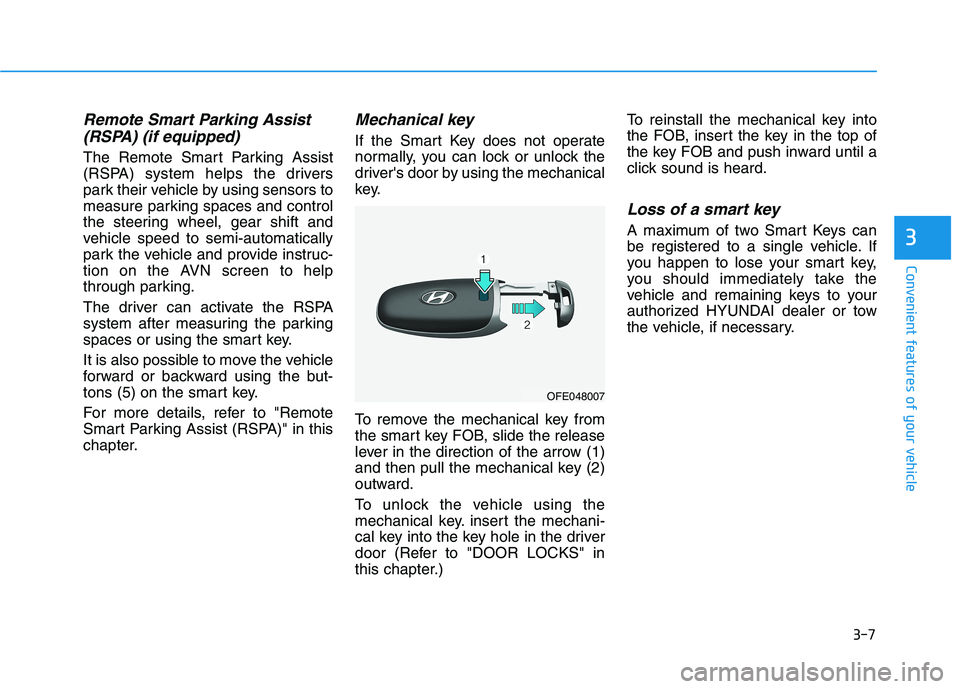
Mechanical key
If the Smart Key does not operate
normally, you can lock or unlock the
driver's door by using the mechanical
key.
To remove the mechanical key from
the smart key FOB, slide the release
lever in the direction of the arrow (1)
and then pull the mechanical key (2)
outward.
To unlock the vehicle using the
mechanical key. insert the mechani-
cal key into the key hole in the driver
door (Refer to "DOOR LOCKS" in
this chapter.)To reinstall the mechanical key into
the FOB, insert the key in the top of
the key FOB and push inward until a
click sound is heard.
Loss of a smart key
A maximum of two Smart Keys can
be registered to a single vehicle. If
you happen to lose your smart key,
you should immediately take the
vehicle and remaining keys to your
authorized HYUNDAI dealer or tow
the vehicle, if necessary.
OFE048007
Page 118 of 561
3-31
Convenient features of your vehicle
3
Side View Mirrors
Make sure to adjust the side view
mirrors to your desired position
before you begin driving.
Your vehicle is equipped with both
left-hand and right-hand side view
mirrors. The mirrors can be adjusted
remotely with the remote switch. The
side view mirrors can be folded to
help prevent damage when going
through an automatic car wash or
when passing through a narrow
street.
The right side view mirror is convex.
Objects seen in the mirror are closer
than they appear.Use the inside rear view mirror or
look back directly to determine the
actual distance of other vehicles
prior to changing lanes.
Do not scrape ice off the mirror
face; this may damage the sur-
face of the glass.
If the mirror is jammed with ice,
do not adjust the mirror by
force. Use an approved spray
de-icer (not radiator antifreeze)
spray, or a sponge or soft cloth
with very warm water, or move
the vehicle to a warm place and
allow the ice to melt.
Do not clean the mirror with harsh
abrasives, fuel or other petroleum
based cleaning products.
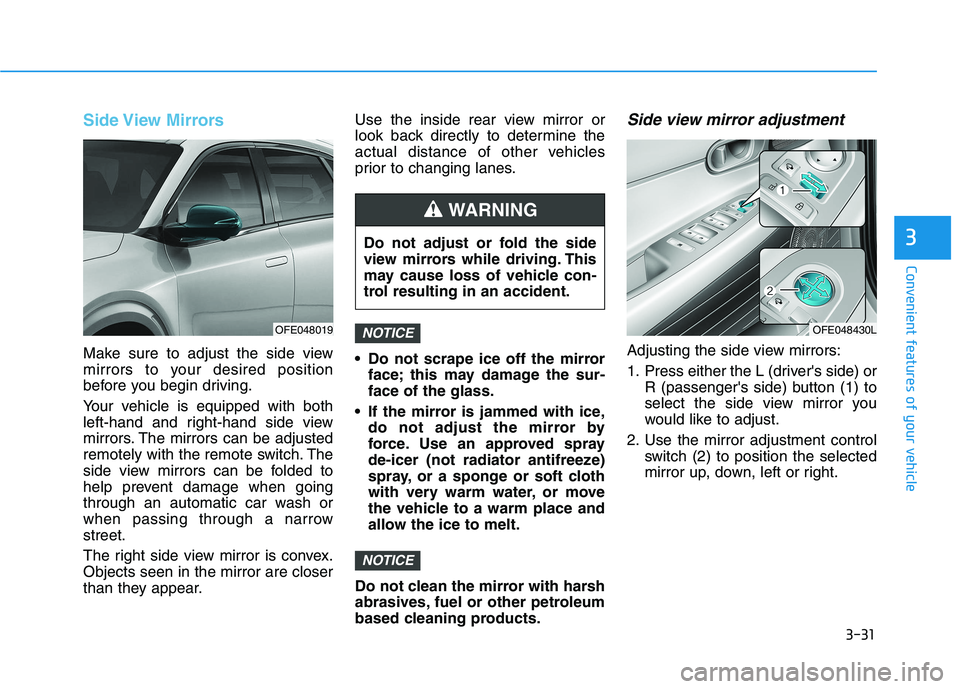
Side view mirror adjustment
Adjusting the side view mirrors:
1. Press either the L (driver's side) or
R (passenger's side) button (1) to
select the side view mirror you
would like to adjust.
2. Use the mirror adjustment control
switch (2) to position the selected
mirror up, down, left or right.
NOTICE
NOTICEOFE048019
Do not adjust or fold the side
view mirrors while driving. This
may cause loss of vehicle con-
trol resulting in an accident.
WARNING
OFE048430L
Page 200 of 561
3-113
Convenient features of your vehicle
3
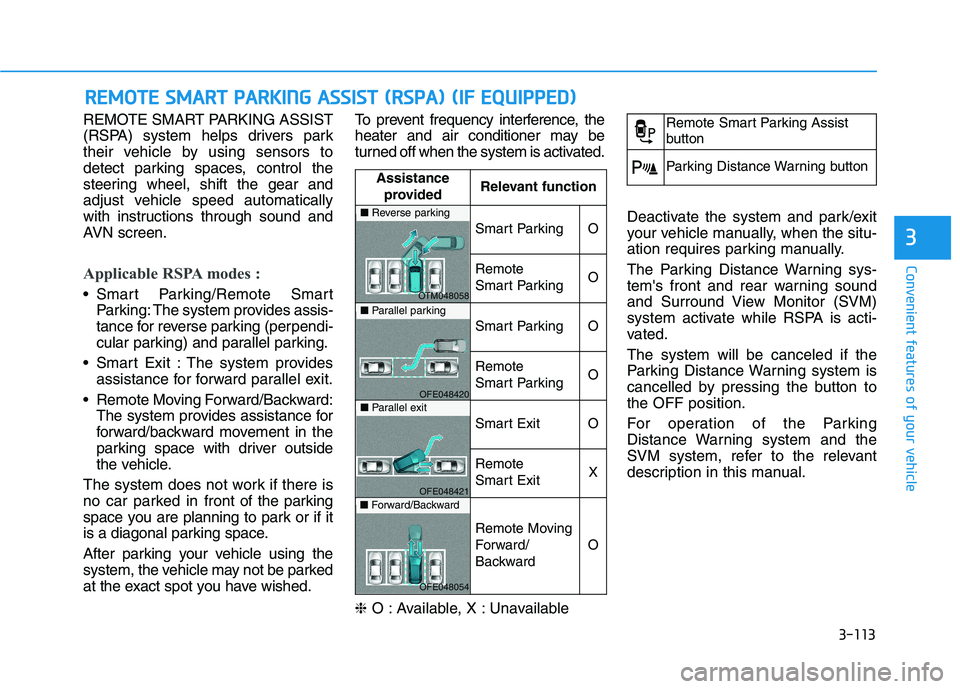
REMOTE SMART PARKING ASSIST
(RSPA) system helps drivers park
their vehicle by using sensors to
detect parking spaces, control the
steering wheel, shift the gear and
adjust vehicle speed automatically
with instructions through sound and
AVN screen.
Applicable RSPA modes :
Smart Parking/Remote Smart
Parking: The system provides assis-
tance for reverse parking (perpendi-
cular parking) and parallel parking.
Smart Exit : The system provides
assistance for forward parallel exit.
Remote Moving Forward/Backward:
The system provides assistance for
forward/backward movement in the
parking space with driver outside
the vehicle.
The system does not work if there is
no car parked in front of the parking
space you are planning to park or if it
is a diagonal parking space.
After parking your vehicle using the
system, the vehicle may not be parked
at the exact spot you have wished.To prevent frequency interference, the
heater and air conditioner may be
turned off when the system is activated.
❈O : Available, X : Unavailable Deactivate the system and park/exit
your vehicle manually, when the situ-
ation requires parking manually.
The Parking Distance Warning sys-
tem's front and rear warning sound
and Surround View Monitor (SVM)
system activate while RSPA is acti-
vated.
The system will be canceled if the
Parking Distance Warning system is
cancelled by pressing the button to
the OFF position.
For operation of the Parking
Distance Warning system and the
SVM system, refer to the relevant
description in this manual.
R RE
EM
MO
OT
TE
E
S
SM
MA
AR
RT
T
P
PA
AR
RK
KI
IN
NG
G
A
AS
SS
SI
IS
ST
T
(
(R
RS
SP
PA
A)
)
(
(I
IF
F
E
EQ
QU
UI
IP
PP
PE
ED
D)
)
Assistance
providedRelevant function
Smart ParkingO
Remote
Smart ParkingO
Smart ParkingO
Remote
Smart ParkingO
Smart ExitO
Remote
Smart ExitX
Remote Moving
Forward/
Backward
O
■Reverse parking
OTM048058■Parallel parking
OFE048420■Parallel exit
OFE048421■Forward/Backward
OFE048054
Remote Smart Parking Assist
button
Parking Distance Warning button
Page 207 of 561
3-120
Convenient features of your vehicle
How the System Works
(Smart Parking)
Smart Parking is available with the
driver on board. Make sure the con-
ditions available before activating the
Smart parking function.
1. Select Smart Parking:
Press the RSPA button with the
shift lever placed in D (Drive) or N
(Neutral) position.
❈However, the Smart Exit is
selected if you press the RSPA
button when the gear is in N
(Neutral) position after the initial
startup.
2. Search for parking space: Slowly
move forward below 12 mph (20
km/h)
3. Search complete: Automatic
search by sensor.
However, check the actual parking
environment before parking the
vehicle.
4. Select parking type: Reverse
(left/right), parallel (left/right)
5. Operating instructions: Smart
Parking/Remote Smart Parking6. Smart Parking assist: Steering
wheel, gear shift and vehicle
speed control (reverse parking).
7. Parking complete: Smart Parking
complete after reaching the park-
ing position
❈ After the parking is complete,
arrange the vehicle position manu-
ally, if necessary.
❈ You can use Smart Parking after
navigation or home screen display
on AVN (You cannot use Smart
Parking if you don't choose
"Confirm" on AVN booting)
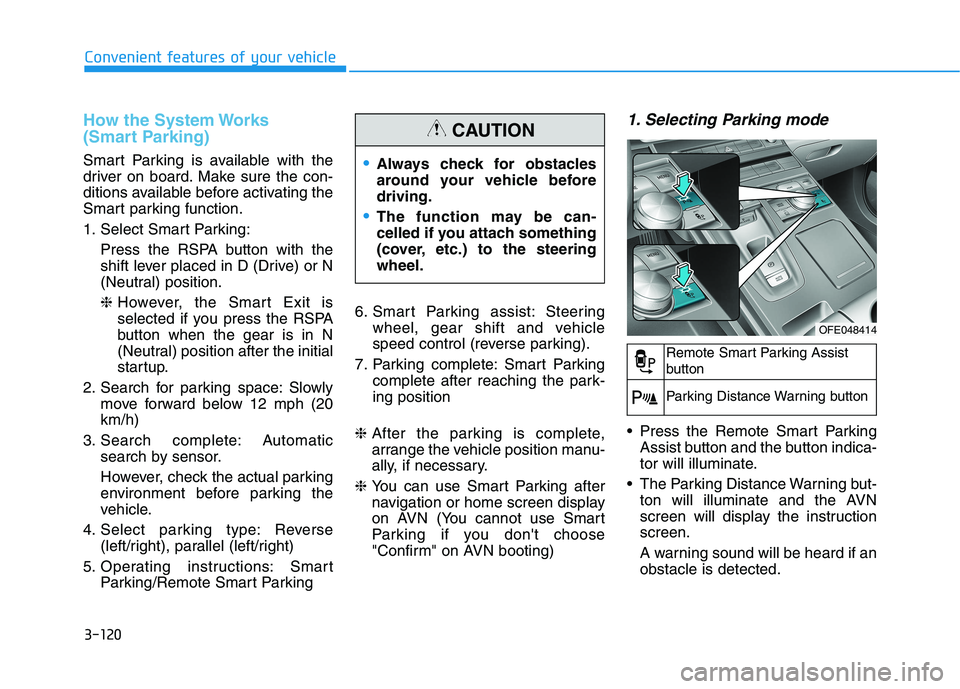
1. Selecting Parking mode
Press the Remote Smart Parking
Assist button and the button indica-
tor will illuminate.
The Parking Distance Warning but-
ton will illuminate and the AVN
screen will display the instruction
screen.
A warning sound will be heard if an
obstacle is detected.
Always check for obstacles
around your vehicle before
driving.
The function may be can-
celled if you attach something
(cover, etc.) to the steering
wheel.
CAUTION
OFE048414
Remote Smart Parking Assist
button
Parking Distance Warning button
Page 214 of 561
3-127
Convenient features of your vehicle
3
The Smart Parking assist is can-
celled while in operation when:
(1) The driver holds the steering
wheel while the steering wheel is
controlled
(2) The gear is shifted or the
Electronic Parking Brake (EPB) is
activated
(3) The hood opens
(4) The vehicle speed exceeds 3
mph (5 km/h)
(5) The vehicle accelerates suddenly
(6) The vehicle slips back while the
vehicle speed is controlled
(7) The wheel is stuck and the vehi-
cle is unable to move
(8) The obstacles are at the front and
back of the vehicle at the same
time
(9) About 3 minutes and 50 seconds
have passed after the Smart
Parking assist is activated
(10) The door opens while the driver’s
seatbelt is unfastened
(11) The gradient of the road
exceeds the range supported by
the Smart Parking assist(12) The steering, shifting gear and
drive assist are impossible
(13) The suspended status lasts for
over 1 minute
(14) The driver continuously presses
and releases the RSPA button
over 10 times
(15) The vehicle is unable to enter
the parking space while the
Smart Parking assist is in acti-
vation
(16) The Traction Control System
(TCS) is activated while the
vehicle speed is controlled
❈ When the Smart Parking assist is
cancelled, gear P (Park) and
Electronic Parking Brake (EPB)
are engaged automatically.
How the System Works
(Remote Smart Parking)
Remote smart Parking is available
with the driver outside the vehicle.
Make sure the conditions available
before activation the Remote smart
parking function.1. Select Remote Smart Parking:
Press the RSPA button with the
shift lever placed in D (Drive) or N
(Neutral) position.
However, the Smart Exit is select-
ed if you press the RSPA button
when the vehicle is in N (Neutral)
position after the initial startup.
2. Search for parking space: Slowly
move forward below 12 mph (20
km/h).
3. Search complete: Automatic
search by sensor.
However, check the actual parking
environment before parking the
vehicle.
4. Select parking type: Reverse
(left/right), parallel (left/right)
5. Operating instructions: Smart
Parking/Remote Smart Parking
6. Remote Smart Parking assist:
Steering wheel, gear shift and
vehicle speed control (reverse
parking)
7. Remote Smart Parking complete
Page 215 of 561
3-128
Convenient features of your vehicle
❈ You can use Smart Parking after
navigation or home screen display
on AVN(You cannot use Smart
Parking if you don't choose
"Confirm" on AVN booting)
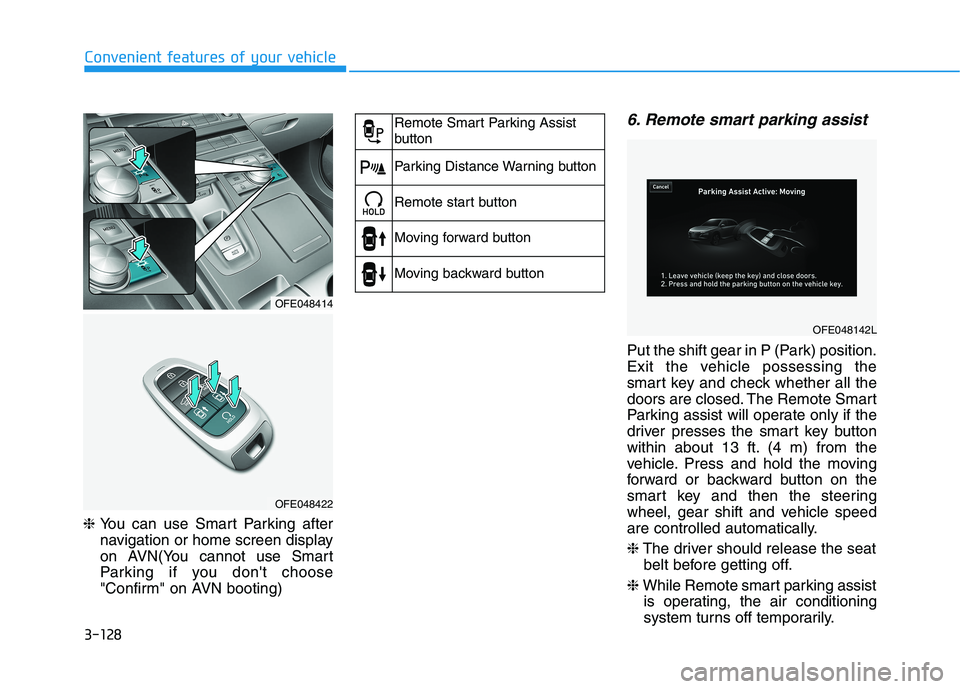
6. Remote smart parking assist
Put the shift gear in P (Park) position.
Exit the vehicle possessing the
smart key and check whether all the
doors are closed. The Remote Smart
Parking assist will operate only if the
driver presses the smart key button
within about 13 ft. (4 m) from the
vehicle. Press and hold the moving
forward or backward button on the
smart key and then the steering
wheel, gear shift and vehicle speed
are controlled automatically.
❈The driver should release the seat
belt before getting off.
❈While Remote smart parking assist
is operating, the air conditioning
system turns off temporarily.
OFE048414
OFE048422
Remote Smart Parking Assist
button
Parking Distance Warning button
Remote start button
Moving forward button
Moving backward button
OFE048142L
Page 217 of 561
3-130
Convenient features of your vehicle
To cancel the Remote Smart
Parking while in operation
(1) Press the RSPA button at the
"Searching for parking space"
stage or the "Selecting parking
type" stage.
(2) Shift the gear to R (Reverse)
position before the operation of
the Remote Smart Parking
assist.
(3) Press the Parking Distance
Warning button or the 'Cancel'
button on the AVN screen.
(4) Driver controls the vehicle during
the system assist.
The Remote Smart Parking is
immediately cancelled and the
vehicle turns off when the remote
start button on the smart key is
pressed.
The function is cancelled but the
vehicle stays on when the driver
enters the vehicle with the smart
key and all the doors are closed or
the driver depresses the brake
pedal.
The Remote Smart Parking assist
will stop temporarily when:
(1) An obstacle at the direction the
vehicle is heading is detected.
(2) The door or liftgate is open.
(3) The moving forward/backward
button on the smart key is
released.
(4) Multiple buttons on the smart key
are pressed at the same time.
(5) The distance between the smart
key and vehicle is over 13 ft (4m).
(6) A button on the other smart key is
pressed.
(7) Rear Cross-Traffic Collision-
Avoidance Assist system is acti-
vated while reversing.
❈The vehicle stops when the
Remote Smart Parking assist will
stop temporarily and the Remote
Smart Parking assist will resume
when the above condition is
cleared.
The Remote Smart Parking assist is
cancelled while in operation when:
(1) The driver holds the steering
wheel while the steering wheel is
controlled
(2) The gear is shifted or the
Electronic Parking Brake (EPB) is
activated
(3) The hood opens
(4) The vehicle speed exceeds 3 mph
(5 km/h)
(5) The vehicle accelerates suddenly
(6) The vehicle slips back while con-
trolling the vehicle speed
(7) The wheel is stuck and the vehicle
is unable to move
(8) Obstacles are at the front and
back of the vehicle at the same
time
(9) About 3 minutes and 50 seconds
have passed after the Remote
Smart Parking assist
(10) The gradient of the road
exceeds the range supported by
the Remote Smart Parking
assist
(11) The steering, shifting gear and
drive assist are impossible
Page 218 of 561
3-131
Convenient features of your vehicle
3
(12) The suspended status lasts for
over 1 minute
(13) The driver continuously presses
and releases the smart key’s
moving forward/backward but-
ton over 10 times
(14) The vehicle is unable to enter
the parking space
(15) The Traction Control System
(TCS) is activated while control-
ling the vehicle speed
(16) The smart key has failure
(17) The accelerator/brake pedal is
depressed while all the doors
are closed
(18) The brake pedal is depressed
while the driver’s door is open
and the smart key is outside the
vehicle
(19) The theft alarm system is acti-
vated
When the Remote Smart Parking
assist is cancelled, gear P (Park)
and Electronic Parking Brake
(EPB) are engaged automatically.
After engaged, the vehicle is auto-
matically turned off. Frequent beep sounds will gener-
ate to alert the deactivation of the
Remote Smart Parking Assist.
How the System Works
(Smart Exit)
Smart exit is available with the driver
on board. Make sure the conditions
available before activation the Smart
parking function.
1. Select Smart Exit:
Press the RSPA button with the
shift lever placed in P (Park) or N
(Neutral) position without driving
the vehicle after the initial startup.
*N (Neutral): Press RSPA button
after starting the vehicle and with-
out driving the vehicle. The Smart
Exit is selected. Then the Parking
mode is automatically selected
after driving.
*P (Park): After driving the vehicle
press RSPA button and Remote
Moving Forward/Backward is
automatically selected.
2. Search for smart exit space:
Automatic searching by sensor at
stopHowever, check the actual envi-
ronment before using Smart exit
function.
3. Select smart exit direction: Parallel
(left/right)
4. Smart Exit assist: Steering wheel,
gear shift and vehicle speed con-
trol (parallel exit)
5. Smart Exit complete
After the Smart Exit is complete,
make sure to check the surrounding
road conditions.
However, the Exit mode is activated
when below conditions are met:
The vehicle speed is kept under 3
mph (5 km/h) after the vehicle is
turned on.
The parallel parking by the Remote
Smart Parking assist is complete. Always be careful while exiting
for other vehicles or pedestrians.
WARNING