ESP HYUNDAI NEXO 2020 Owner's Manual
[x] Cancel search | Manufacturer: HYUNDAI, Model Year: 2020, Model line: NEXO, Model: HYUNDAI NEXO 2020Pages: 561, PDF Size: 48.42 MB
Page 192 of 561
![HYUNDAI NEXO 2020 Owners Manual 3-105
Convenient features of your vehicle
3
D DR
RI
IV
VE
ER
R
A
AS
SS
SI
IS
ST
T
S
SY
YS
ST
TE
EM
M
Parking Distance Warning
(Reverse/Forward) System
(if equipped)
[A] : Front Sensor, [B] : Rear](/img/35/41150/w960_41150-191.png "HYUNDAI NEXO 2020 Owners Manual 3-105
Convenient features of your vehicle
3
D DR
RI
IV
VE
ER
R
A
AS
SS
SI
IS
ST
T
S
SY
YS
ST
TE
EM
M
Parking Distance Warning
(Reverse/Forward) System
(if equipped)
[A] : Front Sensor, [B] : Rear")
3-105
Convenient features of your vehicle
3
D DR
RI
IV
VE
ER
R
A
AS
SS
SI
IS
ST
T
S
SY
YS
ST
TE
EM
M
Parking Distance Warning
(Reverse/Forward) System
(if equipped)
[A] : Front Sensor, [B] : Rear Sensor
The Parking Distance Warning
(Reverse/Forward) system assists
the driver during movement of the
vehicle by chiming if any object is
sensed within the distance of 39
inches (100 cm) in front and 47 inch-
es (120 cm) behind the vehicle.
This system is a supplemental sys-
tem that senses objects within the
range and location of the sensors, it
cannot detect objects in other areas
where sensors are not installed.
ALWAYS look around your
vehicle to make sure there are
no objects or obstacles
before moving the vehicle in
any direction to prevent a col-
lision.
Always pay close attention
when the vehicle is driven
close to objects, particularly
pedestrians, and especially
children.
Be aware that some objects
may not be visible on the
screen or be detected by the
sensors, due to the objects
distance, size or material, all
of which can limit the effec-
tiveness of the sensor.
WARNING
OFE048046N
OFE048047N
Page 196 of 561
3-109
Convenient features of your vehicle
3
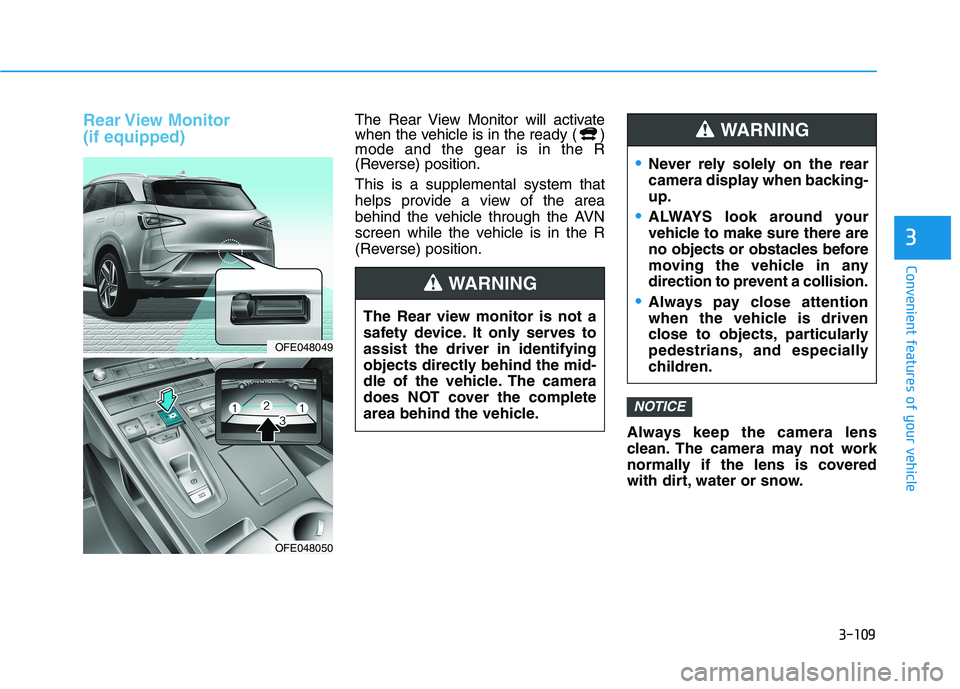
Rear View Monitor
(if equipped)The Rear View Monitor will activate
when the vehicle is in the ready ( )
mode and the gear is in the R
(Reverse) position.
This is a supplemental system that
helps provide a view of the area
behind the vehicle through the AVN
screen while the vehicle is in the R
(Reverse) position.
Always keep the camera lens
clean. The camera may not work
normally if the lens is covered
with dirt, water or snow.
NOTICE
OFE048049
OFE048050
The Rear view monitor is not a
safety device. It only serves to
assist the driver in identifying
objects directly behind the mid-
dle of the vehicle. The camera
does NOT cover the complete
area behind the vehicle.
WARNING
Never rely solely on the rear
camera display when backing-
up.
ALWAYS look around your
vehicle to make sure there are
no objects or obstacles before
moving the vehicle in any
direction to prevent a collision.
Always pay close attention
when the vehicle is driven
close to objects, particularly
pedestrians, and especially
children.
WARNING
Page 201 of 561
3-114
Convenient features of your vehicle
Operating Condition
Use the system when all the below
conditions are met.
When the parking space is a
straight line
When there is a parked vehicle
next to the space where you want
to park
When there is enough space to
move the vehicle
When you choose "Confirm" on
AVN booting.
The RSPA system should only
be considered as a supple-
mentary function. The driver
must check the front and rear
view for objects. The opera-
tional function of the system
can be affected by many fac-
tors and conditions of the sur-
roundings, so the responsibili-
ty rests always with the driver.
The system may not operate
normally if the vehicle needs
wheel alignment adjustment.
Have the vehicle checked by
an authorized HYUNDAI deal-
er.
If you use a different tire or
wheel size rather than the size
recommended by the HYUNDAI
dealer, the system may not
work properly. Always use the
same size tire and wheel.
WARNING
Do not use the system when
in drunken state.
The system may not operate
properly depending on the
surrounding environment and
other conditions.
The system may not recog-
nize the object too close to
the vehicle.
When operating the system,
be careful of the objects locat-
ed above or below the sensor
position. Such object may
damage the vehicle or other
objects.
Do not let children or other
person to use the smart key.
WARNING
Page 209 of 561
Convenient features of your vehicle
When searching for a parking
space, the system may not be
able to find a parking space if
there is no vehicle parked, a
parking space is available
after driving by or a parking
space is available before driv-
ing by.
The system may not operate
normally in the following con-
ditions:
(1) When the sensors are
frozen
(2) When the sensors are dirty
(3) When it snows or rains
heavily
(4) When a pillar or object is
near
(5) Parked vehicle is abnor-
mally parked
In above cases, the system may
not search the parking space
although the parking space
exists. And the system may
search the parking space
although the parking space is
not proper to park.
CAUTION
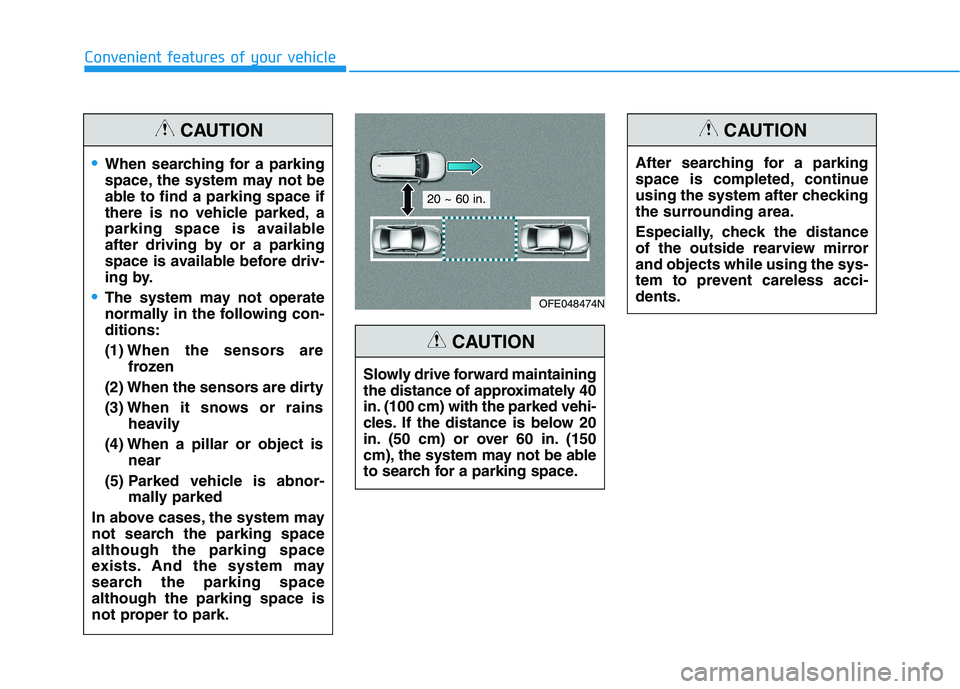
Slowly drive forward maintaining
the distance of approximately 40
in. (100 cm) with the parked vehi-
cles. If the distance is below 20
in. (50 cm) or over 60 in. (150
cm), the system may not be able
to search for a parking space.
CAUTION
After searching for a parking
space is completed, continue
using the system after checking
the surrounding area.
Especially, check the distance
of the outside rearview mirror
and objects while using the sys-
tem to prevent careless acci-
dents.
CAUTION
OFE048474N
20 ~ 60 in.
Page 233 of 561
3-146
Convenient features of your vehicle
Link with other Systems
Activation of other systems may be
restricted according to the circum-
stances while the RSPA system is in
activation. The systems linked to the
RSPA system are as follows:
1. Smart Cruise Control (SCC) sys-
tem
(1) SCC system can be operated at
the same time with the RSPA
system until the "Searching for
parking space" stage.
(2) The SCC system is deactivated
when the RSPA system enters
the "Remote Smart Parking
assist" stage.
(3) After the RSPA system is com-
plete or deactivated, the SCC
system maintains the deactiva-
tion status.2. Auto Hold
(1) The activated Auto Hold is
switched to deactivation status
when the RSPA system is activat-
ed.
(2) The Auto Hold button will not
respond while the RSPA system
is in activation.
(3) After the RSPA system is com-
plete or deactivated, the Auto
Hold will return to the state before
the RSPA system was activated.3. Electronic Stability Control (ESC)
(1) Electronic Stability Control (ESC)
system switches from OFF to
activation status (ESC OFF but-
ton turns off) when the RSPA sys-
tem is activated.
(2) The ESC OFF button will not
respond while the RSPA system
is in activation.
(3) The ABS/TCS/ESC system acti-
vates while the RSPA is in activa-
tion.
(4) After the RSPA system is com-
plete or deactivated, ESC main-
tains the ON status.
Page 263 of 561
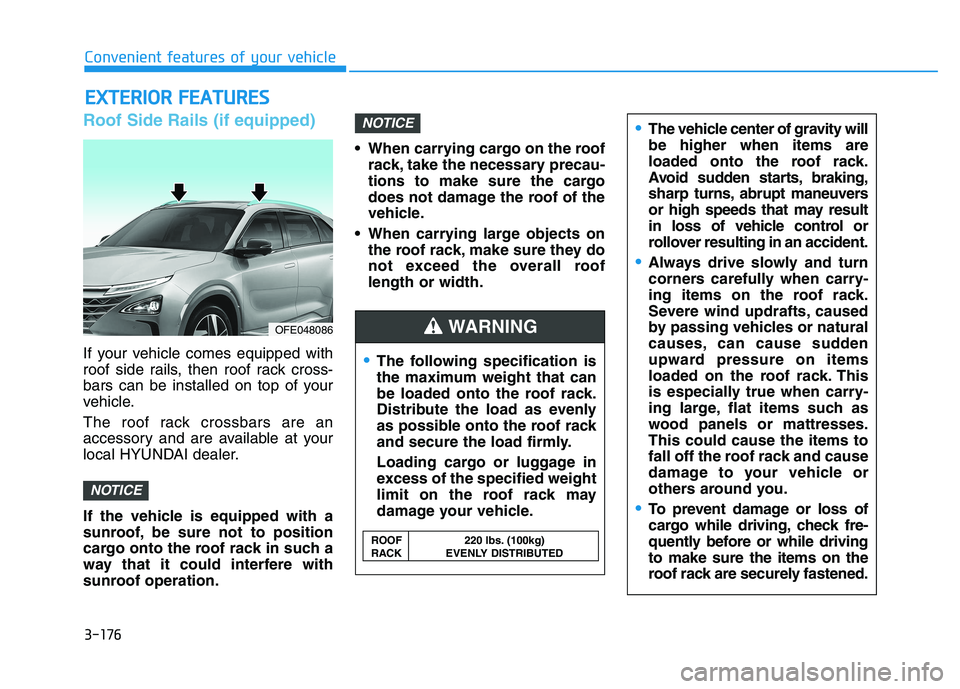
Roof Side Rails (if equipped)
If your vehicle comes equipped with
roof side rails, then roof rack cross-
bars can be installed on top of your
vehicle.
The roof rack crossbars are an
accessory and are available at your
local HYUNDAI dealer.
If the vehicle is equipped with a
sunroof, be sure not to position
cargo onto the roof rack in such a
way that it could interfere with
sunroof operation. When carrying cargo on the roof
rack, take the necessary precau-
tions to make sure the cargo
does not damage the roof of the
vehicle.
When carrying large objects on
the roof rack, make sure they do
not exceed the overall roof
length or width.
NOTICE
NOTICE
E EX
XT
TE
ER
RI
IO
OR
R
F
FE
EA
AT
TU
UR
RE
ES
S
The following specification is
the maximum weight that can
be loaded onto the roof rack.
Distribute the load as evenly
as possible onto the roof rack
and secure the load firmly.
Loading cargo or luggage in
excess of the specified weight
limit on the roof rack may
damage your vehicle.
The vehicle center of gravity will
be higher when items are
loaded onto the roof rack.
Avoid sudden starts, braking,
sharp turns, abrupt maneuvers
or high speeds that may result
in loss of vehicle control or
rollover resulting in an accident.
Always drive slowly and turn
corners carefully when carry-
ing items on the roof rack.
Severe wind updrafts, caused
by passing vehicles or natural
causes, can cause sudden
upward pressure on items
loaded on the roof rack. This
is especially true when carry-
ing large, flat items such as
wood panels or mattresses.
This could cause the items to
fall off the roof rack and cause
damage to your vehicle or
others around you.
To prevent damage or loss of
cargo while driving, check fre-
quently before or while driving
to make sure the items on the
roof rack are securely fastened.
WARNING
ROOF 220 lbs. (100kg)
RACK EVENLY DISTRIBUTED
OFE048086
Convenient features of your vehicle
3-176
Page 272 of 561
5-5
Driving your vehicle
5
NEVER drink or take drugs and
drive.
Drinking or taking drugs and driv-
ing is dangerous and may result
in an accident and SERIOUS
INJURY or DEATH.
Drunk driving is the number
one contributor to the highway
death toll each year. Even a
small amount of alcohol will
affect your reflexes, percep-
tions and judgment. Just one
drink can reduce your ability to
respond to changing conditions
and emergencies and your reac-
tion time gets worse with each
additional drink.
Driving while under the influ-
ence of drugs is as dangerous
or more dangerous than driving
under the influence of alcohol.
WARNING You are much more likely to have
a serious accident if you drink or
take drugs and drive. If you are
drinking or taking drugs, don't
drive. Do not ride with a driver
who has been drinking or taking
drugs. Choose a designated driv-
er or call a taxi.
To reduce the risk of SERIOUS
INJURY or DEATH, take the fol-
lowing precautions:
•ALWAYS wear your seat belt.
All passengers must be prop-
erly belted whenever the vehi-
cle is moving. For more infor-
mation, refer to "Seat Belts" in
chapter 2.
Always drive defensively.
Assume other drivers or pedes-
trians may be careless and
make mistakes.
Stay focused on the task of
driving. Driver distraction can
cause accidents.
Leave plenty of space between
you and the vehicle in front of
you.
WARNING
Page 278 of 561
5-11
Driving your vehicle
Reduction Gear Operation
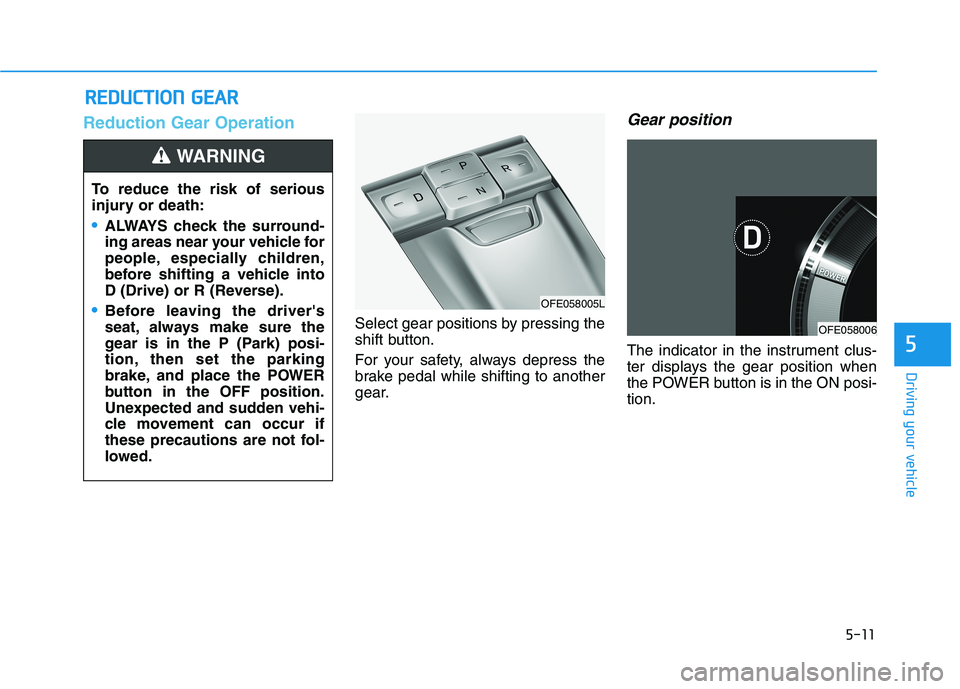
Select gear positions by pressing the
shift button.
For your safety, always depress the
brake pedal while shifting to another
gear.
Gear position
The indicator in the instrument clus-
ter displays the gear position when
the POWER button is in the ON posi-
tion.
R RE
ED
DU
UC
CT
TI
IO
ON
N
G
GE
EA
AR
R
5
To reduce the risk of serious
injury or death:
ALWAYS check the surround-
ing areas near your vehicle for
people, especially children,
before shifting a vehicle into
D (Drive) or R (Reverse).
Before leaving the driver's
seat, always make sure the
gear is in the P (Park) posi-
tion, then set the parking
brake, and place the POWER
button in the OFF position.
Unexpected and sudden vehi-
cle movement can occur if
these precautions are not fol-
lowed.
WARNING
OFE058005L
OFE058006
Page 283 of 561
5-16
Driving your vehicle
Good Driving Practices
Never shift to P (Park) or N
(Neutral) to any other position with
the accelerator pedal depressed.
Never shift to P (Park) when the
vehicle is in motion.
Be sure the vehicle is completely
stopped before you attempt to shift
into R (Reverse) or D (Drive).
Do not shift to N (Neutral) when
driving. Doing so may result in an
accident.
Do not drive with your foot resting
on the brake pedal. Even light, but
consistent pedal pressure can
result in the brakes overheating,
brake wear and possibly even
brake failure.
Always apply the parking brake
when leaving the vehicle. Do not
depend on placing the gear in P
(Park) to keep the vehicle from
moving. Exercise extreme caution when
driving on a slippery surface. Be
especially careful when braking,
accelerating or shifting gears. On a
slippery surface, an abrupt change
in vehicle speed can cause the
drive wheels to lose traction and
may cause loss of vehicle control
resulting in an accident
Optimum vehicle performance and
economy is obtained by smoothly
depressing and releasing the
accelerator.
To reduce the risk of SERIOUS
INJURY or DEATH:
ALWAYS wear your seat belt.
In a collision, an unbelted
occupant is significantly more
likely to be seriously injured
or killed than a properly belt-
ed occupant.
Avoid high speeds when cor-
nering or turning.
WARNING
Do not make quick steering
wheel movements, such as
sharp lane changes or fast,
sharp turns.
The risk of rollover is greatly
increased if you lose control
of your vehicle at highway
speeds.
Loss of control often occurs if
two or more wheels drop off
the roadway and the driver
over steers to reenter the
roadway.
In the event your vehicle
leaves the roadway, do not
steer sharply. Instead, slow
down before pulling back into
the travel lanes.
HYUNDAI recommends you
follow all posted speed limits.
Page 296 of 561
5-29
Driving your vehicle
Anti-lock Brake System (ABS)
ABS is an electronic braking system
that helps prevent a braking skid.
ABS allows the driver to steer and
brake at the same time.
Using ABS
To obtain the maximum benefit from
your ABS in an emergency situation,
do not attempt to modulate your
brake pressure and do not try to
pump your brakes. Depress your
brake pedal as hard as possible.
When you apply your brakes under
conditions which may lock the
wheels, you may hear sounds from
the brakes, or feel a corresponding
sensation in the brake pedal. This is
normal and it means your ABS is
active.
ABS does not reduce the time or dis-
tance it takes to stop the vehicle.
Always maintain a safe distance from
the vehicle in front of you.
ABS will not prevent a skid that
results from sudden changes in
direction, such as trying to take a
corner too fast or making a sudden
lane change. Always drive at a safe
speed for the road and weather con-
ditions.
5
An Anti-Lock Braking System
(ABS) or an Electronic Stability
Control (ESC) system will not
prevent accidents due to
improper or dangerous driving
maneuvers. Even though vehi-
cle control is improved during
emergency braking, always
maintain a safe distance
between you and objects ahead
of you. Vehicle speeds should
always be reduced during
extreme road conditions. The
braking distance for cars
equipped with ABS or ESC may
be longer than for those without
these systems in the following
road conditions.
Drive your vehicle at reduced
speeds during the following
conditions:
Rough, gravel or snow-cov-
ered roads.
WARNING
On roads where the road sur-
face is pitted or has different
surface height.
Tire chains are installed on
your vehicle.
The safety features of an ABS
or ESC equipped vehicle should
not be tested by high speed
driving or cornering. This could
endanger the safety of yourself
or others.