lock HYUNDAI NEXO 2020 Owner's Manual
[x] Cancel search | Manufacturer: HYUNDAI, Model Year: 2020, Model line: NEXO, Model: HYUNDAI NEXO 2020Pages: 561, PDF Size: 48.42 MB
Page 89 of 561
Driver Assist System .........................................3-105
Parking Distance Warning (Reverse/Forward)
System .............................................................................3-105
Rear View Monitor .......................................................3-109
Surround View Monitoring .........................................3-110
Remote Smart Parking Assist (RSPA) .............3-113
Operating Condition......................................................3-114
Non-operating Condition ............................................3-115
Limitations of the System...........................................3-116
How the System Works (Smart Parking) ................3-120
How the System Works (Remote Smart Parking)..3-127
How the System Works (Smart Exit) .......................3-131
How the System Works (Remote Moving Forward/
Backward) .......................................................................3-138
Additional Instructions (Messages) ..........................3-143
Turn signal Showing Vehicle Status while System
in Activation....................................................................3-144
Smart Key Showing Vehicle Status while System
in Activation....................................................................3-145
Link with other Systems .............................................3-146
Automatic Climate Control System ..................3-147
Automatic Temperature Control Mode ....................3-148
Manual Temperature Control Mode .........................3-148
System Operation .........................................................3-155
System Maintenance....................................................3-156
Windshield Defrosting and Defogging ............3-158
Auto Defogging System (Additional Feature with
Automatic Temperature Control System)................3-160
Rear Window Defroster ..............................................3-161
Climate Control Additional Features ...............3-162
Automatic Ventilation ...................................................3-162
Sunroof Inside Air Recirculation ...............................3-162
Storage Compartment .......................................3-163
Center Console Storage ..............................................3-163
Glove Box ........................................................................3-163
Interior Features ................................................3-164
Cup Holder ......................................................................3-164
Sunvisor ...........................................................................3-165
Power Outlet ..................................................................3-166
AC Inverter......................................................................3-167
USB Charger ...................................................................3-169
Wireless Cellular Phone Charging System..............3-169
Clock .................................................................................3-171
Coat Hook .......................................................................3-172
Floor Mat Anchor(s).....................................................3-172
Luggage Net Holder .....................................................3-173
Cargo Security Screen .................................................3-174
Exterior Features ...............................................3-176
Roof Side Rails ..............................................................3-176
3
Page 90 of 561
3-3
Convenient features of your vehicle
Smart Key
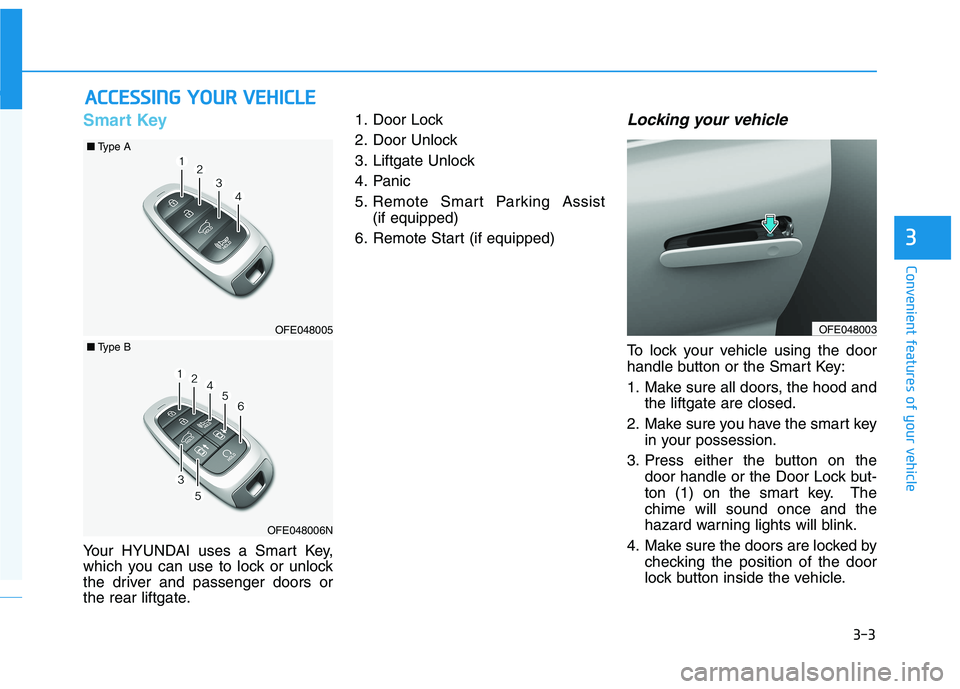
Your HYUNDAI uses a Smart Key,
which you can use to lock or unlock
the driver and passenger doors or
the rear liftgate.1. Door Lock
2. Door Unlock
3. Liftgate Unlock
4. Panic
5. Remote Smart Parking Assist
(if equipped)
6. Remote Start (if equipped)
Locking your vehicle
To lock your vehicle using the door
handle button or the Smart Key:
1. Make sure all doors, the hood and
the liftgate are closed.
2. Make sure you have the smart key
in your possession.
3. Press either the button on the
door handle or the Door Lock but-
ton (1) on the smart key. The
chime will sound once and the
hazard warning lights will blink.
4. Make sure the doors are locked by
checking the position of the door
lock button inside the vehicle.
A AC
CC
CE
ES
SS
SI
IN
NG
G
Y
YO
OU
UR
R
V
VE
EH
HI
IC
CL
LE
E
3
OFE048003OFE048005
■Type A
OFE048006N
■Type B
Page 91 of 561
3-4
Convenient features of your vehicle
Information
The door handle button will only
operate when the smart key is within
28~40 inches (0.7~1 m) from the out-
side door handle.
Note that you cannot lock your vehi-
cle using the door handle button if
any of the following occur:
• The Smart Key is in the vehicle.
The POWER button is in ACC or
ON position.
Any of the doors are open except
for the liftgate.
Unlocking your vehicle
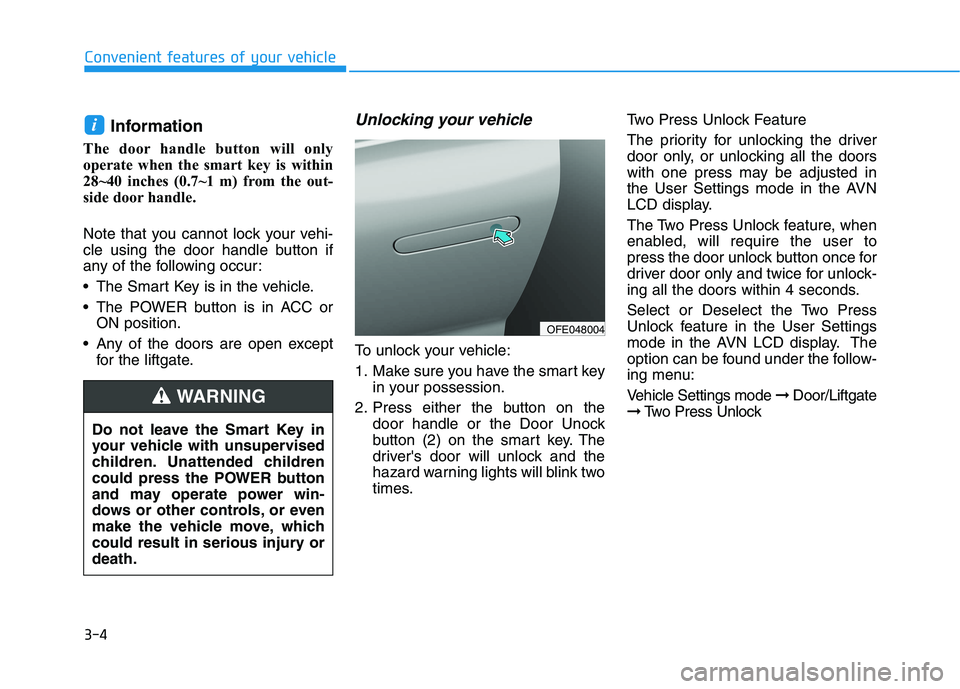
To unlock your vehicle:
1. Make sure you have the smart key
in your possession.
2. Press either the button on the
door handle or the Door Unock
button (2) on the smart key. The
driver's door will unlock and the
hazard warning lights will blink two
times.Two Press Unlock Feature
The priority for unlocking the driver
door only, or unlocking all the doors
with one press may be adjusted in
the User Settings mode in the AVN
LCD display.
The Two Press Unlock feature, when
enabled, will require the user to
press the door unlock button once for
driver door only and twice for unlock-
ing all the doors within 4 seconds.
Select or Deselect the Two Press
Unlock feature in the User Settings
mode in the AVN LCD display. The
option can be found under the follow-
ing menu:
Vehicle Settings mode ➞Door/Liftgate
➞Two Press Unlock
i
Do not leave the Smart Key in
your vehicle with unsupervised
children. Unattended children
could press the POWER button
and may operate power win-
dows or other controls, or even
make the vehicle move, which
could result in serious injury or
death.
WARNING
OFE048004
Page 92 of 561
3-5
Convenient features of your vehicle
3
The Two Press Unlock feature can
also be enabled or disabled by
pressing the door lock and unlock
buttons simultaneously on the Key
FOB:
Press and hold both the Door Lock
button and the Door Unlock button
simultaneously until the hazard
warning lights blink.
This will enable or disable the Two
Press Unlock feature. Repeat this
procedure to enable/disable the
mode again.
Information
• The door handle buttons will only
operate when the smart key is with-
in 28-40 inches (0.7~1m) from the
outside door handle
• Either the driver or front passenger
door can be opened with the door
handle button when the smart key is
within this range
• If you press the front passenger out-
side door handle with the smart key
in your possession, all the doors will
unlock
Opening the liftgate
Non-power liftgate
To unlock and open the liftgate:
1. Make sure you have the smart key
in your possession.
2. Press either the liftgate handle
release switch on the vehicle or
press and hold the Liftgate Unlock
button on the smart key for more
than one second. The hazard
warning lights will blink two times
and the liftgate latch will unlock.
3. Once the liftgate is opened and
then closed, the liftgate will auto-
matically re-lock after 30 seconds.
Information
• The liftgate handle switch will only
operate when the smart key is with-
in 28 inches (0.7 m) from the liftgate
handle.
• The Liftgate Unlock button (3) will
only unlock the liftgate. It will not
release the latch and open the lift-
gate automatically. If the Liftgate
Unlock button is used, someone
must still press the liftgate handle
switch to open the liftgate.
Power liftgate
To unlock and open the liftgate:
1. Make sure you have the smart key
in your possession.
2. Press either the liftgate handle
release switch on the vehicle or
press and hold the Liftgate Unlock
button on the smart key for more
than one second. The hazard
warning lights will blink two times
and the liftgate latch will open.
3. Once the liftgate is opened and
then closed, the liftgate will auto-
matically re-lock after 30 seconds.
Information
The liftgate handle switch will only
operate when the smart key is within
28 inches (0.7 m) from the liftgate
handle.
i
i
i
Page 93 of 561
3-6
Convenient features of your vehicle
Panic button
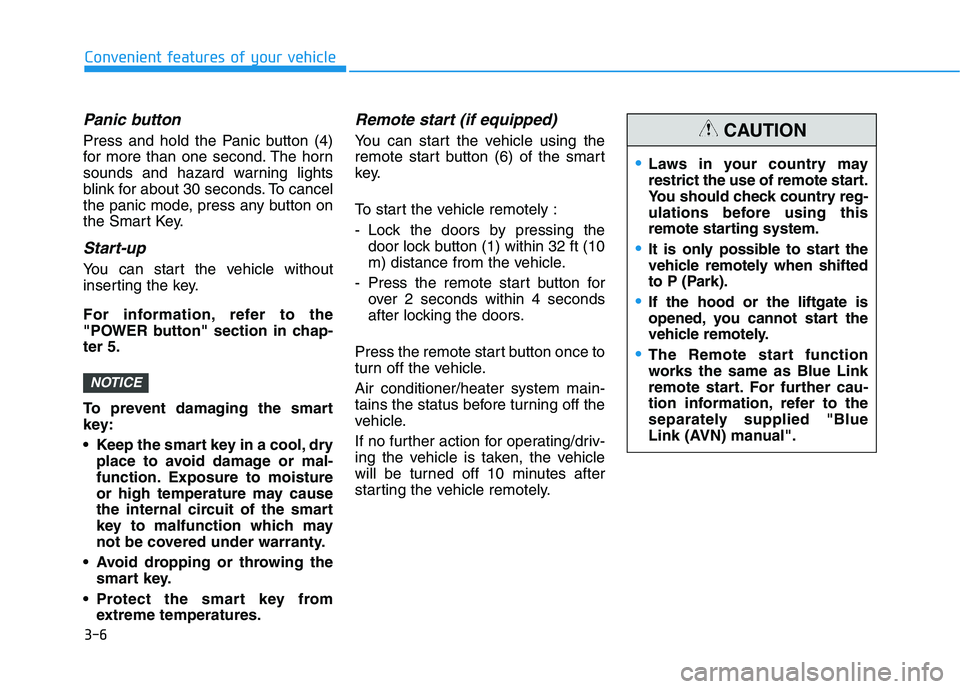
Press and hold the Panic button (4)
for more than one second. The horn
sounds and hazard warning lights
blink for about 30 seconds. To cancel
the panic mode, press any button on
the Smart Key.
Start-up
You can start the vehicle without
inserting the key.
For information, refer to the
"POWER button" section in chap-
ter 5.
To prevent damaging the smart
key:
• Keep the smart key in a cool, dry
place to avoid damage or mal-
function. Exposure to moisture
or high temperature may cause
the internal circuit of the smart
key to malfunction which may
not be covered under warranty.
Avoid dropping or throwing the
smart key.
Protect the smart key from
extreme temperatures.
Remote start (if equipped)
You can start the vehicle using the
remote start button (6) of the smart
key.
To start the vehicle remotely :
- Lock the doors by pressing the
door lock button (1) within 32 ft (10
m) distance from the vehicle.
- Press the remote start button for
over 2 seconds within 4 seconds
after locking the doors.
Press the remote start button once to
turn off the vehicle.
Air conditioner/heater system main-
tains the status before turning off the
vehicle.
If no further action for operating/driv-
ing the vehicle is taken, the vehicle
will be turned off 10 minutes after
starting the vehicle remotely.
NOTICE
Laws in your country may
restrict the use of remote start.
You should check country reg-
ulations before using this
remote starting system.
It is only possible to start the
vehicle remotely when shifted
to P (Park).
If the hood or the liftgate is
opened, you cannot start the
vehicle remotely.
The Remote start function
works the same as Blue Link
remote start. For further cau-
tion information, refer to the
separately supplied "Blue
Link (AVN) manual".
CAUTION
Page 94 of 561
3-7
Convenient features of your vehicle
3
Remote Smart Parking Assist
(RSPA) (if equipped)
The Remote Smart Parking Assist
(RSPA) system helps the drivers
park their vehicle by using sensors to
measure parking spaces and control
the steering wheel, gear shift and
vehicle speed to semi-automatically
park the vehicle and provide instruc-
tion on the AVN screen to help
through parking.
The driver can activate the RSPA
system after measuring the parking
spaces or using the smart key.
It is also possible to move the vehicle
forward or backward using the but-
tons (5) on the smart key.
For more details, refer to "Remote
Smart Parking Assist (RSPA)" in this
chapter.
Mechanical key
If the Smart Key does not operate
normally, you can lock or unlock the
driver's door by using the mechanical
key.
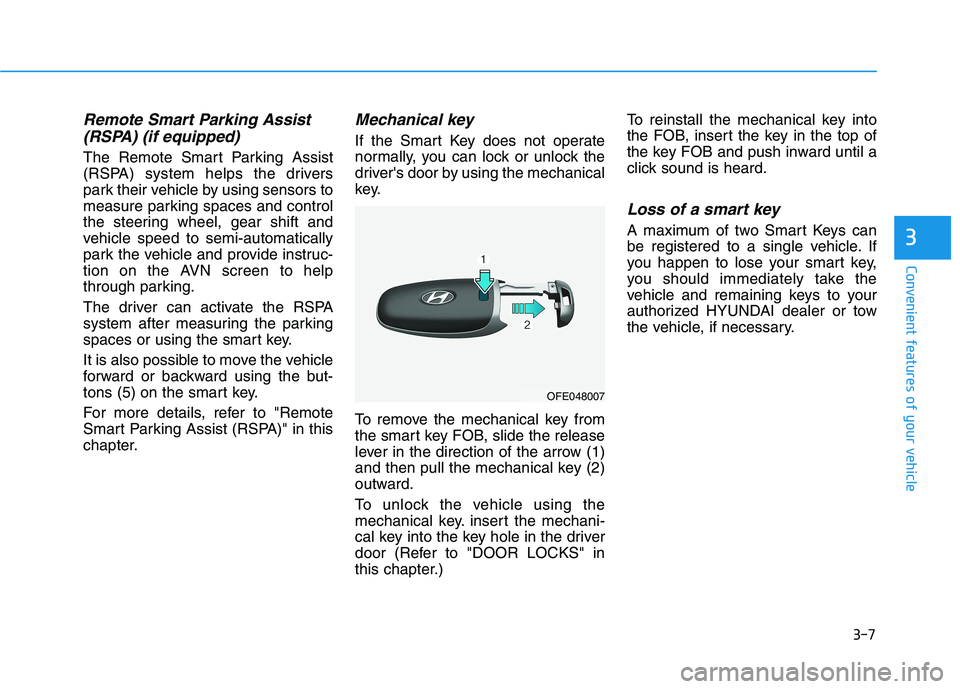
To remove the mechanical key from
the smart key FOB, slide the release
lever in the direction of the arrow (1)
and then pull the mechanical key (2)
outward.
To unlock the vehicle using the
mechanical key. insert the mechani-
cal key into the key hole in the driver
door (Refer to "DOOR LOCKS" in
this chapter.)To reinstall the mechanical key into
the FOB, insert the key in the top of
the key FOB and push inward until a
click sound is heard.
Loss of a smart key
A maximum of two Smart Keys can
be registered to a single vehicle. If
you happen to lose your smart key,
you should immediately take the
vehicle and remaining keys to your
authorized HYUNDAI dealer or tow
the vehicle, if necessary.
OFE048007
Page 95 of 561
3-8
Convenient features of your vehicle
Smart key precautions
The smart key may not work if any of
the following occur:
The smart key is close to a radio
transmitter such as a radio station
or an airport which can interfere
with normal operation of the trans-
mitter.
The smart key is near a mobile two
way radio system or a cellular
phone.
Another vehicle's smart key is being
operated close to your vehicle.
If the smart key does not work cor-
rectly, open and close the door with
the mechanical key. If you have a
problem with the smart key, contact
an authorized HYUNDAI dealer.If the smart key is in close proximity
to your mobile phone, the signal
could be blocked by your mobile
phone's normal operational signals.
This is specifically relevant when the
phone is active such as making and
receiving calls, text messaging,
and/or sending/receiving emails.
When possible, avoid keeping the
remote key and your mobile phone in
the same location such as a pants or
jacket pocket in order to avoid inter-
ference between the two devices.
Keep the smart key away from
electromagnetic materials that
blocks electromagnetic waves to
the key surface.
Always have the smart key with
you when leaving the vehicle. If
the smart key is left near the vehi-
cle, the vehicle battery may be dis-
charged.Information
This device complies with Part 15 of
the FCC rules.
Operation is subject to the following
three conditions:
1. This device may not cause harmful
interference.
2. This device must accept any inter-
ference received, including interfer-
ence that may cause undesired
operation.
3. Changes or modifications not
expressly approved by the party
responsible for compliance could
void the user's authority to operate
the device.
i
NOTICE
NOTICE
Page 98 of 561
3-11
Convenient features of your vehicle
D DO
OO
OR
R
L
LO
OC
CK
KS
S
3
Door unlocking from outside
the vehicle
Smart key
Approach unlock system
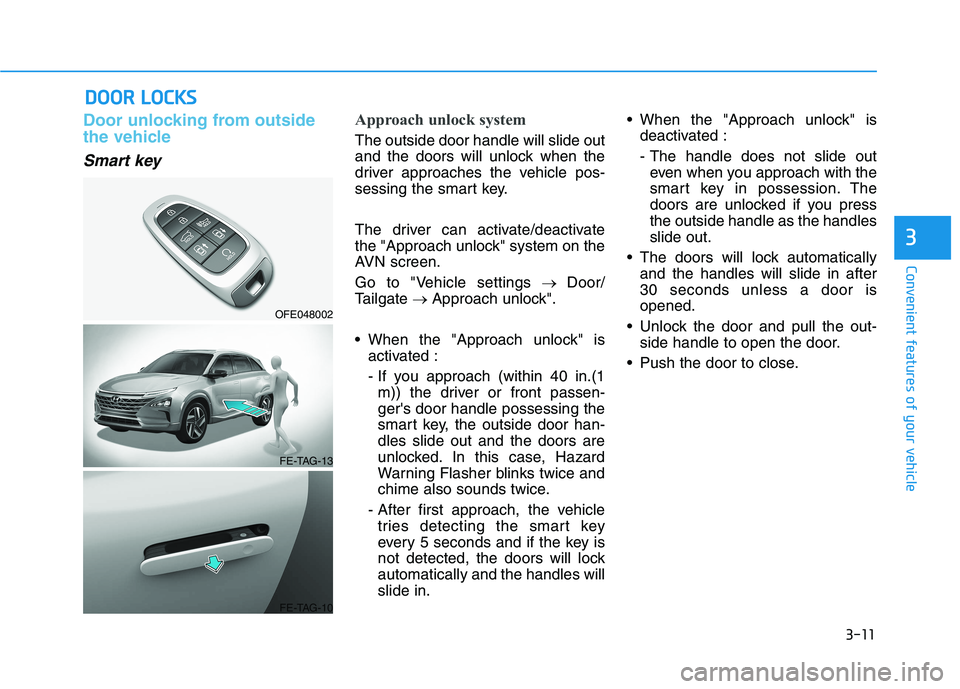
The outside door handle will slide out
and the doors will unlock when the
driver approaches the vehicle pos-
sessing the smart key.
The driver can activate/deactivate
the "Approach unlock" system on the
AVN screen.
Go to "Vehicle settings→ Door/
Tailgate→ Approach unlock".
When the "Approach unlock" is
activated :
- If you approach (within 40 in.(1
m)) the driver or front passen-
ger's door handle possessing the
smart key, the outside door han-
dles slide out and the doors are
unlocked. In this case, Hazard
Warning Flasher blinks twice and
chime also sounds twice.
- After first approach, the vehicle
tries detecting the smart key
every 5 seconds and if the key is
not detected, the doors will lock
automatically and the handles will
slide in. When the "Approach unlock" is
deactivated :
- The handle does not slide out
even when you approach with the
smart key in possession. The
doors are unlocked if you press
the outside handle as the handles
slide out.
The doors will lock automatically
and the handles will slide in after
30 seconds unless a door is
opened.
Unlock the door and pull the out-
side handle to open the door.
Push the door to close.
OFE048002
FE-TAG-13
FE-TAG-10
Page 99 of 561
3-12
If the door is locked/unlocked
multiple times in rapid succes-
sion with the smart key, door
lock button or door lock switch,
the system may stop operating
temporarily in order to protect
the circuit. Also, the "Approach
unlock" system may not oper-
ate. Try operation after a suffi-
cient time in case the system
does not operate due to multiple
operations.
"Approach unlock" system is
not operated continuously.
Retry after a certain period of
time when all the doors are
closed.
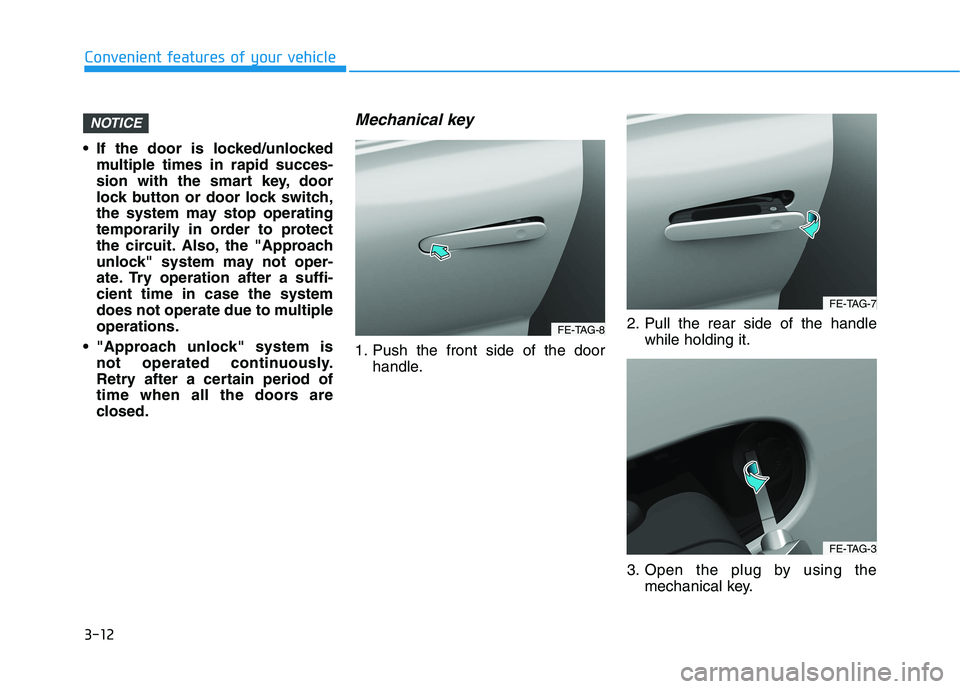
Mechanical key
1. Push the front side of the door
handle.2. Pull the rear side of the handle
while holding it.
3. Open the plug by using the
mechanical key.
NOTICE
Convenient features of your vehicle
FE-TAG-8
FE-TAG-7
FE-TAG-3
Page 100 of 561
3-13
Convenient features of your vehicle
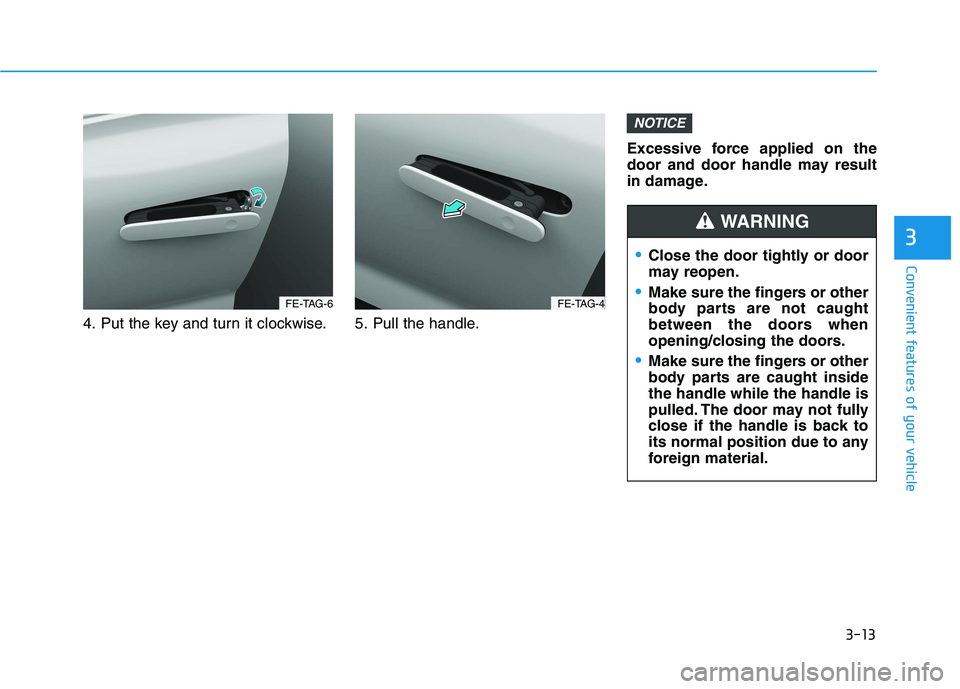
4. Put the key and turn it clockwise. 5. Pull the handle.Excessive force applied on the
door and door handle may result
in damage.
NOTICE
3
FE-TAG-6FE-TAG-4
Close the door tightly or door
may reopen.
Make sure the fingers or other
body parts are not caught
between the doors when
opening/closing the doors.
Make sure the fingers or other
body parts are caught inside
the handle while the handle is
pulled. The door may not fully
close if the handle is back to
its normal position due to any
foreign material.
WARNING