ABS HYUNDAI NEXO 2023 User Guide
[x] Cancel search | Manufacturer: HYUNDAI, Model Year: 2023, Model line: NEXO, Model: HYUNDAI NEXO 2023Pages: 558, PDF Size: 35.01 MB
Page 297 of 558
5-30
ABS cannot prevent a loss of stabili-
ty. Always steer moderately when
braking hard. Severe or sharp steer-
ing wheel movement can still cause
your vehicle to veer into oncoming
traffic or off the road.
On loose or uneven road surfaces,
operation of the anti-lock brake sys-
tem may result in a longer stopping
distance than for vehicles equipped
with a conventional brake system.
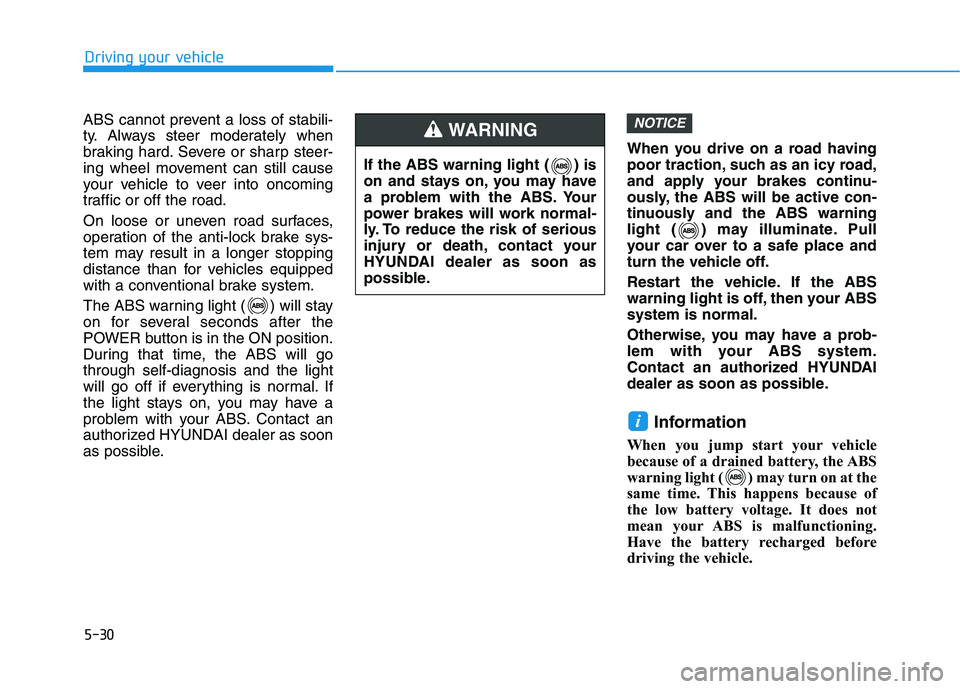
The ABS warning light ( ) will stay
on for several seconds after the
POWER button is in the ON position.
During that time, the ABS will gothrough self-diagnosis and the light
will go off if everything is normal. If
the light stays on, you may have a
problem with your ABS. Contact an
authorized HYUNDAI dealer as soon
as possible.
When you drive on a road having
poor traction, such as an icy road,
and apply your brakes continu-
ously, the ABS will be active con-
tinuously and the ABS warning
light ( ) may illuminate. Pull
your car over to a safe place and
turn the vehicle off.
Restart the vehicle. If the ABS
warning light is off, then your ABSsystem is normal.
Otherwise, you may have a prob-
lem with your ABS system.
Contact an authorized HYUNDAI
dealer as soon as possible.
Information
When you jump start your vehicle
because of a drained battery, the ABS
warning light ( ) may turn on at the
same time. This happens because of
the low battery voltage. It does not
mean your ABS is malfunctioning.
Have the battery recharged before
driving the vehicle.
i
NOTICE
Driving your vehicle
If the ABS warning light ( ) is
on and stays on, you may have
a problem with the ABS. Your
power brakes will work normal-
ly. To reduce the risk of serious
injury or death, contact your
HYUNDAI dealer as soon as
possible.
WARNING
Page 301 of 558
5-34
Driving your vehicle
Do not allow wheel(s) of oneaxle to spin excessively while
the ESC, ABS, and parking brake
warning lights are displayed.
The repairs would not be cov-
ered by the vehicle warranty.
Reduce vehicle power and do
not spin the wheel(s) excessive-
ly while these lights are dis-
played.
When operating the vehicle on a dynamometer, make sure theESC is turned off (ESC OFF lightilluminated).
Information
Turning the ESC off does not affect
ABS or standard brake system opera-
tion.
Vehicle Stability Management (VSM)
The Vehicle Stability Management (VSM) is a function of the Electronic
Stability Control (ESC) system. It
helps ensure the vehicle stays stable
when accelerating or braking sud-
denly on wet, slippery and rough
roads where traction over the four
tires can suddenly become uneven.
VSM operation
VSM ON condition
The VSM operates when:
The Electronic Stability Control (ESC) is on.
Vehicle speed is approximately above 15 km/h (9 mph) on curve
roads.
Vehicle speed is approximately above 30 km/h (18 mph) when the
vehicle is braking on rough roads.
When operating
When you apply your brakes under
conditions which may activate the
ESC, you may hear sounds from the
brakes, or feel a corresponding sen-
sation in the brake pedal. This is nor-
mal and it means your VSM is active.
i
NOTICE
Take the following precautions
when using the Vehicle Stability
Management (VSM):
ALWAYS check the speed and
the distance to the vehicle
ahead. The VSM is not a substi-
tute for safe driving practices.
Never drive too fast for the
road conditions. The VSM sys-
tem will not prevent acci-
dents. Excessive speed in bad
weather, slippery and uneven
roads can result in severeaccidents.
WARNING
Page 370 of 558
5-103
Driving your vehicle
5
To temporarily accelerate withthe Smart Cruise Control on
If you want to speed up temporarily
when the Smart Cruise Control is on,
depress the accelerator pedal.
Increased speed will not interfere
with Smart Cruise Control operationor change the set speed.
To return to the set speed, take your
foot off the accelerator pedal.
If you push the toggle switch down
(SET-) at increased speed, the cruis-ing speed will be set again pedal.
Smart Cruise Control set speedwill be temporarily canceled
when:
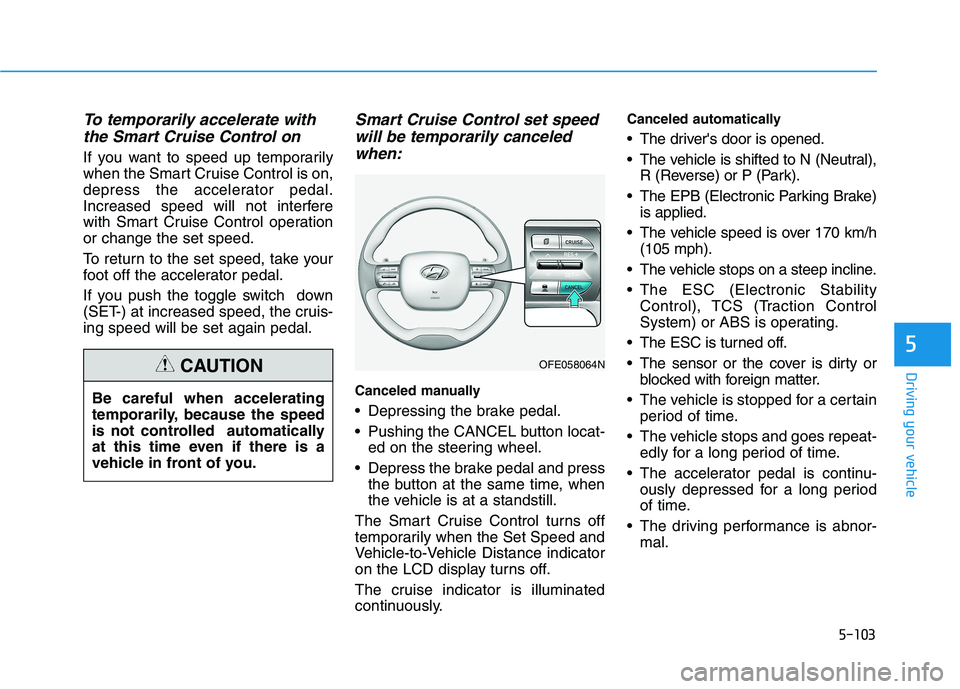
Canceled manually
Depressing the brake pedal.
Pushing the CANCEL button locat- ed on the steering wheel.
Depress the brake pedal and press the button at the same time, when
the vehicle is at a standstill.
The Smart Cruise Control turns off
temporarily when the Set Speed and
Vehicle-to-Vehicle Distance indicator
on the LCD display turns off.
The cruise indicator is illuminated
continuously. Canceled automatically
The driver's door is opened.
The vehicle is shifted to N (Neutral),
R (Reverse) or P (Park).
The EPB (Electronic Parking Brake) is applied.
The vehicle speed is over 170 km/h (105 mph).
The vehicle stops on a steep incline.
The ESC (Electronic Stability Control), TCS (Traction Control
System) or ABS is operating.
The ESC is turned off.
The sensor or the cover is dirty or blocked with foreign matter.
The vehicle is stopped for a certain period of time.
The vehicle stops and goes repeat- edly for a long period of time.
The accelerator pedal is continu- ously depressed for a long period
of time.
The driving performance is abnor- mal.
Be careful when accelerating
temporarily, because the speed
is not controlled automatically
at this time even if there is a
vehicle in front of you.
CAUTIONOFE058064N
Page 453 of 558
7-29
7
Maintenance
TTIIRR EESS AA NN DD WW HHEEEELLSS
Tire Care
For proper maintenance, safety, and
maximum fuel economy, you must
always maintain recommended tire
inflation pressures and stay within
the load limits and weight distribution
recommended for your vehicle.ALWAYS replace tires with the
same size as each tire that
was originally supplied with
this vehicle. Using tires andwheels other than the recom-
mended sizes could cause
unusual handling characteris-
tics, poor vehicle control, or
negatively affect your vehi-
cle's Anti-Lock Brake System(ABS) resulting in a seriousaccident.
Tire failure may cause loss of
vehicle control resulting in an
accident. To reduce risk of
SERIOUS INJURY or DEATH,
take the following precautions:
Inspect your tires monthly for
proper inflation as well as
wear and damage.
The recommended cold tire
pressure for your vehicle can
be found in this manual andon the tire label located on the
driver's side center pillar.
Always use a tire pressure
gauge to measure tire pres-
sure. Tires with too much ortoo little pressure wear
unevenly causing poor han-dling.
Replace tires that are worn,
show uneven wear, or are
damaged. Worn tires can
cause loss of braking effec-
tiveness, steering) control, ortraction.
WARNING
Page 457 of 558
7-33
7
Maintenance
Wheel Alignment and Tire Balance
The wheels on your vehicle were aligned and balanced carefully at the
factory to give you the longest tire life
and best overall performance.
In most cases, you will not need to
have your wheels aligned again.
However, if you notice unusual tire
wear or your vehicle pulling one way
or the other, the alignment may needto be reset.
If you notice your vehicle vibrating
when driving on a smooth road, your
wheels may need to be rebalanced.
Improper wheel weights can dam-
age your vehicle's aluminum
wheels. Use only approved wheelweights.
Tire Replacement
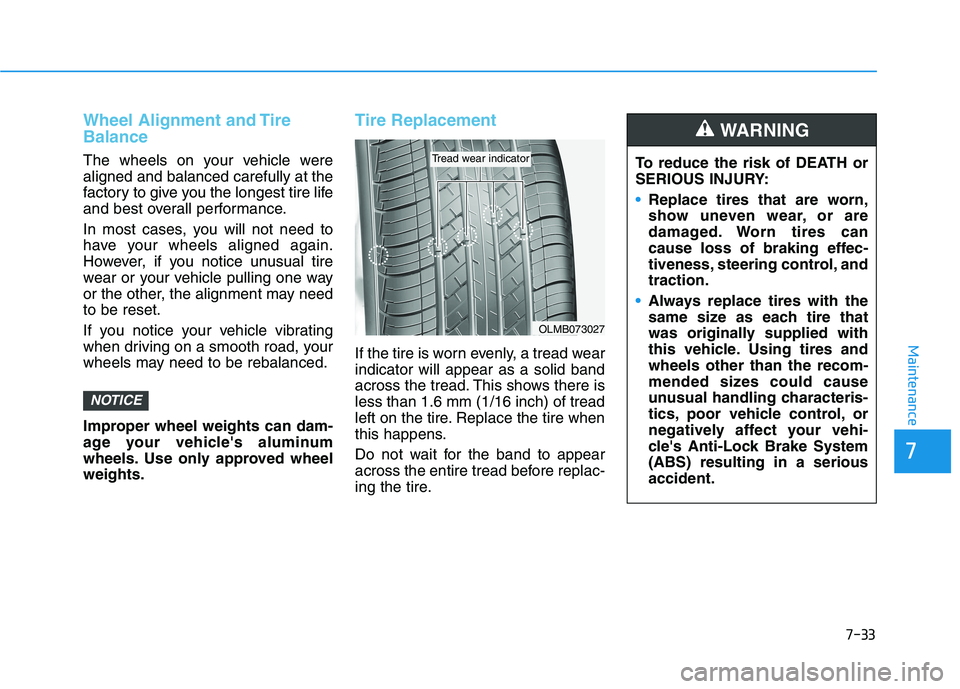
If the tire is worn evenly, a tread wear indicator will appear as a solid band
across the tread. This shows there isless than 1.6 mm (1/16 inch) of tread
left on the tire. Replace the tire when
this happens.
Do not wait for the band to appear
across the entire tread before replac-
ing the tire.
NOTICE
OLMB073027
Tread wear indicatorTo reduce the risk of DEATH or
SERIOUS INJURY:
Replace tires that are worn,
show uneven wear, or are
damaged. Worn tires can
cause loss of braking effec-
tiveness, steering control, andtraction.
Always replace tires with the
same size as each tire that
was originally supplied with
this vehicle. Using tires andwheels other than the recom-
mended sizes could cause
unusual handling characteris-
tics, poor vehicle control, or
negatively affect your vehi-
cle's Anti-Lock Brake System(ABS) resulting in a seriousaccident.
WARNING
Page 485 of 558
7-61
7
Maintenance
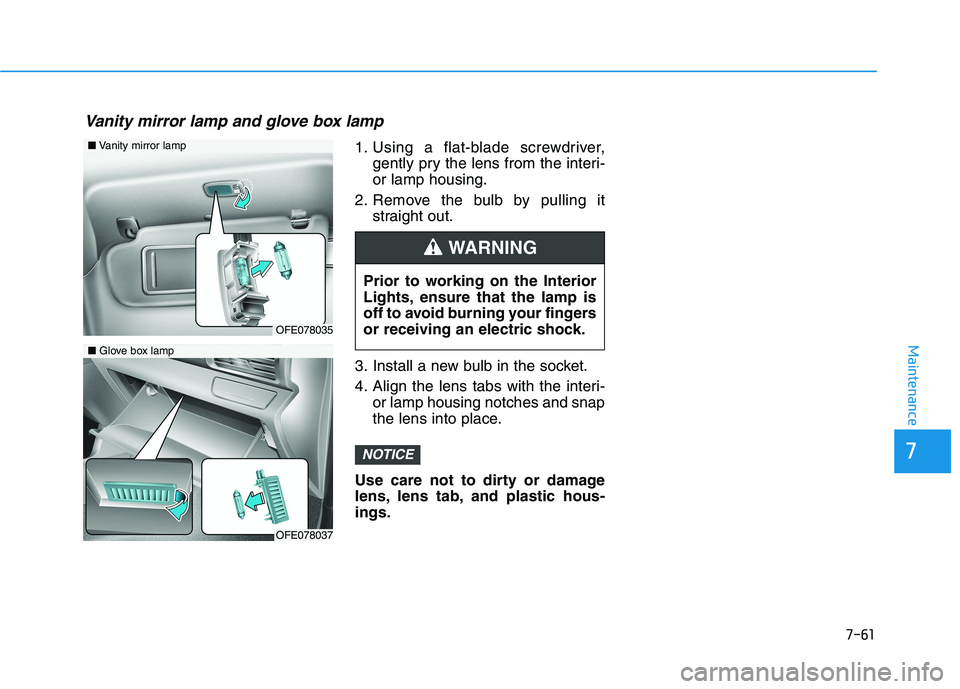
1. Using a flat-blade screwdriver,gently pry the lens from the interi- or lamp housing.
2. Remove the bulb by pulling it straight out.
3. Install a new bulb in the socket.
4. Align the lens tabs with the interi- or lamp housing notches and snap
the lens into place.
Use care not to dirty or damage
lens, lens tab, and plastic hous-ings.
NOTICE
Prior to working on the Interior
Lights, ensure that the lamp is
off to avoid burning your fingers
or receiving an electric shock.
WARNING
■ Vanity mirror lamp
■ Glove box lamp
OFE078035
OFE078037
Vanity mirror lamp and glove box lamp
Page 493 of 558
7-69
7
Maintenance
Caring for the leather seats- Vacuum the seat periodically toremove dust and sand on the
seat. It will prevent abrasion ordamage of the leather and main-
tain its quality.
- Wipe the natural leather seat cover often with dry or soft cloth.
- Use of proper leather protective may prevent abrasion of the
cover and helps maintain the
color. Be sure to read the instruc-tions and consult a specialistwhen using leather coating or
protective agent.
- Light colored (beige, cream beige) leather is easily contami-
nated and the stain is noticeable.
Clean the seats frequently.
- Avoid wiping with wet cloth. It may cause the surface to crack. Cleaning the leather seats
- Remove all contaminationsinstantly. Refer to instructions
below for removal of each con-taminant.
- Cosmetic products (sunscreen, foundation, etc.)
Apply cleansing cream on a clothand wipe the contaminate spot.
Wipe off the cream with a wet
cloth and remove water with a drycloth.
- Beverages (coffee, soft drink, etc.)
Apply a small amount of neutraldetergent and wipe until contami-
nations do not smear.
- Oil Remove oil instantly with
absorbable cloth and wipe with
stain remover used only for natu-
ral leather.
- Chewing gum Harden the gum with ice and
remove gradually.Cleaning the seat belt webbing
Clean the belt webbing with any mild
soap solution recommended for
cleaning upholstery or carpet. Follow
the instructions provided with the
soap. Do not bleach or re-dye the
webbing because this may weakenthe seat belt.
Cleaning the interior windowglass
If the interior glass surfaces of the
vehicle become fogged (that is, cov-
ered with an oily, greasy or waxy
film), they should be cleaned with
glass cleaner. Follow the directions
on the glass cleaner container.
Do not scrape or scratch the
inside of the rear window. This
may result in damage to the rear
window defroster grid.
NOTICE
Page 517 of 558
H15
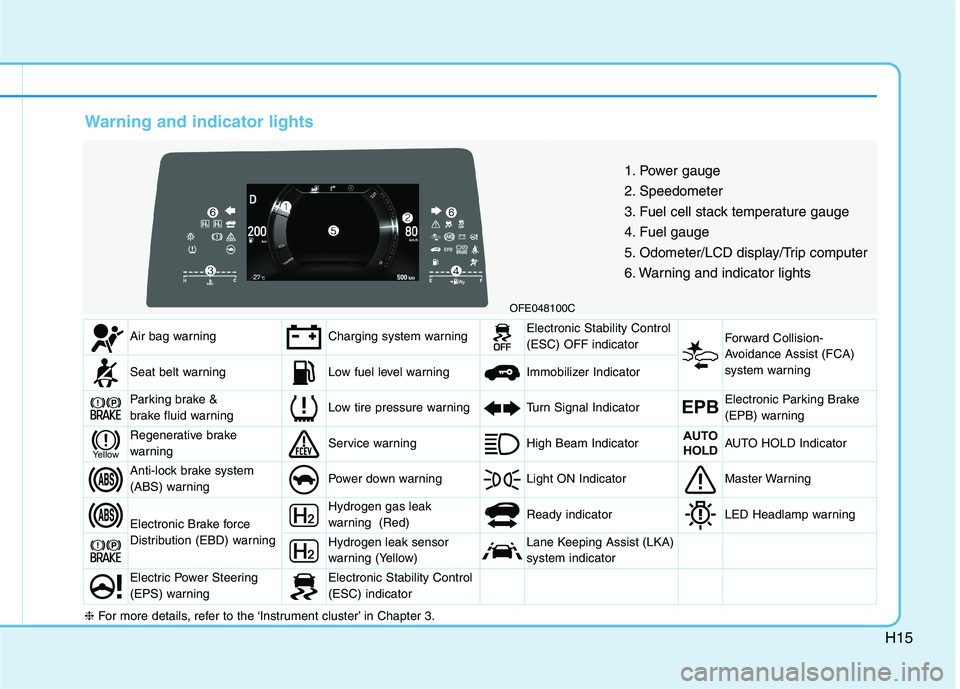
Warning and indicator lights
OFE048100C1. Power gauge
2. Speedometer
3. Fuel cell stack temperature gauge
4. Fuel gauge
5. Odometer/LCD display/Trip computer
6. Warning and indicator lights
Air bag warningCharging system warningElectronic Stability Control (ESC) OFF indicator Forward Collision-
Avoidance Assist (FCA)
system warning
Seat belt warningLow fuel level warning Immobilizer Indicator
Parking brake &
brake fluid warningLow tire pressure warningTurn Signal IndicatorEPBElectronic Parking Brake
(EPB) warning
Regenerative brake
warningService warning High Beam IndicatorAUTO
HOLDAUTO HOLD Indicator
Anti-lock brake system
(ABS) warningPower down warning Light ON IndicatorMaster Warning
Electronic Brake force
Distribution (EBD) warning
Hydrogen gas leak
warning (Red) Ready indicatorLED Headlamp warning
Hydrogen leak sensor
warning (Yellow)Lane Keeping Assist (LKA) system indicator
Electric Power Steering
(EPS) warningElectronic Stability Control (ESC) indicator
Yellow
❈ For more details, refer to the ‘Instrument cluster’ in Chapter 3.
Page 549 of 558
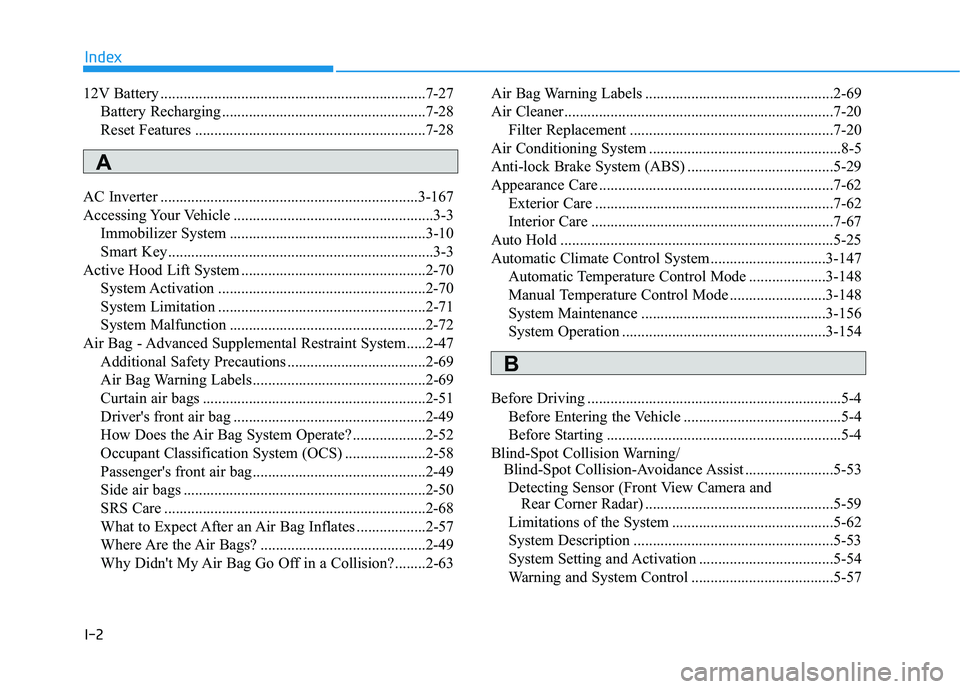
I-2
12V Battery .....................................................................7-27
Battery Recharging .....................................................7-28
Reset Features ............................................................7-28
AC Inverter ...................................................................3-167
Accessing Your Vehicle ....................................................3-3 Immobilizer System ...................................................3-10
Smart Key.....................................................................3-3
Active Hood Lift System ................................................2-70 System Activation ......................................................2-70
System Limitation ......................................................2-71
System Malfunction ...................................................2-72
Air Bag - Advanced Supplemental Restraint System.....2-47 Additional Safety Precautions ....................................2-69
Air Bag Warning Labels.............................................2-69
Curtain air bags ..........................................................2-51
Driver's front air bag ..................................................2-49
How Does the Air Bag System Operate? ...................2-52
Occupant Classification System (OCS) .....................2-58
Passenger's front air bag.............................................2-49
Side air bags ...............................................................2-50
SRS Care ....................................................................2-68
What to Expect After an Air Bag Inflates ..................2-57
Where Are the Air Bags? ...........................................2-49
Why Didn't My Air Bag Go Off in a Collision?........2-63 Air Bag Warning Labels .................................................2-69
Air Cleaner......................................................................7-20
Filter Replacement .....................................................7-20
Air Conditioning System ..................................................8-5
Anti-lock Brake System (ABS) ......................................5-29
Appearance Care .............................................................7-62 Exterior Care ..............................................................7-62
Interior Care ...............................................................7-67
Auto Hold .......................................................................5-25
Automatic Climate Control System..............................3-147 Automatic Temperature Control Mode ....................3-148
Manual Temperature Control Mode .........................3-148
System Maintenance ................................................3-156
System Operation .....................................................3-154
Before Driving ..................................................................5-4 Before Entering the Vehicle .........................................5-4
Before Starting .............................................................5-4
Blind-Spot Collision Warning/ Blind-Spot Collision-Avoidance Assist .......................5-53
Detecting Sensor (Front View Camera and Rear Corner Radar) .................................................5-59
Limitations of the System ..........................................5-62
System Description ....................................................5-53
System Setting and Activation ...................................5-54
Warning and System Control .....................................5-57
Index
A
B
Page 550 of 558
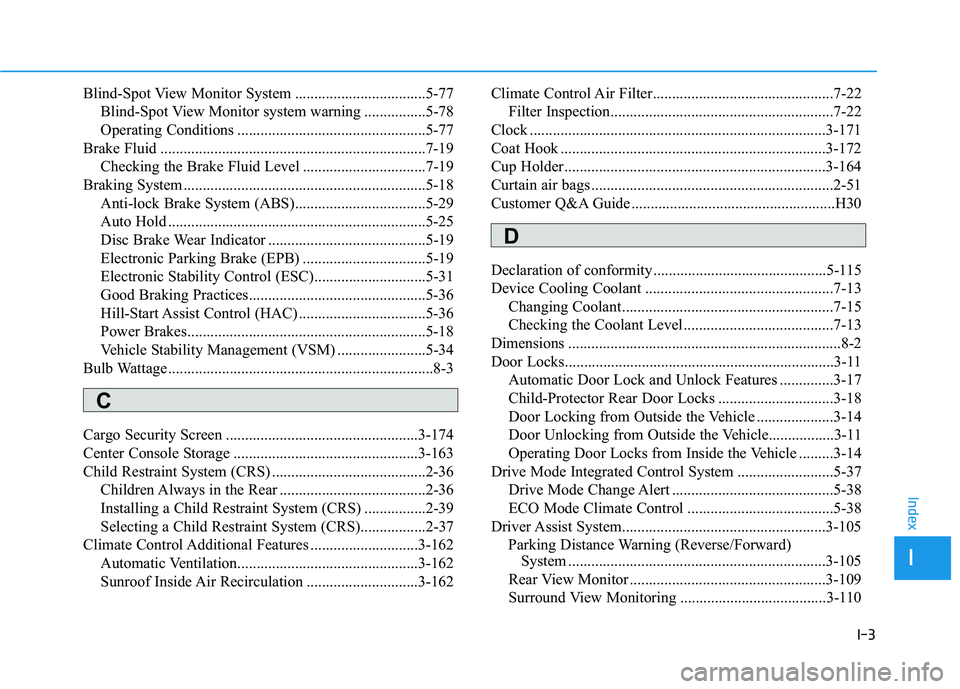
I-3
Blind-Spot View Monitor System ..................................5-77
Blind-Spot View Monitor system warning ................5-78
Operating Conditions .................................................5-77
Brake Fluid .....................................................................7-19 Checking the Brake Fluid Level ................................7-19
Braking System ...............................................................5-18 Anti-lock Brake System (ABS)..................................5-29
Auto Hold ...................................................................5-25
Disc Brake Wear Indicator .........................................5-19
Electronic Parking Brake (EPB) ................................5-19
Electronic Stability Control (ESC).............................5-31
Good Braking Practices..............................................5-36
Hill-Start Assist Control (HAC) .................................5-36
Power Brakes..............................................................5-18
Vehicle Stability Management (VSM) .......................5-34
Bulb Wattage .....................................................................8-3
Cargo Security Screen ..................................................3-174
Center Console Storage ................................................3-163
Child Restraint System (CRS) ........................................2-36 Children Always in the Rear ......................................2-36
Installing a Child Restraint System (CRS) ................2-39
Selecting a Child Restraint System (CRS).................2-37
Climate Control Additional Features ............................3-162
Automatic Ventilation...............................................3-162
Sunroof Inside Air Recirculation .............................3-162 Climate Control Air Filter...............................................7-22
Filter Inspection..........................................................7-22
Clock .............................................................................3-171
Coat Hook .....................................................................3-172
Cup Holder....................................................................3-164
Curtain air bags ...............................................................2-51
Customer Q&A Guide .....................................................H30
Declaration of conformity .............................................5-115
Device Cooling Coolant .................................................7-13
Changing Coolant.......................................................7-15
Checking the Coolant Level .......................................7-13
Dimensions .......................................................................8-2
Door Locks......................................................................3-11 Automatic Door Lock and Unlock Features ..............3-17
Child-Protector Rear Door Locks ..............................3-18
Door Locking from Outside the Vehicle ....................3-14
Door Unlocking from Outside the Vehicle.................3-11
Operating Door Locks from Inside the Vehicle .........3-14
Drive Mode Integrated Control System .........................5-37
Drive Mode Change Alert ..........................................5-38
ECO Mode Climate Control ......................................5-38
Driver Assist System.....................................................3-105 Parking Distance Warning (Reverse/Forward) System ...................................................................3-105
Rear View Monitor ...................................................3-109
Surround View Monitoring ......................................3-110
I
Index
C
D