sunroof HYUNDAI NEXO 2023 User Guide
[x] Cancel search | Manufacturer: HYUNDAI, Model Year: 2023, Model line: NEXO, Model: HYUNDAI NEXO 2023Pages: 558, PDF Size: 35.01 MB
Page 216 of 558
3-129
Convenient features of your vehicle
3
If the driver releases the button thevehicle will stop and the assist will
stop temporarily. Press and hold
the button again to resume the
operation.
❈ You will hear frequent beep
sounds if the driver gets off the
vehicle after setting the Remote
Parking mode.
❈ Press the moving forward or back-
ward button again after checkingthe distance (within about 3 ~ 5 m
(10 ~ 16 ft.)) from the vehicles if
the vehicle didn't move after
pressing and holding the smart
key button for about 5 seconds.7. Remote smart parking com-
plete
When the parking is complete, the
message is displayed on the AVN
screen and the vehicle is automati-
cally turned off. Drivers always
should check whether the door, win-
dow and sunroof are closed and the
door is locked.
When parking is complete:
- The parking complete sound (fre-quent beep) is generated.
- The gear P (Park) and Electronic Parking Brake (EPB) are engaged
automatically.
❈ Release the moving forward/back-
ward button on the smart key.
❈ The parking may complete bump-
ing on the stopper.
❈ When parking is complete, check
the surrounding conditions.Always check for obstacles
around your vehicle beforedriving.
The function may be can-
celled if you attach something
(cover, etc.) to the steeringwheel.
Make sure all the passengers
exit the vehicle when the
Remote Smart Parking isassisted.
Make sure all the smart keys
are outside the vehicle.
The smart key detection
range from the vehicle may
vary depending on the sur-
rounding environment
(indoor/outdoor, strong elec-tric field area).
The smart key detection
range may change as the
vehicle moves. Maintain an
appropriate distance from the
vehicle.
CAUTION
Page 242 of 558
3-155
Convenient features of your vehicle
3
Air conditioning
Your HYUNDAI vehicle air condition- ing system is filled with R-1234yf
refrigerant.
1. Start the vehicle.
2. Press the air conditioning button.
3. Select the Face Level mode.
4. Set the air intake control toRecirculation mode temporarily to
allow the cabin to cool quickly.
When the desired temperature inthe cabin is reached, change the
air intake control back to Fresh
mode.
5. Adjust the fan speed control and temperature control to maintain
maximum comfort.
When maximum cooling is desired,
set the temperature control to the
MAX A/C position, then set the fanspeed control to the highest setting. When using the air conditioning
system, monitor the temperature
gauge closely while driving up
hills or in heavy traffic when out-
side temperatures. Air condition-
ing system operation when climb-ing a steep grade or in high out-side ambient temperatures can
cause fuel cell stack overheating.
Continue to use the fan, but turn the air conditioning system off if
the temperature gauge indicates
fuel cell stack overheating.
Air conditioning system operation
tips
If the vehicle has been parked in
direct sunlight during hot weather,
open the windows for a short time
to let the hot air inside the vehicle
escape.
After sufficient cooling has been achieved, switch back from recircu-
lation mode to fresh mode. To help reduce moisture inside of
the windows on rainy or humid
days, decrease the humidity inside
the vehicle by operating the airconditioning system with the win-
dows and sunroof closed.
Use the air conditioning system every month only for a few minutes
to ensure maximum system per-
formance.
If you operate air conditioner exces- sively, the difference between the
temperature of the outside air andthat of the windshield could cause
the outer surface of the windshield
to fog up, causing loss of visibility. In
this case, set the mode selection
knob or button to the position
and fan speed control to the lowerspeed.
NOTICE
Page 249 of 558
3-162
Convenient features of your vehicle
Automatic Ventilation (if equipped)
When the POWER button is in the
ON position or when the vehicle is in
the ready ( ) mode and tempera-
ture is below 15°C (59°F) with therecirculated air position selected
more than five minutes, the air intakeposition will automatically change tothe outside (fresh) air position.
To cancel or reset the Automatic
Ventilation
When the air conditioning system is
on, select Face Level mode and
press the recirculation mode button
five times within three seconds while
pressing A/C button.
When the Automatic Ventilation fea-
ture is enabled, the recirculation but-
ton LED indicator will blink 6 times.
When the Automatic Ventilation fea-
ture is disabled, the recirculation but-
ton LED indicator will blink 3 times.
Sunroof Inside Air
Recirculation (if equipped)
When the heater or air conditioning system is on with the sunroofopened, the fresh mode will be auto-
matically selected. If you press the
recirculation mode button with thesunroof open, recirculation mode
activate but will only remain enabled
for 3 minutes. After 3 minutes the air
intake control will revert back to
Fresh mode. When the sunroof is closed, the air
intake position will return to the orig-
inal position that was selected.
CCLLIIMM AATTEE CC OO NNTTRR OO LL AA DDDDIITT IIOO NNAALL FF EE AA TTUU RREESS
Page 263 of 558
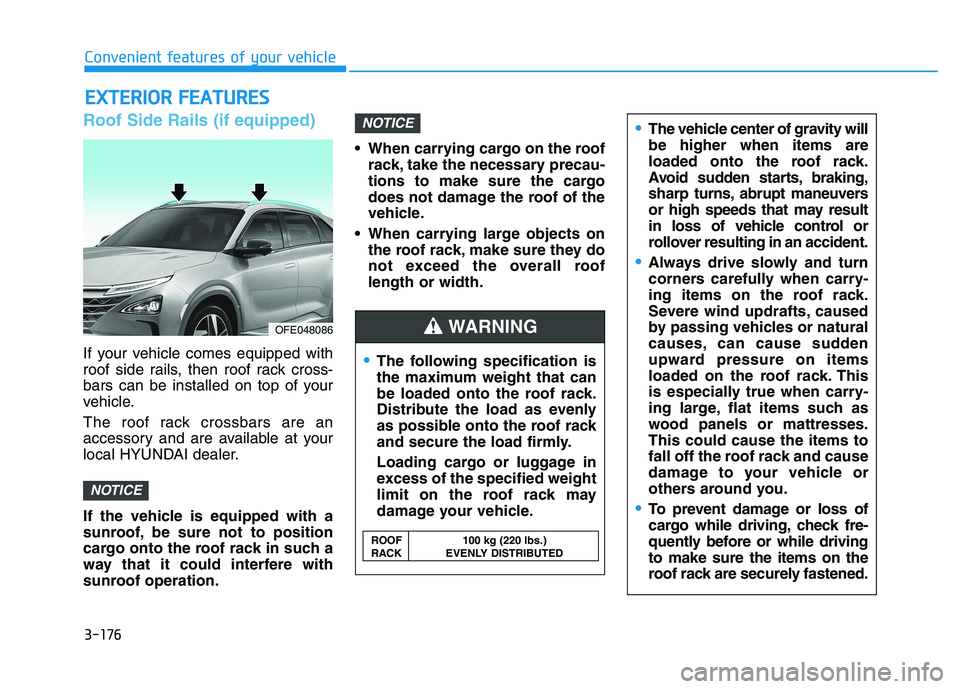
Roof Side Rails (if equipped)
If your vehicle comes equipped with
roof side rails, then roof rack cross-
bars can be installed on top of your
vehicle.
The roof rack crossbars are an
accessory and are available at your
local HYUNDAI dealer.
If the vehicle is equipped with a
sunroof, be sure not to position
cargo onto the roof rack in such a
way that it could interfere with
sunroof operation. When carrying cargo on the roof
rack, take the necessary precau-
tions to make sure the cargo
does not damage the roof of the
vehicle.
When carrying large objects on the roof rack, make sure they do
not exceed the overall rooflength or width.
NOTICE
NOTICE
EEXX TTEERR IIOO RR FF EE AA TTUU RREESS
The following specification is
the maximum weight that can
be loaded onto the roof rack.
Distribute the load as evenly
as possible onto the roof rack
and secure the load firmly.
Loading cargo or luggage in
excess of the specified weight
limit on the roof rack may
damage your vehicle.
The vehicle center of gravity will be higher when items are
loaded onto the roof rack.
Avoid sudden starts, braking,
sharp turns, abrupt maneuvers
or high speeds that may result
in loss of vehicle control or
rollover resulting in an accident.
Always drive slowly and turn
corners carefully when carry-
ing items on the roof rack.
Severe wind updrafts, caused
by passing vehicles or natural
causes, can cause sudden
upward pressure on items
loaded on the roof rack. This
is especially true when carry-
ing large, flat items such as
wood panels or mattresses.This could cause the items to
fall off the roof rack and cause
damage to your vehicle or
others around you.
To prevent damage or loss of
cargo while driving, check fre-
quently before or while drivingto make sure the items on the
roof rack are securely fastened.
WARNING
ROOF 100 kg (220 lbs.)
RACK EVENLY DISTRIBUTED
OFE048086
Convenient features of your vehicle
3-176
Page 403 of 558
6-6
What to do in an emergency
The following items may need to be
reset after the battery has been dis-
charged or the battery has been dis-
connected. See chapter 3 or 4 for:
Power Windows
Trip Computer
Climate Control System
Clock
Audio System
Sunroof
Driver Position Memory System
External power source using 12V
battery
The use of external power acces-
sories may reduce performance
and function of the vehicle.
Especially, the use of dash cam-
eras may shut off the power of the
vehicle prior to the dash camera's
automatic shut-down.
If the power of the vehicle is shut
off, start the vehicle as explained.
(refer to "Using the 12V Battery
Switch")Jump Starting
In the event vehicle still does not
have a functional 12V battery (check
if interior lights will not turn on) then
you can try a jump start using a 12V
booster pack or jumper cables from
another vehicle's 12V battery
according to the following instruc-
tions.1. Position the vehicles close enough
that the jumper cables will reach,
but do not allow the vehicles totouch.
2. Avoid fans or any moving parts in the fuel cell power module com-
partment at all times, even when
the vehicles are turned off.
3. Turn off all electrical devices such as radios, lights, air conditioning,
etc. Put the vehicles in P (Park)
and set the parking brake. Turn
both vehicles OFF.
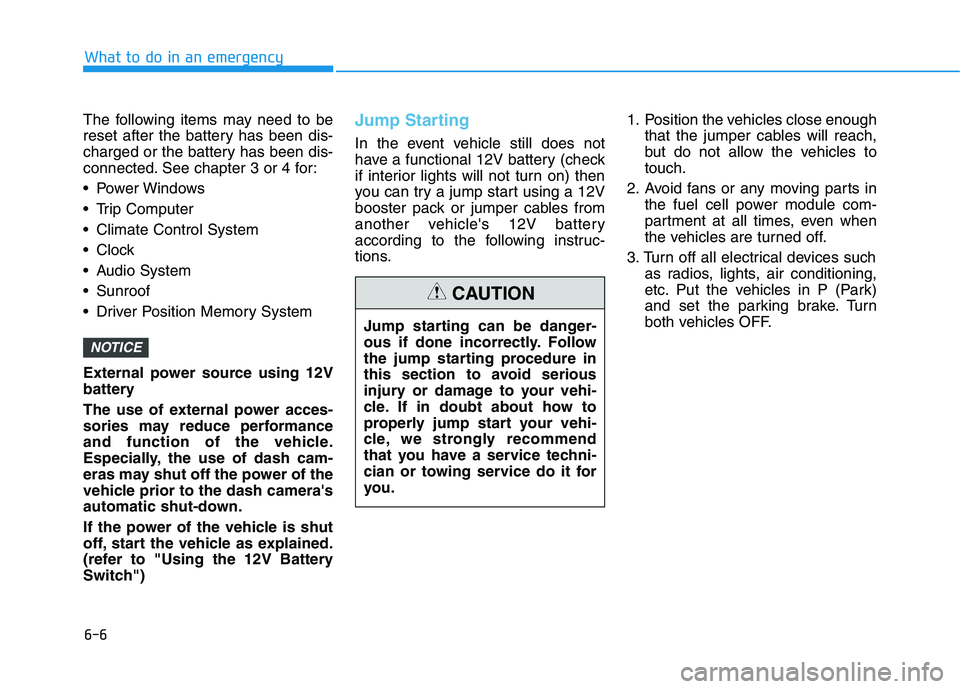
NOTICE
Jump starting can be danger-
ous if done incorrectly. Follow
the jump starting procedure in
this section to avoid serious
injury or damage to your vehi-
cle. If in doubt about how to
properly jump start your vehi-
cle, we strongly recommend
that you have a service techni-
cian or towing service do it for
you.
CAUTION
Page 452 of 558

7-28
Maintenance
Battery Recharging
By RESET button
To charge the discharged 12V bat-
tery, attempt charging by pressing
12V BATT RESET button. For more
details, refer to “If the 12 volt battery
is discharged” in chapter 6.
By jump starting
After a jump start from a good bat-
tery, drive the vehicle for 20-30 min-
utes before it is shutoff. The vehicle
may not restart if you shut it off
before the battery had a chance to
adequately recharge. See "Jump
Starting" in chapter 6 For more
details on jump starting procedures.
Reset Features
Some items need to be reset after
the battery has been discharged or
the battery has been disconnected.
See chapter 3 or 4 for:
Power Windows
Trip Computer
Climate Control System
Clock
Audio System
Sunroof
Driver Position Memory System
OFEQ018012
Page 476 of 558
7-52
Maintenance
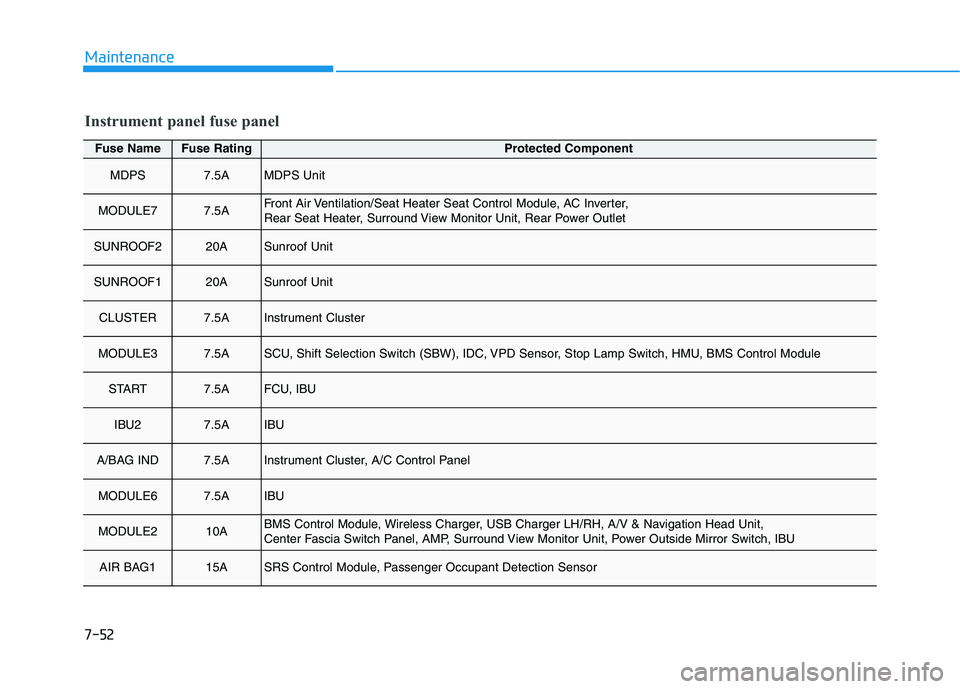
Fuse NameFuse RatingProtected Component
MDPS7.5AMDPS Unit
MODULE77.5AFront Air Ventilation/Seat Heater Seat Control Module, AC Inverter,
Rear Seat Heater, Surround View Monitor Unit, Rear Power Outlet
SUNROOF220ASunroof Unit
SUNROOF120ASunroof Unit
CLUSTER7.5AInstrument Cluster
MODULE37.5ASCU, Shift Selection Switch (SBW), IDC, VPD Sensor, Stop Lamp Switch, HMU, BMS Control Module
START7.5AFCU, IBU
IBU27.5AIBU
A/BAG IND7.5AInstrument Cluster, A/C Control Panel
MODULE67.5AIBU
MODULE210ABMS Control Module, Wireless Charger, USB Charger LH/RH, A/V & Navigation Head Unit,
Center Fascia Switch Panel, AMP, Surround View Monitor Unit, Power Outside Mirror Switch, IBU
AIR BAG115ASRS Control Module, Passenger Occupant Detection Sensor
Instrument panel fuse panel
Page 478 of 558
7-54
Maintenance
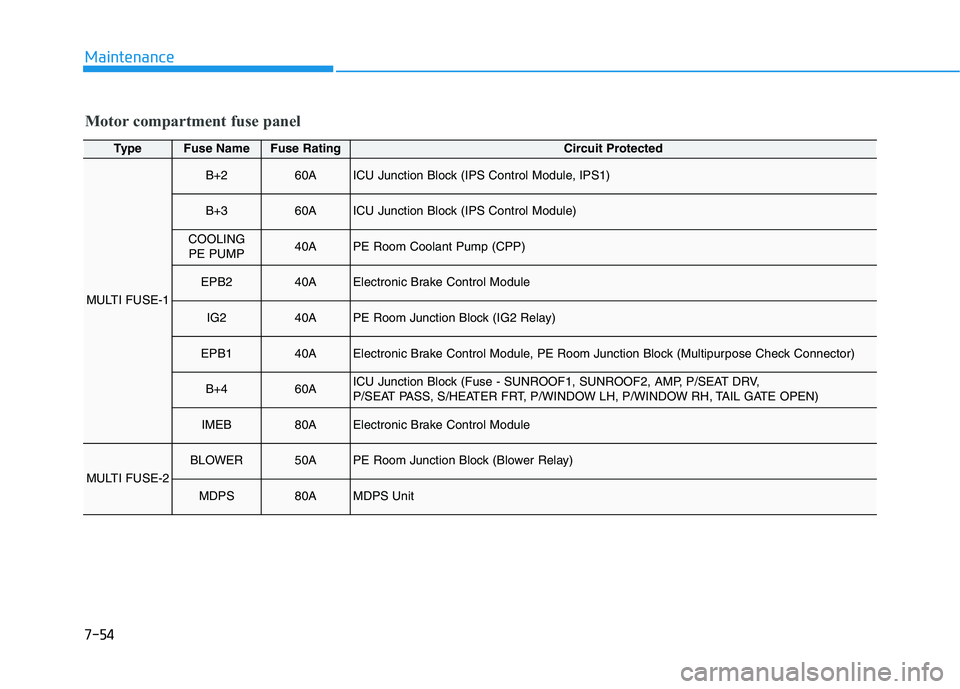
Motor compartment fuse panel
TypeFuse NameFuse RatingCircuit Protected
MULTI FUSE-1
B+260AICU Junction Block (IPS Control Module, IPS1)
B+360AICU Junction Block (IPS Control Module)
COOLING PE PUMP40APE Room Coolant Pump (CPP)
EPB240AElectronic Brake Control Module
IG240APE Room Junction Block (IG2 Relay)
EPB140AElectronic Brake Control Module, PE Room Junction Block (Multipurpose Check Connector)
B+460AICU Junction Block (Fuse - SUNROOF1, SUNROOF2, AMP, P/SEAT DRV,
P/SEAT PASS, S/HEATER FRT, P/WINDOW LH, P/WINDOW RH, TAIL GATE OPEN)
IMEB80AElectronic Brake Control Module
MULTI FUSE-2
BLOWER50APE Room Junction Block (Blower Relay)
MDPS80AMDPS Unit
Page 550 of 558
I-3
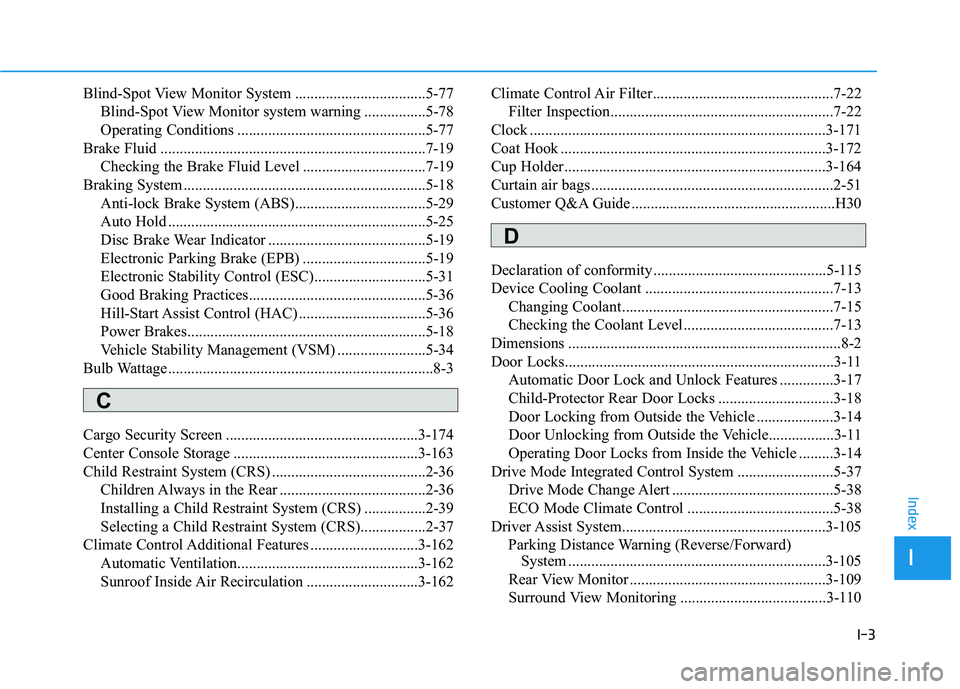
Blind-Spot View Monitor System ..................................5-77
Blind-Spot View Monitor system warning ................5-78
Operating Conditions .................................................5-77
Brake Fluid .....................................................................7-19 Checking the Brake Fluid Level ................................7-19
Braking System ...............................................................5-18 Anti-lock Brake System (ABS)..................................5-29
Auto Hold ...................................................................5-25
Disc Brake Wear Indicator .........................................5-19
Electronic Parking Brake (EPB) ................................5-19
Electronic Stability Control (ESC).............................5-31
Good Braking Practices..............................................5-36
Hill-Start Assist Control (HAC) .................................5-36
Power Brakes..............................................................5-18
Vehicle Stability Management (VSM) .......................5-34
Bulb Wattage .....................................................................8-3
Cargo Security Screen ..................................................3-174
Center Console Storage ................................................3-163
Child Restraint System (CRS) ........................................2-36 Children Always in the Rear ......................................2-36
Installing a Child Restraint System (CRS) ................2-39
Selecting a Child Restraint System (CRS).................2-37
Climate Control Additional Features ............................3-162
Automatic Ventilation...............................................3-162
Sunroof Inside Air Recirculation .............................3-162 Climate Control Air Filter...............................................7-22
Filter Inspection..........................................................7-22
Clock .............................................................................3-171
Coat Hook .....................................................................3-172
Cup Holder....................................................................3-164
Curtain air bags ...............................................................2-51
Customer Q&A Guide .....................................................H30
Declaration of conformity .............................................5-115
Device Cooling Coolant .................................................7-13
Changing Coolant.......................................................7-15
Checking the Coolant Level .......................................7-13
Dimensions .......................................................................8-2
Door Locks......................................................................3-11 Automatic Door Lock and Unlock Features ..............3-17
Child-Protector Rear Door Locks ..............................3-18
Door Locking from Outside the Vehicle ....................3-14
Door Unlocking from Outside the Vehicle.................3-11
Operating Door Locks from Inside the Vehicle .........3-14
Drive Mode Integrated Control System .........................5-37
Drive Mode Change Alert ..........................................5-38
ECO Mode Climate Control ......................................5-38
Driver Assist System.....................................................3-105 Parking Distance Warning (Reverse/Forward) System ...................................................................3-105
Rear View Monitor ...................................................3-109
Surround View Monitoring ......................................3-110
I
Index
C
D
Page 556 of 558
I-9
Smart Cruise Control Vehicle-to-Vehicle Distance ..5-105
To Adjust the Sensitivity of Smart Cruise Control ..5-100
To Convert to Cruise Control Mode ........................5-100
Smart Key .........................................................................3-3
Smart Tailgate .................................................................3-51
Special Driving Conditions ...........................................5-118 Driving at Night........................................................5-119
Driving in Flooded Areas .........................................5-120
Driving in the Rain ...................................................5-119
Hazardous Driving Conditions .................................5-118
Highway Driving ......................................................5-120
Reducing the Risk of a Rollover ..............................5-121
Rocking the Vehicle..................................................5-118
Smooth Cornering ....................................................5-119
SRS Care .........................................................................2-68
Stack Cooling Coolant ....................................................7-16 Changing Coolant.......................................................7-18
Checking the Coolant Level .......................................7-16
Steering Wheel ................................................................3-20
Electric Power Steering (EPS) ...................................3-20
Heated Steering Wheel ...............................................3-22
Horn ............................................................................3-21
Tilt Steering/Telescope Steering.................................3-21
Storage Compartment ...................................................3-163 Center Console Storage ............................................3-163
Glove Box ................................................................3-163 Sunroof............................................................................3-37
Resetting the Sunroof .................................................3-40
Sliding the Sunroof ....................................................3-38
Sunroof Open Warning...............................................3-41
Sunroof Opening and Closing ....................................3-38
Sunshade.....................................................................3-39
Tilting the Sunroof .....................................................3-39
Sunvisor ........................................................................3-165
Surround View Monitoring ...........................................3-110
Tailgate ............................................................................3-43
The components of fCEV .................................................H3 Battery system ..............................................................H5
FCEV powertrain ..........................................................H4
Fuel cell stack ..............................................................H4
High pressure hydrogen storage tanks..........................H5
Theft-Alarm System .......................................................3-19
Tilt Steering/Telescope Steering .....................................3-21
Tire Pressure Monitoring System (TPMS) .....................6-11 Changing a Tire with TPMS ......................................6-15
Check Tire Pressure ....................................................6-11
Low Tire Pressure LCD Display with Position Indicator ..................................................................6-13
Low Tire Pressure Telltale..........................................6-13
Tire Pressure Monitoring System...............................6-12
TPMS Malfunction Indicator .....................................6-14
I
Index
T