drive mode HYUNDAI NEXO 2023 Owner's Manual
[x] Cancel search | Manufacturer: HYUNDAI, Model Year: 2023, Model line: NEXO, Model: HYUNDAI NEXO 2023Pages: 558, PDF Size: 35.01 MB
Page 199 of 558
3-112
Convenient features of your vehicle
Information
If vehicle speed is over 15 km/h (10 mph)
- the DRM image stays ON when therear view was on the screen
- screen (top, front wide, front right and front left) of other modes of
SVM system turns OFF and
switches to the original AVN
screen when other modes were on
the screen
If the SVM system is ON and the vehicle speed is under 15 km/h (10
mph)
- the rear image stays ON when therear view was on the screen
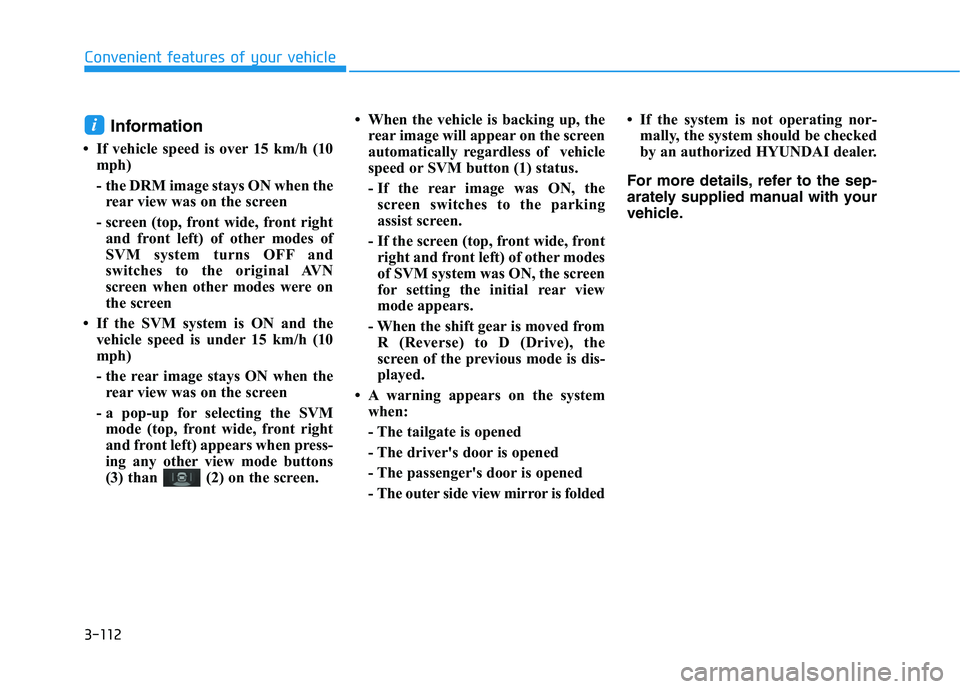
- a pop-up for selecting the SVM mode (top, front wide, front right
and front left) appears when press-
ing any other view mode buttons
(3) than (2) on the screen. When the vehicle is backing up, the
rear image will appear on the screen
automatically regardless of vehicle
speed or SVM button (1) status.
- If the rear image was ON, thescreen switches to the parking
assist screen.
- If the screen (top, front wide, front right and front left) of other modes
of SVM system was ON, the screen
for setting the initial rear view
mode appears.
- When the shift gear is moved from R (Reverse) to D (Drive), the
screen of the previous mode is dis-
played.
A warning appears on the system when:
- The tailgate is opened
- The driver's door is opened
- The passenger's door is opened
- The outer side view mirror is folded If the system is not operating nor-
mally, the system should be checked
by an authorized HYUNDAI dealer.
For more details, refer to the sep-
arately supplied manual with your
vehicle.i
Page 200 of 558
3-113
Convenient features of your vehicle
3
REMOTE SMART PARKING ASSIST
(RSPA) system helps drivers park
their vehicle by using sensors to
detect parking spaces, control the
steering wheel, shift the gear and
adjust vehicle speed automatically
with instructions through sound and
AVN screen.
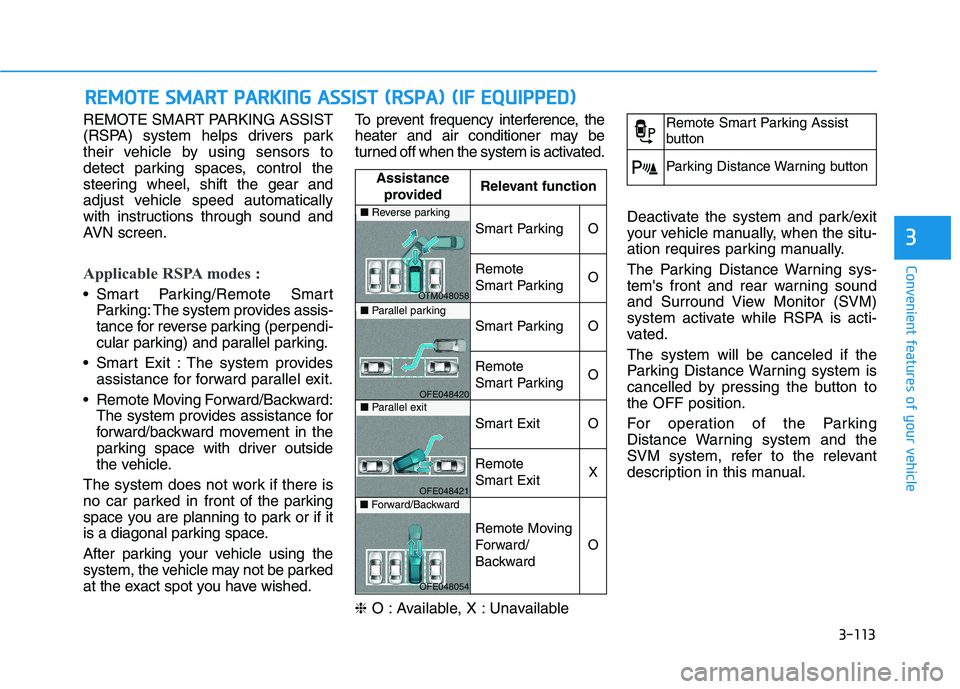
Applicable RSPA modes :
Smart Parking/Remote SmartParking: The system provides assis-
tance for reverse parking (perpendi-
cular parking) and parallel parking.
Smart Exit : The system provides assistance for forward parallel exit.
Remote Moving Forward/Backward: The system provides assistance for
forward/backward movement in the
parking space with driver outside
the vehicle.
The system does not work if there is
no car parked in front of the parking
space you are planning to park or if it
is a diagonal parking space.
After parking your vehicle using the
system, the vehicle may not be parked
at the exact spot you have wished. To prevent frequency interference, the
heater and air conditioner may be
turned off when the system is activated. ❈
O : Available, X : Unavailable Deactivate the system and park/exit
your vehicle manually, when the situ-
ation requires parking manually.
The Parking Distance Warning sys-
tem's front and rear warning sound
and Surround View Monitor (SVM)
system activate while RSPA is acti-
vated. The system will be canceled if the
Parking Distance Warning system is
cancelled by pressing the button tothe OFF position.
For operation of the Parking
Distance Warning system and the
SVM system, refer to the relevant
description in this manual.
RR
EEMM OOTTEE SS MM AARRTT PP AA RRKK IINN GG AA SSSSIISS TT (( RR SSPP AA )) (( IIFF EE QQ UUIIPP PP EEDD ))
Assistance
provided Relevant function
Smart ParkingO
Remote
Smart ParkingO
Smart ParkingO
Remote
Smart ParkingO
Smart ExitO
Remote
Smart ExitX
Remote Moving
Forward/
Backward
O
■
Reverse parking
OTM048058
■Parallel parking
OFE048420
■Parallel exit
OFE048421
■Forward/Backward
OFE048054
Remote Smart Parking Assist
button
Parking Distance Warning button
Page 207 of 558
3-120
Convenient features of your vehicle
How the System Works
(Smart Parking)
Smart Parking is available with the
driver on board. Make sure the con-
ditions available before activating the
Smart parking function.
1. Select Smart Parking:Press the RSPA button with the
shift lever placed in D (Drive) or N
(Neutral) position. ❈However, the Smart Exit is
selected if you press the RSPA
button when the gear is in N
(Neutral) position after the initial
startup.
2. Search for parking space: Slowly move forward below 20 km/h (12mph)
3. Search complete: Automatic search by sensor.
However, check the actual parking
environment before parking the
vehicle.
4. Select parking type: Reverse (left/right), parallel (left/right)
5. Operating instructions: Smart Parking/Remote Smart Parking 6. Smart Parking assist: Steering
wheel, gear shift and vehicle
speed control (reverse parking).
7. Parking complete: Smart Parking complete after reaching the park-ing position
❈ After the parking is complete,
arrange the vehicle position manu-
ally, if necessary.
❈ You can use Smart Parking after
navigation or home screen display
on AVN (You cannot use Smart
Parking if you don't choose
"Confirm" on AVN booting)
1. Selecting Parking mode
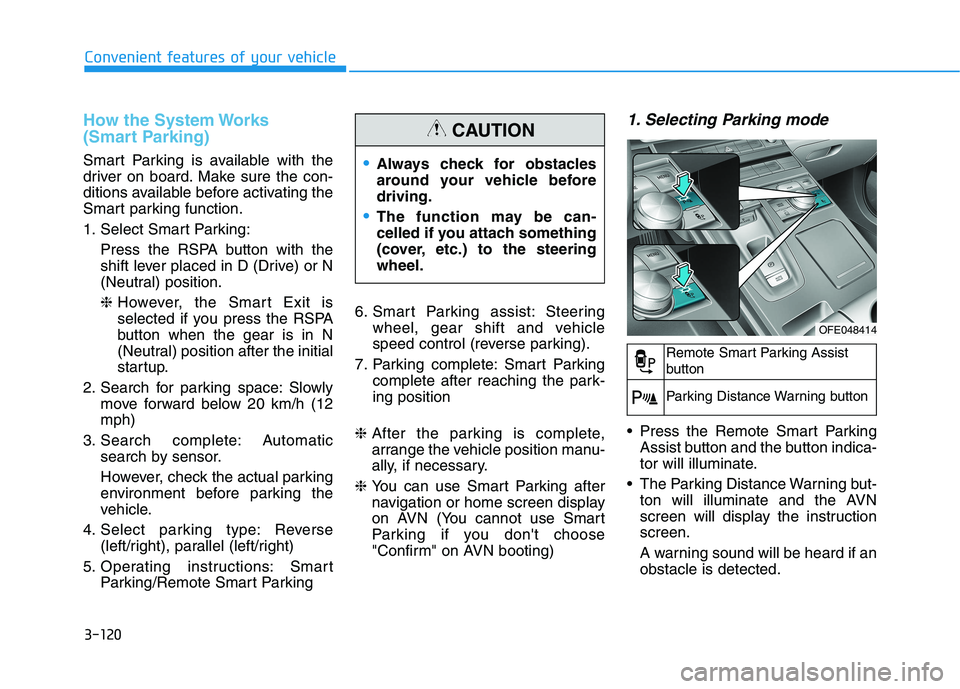
Press the Remote Smart Parking
Assist button and the button indica-
tor will illuminate.
The Parking Distance Warning but- ton will illuminate and the AVN
screen will display the instructionscreen.
A warning sound will be heard if an obstacle is detected.
Always check for obstacles
around your vehicle beforedriving.
The function may be can-
celled if you attach something
(cover, etc.) to the steeringwheel.
CAUTION
OFE048414
Remote Smart Parking Assist
button
Parking Distance Warning button
Page 208 of 558
3-121
Convenient features of your vehicle
3
To deactivate the system:
1. Press the RSPA button again (untilthe "Selecting parking mode" stage).
2. Shift the gear to R (Reverse) posi- tion before the operation of the
Smart Parking assist.
3. Press the 'Cancel' button on the AVN screen while the Smart
Parking is in activation.
4. Press the Parking Distance Warning button while the Smart
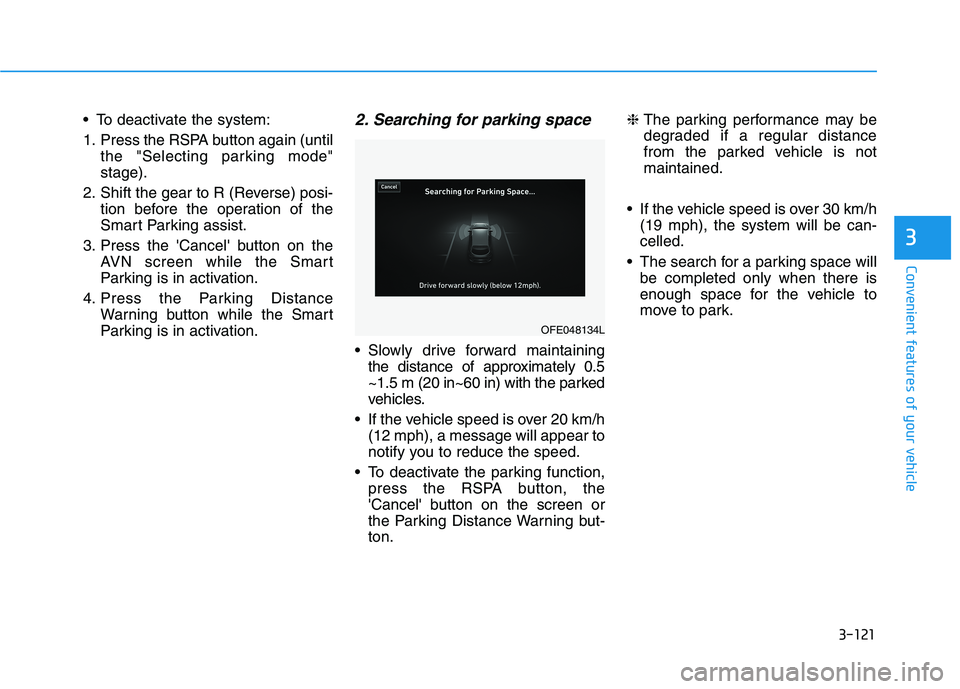
Parking is in activation.2. Searching for parking space
Slowly drive forward maintainingthe distance of approximately 0.5
~1.5 m (20 in~60 in) with the parked
vehicles.
If the vehicle speed is over 20 km/h (12 mph), a message will appear to
notify you to reduce the speed.
To deactivate the parking function, press the RSPA button, the
'Cancel' button on the screen or
the Parking Distance Warning but-ton. ❈
The parking performance may be
degraded if a regular distance
from the parked vehicle is notmaintained.
If the vehicle speed is over 30 km/h (19 mph), the system will be can-celled.
The search for a parking space will be completed only when there is
enough space for the vehicle to
move to park.
OFE048134L
Page 211 of 558
3-124
Convenient features of your vehicle
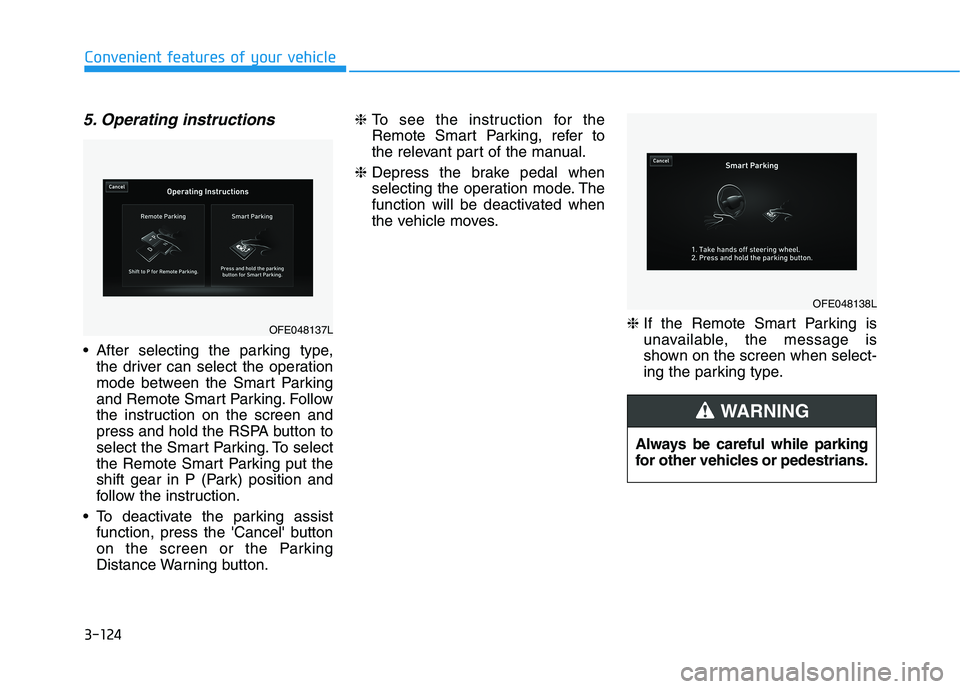
5. Operating instructions
After selecting the parking type,the driver can select the operation
mode between the Smart Parking
and Remote Smart Parking. Follow
the instruction on the screen and
press and hold the RSPA button to
select the Smart Parking. To select
the Remote Smart Parking put the
shift gear in P (Park) position and
follow the instruction.
To deactivate the parking assist function, press the 'Cancel' button
on the screen or the Parking
Distance Warning button. ❈
To see the instruction for the
Remote Smart Parking, refer to
the relevant part of the manual.
❈ Depress the brake pedal when
selecting the operation mode. The
function will be deactivated when
the vehicle moves.
❈ If the Remote Smart Parking is
unavailable, the message is
shown on the screen when select-
ing the parking type.
Always be careful while parking
for other vehicles or pedestrians.
WARNING
OFE048137L
OFE048138L
Page 213 of 558
3-126
Convenient features of your vehicle
To cancel the Smart Parking while
in operation
(1) Press the RSPA button beforeselecting the operation mode.
(2) Shift the gear to to R (Reverse) position before the operation of
the "Smart Parking assist" stage.
(3) Press the Parking Distance
Warning button or the
'Cancel'button on the AVNscreen.
(4) Driver controls the vehicle during the system assist
When the driver shifts the gear after
depressing the brake pedal to stop
the vehicle, the gear shifts and the
Smart Parking is deactivated. In this
case, the Electronic Parking Brake(EPB) is not engaged.
The Smart Parking assist will stop
temporarily when:
(1) An obstacle at the direction the vehicle is heading is detected.
(2) The door or tailgate is open.
(3) The driver’s seatbelt is unfas- tened.
(4) The Rear Cross-Traffic Collision- Avoidance Assist (RCCA) system
is activated while reversing.
(5) The driver releases the RSPA button.
(6) The drivers stops the vehicle by depressing the brake pedal.
❈ The vehicle stops when the Smart
Parking assist will stop temporari-
ly and the Smart Parking assist
will resume when the above condi-tion is cleared.
If the Parking Distance Warningsystem warning sound (distance
from object is within 30 cm (12
in.): continuous beep) occurs,
check the surrounding.
CAUTION
Page 216 of 558
3-129
Convenient features of your vehicle
3
If the driver releases the button thevehicle will stop and the assist will
stop temporarily. Press and hold
the button again to resume the
operation.
❈ You will hear frequent beep
sounds if the driver gets off the
vehicle after setting the Remote
Parking mode.
❈ Press the moving forward or back-
ward button again after checkingthe distance (within about 3 ~ 5 m
(10 ~ 16 ft.)) from the vehicles if
the vehicle didn't move after
pressing and holding the smart
key button for about 5 seconds.7. Remote smart parking com-
plete
When the parking is complete, the
message is displayed on the AVN
screen and the vehicle is automati-
cally turned off. Drivers always
should check whether the door, win-
dow and sunroof are closed and the
door is locked.
When parking is complete:
- The parking complete sound (fre-quent beep) is generated.
- The gear P (Park) and Electronic Parking Brake (EPB) are engaged
automatically.
❈ Release the moving forward/back-
ward button on the smart key.
❈ The parking may complete bump-
ing on the stopper.
❈ When parking is complete, check
the surrounding conditions.Always check for obstacles
around your vehicle beforedriving.
The function may be can-
celled if you attach something
(cover, etc.) to the steeringwheel.
Make sure all the passengers
exit the vehicle when the
Remote Smart Parking isassisted.
Make sure all the smart keys
are outside the vehicle.
The smart key detection
range from the vehicle may
vary depending on the sur-
rounding environment
(indoor/outdoor, strong elec-tric field area).
The smart key detection
range may change as the
vehicle moves. Maintain an
appropriate distance from the
vehicle.
CAUTION
Page 218 of 558
3-131
Convenient features of your vehicle
3
(12) The suspended status lasts forover 1 minute
(13) The driver continuously presses and releases the smart key's
moving forward/backward but-
ton over 10 times
(14) The vehicle is unable to enter the parking space
(15) The Traction Control System
(TCS) is activated while control-
ling the vehicle speed
(16) The smart key has failure
(17) The accelerator/brake pedal is depressed while all the doors are closed
(18) The brake pedal is depressed while the driver's door is open
and the smart key is outside the
vehicle
(19) The theft alarm system is acti- vated
When the Remote Smart Parking assist is cancelled, gear P (Park)
and Electronic Parking Brake
(EPB) are engaged automatically.
After engaged, the vehicle is auto-
matically turned off. Frequent beep sounds will gener-
ate to alert the deactivation of the
Remote Smart Parking Assist.
How the System Works
(Smart Exit)
Smart exit is available with the driver
on board. Make sure the conditions
available before activation the Smart
parking function.
1. Select Smart Exit:
Press the RSPA button with the
shift lever placed in P (Park) or N
(Neutral) position without driving
the vehicle after the initial startup.
*N (Neutral): Press RSPA button
after starting the vehicle and with-
out driving the vehicle. The Smart
Exit is selected. Then the Parkingmode is automatically selected
after driving.
*P (Park): After driving the vehicle
press RSPA button and Remote
Moving Forward/Backward isautomatically selected.
2. Search for smart exit space: Automatic searching by sensor atstop However, check the actual envi-
ronment before using Smart exitfunction.
3. Select smart exit direction: Parallel (left/right)
4. Smart Exit assist: Steering wheel, gear shift and vehicle speed con-
trol (parallel exit)
5. Smart Exit complete
After the Smart Exit is complete,
make sure to check the surrounding
road conditions.
However, the Exit mode is activated
when below conditions are met:
The vehicle speed is kept under 5 km/h (3 mph) after the vehicle is
turned on.
The parallel parking by the Remote Smart Parking assist is complete.
Always be careful while exiting
for other vehicles or pedestrians.
WARNING
Page 234 of 558
3-147
Convenient features of your vehicle
3
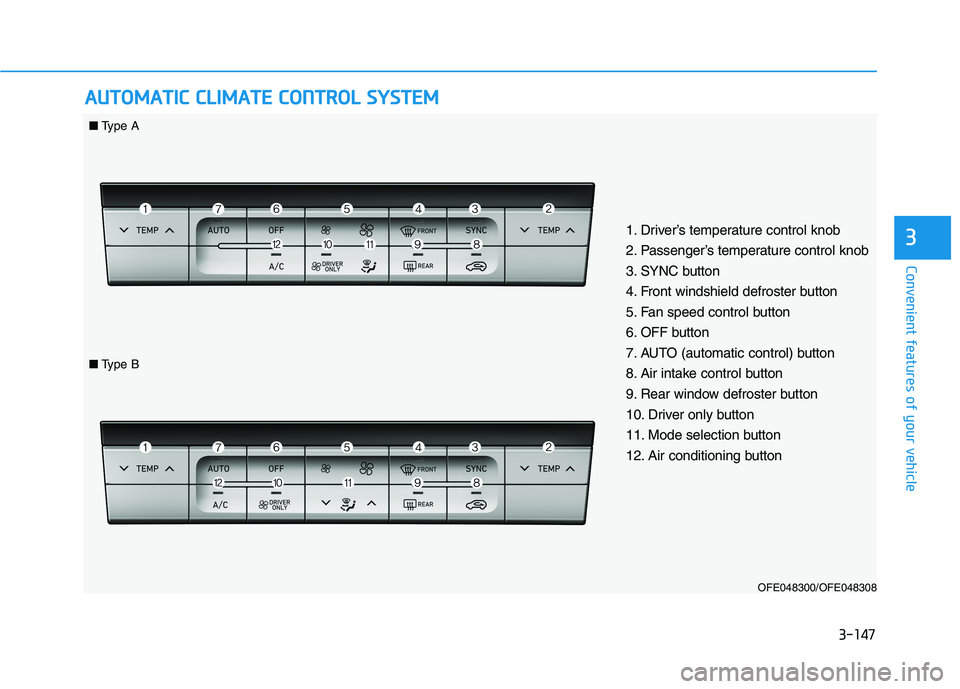
AAUU TTOO MM AATTIICC CC LLIIMM AATTEE CC OO NNTTRR OO LL SS YY SSTT EEMM
OFE048300/OFE048308
1. Driver’s temperature control knob
2. Passenger’s temperature control knob
3. SYNC button
4. Front windshield defroster button
5. Fan speed control button
6. OFF button
7. AUTO (automatic control) button
8. Air intake control button
9. Rear window defroster button
10. Driver only button
11. Mode selection button
12. Air conditioning button
■
Type A
■Type B
Page 239 of 558
3-152
Convenient features of your vehicle
Adjusting the driver and passenger
side temperature individually
Press the "SYNC" button again to
operate the driver and passenger
side temperature individually. The
button indicator will turn off.
Temperature conversion
If the battery has been discharged or
disconnected, the temperature mode
display will reset to Fahrenheit.
To change the temperature unit from °C to °F or °F to °C:
- Press the AUTO button while press-ing the OFF button on the climate
control unit for 3 seconds.
- Go to General settings mode Unit
Temperature in the AVN display.
The temperature unit on both the
cluster LCD display and climate con-
trol screen will change.
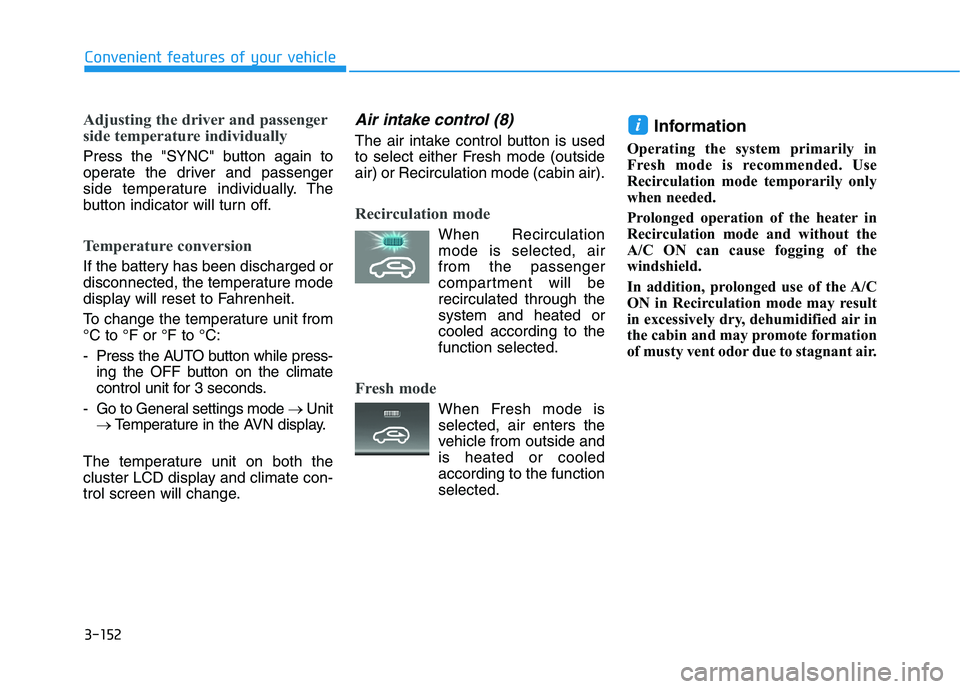
Air intake control (8)
The air intake control button is used
to select either Fresh mode (outsideair) or Recirculation mode (cabin air).
Recirculation mode
When Recirculation mode is selected, air from the passenger
compartment will berecirculated through thesystem and heated or
cooled according to thefunction selected.
Fresh mode
When Fresh mode is selected, air enters the
vehicle from outside andis heated or cooled
according to the functionselected. Information
Operating the system primarily in
Fresh mode is recommended. Use
Recirculation mode temporarily only
when needed.
Prolonged operation of the heater in
Recirculation mode and without the
A/C ON can cause fogging of the
windshield.
In addition, prolonged use of the A/C
ON in Recirculation mode may result
in excessively dry, dehumidified air in
the cabin and may promote formation
of musty vent odor due to stagnant air.
i