light HYUNDAI NEXO 2023 Manual Online
[x] Cancel search | Manufacturer: HYUNDAI, Model Year: 2023, Model line: NEXO, Model: HYUNDAI NEXO 2023Pages: 558, PDF Size: 35.01 MB
Page 258 of 558
3-171
Convenient features of your vehicle
3
The wireless charging processmay temporarily stop, when tem-
perature abnormally increasesinside the wireless cellular phone
charging system. Stop the charg-ing cellular phone and wait until
temperature falls to a certain level.
The wireless charging process may temporarily stop when there
is any metallic item, such as a
coin, between the wireless cellular
phone charging system and the
cellular phone.
When charging some cellular phones with a self-protection fea-
ture, the wireless charging speed
may decrease and the wireless
charging may stop.
If the cellular phone has a thick cover, the wireless charging may
not be possible.
If the cell phone is not completely contacting the charging pad, wire-
less charging may not operate
properly.
Some magnetic items like credit cards, phone cards or rail tickets
may be damaged if left with the
cellular phone during the charging
process. When any cellular phone without a
wireless charging function or ametallic object is placed on the
charging pad, a small noise may
sound. This small sound is due to
the vehicle discerning compatibil-ity of the object placed on the
charging pad. It does not affect
your vehicle or the cellular phone
in any way.
Information
If the POWER button is in the OFF
position, the charging also stops.
Information
This device complies with Industry
Canada RSS-210 standard.
Operation is subject to the following
two conditions:
1. This device may not cause harmful interference.
2. This device must accept any inter- ference received, including interfer-
ence that may cause undesired
operation.
Clock
Select the Vehicle Settings menu on
the AVN screen ➟Select [Date/Time].
GPS time: Displays time according to the received GNSS time.
Daylight saving time : The clock is adjusted forward one hour.
Time format : Switches to 12 hour or 24 hour.
For more details, refer to the sepa-
rately supplied Navigation manual.
i
i
Do not attempt to adjust the
clock while driving. Doing so
may result in distracted driving
which may lead to an accident
involving personal injury ordeath.
WARNING
Page 260 of 558
3-173
Convenient features of your vehicle
3
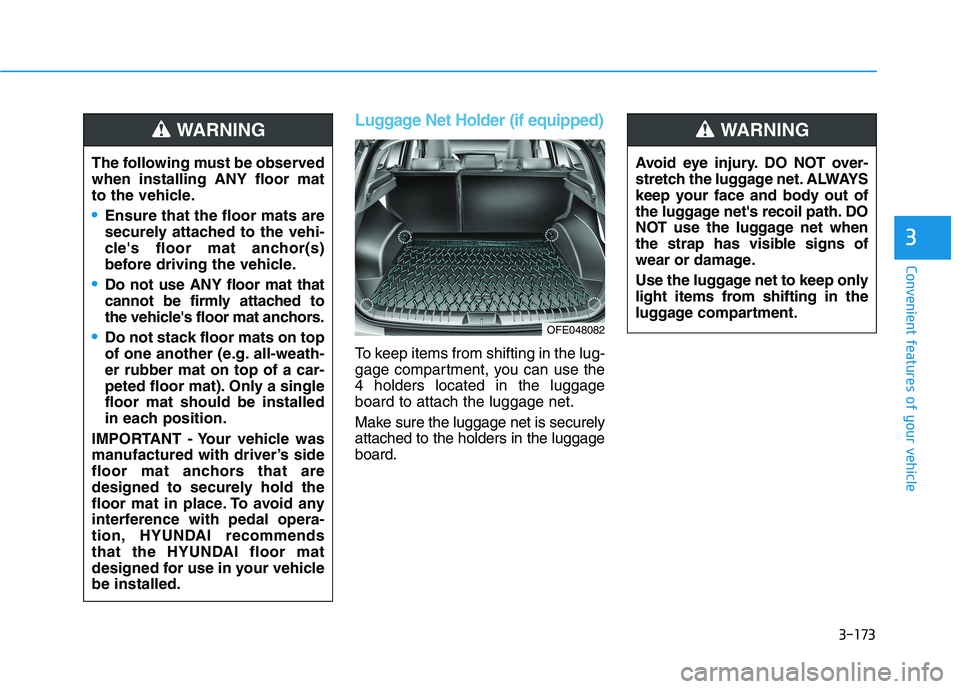
Luggage Net Holder (if equipped)
To keep items from shifting in the lug-
gage compartment, you can use the4 holders located in the luggageboard to attach the luggage net.
Make sure the luggage net is securely attached to the holders in the luggageboard.
The following must be observedwhen installing ANY floor mat
to the vehicle.
Ensure that the floor mats are
securely attached to the vehi-
cle's floor mat anchor(s)
before driving the vehicle.
Do not use ANY floor mat that
cannot be firmly attached to
the vehicle's floor mat anchors.
Do not stack floor mats on top
of one another (e.g. all-weath-er rubber mat on top of a car-
peted floor mat). Only a singlefloor mat should be installed
in each position.
IMPORTANT - Your vehicle was
manufactured with driver’s side
floor mat anchors that are
designed to securely hold the
floor mat in place. To avoid any
interference with pedal opera-
tion, HYUNDAI recommends
that the HYUNDAI floor mat
designed for use in your vehiclebe installed.
WARNING
Avoid eye injury. DO NOT over-
stretch the luggage net. ALWAYS
keep your face and body out of
the luggage net's recoil path. DO
NOT use the luggage net when
the strap has visible signs of
wear or damage.
Use the luggage net to keep only
light items from shifting in the
luggage compartment.
WARNING
OFE048082
Page 269 of 558
5
Blind-Spot View Monitor System ......................5-77Operating Conditions ......................................................5-77
Blind-Spot View Monitor system warning ...............5-78
Lane Keeping Assist (LKA) System ...................5-79 LKA System Operation...................................................5-81
Warning Light and Message.........................................5-83
Limitations of the System .............................................5-85
LKA System Function Change......................................5-86
Lane Following Assist (LFA) System.................5-87 LFA Operation ..................................................................5-88
Warning Message............................................................5-90
Limitations of the System .............................................5-92
Driver Attention Warning (DAW) System .........5-94 System Setting and Activation.....................................5-94
Resetting the System .....................................................5-95
System Standby ...............................................................5-96
System Malfunction .......................................................5-96
Smart Cruise Control With Stop &
Go System .............................................................5-98 Smart Cruise Control Switch ........................................5-99
To Adjust the Sensitivity of
Smart Cruise Control ....................................................5-100 To Convert to Cruise Control Mode .........................5-100
Smart Cruise Control Speed .......................................5-101 Smart Cruise Control Vehicle-to-Vehicle
Distance ...........................................................................5-105
Sensor to Detect Distance to the Vehicle Ahead .5-108
Limitations of the System...........................................5-110
Declaration of conformity ................................5-115
Leading Vehicle Departure Alert .....................5-116 System Setting and Activation ..................................5-116
Special Driving Conditions ................................5-118 Hazardous Driving Conditions....................................5-118
Rocking the Vehicle ......................................................5-118
Smooth Cornering .........................................................5-119
Driving at Night .............................................................5-119
Driving in the Rain ........................................................5-119
Driving in Flooded Areas.............................................5-120
Highway Driving ............................................................5-120
Reducing the Risk of a Rollover ...............................5-121
Winter Driving ....................................................5-122 Snow or Icy Conditions................................................5-122
Winter Precautions .......................................................5-123
Vehicle Load Limit..............................................5-125 Tire Loading Information Label .................................5-125
Trailer Towing .....................................................5-130
Page 271 of 558
5-4
Driving your vehicle
Before Entering the Vehicle
• Be sure all windows, outside mir-ror(s), and outside lights are clean
and unobstructed.
Remove frost, snow, or ice.
Visually check the tires for uneven wear and damage.
Check under the vehicle for any sign of leaks.
Be sure there are no obstacles behind you if you intend to back up.
Before Starting
Make sure the hood, the tailgate,and the doors are securely closed
and locked.
Adjust the position of the seat and steering wheel.
Adjust the inside and outside rearview mirrors.
Verify all the lights work.
Fasten your seatbelt. Check that all passengers have fastened their
seatbelts.
Check the gauges and indicators in the instrument panel and the mes-
sages on the instrument display
when the POWER button is in theON position.
Check that any items you are car- rying are stored properly or fas-
tened down securely.
BBEEFFOO RREE DD RRIIVV IINN GG
To reduce the risk of SERIOUS
INJURY or DEATH, take the fol-
lowing precautions:
•ALWAYS wear your seat belt.
All passengers must be prop-
erly belted whenever the vehi-
cle is moving. For more
details, refer to "Seat Belts" in
chapter 2.
Always drive defensively.
Assume other drivers or pedes-
trians may be careless andmake mistakes.
Stay focused on the task of
driving. Driver distraction cancause accidents.
Leave plenty of space between
you and the vehicle in front of
you.
WARNING
Page 277 of 558
5-10
Driving your vehicle
To prevent damage to the vehicle:
If the " " indicator turns off
while you are in motion, do not
attempt to shift to the P (Park)position.
To prevent damage to the vehicle:
When the stop lamp fuse is blown,
you cannot normally start the
vehicle. Replace the fuse with a
new one. If you are not able to
replace the fuse, you can start the
vehicle by pressing and holding
the POWER button for 10 seconds
with the POWER button in the ACCposition.
Do not press the POWER button
for more than 10 seconds except
when the stop lamp fuse is blown.
For your safety always depress
the brake pedal before starting the
vehicle.Information
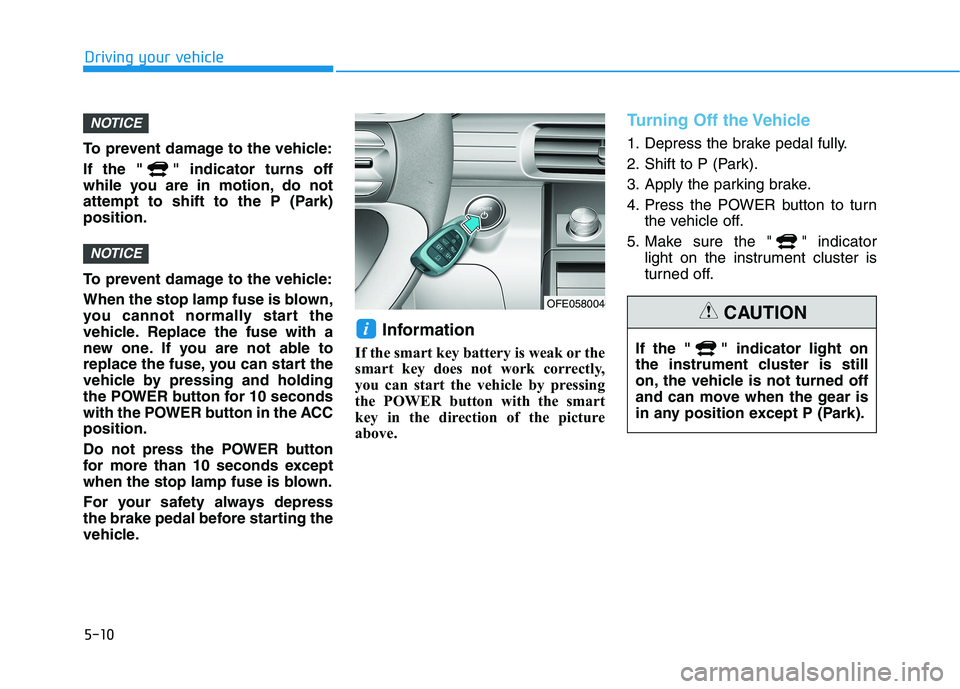
If the smart key battery is weak or the
smart key does not work correctly,
you can start the vehicle by pressing
the POWER button with the smart
key in the direction of the picture
above.
Turning Off the Vehicle
1. Depress the brake pedal fully.
2. Shift to P (Park).
3. Apply the parking brake.
4. Press the POWER button to turn the vehicle off.
5. Make sure the " " indicator light on the instrument cluster is
turned off.
i
NOTICE
NOTICE
OFE058004
If the " " indicator light on
the instrument cluster is still
on, the vehicle is not turned off
and can move when the gear is
in any position except P (Park).CAUTION
Page 283 of 558
5-16
Driving your vehicle
Good Driving Practices
Never shift to P (Park) or N(Neutral) to any other position with
the accelerator pedal depressed.
Never shift to P (Park) when the vehicle is in motion.
Be sure the vehicle is completely
stopped before you attempt to shift
into R (Reverse) or D (Drive).
Do not shift to N (Neutral) when driving. Doing so may result in anaccident.
Do not drive with your foot resting on the brake pedal. Even light, butconsistent pedal pressure can
result in the brakes overheating,
brake wear and possibly even
brake failure.
Always apply the parking brake when leaving the vehicle. Do notdepend on placing the gear in P
(Park) to keep the vehicle from
moving. Exercise extreme caution when
driving on a slippery surface. Be
especially careful when braking,
accelerating or shifting gears. On a
slippery surface, an abrupt change
in vehicle speed can cause the
drive wheels to lose traction and
may cause loss of vehicle controlresulting in an accident
Optimum vehicle performance and economy is obtained by smoothlydepressing and releasing the
accelerator.
To reduce the risk of SERIOUS
INJURY or DEATH:
ALWAYS wear your seat belt.
In a collision, an unbelted
occupant is significantly more
likely to be seriously injured
or killed than a properly belt-ed occupant.
Avoid high speeds when cor- nering or turning.
Do not make quick steering
wheel movements, such as
sharp lane changes or fast,sharp turns.
WARNING
The risk of rollover is greatly
increased if you lose control
of your vehicle at highwayspeeds.
Loss of control often occurs if
two or more wheels drop off
the roadway and the driver
over steers to reenter the
roadway.
In the event your vehicle
leaves the roadway, do not
steer sharply. Instead, slow
down before pulling back into
the travel lanes.
HYUNDAI recommends you
follow all posted speed limits.
Driving uphill or downhill,
always shift to D (Drive) when
driving forward or to R
(Reverse) when driving back-
wards, and check the gear
position indicated on the clus-
ter before driving. If you drivein the opposite direction of
the selected gear, the vehiclewill turn off and a seriousaccident might be occurreddue to the degraded brake
performance.
Page 285 of 558
5-18
Power Brakes
Your vehicle has power-assisted
brakes that adjust automatically
through normal usage.
If the power is not supplied such as
battery discharge, the power assist
for the brakes will not work. You can
still stop your vehicle by applying
greater force to the brake pedal than
typical. The stopping distance, how-
ever, will be longer than with power
brakes.
Do not pump the brake pedal when
the power assist has been interrupt-ed.
Pump the brake pedal only when
necessary to maintain steering con-
trol on slippery surfaces.
BBRRAA KKIINN GG SS YY SSTT EEMM
Driving your vehicle
Take the following precautions:
Do not drive with your foot resting on the brake pedal.This will create abnormal high
brake temperatures, exces-sive brake lining and pad
wear, and increased stoppingdistances.
When descending down a
long or steep hill, use the pad-
dle shifter (left side lever) to
increase regenerative braking
control in order to control
your speed without using the
brake pedal excessively.
Applying the brakes continu-
ously will cause the brakes to
overheat and could result in a
temporary loss of braking per-
formance.
Wet brakes may impair the
vehicle's ability to safely slow
down; the vehicle may alsopull to one side when the
brakes are applied. Applying
the brakes lightly will indicate
whether they have been
affected in this way. Always
test your brakes in this fash-
ion after driving through deep
water. To dry the brakes, light-
ly tap the brake pedal to heatup the brakes while maintain-
ing a safe forward speed until
brake performance returns to
normal. Avoid driving at highspeeds until the brakes func-
tion correctly.WARNING
Page 286 of 558
5-19
Driving your vehicle
5
Do not continue depressing thebrake pedal if the " "indica-
tor is OFF. The battery may be
discharged.
Noise and vibration generated during braking is normal.
Under normal operation, electric brake pump noise and motor
vibration may occur temporarily
in below cases.
- When the pedal is depressedsuddenly.
- When the pedal is repeatedly depressed in short intervals.
- When the ABS function is acti- vated while braking.
Disc Brake Wear Indicator
When your brake pads are worn and
new pads are required, you will hear
a high pitched warning sound from
your front or rear brakes. You mayhear this sound come and go or it
may occur whenever you depress
the brake pedal.
Note that some driving conditions or
climates may cause a brake squeal
when you first apply (or lightly apply)
the brakes. This is normal and does
not indicate a problem with your
brakes.
To avoid costly brake repairs, do
not continue to drive with wornbrake pads.
Information
Always replace brake pads as com-
plete front or rear axle sets.
Electronic Parking Brake (EPB)
Applying the parking brake
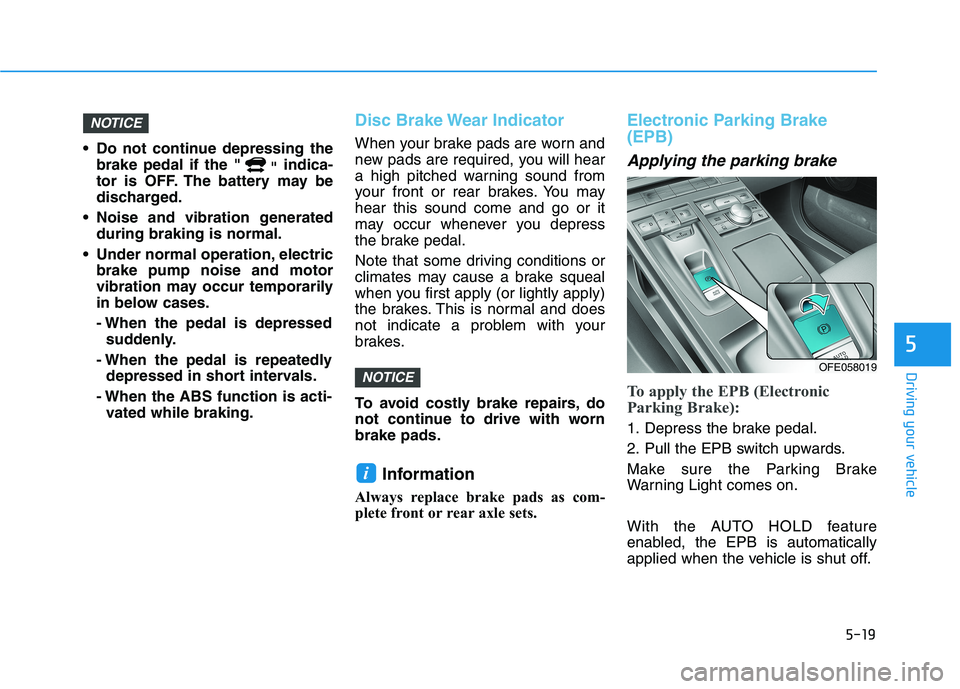
To apply the EPB (Electronic
Parking Brake):
1. Depress the brake pedal.
2. Pull the EPB switch upwards.
Make sure the Parking Brake
Warning Light comes on.
With the AUTO HOLD feature
enabled, the EPB is automatically
applied when the vehicle is shut off.
i
NOTICE
NOTICE
OFE058019
Page 287 of 558
5-20
Driving your vehicle
However, if the Auto Hold function is
not activated, the EPB is not auto-
matically applied even though the
vehicle stops and turned off.Releasing the parking brake
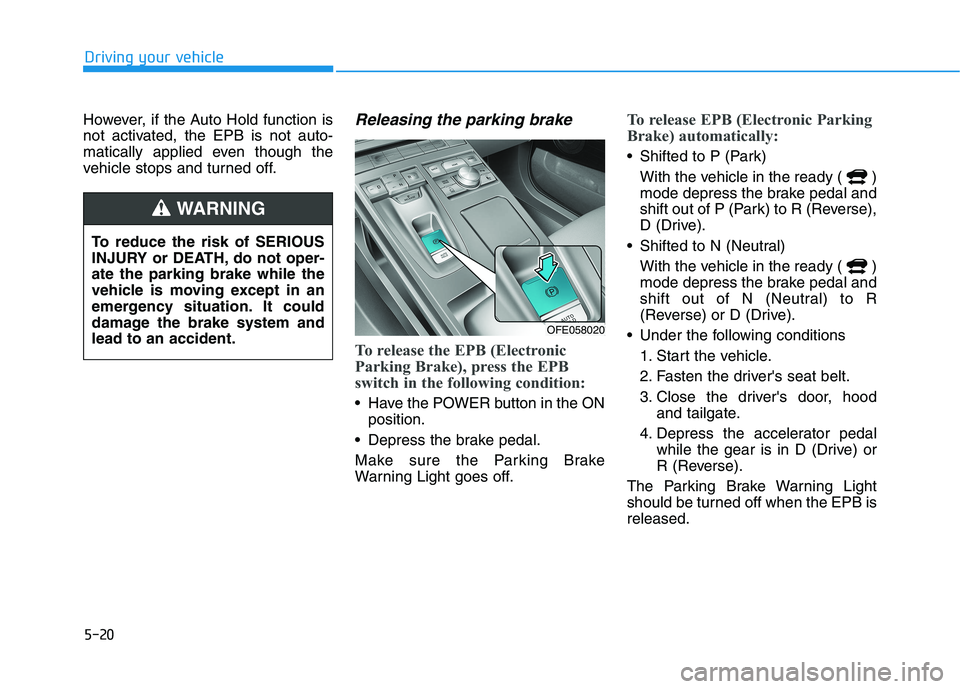
To release the EPB (Electronic
Parking Brake), press the EPB
switch in the following condition:
Have the POWER button in the ONposition.
Depress the brake pedal.
Make sure the Parking Brake
Warning Light goes off.
To release EPB (Electronic Parking
Brake) automatically:
Shifted to P (Park) With the vehicle in the ready ( )
mode depress the brake pedal and
shift out of P (Park) to R (Reverse),
D (Drive).
Shifted to N (Neutral) With the vehicle in the ready ( )
mode depress the brake pedal and
shift out of N (Neutral) to R
(Reverse) or D (Drive).
Under the following conditions 1. Start the vehicle.
2. Fasten the driver's seat belt.
3. Close the driver's door, hood and tailgate.
4. Depress the accelerator pedal while the gear is in D (Drive) or
R (Reverse).
The Parking Brake Warning Light
should be turned off when the EPB isreleased.
To reduce the risk of SERIOUS
INJURY or DEATH, do not oper-ate the parking brake while the
vehicle is moving except in an
emergency situation. It could
damage the brake system andlead to an accident.
WARNING
OFE058020
Page 288 of 558
5-21
Driving your vehicle
5
Information
For your safety, you can engage the EPB even though the POWER but-
ton is in the OFF position, but you
cannot release it.
For your safety, depress the brake pedal and release the parking brake
manually with the EPB switch when
you drive downhill or when backing
up the vehicle.
If the parking brake warning light is still on even though the EPB
has been released, have the sys-
tem checked an authorized
HYUNDAI dealer.
Do not drive your vehicle with the EPB applied. It may cause
excessive brake pad and brake
rotor wear.EPB (Electronic Parking Brake)
may be automatically applied
when:
Requested by other systems
If the driver turns the vehicle offwhile Auto Hold is operating, EPB will be automatically applied.
Warning messages
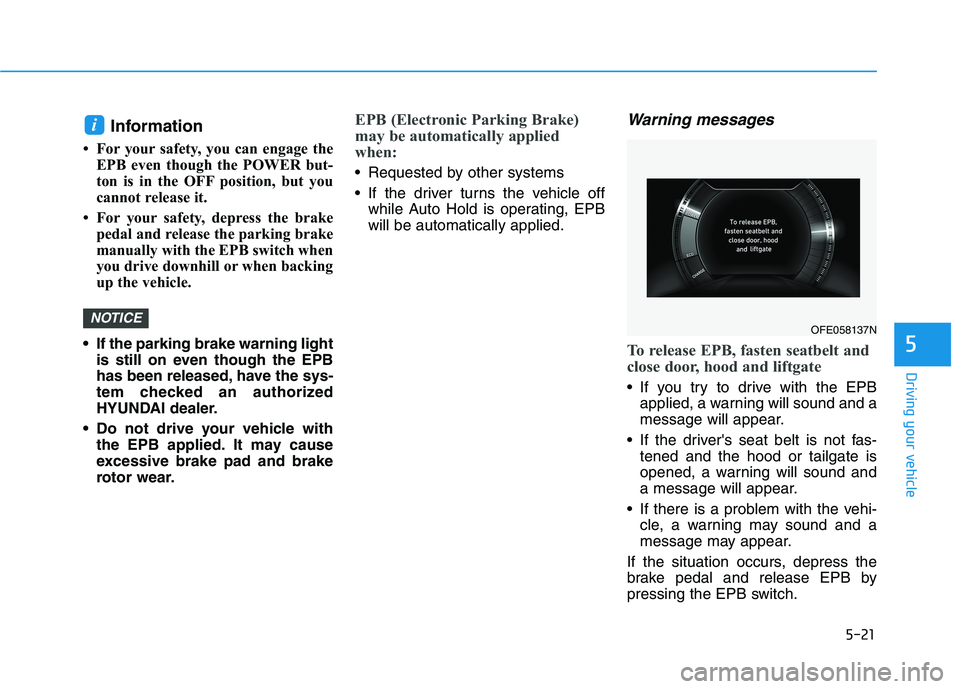
To release EPB, fasten seatbelt and
close door, hood and liftgate
If you try to drive with the EPBapplied, a warning will sound and a
message will appear.
If the driver's seat belt is not fas- tened and the hood or tailgate is
opened, a warning will sound and
a message will appear.
If there is a problem with the vehi- cle, a warning may sound and a
message may appear.
If the situation occurs, depress the
brake pedal and release EPB by
pressing the EPB switch.
NOTICE
i
OFE058137N