fog light HYUNDAI NEXO 2023 Owners Manual
[x] Cancel search | Manufacturer: HYUNDAI, Model Year: 2023, Model line: NEXO, Model: HYUNDAI NEXO 2023Pages: 558, PDF Size: 35.01 MB
Page 176 of 558
3-89
Convenient features of your vehicle
3
LLIIGG HH TTIINN GG
Exterior Lights
Lighting control
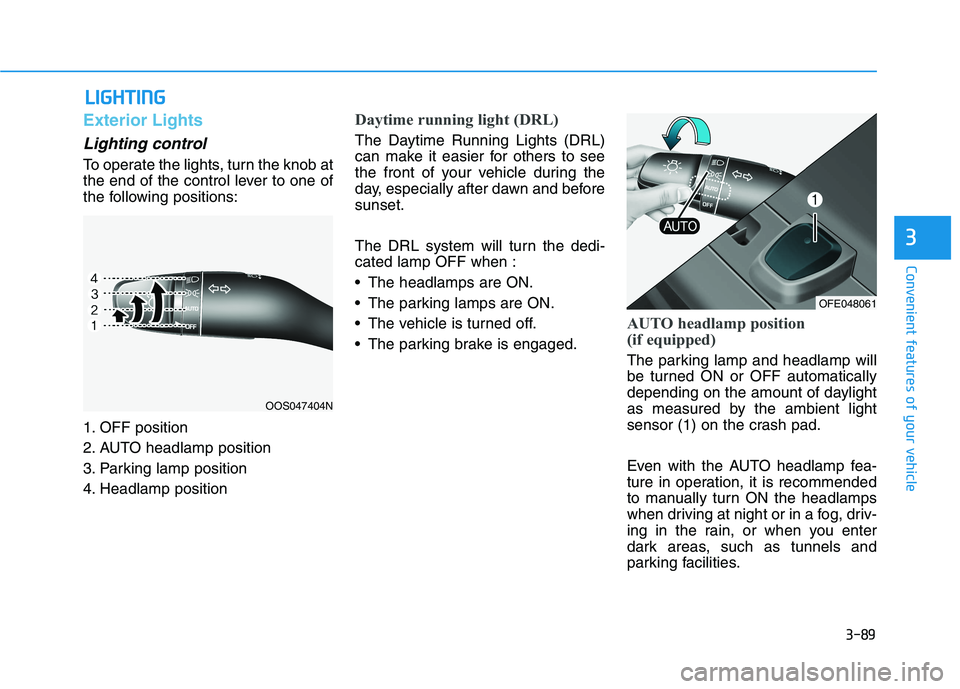
To operate the lights, turn the knob at
the end of the control lever to one of
the following positions:
1. OFF position
2. AUTO headlamp position
3. Parking lamp position
4. Headlamp position
Daytime running light (DRL)
The Daytime Running Lights (DRL)
can make it easier for others to see
the front of your vehicle during the
day, especially after dawn and beforesunset.
The DRL system will turn the dedi- cated lamp OFF when :
The headlamps are ON.
The parking lamps are ON.
The vehicle is turned off.
The parking brake is engaged.
AUTO headlamp position
(if equipped)
The parking lamp and headlamp will
be turned ON or OFF automatically
depending on the amount of daylight
as measured by the ambient light
sensor (1) on the crash pad.
Even with the AUTO headlamp fea-
ture in operation, it is recommended
to manually turn ON the headlamps
when driving at night or in a fog, driv-
ing in the rain, or when you enter
dark areas, such as tunnels and
parking facilities.
OOS047404N
OFE048061
Page 180 of 558
3-93
Convenient features of your vehicle
3
The system may not operate nor-
mally if any of the following con-ditions should occur:
1) When the illumination froman on-coming vehicle or a
vehicle in front is dim. Such
examples may include:
When the headlamps of an on-
coming vehicle or the tail
lamps of a vehicle in front is
covered with dust, snow, or
water.
When the headlamps on an on-
coming vehicle are OFF, but the
fog lamps are ON.
2) When the High Beam Assist camera is adversely affected
by an external condition.
Such examples may include:
When the vehicle's head-
lamps have been damaged or
not repaired properly.
When the vehicle headlamps
are not aimed properly.
When the vehicle is driven on
a narrow curved road or rough
road.
When the vehicle is driven on
an uphill road or downhill
road.
When only part of the vehicle in
front is visible on a crossroad
or curved road.
When there is a traffic light,
reflecting sign, flashing sign or
mirror.
When the road conditions are
bad such as being wet or cov-
ered with snow.
When a vehicle suddenly
appears from a curve.
When the vehicle is tilted from
a flat tire or being towed.
When the Lane Keeping Assist (LKA) system warning lightilluminates.
When the light from the on-
coming or front vehicle is not
detected because of exhaust
fume, smoke, fog, snow, etc.
When the front window is cov-
ered with foreign matters such
as ice, dust, fog, or is damaged.
3) When the forward visibility is poor. Such examples may
include:
When the headlamps of an on-
coming vehicle or a vehicle in
front is not detected due topoor outside visibility (smog,
smoke, dust, fog, heavy rain,
snow, etc.).
When the windshield visibility
is poor.
WARNING
Page 241 of 558
3-154
Convenient features of your vehicle
Driver only
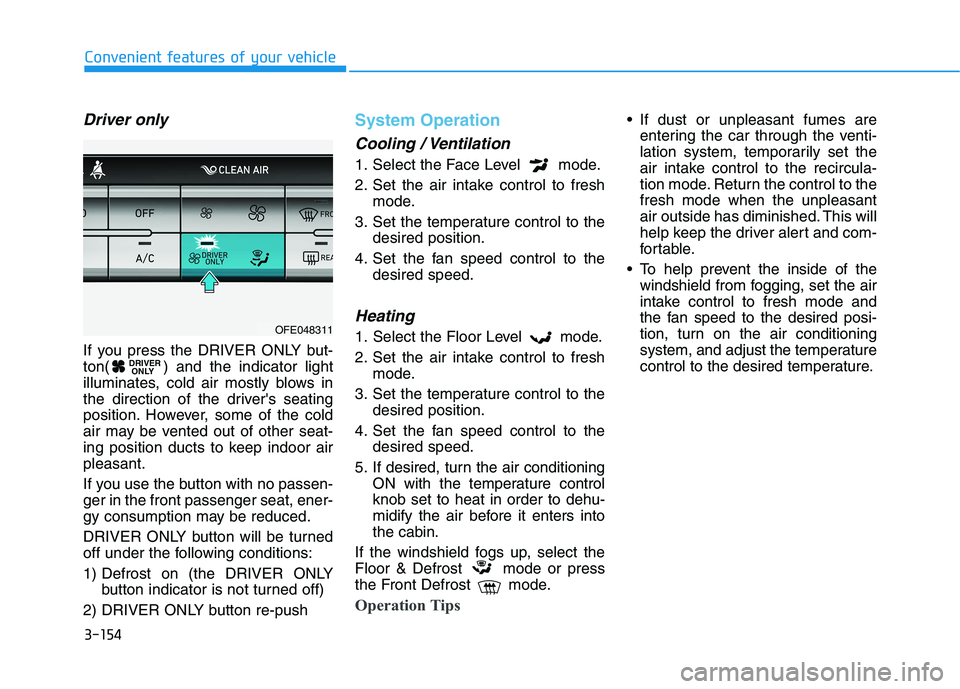
If you press the DRIVER ONLY but-
ton( ) and the indicator light
illuminates, cold air mostly blows in
the direction of the driver's seating
position. However, some of the cold
air may be vented out of other seat-
ing position ducts to keep indoor airpleasant.
If you use the button with no passen- ger in the front passenger seat, ener-
gy consumption may be reduced.
DRIVER ONLY button will be turned
off under the following conditions:
1) Defrost on (the DRIVER ONLYbutton indicator is not turned off)
2) DRIVER ONLY button re-push
System Operation
Cooling / Ventilation
1. Select the Face Level mode.
2. Set the air intake control to fresh mode.
3. Set the temperature control to the desired position.
4. Set the fan speed control to the desired speed.
Heating
1. Select the Floor Level mode.
2. Set the air intake control to freshmode.
3. Set the temperature control to the desired position.
4. Set the fan speed control to the desired speed.
5. If desired, turn the air conditioning ON with the temperature control knob set to heat in order to dehu-
midify the air before it enters intothe cabin.
If the windshield fogs up, select the
Floor & Defrost mode or press
the Front Defrost mode.
Operation Tips
If dust or unpleasant fumes are entering the car through the venti-
lation system, temporarily set the
air intake control to the recircula-
tion mode. Return the control to thefresh mode when the unpleasant
air outside has diminished. This will
help keep the driver alert and com-
fortable.
To help prevent the inside of the windshield from fogging, set the air
intake control to fresh mode and
the fan speed to the desired posi-
tion, turn on the air conditioning
system, and adjust the temperature
control to the desired temperature.
DRIVER ONLY
OFE048311
Page 242 of 558
3-155
Convenient features of your vehicle
3
Air conditioning
Your HYUNDAI vehicle air condition- ing system is filled with R-1234yf
refrigerant.
1. Start the vehicle.
2. Press the air conditioning button.
3. Select the Face Level mode.
4. Set the air intake control toRecirculation mode temporarily to
allow the cabin to cool quickly.
When the desired temperature inthe cabin is reached, change the
air intake control back to Fresh
mode.
5. Adjust the fan speed control and temperature control to maintain
maximum comfort.
When maximum cooling is desired,
set the temperature control to the
MAX A/C position, then set the fanspeed control to the highest setting. When using the air conditioning
system, monitor the temperature
gauge closely while driving up
hills or in heavy traffic when out-
side temperatures. Air condition-
ing system operation when climb-ing a steep grade or in high out-side ambient temperatures can
cause fuel cell stack overheating.
Continue to use the fan, but turn the air conditioning system off if
the temperature gauge indicates
fuel cell stack overheating.
Air conditioning system operation
tips
If the vehicle has been parked in
direct sunlight during hot weather,
open the windows for a short time
to let the hot air inside the vehicle
escape.
After sufficient cooling has been achieved, switch back from recircu-
lation mode to fresh mode. To help reduce moisture inside of
the windows on rainy or humid
days, decrease the humidity inside
the vehicle by operating the airconditioning system with the win-
dows and sunroof closed.
Use the air conditioning system every month only for a few minutes
to ensure maximum system per-
formance.
If you operate air conditioner exces- sively, the difference between the
temperature of the outside air andthat of the windshield could cause
the outer surface of the windshield
to fog up, causing loss of visibility. In
this case, set the mode selection
knob or button to the position
and fan speed control to the lowerspeed.
NOTICE
Page 246 of 558
3-159
Convenient features of your vehicle
3
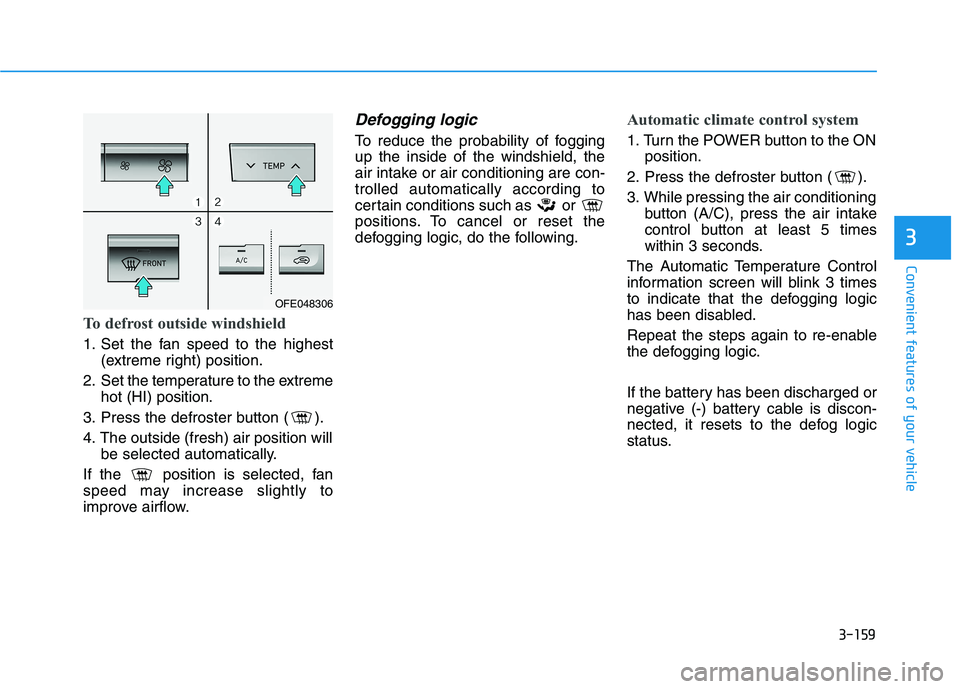
To defrost outside windshield
1. Set the fan speed to the highest(extreme right) position.
2. Set the temperature to the extreme hot (HI) position.
3. Press the defroster button ( ).
4. The outside (fresh) air position will be selected automatically.
If the position is selected, fan
speed may increase slightly to
improve airflow.
Defogging logic
To reduce the probability of foggingup the inside of the windshield, the
air intake or air conditioning are con-trolled automatically according to
certain conditions such as or
positions. To cancel or reset the
defogging logic, do the following.
Automatic climate control system
1. Turn the POWER button to the ON position.
2. Press the defroster button ( ).
3. While pressing the air conditioning button (A/C), press the air intake
control button at least 5 times
within 3 seconds.
The Automatic Temperature Control
information screen will blink 3 times
to indicate that the defogging logic
has been disabled.
Repeat the steps again to re-enable
the defogging logic.
If the battery has been discharged or
negative (-) battery cable is discon-
nected, it resets to the defog logic
status.
OFE048306
Page 315 of 558
5-48
Driving your vehicle
The vehicle is on unpaved oruneven rough surfaces, or road
with sudden gradient changes.
The vehicle drives through a con- struction area, on an unpaved
road, or above metal materials,
such as a railway
The vehicle in front is too small to be detected (for example a motor-
cycle or a bicycle, etc.)
The camera’s field of view is not well illuminated (either too dark or
too much reflection or too much
backlight that obscures the field of
view)
The camera does not recognize the entire vehicle in front.
The vehicle in front is an oversize vehicle or trailer that is too big to
be detected by the camera recog-
nition system (for example a tractor
trailer, etc.)
The vehicle in front does not have rear lights or the rear lights are not
turned ON or the rear lights are
located unusually.
The outside brightness changes suddenly, for example when enter-
ing or exiting a tunnel The vehicle drives inside a building,
such as a basement parking lot
The adverse road conditions cause excessive vehicle vibrations while
driving
You are on a roundabout and the vehicle in front circles
The camera lens is contaminated due to tinted, filmed or coated
windshield, damaged glass, or
stuck of foreign matter (sticker,
bug, etc.) on the glass
The camera is damaged.
The brightness outside is too low such as when the headlamps are
not on at night or the vehicle isgoing through a tunnel.
Light coming from a street light or an oncoming vehicle is reflected on
a wet road surface such as a pud-dle in the road
The field of view in front is obstruct- ed by sun glare
The shadow is on the road by a median strip, trees, etc.
The vehicle drives through a toll- gate. The windshield glass is fogged up; a
clear view of the road is obstructed
The radar/camera sensor recogni- tion is limited
The rear part of the vehicle in front is not normally visible (for example,
the vehicle is spinning or the vehi-
cle is overturned)
There is severe irregular reflection from the radar sensor
The sensor recognition changes suddenly when passing over a
speed bump
The vehicle in front is driving errat- ically
The vehicle in front is moving verti- cally to the driving direction
The vehicle in front is stopped ver- tically
The vehicle in front is driving towards your vehicle or reversing
You are on a roundabout and the vehicle in front circles.
Page 318 of 558
5-51
Driving your vehicle
5
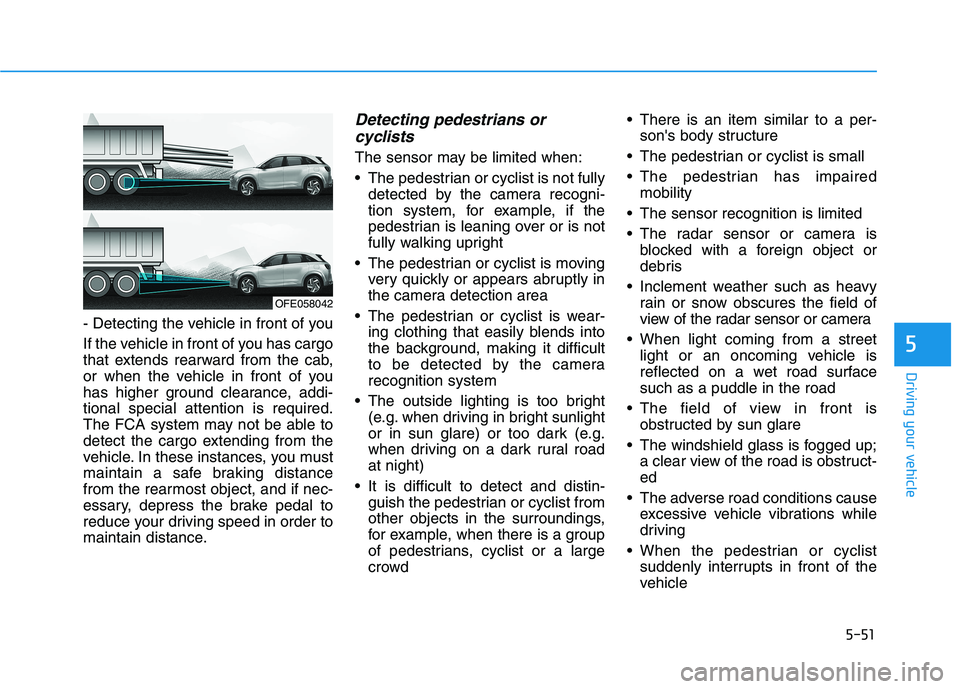
- Detecting the vehicle in front of you
If the vehicle in front of you has cargo
that extends rearward from the cab,
or when the vehicle in front of you
has higher ground clearance, addi-tional special attention is required.
The FCA system may not be able to
detect the cargo extending from the
vehicle. In these instances, you must
maintain a safe braking distance
from the rearmost object, and if nec-
essary, depress the brake pedal to
reduce your driving speed in order to
maintain distance.
Detecting pedestrians orcyclists
The sensor may be limited when:
The pedestrian or cyclist is not fully detected by the camera recogni-
tion system, for example, if the
pedestrian is leaning over or is not
fully walking upright
The pedestrian or cyclist is moving very quickly or appears abruptly in
the camera detection area
The pedestrian or cyclist is wear- ing clothing that easily blends into
the background, making it difficult
to be detected by the camerarecognition system
The outside lighting is too bright (e.g. when driving in bright sunlight
or in sun glare) or too dark (e.g.
when driving on a dark rural roadat night)
It is difficult to detect and distin- guish the pedestrian or cyclist from
other objects in the surroundings,
for example, when there is a group
of pedestrians, cyclist or a large
crowd There is an item similar to a per-
son's body structure
The pedestrian or cyclist is small
The pedestrian has impaired mobility
The sensor recognition is limited
The radar sensor or camera is blocked with a foreign object or
debris
Inclement weather such as heavy rain or snow obscures the field of
view of the radar sensor or camera
When light coming from a street light or an oncoming vehicle is
reflected on a wet road surfacesuch as a puddle in the road
The field of view in front is obstructed by sun glare
The windshield glass is fogged up; a clear view of the road is obstruct-ed
The adverse road conditions cause excessive vehicle vibrations while
driving
When the pedestrian or cyclist suddenly interrupts in front of the
vehicle
OFE058042
Page 360 of 558
5-93
Driving your vehicle
Driving on a steep grade, over ahill, or when driving on a curved road.
The adverse road conditions cause excessive vehicle vibrations while
driving.
The surrounding of the inside rear view mirror temperature is highdue to direct sunlight, etc.
When front visibility is poor
The windshield or the camera lens is blocked with dirt or debris.
The windshield glass is fogged up; a clear view of the road is obstruct- ed.
Placing objects on the dashboard, etc.
The sensor cannot detect the lane because of fog, heavy rain or snow.
5
Page 493 of 558
7-69
7
Maintenance
Caring for the leather seats- Vacuum the seat periodically toremove dust and sand on the
seat. It will prevent abrasion ordamage of the leather and main-
tain its quality.
- Wipe the natural leather seat cover often with dry or soft cloth.
- Use of proper leather protective may prevent abrasion of the
cover and helps maintain the
color. Be sure to read the instruc-tions and consult a specialistwhen using leather coating or
protective agent.
- Light colored (beige, cream beige) leather is easily contami-
nated and the stain is noticeable.
Clean the seats frequently.
- Avoid wiping with wet cloth. It may cause the surface to crack. Cleaning the leather seats
- Remove all contaminationsinstantly. Refer to instructions
below for removal of each con-taminant.
- Cosmetic products (sunscreen, foundation, etc.)
Apply cleansing cream on a clothand wipe the contaminate spot.
Wipe off the cream with a wet
cloth and remove water with a drycloth.
- Beverages (coffee, soft drink, etc.)
Apply a small amount of neutraldetergent and wipe until contami-
nations do not smear.
- Oil Remove oil instantly with
absorbable cloth and wipe with
stain remover used only for natu-
ral leather.
- Chewing gum Harden the gum with ice and
remove gradually.Cleaning the seat belt webbing
Clean the belt webbing with any mild
soap solution recommended for
cleaning upholstery or carpet. Follow
the instructions provided with the
soap. Do not bleach or re-dye the
webbing because this may weakenthe seat belt.
Cleaning the interior windowglass
If the interior glass surfaces of the
vehicle become fogged (that is, cov-
ered with an oily, greasy or waxy
film), they should be cleaned with
glass cleaner. Follow the directions
on the glass cleaner container.
Do not scrape or scratch the
inside of the rear window. This
may result in damage to the rear
window defroster grid.
NOTICE
Page 557 of 558
I-10
Tire Specification and Pressure Label ..............................8-8
Tires and Wheels .....................................................7-29, 8-4
All Season Tires .........................................................7-42
Check Tire Inflation Pressure .....................................7-31
Low Aspect Ratio Tires ..............................................7-43
Radial-Ply Tires ..........................................................7-42
Recommended Cold Tire Inflation Pressures.............7-30
Snow Tires ..................................................................7-42
Summer Tires .............................................................7-42
Tire Care .....................................................................7-29
Tire Maintenance ........................................................7-34
Tire Replacement........................................................7-33
Tire Rotation...............................................................7-32
Tire Sidewall Labeling ...............................................7-34
Tire Terminology and Definitions ..............................7-38
Tire Traction ...............................................................7-34
Wheel Alignment and Tire Balance ...........................7-33
Wheel Replacement....................................................7-34
Towing ............................................................................6-24
Emergency Towing.....................................................6-26
Removable Towing Hook...........................................6-25
Towing Service ...........................................................6-24
Traction Motor Number ....................................................8-8
Trailer Towing...............................................................5-130
Trip Computer .................................................................3-85 USB Charger .................................................................3-169
Vehicle Certification Label ...............................................8-7
Vehicle Identification Number (VIN) ...............................8-7
Vehicle Load Limit .......................................................5-125
Tire Loading Information Label...............................5-125
Vehicle Stability Management (VSM)............................5-34
Volume and Weight ...........................................................8-5
Warning and Indicator Lights .........................................3-65
Washer Fluid ...................................................................7-20 Checking the Washer Fluid Level ..............................7-20
Welcome System.............................................................3-99
Windows .........................................................................3-33 Power Windows..........................................................3-34
Windshield Defrosting and Defogging .........................3-158 Auto Defogging System (Additional Feature with Automatic Temperature Control System) .....3-160
Rear Window Defroster............................................3-161
Winter Driving ..............................................................5-122
Snow or Icy Conditions............................................5-122
Winter Precautions ...................................................5-123
Index
U
V
W