horn HYUNDAI NEXO 2023 Owners Manual
[x] Cancel search | Manufacturer: HYUNDAI, Model Year: 2023, Model line: NEXO, Model: HYUNDAI NEXO 2023Pages: 558, PDF Size: 35.01 MB
Page 14 of 558
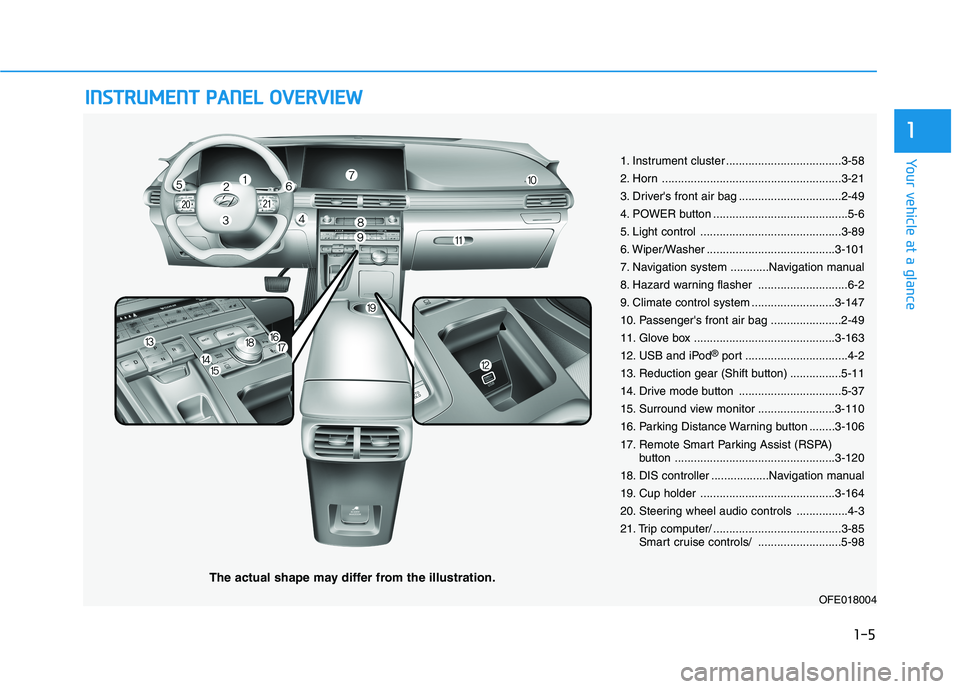
IINN SSTT RR UU MM EENN TT PP AA NN EELL OO VVEERR VV IIEE WW
The actual shape may differ from the illustration.
1-5
Your vehicle at a glance
1
1. Instrument cluster ....................................3-58
2. Horn ........................................................3-21
3. Driver's front air bag ................................2-49
4. POWER button ..........................................5-6
5. Light control ............................................3-89
6. Wiper/Washer ........................................3-101
7. Navigation system ............Navigation manual
8. Hazard warning flasher ............................6-2
9. Climate control system ..........................3-147
10. Passenger's front air bag ......................2-49
11. Glove box ............................................3-163
12. USB and iPod®
port ................................4-2
13. Reduction gear (Shift button) ................5-11
14. Drive mode button ................................5-37
15. Surround view monitor ........................3-110
16. Parking Distance Warning button ........3-106
17. Remote Smart Parking Assist (RSPA) button ..................................................3-120
18. DIS controller ..................Navigation manual
19. Cup holder ..........................................3-164
20. Steering wheel audio controls ................4-3
21. Trip computer/ ........................................3-85 Smart cruise controls/ ..........................5-98
OFE018004
Page 88 of 558
Convenient features of your vehicle
Accessing Your Vehicle .........................................3-3Smart Key ............................................................................3-3
Immobilizer System .........................................................3-10
Door Locks ............................................................3-11 Door Unlocking from Outside the Vehicle ................3-11
Door Locking from Outside the Vehicle ....................3-14
Operating Door Locks from Inside the Vehicle .......3-14
Automatic Door Lock and Unlock Features .............3-17
Child-Protector Rear Door Locks ...............................3-18
Theft-Alarm System ............................................3-19
Steering Wheel .....................................................3-20 Electric Power Steering (EPS) .....................................3-20
Tilt Steering/Telescope Steering.................................3-21
Horn ....................................................................................3-21
Heated Steering Wheel ..................................................3-22
Mirrors ...................................................................3-23 Inside Rearview Mirror ..................................................3-23
Side View Mirrors ...........................................................3-30
Windows ................................................................3-33 Power Windows ...............................................................3-34
Sunroof..................................................................3-37 Sunroof Opening and Closing ......................................3-38
Sliding the Sunroof .........................................................3-38
Tilting the Sunroof .........................................................3-39
Sunshade ...........................................................................3-39 Resetting the Sunroof ...................................................3-40
Sunroof Open Warning ..................................................3-41
Exterior Features .................................................3-42 Hood ...................................................................................3-42
Non-Powered Tailgate ...................................................3-43
Power Tailgate .................................................................3-45
Smart Tailgate ..................................................................3-51
Fuel Filler Door ................................................................3-55
Emergency Fuel Filler Door Release..........................3-57
Instrument Cluster ...............................................3-58 Instrument Cluster Control............................................3-59
Gauges and Meters ........................................................3-59
Warning and Indicator Lights .......................................3-65
LCD Display Messages ...................................................3-76
LCD Display ...........................................................3-81 LCD Display Control ........................................................3-81
LCD Display Modes .........................................................3-82
Trip Computer .......................................................3-85
Lighting..................................................................3-89 Exterior Lights .................................................................3-89
Interior Lights...................................................................3-96
Welcome System .............................................................3-99
Wipers and Washers..........................................3-101 Front Windshield Wipers .............................................3-101
Front Windshield Washers ..........................................3-103
Rear Window Wiper and Washer..............................3-104
3
Page 93 of 558
3-6
Convenient features of your vehicle
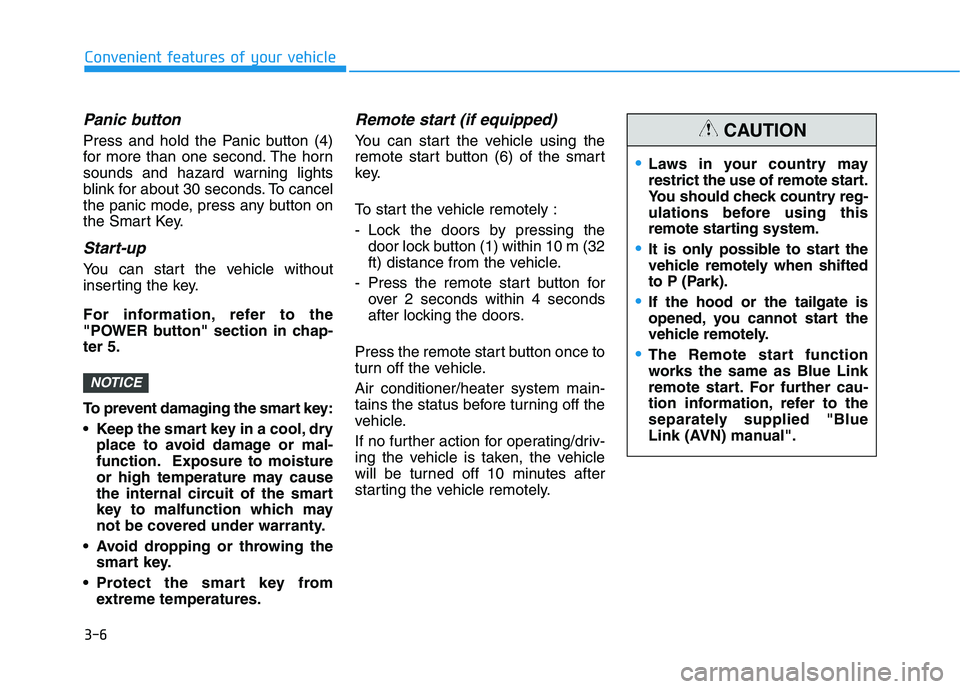
Panic button
Press and hold the Panic button (4)
for more than one second. The horn
sounds and hazard warning lights
blink for about 30 seconds. To cancel
the panic mode, press any button on
the Smart Key.
Start-up
You can start the vehicle without
inserting the key.
For information, refer to the
"POWER button" section in chap-ter 5.
To prevent damaging the smart key:
• Keep the smart key in a cool, dryplace to avoid damage or mal-
function. Exposure to moisture
or high temperature may cause
the internal circuit of the smart
key to malfunction which may
not be covered under warranty.
Avoid dropping or throwing the smart key.
Protect the smart key from extreme temperatures.
Remote start (if equipped)
You can start the vehicle using the
remote start button (6) of the smart
key.
To start the vehicle remotely :
- Lock the doors by pressing thedoor lock button (1) within 10 m (32
ft) distance from the vehicle.
- Press the remote start button for over 2 seconds within 4 seconds
after locking the doors.
Press the remote start button once to
turn off the vehicle. Air conditioner/heater system main-
tains the status before turning off the
vehicle.
If no further action for operating/driv-
ing the vehicle is taken, the vehicle
will be turned off 10 minutes after
starting the vehicle remotely.
NOTICE
Laws in your country may
restrict the use of remote start.
You should check country reg-
ulations before using this
remote starting system.
It is only possible to start the
vehicle remotely when shifted
to P (Park).
If the hood or the tailgate is
opened, you cannot start the
vehicle remotely.
The Remote start function
works the same as Blue Link
remote start. For further cau-
tion information, refer to the
separately supplied "Blue
Link (AVN) manual".
CAUTION
Page 106 of 558
3-19
Convenient features of your vehicle
This system helps to protect your
vehicle and valuables. The horn will
sound and the hazard warning lights
will blink continuously if any of the
following occurs:
- A door is opened without using thesmart key.
- The tailgate is opened without using the smart key.
- The hood is opened.
The alarm continues for 30 seconds,
then the system resets. To turn off
the alarm, unlock the doors with the
smart key.
The Theft Alarm System automati-
cally sets 30 seconds after you lock
the doors and the tailgate. For the
system to activate, you must lock thedoors and the tailgate from outside
the vehicle with the smart key or by
pressing the button on the outside of
the door handles with the smart key
in your possession.
The hazard warning lights will blink and the chime will sound once to
indicate the system is armed. Once the security system is set,
opening any door, the tailgate, or the
hood without using the smart key will
cause the alarm to activate.
The Theft Alarm System will not set if
the hood, the tailgate, or any door is
not fully closed. If the system will not
set, check the hood, the tailgate, orthe doors are fully closed. Do not attempt to alter this system or
add other devices to it.
Information
Do not lock the doors until all pas- sengers have left the vehicle. If the
remaining passenger leaves the
vehicle when the system is armed,
the alarm will be activated.
If the vehicle is not disarmed with the smart key, open the doors by using
the mechanical key and start the
vehicle ( indicator ON) by
directly pressing the POWER button
with the smart key.
When the system is disarmed but a door or tailgate is not opened within
30 seconds, the system will be
rearmed.i
TTHH EEFFTT --AA LLAA RRMM SS YY SSTT EEMM
3
Page 108 of 558
3-21
Convenient features of your vehicle
3
Tilt Steering / Telescope Steering
Adjust the steering wheel so it points
toward your chest, not toward your
face. Make sure you can see the
instrument cluster warning lights and
gauges. After adjusting, push the
steering wheel both up and down to
be certain it is locked in position.
Always adjust the position of the
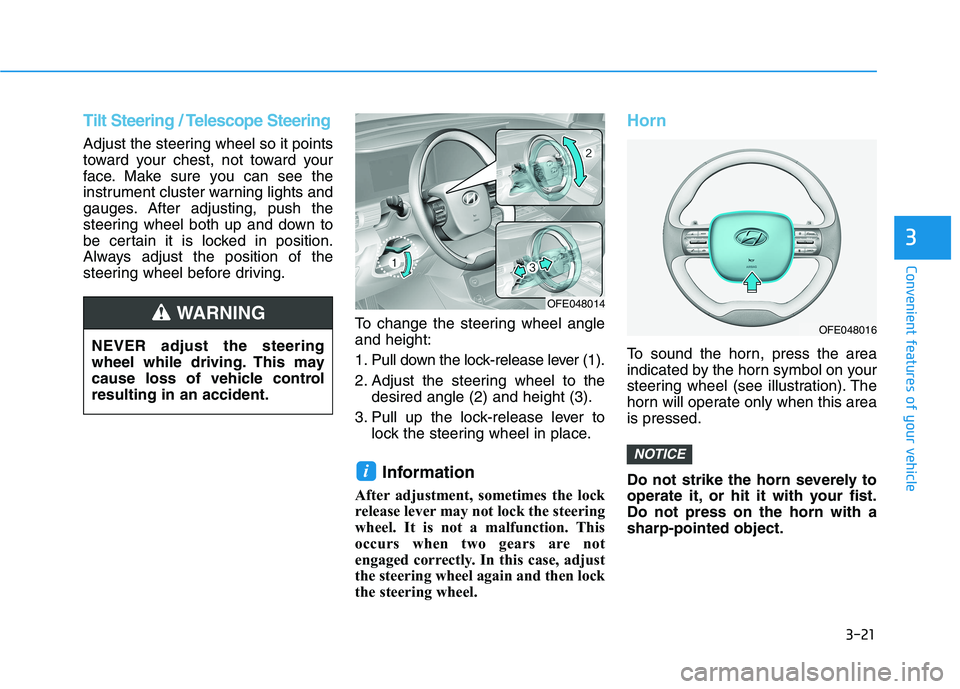
steering wheel before driving.To change the steering wheel angleand height:
1. Pull down the lock-release lever (1).
2. Adjust the steering wheel to thedesired angle (2) and height (3).
3. Pull up the lock-release lever to lock the steering wheel in place.
Information
After adjustment, sometimes the lock
release lever may not lock the steering
wheel. It is not a malfunction. This
occurs when two gears are not
engaged correctly. In this case, adjust
the steering wheel again and then lock
the steering wheel.
Horn
To sound the horn, press the area
indicated by the horn symbol on your
steering wheel (see illustration). The
horn will operate only when this areais pressed.
Do not strike the horn severely to
operate it, or hit it with your fist.Do not press on the horn with asharp-pointed object.
NOTICE
i
NEVER adjust the steering
wheel while driving. This may
cause loss of vehicle controlresulting in an accident.
WARNING OFE048014
OFE048016
Page 194 of 558
3-107
Convenient features of your vehicle
3
Non-operational conditions ofParking Distance Warning
(Reverse/Forward) system
The Parking Distance Warning
(Reverse/Forward) system may not
operate normally when any of the
following occur:
Moisture is frozen to the sensor.
Sensor is covered with foreign mat- ter, such as snow or water, or the
sensor cover is blocked.
The Parking Distance Warning
(Reverse/Forward) system may
experience a malfunction when the
following occurs:
Driving on uneven road surfacessuch as unpaved roads, gravel,
bumps, or gradient.
Objects generating excessive noise such as vehicle horns, loud motor-
cycle engines, or truck air brakes
can interfere with the sensor.
Heavy rain or water spray is present.
Wireless transmitters or mobile phones are present near the sensor.
The sensor is covered with snow.
Distance
from object Warning indicator
Warning soundWhen driving forwardWhen driving rearward
61 ~ 100
(24 ~ 39)Front-Buzzer beeps intermittently
61 ~ 120
(24 ~ 47)Rear-Buzzer beeps intermittently
31 ~ 60
(12 ~ 24)FrontBuzzer beeps frequently
Rear-Buzzer beeps frequently
30
(12)FrontBuzzer sounds continuously
Rear-Buzzer sounds continuously
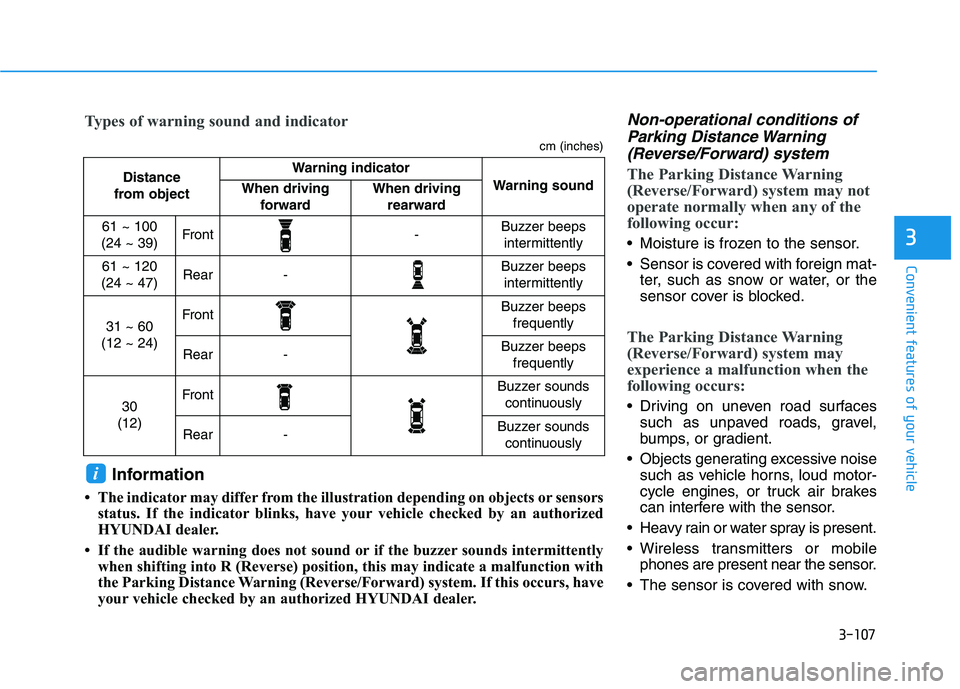
Types of warning sound and indicator
cm (inches)
Information
The indicator may differ from the illustration depending on objects or sensors status. If the indicator blinks, have your vehicle checked by an authorized
HYUNDAI dealer.
If the audible warning does not sound or if the buzzer sounds intermittently when shifting into R (Reverse) position, this may indicate a malfunction with
the Parking Distance Warning (Reverse/Forward) system. If this occurs, have
your vehicle checked by an authorized HYUNDAI dealer.
i
Page 552 of 558
I-5
Front Windshield Washers ............................................3-103
Front Windshield Wipers ..............................................3-101
Fuel Cell Power Module Compartment ....................1-6, 7-3
Fuel Filler Door ..............................................................3-55
Fuses ...............................................................................7-45
Fuel Cell Power Module Compartment Panel Fuse Replacement ...................................................7-47
Fuse/Relay Panel Description ....................................7-49
Instrument Panel Fuse Replacement ..........................7-46
Gauges and Meters .........................................................3-59
Glove Box .....................................................................3-163
Hazard Warning Flasher ...................................................6-2
Head Restraints ...............................................................2-13
Heated Steering Wheel ...................................................3-22
Hill-Start Assist Control (HAC) .....................................5-36
Hood................................................................................3-42
Horn ................................................................................3-21 If the 12 Volt Battery is Discharged .................................6-5
Before Jump Starting....................................................6-5
Jump Starting................................................................6-6
If the Vehicle Overheats....................................................6-9
If the Vehicle Will Not Start .............................................6-4
If You Have a Flat Tire (With Tire Mobility Kit)...........6-17
Immobilizer System ........................................................3-10
Important Safety Precautions............................................2-2 Air Bag Hazards ...........................................................2-2
Always Wear Your Seat Belt ........................................2-2
Control Your Speed ......................................................2-3
Driver Distraction.........................................................2-2
Keep Your Vehicle in Safe Condition ..........................2-3
Restrain All Children....................................................2-2
In Case of an Emergency While Driving .........................6-2
Emergency venting of hydrogen gas............................6-3
If a fire occurs ..............................................................6-3
If a submersion in water occurs ...................................6-3
If an accident occurs.....................................................6-2
If the vehicle stalls at a crossroad or crossing .............6-3
If the vehicle stalls while driving .................................6-4
If you have a flat tire while driving .............................6-4
I
Index
G
H
I
Page 556 of 558
I-9
Smart Cruise Control Vehicle-to-Vehicle Distance ..5-105
To Adjust the Sensitivity of Smart Cruise Control ..5-100
To Convert to Cruise Control Mode ........................5-100
Smart Key .........................................................................3-3
Smart Tailgate .................................................................3-51
Special Driving Conditions ...........................................5-118 Driving at Night........................................................5-119
Driving in Flooded Areas .........................................5-120
Driving in the Rain ...................................................5-119
Hazardous Driving Conditions .................................5-118
Highway Driving ......................................................5-120
Reducing the Risk of a Rollover ..............................5-121
Rocking the Vehicle..................................................5-118
Smooth Cornering ....................................................5-119
SRS Care .........................................................................2-68
Stack Cooling Coolant ....................................................7-16 Changing Coolant.......................................................7-18
Checking the Coolant Level .......................................7-16
Steering Wheel ................................................................3-20
Electric Power Steering (EPS) ...................................3-20
Heated Steering Wheel ...............................................3-22
Horn ............................................................................3-21
Tilt Steering/Telescope Steering.................................3-21
Storage Compartment ...................................................3-163 Center Console Storage ............................................3-163
Glove Box ................................................................3-163 Sunroof............................................................................3-37
Resetting the Sunroof .................................................3-40
Sliding the Sunroof ....................................................3-38
Sunroof Open Warning...............................................3-41
Sunroof Opening and Closing ....................................3-38
Sunshade.....................................................................3-39
Tilting the Sunroof .....................................................3-39
Sunvisor ........................................................................3-165
Surround View Monitoring ...........................................3-110
Tailgate ............................................................................3-43
The components of fCEV .................................................H3 Battery system ..............................................................H5
FCEV powertrain ..........................................................H4
Fuel cell stack ..............................................................H4
High pressure hydrogen storage tanks..........................H5
Theft-Alarm System .......................................................3-19
Tilt Steering/Telescope Steering .....................................3-21
Tire Pressure Monitoring System (TPMS) .....................6-11 Changing a Tire with TPMS ......................................6-15
Check Tire Pressure ....................................................6-11
Low Tire Pressure LCD Display with Position Indicator ..................................................................6-13
Low Tire Pressure Telltale..........................................6-13
Tire Pressure Monitoring System...............................6-12
TPMS Malfunction Indicator .....................................6-14
I
Index
T