park assist HYUNDAI NEXO 2023 Owners Manual
[x] Cancel search | Manufacturer: HYUNDAI, Model Year: 2023, Model line: NEXO, Model: HYUNDAI NEXO 2023Pages: 558, PDF Size: 35.01 MB
Page 14 of 558
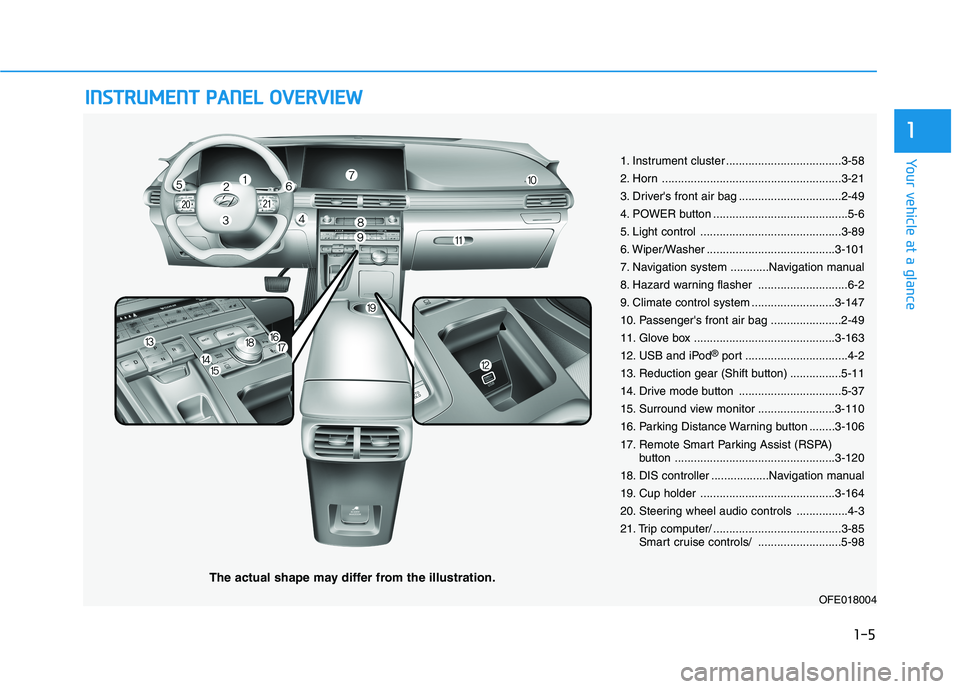
IINN SSTT RR UU MM EENN TT PP AA NN EELL OO VVEERR VV IIEE WW
The actual shape may differ from the illustration.
1-5
Your vehicle at a glance
1
1. Instrument cluster ....................................3-58
2. Horn ........................................................3-21
3. Driver's front air bag ................................2-49
4. POWER button ..........................................5-6
5. Light control ............................................3-89
6. Wiper/Washer ........................................3-101
7. Navigation system ............Navigation manual
8. Hazard warning flasher ............................6-2
9. Climate control system ..........................3-147
10. Passenger's front air bag ......................2-49
11. Glove box ............................................3-163
12. USB and iPod®
port ................................4-2
13. Reduction gear (Shift button) ................5-11
14. Drive mode button ................................5-37
15. Surround view monitor ........................3-110
16. Parking Distance Warning button ........3-106
17. Remote Smart Parking Assist (RSPA) button ..................................................3-120
18. DIS controller ..................Navigation manual
19. Cup holder ..........................................3-164
20. Steering wheel audio controls ................4-3
21. Trip computer/ ........................................3-85 Smart cruise controls/ ..........................5-98
OFE018004
Page 89 of 558
Driver Assist System .........................................3-105Parking Distance Warning (Reverse/Forward)
System .............................................................................3-105Rear View Monitor .......................................................3-109
Surround View Monitoring .........................................3-110
Remote Smart Parking Assist (RSPA) .............3-113 Operating Condition......................................................3-114
Non-operating Condition ............................................3-115
Limitations of the System...........................................3-116
How the System Works (Smart Parking) ................3-120
How the System Works (Remote Smart Parking)..3-127
How the System Works (Smart Exit) .......................3-131
How the System Works (Remote Moving Forward/
Backward) .......................................................................3-138 Additional Instructions (Messages) ..........................3-143
Turn signal Showing Vehicle Status while System
in Activation....................................................................3-144
Smart Key Showing Vehicle Status while System
in Activation....................................................................3-145 Link with other Systems .............................................3-146
Automatic Climate Control System ..................3-147 Automatic Temperature Control Mode ....................3-148
Manual Temperature Control Mode .........................3-148
System Operation .........................................................3-154
System Maintenance....................................................3-156 Windshield Defrosting and Defogging ............3-158
Auto Defogging System (Additional Feature with
Automatic Temperature Control System)................3-160Rear Window Defroster ..............................................3-161
Climate Control Additional Features ...............3-162 Automatic Ventilation ...................................................3-162
Sunroof Inside Air Recirculation ...............................3-162
Storage Compartment .......................................3-163 Center Console Storage ..............................................3-163
Glove Box ........................................................................3-163
Interior Features ................................................3-164 Cup Holder ......................................................................3-164
Sunvisor ...........................................................................3-165
Power Outlet ..................................................................3-166
AC Inverter......................................................................3-167
USB Charger ...................................................................3-169
Wireless Cellular Phone Charging System..............3-169
Clock .................................................................................3-171
Coat Hook .......................................................................3-172
Floor Mat Anchor(s).....................................................3-172
Luggage Net Holder .....................................................3-173
Cargo Security Screen .................................................3-174
Exterior Features ...............................................3-176 Roof Side Rails ..............................................................3-176
3
Page 90 of 558
3-3
Convenient features of your vehicle
Smart Key
Your HYUNDAI uses a Smart Key,
which you can use to lock or unlock
the driver and passenger doors or
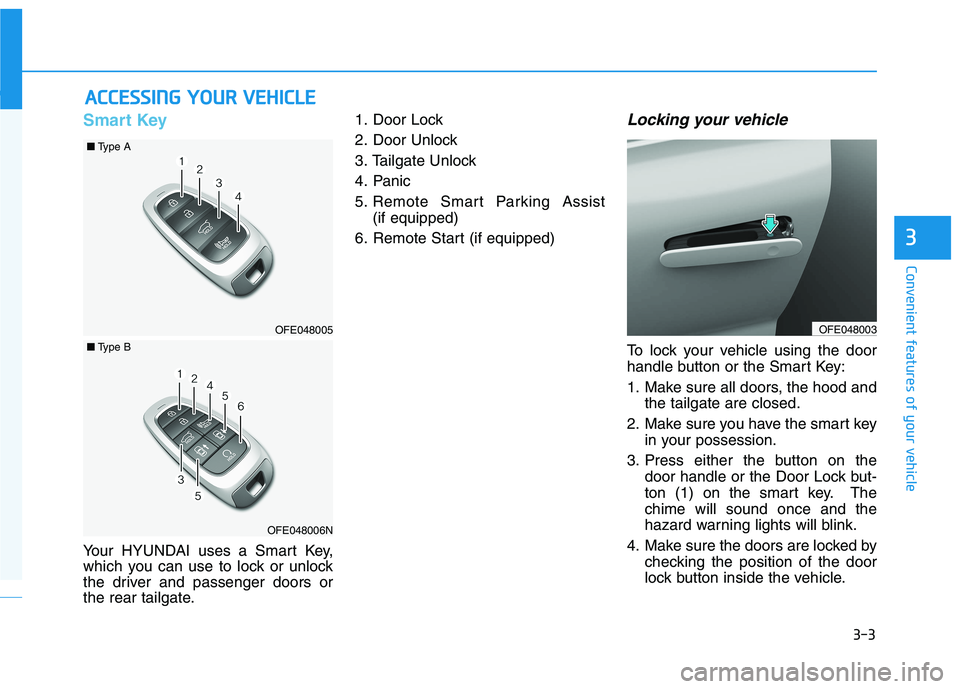
the rear tailgate.1. Door Lock
2. Door Unlock
3. Tailgate Unlock
4. Panic
5. Remote Smart Parking Assist
(if equipped)
6. Remote Start (if equipped)
Locking your vehicle
To lock your vehicle using the door
handle button or the Smart Key:
1. Make sure all doors, the hood and the tailgate are closed.
2. Make sure you have the smart key in your possession.
3. Press either the button on the door handle or the Door Lock but-
ton (1) on the smart key. Thechime will sound once and the
hazard warning lights will blink.
4. Make sure the doors are locked by checking the position of the door
lock button inside the vehicle.
AACCCCEE SSSSIINN GG YY OO UURR VV EEHH IICC LLEE
3
OFE048003OFE048005
■ Type A
OFE048006N
■Type B
Page 94 of 558
3-7
Convenient features of your vehicle
3
Remote Smart Parking Assist(RSPA) (if equipped)
The Remote Smart Parking Assist
(RSPA) system helps the drivers
park their vehicle by using sensors to
measure parking spaces and control
the steering wheel, gear shift and
vehicle speed to semi-automatically
park the vehicle and provide instruc-
tion on the AVN screen to help
through parking.
The driver can activate the RSPA
system after measuring the parking
spaces or using the smart key.
It is also possible to move the vehicle
forward or backward using the but-
tons (5) on the smart key.
For more details, refer to "Remote
Smart Parking Assist (RSPA)" in
this chapter.
Mechanical key
If the Smart Key does not operate
normally, you can lock or unlock the
driver's door by using the mechanical
key.
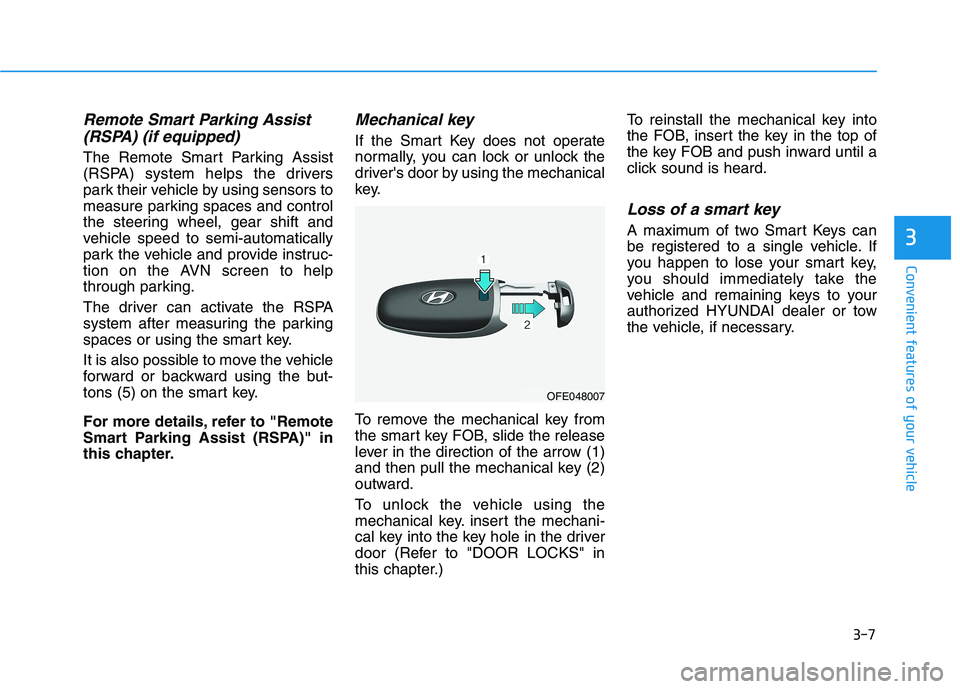
To remove the mechanical key from
the smart key FOB, slide the release
lever in the direction of the arrow (1)
and then pull the mechanical key (2)
outward.
To unlock the vehicle using the
mechanical key. insert the mechani-
cal key into the key hole in the driver
door (Refer to "DOOR LOCKS" in
this chapter.) To reinstall the mechanical key into
the FOB, insert the key in the top of
the key FOB and push inward until a
click sound is heard.
Loss of a smart key
A maximum of two Smart Keys can
be registered to a single vehicle. If
you happen to lose your smart key,
you should immediately take the
vehicle and remaining keys to your
authorized HYUNDAI dealer or tow
the vehicle, if necessary.
OFE048007
Page 156 of 558
3-69
Convenient features of your vehicle
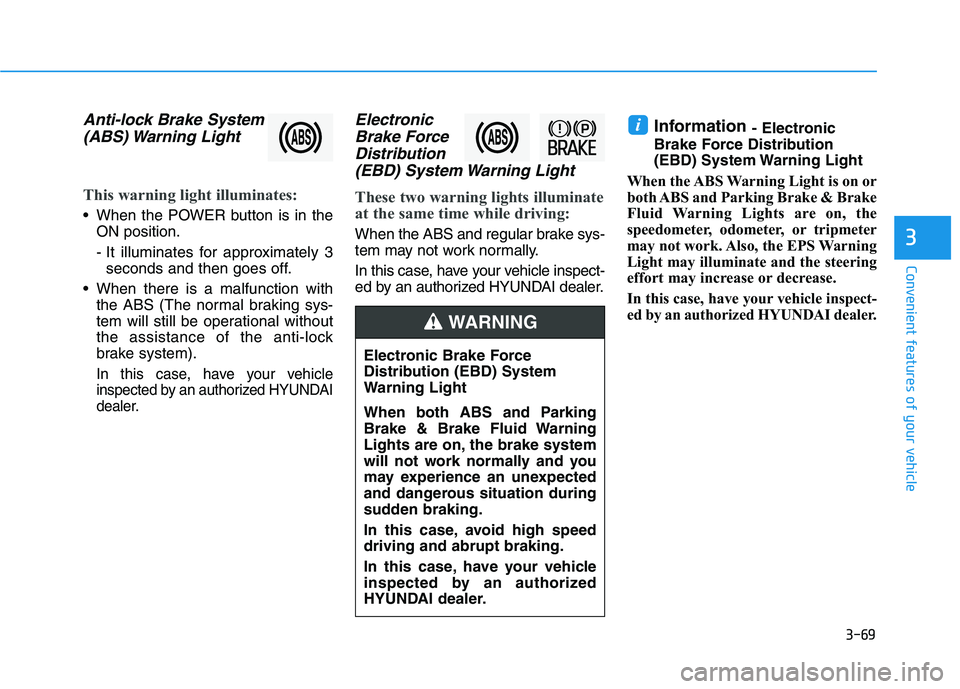
Anti-lock Brake System(ABS) Warning Light
This warning light illuminates:
When the POWER button is in the ON position.
- It illuminates for approximately 3seconds and then goes off.
When there is a malfunction with the ABS (The normal braking sys-
tem will still be operational without
the assistance of the anti-lock
brake system).
In this case, have your vehicle
inspected by an authorized HYUNDAI
dealer.
Electronic
Brake Force
Distribution (EBD) System Warning Light
These two warning lights illuminate
at the same time while driving:
When the ABS and regular brake sys-
tem may not work normally.
In this case, have your vehicle inspect-
ed by an authorized HYUNDAI dealer. Information
- Electronic
Brake Force Distribution
(EBD) System Warning Light
When the ABS Warning Light is on or
both ABS and Parking Brake & Brake
Fluid Warning Lights are on, the
speedometer, odometer, or tripmeter
may not work. Also, the EPS Warning
Light may illuminate and the steering
effort may increase or decrease.
In this case, have your vehicle inspect-
ed by an authorized HYUNDAI dealer.
i
3
Electronic Brake Force
Distribution (EBD) System
Warning Light
When both ABS and Parking
Brake & Brake Fluid Warning
Lights are on, the brake system
will not work normally and you
may experience an unexpected
and dangerous situation during
sudden braking.
In this case, avoid high speed driving and abrupt braking.
In this case, have your vehicle
inspected by an authorized
HYUNDAI dealer.
WARNING
Page 192 of 558
![HYUNDAI NEXO 2023 Owners Manual 3-105
Convenient features of your vehicle
3
DDRRIIVV EERR AA SSSSIISS TT SS YY SSTT EEMM
Parking Distance Warning
(Reverse/Forward) System(if equipped)
[A] : Front Sensor, [B] : Rear Sensor The P](/img/35/56173/w960_56173-191.png "HYUNDAI NEXO 2023 Owners Manual 3-105
Convenient features of your vehicle
3
DDRRIIVV EERR AA SSSSIISS TT SS YY SSTT EEMM
Parking Distance Warning
(Reverse/Forward) System(if equipped)
[A] : Front Sensor, [B] : Rear Sensor The P")
3-105
Convenient features of your vehicle
3
DDRRIIVV EERR AA SSSSIISS TT SS YY SSTT EEMM
Parking Distance Warning
(Reverse/Forward) System(if equipped)
[A] : Front Sensor, [B] : Rear Sensor The Parking Distance Warning
(Reverse/Forward) system assists
the driver during movement of the
vehicle by chiming if any object issensed within the distance of 100 cm(39 inches) in front and 120 cm (47
inches) behind the vehicle. This system is a supplemental sys- tem that senses objects within the
range and location of the sensors, itcannot detect objects in other areaswhere sensors are not installed.
ALWAYS look around your
vehicle to make sure there are
no objects or obstacles
before moving the vehicle in
any direction to prevent a col-lision.
Always pay close attention
when the vehicle is driven
close to objects, particularly
pedestrians, and especially
children.
Be aware that some objects
may not be visible on the
screen or be detected by the
sensors, due to the objects
distance, size or material, all
of which can limit the effec-
tiveness of the sensor.
WARNING
OFE048046N
OFE048047N
Page 193 of 558
3-106
Convenient features of your vehicle
Operation of the ParkingDistance Warning
(Reverse/Forward) System
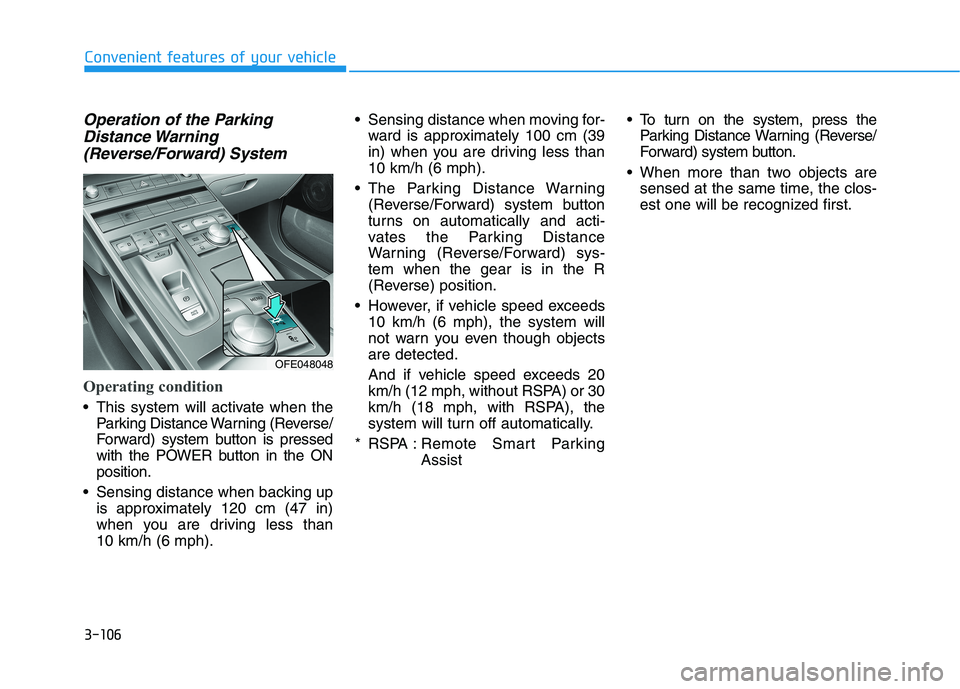
Operating condition
This system will activate when the Parking Distance Warning (Reverse/
Forward) system button is pressed
with the POWER button in the ONposition.
Sensing distance when backing up is approximately 120 cm (47 in)
when you are driving less than 10 km/h (6 mph). Sensing distance when moving for-
ward is approximately 100 cm (39
in) when you are driving less than10 km/h (6 mph).
The Parking Distance Warning (Reverse/Forward) system button
turns on automatically and acti-
vates the Parking Distance
Warning (Reverse/Forward) sys-tem when the gear is in the R
(Reverse) position.
However, if vehicle speed exceeds 10 km/h (6 mph), the system will
not warn you even though objectsare detected.
And if vehicle speed exceeds 20
km/h (12 mph, without RSPA) or 30
km/h (18 mph, with RSPA), the
system will turn off automatically.
* RSPA : Remote Smart Parking Assist To turn on the system, press the
Parking Distance Warning (Reverse/
Forward) system button.
When more than two objects are sensed at the same time, the clos-
est one will be recognized first.
OFE048048
Page 197 of 558
3-110
Convenient features of your vehicle
Surround View Monitoring (if equipped)
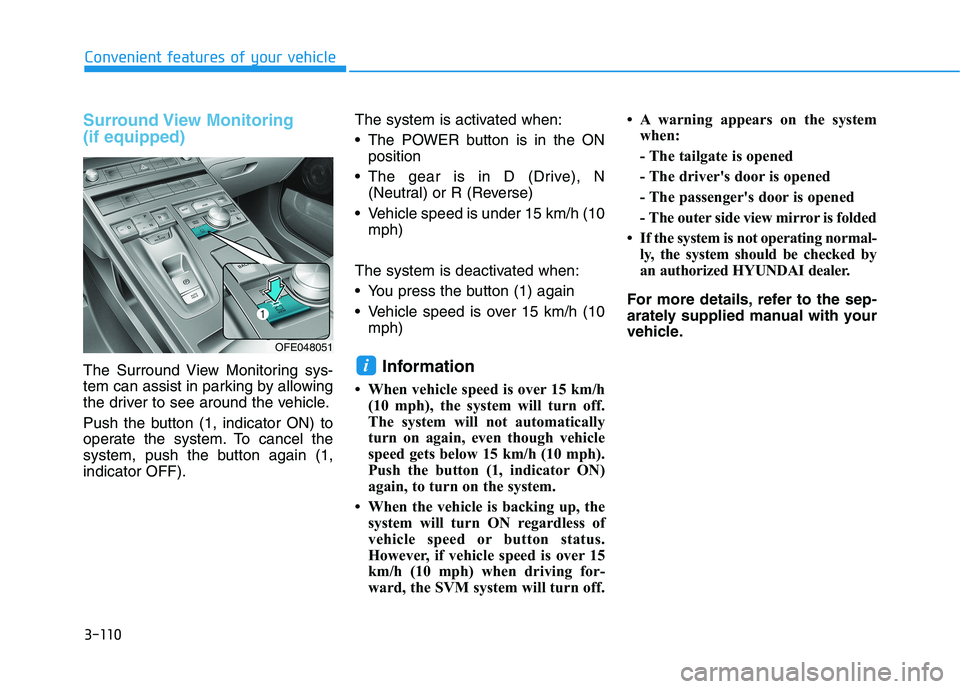
The Surround View Monitoring sys-
tem can assist in parking by allowing
the driver to see around the vehicle.
Push the button (1, indicator ON) to
operate the system. To cancel the
system, push the button again (1,indicator OFF).The system is activated when:
The POWER button is in the ON
position
The gear is in D (Drive), N (Neutral) or R (Reverse)
Vehicle speed is under 15 km/h (10 mph)
The system is deactivated when:
You press the button (1) again
Vehicle speed is over 15 km/h (10 mph)
Information
When vehicle speed is over 15 km/h (10 mph), the system will turn off.
The system will not automatically
turn on again, even though vehicle
speed gets below 15 km/h (10 mph).
Push the button (1, indicator ON)
again, to turn on the system.
When the vehicle is backing up, the system will turn ON regardless of
vehicle speed or button status.
However, if vehicle speed is over 15
km/h (10 mph) when driving for-
ward, the SVM system will turn off. A warning appears on the system
when:
- The tailgate is opened
- The driver's door is opened
- The passenger's door is opened
- The outer side view mirror is folded
If the system is not operating normal- ly, the system should be checked by
an authorized HYUNDAI dealer.
For more details, refer to the sep-
arately supplied manual with your
vehicle.i
OFE048051
Page 198 of 558
3-111
Convenient features of your vehicle
3
Always keep the camera lens
clean. The camera may not work
normally if the lens is covered
with foreign material.
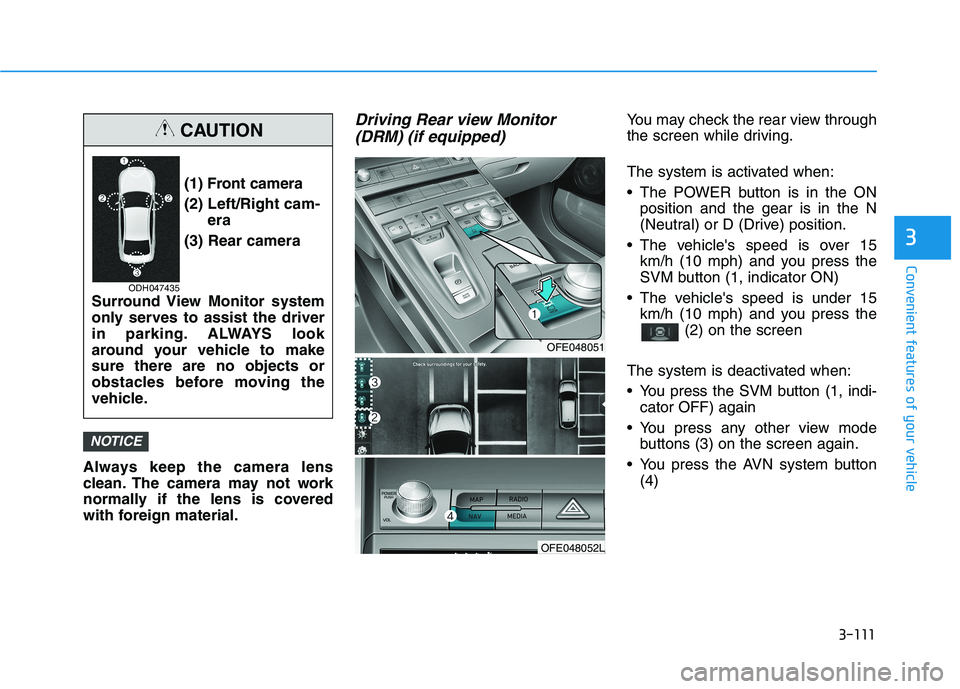
Driving Rear view Monitor(DRM) (if equipped)You may check the rear view through
the screen while driving.
The system is activated when:
The POWER button is in the ON position and the gear is in the N
(Neutral) or D (Drive) position.
The vehicle's speed is over 15 km/h (10 mph) and you press the
SVM button (1, indicator ON)
The vehicle's speed is under 15 km/h (10 mph) and you press the (2) on the screen
The system is deactivated when:
You press the SVM button (1, indi- cator OFF) again
You press any other view mode buttons (3) on the screen again.
You press the AVN system button (4)
NOTICE
(1) Front camera
(2) Left/Right cam- era
(3) Rear camera
Surround View Monitor system
only serves to assist the driver
in parking. ALWAYS look
around your vehicle to makesure there are no objects or
obstacles before moving the
vehicle.
CAUTION
ODH047435
OFE048051
OFE048052L
Page 199 of 558
3-112
Convenient features of your vehicle
Information
If vehicle speed is over 15 km/h (10 mph)
- the DRM image stays ON when therear view was on the screen
- screen (top, front wide, front right and front left) of other modes of
SVM system turns OFF and
switches to the original AVN
screen when other modes were on
the screen
If the SVM system is ON and the vehicle speed is under 15 km/h (10
mph)
- the rear image stays ON when therear view was on the screen
- a pop-up for selecting the SVM mode (top, front wide, front right
and front left) appears when press-
ing any other view mode buttons
(3) than (2) on the screen. When the vehicle is backing up, the
rear image will appear on the screen
automatically regardless of vehicle
speed or SVM button (1) status.
- If the rear image was ON, thescreen switches to the parking
assist screen.
- If the screen (top, front wide, front right and front left) of other modes
of SVM system was ON, the screen
for setting the initial rear view
mode appears.
- When the shift gear is moved from R (Reverse) to D (Drive), the
screen of the previous mode is dis-
played.
A warning appears on the system when:
- The tailgate is opened
- The driver's door is opened
- The passenger's door is opened
- The outer side view mirror is folded If the system is not operating nor-
mally, the system should be checked
by an authorized HYUNDAI dealer.
For more details, refer to the sep-
arately supplied manual with your
vehicle.i