light Hyundai Palisade 2020 Owners Manual
[x] Cancel search | Manufacturer: HYUNDAI, Model Year: 2020, Model line: Palisade, Model: Hyundai Palisade 2020Pages: 611, PDF Size: 18.86 MB
Page 265 of 611
3-169
Convenient features of your vehicle
3
Air conditioning system operation tips
If the vehicle has been parked indirect sunlight during hot weather,
open the windows for a short time
to let the hot air inside the vehicle
escape.
After sufficient cooling has been achieved, switch back from recircu-
lation mode to fresh mode.
To help reduce moisture inside of the windows on rainy or humid
days, decrease the humidity inside
the vehicle by operating the air con-
ditioning system with the windows
and sunroof closed.
Use the air conditioning system every month only for a few minutes
to ensure maximum system per-
formance.
If you operate air conditioner exces- sively, the difference between the
temperature of the outside air and
that of the windshield could cause
the outer surface of the windshield
to fog up, causing loss of visibility.
In this case, set the mode selection
knob or button to the position
and fan speed control to the lower
speed.
System Maintenance
Cabin air filter
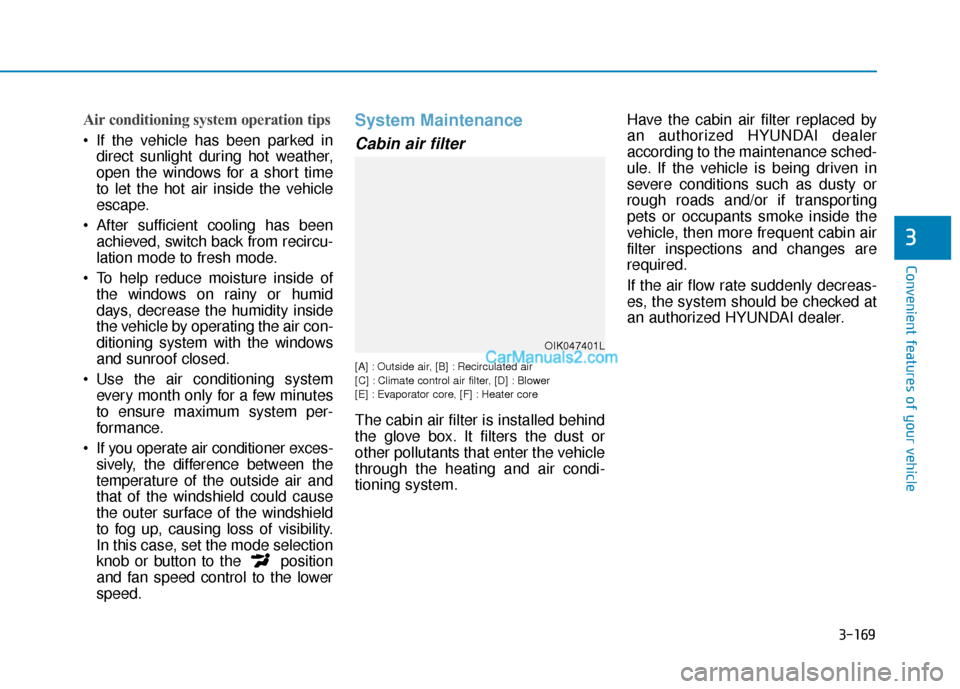
[A] : Outside air, [B] : Recirculated air
[C] : Climate control air filter, [D] : Blower
[E] : Evaporator core, [F] : Heater core
The cabin air filter is installed behind
the glove box. It filters the dust or
other pollutants that enter the vehicle
through the heating and air condi-
tioning system. Have the cabin air filter replaced by
an authorized HYUNDAI dealer
according to the maintenance sched-
ule. If the vehicle is being driven in
severe conditions such as dusty or
rough roads and/or if transporting
pets or occupants smoke inside the
vehicle, then more frequent cabin air
filter inspections and changes are
required.
If the air flow rate suddenly decreas-
es, the system should be checked at
an authorized HYUNDAI dealer.
OIK047401L
Page 269 of 611
3-173
Convenient features of your vehicle
3
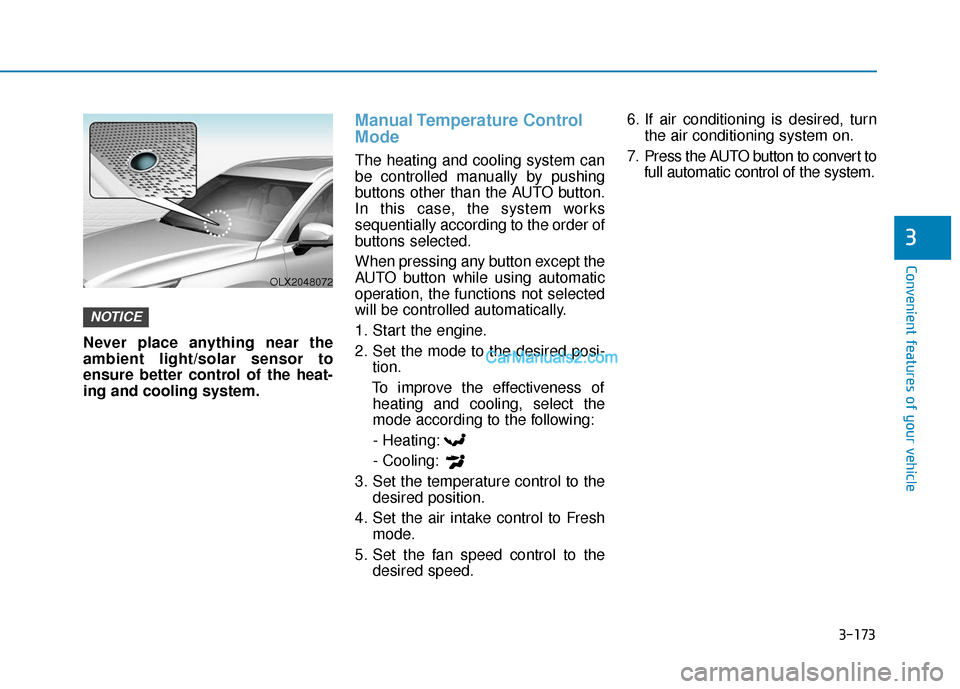
Never place anything near the
ambient light/solar sensor to
ensure better control of the heat-
ing and cooling system.
Manual Temperature Control
Mode
The heating and cooling system can
be controlled manually by pushing
buttons other than the AUTO button.
In this case, the system works
sequentially according to the order of
buttons selected.
When pressing any button except the
AUTO button while using automatic
operation, the functions not selected
will be controlled automatically.
1. Start the engine.
2. Set the mode to the desired posi-tion.
To improve the effectiveness of heating and cooling, select the
mode according to the following:
- Heating:
- Cooling:
3. Set the temperature control to the desired position.
4. Set the air intake control to Fresh mode.
5. Set the fan speed control to the desired speed. 6. If air conditioning is desired, turn
the air conditioning system on.
7. Press the AUTO button to convert to full automatic control of the system.
NOTICE
OLX2048072
Page 274 of 611
3-178
Convenient features of your vehicle
Air conditioning (7)
Push the A/C button to manually turn
the system on (indicator light will illu-
minate) and off.
OFF mode (5)
Push the OFF button to turn the cli-
mate control system off. You can still
operate the mode and air intake but-
tons as long as the ignition switch is
in the ON position.
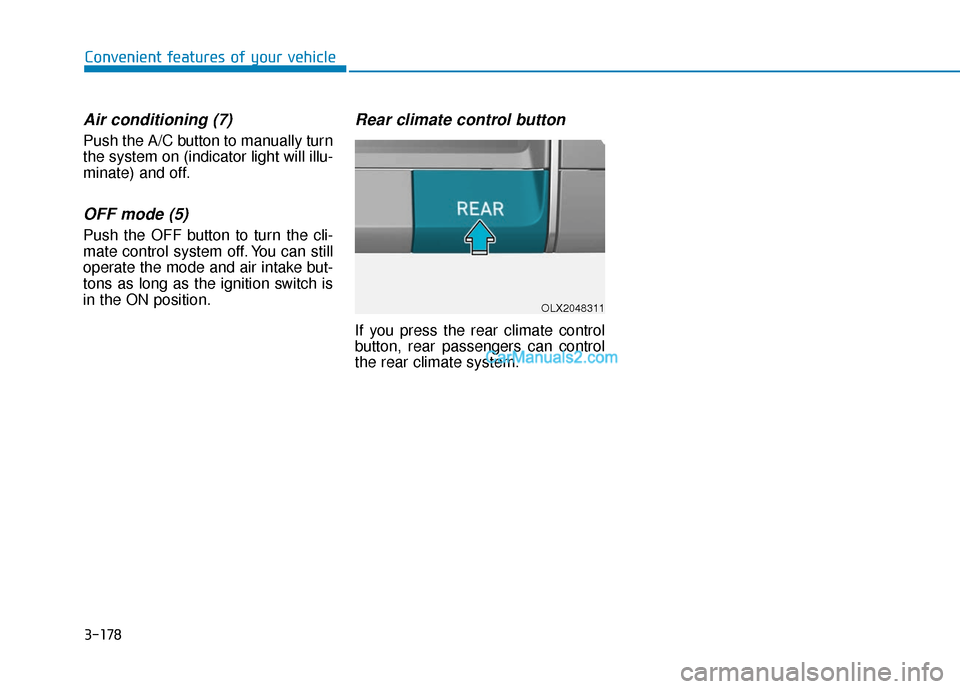
Rear climate control button
If you press the rear climate control
button, rear passengers can control
the rear climate system.
OLX2048311
Page 279 of 611
3-183
Convenient features of your vehicle
3
Operation Tips
To keep dust or unpleasant fumesfrom entering the car through the
ventilation system, temporarily set
the air intake control to the recircu-
lation mode. Return the control to
the to fresh mode when the
unpleasant air outside has dimin-
ished. This will help keep the driver
alert and comfortable.
To help prevent the inside of the windshield from fogging, set the air
intake control to fresh mode and
the fan speed to the desired posi-
tion, turn on the air conditioning
system, and adjust the temperature
control to the desired temperature.
Air conditioning
Your HYUNDAI vehicle air condition-
ing system is filled with R-134a
refrigerant.
1. Start the engine.
2. Press the air conditioning button.
3. Select the Face Level mode.
4. Set the air intake control to Recirculation mode temporarily to
allow the cabin to cool quickly.
When the desired temperature in
the cabin is reached, change the
air intake control back to Fresh
mode.
5. Adjust the fan speed control and temperature control to maintain
maximum comfort.
When maximum cooling is desired,
set the temperature control to the
MAX A/C position, then set the fan
speed control to the highest setting. When using the air conditioning
system, monitor the engine tem-
perature gauge closely while driv-
ing up hills or in heavy traffic
when outside temperatures. Air
conditioning system operation
when climbing a steep grade or in
high outside ambient tempera-
tures can cause engine overheat-
ing. Continue to use the fan, but
turn the air conditioning system
off if the engine temperature
gauge indicates engine overheat-
ing.
Air conditioning system operation
tips
If the vehicle has been parked in
direct sunlight during hot weather,
open the windows for a short time
to let the hot air inside the vehicle
escape.
After sufficient cooling has been achieved, switch back from recircu-
lation mode to fresh mode.
NOTICE
Page 288 of 611
3-192
Convenient features of your vehicle
S
ST
T O
O R
RA
A G
G E
E
C
C O
O M
M P
PA
A R
RT
TM
M E
EN
N T
T
To avoid possible theft, do not
leave valuables in the storage
compartments.
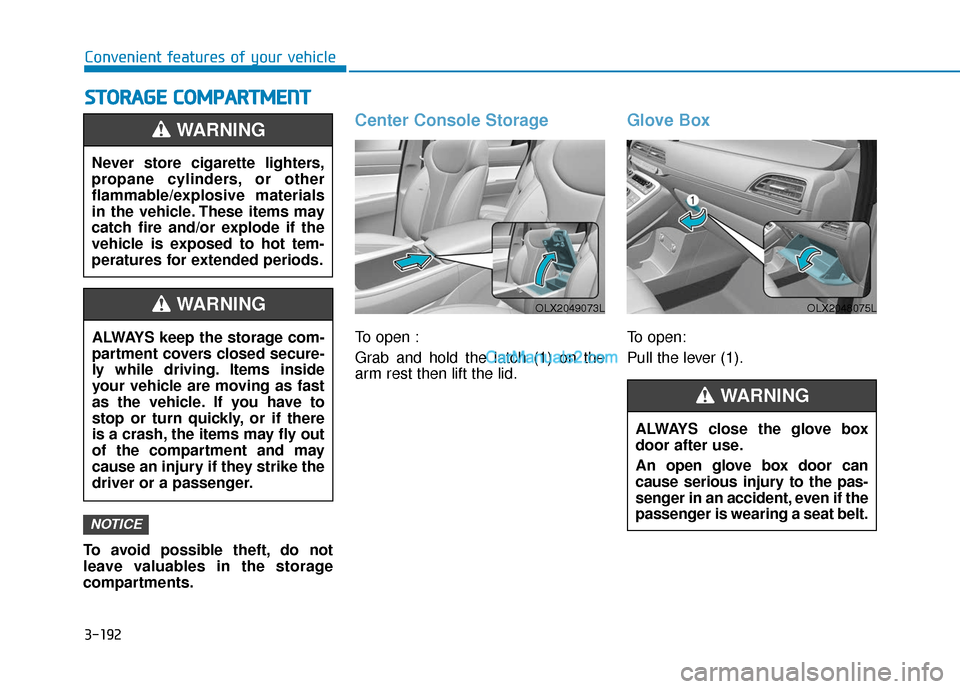
Center Console Storage
To open :
Grab and hold the latch (1) on the
arm rest then lift the lid.
Glove Box
To open:
Pull the lever (1).
NOTICE
Never store cigarette lighters,
propane cylinders, or other
flammable/explosive materials
in the vehicle. These items may
catch fire and/or explode if the
vehicle is exposed to hot tem-
peratures for extended periods.
WARNING
ALWAYS keep the storage com-
partment covers closed secure-
ly while driving. Items inside
your vehicle are moving as fast
as the vehicle. If you have to
stop or turn quickly, or if there
is a crash, the items may fly out
of the compartment and may
cause an injury if they strike the
driver or a passenger.
WARNING
ALWAYS close the glove box
door after use.
An open glove box door can
cause serious injury to the pas-
senger in an accident, even if the
passenger is wearing a seat belt.
WARNING
OLX2049073LOLX2048075L
Page 291 of 611
3-195
Convenient features of your vehicle
3
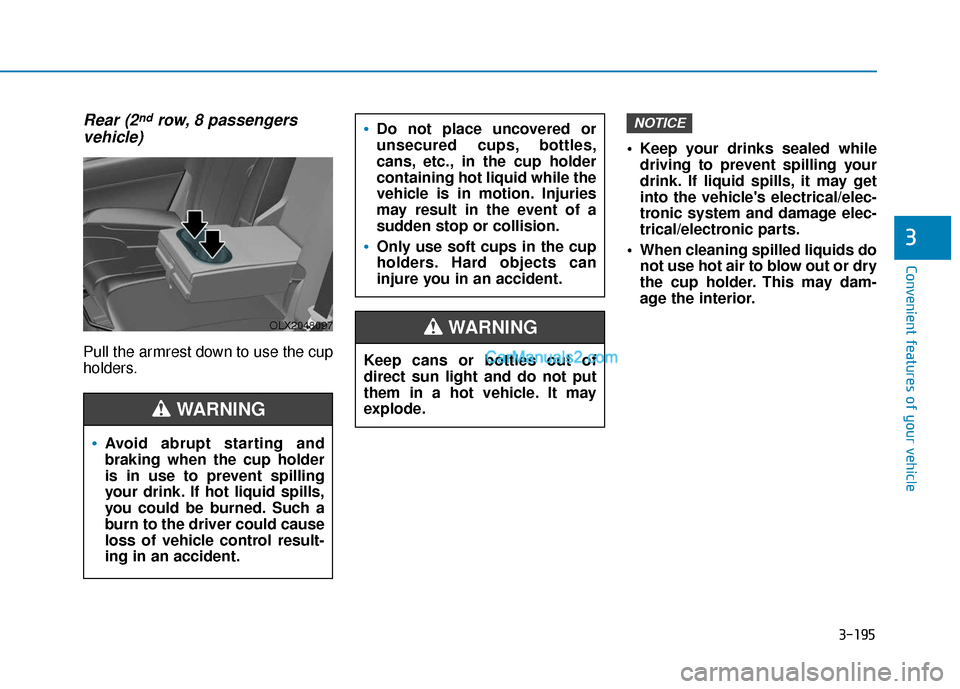
Rear (2ndrow, 8 passengers
vehicle)
Pull the armrest down to use the cup
holders. Keep your drinks sealed while
driving to prevent spilling your
drink. If liquid spills, it may get
into the vehicle's electrical/elec-
tronic system and damage elec-
trical/electronic parts.
When cleaning spilled liquids do not use hot air to blow out or dry
the cup holder. This may dam-
age the interior.
NOTICE
Keep cans or bottles out of
direct sun light and do not put
them in a hot vehicle. It may
explode.
WARNING
Do not place uncovered or
unsecured cups, bottles,
cans, etc., in the cup holder
containing hot liquid while the
vehicle is in motion. Injuries
may result in the event of a
sudden stop or collision.
Only use soft cups in the cup
holders. Hard objects can
injure you in an accident.
Avoid abrupt starting and
braking when the cup holder
is in use to prevent spilling
your drink. If hot liquid spills,
you could be burned. Such a
burn to the driver could cause
loss of vehicle control result-
ing in an accident.
WARNING
OLX2048097
Page 297 of 611
3-201
Convenient features of your vehicle
3
A smart phone or a tablet PC mayget warmer during the re-charging
process. It does not indicate any
malfunction with the charging sys-
tem.
A smart phone or a tablet PC, which adopts a different re-charg-
ing method, may not be properly
re-charged. In this case, use an
exclusive charger of your device.
The charging terminal is only to recharge a device. Do not use the
charging terminal either to turn ON
an audio or to play media.Wireless Cellular Phone
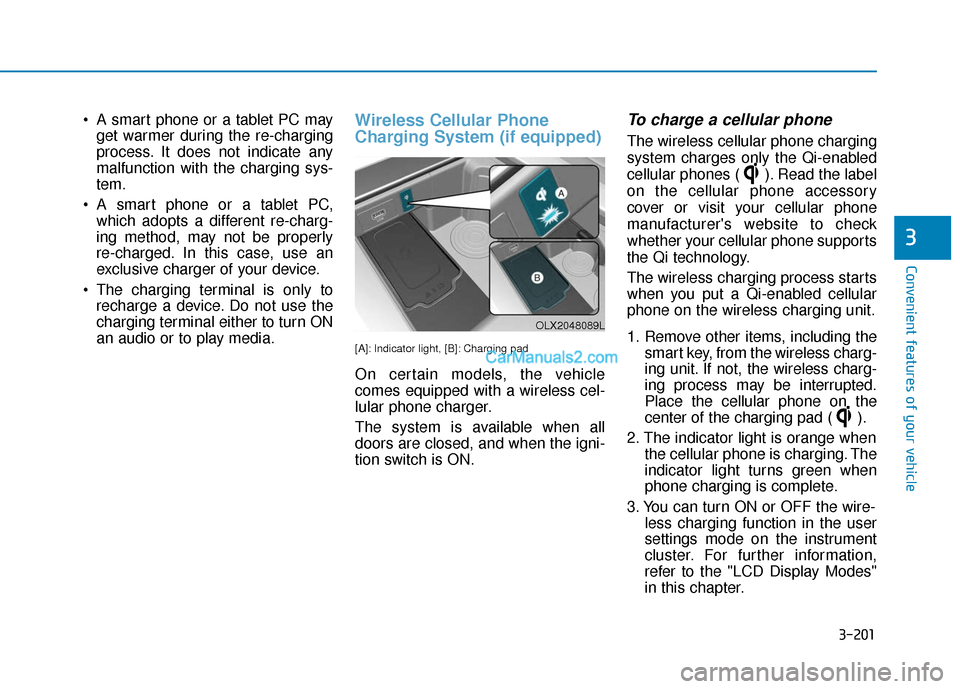
Charging System (if equipped)
[A]: Indicator light, [B]: Charging pad
On certain models, the vehicle
comes equipped with a wireless cel-
lular phone charger.
The system is available when all
doors are closed, and when the igni-
tion switch is ON.
To charge a cellular phone
The wireless cellular phone charging
system charges only the Qi-enabled
cellular phones ( ). Read the label
on the cellular phone accessory
cover or visit your cellular phone
manufacturer's website to check
whether your cellular phone supports
the Qi technology.
The wireless charging process starts
when you put a Qi-enabled cellular
phone on the wireless charging unit.
1. Remove other items, including the smart key, from the wireless charg-
ing unit. If not, the wireless charg-
ing process may be interrupted.
Place the cellular phone on the
center of the charging pad ( ).
2. The indicator light is orange when the cellular phone is charging. The
indicator light turns green when
phone charging is complete.
3. You can turn ON or OFF the wire- less charging function in the user
settings mode on the instrument
cluster. For further information,
refer to the "LCD Display Modes"
in this chapter.
OLX2048089L
Page 298 of 611
3-202
Convenient features of your vehicle
If your cellular phone is not charging:
- Slightly change the position of the cellular phone on the charging
pad.
- Make sure the indicator light is orange.
The indicator light will blink orange for
10 seconds if there is a malfunction in
the wireless charging system.
In this case, temporarily stop the
charging process, and re-attempt to
charge your cellular phone again.
The system warns you with a mes-
sage on the LCD display if the cellular
phone is still on the wireless charging
unit after the engine is turned OFF
and the front door is opened.
Information
For some manufacturers' cellular
phones, the system may not warn you
even though the cellular phone is left
on the wireless charging unit. This is
due to the particular characteristic of
the cellular phone and not a malfunc-
tion of the wireless charging. The wireless cellular phone
charging system may not sup-
port certain cellular phones,
which are not verified for the Qi
specification ( ).
When placing your cellular phone on the charging mat,
position the phone in the middle
of the mat for optimal charging
performance. If your cell phone
is off to the side, the charging
rate may be less and in some
cases the cell phone may experi-
ence higher heat conduction.
In some cases, the wireless charging may stop temporarily
when the Remote Key or Smart
Key is used, either when starting
the vehicle or locking/unlocking
the doors, etc.
When charging certain cellular phones, the charging indicator
may not change to green when
the cell phone is fully charged.
The wireless charging process may temporarily stop, when tem-
perature abnormally increases
inside the wireless cellular phone
charging system. Stop the charg-
ing cellular phone and wait until
temperature falls to a certain level.
The wireless charging process may temporarily stop when there
is any metallic item, such as a
coin, between the wireless cellular
phone charging system and the
cellular phone.
When charging some cellular phones with a self-protection fea-
ture, the wireless charging speed
may decrease and the wireless
charging may stop.
If the cellular phone has a thick cover, the wireless charging may
not be possible.
If the cell phone is not completely contacting the charging pad, wire-
less charging may not operate
properly.
Some magnetic items like credit cards, phone cards or rail tickets
may be damaged if left with the
cellular phone during the charging
process.NOTICE
i
Page 301 of 611
3-205
Convenient features of your vehicle
3
Luggage Net Holder
(if equipped)
To keep items from shifting in the lug-
gage compartment, you can use the
4 holders located in the luggage
board to attach the luggage net.
Make sure the luggage net is secure-
ly attached to the holders in the lug-
gage board.
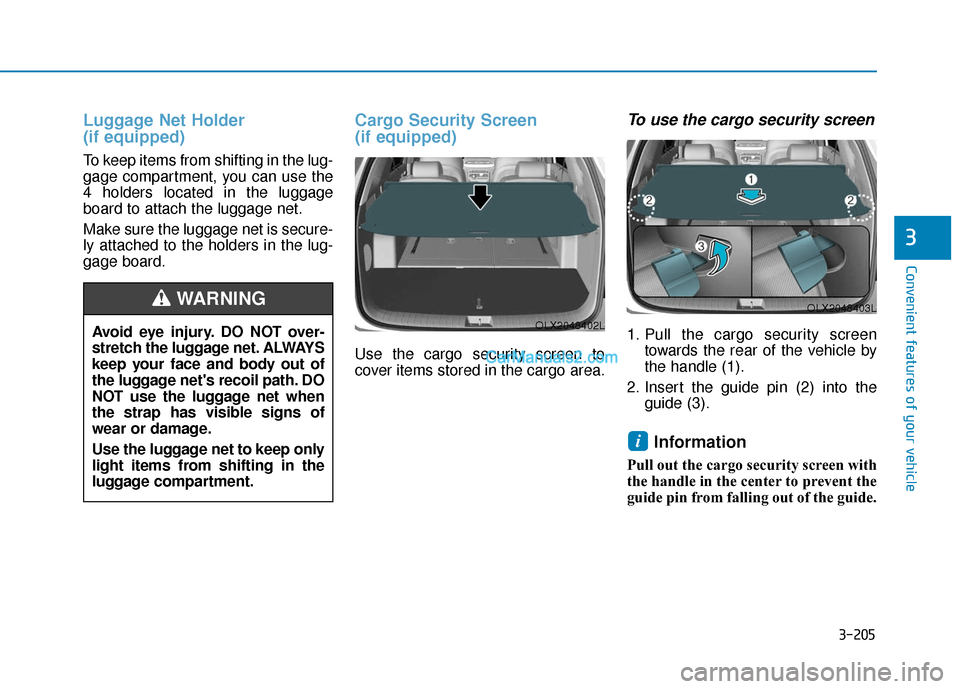
Cargo Security Screen
(if equipped)
Use the cargo security screen to
cover items stored in the cargo area.
To use the cargo security screen
1. Pull the cargo security screentowards the rear of the vehicle by
the handle (1).
2. Insert the guide pin (2) into the guide (3).
Information
Pull out the cargo security screen with
the handle in the center to prevent the
guide pin from falling out of the guide.
i
OLX2048403L
OLX2048402LAvoid eye injury. DO NOT over-
stretch the luggage net. ALWAYS
keep your face and body out of
the luggage net's recoil path. DO
NOT use the luggage net when
the strap has visible signs of
wear or damage.
Use the luggage net to keep only
light items from shifting in the
luggage compartment.
WARNING
Page 311 of 611
5
Blind-Spot Collision Warning/
Blind-Spot Collision-Avoidance Assist .............5-78
System Description .........................................................5-78
System Setting and Operation .....................................5-79
Warning and System Control .......................................5-82
Detecting Sensor (Camera and Radar) ......................5-84
Limitations of the System .............................................5-87
Rear Cross-Traffic Collision Warning (RCCW)/
Rear Cross-Traffic Collision-Avoidance Assist
(RCCA) ...................................................................5-92
System Description .........................................................5-92
System Setting and Operation .....................................5-93
Warning and System Control .......................................5-95
Detecting Sensor .............................................................5-98
Limitations of the System .............................................5-99
Lane Following Assist (LFA) system ...............5-103
LFA Setting and Operation .........................................5-104
Warning Message .........................................................5-105
Limitations of the System...........................................5-107
Lane Keeping Assist (LKA) system .................5-109
LKA System Operation.................................................5-110
Warning Light and Message ......................................5-112
Limitations of the System...........................................5-114
LKA System Function Change ...................................5-116
Driver Attention Warning (DAW) system .......5-117
System Setting and Operation...................................5-117
Resetting the System ...................................................5-118
System Standby.............................................................5-119
System Malfunction .....................................................5-119
Highway Driving Assist (HDA) system ............5-121
System Setting and Operation...................................5-121
Warning Message .........................................................5-124
Smart Cruise Control With Stop &
Go System ...........................................................5-128
Smart Cruise Control Switch ......................................5-129
Adjusting the Sensitivity of Smart Cruise
Control ........................................................................\
.....5-129
To Convert to Cruise Control Mode .........................5-130
Smart Cruise Control Speed .......................................5-131
Smart Cruise Control Vehicle-to-Vehicle
Distance ........................................................................\
...5-135
Sensor to Detect Distance to the
Vehicle Ahead ................................................................5-138
Limitations of the System...........................................5-140
Leading Vehicle Departure Alert .....................5-146
System Setting and Operation...................................5-146