heating Hyundai Palisade 2020 User Guide
[x] Cancel search | Manufacturer: HYUNDAI, Model Year: 2020, Model line: Palisade, Model: Hyundai Palisade 2020Pages: 611, PDF Size: 18.86 MB
Page 269 of 611
3-173
Convenient features of your vehicle
3
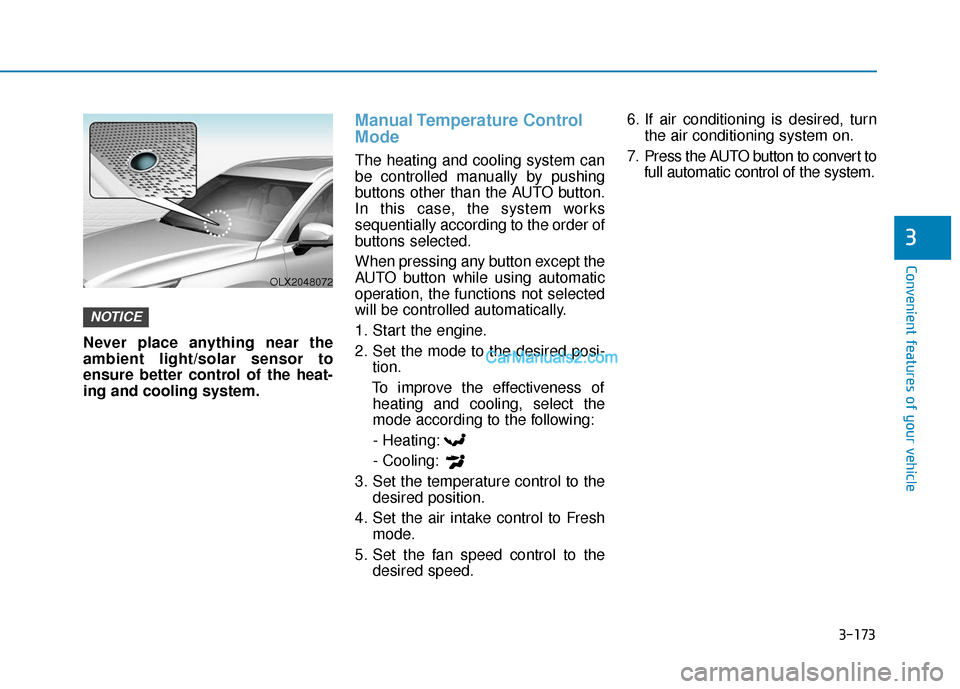
Never place anything near the
ambient light/solar sensor to
ensure better control of the heat-
ing and cooling system.
Manual Temperature Control
Mode
The heating and cooling system can
be controlled manually by pushing
buttons other than the AUTO button.
In this case, the system works
sequentially according to the order of
buttons selected.
When pressing any button except the
AUTO button while using automatic
operation, the functions not selected
will be controlled automatically.
1. Start the engine.
2. Set the mode to the desired posi-tion.
To improve the effectiveness of heating and cooling, select the
mode according to the following:
- Heating:
- Cooling:
3. Set the temperature control to the desired position.
4. Set the air intake control to Fresh mode.
5. Set the fan speed control to the desired speed. 6. If air conditioning is desired, turn
the air conditioning system on.
7. Press the AUTO button to convert to full automatic control of the system.
NOTICE
OLX2048072
Page 275 of 611
3-179
Convenient features of your vehicle
3
Rear climate control
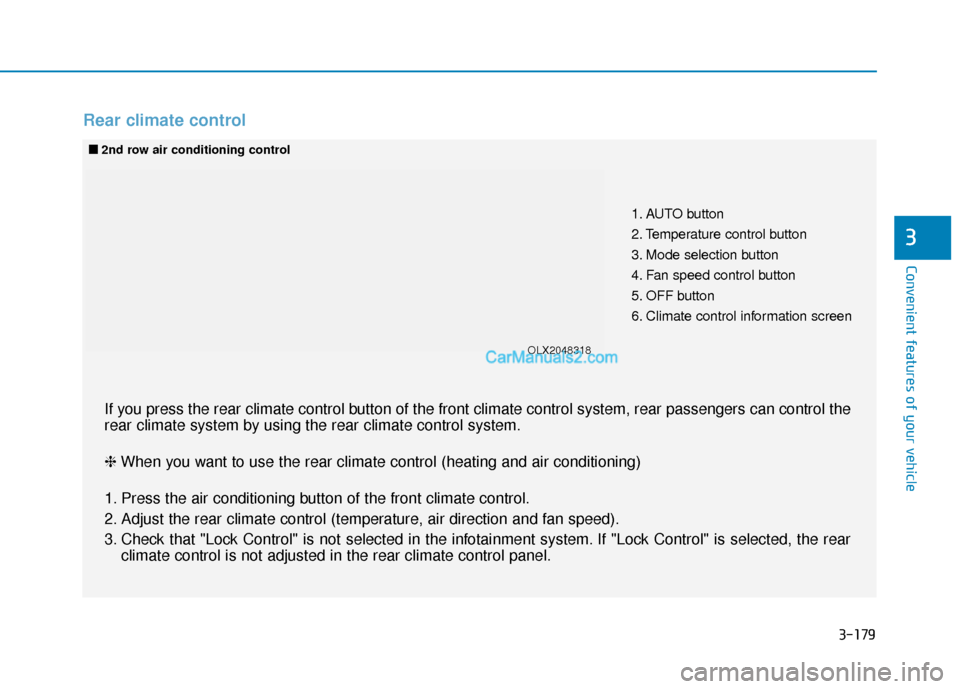
1. AUTO button
2. Temperature control button
3. Mode selection button
4. Fan speed control button
5. OFF button
6. Climate control information screen
■
■2nd row air conditioning control
If you press the rear climate control button of the front climate control system, rear passengers can control t\
he
rear climate system by using the rear climate control system.
❈ When you want to use the rear climate control (heating and air conditioning)
1. Press the air conditioning button of the front climate control.
2. Adjust the rear climate control (temperature, air direction and fan speed).
3. Check that "Lock Control" is not selected in the infotainment system. If "Lock Control" is selected, the rear climate control is not adjusted in the rear climate control panel.
OLX2048318
Page 277 of 611
3-181
Convenient features of your vehicle
3
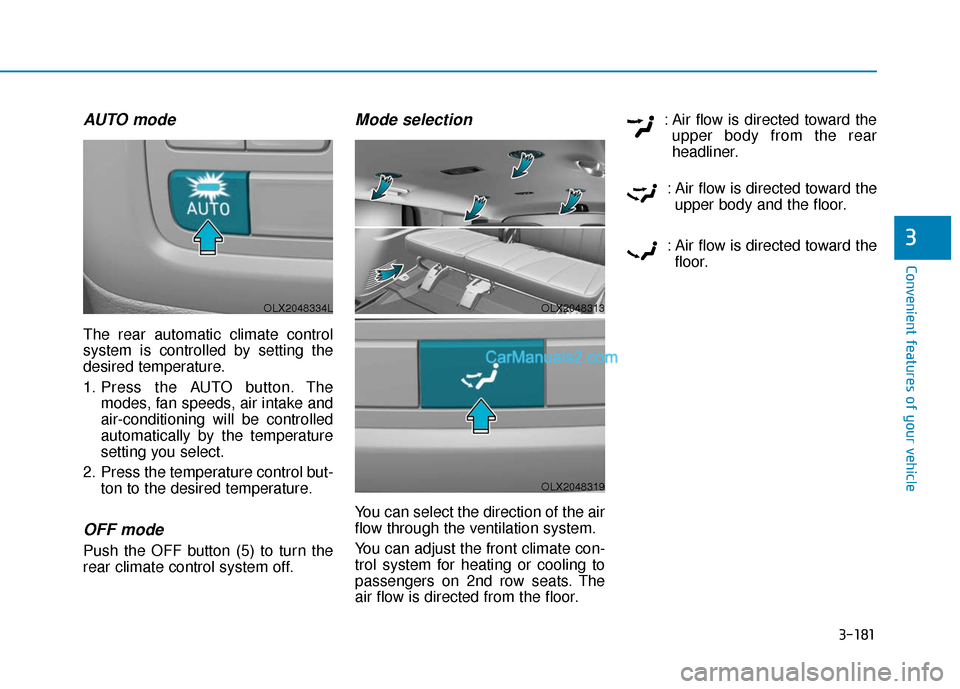
AUTO mode
The rear automatic climate control
system is controlled by setting the
desired temperature.
1. Press the AUTO button. Themodes, fan speeds, air intake and
air-conditioning will be controlled
automatically by the temperature
setting you select.
2. Press the temperature control but- ton to the desired temperature.
OFF mode
Push the OFF button (5) to turn the
rear climate control system off.
Mode selection
You can select the direction of the air
flow through the ventilation system.
You can adjust the front climate con-
trol system for heating or cooling to
passengers on 2nd row seats. The
air flow is directed from the floor. : Air flow is directed toward the
upper body from the rear
headliner.
: Air flow is directed toward the upper body and the floor.
: Air flow is directed toward the floor.
OLX2048313
OLX2048319
OLX2048334L
Page 278 of 611
3-182
Convenient features of your vehicle
Rear vents on the headliner
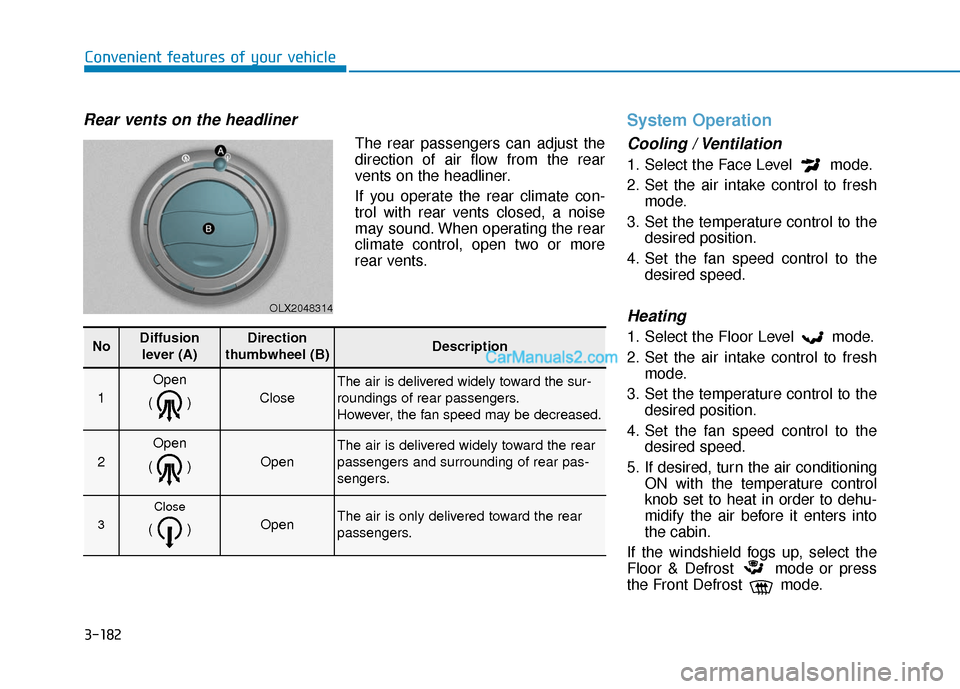
The rear passengers can adjust the
direction of air flow from the rear
vents on the headliner.
If you operate the rear climate con-
trol with rear vents closed, a noise
may sound. When operating the rear
climate control, open two or more
rear vents.
System Operation
Cooling / Ventilation
1. Select the Face Level mode.
2. Set the air intake control to freshmode.
3. Set the temperature control to the desired position.
4. Set the fan speed control to the desired speed.
Heating
1. Select the Floor Level mode.
2. Set the air intake control to freshmode.
3. Set the temperature control to the desired position.
4. Set the fan speed control to the desired speed.
5. If desired, turn the air conditioning ON with the temperature control
knob set to heat in order to dehu-
midify the air before it enters into
the cabin.
If the windshield fogs up, select the
Floor & Defrost mode or press
the Front Defrost mode.
OLX2048314
NoDiffusion lever (A)Direction
thumbwheel (B)Description
1
Open
()
Close
The air is delivered widely toward the sur-
roundings of rear passengers.
However, the fan speed may be decreased.
2
Open
()
Open
The air is delivered widely toward the rear
passengers and surrounding of rear pas-
sengers.
3
Close
() Open The air is only delivered toward the rear
passengers.
Page 280 of 611
3-184
Convenient features of your vehicle
To help reduce moisture inside of the windows on rainy or humid
days, decrease the humidity inside
the vehicle by operating the air
conditioning system with the win-
dows and sunroof closed.
Use the air conditioning system every month only for a few minutes
to ensure maximum system per-
formance.
If you operate air conditioner excessively, the difference between
the temperature of the outside air
and that of the windshield could
cause the outer surface of the
windshield to fog up, causing loss
of visibility. In this case, set the
mode selection knob or button to
the position and fan speed
control to the lower speed.
System Maintenance
Cabin air filter
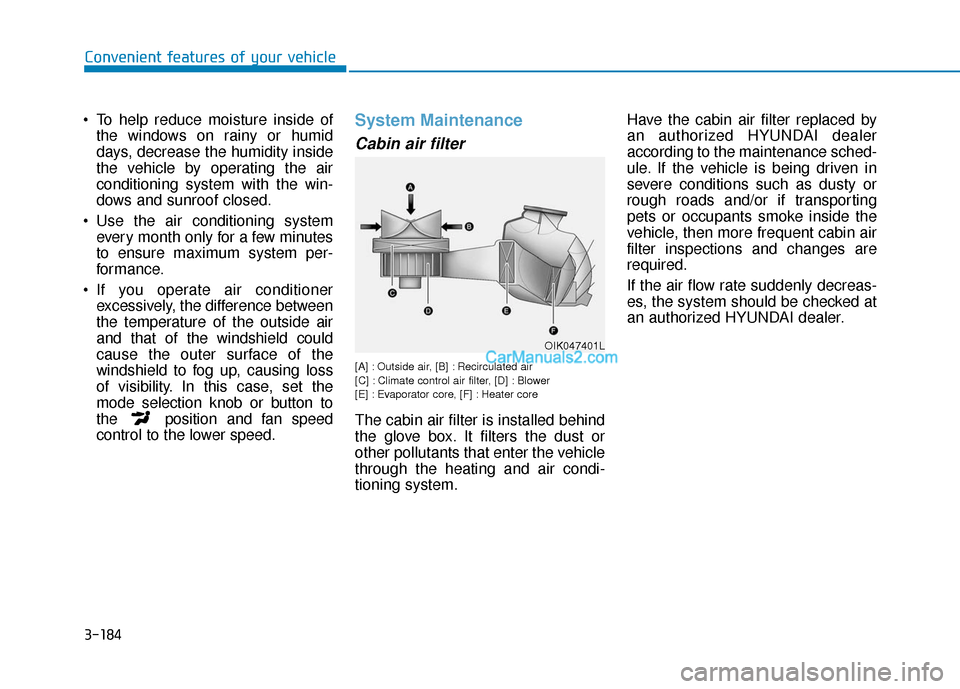
[A] : Outside air, [B] : Recirculated air
[C] : Climate control air filter, [D] : Blower
[E] : Evaporator core, [F] : Heater core
The cabin air filter is installed behind
the glove box. It filters the dust or
other pollutants that enter the vehicle
through the heating and air condi-
tioning system. Have the cabin air filter replaced by
an authorized HYUNDAI dealer
according to the maintenance sched-
ule. If the vehicle is being driven in
severe conditions such as dusty or
rough roads and/or if transporting
pets or occupants smoke inside the
vehicle, then more frequent cabin air
filter inspections and changes are
required.
If the air flow rate suddenly decreas-
es, the system should be checked at
an authorized HYUNDAI dealer.
OIK047401L
Page 282 of 611
3-186
Convenient features of your vehicle
For maximum defrost perform-ance, set the temperature control
knob to the highest temperature
setting (rotated all the way to the
right) and the fan speed control to
the highest setting.
If warm air to the floor is desired while defrosting or defogging, set the
mode to the floor-defrost position.
Before driving, clear all snow and ice from the windshield, rear win-
dow, side view mirrors, and all side
windows.
Clear all snow and ice from the hood and air inlet in the cowl grill to
improve heater and defroster effi-
ciency and to reduce the probability
of fogging up the inside of the wind-
shield.
If the engine temperature is still
cold after starting, then a brief
engine warm up period may be
required for the vented air flow to
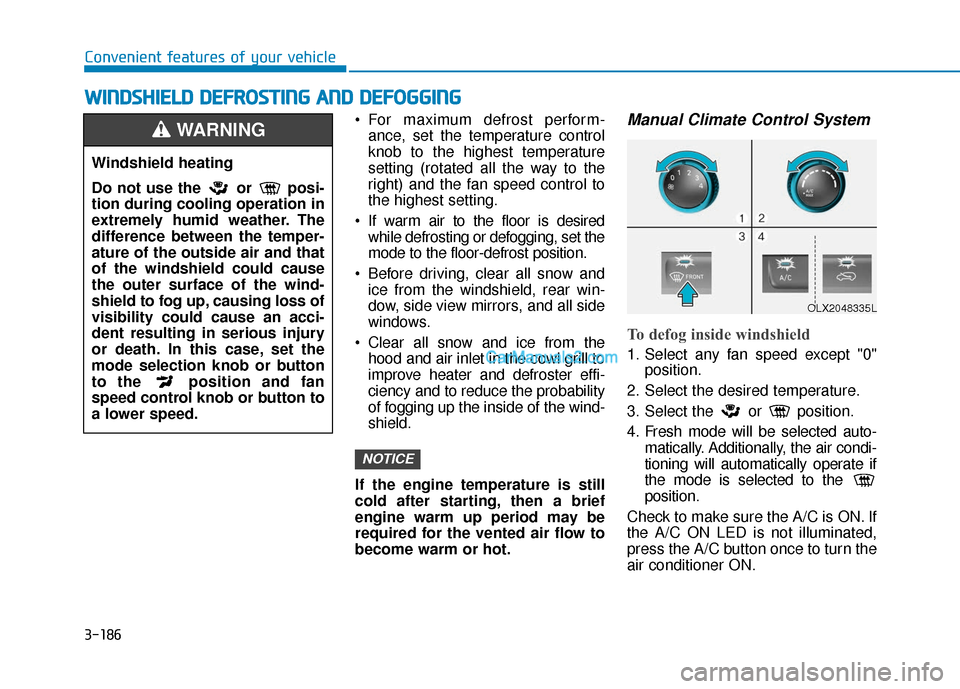
become warm or hot.Manual Climate Control System
To defog inside windshield
1. Select any fan speed except "0" position.
2. Select the desired temperature.
3. Select the or position.
4. Fresh mode will be selected auto- matically. Additionally, the air condi-
tioning will automatically operate if
the mode is selected to the
position.
Check to make sure the A/C is ON. If
the A/C ON LED is not illuminated,
press the A/C button once to turn the
air conditioner ON.
NOTICE
W
W I
IN
N D
DS
SH
H I
IE
E L
LD
D
D
D E
EF
FR
R O
O S
ST
T I
IN
N G
G
A
A N
N D
D
D
D E
EF
FO
O G
GG
GI
IN
N G
G
Windshield heating
Do not use the or posi-
tion during cooling operation in
extremely humid weather. The
difference between the temper-
ature of the outside air and that
of the windshield could cause
the outer surface of the wind-
shield to fog up, causing loss of
visibility could cause an acci-
dent resulting in serious injury
or death. In this case, set the
mode selection knob or button
to the position and fan
speed control knob or button to
a lower speed.
WARNING
OLX2048335L
Page 329 of 611
5-20
Driving your vehicle
Shift button held down
The warning message appears on
the LCD display, when the shift but-
ton is pressed continuously or the
shift button does not properly oper-
ate. Clean the surroundings of gear
shift button.
If this message appears again, we
recommend you to have the vehicle
inspected by an authorized
HYUNDAI dealer.
Shifter system malfunction
The warning message appears on
the LCD display, when the transmis-
sion or the shift button does not prop-
erly operate in the P (Park) position.
In this case, we recommend you to
immediately have the vehicle
inspected by an authorized
HYUNDAI dealer.
Check shift controls
The warning message appears on
the LCD display, when there is a mal-
function with transmission shift but-
ton.
In this case, we recommend you to
immediately have the vehicle
inspected by an authorized
HYUNDAI dealer.
Good driving practices
Never shift the gear from P (Park)or N (Neutral) to any other position
with the accelerator pedal
depressed.
Never shift the gear into P (Park) when the vehicle is in motion.
Be sure the vehicle is completely
stopped before you attempt to shift
into R (Reverse) or D (Drive).
Do not shift the gear to N (Neutral) when driving. Doing so may result
in an accident because of a loss of
engine braking and the transmis-
sion could be damaged.
Do not drive with your foot resting on the brake pedal. Even light, but
consistent pedal pressure can
result in the brakes overheating,
brake wear and possibly even
brake failure.
When driving in sports mode, slow down before shifting to a lower
gear. Otherwise, the lower gear
may not be engaged if the engine
rpms are outside of the allowable
range.
Page 351 of 611
5-42
Driving your vehicle
Trailer Stability Assist (TSA)
Trailer Stability Assist system helps
stabilize the vehicle and trailer when
the trailer sways or oscillates. There
are various reasons making the vehi-
cle sway and oscillate.
Factors of swaying are such as:
- High speed
- Strong crosswinds
- Improper overloading
- Sudden controlling of steeringwheel
- Uneven road
Trailer Stability Assist system contin-
uously analyzes the vehicle and trail-
er instability. When the Trailer
Stability Assist system detects some
sway, the brakes are applied auto-
matically to stabilize the vehicle on
the front wheel. However, if it is not
enough to stabilize, the brakes are
applied on all wheels automatically
and engine power is properly
reduced. When the vehicle is stable
from swaying, trailer stability assist
system does not operate.
Good Braking Practices
Wet brakes can be dangerous! The
brakes may get wet if the vehicle is
driven through standing water or if it
is washed. Your vehicle will not stop
as quickly if the brakes are wet. Wet
brakes may cause the vehicle to pull
to one side. To dry the brakes, apply the brakes
lightly until the braking action returns
to normal, taking care to keep the
vehicle under control at all times. If
the braking action does not return to
normal, stop as soon as it is safe to
do so and call an authorized
HYUNDAI dealer for assistance.
DO NOT drive with your foot resting
on the brake pedal. Even light, but
constant pedal pressure can result in
the brakes overheating, brake wear,
and possibly even brake failure.
If a tire goes flat while you are driv-
ing, apply the brakes gently and
keep the vehicle pointed straight
ahead while you slow down. When
you are moving slowly enough for it
to be safe to do so, pull off the road
and stop in a safe location.
Keep your foot firmly on the brake
pedal when the vehicle is stopped to
prevent the vehicle from rolling for-
ward.
Whenever leaving the vehicle or
parking, always come to a com-
plete stop and continue to
depress the brake pedal. Shift
the gear to P (Park), then apply
the parking brake, and place the
ignition switch in the LOCK/OFF
position.
Vehicles parked with the park-
ing brake not applied or not
fully engaged may roll inadver-
tently and may cause injury to
the driver and others. ALWAYS
apply the parking brake before
exiting the vehicle.
WARNING
Page 457 of 611
5-148
Driving your vehicle
Hazardous Driving Conditions
When hazardous driving elements
are encountered such as water,
snow, ice, mud and sand, take the
below suggestions:
Drive cautiously and keep a longerbraking distance.
Avoid abrupt braking or steering.
When your vehicle is stuck in snow, mud, or sand, use second gear.
Accelerate slowly to avoid unnec-
essary wheel spin.
Put sand, rock salt, tire chains or other non-slip materials under the
wheels to provide additional trac-
tion while the vehicle becomes
stuck in ice, snow, or mud.
Rocking the Vehicle
If it is necessary to rock the vehicle
to free it from snow, sand, or mud,
first turn the steering wheel right and
left to clear the area around your
front wheels. Then, shift back and
forth between R (Reverse) and a for-
ward gear.
Try to avoid spinning the wheels, and
do not race the engine.
To prevent transmission wear, wait
until the wheels stop spinning before
shifting gears. Release the accelera-
tor pedal while shifting, and press
lightly on the accelerator pedal while
the transmission is in gear. Slowly
spinning the wheels in forward and
reverse directions causes a rocking
motion that may free the vehicle.
S SP
P E
EC
CI
IA
A L
L
D
D R
RI
IV
V I
IN
N G
G
C
C O
O N
ND
DI
IT
T I
IO
O N
NS
S
Downshifting with an automatic
transmission while driving on
slippery surfaces can cause an
accident. The sudden change in
tire speed could cause the tires
to skid. Be careful when down-
shifting on slippery surfaces.
WARNING
If the vehicle is stuck and
excessive wheel spin occurs,
the temperature in the tires can
increase very quickly. If the tires
become damaged, a tire blow
out or tire explosion can occur.
This condition is dangerous -
you and others may be injured.
Do not attempt this procedure if
people or objects are anywhere
near the vehicle.
If you attempt to free the vehicle,
the vehicle can overheat quickly,
possibly causing an engine
compartment fire or other dam-
age. Try to avoid spinning the
wheels as much as possible to
prevent overheating of either the
tires or the engine. DO NOT
allow the vehicle to spin the
wheels above 35 mph (56 km/h).
WARNING
Page 458 of 611
5-149
Driving your vehicle
5
Information
The ESC system must be turned OFF
before rocking the vehicle.
If you are still stuck after rocking
the vehicle a few times, have the
vehicle pulled out by a tow vehicle
to avoid engine overheating, pos-
sible damage to the transmission,
and tire damage. See "Towing" in
chapter 6.
Smooth Cornering
Avoid braking or gear changing in
corners, especially when roads are
wet. Ideally, corners should always
be taken under gentle acceleration.
Driving at Night
Night driving presents more hazards
than driving in the daylight. Here are
some important tips to remember:
Slow down and keep more dis-tance between you and other vehi-
cles, as it may be more difficult to
see at night, especially in areas
where there may not be any street
lights.
Adjust your mirrors to reduce the glare from other driver's head-
lamps.
Keep your headlamps clean and properly aimed. Dirty or improperly
aimed headlamps will make it
much more difficult to see at night.
Avoid staring directly at the head- lamps of oncoming vehicles. You
could be temporarily blinded, and it
will take several seconds for your
eyes to readjust to the darkness.
Driving in the Rain
Rain and wet roads can make driving
dangerous. Here are a few things to
consider when driving in the rain or
on slick pavement:
Slow down and allow extra follow-ing distance. A heavy rainfall
makes it harder to see and increas-
es the distance needed to stop
your vehicle.
Turn OFF your Cruise Control.
Replace your windshield wiper blades when they show signs of
streaking or missing areas on the
windshield.
Tires should be properly main- tained with at least 2/32nds of an
inch of tread depth. If your tires do
not have enough tread, making a
quick stop on wet pavement can
cause a skid and possibly lead to
an accident. See "Tire replace-
ment" in chapter 7 .
Turn on your headlamps to make it easier for others to see you.
NOTICE
i