navigation Hyundai Palisade 2020 User Guide
[x] Cancel search | Manufacturer: HYUNDAI, Model Year: 2020, Model line: Palisade, Model: Hyundai Palisade 2020Pages: 611, PDF Size: 18.86 MB
Page 363 of 611
5-54
Driving your vehicle
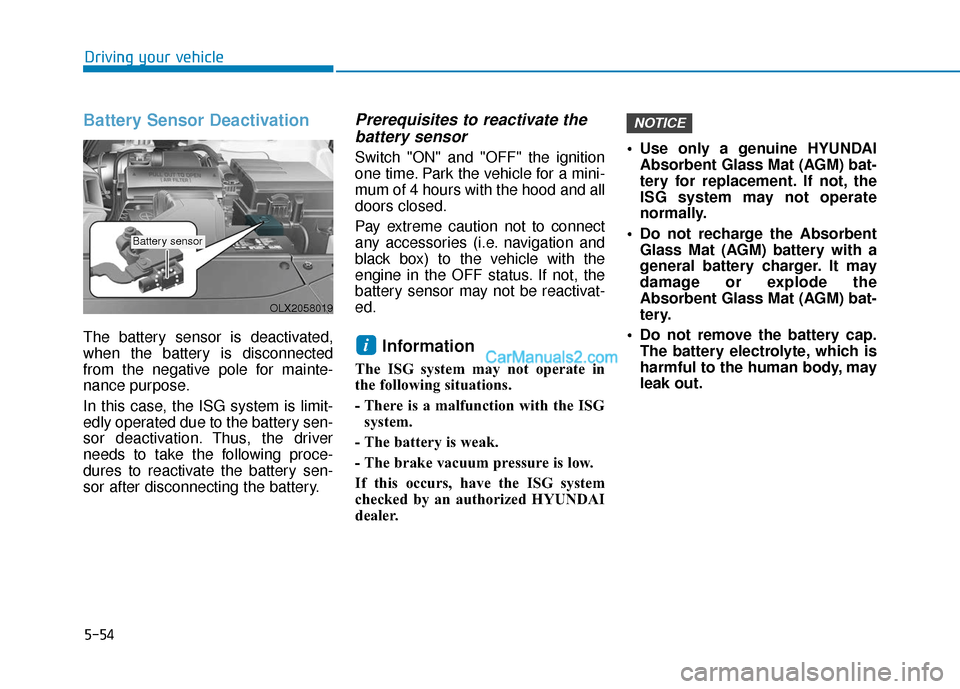
Battery Sensor Deactivation
The battery sensor is deactivated,
when the battery is disconnected
from the negative pole for mainte-
nance purpose.
In this case, the ISG system is limit-
edly operated due to the battery sen-
sor deactivation. Thus, the driver
needs to take the following proce-
dures to reactivate the battery sen-
sor after disconnecting the battery.
Prerequisites to reactivate thebattery sensor
Switch "ON" and "OFF" the ignition
one time. Park the vehicle for a mini-
mum of 4 hours with the hood and all
doors closed.
Pay extreme caution not to connect
any accessories (i.e. navigation and
black box) to the vehicle with the
engine in the OFF status. If not, the
battery sensor may not be reactivat-
ed.
Information
The ISG system may not operate in
the following situations.
- There is a malfunction with the ISG
system.
- The battery is weak.
- The brake vacuum pressure is low.
If this occurs, have the ISG system
checked by an authorized HYUNDAI
dealer. Use only a genuine HYUNDAI
Absorbent Glass Mat (AGM) bat-
tery for replacement. If not, the
ISG system may not operate
normally.
Do not recharge the Absorbent Glass Mat (AGM) battery with a
general battery charger. It may
damage or explode the
Absorbent Glass Mat (AGM) bat-
tery.
Do not remove the battery cap. The battery electrolyte, which is
harmful to the human body, may
leak out.
NOTICE
i
OLX2058019
Battery sensor
Page 430 of 611
5-121
Driving your vehicle
5
The Highway Driving Assist (HDA)
system helps keep the vehicle
between lanes, maintain a distance
with the vehicle ahead, and automat-
ically adjusts the vehicle speed to the
speed limit while driving on the high-
way.Information
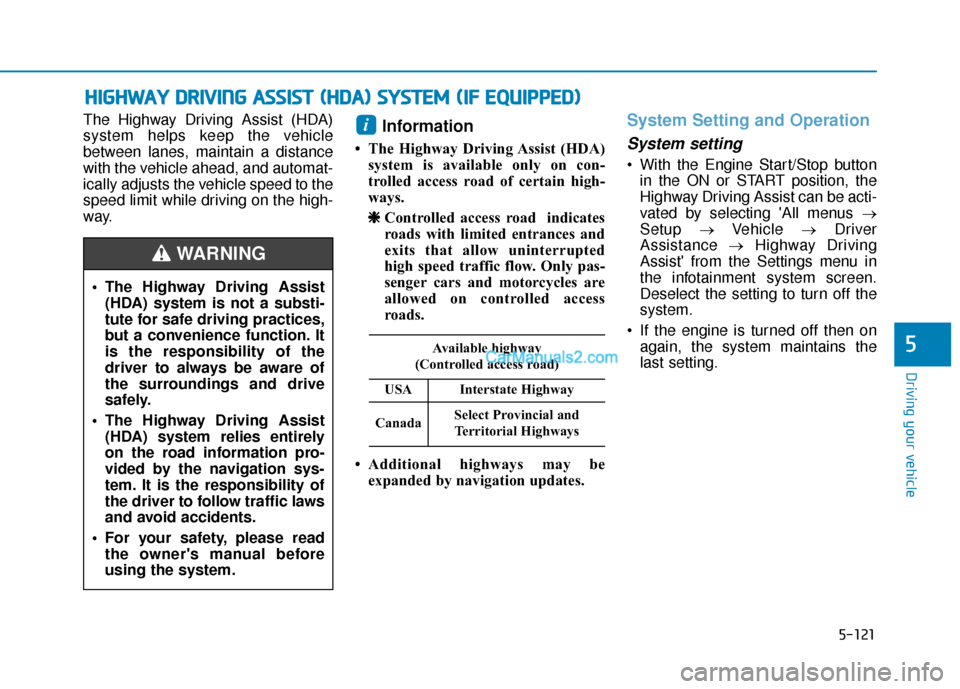
• The Highway Driving Assist (HDA)system is available only on con-
trolled access road of certain high-
ways.
❈ ❈ Controlled access road indicates
roads with limited entrances and
exits that allow uninterrupted
high speed traffic flow. Only pas-
senger cars and motorcycles are
allowed on controlled access
roads.
• Additional highways may be expanded by navigation updates.
System Setting and Operation
System setting
With the Engine Start/Stop buttonin the ON or START position, the
Highway Driving Assist can be acti-
vated by selecting 'All menus →
Setup →Vehicle →Driver
Assistance →Highway Driving
Assist' from the Settings menu in
the infotainment system screen.
Deselect the setting to turn off the
system.
If the engine is turned off then on again, the system maintains the
last setting.
i
H HI
IG
G H
H W
W A
AY
Y
D
D R
RI
IV
V I
IN
N G
G
A
A S
SS
SI
IS
S T
T
(
( H
H D
DA
A )
)
S
S Y
Y S
ST
T E
EM
M
(
( I
IF
F
E
E Q
Q U
UI
IP
P P
PE
ED
D )
)
The Highway Driving Assist
(HDA) system is not a substi-
tute for safe driving practices,
but a convenience function. It
is the responsibility of the
driver to always be aware of
the surroundings and drive
safely.
The Highway Driving Assist (HDA) system relies entirely
on the road information pro-
vided by the navigation sys-
tem. It is the responsibility of
the driver to follow traffic laws
and avoid accidents.
For your safety, please read the owner's manual before
using the system.
WARNING
Available highway
(Controlled access road)
USAInterstate Highway
CanadaSelect Provincial and Territorial Highways
Page 435 of 611
5-126
Driving your vehicle
Information
• Highway Driving Assist is limited inother countries.
• Highway Driving Assist only oper- ates based on the speed limits of the
highway but it does not work with
the speed cameras.
• The time gap could occur between the navigation speed warning and
system operation.
• The system is not designed to work on highways other than mentioned
as a controlled access road. The sys-
tem automatically cancels when you
leave the highway.
• If there is a problem with Highway Driving Assist, the system cannot be
activated in the infotainment system
screen.
• If your vehicle is 1640 ft. (500 m) ahead and behind of an open toll-
gate, the system is automatically
canceled. Also, it is converted to
Smart Cruise Control automatically
with a pop-up message on the navi-
gation. • In the automatic speed setting
mode, the vehicle automatically
accelerates or decelerates when the
highway speed limit changes.
• If your vehicle speed exceeds 95 mph (153 km/h), Highway Driving
Assist is automatically canceled.
Also, it is converted to Smart Cruise
Control automatically with a pop-
up message on the navigation.
• If you enter a rest area on the high- way or a IC/JC (intersection/junc-
tion) without a destination set, the
system is canceled later than when
the vehicle actually leaves the high-
way.
i
The Highway Driving Assist
system may not function prop-
erly in the following situations:
The navigation is not working
properly.
The navigation is not updated.
The real-time GPS or map
information provided has
errors.
The navigation is overloaded
by performing functions such
as route search, video play-
back, voice recognition, etc.
are performing simultaneous-
ly.
GPS signals are blocked in
areas such as a tunnel.
The driver goes off course or
the route to the destination is
changed or canceled by reset-
ting the navigation.
The vehicle enters a service
station or rest area
Android Auto or Car Play is
operating.
CAUTION
Page 436 of 611
5-127
Driving your vehicle
5
Information
• For information's on vehicle to vehi-cle distance control and the front
radar, refer to "Smart Cruise
Control (Stop & Go)" in this chap-
ter.
• For information's on steering con- trol and distance control and the
front camera, refer to "Lane
Following Assist (LFA)" in this
chapter.
Information
This device complies with Part 15 of
the FCC rules.
Operation is subject to the following
three conditions:
1. This device may not cause harmful interference, and
2. This device must accept any inter- ference received, including interfer-
ence that may cause undesired
operation.
3. Changes or modifications not expressly approved by the party
responsible for compliance could
void the user's authority to operate
the device.
Information
Radio frequency radiation exposure
information:
This equipment complies with FCC
radiation exposure limits set forth for
an uncontrolled environment.
This equipment should be installed
and operated with minimum distance
of 8 in. (20 cm) between the radiator
(antenna) and your body.
This transmitter must not be co-locat-
ed or operating in conjunction with
any other antenna or transmitter.
ii
i
The navigation cannot detect
the current vehicle position
(ex: elevated roads including
overpass adjacent to general
roads or nearby roads exist in
a parallel way).
The navigation is being updat-
ed while driving.
The navigation is being reset
while driving.
The road is slippery due to
bad weather such as rain or
snow.
Page 490 of 611
6-12
What to do in an emergency
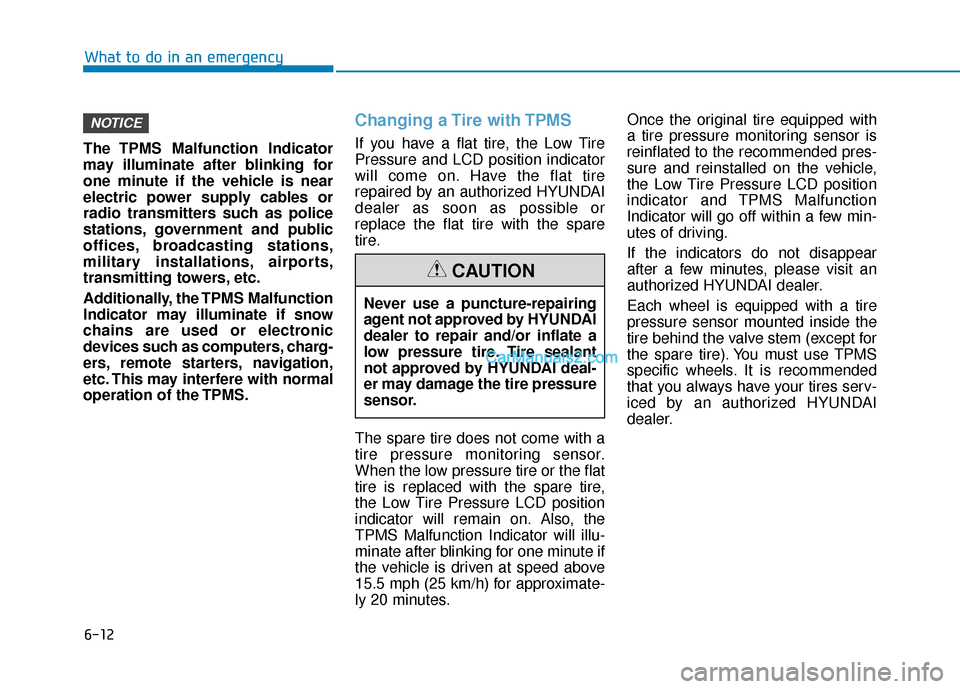
The TPMS Malfunction Indicator
may illuminate after blinking for
one minute if the vehicle is near
electric power supply cables or
radio transmitters such as police
stations, government and public
offices, broadcasting stations,
military installations, airports,
transmitting towers, etc.
Additionally, the TPMS Malfunction
Indicator may illuminate if snow
chains are used or electronic
devices such as computers, charg-
ers, remote starters, navigation,
etc. This may interfere with normal
operation of the TPMS.
Changing a Tire with TPMS
If you have a flat tire, the Low Tire
Pressure and LCD position indicator
will come on. Have the flat tire
repaired by an authorized HYUNDAI
dealer as soon as possible or
replace the flat tire with the spare
tire.
The spare tire does not come with a
tire pressure monitoring sensor.
When the low pressure tire or the flat
tire is replaced with the spare tire,
the Low Tire Pressure LCD position
indicator will remain on. Also, the
TPMS Malfunction Indicator will illu-
minate after blinking for one minute if
the vehicle is driven at speed above
15.5 mph (25 km/h) for approximate-
ly 20 minutes. Once the original tire equipped with
a tire pressure monitoring sensor is
reinflated to the recommended pres-
sure and reinstalled on the vehicle,
the Low Tire Pressure LCD position
indicator and TPMS Malfunction
Indicator will go off within a few min-
utes of driving.
If the indicators do not disappear
after a few minutes, please visit an
authorized HYUNDAI dealer.
Each wheel is equipped with a tire
pressure sensor mounted inside the
tire behind the valve stem (except for
the spare tire). You must use TPMS
specific wheels. It is recommended
that you always have your tires serv-
iced by an authorized HYUNDAI
dealer.
NOTICE
Never use a puncture-repairing
agent not approved by HYUNDAI
dealer to repair and/or inflate a
low pressure tire. Tire sealant
not approved by HYUNDAI deal-
er may damage the tire pressure
sensor.
CAUTION
Page 557 of 611
7-54
Maintenance
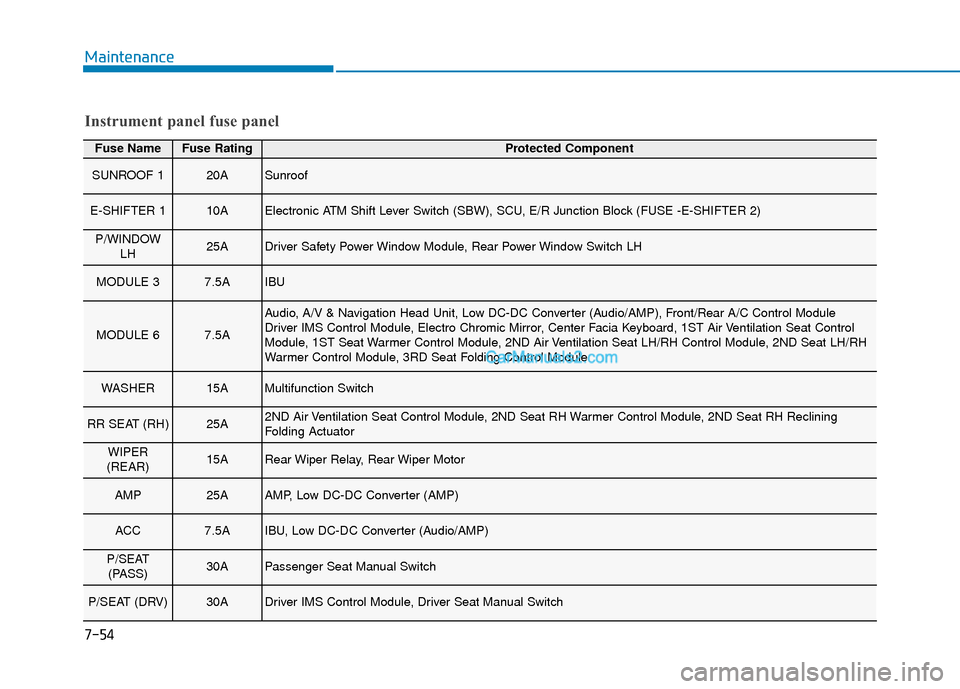
Fuse NameFuse RatingProtected Component
SUNROOF 120ASunroof
E-SHIFTER 110AElectronic ATM Shift Lever Switch (SBW), SCU, E/R Junction Block (FUSE -E-SHIFTER 2)
P/WINDOWLH25ADriver Safety Power Window Module, Rear Power Window Switch LH
MODULE 37.5AIBU
MODULE 67.5A
Audio, A/V & Navigation Head Unit, Low DC-DC Converter (Audio/AMP), Front/Rear A/C Control Module
Driver IMS Control Module, Electro Chromic Mirror, Center Facia Keyboard, 1ST Air Ventilation Seat Control
Module, 1ST Seat Warmer Control Module, 2ND Air Ventilation Seat LH/RH Control Module, 2ND Seat LH/RH
Warmer Control Module, 3RD Seat Folding Control Module
WASHER15AMultifunction Switch
RR SEAT (RH)25A2ND Air Ventilation Seat Control Module, 2ND Seat RH Warmer Control Module, 2ND Seat RH Reclining
Folding Actuator
WIPER
(REAR)15ARear Wiper Relay, Rear Wiper Motor
AMP25AAMP, Low DC-DC Converter (AMP)
ACC7.5AIBU, Low DC-DC Converter (Audio/AMP)
P/SEAT (PASS)30APassenger Seat Manual Switch
P/SEAT (DRV)30ADriver IMS Control Module, Driver Seat Manual Switch
Instrument panel fuse panel
Page 599 of 611

I-2
AC inverter ...................................................................3-198\
Air bag warning labels ....................................................2-79
Air bags ........................................................................\
...2-57Additional safety precautions .....................................2-79
Air bag collision sensors ............................................2-73
Air bag inflation conditions .......................................2-75
Air bag non-inflation conditions ................................2-76
Air bag warning labels ...............................................2-79
Curtain air bags ..........................................................2-62
Do not install a child restraint on the front passenger seat..........................................................2-72
Driver's air bag ...........................................................2-59
Driver's knee air bag ..................................................2-59
How does the air bags system operate? .....................2-63
Occupant classification system (OCS) .......................2-68
Passenger's front air bag.............................................2-59
Side air bags ...............................................................2-60
SRS Care ....................................................................2-78\
SRS components and functions..................................2-63
SRS warning light ......................................................2-63
What to expect after an air bag inflates .....................2-67
Why didn't my air bag go off in a collision ...............2-73
Air cleaner filter replacement .........................................7-22
Air conditioning refrigerant label .................................3-185
Air conditioning system specification ..............................8-6
All Wheel Drive (AWD) .................................................5-43 Antenna ........................................................................\
.....4-2
Anti-lock Brake System (ABS) ......................................5-33
Appearance care..............................................................7-69
Exterior care ...............................................................7-69
Interior care ................................................................7-74
Armrest ........................................................................\
...2-20
Audio/Video/Navigation system .......................................4-4
Auto defogging system .................................................3-188
Auto headlamp position ................................................3-132
Automatic climate control system ................................3-171 Air conditioning .......................................................3-178
Air intake control .....................................................3-176
Automatic heating and air conditioning ...................3-172
Fan speed control .....................................................3-177
Manual heating and air conditioning .......................3-173
Mode selection .........................................................3-174
OFF mode.................................................................3-178
Rear climate control button ......................................3-178
System maintenance .................................................3-184
Temperature control .................................................3-175
Automatic transmission ..................................................5-15 Good driving practices ...............................................5-20
Paddle shifter ..............................................................5-22
Parking........................................................................\
5-18
Shift lock system ........................................................5-17
Automatic ventilation ...................................................3-191
Index
A
Page 604 of 611

I-7
Infotainment system..........................................................4-2Antenna ........................................................................\
4-2
Audio/Video/Navigation system ..................................4-4
Bluetooth
®Wireless Technology..................................4-4
Steering wheel audio controls ......................................4-3
USB port.......................................................................4\
-2
Inside rearview mirror ....................................................3-33
Instrument cluster ...........................................................3-69 Assist mode ................................................................3-98
Adjusting instrument cluster illumination..................3-69
Gauges and meters .....................................................3-71
LCD display control ...................................................3-96
LCD display messages ...............................................3-90
LCD display modes ....................................................3-97
Option menu .............................................................3-119
Transmission shift indicator .......................................3-76
Trip computer mode .................................................3-110
User settings mode ...................................................3-100
Warning and indicator lights ......................................3-76
Instrument panel fuse replacement .................................7-49
Instrument panel overview ...............................................1-5
Interior care .....................................................................7-7\
4
Interior features AC inverter ...............................................................3-198
Cargo security screen ...............................................3-205
Clock ........................................................................\
3-203
Coat hanger ..............................................................3-203
Conversation mirror .................................................3-196 Cup holder ................................................................3-194
Floor mat anchor(s) ..................................................3-204
Luggage net (holder) ................................................3-205
Power outlet..............................................................3-197
Side curtain...............................................................3-207
Sunvisor ....................................................................3-19\
6
USB charger .............................................................3-200
Wireless cellular phone charging system .................3-201
Interior lamp AUTO cut................................................3-139
Interior lights.................................................................3-139 Front lamps...............................................................3-139
Grove box lamp ........................................................3-141
Interior lamp AUTO cut ...........................................3-139
Luggage compartment lamp .....................................3-140
Puddle lamp ..............................................................3-141
Rear lamps ................................................................3-140
Vanity mirror lamp ...................................................3-141
Interior overview...............................................................1-4
Jump starting .....................................................................6-4\
Key ignition switch ...........................................................5-7
I
Index
J
K