climate control Hyundai Palisade 2020 Owner's Guide
[x] Cancel search | Manufacturer: HYUNDAI, Model Year: 2020, Model line: Palisade, Model: Hyundai Palisade 2020Pages: 611, PDF Size: 18.86 MB
Page 275 of 611
3-179
Convenient features of your vehicle
3
Rear climate control
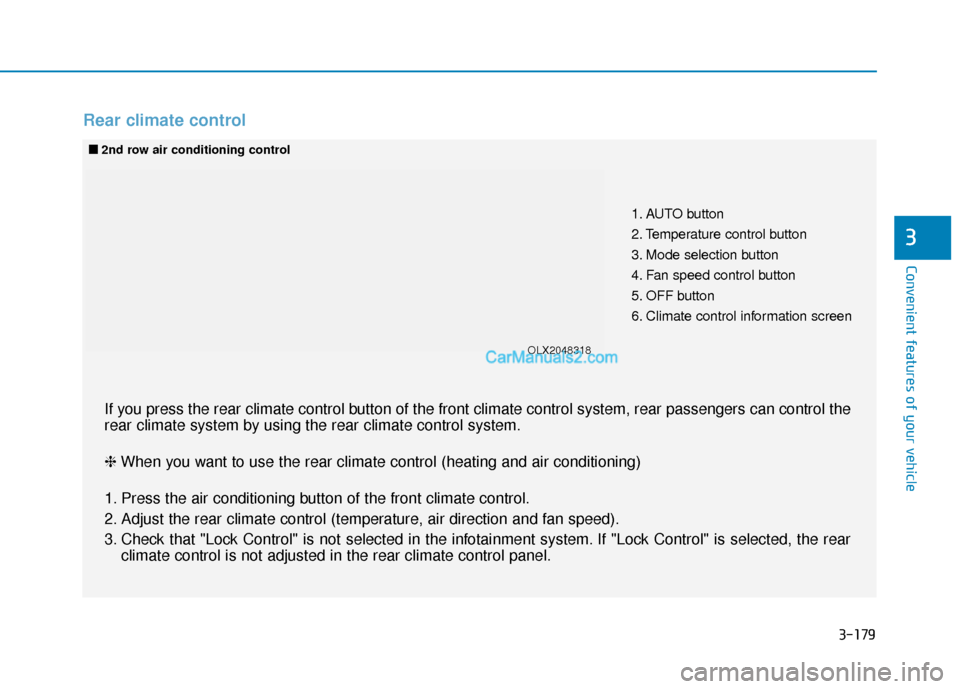
1. AUTO button
2. Temperature control button
3. Mode selection button
4. Fan speed control button
5. OFF button
6. Climate control information screen
■
■2nd row air conditioning control
If you press the rear climate control button of the front climate control system, rear passengers can control t\
he
rear climate system by using the rear climate control system.
❈ When you want to use the rear climate control (heating and air conditioning)
1. Press the air conditioning button of the front climate control.
2. Adjust the rear climate control (temperature, air direction and fan speed).
3. Check that "Lock Control" is not selected in the infotainment system. If "Lock Control" is selected, the rear climate control is not adjusted in the rear climate control panel.
OLX2048318
Page 276 of 611
3-180
Convenient features of your vehicle
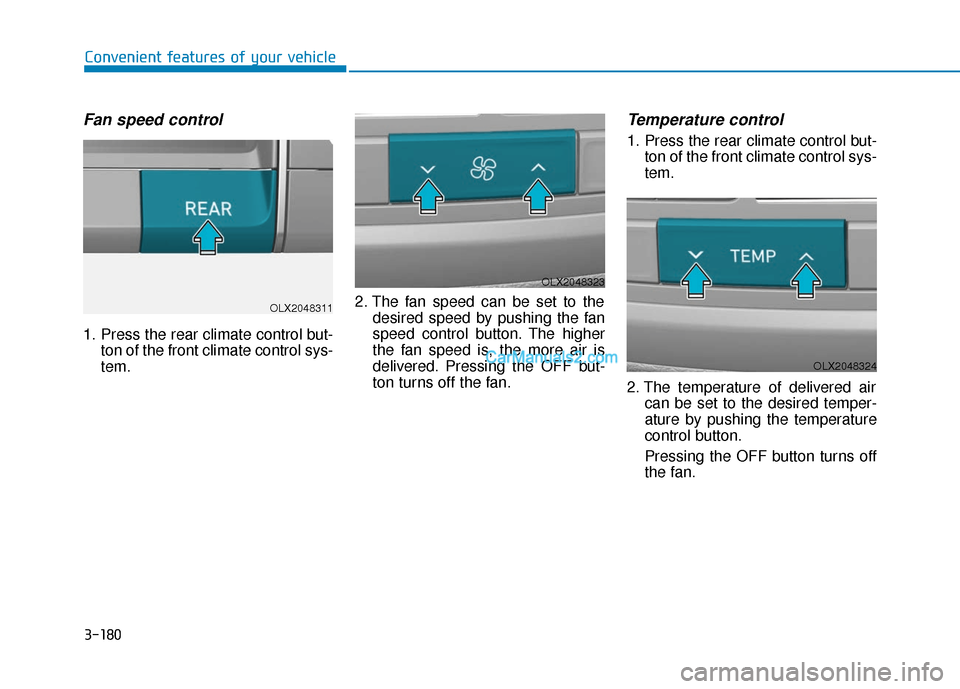
Fan speed control
1. Press the rear climate control but-ton of the front climate control sys-
tem. 2. The fan speed can be set to the
desired speed by pushing the fan
speed control button. The higher
the fan speed is, the more air is
delivered. Pressing the OFF but-
ton turns off the fan.
Temperature control
1. Press the rear climate control but-ton of the front climate control sys-
tem.
2. The temperature of delivered air can be set to the desired temper-
ature by pushing the temperature
control button.
Pressing the OFF button turns off
the fan.
OLX2048311
OLX2048323
OLX2048324
Page 277 of 611
3-181
Convenient features of your vehicle
3
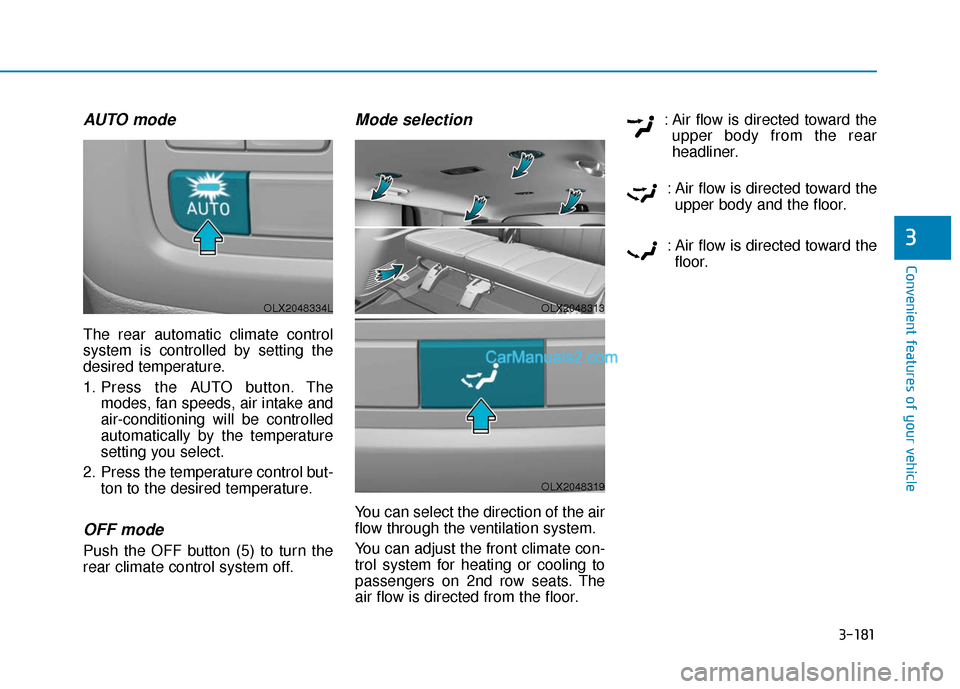
AUTO mode
The rear automatic climate control
system is controlled by setting the
desired temperature.
1. Press the AUTO button. Themodes, fan speeds, air intake and
air-conditioning will be controlled
automatically by the temperature
setting you select.
2. Press the temperature control but- ton to the desired temperature.
OFF mode
Push the OFF button (5) to turn the
rear climate control system off.
Mode selection
You can select the direction of the air
flow through the ventilation system.
You can adjust the front climate con-
trol system for heating or cooling to
passengers on 2nd row seats. The
air flow is directed from the floor. : Air flow is directed toward the
upper body from the rear
headliner.
: Air flow is directed toward the upper body and the floor.
: Air flow is directed toward the floor.
OLX2048313
OLX2048319
OLX2048334L
Page 278 of 611
3-182
Convenient features of your vehicle
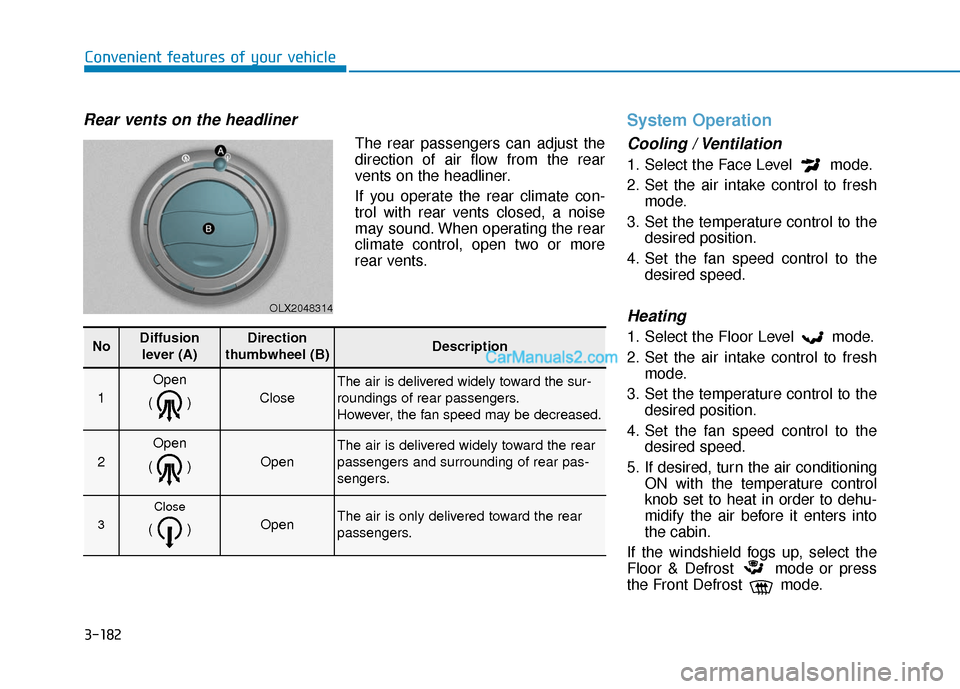
Rear vents on the headliner
The rear passengers can adjust the
direction of air flow from the rear
vents on the headliner.
If you operate the rear climate con-
trol with rear vents closed, a noise
may sound. When operating the rear
climate control, open two or more
rear vents.
System Operation
Cooling / Ventilation
1. Select the Face Level mode.
2. Set the air intake control to freshmode.
3. Set the temperature control to the desired position.
4. Set the fan speed control to the desired speed.
Heating
1. Select the Floor Level mode.
2. Set the air intake control to freshmode.
3. Set the temperature control to the desired position.
4. Set the fan speed control to the desired speed.
5. If desired, turn the air conditioning ON with the temperature control
knob set to heat in order to dehu-
midify the air before it enters into
the cabin.
If the windshield fogs up, select the
Floor & Defrost mode or press
the Front Defrost mode.
OLX2048314
NoDiffusion lever (A)Direction
thumbwheel (B)Description
1
Open
()
Close
The air is delivered widely toward the sur-
roundings of rear passengers.
However, the fan speed may be decreased.
2
Open
()
Open
The air is delivered widely toward the rear
passengers and surrounding of rear pas-
sengers.
3
Close
() Open The air is only delivered toward the rear
passengers.
Page 280 of 611
3-184
Convenient features of your vehicle
To help reduce moisture inside of the windows on rainy or humid
days, decrease the humidity inside
the vehicle by operating the air
conditioning system with the win-
dows and sunroof closed.
Use the air conditioning system every month only for a few minutes
to ensure maximum system per-
formance.
If you operate air conditioner excessively, the difference between
the temperature of the outside air
and that of the windshield could
cause the outer surface of the
windshield to fog up, causing loss
of visibility. In this case, set the
mode selection knob or button to
the position and fan speed
control to the lower speed.
System Maintenance
Cabin air filter
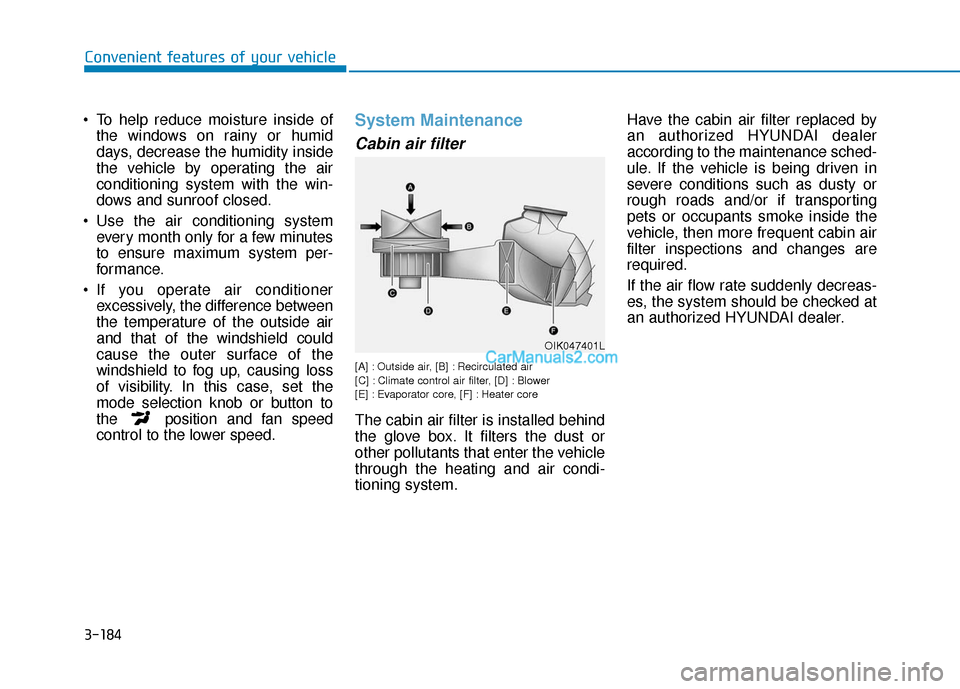
[A] : Outside air, [B] : Recirculated air
[C] : Climate control air filter, [D] : Blower
[E] : Evaporator core, [F] : Heater core
The cabin air filter is installed behind
the glove box. It filters the dust or
other pollutants that enter the vehicle
through the heating and air condi-
tioning system. Have the cabin air filter replaced by
an authorized HYUNDAI dealer
according to the maintenance sched-
ule. If the vehicle is being driven in
severe conditions such as dusty or
rough roads and/or if transporting
pets or occupants smoke inside the
vehicle, then more frequent cabin air
filter inspections and changes are
required.
If the air flow rate suddenly decreas-
es, the system should be checked at
an authorized HYUNDAI dealer.
OIK047401L
Page 282 of 611
3-186
Convenient features of your vehicle
For maximum defrost perform-ance, set the temperature control
knob to the highest temperature
setting (rotated all the way to the
right) and the fan speed control to
the highest setting.
If warm air to the floor is desired while defrosting or defogging, set the
mode to the floor-defrost position.
Before driving, clear all snow and ice from the windshield, rear win-
dow, side view mirrors, and all side
windows.
Clear all snow and ice from the hood and air inlet in the cowl grill to
improve heater and defroster effi-
ciency and to reduce the probability
of fogging up the inside of the wind-
shield.
If the engine temperature is still
cold after starting, then a brief
engine warm up period may be
required for the vented air flow to
become warm or hot.Manual Climate Control System
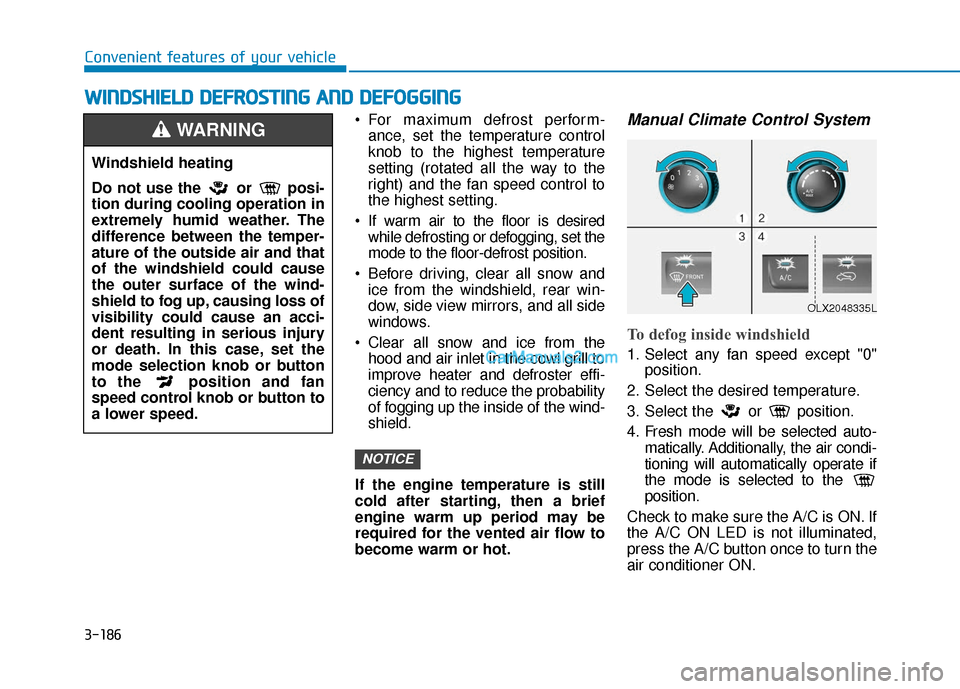
To defog inside windshield
1. Select any fan speed except "0" position.
2. Select the desired temperature.
3. Select the or position.
4. Fresh mode will be selected auto- matically. Additionally, the air condi-
tioning will automatically operate if
the mode is selected to the
position.
Check to make sure the A/C is ON. If
the A/C ON LED is not illuminated,
press the A/C button once to turn the
air conditioner ON.
NOTICE
W
W I
IN
N D
DS
SH
H I
IE
E L
LD
D
D
D E
EF
FR
R O
O S
ST
T I
IN
N G
G
A
A N
N D
D
D
D E
EF
FO
O G
GG
GI
IN
N G
G
Windshield heating
Do not use the or posi-
tion during cooling operation in
extremely humid weather. The
difference between the temper-
ature of the outside air and that
of the windshield could cause
the outer surface of the wind-
shield to fog up, causing loss of
visibility could cause an acci-
dent resulting in serious injury
or death. In this case, set the
mode selection knob or button
to the position and fan
speed control knob or button to
a lower speed.
WARNING
OLX2048335L
Page 284 of 611
3-188
Convenient features of your vehicle
Defogging logic
To reduce the probability of fogging
up the inside of the windshield, the
air intake or air conditioning are con-
trolled automatically according to
certain conditions such as or
positions. To cancel or reset the
defogging logic, do the following.
Manual climate control system
1. Turn the ignition switch to the ONposition.
2. Press the defroster button ( ).
3. Press the air intake control button at least 5 times within 3 seconds.
The LED indicator on the air intake
button will blink 3 times to indicate
that the defogging logic has been
disabled.
Repeat the steps again to re-enable
the defogging logic.
If the battery has been discharged or
disconnected, it resets to the defog
logic status.
Automatic climate control system
1. Turn the ignition switch to the ON position.
2. Press the defroster button ( ).
3. While pressing the air conditioning button (A/C), press the air intake
control button at least 5 times
within 3 seconds.
The Automatic Climate Control infor-
mation screen will blink 3 times to
indicate that the defogging logic has
been disabled.
Repeat the steps again to re-enable
the defogging logic.
If the battery has been discharged or
disconnected, it resets to the defog
logic status.
Auto Defogging System
(Additional Feature with
Automatic Temperature
Control System) (if equipped)
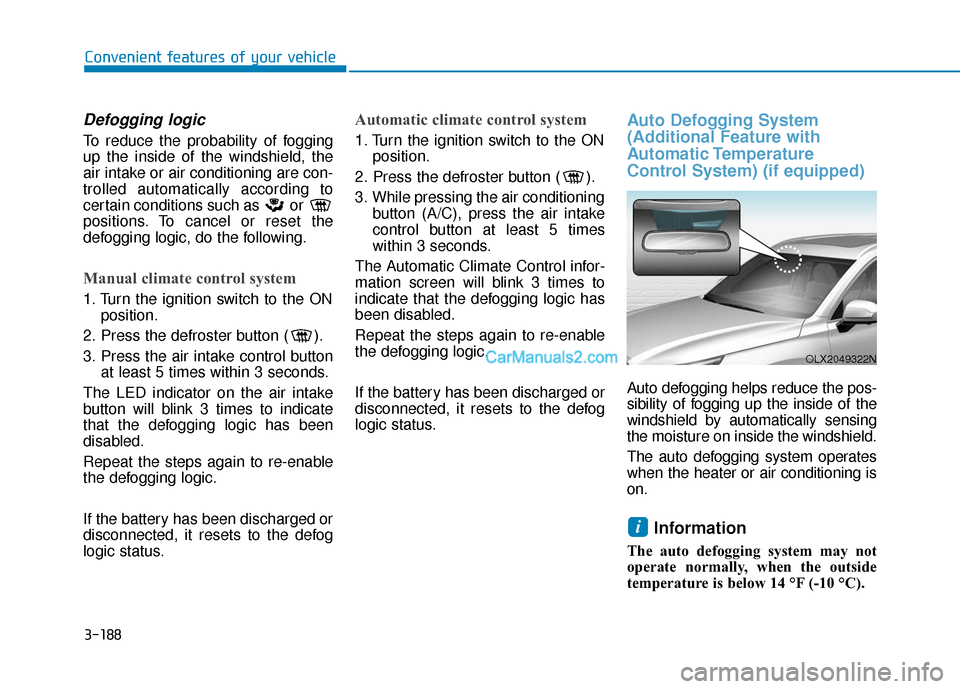
Auto defogging helps reduce the pos-
sibility of fogging up the inside of the
windshield by automatically sensing
the moisture on inside the windshield.
The auto defogging system operates
when the heater or air conditioning is
on.
Information
The auto defogging system may not
operate normally, when the outside
temperature is below 14 °F (-10 °C).
i
OLX2049322N
Page 285 of 611
3-189
Convenient features of your vehicle
3
When the Auto Defogging
System operates, the indi-
cator will illuminate.
If a high amount of humidity is
detected in the vehicle, the Auto
Defogging System will be enabled.
The following steps will be performed
automatically:
Step 1) The A/C button will turn ON.
Step 2) The air intake control will change to Fresh mode.
Step 3) The mode will be changed to defrost to direct airflow to the
windshield.
Step 4) The fan speed will be set to MAX.
If the air conditioning is off or recircu-
lated air position is manually select-
ed while Auto Defogging System is
ON, the Auto Defogging System
Indicator will blink 3 times to signal
that the manual operation has been
canceled.To cancel or reset the
Auto Defogging System
Press the front windshield defroster
button for 3 seconds when the igni-
tion switch is in the ON position.
When the Auto Defogging System is
canceled, the ADS OFF symbol will
blink 3 times and ADS OFF will be
displayed on the climate control
information screen.
When the Auto Defogging System is
reset, the ADS OFF symbol will blink
6 times without a signal.
Information
• When the air conditioning is turned on by Auto defogging system, if you
try to turn off the air conditioning, the
indicator will blink 3 times and the air
conditioning will not be turned off.
• To maintain the effectiveness and efficiency of the Auto Defogging
System, do not select Recirculation
mode while the system is operating.
• When the Auto Defogging System is operating, the fan speed adjustment
button, the temperature adjustment
knob, and the air intake control but-
ton are all disabled.
Do not remove the sensor cover
located on the upper end of the
windshield glass.
Damage to system parts could
occur and may not be covered by
your vehicle warranty.
NOTICE
i
Page 504 of 611
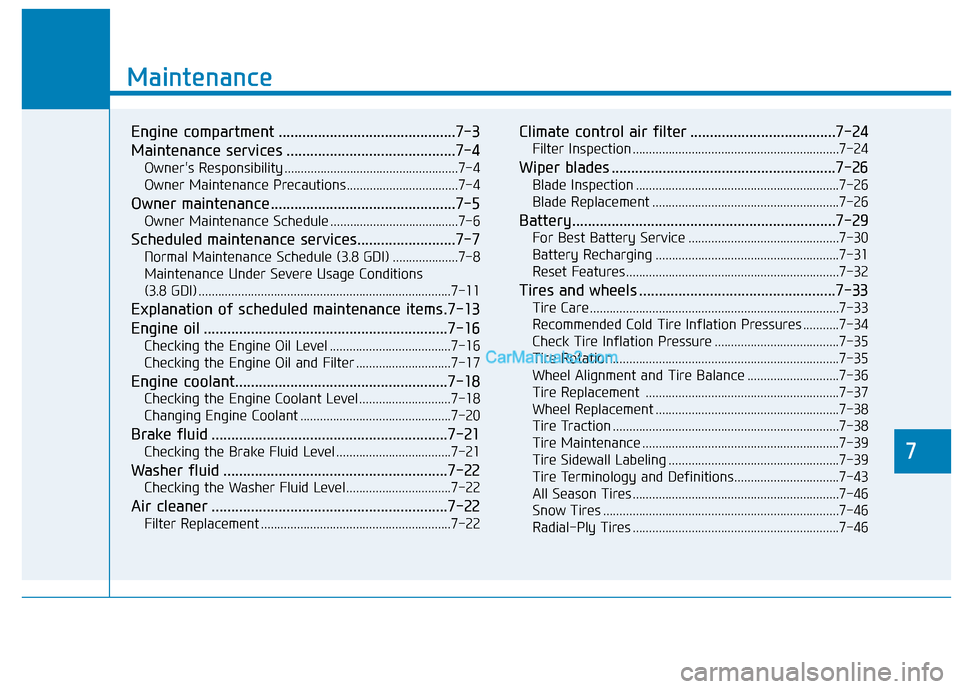
7
Maintenance
7
Maintenance
Engine compartment .............................................7-3
Maintenance services ...........................................7-4
Owner's Responsibility .....................................................7-4
Owner Maintenance Precautions..................................7-4
Owner maintenance ...............................................7-5
Owner Maintenance Schedule .......................................7-6
Scheduled maintenance services.........................7-7
Normal Maintenance Schedule (3.8 GDI) ....................7-8
Maintenance Under Severe Usage Conditions
(3.8 GDI) ........................................................................\
.....7-11
Explanation of scheduled maintenance items .7-13
Engine oil ..............................................................7-16
Checking the Engine Oil Level .....................................7-16
Checking the Engine Oil and Filter .............................7-17
Engine coolant......................................................7-18
Checking the Engine Coolant Level ............................7-18
Changing Engine Coolant ..............................................7-20
Brake fluid ............................................................7-21
Checking the Brake Fluid Level ...................................7-21
Washer fluid .........................................................7-22
Checking the Washer Fluid Level................................7-22
Air cleaner ............................................................7-22
Filter Replacement ..........................................................7-22
Climate control air filter .....................................7-24
Filter Inspection ...............................................................7-24
Wiper blades .........................................................7-26
Blade Inspection ..............................................................7-26
Blade Replacement .........................................................7-26
Battery...................................................................7-29
For Best Battery Service ..............................................7-30
Battery Recharging ........................................................7-31
Reset Features.................................................................7-32
Tires and wheels ..................................................7-33
Tire Care ........................................................................\
....7-33
Recommended Cold Tire Inflation Pressures ...........7-34
Check Tire Inflation Pressure ......................................7-35
Tire Rotation...................................................................\
..7-35
Wheel Alignment and Tire Balance ............................7-36
Tire Replacement ...........................................................7-37
Wheel Replacement ........................................................7-38
Tire Traction .....................................................................7-3\
8
Tire Maintenance ............................................................7-39
Tire Sidewall Labeling ....................................................7-39
Tire Terminology and Definitions................................7-43
All Season Tires ...............................................................7-46
Snow Tires ........................................................................\
7-46
Radial-Ply Tires ...............................................................7-46
7
Page 512 of 611
Maintenance
7
7-9
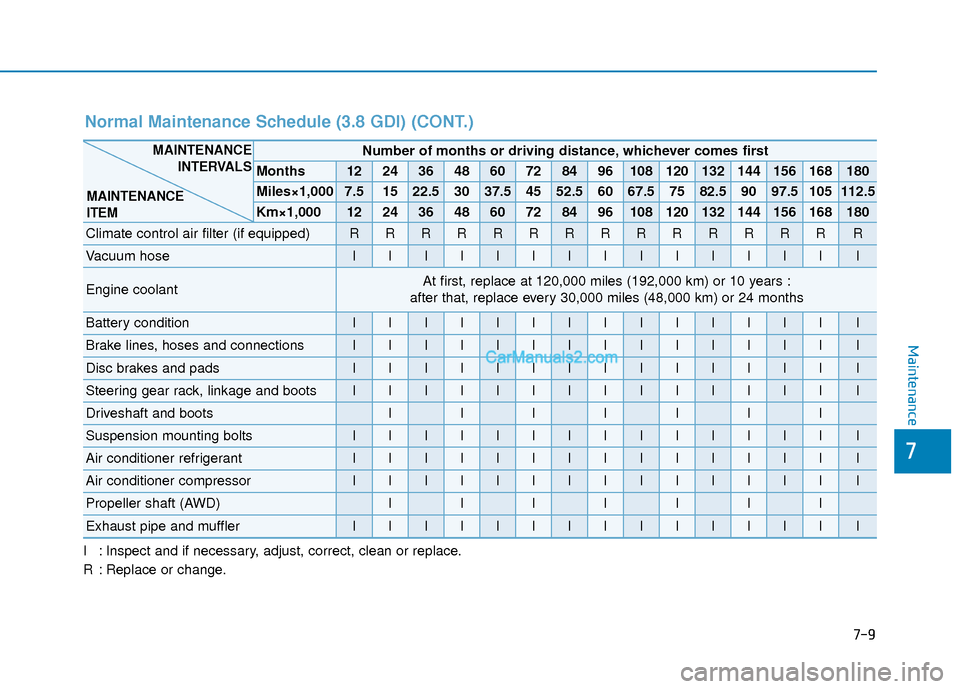
I : Inspect and if necessary, adjust, correct, clean or replace.
R : Replace or change.
Number of months or driving distance, whichever comes first
Months1224364860728496108120132144156168180
Miles×1,0007.51522.53037.54552.56067.57582.59097.5105112.5
Km×1,0001224364860728496108120132144156168180
Climate control air filter (if equipped)RRRRRRRRRRRRRRR
Vacuum hoseIIIIIIIIIIIIIII
Engine coolantAt first, replace at 120,000 miles (192,000 km) or 10 years :
after that, replace every 30,000 miles (48,000 km) or 24 months
Battery conditionIIIIIIIIIIIIIII
Brake lines, hoses and connectionsIIIIIIIIIIIIIII
Disc brakes and padsIIIIIIIIIIIIIII
Steering gear rack, linkage and bootsIIIIIIIIIIIIIII
Driveshaft and bootsIIIIIII
Suspension mounting boltsIIIIIIIIIIIIIII
Air conditioner refrigerantIIIIIIIIIIIIIII
Air conditioner compressorIIIIIIIIIIIIIII
Propeller shaft (AWD)IIIIIII
Exhaust pipe and mufflerIIIIIIIIIIIIIII
MAINTENANCE INTERVALS
MAINTENANCE
ITEM
Normal Maintenance Schedule (3.8 GDI) (CONT.)