lock HYUNDAI PALISADE 2021 Owners Manual
[x] Cancel search | Manufacturer: HYUNDAI, Model Year: 2021, Model line: PALISADE, Model: HYUNDAI PALISADE 2021Pages: 612, PDF Size: 33.36 MB
Page 307 of 612
4-2
Multimedia System
• If you install an aftermarket HID
head lamp, your vehicle's audio
and electronic devices may not
function properly.
Prevent chemicals such as per-
fume, cosmetic oil, sun cream,
hand cleaner, and air freshener
from contacting the interior
parts because they may cause
damage or discoloration.
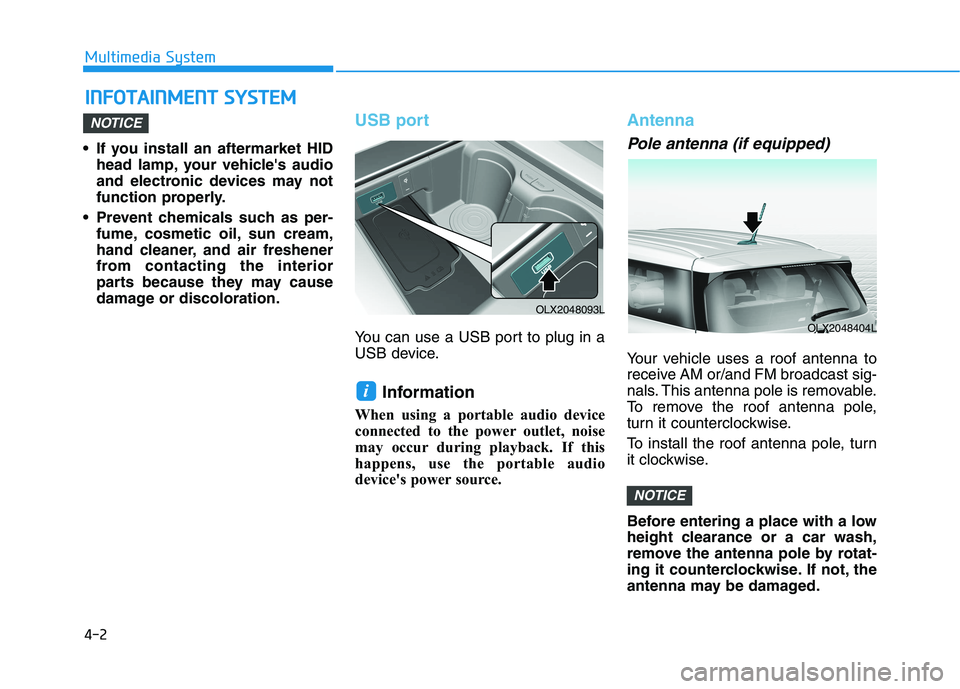
USB port
You can use a USB port to plug in a
USB device.
Information
When using a portable audio device
connected to the power outlet, noise
may occur during playback. If this
happens, use the portable audio
device's power source.
Antenna
Pole antenna (if equipped)
Your vehicle uses a roof antenna to
receive AM or/and FM broadcast sig-
nals. This antenna pole is removable.
To remove the roof antenna pole,
turn it counterclockwise.
To install the roof antenna pole, turn
it clockwise.
Before entering a place with a low
height clearance or a car wash,
remove the antenna pole by rotat-
ing it counterclockwise. If not, the
antenna may be damaged.
NOTICE
i
NOTICE
I IN
NF
FO
OT
TA
AI
IN
NM
ME
EN
NT
T
S
SY
YS
ST
TE
EM
M
OLX2048404L
OLX2048093L
Page 310 of 612
Driving your vehicle
5
Before Driving ........................................................5-5
Before Entering the Vehicle ...........................................5-5
Before Starting ..................................................................5-5
Ignition Switch ........................................................5-7
Key Ignition Switch ...........................................................5-7
Engine Start/Stop Button .............................................5-10
Automatic Transmission ......................................5-15
Automatic transmission operation ..............................5-15
Parking ...............................................................................5-18
LCD display message ......................................................5-19
Good driving practices ...................................................5-20
Paddle Shifter (Manual Shift Mode) ..........................5-22
Braking system.....................................................5-23
Power Brakes ...................................................................5-23
Disc Brakes Wear Indicator ..........................................5-24
Electronic Parking Brake (EPB)...................................5-24
Auto Hold ..........................................................................5-29
Anti-lock Brake System (ABS) ....................................5-33
Electronic Stability Control (ESC)................................5-35
Vehicle Stability Management (VSM).........................5-38
Hill-Start Assist Control (HAC) ....................................5-39
Downhill Brake Control (DBC) ......................................5-39
Trailer Stability Assist (TSA) .........................................5-42
Good Braking Practices .................................................5-42
All Wheel Drive (AWD) ........................................5-43
AWD Operation ................................................................5-44
LCD display message ......................................................5-47
Emergency Precautions.................................................5-48
ISG (Idle Stop and Go) system ...........................5-50
To Activate the ISG System ..........................................5-50
To Deactivate the ISG System......................................5-53
ISG System Malfunction ................................................5-53
Battery Sensor Deactivation ........................................5-54
Drive Mode Integrated Control system
(2WD) .....................................................................5-55
Drive Mode .......................................................................5-55
Drive Mode Integrated Control system
(AWD) ....................................................................5-59
Drive Mode .......................................................................5-59
Forward Collision-Avoidance Assist (FCA)
system....................................................................5-63
System Setting and Operation .....................................5-63
FCA Warning Message and Brake Control ...............5-66
FCA Sensor (Front Radar/Front Camera) .................5-68
System Malfunction .......................................................5-70
Limitations of the System .............................................5-72
Page 314 of 612
5-5
Driving your vehicle
5
Before Entering the Vehicle
• Be sure all windows, outside mir-
ror(s), and outside lights are clean
and unobstructed.
Remove frost, snow, or ice.
Visually check the tires for uneven
wear and damage.
Check under the vehicle for any
sign of leaks.
Be sure there are no obstacles
behind you if you intend to back up.
Before Starting
Make sure the hood, the liftgate,
and the doors are securely closed
and locked.
Adjust the position of the seat and
steering wheel.
Adjust the inside and outside
rearview mirrors.
Verify all the lights work.
Fasten your seatbelt. Check that all
passengers have fastened their
seatbelts.
Check the gauges and indicators in
the instrument panel and the mes-
sages on the instrument display
when the ignition switch is in the
ON position.
Check that any items you are car-
rying are stored properly or fas-
tened down securely. CALIFORNIA PROPOSITION 65
WARNING
Engine exhaust and a wide vari-
ety of automobile components
including components found in
the interior furnishings in a
vehicle, contain or emit harmful
chemicals known to the State of
California to cause cancer and
birth defects and reproductive
harm. In addition, certain fluids
contained in vehicles and cer-
tain products of components
contain or emit chemicals
known to the State of California
to cause cancer and birth
defects or other reproductive
harm.
For more information go to
https://www.p65warnings.ca.go
v/passenger-vehicleWARNING
B BE
EF
FO
OR
RE
E
D
DR
RI
IV
VI
IN
NG
G
Page 316 of 612
5-7
Driving your vehicle
5
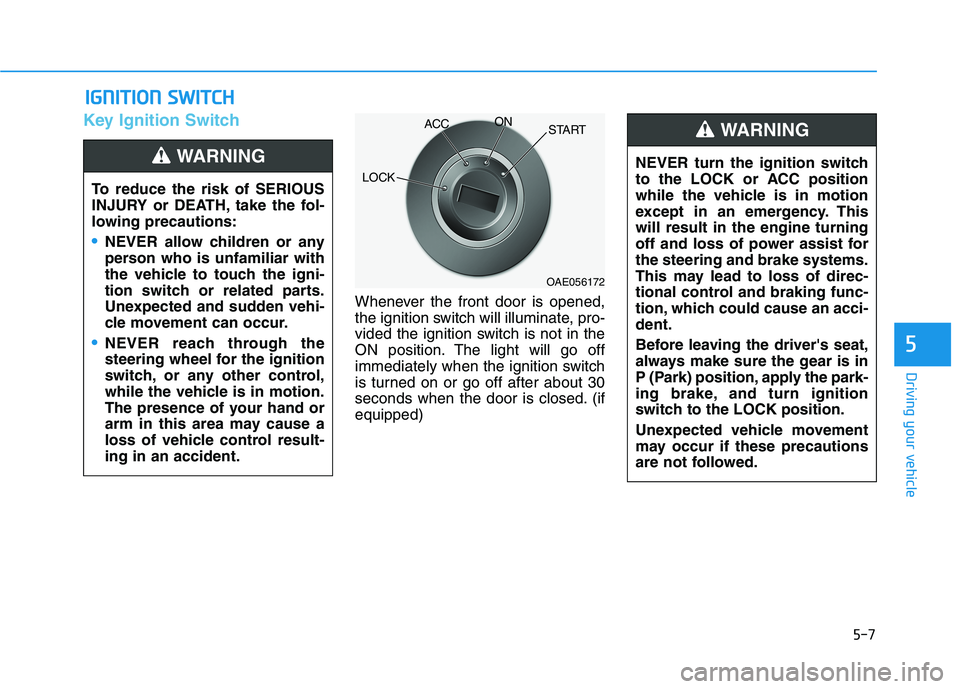
Key Ignition Switch
Whenever the front door is opened,
the ignition switch will illuminate, pro-
vided the ignition switch is not in the
ON position. The light will go off
immediately when the ignition switch
is turned on or go off after about 30
seconds when the door is closed. (if
equipped)
I IG
GN
NI
IT
TI
IO
ON
N
S
SW
WI
IT
TC
CH
H
To reduce the risk of SERIOUS
INJURY or DEATH, take the fol-
lowing precautions:
NEVER allow children or any
person who is unfamiliar with
the vehicle to touch the igni-
tion switch or related parts.
Unexpected and sudden vehi-
cle movement can occur.
NEVER reach through the
steering wheel for the ignition
switch, or any other control,
while the vehicle is in motion.
The presence of your hand or
arm in this area may cause a
loss of vehicle control result-
ing in an accident.
WARNING NEVER turn the ignition switch
to the LOCK or ACC position
while the vehicle is in motion
except in an emergency. This
will result in the engine turning
off and loss of power assist for
the steering and brake systems.
This may lead to loss of direc-
tional control and braking func-
tion, which could cause an acci-
dent.
Before leaving the driver's seat,
always make sure the gear is in
P (Park) position, apply the park-
ing brake, and turn ignition
switch to the LOCK position.
Unexpected vehicle movement
may occur if these precautions
are not followed.
WARNING
OAE056172
LOCKACCON
START
Page 317 of 612
5-8
Driving your vehicle
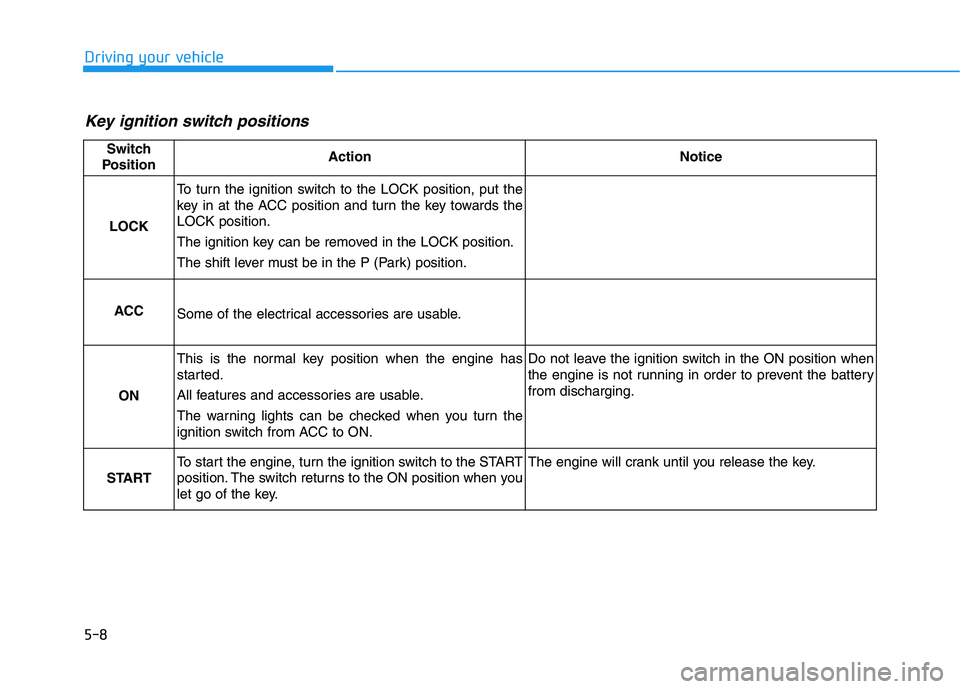
Key ignition switch positions
Switch
PositionActionNotice
LOCK
To turn the ignition switch to the LOCK position, put the
key in at the ACC position and turn the key towards the
LOCK position.
The ignition key can be removed in the LOCK position.
The shift lever must be in the P (Park) position.
ACCSome of the electrical accessories are usable.
ON
This is the normal key position when the engine has
started.
All features and accessories are usable.
The warning lights can be checked when you turn the
ignition switch from ACC to ON.Do not leave the ignition switch in the ON position when
the engine is not running in order to prevent the battery
from discharging.
START
To start the engine, turn the ignition switch to the START
position. The switch returns to the ON position when you
let go of the key.The engine will crank until you release the key.
Page 325 of 612
Driving your vehicle
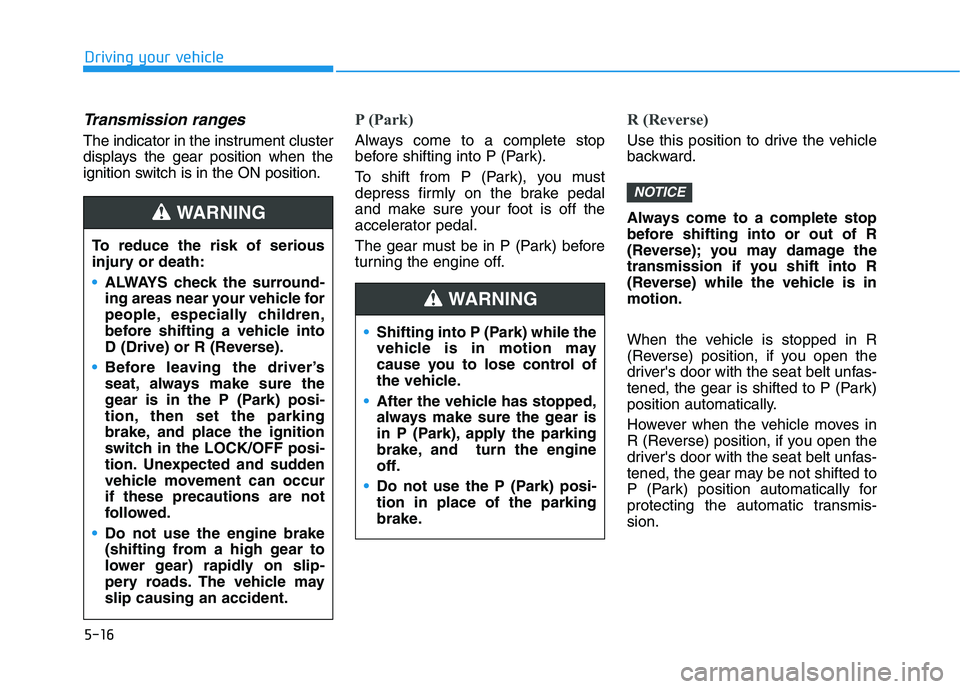
Transmission ranges
The indicator in the instrument cluster
displays the gear position when the
ignition switch is in the ON position.
P (Park)
Always come to a complete stop
before shifting into P (Park).
To shift from P (Park), you must
depress firmly on the brake pedal
and make sure your foot is off the
accelerator pedal.
The gear must be in P (Park) before
turning the engine off.
R (Reverse)
Use this position to drive the vehicle
backward.
Always come to a complete stop
before shifting into or out of R
(Reverse); you may damage the
transmission if you shift into R
(Reverse) while the vehicle is in
motion.
When the vehicle is stopped in R
(Reverse) position, if you open the
driver's door with the seat belt unfas-
tened, the gear is shifted to P (Park)
position automatically.
However when the vehicle moves in
R (Reverse) position, if you open the
driver's door with the seat belt unfas-
tened, the gear may be not shifted to
P (Park) position automatically for
protecting the automatic transmis-
sion.
NOTICE
To reduce the risk of serious
injury or death:
ALWAYS check the surround-
ing areas near your vehicle for
people, especially children,
before shifting a vehicle into
D (Drive) or R (Reverse).
Before leaving the driver’s
seat, always make sure the
gear is in the P (Park) posi-
tion, then set the parking
brake, and place the ignition
switch in the LOCK/OFF posi-
tion. Unexpected and sudden
vehicle movement can occur
if these precautions are not
followed.
Do not use the engine brake
(shifting from a high gear to
lower gear) rapidly on slip-
pery roads. The vehicle may
slip causing an accident.
WARNING
Shifting into P (Park) while the
vehicle is in motion may
cause you to lose control of
the vehicle.
After the vehicle has stopped,
always make sure the gear is
in P (Park), apply the parking
brake, and turn the engine
off.
Do not use the P (Park) posi-
tion in place of the parking
brake.
WARNING
5-16
Page 326 of 612
5-17
Driving your vehicle
5
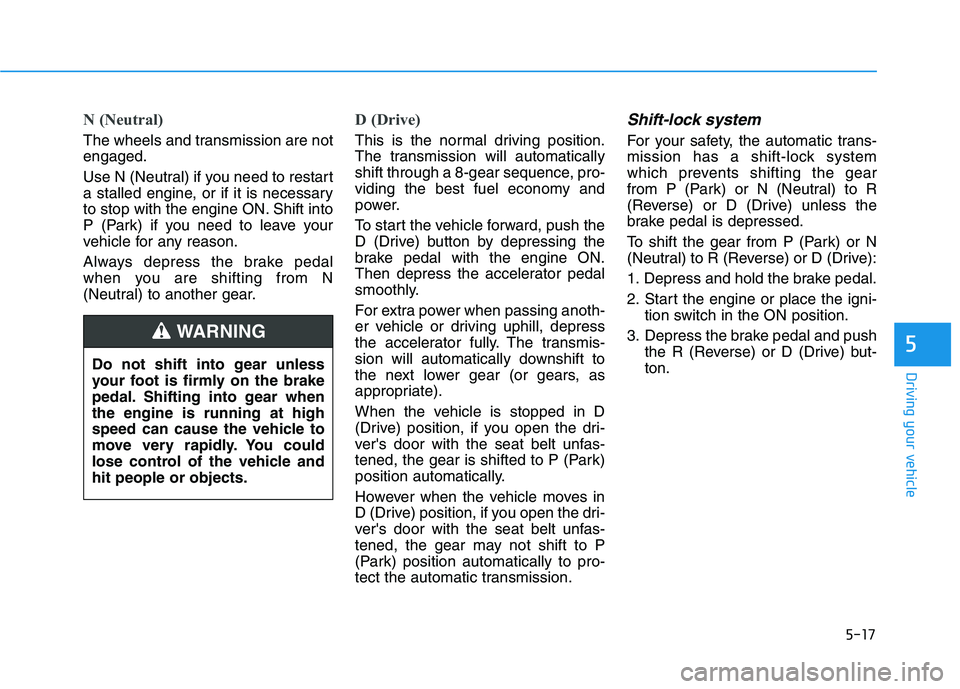
N (Neutral)
The wheels and transmission are not
engaged.
Use N (Neutral) if you need to restart
a stalled engine, or if it is necessary
to stop with the engine ON. Shift into
P (Park) if you need to leave your
vehicle for any reason.
Always depress the brake pedal
when you are shifting from N
(Neutral) to another gear.
D (Drive)
This is the normal driving position.
The transmission will automatically
shift through a 8-gear sequence, pro-
viding the best fuel economy and
power.
To start the vehicle forward, push the
D (Drive) button by depressing the
brake pedal with the engine ON.
Then depress the accelerator pedal
smoothly.
For extra power when passing anoth-
er vehicle or driving uphill, depress
the accelerator fully. The transmis-
sion will automatically downshift to
the next lower gear (or gears, as
appropriate).
When the vehicle is stopped in D
(Drive) position, if you open the dri-
ver's door with the seat belt unfas-
tened, the gear is shifted to P (Park)
position automatically.
However when the vehicle moves in
D (Drive) position, if you open the dri-
ver's door with the seat belt unfas-
tened, the gear may not shift to P
(Park) position automatically to pro-
tect the automatic transmission.
Shift-lock system
For your safety, the automatic trans-
mission has a shift-lock system
which prevents shifting the gear
from P (Park) or N (Neutral) to R
(Reverse) or D (Drive) unless the
brake pedal is depressed.
To shift the gear from P (Park) or N
(Neutral) to R (Reverse) or D (Drive):
1. Depress and hold the brake pedal.
2. Start the engine or place the igni-
tion switch in the ON position.
3. Depress the brake pedal and push
the R (Reverse) or D (Drive) but-
ton. Do not shift into gear unless
your foot is firmly on the brake
pedal. Shifting into gear when
the engine is running at high
speed can cause the vehicle to
move very rapidly. You could
lose control of the vehicle and
hit people or objects.
WARNING
Page 327 of 612
5-18
Driving your vehicle
When the battery is discharged:
You cannot shift the gear when the
battery is discharged.
In emergencies, do the following to
move the shift button to N (Neutral)
on a level ground.
1. Connect the battery cables from
another vehicle or from a another
battery to the jump-starting termi-
nals inside the engine compart-
ment.
For more information refer to
"Jump Starting" in chapter 6.
2. Release the parking brake with
the Engine Start/Stop button in the
ON position.
3. Shift the gear to the N(Neutral)
position. Refer to the "Stay in
Neutral when vehicle is Off" in this
chapter.
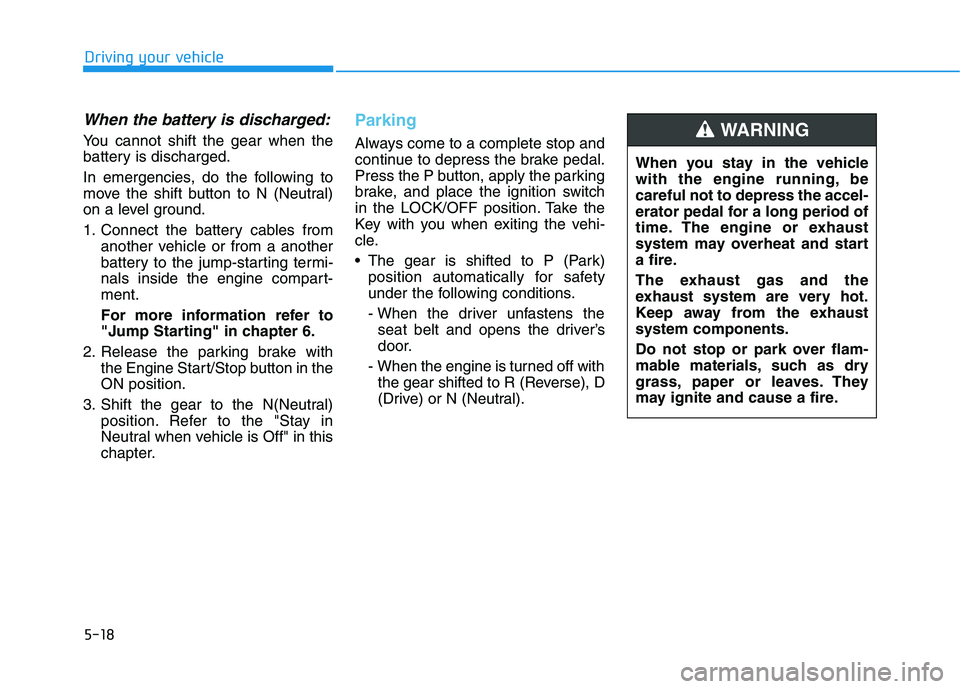
Parking
Always come to a complete stop and
continue to depress the brake pedal.
Press the P button, apply the parking
brake, and place the ignition switch
in the LOCK/OFF position. Take the
Key with you when exiting the vehi-
cle.
The gear is shifted to P (Park)
position automatically for safety
under the following conditions.
- When the driver unfastens the
seat belt and opens the driver’s
door.
- When the engine is turned off with
the gear shifted to R (Reverse), D
(Drive) or N (Neutral).When you stay in the vehicle
with the engine running, be
careful not to depress the accel-
erator pedal for a long period of
time. The engine or exhaust
system may overheat and start
a fire.
The exhaust gas and the
exhaust system are very hot.
Keep away from the exhaust
system components.
Do not stop or park over flam-
mable materials, such as dry
grass, paper or leaves. They
may ignite and cause a fire.WARNING
Page 342 of 612
![HYUNDAI PALISADE 2021 Owners Manual 5-33
Driving your vehicle
5
AUTO HOLD conditions not met.
Close door and hood.
When you press the [AUTO HOLD]
switch, if the drivers door and engine
hood are not closed, a warning will
sound and a me](/img/35/41162/w960_41162-341.png "HYUNDAI PALISADE 2021 Owners Manual 5-33
Driving your vehicle
5
AUTO HOLD conditions not met.
Close door and hood.
When you press the [AUTO HOLD]
switch, if the drivers door and engine
hood are not closed, a warning will
sound and a me")
5-33
Driving your vehicle
5
AUTO HOLD conditions not met.
Close door and hood.
When you press the [AUTO HOLD]
switch, if the driver's door and engine
hood are not closed, a warning will
sound and a message will appear on
the cluster LCD display.
Press the [AUTO HOLD] switch after
closing the driver's door and hood.
Anti-lock Brake System (ABS)
ABS is an electronic braking system
that helps prevent a braking skid.
ABS allows the driver to steer and
brake at the same time. An Anti-Lock Braking System
(ABS) or an Electronic Stability
Control (ESC) system will not
prevent accidents due to
improper or dangerous driving
maneuvers. Even though vehi-
cle control is improved during
emergency braking, always
maintain a safe distance
between you and objects ahead
of you. Vehicle speeds should
always be reduced during
extreme road conditions. The
braking distance for cars
equipped with ABS or ESC may
be longer than for those without
these systems in the following
road conditions.
Drive your vehicle at reduced
speeds during the following
conditions:
Rough, gravel or snow-cov-
ered roads.
On roads where the road sur-
face is pitted or has different
surface height.
WARNING
OTM058159L
Tire chains are installed on
your vehicle.
The safety features of an ABS
or ESC equipped vehicle should
not be tested by high speed
driving or cornering. This could
endanger the safety of yourself
or others.
Page 343 of 612
5-34
Driving your vehicle
Using ABS
To obtain the maximum benefit from
your ABS in an emergency situation,
do not attempt to modulate your
brake pressure and do not try to
pump your brakes. Depress your
brake pedal as hard as possible.
When you apply your brakes under
conditions which may lock the
wheels, you may hear sounds from
the brakes, or feel a corresponding
sensation in the brake pedal. This is
normal and it means your ABS is
active.
ABS does not reduce the time or dis-
tance it takes to stop the vehicle.
Always maintain a safe distance from
the vehicle in front of you.
ABS will not prevent a skid that
results from sudden changes in
direction, such as trying to take a
corner too fast or making a sudden
lane change. Always drive at a safe
speed for the road and weather con-
ditions.ABS cannot prevent a loss of stabili-
ty. Always steer moderately when
braking hard. Severe or sharp steer-
ing wheel movement can still cause
your vehicle to veer into oncoming
traffic or off the road.
On loose or uneven road surfaces,
operation of the anti-lock brake sys-
tem may result in a longer stopping
distance than for vehicles equipped
with a conventional brake system.
The ABS warning light ( ) will stay
on for several seconds after the igni-
tion switch is in the ON position.
During that time, the ABS will go
through self-diagnosis and the light
will go off if everything is normal. If
the light stays on, you may have a
problem with your ABS. Contact an
authorized HYUNDAI dealer as soon
as possible
If the ABS warning light ( ) is
on and stays on, you may have
a problem with the ABS. Your
power brakes will work normal-
ly. To reduce the risk of serious
injury or death, contact your
HYUNDAI dealer as soon as
possible.
WARNING