warning HYUNDAI PALISADE 2021 Owners Manual
[x] Cancel search | Manufacturer: HYUNDAI, Model Year: 2021, Model line: PALISADE, Model: HYUNDAI PALISADE 2021Pages: 612, PDF Size: 33.36 MB
Page 245 of 612
3-149
Convenient features of your vehicle
3
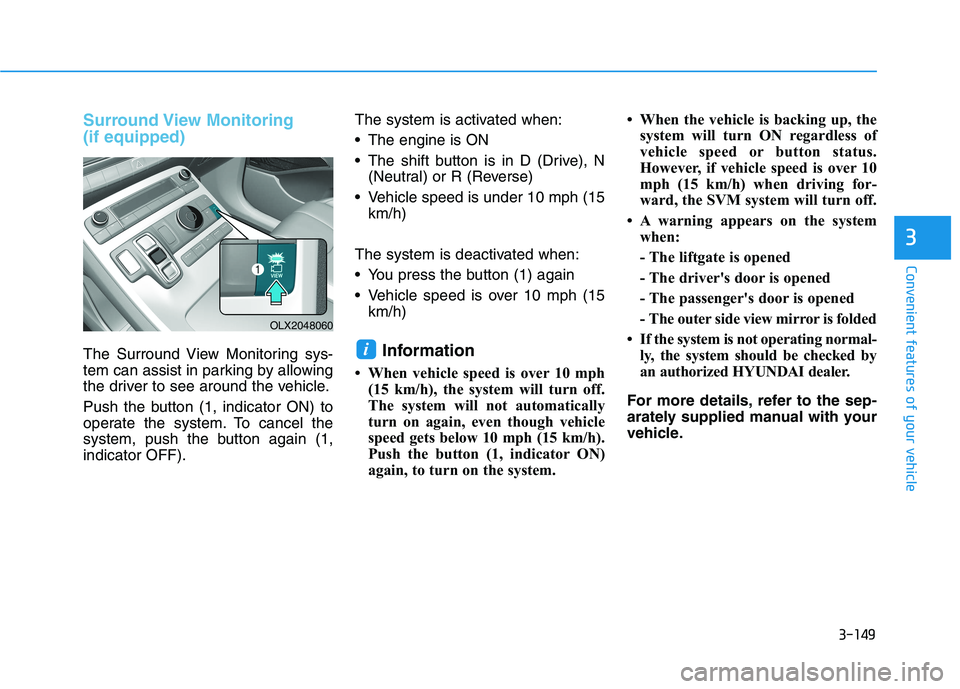
Surround View Monitoring
(if equipped)
The Surround View Monitoring sys-
tem can assist in parking by allowing
the driver to see around the vehicle.
Push the button (1, indicator ON) to
operate the system. To cancel the
system, push the button again (1,
indicator OFF).The system is activated when:
The engine is ON
The shift button is in D (Drive), N
(Neutral) or R (Reverse)
Vehicle speed is under 10 mph (15
km/h)
The system is deactivated when:
You press the button (1) again
Vehicle speed is over 10 mph (15
km/h)Information
• When vehicle speed is over 10 mph
(15 km/h), the system will turn off.
The system will not automatically
turn on again, even though vehicle
speed gets below 10 mph (15 km/h).
Push the button (1, indicator ON)
again, to turn on the system.• When the vehicle is backing up, the
system will turn ON regardless of
vehicle speed or button status.
However, if vehicle speed is over 10
mph (15 km/h) when driving for-
ward, the SVM system will turn off.
• A warning appears on the system
when:
- The liftgate is opened
- The driver's door is opened
- The passenger's door is opened
- The outer side view mirror is folded
• If the system is not operating normal-
ly, the system should be checked by
an authorized HYUNDAI dealer.
For more details, refer to the sep-
arately supplied manual with your
vehicle.
i
OLX2048060
Page 247 of 612
3-151
Convenient features of your vehicle
3
To turn off BVM system
1. The ignition switch is turned to the
OFF position.
2. The turn signal is deactivated
3. A warning screen pops up and
takes priority over the Blind-Spot
View Monitor system.System setting
With the engine ON, the Blind-spot
View Monitor system turns on and
gets ready to be activated when the
'User Settings →Driver Assistance
→ Blind-Spot Safety →Blind-Spot
View' is selected on the cluster. The
system stops operation when the set-
ting is deactivated.
Like all assistance systems,
BVM system has limitations.
Over-reliance on the system
may result in a collision.
Always look around your vehi-
cle to make sure there are no
objects or obstacles before
moving the vehicle in any
direction to prevent a colli-
sion.
Objects are closer than they
appear. Failure to visually
confirm that is safe to change
the lane before doing so may
result in crash and serious
injury or death.
Always keep the camera lens
clean. The camera may not
work normally if the lens is
covered with foreign material.
CAUTION
Page 248 of 612
![HYUNDAI PALISADE 2021 Owners Manual 3-152
Reverse Parking Distance
Warning System (if equipped)
[B] : Sensor
The optional Reverse Parking
Distance Warning system assists the
driver during reverse movement of
the vehicle by chiming if an](/img/35/41162/w960_41162-247.png "HYUNDAI PALISADE 2021 Owners Manual 3-152
Reverse Parking Distance
Warning System (if equipped)
[B] : Sensor
The optional Reverse Parking
Distance Warning system assists the
driver during reverse movement of
the vehicle by chiming if an")
3-152
Reverse Parking Distance
Warning System (if equipped)
[B] : Sensor
The optional Reverse Parking
Distance Warning system assists the
driver during reverse movement of
the vehicle by chiming if any object is
sensed within approximately 50 in
(120 cm) behind the vehicle.
This system is a supplemental sys-
tem that senses objects within the
range and location of the sensors, it
cannot detect objects in other areas
where sensors are not installed.
Operation of the Reverse
Parking Distance Warning sys-
tem
Operating condition
This system will activate when
backing up with the ignition switch
in the ON position. However, if the
vehicle speed exceeds 3 mph (5
km/h), the system may not detect
objects.
If the vehicle speed exceeds 6 mph
(10 km/h), the system will not warn
you even though objects are
detected.
When more than two objects are
sensed at the same time, the clos-
est one will be recognized first.
Convenient features of your vehicle
ALWAYS look around your vehi-
cle to make sure there are not
any objects or obstacles before
moving the vehicle in any direc-
tion to prevent a collision.
Always pay close attention
when the vehicle is driven close
to objects, particularly pedestri-
ans, and especially children.
Be aware that some objects
may not be visible on the
screen or be detected by the
sensors, due to the objects
distance, size or material, all of
which can limit the effective-
ness of the sensor.
WARNING
OLX2048053L
Page 249 of 612

3-153
Convenient features of your vehicle
3
Types of warning sound and indicator
The indicator may differ from the
illustration as objects or sensors
status. If the indicator blinks,
have your vehicle checked by an
authorized HYUNDAI dealer.
If the audible warning does not
sound or if the buzzer sounds
intermittently when shifting into R
(Reverse) position, this may indi-
cate a malfunction with the
Reverse Parking Distance Warning
system. If this occurs, have your
vehicle checked by an authorized
HYUNDAI dealer as soon as possi-
ble.
To Turn OFF the Reverse
Parking Distance Warning sys-
tem
Push the button to turn OFF the
Reverse Parking Distance Warning
system. The indicator light on the
button will turn on.
NOTICE
Types of warning soundIndicator
When an object is 24 to 47 in
(60 to 120 cm) from the rear
bumper, the warning sound
beeps intermittently.
When an object is 12 to 24 in
(30 to 60 cm) from the rear
bumper, the warning sound
beeps more frequently.
When an object is within 12 in
(30 cm) from the rear bumper,
the warning sound beeps
continuously.OLX2049096N
Page 250 of 612
3-154
Convenient features of your vehicle
Conditions Where the Reverse
Parking Distance Warning sys-
tem May Not Operate
The Reverse Parking Distance
Warning system may not operate
normally when any of the following
occur:
The sensor is covered with dirt or
debris such as snow or ice, or the
sensor cover is blocked.
The Reverse Parking Distance
Warning system may experience a
malfunction when the following
occurs:
Driving on uneven road surfaces
such as unpaved roads, gravel,
bumps, or gradient.
Objects generating excessive
noise such as vehicle horns, loud
motorcycle engines, or truck air
brakes can interfere with the sen-
sor.
Heavy rain or water spray is pres-
ent.
Wireless transmitters or mobile
phones are present near the sen-
sor. The sensor is covered with snow.
Any non-factory equipment or
accessories have been installed, or
if the vehicle bumper height or sen-
sor installation has been modified.
Detecting range may decrease when:
Outside air temperature is extreme-
ly hot or cold.
Undetectable objects smaller than
40 inches (1 m) and narrower than
6 inches (14 cm) in diameter.
The following objects may not be
recognized by the sensor:
Sharp or slim objects such as
ropes, chains or small poles.
Objects, which tend to absorb sen-
sor frequency such as clothes,
spongy material or snow.
Reverse Parking Distance
Warning system Precautions
The Reverse Parking Distance
Warning system may not operate
consistently in some circum-
stances depending on the speed of
the vehicle and the shapes of the
objects detected.
The Reverse Parking Distance
Warning system may malfunction if
the vehicle bumper height or sen-
sor installation has been modified
or damaged. Any non-factory
installed equipment or accessories
may also interfere with the sensor
performance.
The sensor may not recognize
objects less than 12 in. (30 cm)
from the sensor, or it may sense an
incorrect distance. Use caution.
When the sensor is blocked with
snow, dirt, debris, or ice, the rear
parking assist system may be inop-
erative until the snow or ice melts,
or the debris is removed. Use a
soft cloth to wipe debris away from
the sensor.
Page 251 of 612
3-155
Convenient features of your vehicle
3
Do not push, scratch or strike the
sensor with any hard objects that
could damage the surface of the
sensor. Sensor damage could occur.
Do not spray the sensors or its sur-
rounding area directly with a high
pressure washer. Doing so may
cause the sensors to fail to operate
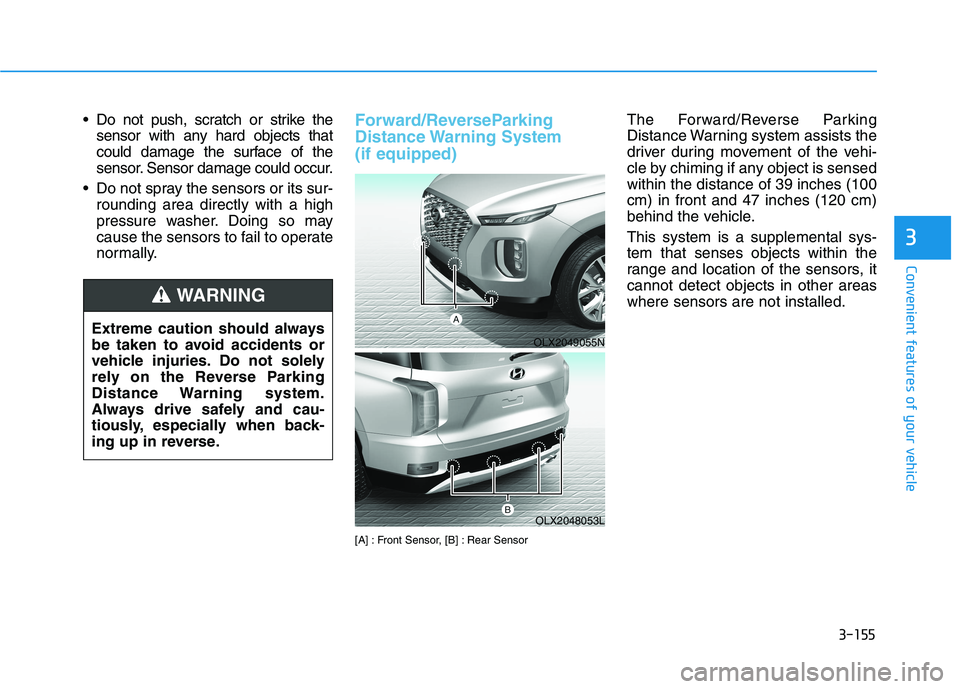
normally.Forward/ReverseParking
Distance Warning System
(if equipped)
[A] : Front Sensor, [B] : Rear Sensor
The Forward/Reverse Parking
Distance Warning system assists the
driver during movement of the vehi-
cle by chiming if any object is sensed
within the distance of 39 inches (100
cm) in front and 47 inches (120 cm)
behind the vehicle.
This system is a supplemental sys-
tem that senses objects within the
range and location of the sensors, it
cannot detect objects in other areas
where sensors are not installed.
OLX2049055N
OLX2048053L
Extreme caution should always
be taken to avoid accidents or
vehicle injuries. Do not solely
rely on the Reverse Parking
Distance Warning system.
Always drive safely and cau-
tiously, especially when back-
ing up in reverse.
WARNING
Page 252 of 612
3-156
Operation of the
Forward/Reverse Parking
Distance Warning System
Operating condition
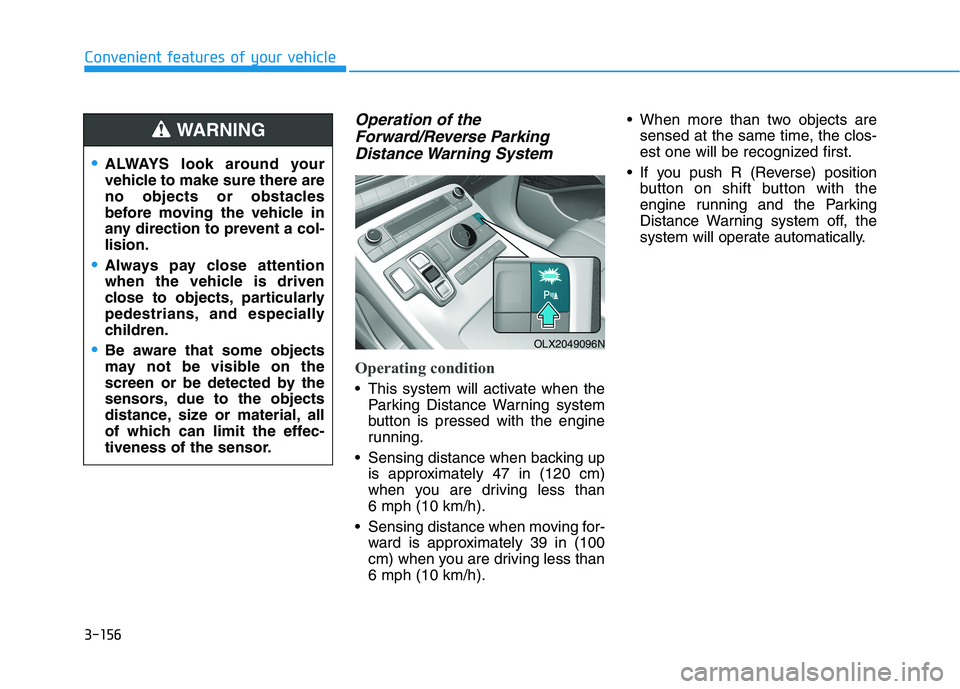
This system will activate when the
Parking Distance Warning system
button is pressed with the engine
running.
Sensing distance when backing up
is approximately 47 in (120 cm)
when you are driving less than
6 mph (10 km/h).
Sensing distance when moving for-
ward is approximately 39 in (100
cm) when you are driving less than
6 mph (10 km/h). When more than two objects are
sensed at the same time, the clos-
est one will be recognized first.
If you push R (Reverse) position
button on shift button with the
engine running and the Parking
Distance Warning system off, the
system will operate automatically.
Convenient features of your vehicle
ALWAYS look around your
vehicle to make sure there are
no objects or obstacles
before moving the vehicle in
any direction to prevent a col-
lision.
Always pay close attention
when the vehicle is driven
close to objects, particularly
pedestrians, and especially
children.
Be aware that some objects
may not be visible on the
screen or be detected by the
sensors, due to the objects
distance, size or material, all
of which can limit the effec-
tiveness of the sensor.
WARNING
OLX2049096N
Page 253 of 612
3-157
Convenient features of your vehicle
Non-operational conditions of
Forward/Reverse Parking
Distance Warning system
The Forward/Reverse Parking
Distance Warning system may not
operate normally when any of the
following occur:
Moisture is frozen to the sensor.
Sensor is covered with foreign mat-
ter, such as snow or water, or the
sensor cover is blocked.
The Forward/Reverse Parking
Distance Warning system may
experience a malfunction when the
following occurs:
Driving on uneven road surfaces
such as unpaved roads, gravel,
bumps, or gradient.
Objects generating excessive noise
such as vehicle horns, loud motor-
cycle engines, or truck air brakes
can interfere with the sensor.
Heavy rain or water spray is present.
Wireless transmitters or mobile
phones are present near the sensor.
The sensor is covered with snow.
3
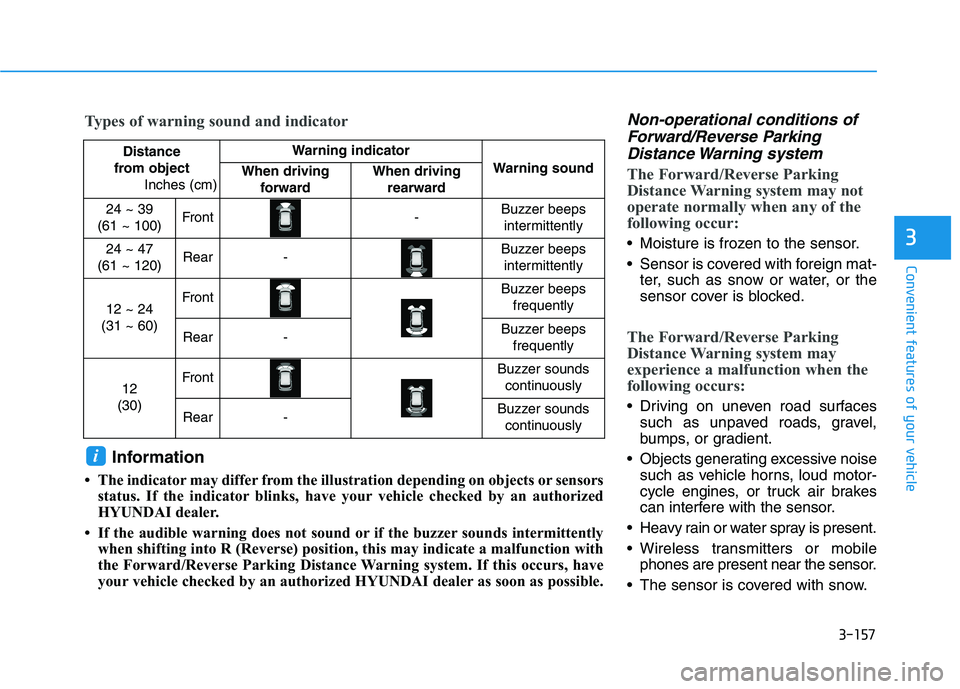
Distance
from object
Inches (cm)Warning indicator
Warning soundWhen driving
forwardWhen driving
rearward
24 ~ 39
(61 ~ 100)Front-Buzzer beeps
intermittently
24 ~ 47
(61 ~ 120)Rear-Buzzer beeps
intermittently
12 ~ 24
(31 ~ 60)FrontBuzzer beeps
frequently
Rear-Buzzer beeps
frequently
12
(30)FrontBuzzer sounds
continuously
Rear-Buzzer sounds
continuously
Types of warning sound and indicator
Information
• The indicator may differ from the illustration depending on objects or sensors
status. If the indicator blinks, have your vehicle checked by an authorized
HYUNDAI dealer.
• If the audible warning does not sound or if the buzzer sounds intermittently
when shifting into R (Reverse) position, this may indicate a malfunction with
the Forward/Reverse Parking Distance Warning system. If this occurs, have
your vehicle checked by an authorized HYUNDAI dealer as soon as possible.
i
Page 254 of 612
3-158
Any non-factory equipment or
accessories have been installed, or
if the vehicle bumper height or sen-
sor installation has been modified.
Detecting range may decrease when:
Outside air temperature is
extremely hot or cold.
Undetectable objects smaller than
40 inches (1 m) and narrower than
6 inches (14 cm) in diameter.
The following objects may not be
recognized by the sensor:
Sharp or slim objects such as
ropes, chains or small poles.
Objects, which tend to absorb sen-
sor frequency such as clothes,
spongy material or snow.
Forward/Reverse Parking
Distance Warning system pre-
cautions
The Forward/Reverse Parking
Distance Warning system may not
operate consistently in some cir-
cumstances depending on the
speed of the vehicle and the
shapes of the objects detected.
The Forward/Reverse Parking
Distance Warning system may mal-
function if the vehicle bumper
height or sensor installation has
been modified or damaged. Any
non-factory installed equipment or
accessories may also interfere with
the sensor performance.
The sensor may not recognize
objects less than 15 inches. (40
cm) from the sensor, or it may
sense an incorrect distance. Use
caution.
When the sensor is blocked with
snow, dirt, debris, or ice, the sys-
tem may be inoperative until the
snow or ice melts, or the debris is
removed. Use a soft cloth to wipe
debris away from the sensor. Do not push, scratch or strike the
sensor with any hard objects that
could damage the surface of the
sensor. Sensor damage could occur.
Do not spray the sensors or its sur-
rounding area directly with a high
pressure washer. Doing so may
cause the sensors to fail to operate
normally.
Convenient features of your vehicle
Your new vehicle warranty does
not cover any accidents or dam-
age to the vehicle or injuries to
its occupants related to a
Forward/Reverse Parking
Distance Warning system.
Always drive safely and cau-
tiously.
WARNING
Page 259 of 612
3-163
Convenient features of your vehicle
3
Fan speed control (1)
Turn the knob to the right to increase
the fan speed and airflow. Turn the
knob to the left to decrease fan
speed and airflow.
Setting the fan speed control knob to
the "0" position turns off the fan.
Operating the fan speed when the
ignition switch is in the ON posi-
tion could cause the battery to
discharge. Operate the fan speed
when the engine is running.
Air conditioning (3)
Push the A/C button to turn the sys-
tem on (indicator light will illuminate)
and off.
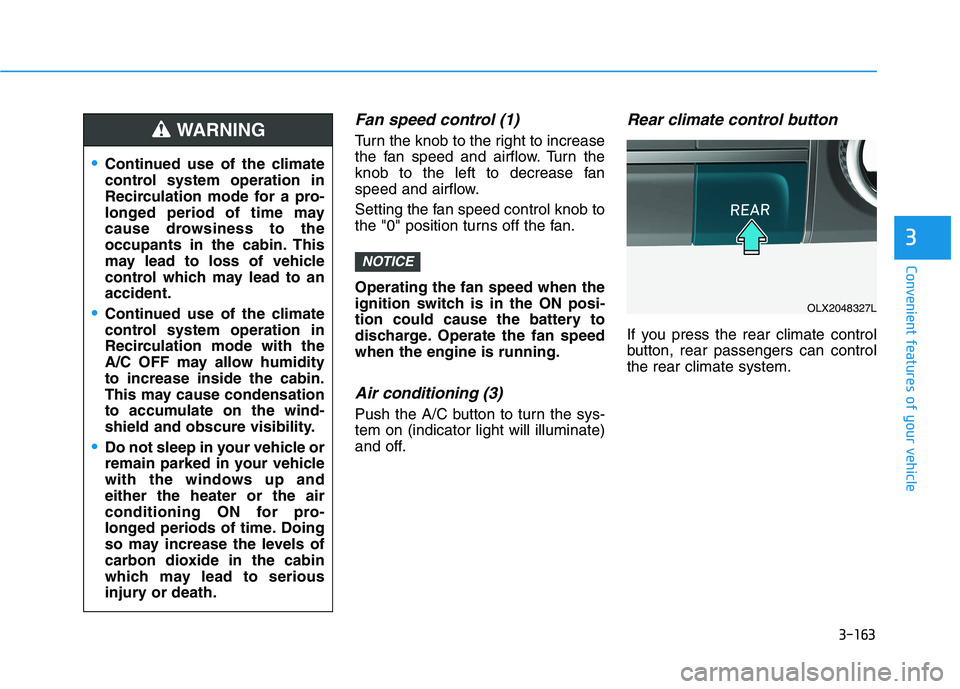
Rear climate control button
If you press the rear climate control
button, rear passengers can control
the rear climate system.
NOTICE
Continued use of the climate
control system operation in
Recirculation mode for a pro-
longed period of time may
cause drowsiness to the
occupants in the cabin. This
may lead to loss of vehicle
control which may lead to an
accident.
Continued use of the climate
control system operation in
Recirculation mode with the
A/C OFF may allow humidity
to increase inside the cabin.
This may cause condensation
to accumulate on the wind-
shield and obscure visibility.
Do not sleep in your vehicle or
remain parked in your vehicle
with the windows up and
either the heater or the air
conditioning ON for pro-
longed periods of time. Doing
so may increase the levels of
carbon dioxide in the cabin
which may lead to serious
injury or death.
WARNING
OLX2048327L