tow HYUNDAI PALISADE 2021 Owner's Manual
[x] Cancel search | Manufacturer: HYUNDAI, Model Year: 2021, Model line: PALISADE, Model: HYUNDAI PALISADE 2021Pages: 612, PDF Size: 33.36 MB
Page 263 of 612
3-167
Convenient features of your vehicle
3
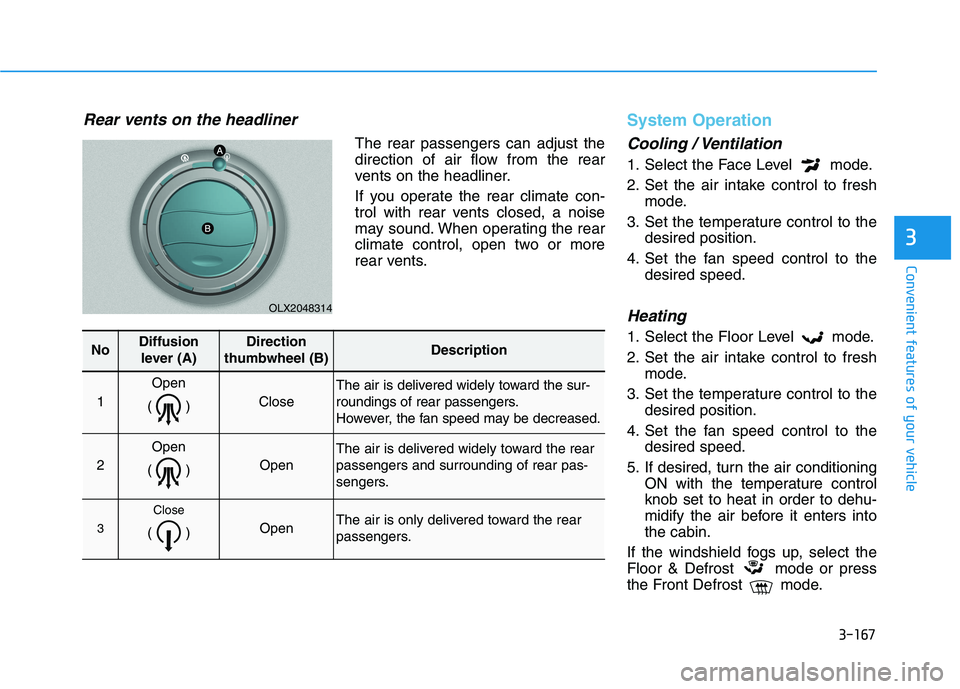
Rear vents on the headliner
The rear passengers can adjust the
direction of air flow from the rear
vents on the headliner.
If you operate the rear climate con-
trol with rear vents closed, a noise
may sound. When operating the rear
climate control, open two or more
rear vents.
System Operation
Cooling / Ventilation
1. Select the Face Level mode.
2. Set the air intake control to fresh
mode.
3. Set the temperature control to the
desired position.
4. Set the fan speed control to the
desired speed.
Heating
1. Select the Floor Level mode.
2. Set the air intake control to fresh
mode.
3. Set the temperature control to the
desired position.
4. Set the fan speed control to the
desired speed.
5. If desired, turn the air conditioning
ON with the temperature control
knob set to heat in order to dehu-
midify the air before it enters into
the cabin.
If the windshield fogs up, select the
Floor & Defrost mode or press
the Front Defrost mode.
OLX2048314
NoDiffusion
lever (A)Direction
thumbwheel (B)Description
1
Open
()
Close
The air is delivered widely toward the sur-
roundings of rear passengers.
However, the fan speed may be decreased.
2
Open
()
Open
The air is delivered widely toward the rear
passengers and surrounding of rear pas-
sengers.
3
Close
() Open The air is only delivered toward the rear
passengers.
Page 270 of 612

3-174
Convenient features of your vehicle
Mode selection (9)The air flow outlet direction is cycled
as follows:
Face-Level (B, D)
Air flow is directed toward the upper
body and face. Additionally, each
outlet can be controlled to direct the
air discharged from the outlet.
Bi-Level (B, C, D, E)
Air flow is directed towards the face
and the floor.
OLX2048304
The mode selection button controls the direction of the air flow through the
ventilation system.
Page 277 of 612
3-181
Convenient features of your vehicle
3
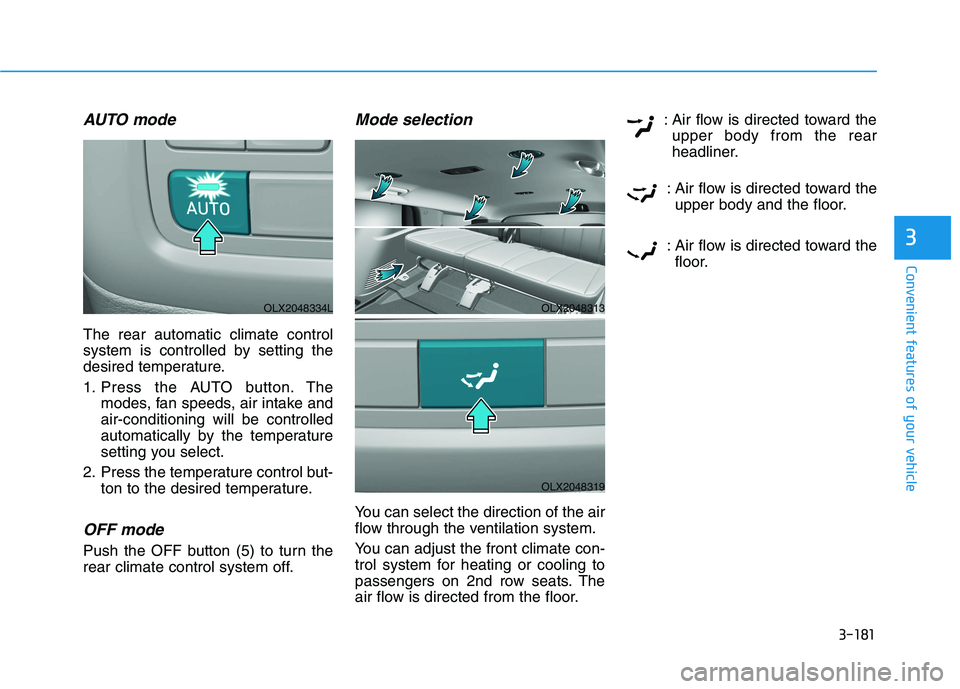
AUTO mode
The rear automatic climate control
system is controlled by setting the
desired temperature.
1. Press the AUTO button. The
modes, fan speeds, air intake and
air-conditioning will be controlled
automatically by the temperature
setting you select.
2. Press the temperature control but-
ton to the desired temperature.
OFF mode
Push the OFF button (5) to turn the
rear climate control system off.
Mode selection
You can select the direction of the air
flow through the ventilation system.
You can adjust the front climate con-
trol system for heating or cooling to
passengers on 2nd row seats. The
air flow is directed from the floor.: Air flow is directed toward the
upper body from the rear
headliner.
: Air flow is directed toward the
upper body and the floor.
: Air flow is directed toward the
floor.
OLX2048313
OLX2048319
OLX2048334L
Page 278 of 612
3-182
Convenient features of your vehicle
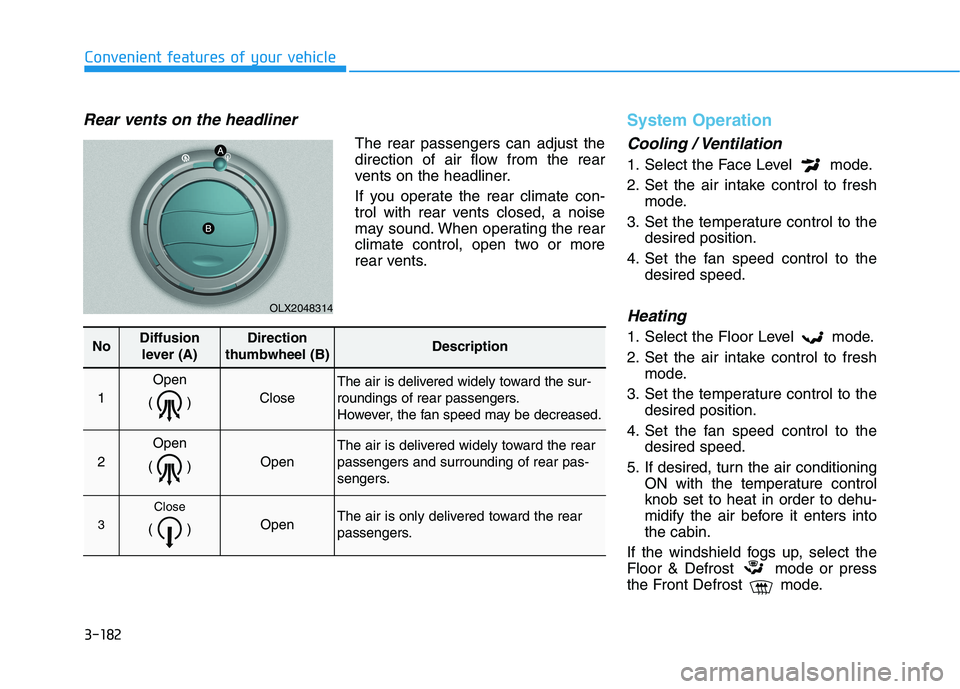
Rear vents on the headliner
The rear passengers can adjust the
direction of air flow from the rear
vents on the headliner.
If you operate the rear climate con-
trol with rear vents closed, a noise
may sound. When operating the rear
climate control, open two or more
rear vents.
System Operation
Cooling / Ventilation
1. Select the Face Level mode.
2. Set the air intake control to fresh
mode.
3. Set the temperature control to the
desired position.
4. Set the fan speed control to the
desired speed.
Heating
1. Select the Floor Level mode.
2. Set the air intake control to fresh
mode.
3. Set the temperature control to the
desired position.
4. Set the fan speed control to the
desired speed.
5. If desired, turn the air conditioning
ON with the temperature control
knob set to heat in order to dehu-
midify the air before it enters into
the cabin.
If the windshield fogs up, select the
Floor & Defrost mode or press
the Front Defrost mode.
OLX2048314
NoDiffusion
lever (A)Direction
thumbwheel (B)Description
1
Open
()
Close
The air is delivered widely toward the sur-
roundings of rear passengers.
However, the fan speed may be decreased.
2
Open
()
Open
The air is delivered widely toward the rear
passengers and surrounding of rear pas-
sengers.
3
Close
() Open The air is only delivered toward the rear
passengers.
Page 292 of 612
3-196
Convenient features of your vehicle
Conversation mirror
You can see widely the rear view
through the conversation mirror.
To open:
Press the cover and the holder will
slowly open.
To close:
Push back into position.
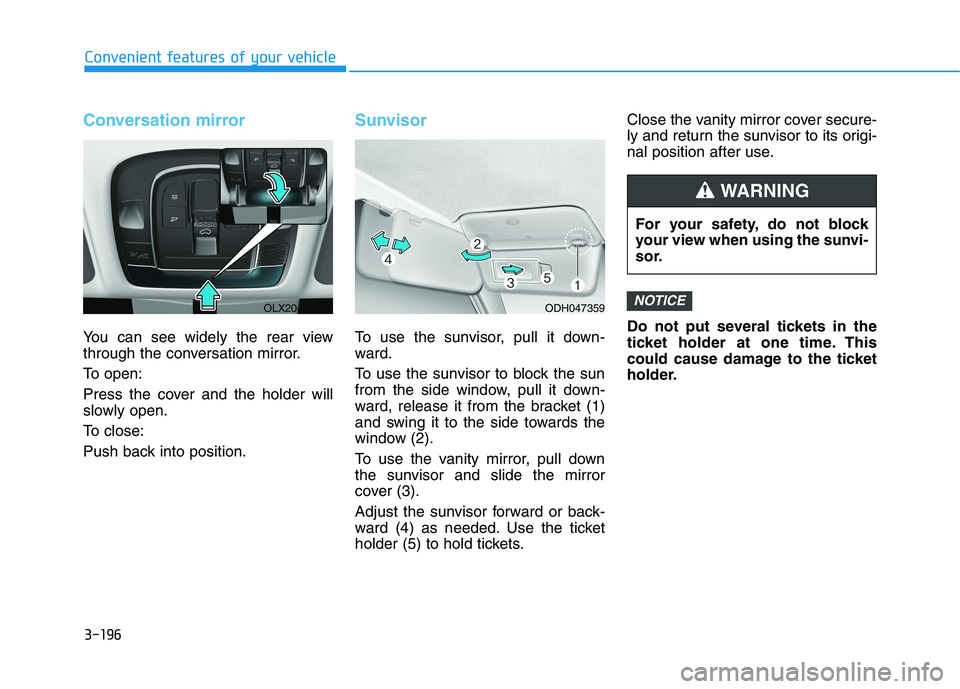
Sunvisor
To use the sunvisor, pull it down-
ward.
To use the sunvisor to block the sun
from the side window, pull it down-
ward, release it from the bracket (1)
and swing it to the side towards the
window (2).
To use the vanity mirror, pull down
the sunvisor and slide the mirror
cover (3).
Adjust the sunvisor forward or back-
ward (4) as needed. Use the ticket
holder (5) to hold tickets.Close the vanity mirror cover secure-
ly and return the sunvisor to its origi-
nal position after use.
Do not put several tickets in the
ticket holder at one time. This
could cause damage to the ticket
holder.
NOTICE
For your safety, do not block
your view when using the sunvi-
sor.
WARNING
ODH047359OLX2048074L
Page 301 of 612
3-205
Convenient features of your vehicle
3
Luggage Net Holder
(if equipped)
To keep items from shifting in the lug-
gage compartment, you can use the
4 holders located in the luggage
board to attach the luggage net.
Make sure the luggage net is secure-
ly attached to the holders in the lug-
gage board.
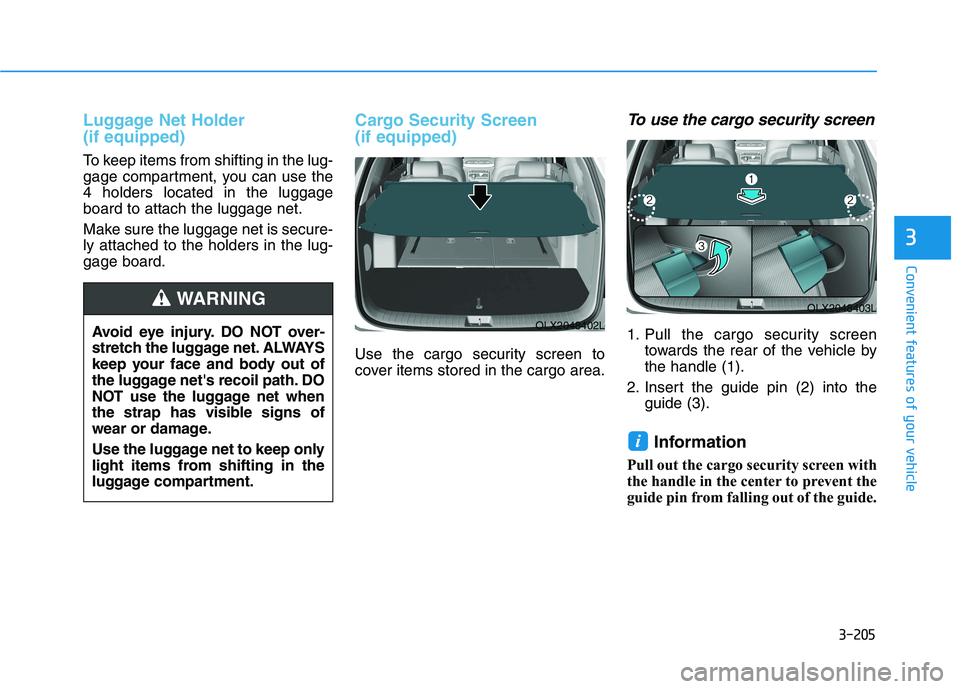
Cargo Security Screen
(if equipped)
Use the cargo security screen to
cover items stored in the cargo area.
To use the cargo security screen
1. Pull the cargo security screen
towards the rear of the vehicle by
the handle (1).
2. Insert the guide pin (2) into the
guide (3).
Information
Pull out the cargo security screen with
the handle in the center to prevent the
guide pin from falling out of the guide.
i
OLX2048403L
OLX2048402LAvoid eye injury. DO NOT over-
stretch the luggage net. ALWAYS
keep your face and body out of
the luggage net's recoil path. DO
NOT use the luggage net when
the strap has visible signs of
wear or damage.
Use the luggage net to keep only
light items from shifting in the
luggage compartment.
WARNING
Page 312 of 612
Leading Vehicle Departure Alert .....................5-147
System Setting and Operation...................................5-147
Special Driving Conditions ................................5-149
Hazardous Driving Conditions....................................5-149
Rocking the Vehicle ......................................................5-149
Smooth Cornering .........................................................5-150
Driving at Night .............................................................5-150
Driving in the Rain ........................................................5-150
Driving in Flooded Areas.............................................5-151
Highway Driving ............................................................5-151
Reducing the Risk of a Rollover ...............................5-152
Winter Driving ....................................................5-153
Snow or Icy Conditions................................................5-153
Winter Precautions .......................................................5-155
Trailer Towing .....................................................5-157
If you decide to pull a trailer .....................................5-157
Trailer towing equipment ............................................5-159
Driving with a trailer ....................................................5-160
Maintenance when trailer towing ...........................5-163
Vehicle Load Limit..............................................5-165
Tire Loading Information Label .................................5-166
5
Page 317 of 612
5-8
Driving your vehicle
Key ignition switch positions
Switch
PositionActionNotice
LOCK
To turn the ignition switch to the LOCK position, put the
key in at the ACC position and turn the key towards the
LOCK position.
The ignition key can be removed in the LOCK position.
The shift lever must be in the P (Park) position.
ACCSome of the electrical accessories are usable.
ON
This is the normal key position when the engine has
started.
All features and accessories are usable.
The warning lights can be checked when you turn the
ignition switch from ACC to ON.Do not leave the ignition switch in the ON position when
the engine is not running in order to prevent the battery
from discharging.
START
To start the engine, turn the ignition switch to the START
position. The switch returns to the ON position when you
let go of the key.The engine will crank until you release the key.
Page 318 of 612
5-9
Driving your vehicle
5
Starting the engine 1. Make sure the parking brake is
applied.
2. Make sure the gear is in P (Park).
3. Depress the brake pedal.
4. Turn the ignition switch to the
START position. Hold the key
(maximum of 10 seconds) until the
engine starts and release it.
Information
• It is best to maintain a moderate
engine speed until the vehicle engine
comes up to normal operating tem-
perature. Avoid harsh or abrupt
acceleration or deceleration while
the engine is still cold.
• Whether the engine is cold or warm,
always start the vehicle with your
foot on the brake pedal. Do not
depress the accelerator while start-
ing the vehicle. Do not rev the
engine while warming it up.To prevent damage to the vehicle:
Do not hold the ignition key in
the START position for more
than 10 seconds. Wait 5 to 10
seconds before trying again.
Do not push or tow your vehicle
to start the engine.Turning off the engine
1. Stop the vehicle and depress the
brake pedal fully.
2. Shift the gear to P (Park).
3. Turn the ignition switch to the off
position and apply the parking
brake.
NOTICE
i
Always wear appropriate shoes
when operating your vehicle.
Unsuitable shoes, such as high
heels, ski boots, sandals, flip-
flops, etc., may interfere with
your ability to use the brake and
accelerator pedals.
WARNING
Page 323 of 612
5-14
Driving your vehicle
To prevent damage to the vehicle:
If the engine stalls while you are
in motion, do not attempt to shift
the gear to the P (Park) position.
If traffic and road conditions
permit, you may put the gear in
the N (Neutral) position while the
vehicle is still moving and press
the Engine Start/Stop button in
an attempt to restart the engine.
Do not push or tow your vehicle
to start the engine.To prevent damage to the vehicle:
When the stop lamp switch fuse is
blown, you can't start the engine
normally. Replace the fuse with a
new one. If you are not able to
replace the fuse, you can start the
engine by pressing and holding
the Engine Start/Stop button for
10 seconds with the Engine Start/
Stop button in the ACC position.
Do not press the Engine Start/Stop
button for more than 10 seconds
except when the stop lamp switch
fuse is blown.
For your safety always depress
the brake pedal before starting the
engine.
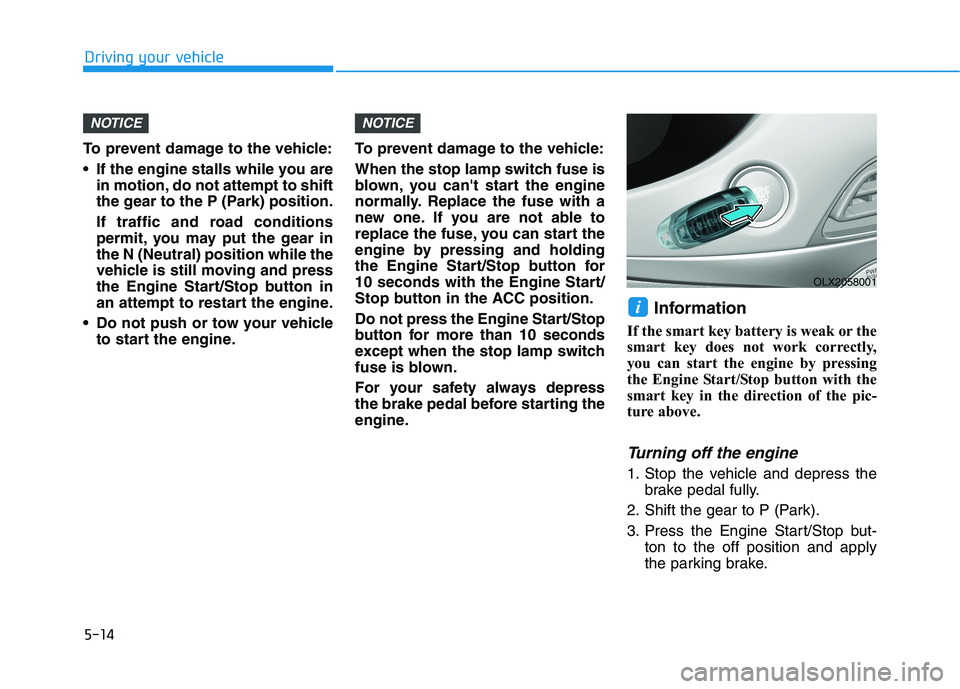
Information
If the smart key battery is weak or the
smart key does not work correctly,
you can start the engine by pressing
the Engine Start/Stop button with the
smart key in the direction of the pic-
ture above.
Turning off the engine
1. Stop the vehicle and depress the
brake pedal fully.
2. Shift the gear to P (Park).
3. Press the Engine Start/Stop but-
ton to the off position and apply
the parking brake.
i
NOTICENOTICE
OLX2058001