brake sensor HYUNDAI PALISADE 2021 Owners Manual
[x] Cancel search | Manufacturer: HYUNDAI, Model Year: 2021, Model line: PALISADE, Model: HYUNDAI PALISADE 2021Pages: 612, PDF Size: 33.36 MB
Page 94 of 612
2-77
Safety system of your vehicle
2
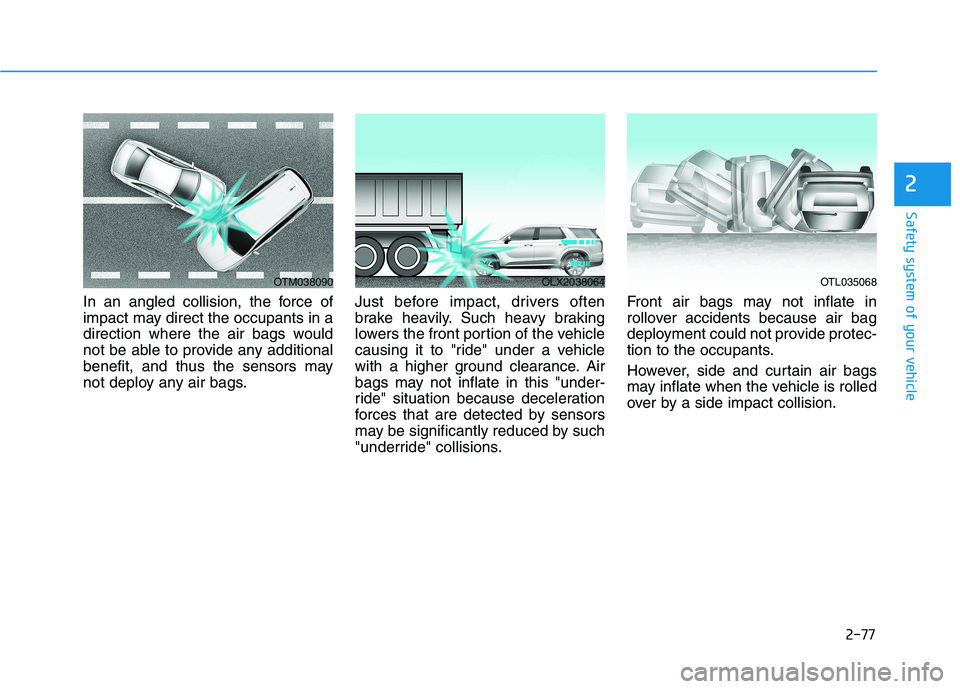
In an angled collision, the force of
impact may direct the occupants in a
direction where the air bags would
not be able to provide any additional
benefit, and thus the sensors may
not deploy any air bags.Just before impact, drivers often
brake heavily. Such heavy braking
lowers the front portion of the vehicle
causing it to "ride" under a vehicle
with a higher ground clearance. Air
bags may not inflate in this "under-
ride" situation because deceleration
forces that are detected by sensors
may be significantly reduced by such
"underride" collisions.Front air bags may not inflate in
rollover accidents because air bag
deployment could not provide protec-
tion to the occupants.
However, side and curtain air bags
may inflate when the vehicle is rolled
over by a side impact collision.
OTM038090OLX2038064OTL035068
Page 228 of 612
3-132
Convenient features of your vehicle
L LI
IG
GH
HT
TI
IN
NG
G
Exterior Lights
Lighting control
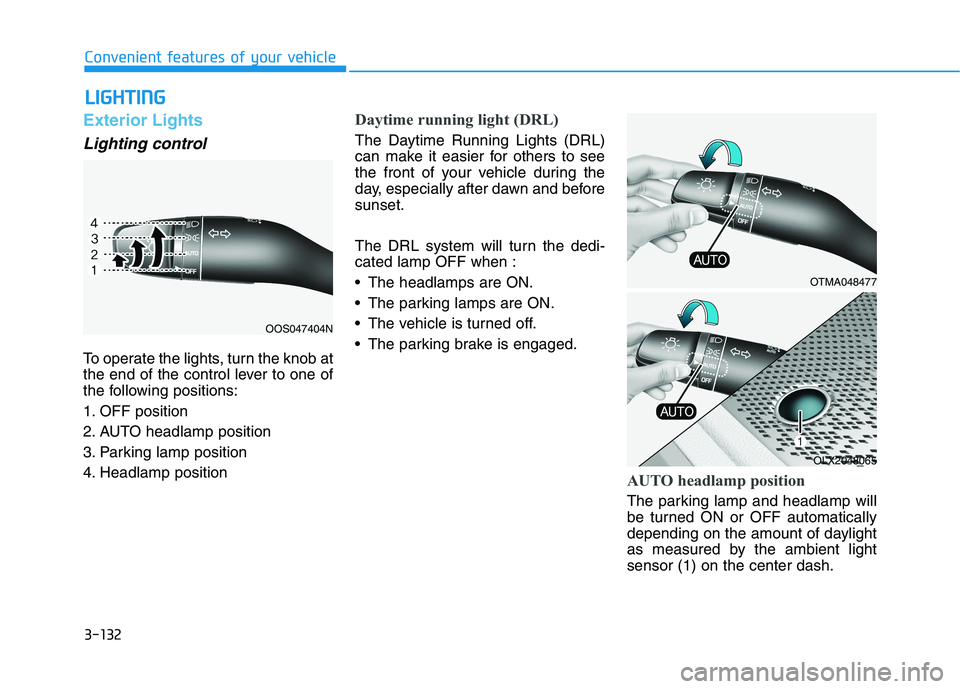
To operate the lights, turn the knob at
the end of the control lever to one of
the following positions:
1. OFF position
2. AUTO headlamp position
3. Parking lamp position
4. Headlamp position
Daytime running light (DRL)
The Daytime Running Lights (DRL)
can make it easier for others to see
the front of your vehicle during the
day, especially after dawn and before
sunset.
The DRL system will turn the dedi-
cated lamp OFF when :
• The headlamps are ON.
The parking lamps are ON.
The vehicle is turned off.
The parking brake is engaged.
AUTO headlamp position
The parking lamp and headlamp will
be turned ON or OFF automatically
depending on the amount of daylight
as measured by the ambient light
sensor (1) on the center dash.
OOS047404N
OTMA048477
OLX2048065
Page 250 of 612
3-154
Convenient features of your vehicle
Conditions Where the Reverse
Parking Distance Warning sys-
tem May Not Operate
The Reverse Parking Distance
Warning system may not operate
normally when any of the following
occur:
The sensor is covered with dirt or
debris such as snow or ice, or the
sensor cover is blocked.
The Reverse Parking Distance
Warning system may experience a
malfunction when the following
occurs:
Driving on uneven road surfaces
such as unpaved roads, gravel,
bumps, or gradient.
Objects generating excessive
noise such as vehicle horns, loud
motorcycle engines, or truck air
brakes can interfere with the sen-
sor.
Heavy rain or water spray is pres-
ent.
Wireless transmitters or mobile
phones are present near the sen-
sor. The sensor is covered with snow.
Any non-factory equipment or
accessories have been installed, or
if the vehicle bumper height or sen-
sor installation has been modified.
Detecting range may decrease when:
Outside air temperature is extreme-
ly hot or cold.
Undetectable objects smaller than
40 inches (1 m) and narrower than
6 inches (14 cm) in diameter.
The following objects may not be
recognized by the sensor:
Sharp or slim objects such as
ropes, chains or small poles.
Objects, which tend to absorb sen-
sor frequency such as clothes,
spongy material or snow.
Reverse Parking Distance
Warning system Precautions
The Reverse Parking Distance
Warning system may not operate
consistently in some circum-
stances depending on the speed of
the vehicle and the shapes of the
objects detected.
The Reverse Parking Distance
Warning system may malfunction if
the vehicle bumper height or sen-
sor installation has been modified
or damaged. Any non-factory
installed equipment or accessories
may also interfere with the sensor
performance.
The sensor may not recognize
objects less than 12 in. (30 cm)
from the sensor, or it may sense an
incorrect distance. Use caution.
When the sensor is blocked with
snow, dirt, debris, or ice, the rear
parking assist system may be inop-
erative until the snow or ice melts,
or the debris is removed. Use a
soft cloth to wipe debris away from
the sensor.
Page 253 of 612
3-157
Convenient features of your vehicle
Non-operational conditions of
Forward/Reverse Parking
Distance Warning system
The Forward/Reverse Parking
Distance Warning system may not
operate normally when any of the
following occur:
Moisture is frozen to the sensor.
Sensor is covered with foreign mat-
ter, such as snow or water, or the
sensor cover is blocked.
The Forward/Reverse Parking
Distance Warning system may
experience a malfunction when the
following occurs:
Driving on uneven road surfaces
such as unpaved roads, gravel,
bumps, or gradient.
Objects generating excessive noise
such as vehicle horns, loud motor-
cycle engines, or truck air brakes
can interfere with the sensor.
Heavy rain or water spray is present.
Wireless transmitters or mobile
phones are present near the sensor.
The sensor is covered with snow.
3
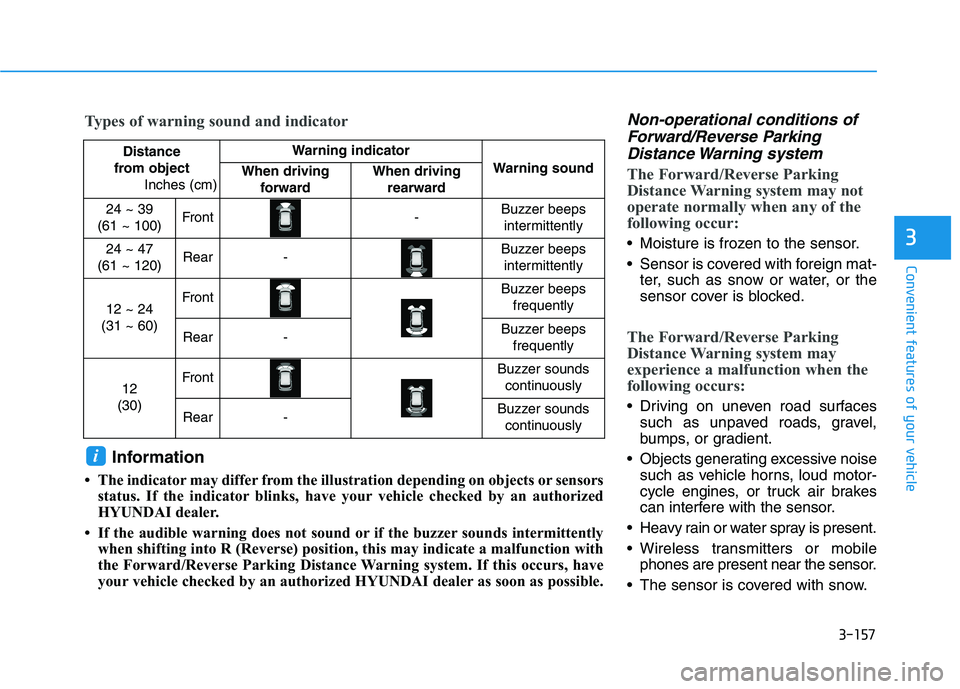
Distance
from object
Inches (cm)Warning indicator
Warning soundWhen driving
forwardWhen driving
rearward
24 ~ 39
(61 ~ 100)Front-Buzzer beeps
intermittently
24 ~ 47
(61 ~ 120)Rear-Buzzer beeps
intermittently
12 ~ 24
(31 ~ 60)FrontBuzzer beeps
frequently
Rear-Buzzer beeps
frequently
12
(30)FrontBuzzer sounds
continuously
Rear-Buzzer sounds
continuously
Types of warning sound and indicator
Information
• The indicator may differ from the illustration depending on objects or sensors
status. If the indicator blinks, have your vehicle checked by an authorized
HYUNDAI dealer.
• If the audible warning does not sound or if the buzzer sounds intermittently
when shifting into R (Reverse) position, this may indicate a malfunction with
the Forward/Reverse Parking Distance Warning system. If this occurs, have
your vehicle checked by an authorized HYUNDAI dealer as soon as possible.
i
Page 310 of 612
Driving your vehicle
5
Before Driving ........................................................5-5
Before Entering the Vehicle ...........................................5-5
Before Starting ..................................................................5-5
Ignition Switch ........................................................5-7
Key Ignition Switch ...........................................................5-7
Engine Start/Stop Button .............................................5-10
Automatic Transmission ......................................5-15
Automatic transmission operation ..............................5-15
Parking ...............................................................................5-18
LCD display message ......................................................5-19
Good driving practices ...................................................5-20
Paddle Shifter (Manual Shift Mode) ..........................5-22
Braking system.....................................................5-23
Power Brakes ...................................................................5-23
Disc Brakes Wear Indicator ..........................................5-24
Electronic Parking Brake (EPB)...................................5-24
Auto Hold ..........................................................................5-29
Anti-lock Brake System (ABS) ....................................5-33
Electronic Stability Control (ESC)................................5-35
Vehicle Stability Management (VSM).........................5-38
Hill-Start Assist Control (HAC) ....................................5-39
Downhill Brake Control (DBC) ......................................5-39
Trailer Stability Assist (TSA) .........................................5-42
Good Braking Practices .................................................5-42
All Wheel Drive (AWD) ........................................5-43
AWD Operation ................................................................5-44
LCD display message ......................................................5-47
Emergency Precautions.................................................5-48
ISG (Idle Stop and Go) system ...........................5-50
To Activate the ISG System ..........................................5-50
To Deactivate the ISG System......................................5-53
ISG System Malfunction ................................................5-53
Battery Sensor Deactivation ........................................5-54
Drive Mode Integrated Control system
(2WD) .....................................................................5-55
Drive Mode .......................................................................5-55
Drive Mode Integrated Control system
(AWD) ....................................................................5-59
Drive Mode .......................................................................5-59
Forward Collision-Avoidance Assist (FCA)
system....................................................................5-63
System Setting and Operation .....................................5-63
FCA Warning Message and Brake Control ...............5-66
FCA Sensor (Front Radar/Front Camera) .................5-68
System Malfunction .......................................................5-70
Limitations of the System .............................................5-72
Page 359 of 612
5-50
Driving your vehicle
The Idle Stop and Go (ISG) system
automatically and temporarily shuts
down the engine when the vehicle is
stopped and idling to improve fuel
efficiency and reduce exhaust gas
emissions. (i.e. red stop light, stop
sign, and traffic jam).
The engine is automatically started
upon satisfying the starting condi-
tions.
The ISG system is always active,
when the engine is running.
Information
When the engine is automatically
started by the ISG system, some warn-
ing lights (i.e. ABS, ESC, ESC OFF,
EPS, and parking brake warning
light) may illuminate for a few sec-
onds due to the low battery voltage.
However, it does not indicate a mal-
function with the ISG system.
To Activate the ISG System
Prerequisite for activation
The ISG system operates in the fol-
lowing situations.
The driver's seatbelt is fastened
The driver's door and hood are
closed
The brake vacuum pressure is
adequate
The battery sensor is activated and
the battery is sufficiently charged
Outside temperature is not too low
or too high
The vehicle is driven over a con-
stant speed and stops
The climate control system satis-
fies the conditions
The vehicle is sufficiently warmed
up
The incline is gradual
The steering wheel is turned less
than 180 degrees and then the
vehicle stops
Information
The ISG system is
not activated, when
the prerequisites to
activate the ISG sys-
tem are unsatisfied.
In this case, the ISG
OFF button indicator illuminates,
and the auto stop indicator ( )
illuminates in yellow on the instru-
ment cluster.
• When the above indicator remains
illuminated on the instrument clus-
ter, we recommend that you have
the IGS system checked by an
authorized HYUNDAI dealer.
i
i
I IS
SG
G
(
(I
ID
DL
LE
E
S
ST
TO
OP
P
A
AN
ND
D
G
GO
O)
)
S
SY
YS
ST
TE
EM
M
(
(I
IF
F
E
EQ
QU
UI
IP
PP
PE
ED
D)
)
•
Page 363 of 612
5-54
Driving your vehicle
Battery Sensor Deactivation
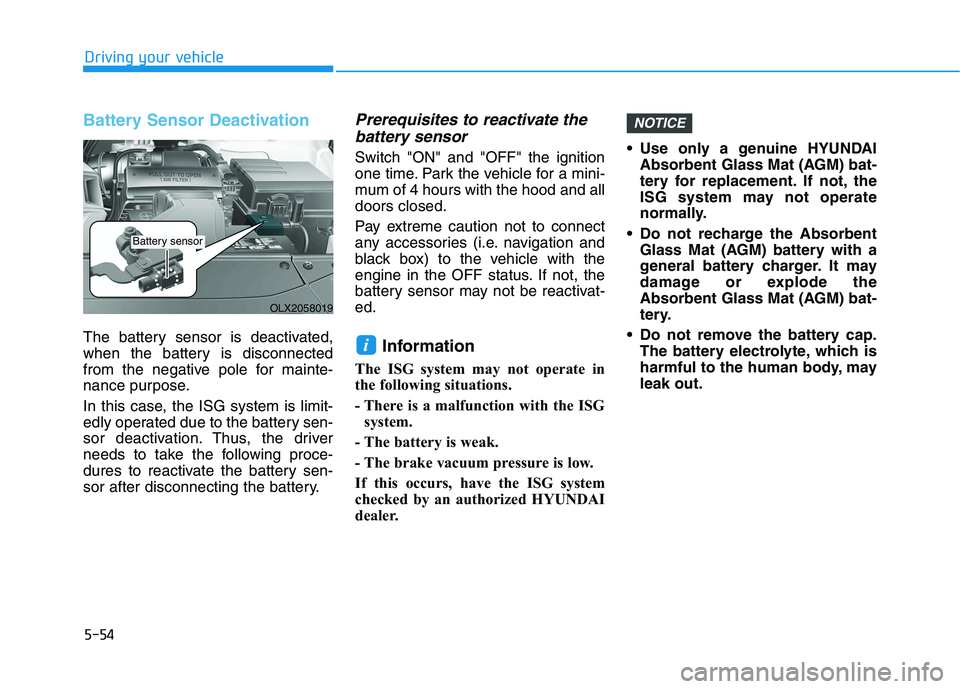
The battery sensor is deactivated,
when the battery is disconnected
from the negative pole for mainte-
nance purpose.
In this case, the ISG system is limit-
edly operated due to the battery sen-
sor deactivation. Thus, the driver
needs to take the following proce-
dures to reactivate the battery sen-
sor after disconnecting the battery.
Prerequisites to reactivate the
battery sensor
Switch "ON" and "OFF" the ignition
one time. Park the vehicle for a mini-
mum of 4 hours with the hood and all
doors closed.
Pay extreme caution not to connect
any accessories (i.e. navigation and
black box) to the vehicle with the
engine in the OFF status. If not, the
battery sensor may not be reactivat-
ed.
Information
The ISG system may not operate in
the following situations.
- There is a malfunction with the ISG
system.
- The battery is weak.
- The brake vacuum pressure is low.
If this occurs, have the ISG system
checked by an authorized HYUNDAI
dealer. Use only a genuine HYUNDAI
Absorbent Glass Mat (AGM) bat-
tery for replacement. If not, the
ISG system may not operate
normally.
Do not recharge the Absorbent
Glass Mat (AGM) battery with a
general battery charger. It may
damage or explode the
Absorbent Glass Mat (AGM) bat-
tery.
Do not remove the battery cap.
The battery electrolyte, which is
harmful to the human body, may
leak out.
NOTICE
i
OLX2058019
Battery sensor
Page 377 of 612
5-68
Driving your vehicle
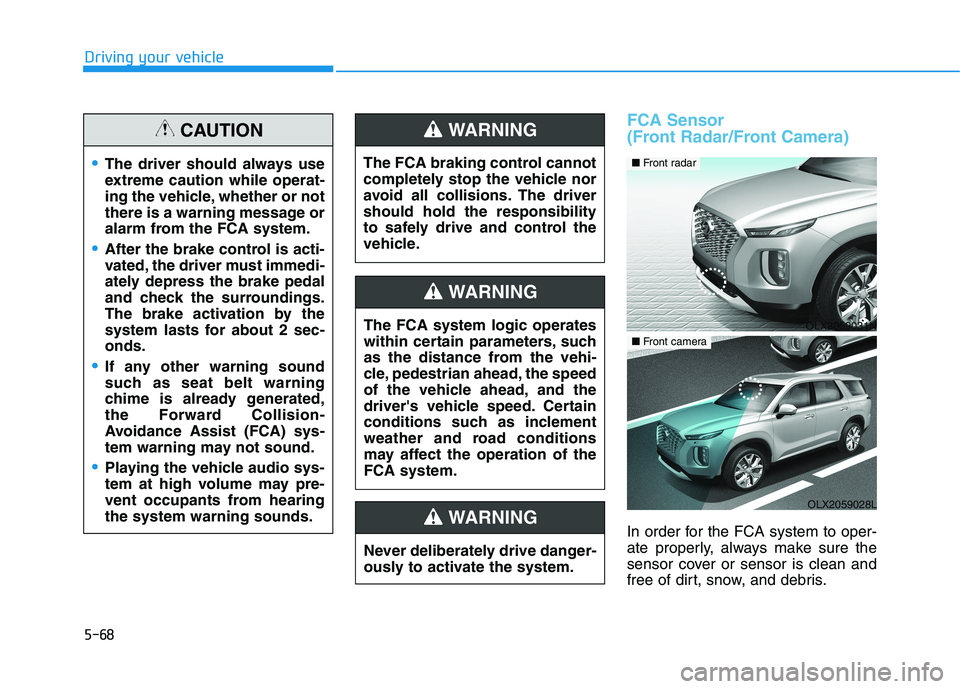
FCA Sensor
(Front Radar/Front Camera)
In order for the FCA system to oper-
ate properly, always make sure the
sensor cover or sensor is clean and
free of dirt, snow, and debris.
The driver should always use
extreme caution while operat-
ing the vehicle, whether or not
there is a warning message or
alarm from the FCA system.
After the brake control is acti-
vated, the driver must immedi-
ately depress the brake pedal
and check the surroundings.
The brake activation by the
system lasts for about 2 sec-
onds.
If any other warning sound
such as seat belt warning
chime is already generated,
the Forward Collision-
Avoidance Assist (FCA) sys-
tem warning may not sound.
Playing the vehicle audio sys-
tem at high volume may pre-
vent occupants from hearing
the system warning sounds.
CAUTION
The FCA system logic operates
within certain parameters, such
as the distance from the vehi-
cle, pedestrian ahead, the speed
of the vehicle ahead, and the
driver's vehicle speed. Certain
conditions such as inclement
weather and road conditions
may affect the operation of the
FCA system.
WARNING
The FCA braking control cannot
completely stop the vehicle nor
avoid all collisions. The driver
should hold the responsibility
to safely drive and control the
vehicle.
WARNING
Never deliberately drive danger-
ously to activate the system.
WARNING
OLX2059031N
■ Front radar
OLX2059028L
■ Front camera
Page 380 of 612
5-71
Driving your vehicle
5
Both FCA warning light and warn-
ing message will disappear once
the ESC warning light issue is
resolved.The FCA system may not acti-
vate if the driver applies the
brake pedal to avoid collision.
The brake control may be
insufficient, possibly causing
a collision, if a vehicle in front
abruptly stops. Always pay
extreme caution.
The FCA system may not acti-
vate according to the road
conditions, inclement weath-
er, driving conditions or traffic
conditions.
Occupants may get injured, if
the vehicle abruptly stops by
the activated FCA system. Pay
extreme caution.
The FCA system operates
only to detect vehicles, pedes-
trian in front of the vehicle.
FCA is only a supplemental
system for the driver's con-
venience. It is the driver's
responsibility to control the
vehicle operation. Do not
solely depend on the FCA
system. Rather, maintain a
safe braking distance, and, if
necessary, depress the brake
pedal to reduce the driving
speed or to stop the vehicle.
In certain instances and
under certain driving condi-
tions, the FCA system may
activate prematurely. This ini-
tial warning message appears
on the LCD display with a
warning chime.
WARNING
Also due to sensing limita-
tions, in certain situations, the
front radar sensor or camera
recognition system may not
detect the vehicle, pedestrian
ahead. The FCA system may
not activate and the warning
message may not be dis-
played.
If there is a malfunction with
the FCA system, the Forward
Collision avoidance assist
system is not applied even
though the braking system is
operating normally.
If the vehicle in front stops
suddenly, you may have less
control of the brake system.
Therefore, always keep a safe
distance between your vehicle
and the vehicle in front of you.
The FCA system may activate
during braking and the vehi-
cle may stop suddenly shift-
ing loose objects toward the
passengers. Always keep
loose objects secured.
Page 383 of 612
5-74
Driving your vehicle
The sensor recognition changes
suddenly when passing over a
speed bump
The vehicle in front is moving verti-
cally to the driving direction
The vehicle in front is stopped ver-
tically
The vehicle in front is driving
towards your vehicle or reversing
You are on a roundabout and the
vehicle in front circles
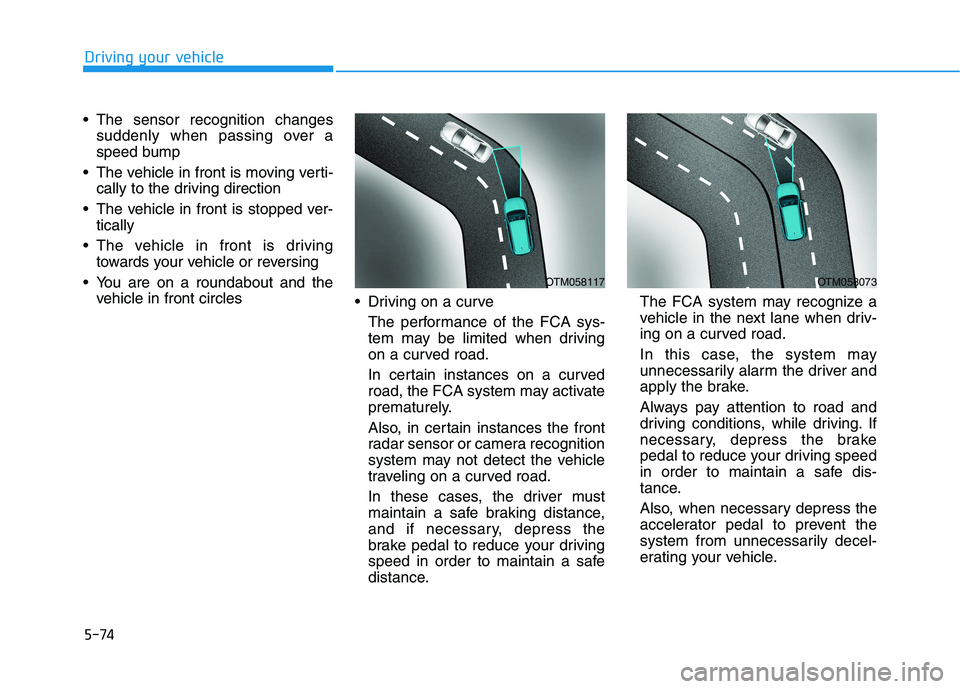
Driving on a curve
The performance of the FCA sys-
tem may be limited when driving
on a curved road.
In certain instances on a curved
road, the FCA system may activate
prematurely.
Also, in certain instances the front
radar sensor or camera recognition
system may not detect the vehicle
traveling on a curved road.
In these cases, the driver must
maintain a safe braking distance,
and if necessary, depress the
brake pedal to reduce your driving
speed in order to maintain a safe
distance.The FCA system may recognize a
vehicle in the next lane when driv-
ing on a curved road.
In this case, the system may
unnecessarily alarm the driver and
apply the brake.
Always pay attention to road and
driving conditions, while driving. If
necessary, depress the brake
pedal to reduce your driving speed
in order to maintain a safe dis-
tance.
Also, when necessary depress the
accelerator pedal to prevent the
system from unnecessarily decel-
erating your vehicle.
OTM058117OTM058073