cruise distance control HYUNDAI PALISADE 2021 Owners Manual
[x] Cancel search | Manufacturer: HYUNDAI, Model Year: 2021, Model line: PALISADE, Model: HYUNDAI PALISADE 2021Pages: 612, PDF Size: 33.36 MB
Page 16 of 612
I IN
NS
ST
TR
RU
UM
ME
EN
NT
T
P
PA
AN
NE
EL
L
O
OV
VE
ER
RV
VI
IE
EW
W
(
(I
I)
)
The actual shape may differ from the illustration.
1-5
Your vehicle at a glance
1
OLX2019004N
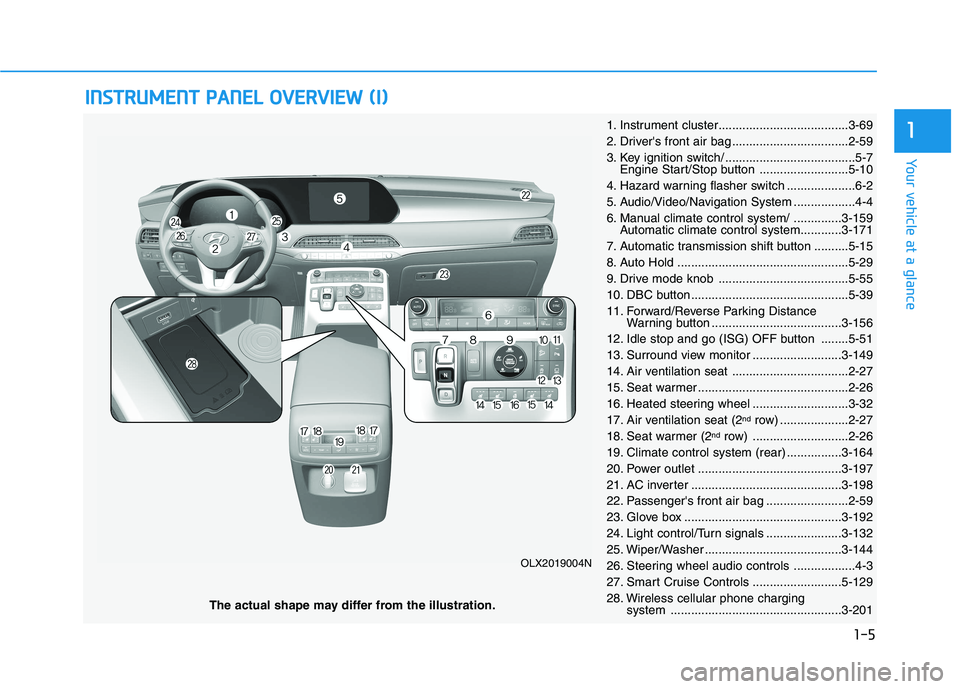
1. Instrument cluster......................................3-69
2. Driver's front air bag ..................................2-59
3. Key ignition switch/ ......................................5-7
Engine Start/Stop button ..........................5-10
4. Hazard warning flasher switch ....................6-2
5. Audio/Video/Navigation System ..................4-4
6. Manual climate control system/ ..............3-159
Automatic climate control system............3-171
7. Automatic transmission shift button ..........5-15
8. Auto Hold ..................................................5-29
9. Drive mode knob ......................................5-55
10. DBC button ..............................................5-39
11. Forward/Reverse Parking Distance
Warning button ......................................3-156
12. Idle stop and go (ISG) OFF button ........5-51
13. Surround view monitor ..........................3-149
14. Air ventilation seat ..................................2-27
15. Seat warmer ............................................2-26
16. Heated steering wheel ............................3-32
17. Air ventilation seat (2
ndrow) ....................2-27
18. Seat warmer (2ndrow) ............................2-26
19. Climate control system (rear) ................3-164
20. Power outlet ..........................................3-197
21. AC inverter ............................................3-198
22. Passenger's front air bag ........................2-59
23. Glove box ..............................................3-192
24. Light control/Turn signals ......................3-132
25. Wiper/Washer ........................................3-144
26. Steering wheel audio controls ..................4-3
27. Smart Cruise Controls ..........................5-129
28. Wireless cellular phone charging
system ..................................................3-201
Page 214 of 612
3-118
Convenient features of your vehicle
Other Information Display
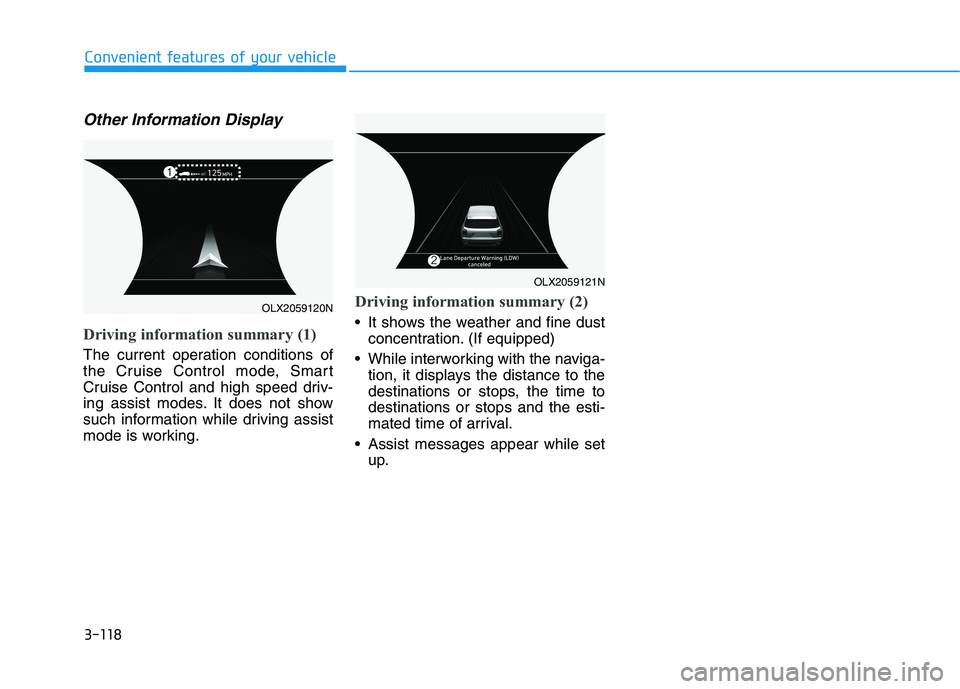
Driving information summary (1)
The current operation conditions of
the Cruise Control mode, Smart
Cruise Control and high speed driv-
ing assist modes. It does not show
such information while driving assist
mode is working.
Driving information summary (2)
It shows the weather and fine dust
concentration. (If equipped)
While interworking with the naviga-
tion, it displays the distance to the
destinations or stops, the time to
destinations or stops and the esti-
mated time of arrival.
Assist messages appear while set
up.
OLX2059120N
OLX2059121N
Page 311 of 612
5
Blind-Spot Collision Warning/
Blind-Spot Collision-Avoidance Assist .............5-78
System Description .........................................................5-78
System Setting and Operation .....................................5-79
Warning and System Control .......................................5-82
Detecting Sensor (Camera and Radar) ......................5-84
Limitations of the System .............................................5-87
Declaration of conformity .................................5-92
The radio frequency components
(Rear Corner Radar) complies: ....................................5-92
Rear Cross-Traffic Collision Warning (RCCW)/
Rear Cross-Traffic Collision-Avoidance Assist
(RCCA) ...................................................................5-93
System Description .........................................................5-93
System Setting and Operation .....................................5-94
Warning and System Control .......................................5-96
Detecting Sensor .............................................................5-99
Limitations of the System...........................................5-100
Lane Following Assist (LFA) system ...............5-104
LFA Setting and Operation .........................................5-105
Warning Message .........................................................5-106
Limitations of the System...........................................5-108
Lane Keeping Assist (LKA) system .................5-110
LKA System Operation.................................................5-111
Warning Light and Message ......................................5-113
Limitations of the System...........................................5-115
LKA System Function Change ...................................5-117
Driver Attention Warning (DAW) system .......5-118
System Setting and Operation...................................5-118
Resetting the System ...................................................5-119
System Standby.............................................................5-120
System Malfunction .....................................................5-120
Highway Driving Assist (HDA) system ............5-122
System Setting and Operation...................................5-122
Warning Message .........................................................5-125
Smart Cruise Control With Stop &
Go System ...........................................................5-129
Smart Cruise Control Switch ......................................5-130
Adjusting the Sensitivity of Smart Cruise
Control .............................................................................5-130
To Convert to Cruise Control Mode .........................5-131
Smart Cruise Control Speed .......................................5-132
Smart Cruise Control Vehicle-to-Vehicle
Distance ...........................................................................5-136
Sensor to Detect Distance to the
Vehicle Ahead ................................................................5-139
Limitations of the System...........................................5-141
Page 432 of 612
5-123
Driving your vehicle
5
Operating conditions
Select 'Highway Driving Assist' from
the Settings menu in the infotain-
ment system screen and satisfy the
following conditions for the system to
operate.
Driving on the highway main line
Smart Cruise Control is operating
- If the Smart Cruise Control is in
the READY state the Highway
Driving Assist will be in the
READY state. The indi-
cator on the cluster will illuminate
white.
Vehicle speed is under 95 mph
(153 km/h)
If all the mentioned conditions are
satisfied, the system is ENABLED
and the indicator on the
cluster will illuminate green.
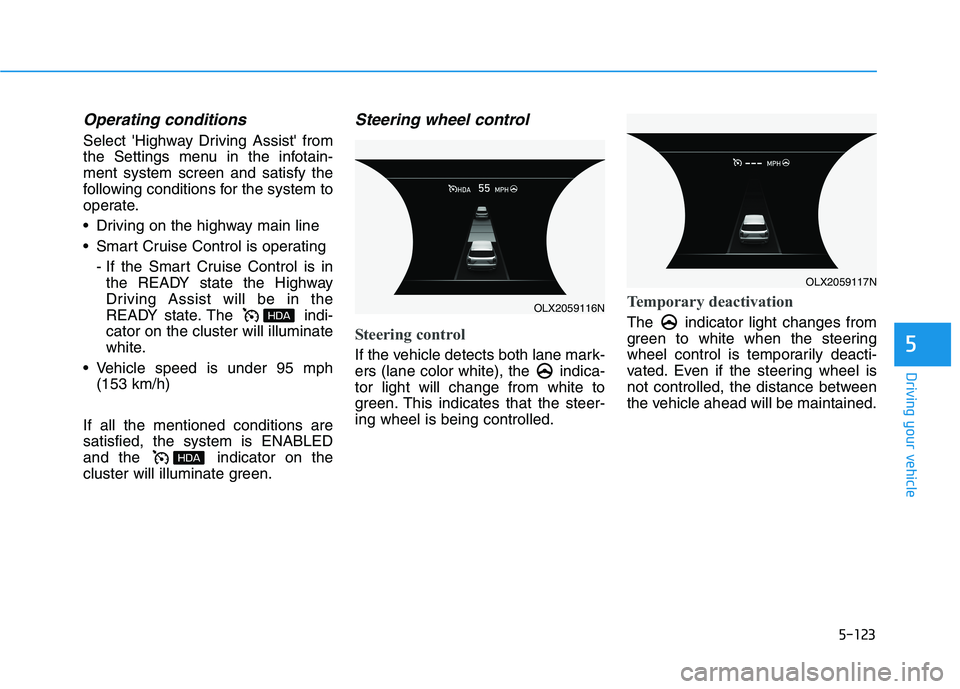
Steering wheel control
Steering control
If the vehicle detects both lane mark-
ers (lane color white), the indica-
tor light will change from white to
green. This indicates that the steer-
ing wheel is being controlled.
Temporary deactivation
The indicator light changes from
green to white when the steering
wheel control is temporarily deacti-
vated. Even if the steering wheel is
not controlled, the distance between
the vehicle ahead will be maintained.
OLX2059116N
OLX2059117N
Page 437 of 612
5-128
Driving your vehicle
Information
• For information's on vehicle to vehi-
cle distance control and the front
radar, refer to "Smart Cruise
Control (Stop & Go)" in this chap-
ter.
• For information's on steering con-
trol and distance control and the
front camera, refer to "Lane
Following Assist (LFA)" in this
chapter.
Information
This device complies with Part 15 of
the FCC rules.
Operation is subject to the following
three conditions:
1. This device may not cause harmful
interference, and
2. This device must accept any inter-
ference received, including interfer-
ence that may cause undesired
operation.
3. Changes or modifications not
expressly approved by the party
responsible for compliance could
void the user's authority to operate
the device.
Information
Radio frequency radiation exposure
information:
This equipment complies with FCC
radiation exposure limits set forth for
an uncontrolled environment.
This equipment should be installed
and operated with minimum distance
of 8 in. (20 cm) between the radiator
(antenna) and your body.
This transmitter must not be co-locat-
ed or operating in conjunction with
any other antenna or transmitter.
ii
i
The navigation cannot detect
the current vehicle position
(ex: elevated roads including
overpass adjacent to general
roads or nearby roads exist in
a parallel way).
The navigation is being updat-
ed while driving.
The navigation is being reset
while driving.
The road is slippery due to
bad weather such as rain or
snow.
Page 438 of 612
5-129
Driving your vehicle
5
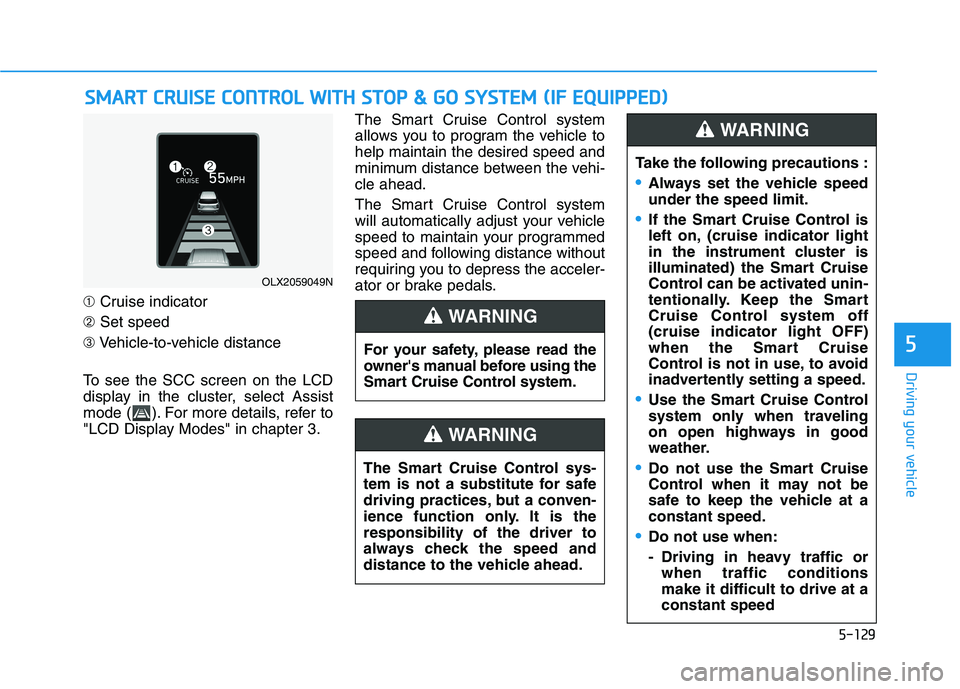
➀Cruise indicator
➁Set speed
➂Vehicle-to-vehicle distance
To see the SCC screen on the LCD
display in the cluster, select Assist
mode ( ). For more details, refer to
"LCD Display Modes" in chapter 3.The Smart Cruise Control system
allows you to program the vehicle to
help maintain the desired speed and
minimum distance between the vehi-
cle ahead.
The Smart Cruise Control system
will automatically adjust your vehicle
speed to maintain your programmed
speed and following distance without
requiring you to depress the acceler-
ator or brake pedals.
S SM
MA
AR
RT
T
C
CR
RU
UI
IS
SE
E
C
CO
ON
NT
TR
RO
OL
L
W
WI
IT
TH
H
S
ST
TO
OP
P
&
&
G
GO
O
S
SY
YS
ST
TE
EM
M
(
(I
IF
F
E
EQ
QU
UI
IP
PP
PE
ED
D)
)
For your safety, please read the
owner's manual before using the
Smart Cruise Control system.
WARNING
The Smart Cruise Control sys-
tem is not a substitute for safe
driving practices, but a conven-
ience function only. It is the
responsibility of the driver to
always check the speed and
distance to the vehicle ahead.
WARNING
OLX2059049N
Take the following precautions :
Always set the vehicle speed
under the speed limit.
If the Smart Cruise Control is
left on, (cruise indicator light
in the instrument cluster is
illuminated) the Smart Cruise
Control can be activated unin-
tentionally. Keep the Smart
Cruise Control system off
(cruise indicator light OFF)
when the Smart Cruise
Control is not in use, to avoid
inadvertently setting a speed.
Use the Smart Cruise Control
system only when traveling
on open highways in good
weather.
Do not use the Smart Cruise
Control when it may not be
safe to keep the vehicle at a
constant speed.
Do not use when:
- Driving in heavy traffic or
when traffic conditions
make it difficult to drive at a
constant speed
WARNING
Page 439 of 612
5-130
Driving your vehicle
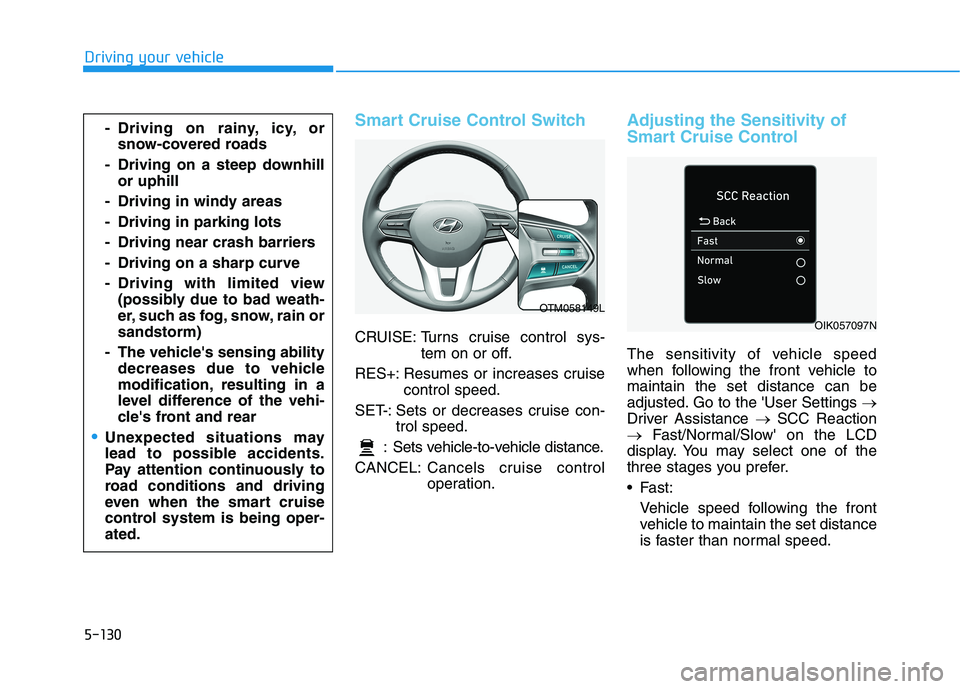
Smart Cruise Control Switch
CRUISE: Turns cruise control sys-
tem on or off.
RES+: Resumes or increases cruise
control speed.
SET-: Sets or decreases cruise con-
trol speed.
: Sets vehicle-to-vehicle distance.
CANCEL:Cancels cruise control
operation.
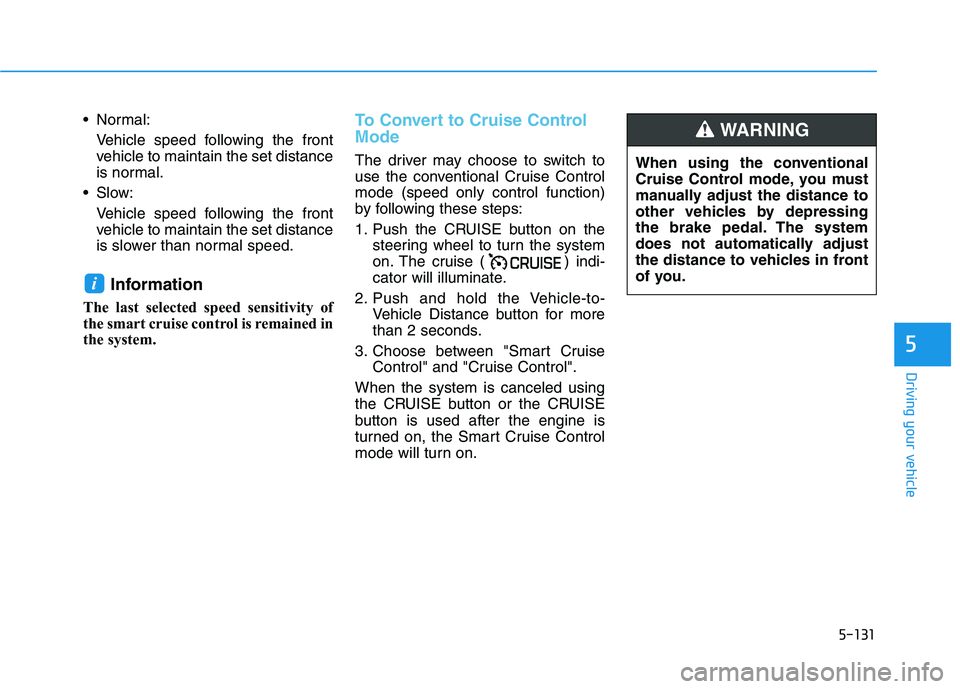
Adjusting the Sensitivity of
Smart Cruise Control
The sensitivity of vehicle speed
when following the front vehicle to
maintain the set distance can be
adjusted. Go to the 'User Settings →
Driver Assistance →SCC Reaction
→Fast/Normal/Slow' on the LCD
display. You may select one of the
three stages you prefer.
Fast:
Vehicle speed following the front
vehicle to maintain the set distance
is faster than normal speed.
- Driving on rainy, icy, or
snow-covered roads
- Driving on a steep downhill
or uphill
- Driving in windy areas
- Driving in parking lots
- Driving near crash barriers
- Driving on a sharp curve
- Driving with limited view
(possibly due to bad weath-
er, such as fog, snow, rain or
sandstorm)
- The vehicle's sensing ability
decreases due to vehicle
modification, resulting in a
level difference of the vehi-
cle's front and rear
Unexpected situations may
lead to possible accidents.
Pay attention continuously to
road conditions and driving
even when the smart cruise
control system is being oper-
ated.
OTM058149L
OIK057097N
Page 440 of 612
5-131
Driving your vehicle
5
Normal:
Vehicle speed following the front
vehicle to maintain the set distance
is normal.
Slow:
Vehicle speed following the front
vehicle to maintain the set distance
is slower than normal speed.
Information
The last selected speed sensitivity of
the smart cruise control is remained in
the system.
To Convert to Cruise Control
Mode
The driver may choose to switch to
use the conventional Cruise Control
mode (speed only control function)
by following these steps:
1. Push the CRUISE button on the
steering wheel to turn the system
on. The cruise ( ) indi-
cator will illuminate.
2. Push and hold the Vehicle-to-
Vehicle Distance button for more
than 2 seconds.
3. Choose between "Smart Cruise
Control" and "Cruise Control".
When the system is canceled using
the CRUISE button or the CRUISE
button is used after the engine is
turned on, the Smart Cruise Control
mode will turn on.
i
When using the conventional
Cruise Control mode, you must
manually adjust the distance to
other vehicles by depressing
the brake pedal. The system
does not automatically adjust
the distance to vehicles in front
of you.
WARNING
Page 441 of 612
5-132
Driving your vehicle
Smart Cruise Control Speed
To set Smart Cruise Control
speed
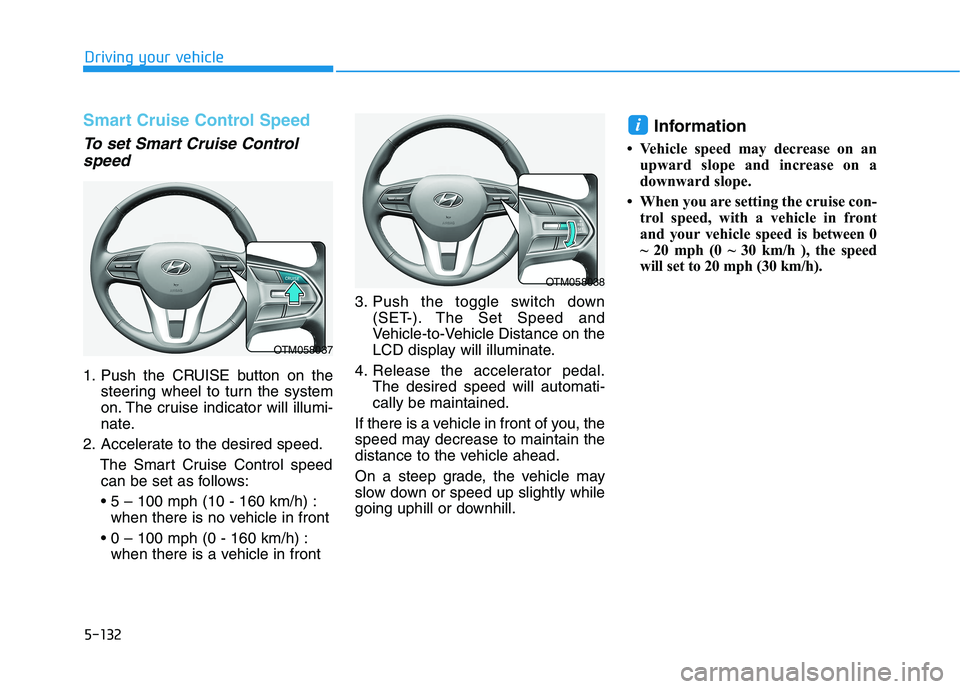
1. Push the CRUISE button on the
steering wheel to turn the system
on. The cruise indicator will illumi-
nate.
2. Accelerate to the desired speed.
The Smart Cruise Control speed
can be set as follows:
when there is no vehicle in front
when there is a vehicle in front3. Push the toggle switch down
(SET-). The Set Speed and
Vehicle-to-Vehicle Distance on the
LCD display will illuminate.
4. Release the accelerator pedal.
The desired speed will automati-
cally be maintained.
If there is a vehicle in front of you, the
speed may decrease to maintain the
distance to the vehicle ahead.
On a steep grade, the vehicle may
slow down or speed up slightly while
going uphill or downhill.
Information
• Vehicle speed may decrease on an
upward slope and increase on a
downward slope.
• When you are setting the cruise con-
trol speed, with a vehicle in front
and your vehicle speed is between 0
~ 20 mph (0 ~ 30 km/h ), the speed
will set to 20 mph (30 km/h).
i
OTM058037
OTM058038
Page 443 of 612
5-134
Driving your vehicle
To temporarily accelerate with
the Smart Cruise Control on
If you want to speed up temporarily
when the Smart Cruise Control is on,
depress the accelerator pedal.
Increased speed will not interfere
with Smart Cruise Control operation
or change the set speed.
To return to the set speed, take your
foot off the accelerator pedal.
If you push the toggle switch down
(SET-) at increased speed, the cruis-
ing speed will be set again corre-
sponding to the pedal position.
Smart Cruise Control set speed
will be temporarily canceled
when:
Canceled manually
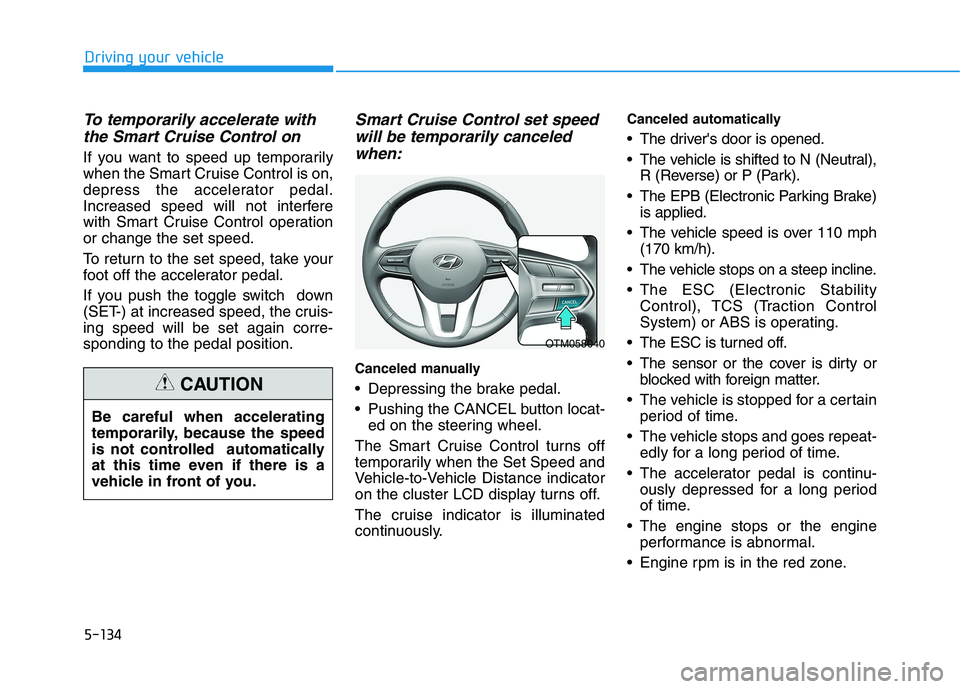
Depressing the brake pedal.
Pushing the CANCEL button locat-
ed on the steering wheel.
The Smart Cruise Control turns off
temporarily when the Set Speed and
Vehicle-to-Vehicle Distance indicator
on the cluster LCD display turns off.
The cruise indicator is illuminated
continuously.
Canceled automatically
The driver's door is opened.
The vehicle is shifted to N (Neutral),
R (Reverse) or P (Park).
The EPB (Electronic Parking Brake)
is applied.
The vehicle speed is over 110 mph
(170 km/h).
The vehicle stops on a steep incline.
The ESC (Electronic Stability
Control), TCS (Traction Control
System) or ABS is operating.
The ESC is turned off.
The sensor or the cover is dirty or
blocked with foreign matter.
The vehicle is stopped for a certain
period of time.
The vehicle stops and goes repeat-
edly for a long period of time.
The accelerator pedal is continu-
ously depressed for a long period
of time.
The engine stops or the engine
performance is abnormal.
Engine rpm is in the red zone. Be careful when accelerating
temporarily, because the speed
is not controlled automatically
at this time even if there is a
vehicle in front of you.
CAUTION
OTM058040