mirrors HYUNDAI PALISADE 2021 Owners Manual
[x] Cancel search | Manufacturer: HYUNDAI, Model Year: 2021, Model line: PALISADE, Model: HYUNDAI PALISADE 2021Pages: 612, PDF Size: 33.36 MB
Page 97 of 612
Convenient features of your vehicle
Accessing your vehicle .........................................3-4
Remote Key.........................................................................3-4
Smart Key ............................................................................3-8
Immobilizer System .........................................................3-14
Door locks .............................................................3-15
Operating Door Locks from Outside the Vehicle ....3-15
Operating Door Locks from Inside the Vehicle .......3-16
Automatic Door Lock and Unlock Features .............3-19
Child-Protector Rear Door Locks ...............................3-20
Electronic Child Safety Lock System .........................3-20
Safe Exit Assist (SEA) System .....................................3-21
Rear Occupant Alert (ROA) System ...........................3-23
Theft-alarm system.............................................3-26
Driver position memory system .........................3-27
Storing Positions into Memory ....................................3-27
Recalling Positions from Memory...............................3-28
Resetting the Driver's Seat Memory System...........3-28
Easy Access Function ....................................................3-29
Steering wheel......................................................3-30
Electric Power Steering (EPS) .....................................3-30
Tilt Steering / Telescopic Steering .............................3-31
Horn ....................................................................................3-31
Heated Steering Wheel ..................................................3-32
Mirrors ...................................................................3-33
Inside Rearview Mirror ..................................................3-33
Side View Mirrors ...........................................................3-39
Reverse Parking Aid Function......................................3-41
Windows ................................................................3-42
Power Windows ...............................................................3-43
Sunroof..................................................................3-46
Sunroof ..............................................................................3-46
Dual wide sunroof...........................................................3-46
Sunshade ...........................................................................3-47
Sunroof Opening and Closing ......................................3-48
Sliding the Sunroof .........................................................3-48
Tilting the Sunroof (Front) ...........................................3-49
Resetting the Sunroof ...................................................3-50
Resetting the rear sunshade........................................3-51
Sunroof Open Warning ..................................................3-52
Exterior features .................................................3-53
Hood ...................................................................................3-53
Non-Powered Liftgate ...................................................3-54
Power Liftgate .................................................................3-56
Smart Liftgate ..................................................................3-62
Fuel Filler Door ................................................................3-66
3
Page 135 of 612
3-39
Convenient features of your vehicle
3
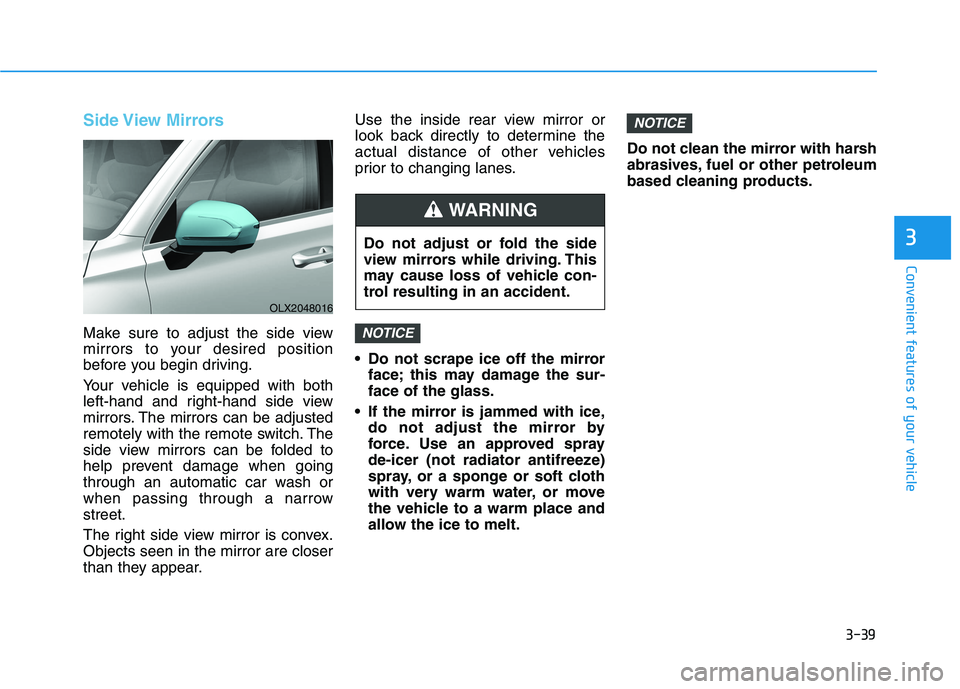
Side View Mirrors
Make sure to adjust the side view
mirrors to your desired position
before you begin driving.
Your vehicle is equipped with both
left-hand and right-hand side view
mirrors. The mirrors can be adjusted
remotely with the remote switch. The
side view mirrors can be folded to
help prevent damage when going
through an automatic car wash or
when passing through a narrow
street.
The right side view mirror is convex.
Objects seen in the mirror are closer
than they appear.Use the inside rear view mirror or
look back directly to determine the
actual distance of other vehicles
prior to changing lanes.
Do not scrape ice off the mirror
face; this may damage the sur-
face of the glass.
If the mirror is jammed with ice,
do not adjust the mirror by
force. Use an approved spray
de-icer (not radiator antifreeze)
spray, or a sponge or soft cloth
with very warm water, or move
the vehicle to a warm place and
allow the ice to melt.Do not clean the mirror with harsh
abrasives, fuel or other petroleum
based cleaning products.
NOTICE
NOTICE
OLX2048016
Do not adjust or fold the side
view mirrors while driving. This
may cause loss of vehicle con-
trol resulting in an accident.
WARNING
Page 136 of 612
3-40
Convenient features of your vehicle
Side view mirror adjustment
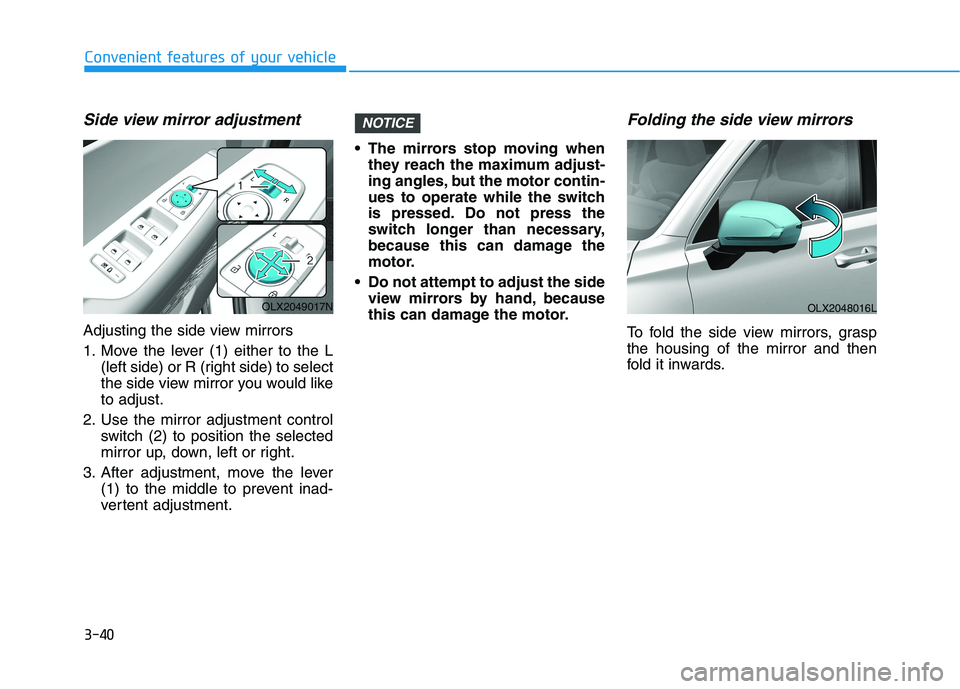
Adjusting the side view mirrors
1. Move the lever (1) either to the L
(left side) or R (right side) to select
the side view mirror you would like
to adjust.
2. Use the mirror adjustment control
switch (2) to position the selected
mirror up, down, left or right.
3. After adjustment, move the lever
(1) to the middle to prevent inad-
vertent adjustment. The mirrors stop moving when
they reach the maximum adjust-
ing angles, but the motor contin-
ues to operate while the switch
is pressed. Do not press the
switch longer than necessary,
because this can damage the
motor.
Do not attempt to adjust the side
view mirrors by hand, because
this can damage the motor.
Folding the side view mirrors
To fold the side view mirrors, grasp
the housing of the mirror and then
fold it inwards.
NOTICE
OLX2048016L OLX2049017N
Page 137 of 612
3-41
Convenient features of your vehicle
3
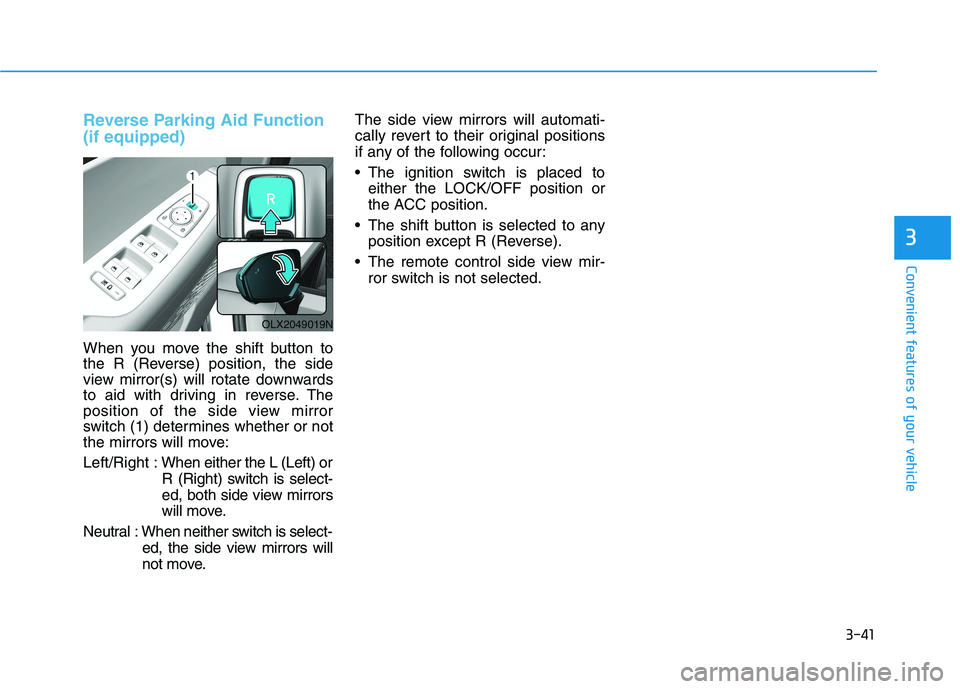
Reverse Parking Aid Function
(if equipped)
When you move the shift button to
the R (Reverse) position, the side
view mirror(s) will rotate downwards
to aid with driving in reverse. The
position of the side view mirror
switch (1) determines whether or not
the mirrors will move:
Left/Right :When either the L (Left) or
R (Right) switch is select-
ed, both side view mirrors
will move.
Neutral : When neither switch is select-
ed, the side view mirrors will
not move.The side view mirrors will automati-
cally revert to their original positions
if any of the following occur:
The ignition switch is placed to
either the LOCK/OFF position or
the ACC position.
The shift button is selected to any
position except R (Reverse).
The remote control side view mir-
ror switch is not selected.
OLX2049019N
Page 233 of 612
3-137
Convenient features of your vehicle
3
Turn signals and lane change
signals
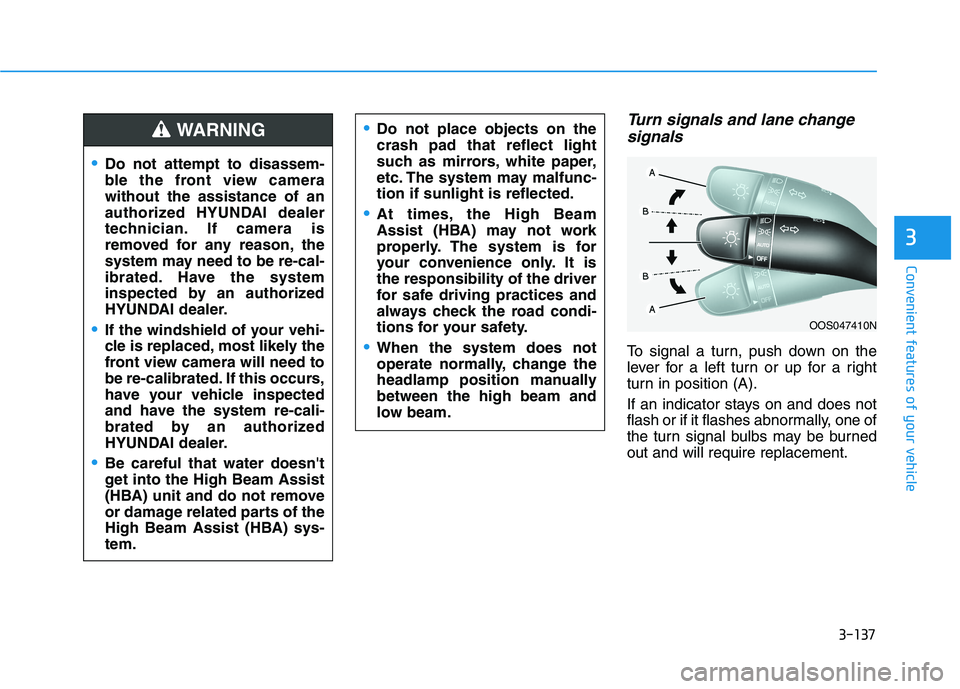
To signal a turn, push down on the
lever for a left turn or up for a right
turn in position (A).
If an indicator stays on and does not
flash or if it flashes abnormally, one of
the turn signal bulbs may be burned
out and will require replacement.
OOS047410N
Do not attempt to disassem-
ble the front view camera
without the assistance of an
authorized HYUNDAI dealer
technician. If camera is
removed for any reason, the
system may need to be re-cal-
ibrated. Have the system
inspected by an authorized
HYUNDAI dealer.
If the windshield of your vehi-
cle is replaced, most likely the
front view camera will need to
be re-calibrated. If this occurs,
have your vehicle inspected
and have the system re-cali-
brated by an authorized
HYUNDAI dealer.
Be careful that water doesn't
get into the High Beam Assist
(HBA) unit and do not remove
or damage related parts of the
High Beam Assist (HBA) sys-
tem.
Do not place objects on the
crash pad that reflect light
such as mirrors, white paper,
etc. The system may malfunc-
tion if sunlight is reflected.
At times, the High Beam
Assist (HBA) may not work
properly. The system is for
your convenience only. It is
the responsibility of the driver
for safe driving practices and
always check the road condi-
tions for your safety.
When the system does not
operate normally, change the
headlamp position manually
between the high beam and
low beam.
WARNING
Page 282 of 612
3-186
Convenient features of your vehicle
For maximum defrost perform-
ance, set the temperature control
knob to the highest temperature
setting (rotated all the way to the
right) and the fan speed control to
the highest setting.
If warm air to the floor is desired
while defrosting or defogging, set the
mode to the floor-defrost position.
Before driving, clear all snow and
ice from the windshield, rear win-
dow, side view mirrors, and all side
windows.
Clear all snow and ice from the
hood and air inlet in the cowl grill to
improve heater and defroster effi-
ciency and to reduce the probability
of fogging up the inside of the wind-
shield.
If the engine temperature is still
cold after starting, then a brief
engine warm up period may be
required for the vented air flow to
become warm or hot.Manual Climate Control System
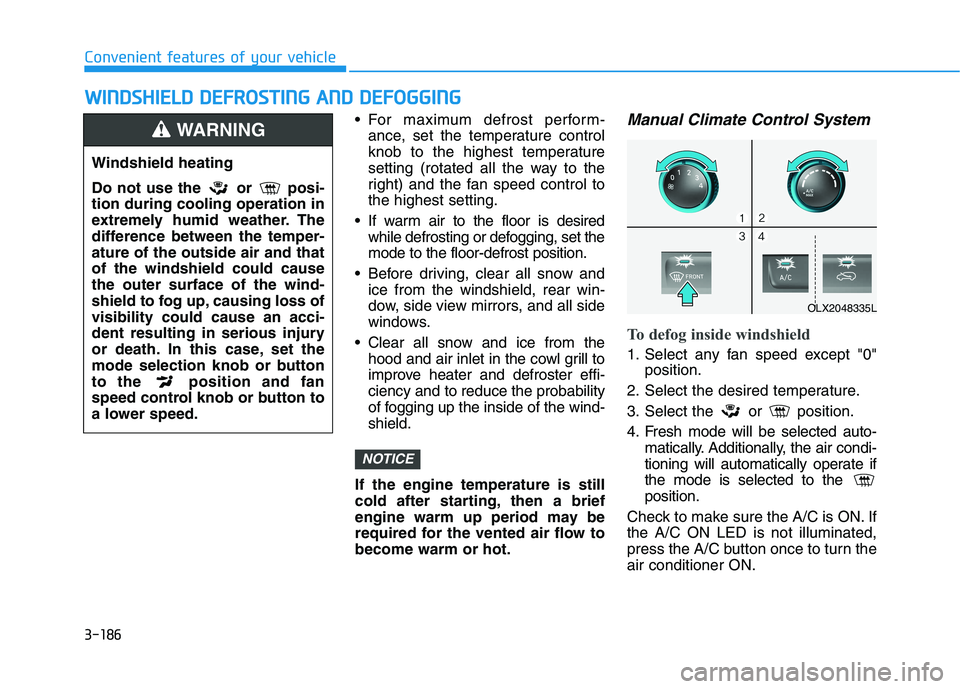
To defog inside windshield
1. Select any fan speed except "0"
position.
2. Select the desired temperature.
3. Select the or position.
4. Fresh mode will be selected auto-
matically. Additionally, the air condi-
tioning will automatically operate if
the mode is selected to the
position.
Check to make sure the A/C is ON. If
the A/C ON LED is not illuminated,
press the A/C button once to turn the
air conditioner ON.
NOTICE
W WI
IN
ND
DS
SH
HI
IE
EL
LD
D
D
DE
EF
FR
RO
OS
ST
TI
IN
NG
G
A
AN
ND
D
D
DE
EF
FO
OG
GG
GI
IN
NG
G
Windshield heating
Do not use the or posi-
tion during cooling operation in
extremely humid weather. The
difference between the temper-
ature of the outside air and that
of the windshield could cause
the outer surface of the wind-
shield to fog up, causing loss of
visibility could cause an acci-
dent resulting in serious injury
or death. In this case, set the
mode selection knob or button
to the position and fan
speed control knob or button to
a lower speed.
WARNING
OLX2048335L
Page 314 of 612
5-5
Driving your vehicle
5
Before Entering the Vehicle
• Be sure all windows, outside mir-
ror(s), and outside lights are clean
and unobstructed.
Remove frost, snow, or ice.
Visually check the tires for uneven
wear and damage.
Check under the vehicle for any
sign of leaks.
Be sure there are no obstacles
behind you if you intend to back up.
Before Starting
Make sure the hood, the liftgate,
and the doors are securely closed
and locked.
Adjust the position of the seat and
steering wheel.
Adjust the inside and outside
rearview mirrors.
Verify all the lights work.
Fasten your seatbelt. Check that all
passengers have fastened their
seatbelts.
Check the gauges and indicators in
the instrument panel and the mes-
sages on the instrument display
when the ignition switch is in the
ON position.
Check that any items you are car-
rying are stored properly or fas-
tened down securely. CALIFORNIA PROPOSITION 65
WARNING
Engine exhaust and a wide vari-
ety of automobile components
including components found in
the interior furnishings in a
vehicle, contain or emit harmful
chemicals known to the State of
California to cause cancer and
birth defects and reproductive
harm. In addition, certain fluids
contained in vehicles and cer-
tain products of components
contain or emit chemicals
known to the State of California
to cause cancer and birth
defects or other reproductive
harm.
For more information go to
https://www.p65warnings.ca.go
v/passenger-vehicleWARNING
B BE
EF
FO
OR
RE
E
D
DR
RI
IV
VI
IN
NG
G
Page 414 of 612
5-105
Driving your vehicle
5
LFA Setting and Operation
System setting
With the ignition switch in the ON
position, the Lane Following Assist
can be activated by selecting 'User
settings →Driver Assistance →
Driving Assist →Lane Following
Assist' in the cluster LCD display.
Deselect the setting to turn off the
system.
If the engine is turned off then on
again, the system maintains the
last setting.
Operating conditions
Select 'Lane Following Assist' from
the Settings menu in the cluster LCD
display and satisfy the following con-
ditions for the system to operate.
- The Smart Cruise Control is oper-
ating
- Vehicle speed is lower than 95
mph (153 km/h)
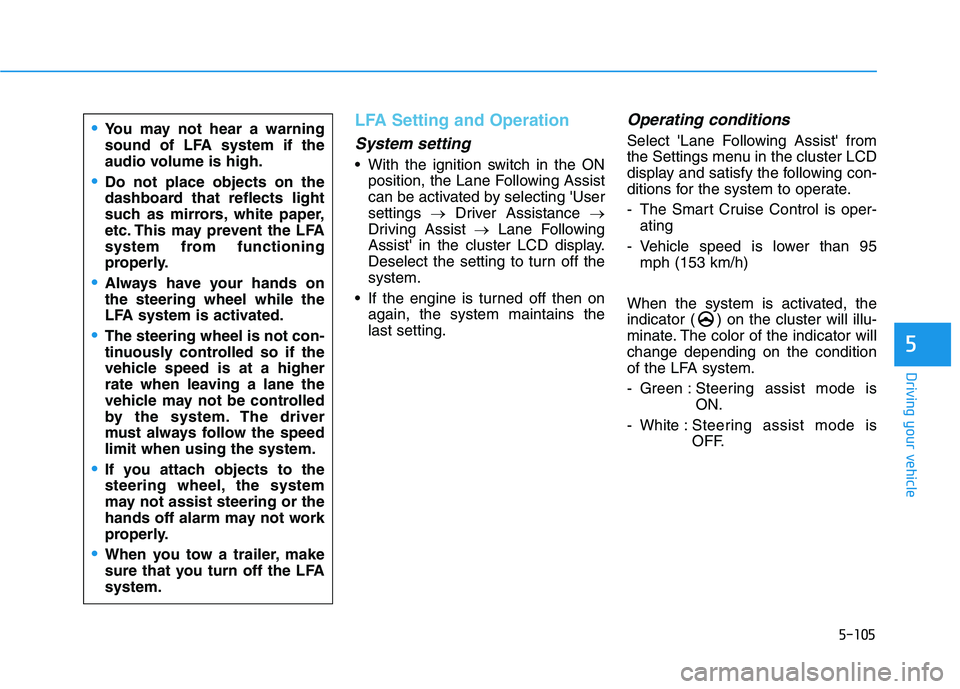
When the system is activated, the
indicator ( ) on the cluster will illu-
minate. The color of the indicator will
change depending on the condition
of the LFA system.
- Green : Steering assist mode is
ON.
- White :Steering assist mode is
OFF.You may not hear a warning
sound of LFA system if the
audio volume is high.
Do not place objects on the
dashboard that reflects light
such as mirrors, white paper,
etc. This may prevent the LFA
system from functioning
properly.
Always have your hands on
the steering wheel while the
LFA system is activated.
The steering wheel is not con-
tinuously controlled so if the
vehicle speed is at a higher
rate when leaving a lane the
vehicle may not be controlled
by the system. The driver
must always follow the speed
limit when using the system.
If you attach objects to the
steering wheel, the system
may not assist steering or the
hands off alarm may not work
properly.
When you tow a trailer, make
sure that you turn off the LFA
system.
Page 420 of 612
5-111
Driving your vehicle
5
LKA System Operation
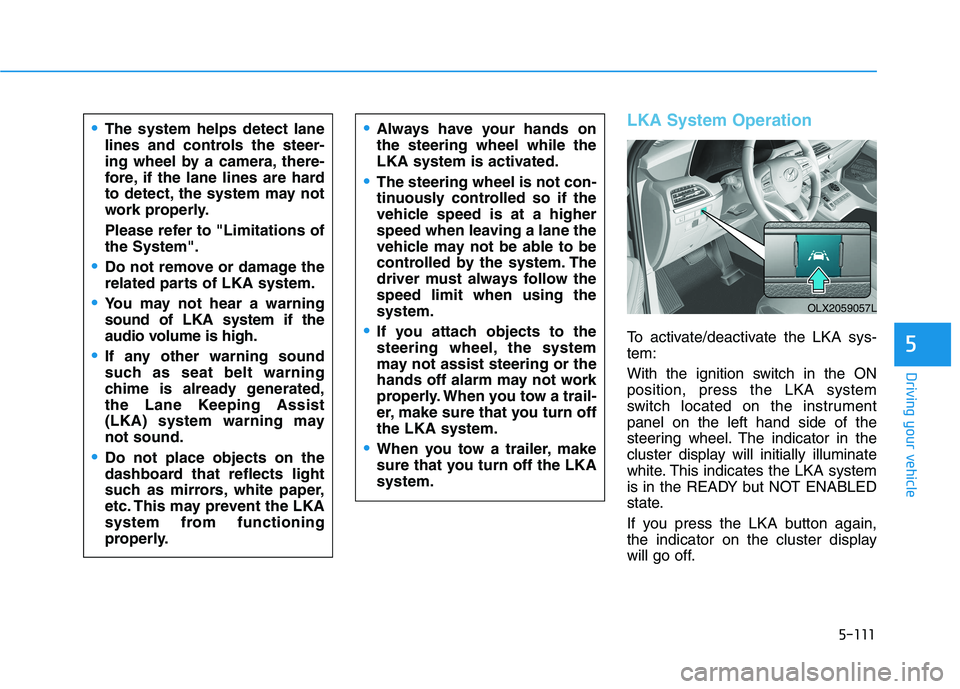
To activate/deactivate the LKA sys-
tem:
With the ignition switch in the ON
position, press the LKA system
switch located on the instrument
panel on the left hand side of the
steering wheel. The indicator in the
cluster display will initially illuminate
white. This indicates the LKA system
is in the READY but NOT ENABLED
state.
If you press the LKA button again,
the indicator on the cluster display
will go off.
The system helps detect lane
lines and controls the steer-
ing wheel by a camera, there-
fore, if the lane lines are hard
to detect, the system may not
work properly.
Please refer to "Limitations of
the System".
Do not remove or damage the
related parts of LKA system.
You may not hear a warning
sound of LKA system if the
audio volume is high.
If any other warning sound
such as seat belt warning
chime is already generated,
the Lane Keeping Assist
(LKA) system warning may
not sound.
Do not place objects on the
dashboard that reflects light
such as mirrors, white paper,
etc. This may prevent the LKA
system from functioning
properly.
Always have your hands on
the steering wheel while the
LKA system is activated.
The steering wheel is not con-
tinuously controlled so if the
vehicle speed is at a higher
speed when leaving a lane the
vehicle may not be able to be
controlled by the system. The
driver must always follow the
speed limit when using the
system.
If you attach objects to the
steering wheel, the system
may not assist steering or the
hands off alarm may not work
properly. When you tow a trail-
er, make sure that you turn off
the LKA system.
When you tow a trailer, make
sure that you turn off the LKA
system.
OLX2059057L
Page 459 of 612
5-150
Driving your vehicle
Information
The ESC system must be turned OFF
before rocking the vehicle.
If you are still stuck after rocking
the vehicle a few times, have the
vehicle pulled out by a tow vehicle
to avoid engine overheating, pos-
sible damage to the transmission,
and tire damage. See "Towing" in
chapter 6.
Smooth Cornering
Avoid braking or gear changing in
corners, especially when roads are
wet. Ideally, corners should always
be taken under gentle acceleration.
Driving at Night
Night driving presents more hazards
than driving in the daylight. Here are
some important tips to remember:
Slow down and keep more dis-
tance between you and other vehi-
cles, as it may be more difficult to
see at night, especially in areas
where there may not be any street
lights.
Adjust your mirrors to reduce the
glare from other driver's head-
lamps.
Keep your headlamps clean and
properly aimed. Dirty or improperly
aimed headlamps will make it
much more difficult to see at night.
Avoid staring directly at the head-
lamps of oncoming vehicles. You
could be temporarily blinded, and it
will take several seconds for your
eyes to readjust to the darkness.
Driving in the Rain
Rain and wet roads can make driving
dangerous. Here are a few things to
consider when driving in the rain or
on slick pavement:
Slow down and allow extra follow-
ing distance. A heavy rainfall
makes it harder to see and increas-
es the distance needed to stop
your vehicle.
Turn OFF your Cruise Control.
Replace your windshield wiper
blades when they show signs of
streaking or missing areas on the
windshield.
Tires should be properly main-
tained with at least 2/32nds of an
inch of tread depth. If your tires do
not have enough tread, making a
quick stop on wet pavement can
cause a skid and possibly lead to
an accident.See "Tire replace-
ment" in chapter 7.
Turn on your headlamps to make it
easier for others to see you.
NOTICE
i