Fan HYUNDAI PALISADE 2022 User Guide
[x] Cancel search | Manufacturer: HYUNDAI, Model Year: 2022, Model line: PALISADE, Model: HYUNDAI PALISADE 2022Pages: 663, PDF Size: 15.74 MB
Page 75 of 663
2-58
Safety system of your vehicle
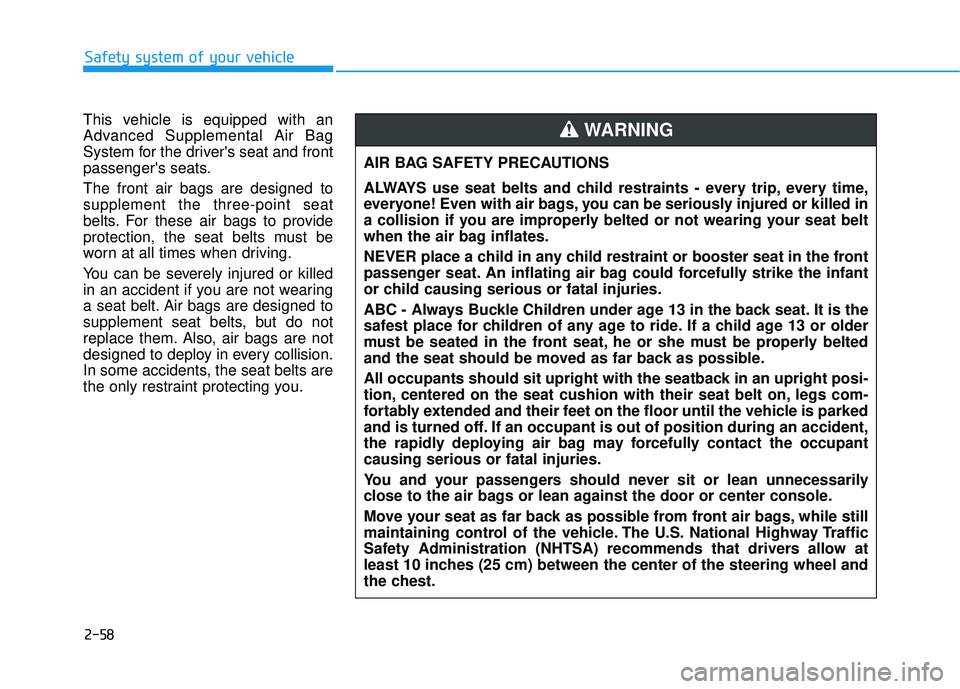
This vehicle is equipped with an
Advanced Supplemental Air Bag
System for the driver's seat and front
passenger's seats.
The front air bags are designed to
supplement the three-point seat
belts. For these air bags to provide
protection, the seat belts must be
worn at all times when driving.
You can be severely injured or killed
in an accident if you are not wearing
a seat belt. Air bags are designed to
supplement seat belts, but do not
replace them. Also, air bags are not
designed to deploy in every collision.
In some accidents, the seat belts are
the only restraint protecting you. AIR BAG SAFETY PRECAUTIONS
ALWAYS use seat belts and child restraints - every trip, every time,
everyone! Even with air bags, you can be seriously injured or killed in
a collision if you are improperly belted or not wearing your seat belt
when the air bag inflates.
NEVER place a child in any child restraint or booster seat in the front
passenger seat. An inflating air bag could forcefully strike the infant
or child causing serious or fatal injuries.
ABC - Always Buckle Children under age 13 in the back seat. It is the
safest place for children of any age to ride. If a child age 13 or older
must be seated in the front seat, he or she must be properly belted
and the seat should be moved as far back as possible.
All occupants should sit upright with the seatback in an upright posi-
tion, centered on the seat cushion with their seat belt on, legs com-
fortably extended and their feet on the floor until the vehicle is parked
and is turned off. If an occupant is out of position during an accident,
the rapidly deploying air bag may forcefully contact the occupant
causing serious or fatal injuries.
You and your passengers should never sit or lean unnecessarily
close to the air bags or lean against the door or center console.
Move your seat as far back as possible from front air bags, while still
maintaining control of the vehicle. The U.S. National Highway Traffic
Safety Administration (NHTSA) recommends that drivers allow at
least 10 inches (25 cm) between the center of the steering wheel and
the chest.
WARNING
Page 86 of 663
2-69
Safety system of your vehicle
2
Always be sure that you and all vehi-
cle occupants are seated properly
and wearing the seat belt properly for
the most effective protection by the
air bag and the seat belt.
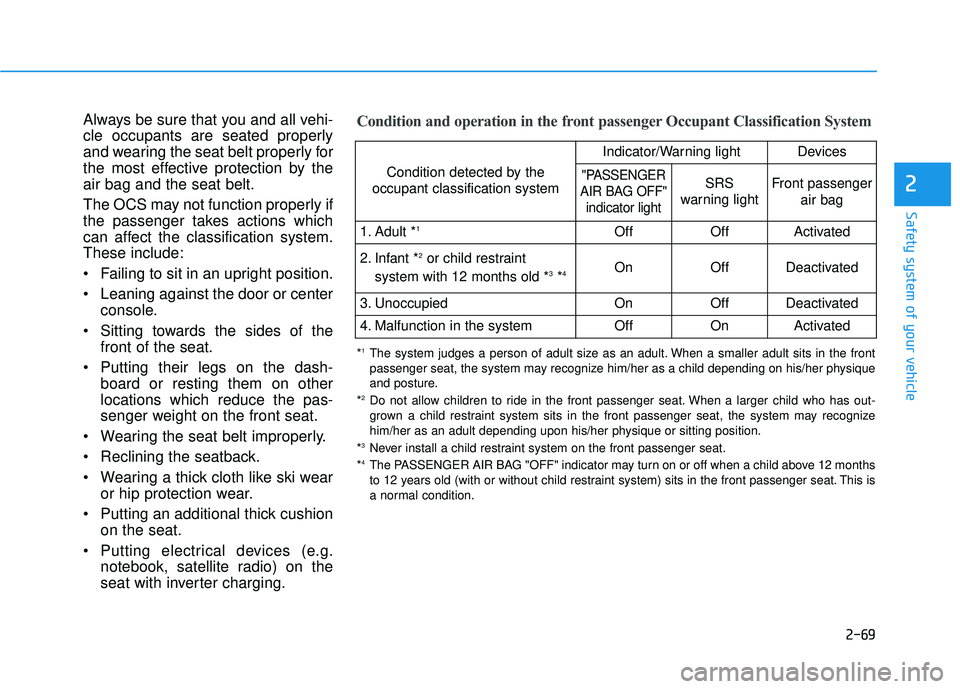
The OCS may not function properly if
the passenger takes actions which
can affect the classification system.
These include:
Failing to sit in an upright position.
Leaning against the door or centerconsole.
Sitting towards the sides of the front of the seat.
Putting their legs on the dash- board or resting them on other
locations which reduce the pas-
senger weight on the front seat.
Wearing the seat belt improperly.
Reclining the seatback.
Wearing a thick cloth like ski wear or hip protection wear.
Putting an additional thick cushion on the seat.
Putting electrical devices (e.g. notebook, satellite radio) on the
seat with inverter charging.Condition and operation in the front passenger Occupant Classification System
Condition detected by the
occupant classification system
Indicator/Warning lightDevices
"PASSENGER
AIR BAG OFF" indicator lightSRS
warning lightFront passenger
air bag
1. Adult *1OffOffActivated
2. Infant *2or child restraint
system with 12 months old *3*4 OnOffDeactivated
3. Unoccupied OnOffDeactivated
4. Malfunction in the systemOffOnActivated
*1The system judges a person of adult size as an adult. When a smaller adult sits in the front
passenger seat, the system may recognize him/her as a child depending on his/her physique
and posture.
*
2Do not allow children to ride in the front passenger seat. When a larger child who has out- grown a child restraint system sits in the front passenger seat, the system may recognize
him/her as an adult depending upon his/her physique or sitting position.
*
3Never install a child restraint system on the front passenger seat.
*4The PASSENGER AIR BAG "OFF" indicator may turn on or off when a child above 12 months
to 12 years old (with or without child restraint system) sits in the front passenger seat. This is
a normal condition.
Page 280 of 663
3-184
Convenience Features
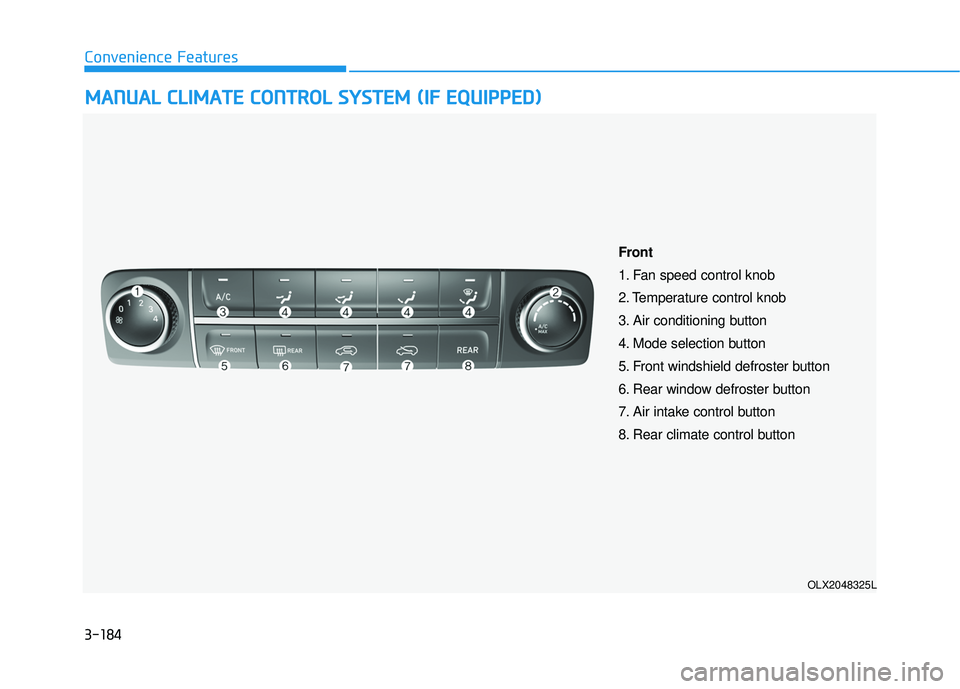
M MA AN N U U A AL L C C L LI IM M A AT TE E C C O O N NT TR R O O L L S S Y Y S ST T E EM M ( ( I IF F E E Q Q U UI IP P P PE ED D ) )
OLX2048325L
Front
1. Fan speed control knob
2. Temperature control knob
3. Air conditioning button
4. Mode selection button
5. Front windshield defroster button
6. Rear window defroster button
7. Air intake control button
8. Rear climate control button
Page 281 of 663
3-185
Convenience Features
3
Heating and Air Conditioning
1. Start the engine.
2. Set the mode to the desired position.To improve the effectiveness of heat-ing and cooling, select the mode
according to the following:
- Heating:
- Cooling:
3. Set the temperature control to the desired position.
4. Set the air intake control to Fresh mode or Recirculation mode posi-
tion.
5. Set the fan speed control to the desired speed.
6. If air conditioning is desired, turn the air conditioning system on.
When starting the vehicle in cold
weather a more efficient way to heat
the passenger compartment is to do
the following.
- Turn off or lower the blower, right after starting the engine.
- Engine temperature is still low and the air flow from the heater is still
cold.
- After a few minutes of engine warm up, turn on or set the fan to a higher
level and adjust the temperature set-
ting to hot.
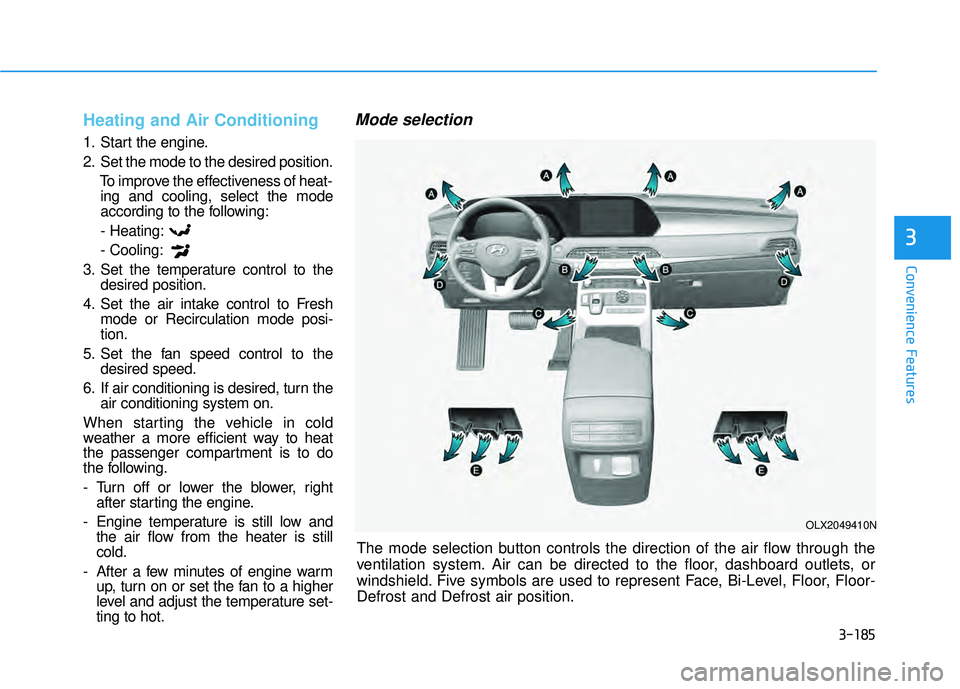
Mode selection
The mode selection button controls the direction of the air flow through the
ventilation system. Air can be directed to the floor, dashboard outlets, or
windshield. Five symbols are used to represent Face, Bi-Level, Floor, Floor-
Defrost and Defrost air position.
OLX2049410N
Page 282 of 663
3-186
Convenience Features
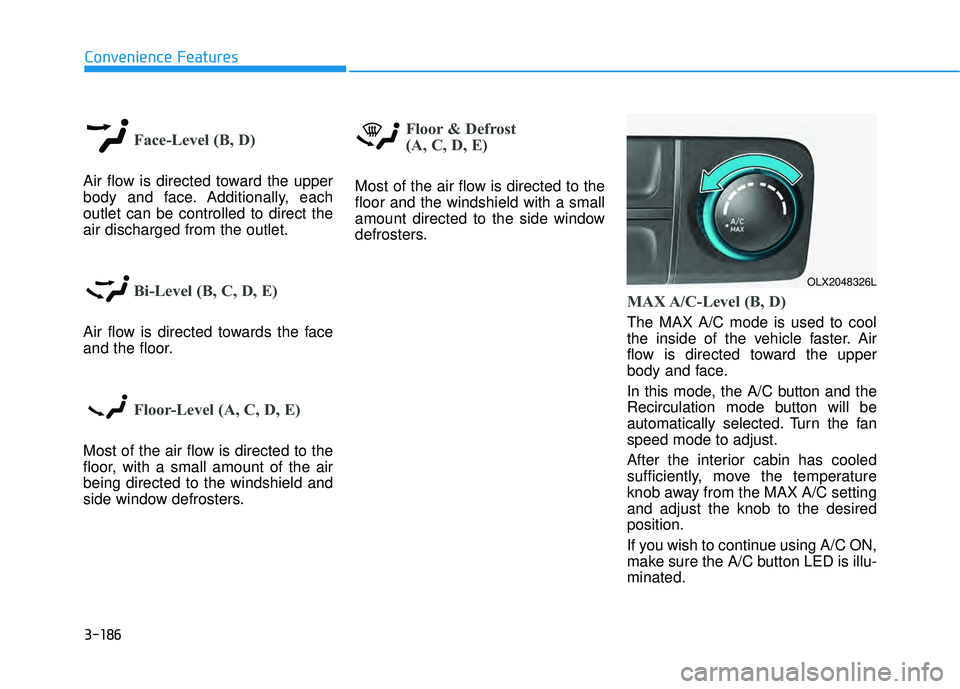
Face-Level (B, D)
Air flow is directed toward the upper
body and face. Additionally, each
outlet can be controlled to direct the
air discharged from the outlet.
Bi-Level (B, C, D, E)
Air flow is directed towards the face
and the floor.
Floor-Level (A, C, D, E)
Most of the air flow is directed to the
floor, with a small amount of the air
being directed to the windshield and
side window defrosters.
Floor & Defrost
(A, C, D, E)
Most of the air flow is directed to the
floor and the windshield with a small
amount directed to the side window
defrosters.
MAX A/C-Level (B, D)
The MAX A/C mode is used to cool
the inside of the vehicle faster. Air
flow is directed toward the upper
body and face.
In this mode, the A/C button and the
Recirculation mode button will be
automatically selected. Turn the fan
speed mode to adjust.
After the interior cabin has cooled
sufficiently, move the temperature
knob away from the MAX A/C setting
and adjust the knob to the desired
position.
If you wish to continue using A/C ON,
make sure the A/C button LED is illu-
minated.
OLX2048326L
Page 284 of 663
3-188
Convenience Features
Fan speed control (1)
Turn the knob to the right to increase
the fan speed and airflow. Turn the
knob to the left to decrease fan
speed and airflow.
Setting the fan speed control knob to
the "0" position turns off the fan.
Operating the fan speed when the
ignition switch is in the ON posi-
tion could cause the battery to
discharge. Operate the fan speed
when the engine is running.
Air conditioning (3)
Push the A/C button to turn the sys-
tem on (indicator light will illuminate)
and off.
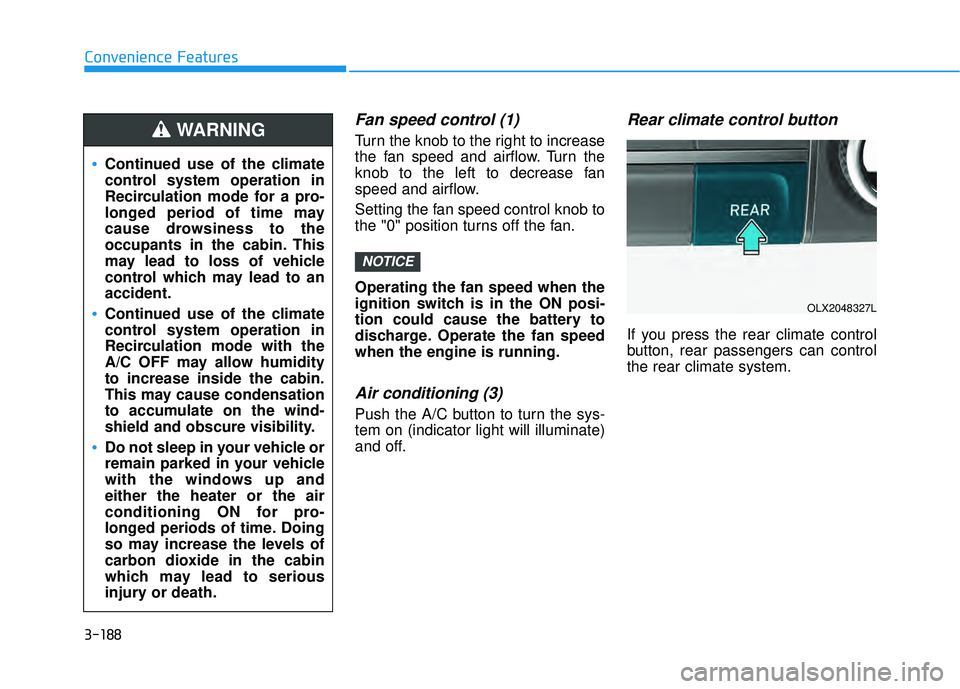
Rear climate control button
If you press the rear climate control
button, rear passengers can control
the rear climate system.
NOTICE
Continued use of the climate
control system operation in
Recirculation mode for a pro-
longed period of time may
cause drowsiness to the
occupants in the cabin. This
may lead to loss of vehicle
control which may lead to an
accident.
Continued use of the climate
control system operation in
Recirculation mode with the
A/C OFF may allow humidity
to increase inside the cabin.
This may cause condensation
to accumulate on the wind-
shield and obscure visibility.
Do not sleep in your vehicle or
remain parked in your vehicle
with the windows up and
either the heater or the air
conditioning ON for pro-
longed periods of time. Doing
so may increase the levels of
carbon dioxide in the cabin
which may lead to serious
injury or death.
WARNING
OLX2048327L
Page 285 of 663
3-189
Convenience Features
3
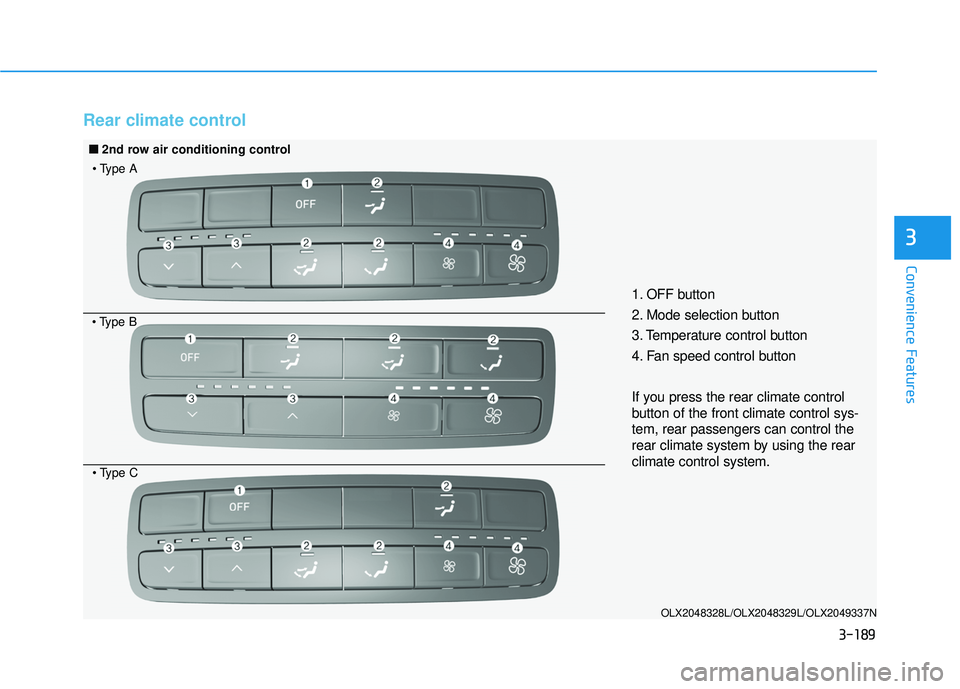
Rear climate control
OLX2048328L/OLX2048329L/OLX2049337N
1. OFF button
2. Mode selection button
3. Temperature control button
4. Fan speed control button
If you press the rear climate control
button of the front climate control sys-
tem, rear passengers can control the
rear climate system by using the rear
climate control system.
■ ■2nd row air conditioning control
Page 286 of 663
3-190
Convenience Features
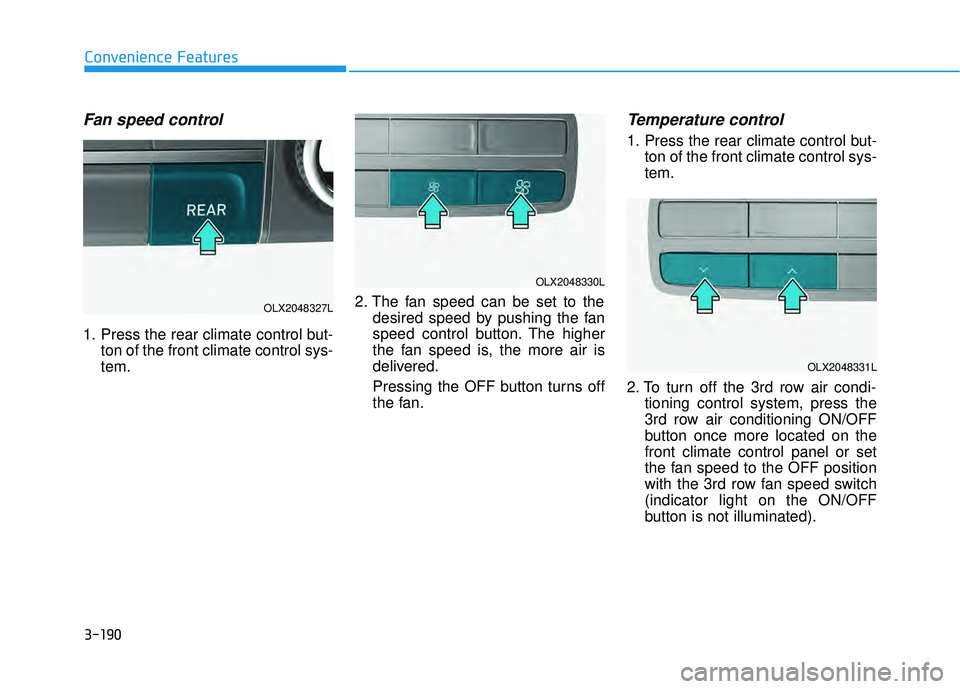
Fan speed control
1. Press the rear climate control but-ton of the front climate control sys-
tem. 2. The fan speed can be set to the
desired speed by pushing the fan
speed control button. The higher
the fan speed is, the more air is
delivered.
Pressing the OFF button turns off
the fan.
Temperature control
1. Press the rear climate control but-ton of the front climate control sys-
tem.
2. To turn off the 3rd row air condi- tioning control system, press the
3rd row air conditioning ON/OFF
button once more located on the
front climate control panel or set
the fan speed to the OFF position
with the 3rd row fan speed switch
(indicator light on the ON/OFF
button is not illuminated).
OLX2048327L
OLX2048330L
OLX2048331L
Page 288 of 663
3-192
Convenience Features
Rear vents on the headliner
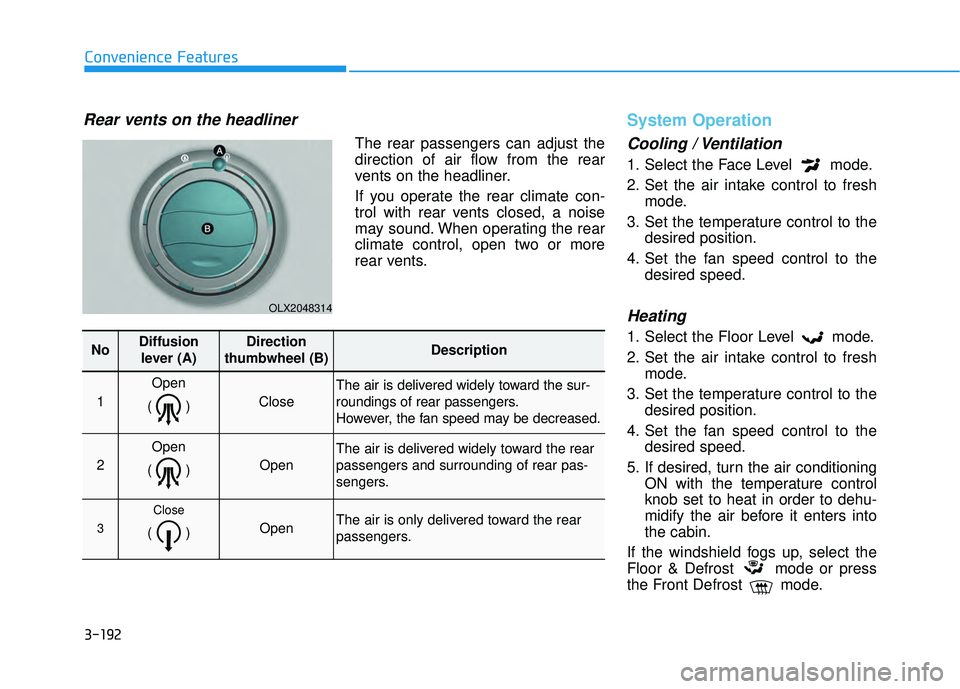
The rear passengers can adjust the
direction of air flow from the rear
vents on the headliner.
If you operate the rear climate con-
trol with rear vents closed, a noise
may sound. When operating the rear
climate control, open two or more
rear vents.
System Operation
Cooling / Ventilation
1. Select the Face Level mode.
2. Set the air intake control to freshmode.
3. Set the temperature control to the desired position.
4. Set the fan speed control to the desired speed.
Heating
1. Select the Floor Level mode.
2. Set the air intake control to freshmode.
3. Set the temperature control to the desired position.
4. Set the fan speed control to the desired speed.
5. If desired, turn the air conditioning ON with the temperature control
knob set to heat in order to dehu-
midify the air before it enters into
the cabin.
If the windshield fogs up, select the
Floor & Defrost mode or press
the Front Defrost mode.
OLX2048314
NoDiffusion lever (A)Direction
thumbwheel (B)Description
1
Open
()
Close
The air is delivered widely toward the sur-
roundings of rear passengers.
However, the fan speed may be decreased.
2
Open
()
Open
The air is delivered widely toward the rear
passengers and surrounding of rear pas-
sengers.
3
Close
() Open The air is only delivered toward the rear
passengers.
Page 289 of 663
3-193
Convenience Features
3
Operation Tips
To keep dust or unpleasant fumesfrom entering the vehicle through
the ventilation system, temporarily
set the air intake control to recircu-
lation mode. Return the control to
fresh mode when the unpleasant
air outside has diminished. This will
help keep the driver alert and com-
fortable.
To help prevent the inside of the windshield from fogging, set the air
intake control to fresh mode and
fan speed to the desired position,
turn on the air conditioning system,
and adjust the temperature control
to the desired temperature.
Air conditioning
Your HYUNDAI vehicle air condition-
ing system is filled with R-134a
refrigerant.
1. Start the engine.
2. Press the air conditioning button.
3. Select the Face Level mode. 4. Set the air intake control to
Recirculation mode temporarily to
allow the cabin to cool quickly.
When the desired temperature in
the cabin is reached, change the
air intake control back to Fresh
mode.
5. Adjust the fan speed control and temperature control to maintain
maximum comfort.
When maximum cooling is desired,
set the temperature control to the
MAX A/C position, then set the fan
speed control to the highest setting.
When using the air conditioning
system, monitor the engine tem-
perature gauge closely while driv-
ing up hills or in heavy traffic when
outside temperatures are high. Air
conditioning system operation
when climbing a steep grade or in
high outside ambient tempera-
tures can cause engine overheat-
ing.
Continue to use the fan, but turn
the air conditioning system off if
the engine temperature gauge
indicates engine overheating.
Air conditioning system operation tips
If the vehicle has been parked in direct sunlight during hot weather,
open the windows for a short time
to let the hot air inside the vehicle
escape.
After sufficient cooling has been achieved, switch back from recircu-
lation mode to fresh mode.
To help reduce moisture inside of the windows on rainy or humid
days, decrease the humidity inside
the vehicle by operating the air con-
ditioning system with the windows
and sunroof closed.
Use the air conditioning system every month only for a few minutes
to ensure maximum system per-
formance.
If you operate air conditioner exces- sively, the difference between the
temperature of the outside air and
that of the windshield could cause
the outer surface of the windshield
to fog up, causing loss of visibility.
In this case, set the mode selection
knob or button to the position
and fan speed control to the lower
speed.
NOTICE