ECU HYUNDAI PALISADE 2022 Owner's Manual
[x] Cancel search | Manufacturer: HYUNDAI, Model Year: 2022, Model line: PALISADE, Model: HYUNDAI PALISADE 2022Pages: 663, PDF Size: 15.74 MB
Page 137 of 663
3-41
Convenience Features
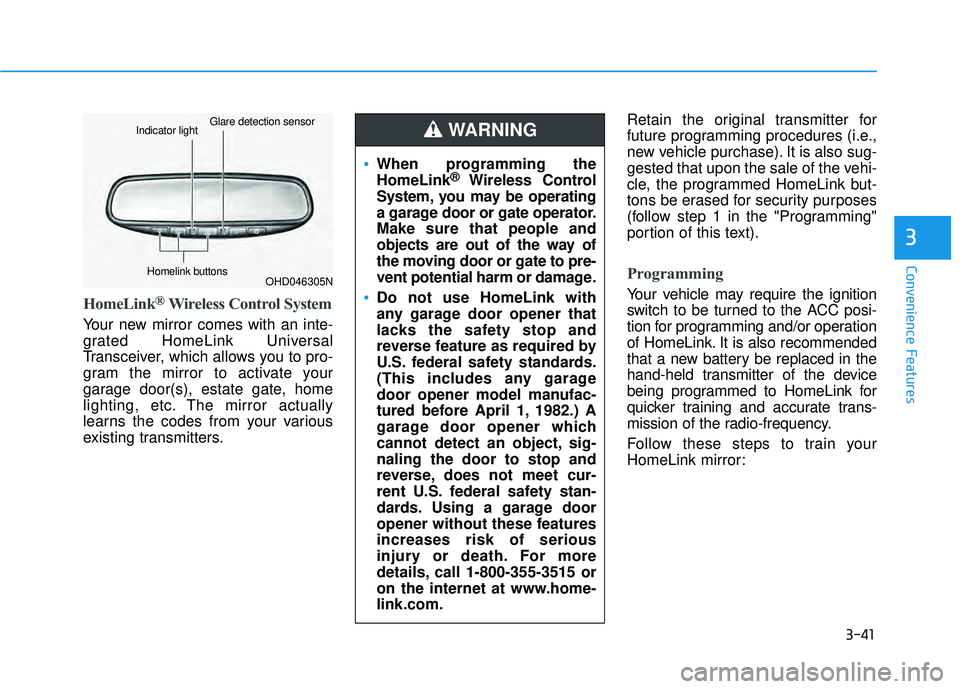
HomeLink®Wireless Control System
Your new mirror comes with an inte-
grated HomeLink Universal
Transceiver, which allows you to pro-
gram the mirror to activate your
garage door(s), estate gate, home
lighting, etc. The mirror actually
learns the codes from your various
existing transmitters.Retain the original transmitter for
future programming procedures (i.e.,
new vehicle purchase). It is also sug-
gested that upon the sale of the vehi-
cle, the programmed HomeLink but-
tons be erased for security purposes
(follow step 1 in the "Programming"
portion of this text).
Programming
Your vehicle may require the ignition
switch to be turned to the ACC posi-
tion for programming and/or operation
of HomeLink. It is also recommended
that a new battery be replaced in the
hand-held transmitter of the device
being programmed to HomeLink for
quicker training and accurate trans-
mission of the radio-frequency.
Follow these steps to train your
HomeLink mirror:
3
OHD046305N
Glare detection sensorIndicator light
Homelink buttons
When programming the
HomeLink®Wireless Control
System, you may be operating
a garage door or gate operator.
Make sure that people and
objects are out of the way of
the moving door or gate to pre-
vent potential harm or damage.
Do not use HomeLink with
any garage door opener that
lacks the safety stop and
reverse feature as required by
U.S. federal safety standards.
(This includes any garage
door opener model manufac-
tured before April 1, 1982.) A
garage door opener which
cannot detect an object, sig-
naling the door to stop and
reverse, does not meet cur-
rent U.S. federal safety stan-
dards. Using a garage door
opener without these features
increases risk of serious
injury or death. For more
details, call 1-800-355-3515 or
on the internet at www.home-
link.com.
WARNING
Page 139 of 663
3-43
Convenience Features
Some gate operators and garage
door openers may require you to
replace step #3 with the "cycling"
procedure noted in the "Canadian
Programming" section of this doc-
ument.
Rolling code programming
To train a garage door opener (or
other rolling code equipped devices)
with the rolling code feature, follow
these instructions after completing
the "Programming" portion of this
text. (A second person may make the
following training procedures quicker
& easier.)
4. Locate the "learn" or "smart" but-ton on the device's motor head
unit. Exact location and color of
the button may vary by product
brand. If there is difficulty locating
the "learn" or "smart" button, refer-
ence the device's owner's manual
or contact HomeLink at 1-800-
355-3515 or on the internet at
www.homelink.com. 5. Press and release the "learn" or
"smart" button on the device’s
motor head unit. You have 30 sec-
onds to complete step number 6.
6. Return to the vehicle and firmly press and release the pro-
grammed HomeLink button up to
three times. The rolling code
equipped device should now rec-
ognize the HomeLink signal and
activate when the HomeLink but-
ton is pressed. The remaining two
buttons may now be programmed
if this has not previously been
done. Refer to the "Programming"
portion of this text.
Operating HomeLink
To operate, simply press the pro-
grammed HomeLink button.
Activation will now occur for the
trained product (garage door, securi-
ty system, entry door lock, estate
gate, or home or office lighting). For
convenience, the hand-held trans-
mitter of the device may also be used
at any time. The HomeLink Wireless
Controls System (once programmed)
or the original hand-held transmitter
may be used to activate the device
(e.g. garage door, entry door lock,
etc.). In the event that there are still
programming difficulties, contact
HomeLink at 1-800-355-3515 or on
the internet at www.homelink.com.
NOTICE
3
Page 141 of 663
3-45
Convenience Features
Integrated HomeLink®Wireless
Control System
The HomeLink®Wireless Control
System provides a convenient way to
replace up to three handheld radio-
frequency (RF) transmitters used to
activate compatible devices such as
gate operators, garage door open-
ers, entry door locks, security sys-
tems, and home lighting.
Considering the Home Security
when the vehicle is parked out-
side the garage, the HomeLink will
ONLY work when the ignition
switch is in ACC position or ON
position.
NOTICE
3
Before programming HomeLink
to a garage door opener or gate
operator, make sure that people
and objects are out of the way
of the device to prevent poten-
tial harm or damage. When pro-
gramming a garage door open-
er, it is advised to park outside
of the garage.
Do not use HomeLink with any
garage door opener that lacks
safety stop and reverse features
as required by U.S. federal safe-
ty standards (this includes any
garage door opener model man-
ufactured before April 1, 1982).
A garage door that cannot
detect an object signaling the
door to stop and reverse - does
not meet current U.S. federal
safety standards. For more
information, contact HomeLink
at www.homelink.com, or call
HomeLink customer support at
1-800-355-3515.
(Continued)
(Continued)
It is also recommended that a
new battery be replaced in the
hand-held transmitter of the
device being trained to
HomeLink for quicker training
and accurate transmission of
the radio frequency.WARNING
Page 144 of 663
3-48
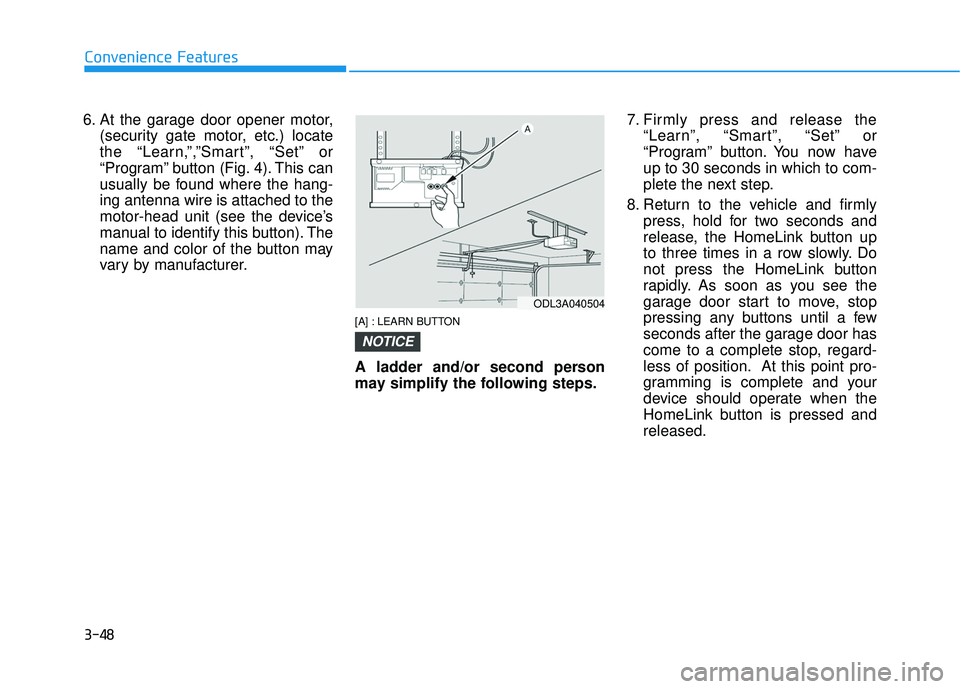
6. At the garage door opener motor,(security gate motor, etc.) locate
the “Learn,”,”Smart”, “Set” or
“Program” button (Fig. 4). This can
usually be found where the hang-
ing antenna wire is attached to the
motor-head unit (see the device’s
manual to identify this button). The
name and color of the button may
vary by manufacturer.
[A] : LEARN BUTTON
A ladder and/or second person
may simplify the following steps. 7. Firmly press and release the
“Learn”, “Smart”, “Set” or
“Program” button. You now have
up to 30 seconds in which to com-
plete the next step.
8. Return to the vehicle and firmly press, hold for two seconds and
release, the HomeLink button up
to three times in a row slowly. Do
not press the HomeLink button
rapidly. As soon as you see the
garage door start to move, stop
pressing any buttons until a few
seconds after the garage door has
come to a complete stop, regard-
less of position. At this point pro-
gramming is complete and your
device should operate when the
HomeLink button is pressed and
released.
NOTICE
Convenience Features
ODL3A040504
Page 161 of 663
3-65
Convenience Features
3
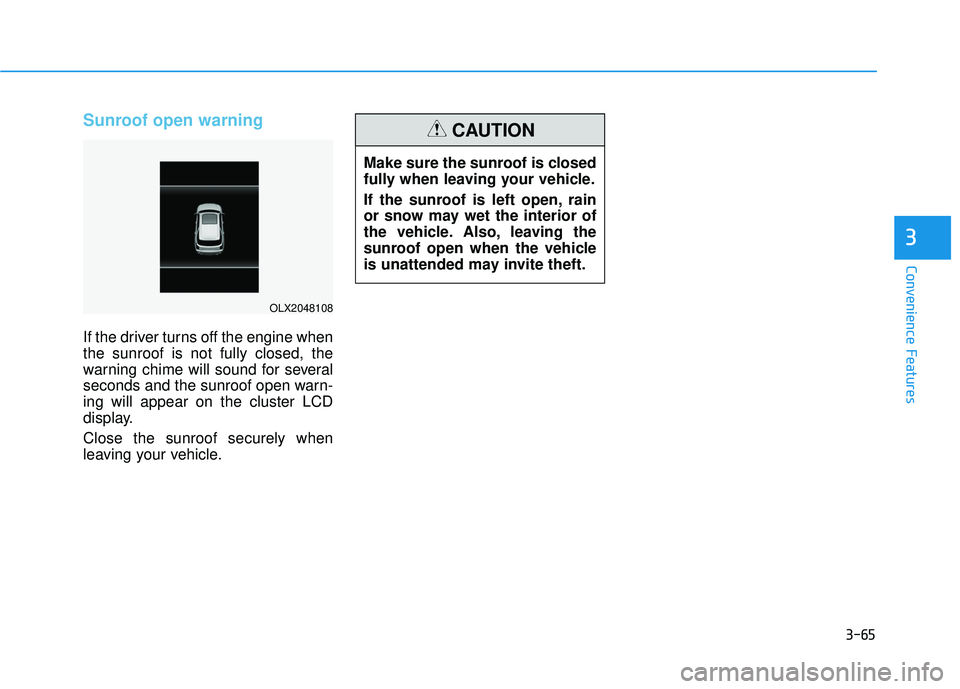
Sunroof open warning
If the driver turns off the engine when
the sunroof is not fully closed, the
warning chime will sound for several
seconds and the sunroof open warn-
ing will appear on the cluster LCD
display.
Close the sunroof securely when
leaving your vehicle.
OLX2048108
Make sure the sunroof is closed
fully when leaving your vehicle.
If the sunroof is left open, rain
or snow may wet the interior of
the vehicle. Also, leaving the
sunroof open when the vehicle
is unattended may invite theft.
CAUTION
Page 162 of 663
3-66
Convenience Features
Hood
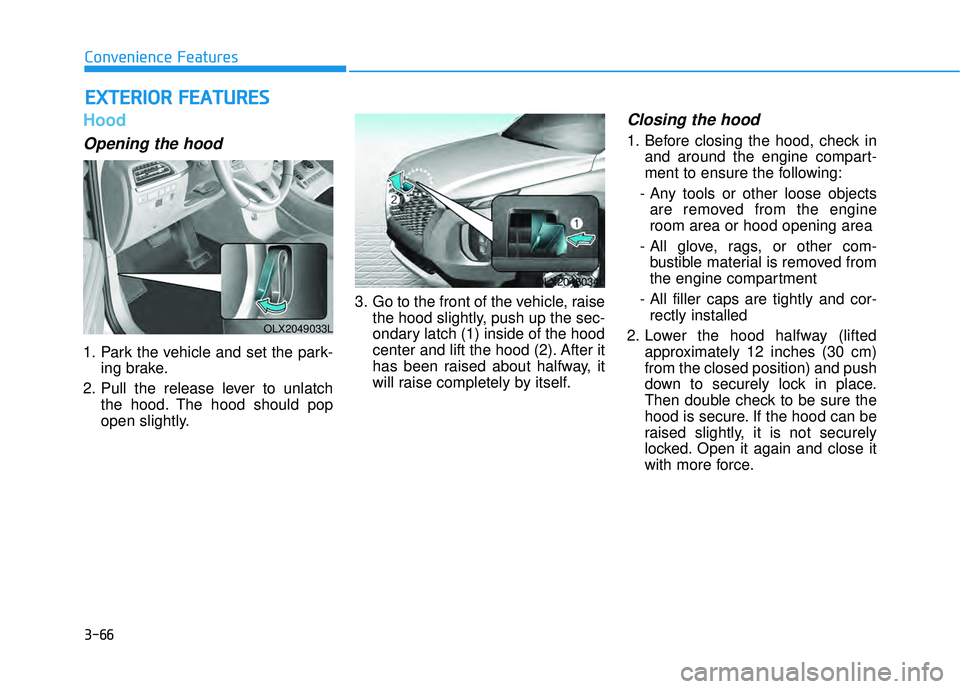
Opening the hood
1. Park the vehicle and set the park-ing brake.
2. Pull the release lever to unlatch the hood. The hood should pop
open slightly. 3. Go to the front of the vehicle, raise
the hood slightly, push up the sec-
ondary latch (1) inside of the hood
center and lift the hood (2). After it
has been raised about halfway, it
will raise completely by itself.
Closing the hood
1. Before closing the hood, check inand around the engine compart-
ment to ensure the following:
- Any tools or other loose objects are removed from the engine
room area or hood opening area
- All glove, rags, or other com- bustible material is removed from
the engine compartment
- All filler caps are tightly and cor- rectly installed
2. Lower the hood halfway (lifted approximately 12 inches (30 cm)
from the closed position) and push
down to securely lock in place.
Then double check to be sure the
hood is secure. If the hood can be
raised slightly, it is not securely
locked. Open it again and close it
with more force.
E EX X T TE ER R I IO O R R F F E E A A T TU U R RE ES S
OLX2049033L
OLX2048034L
Page 163 of 663
3-67
Convenience Features
3
Non-Powered Liftgate
(if equipped)
Opening the liftgate
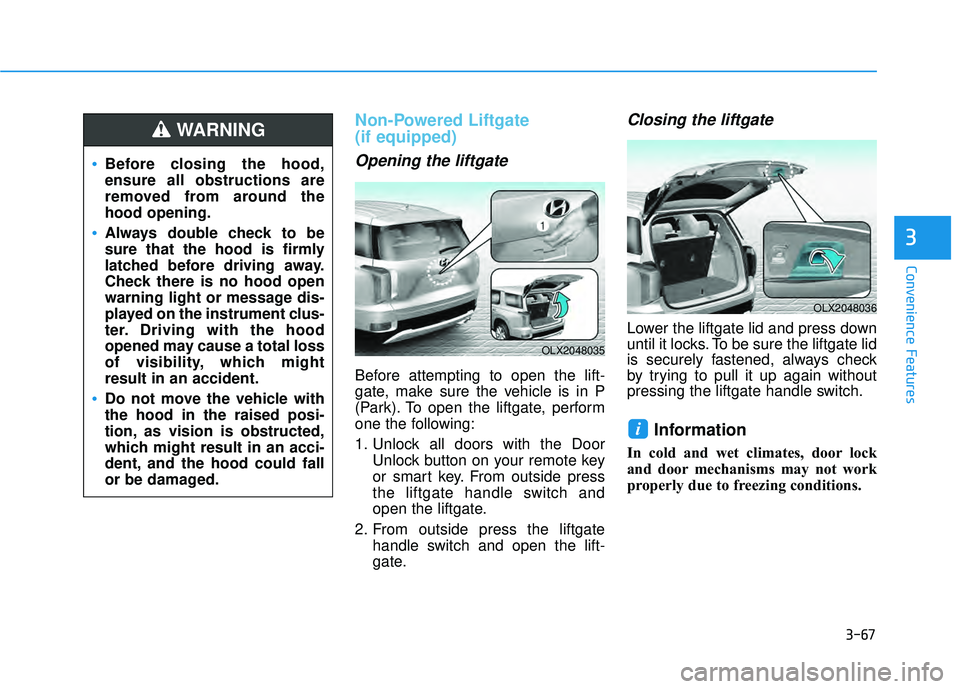
Before attempting to open the lift-
gate, make sure the vehicle is in P
(Park). To open the liftgate, perform
one the following:
1. Unlock all doors with the DoorUnlock button on your remote key
or smart key. From outside press
the liftgate handle switch and
open the liftgate.
2. From outside press the liftgate handle switch and open the lift-
gate.
Closing the liftgate
Lower the liftgate lid and press down
until it locks. To be sure the liftgate lid
is securely fastened, always check
by trying to pull it up again without
pressing the liftgate handle switch.
Information
In cold and wet climates, door lock
and door mechanisms may not work
properly due to freezing conditions.
i
Before closing the hood,
ensure all obstructions are
removed from around the
hood opening.
Always double check to be
sure that the hood is firmly
latched before driving away.
Check there is no hood open
warning light or message dis-
played on the instrument clus-
ter. Driving with the hood
opened may cause a total loss
of visibility, which might
result in an accident.
Do not move the vehicle with
the hood in the raised posi-
tion, as vision is obstructed,
which might result in an acci-
dent, and the hood could fall
or be damaged.
WARNING
OLX2048035
OLX2048036
Page 175 of 663
3-79
Convenience Features
3
Fuel Filler Door
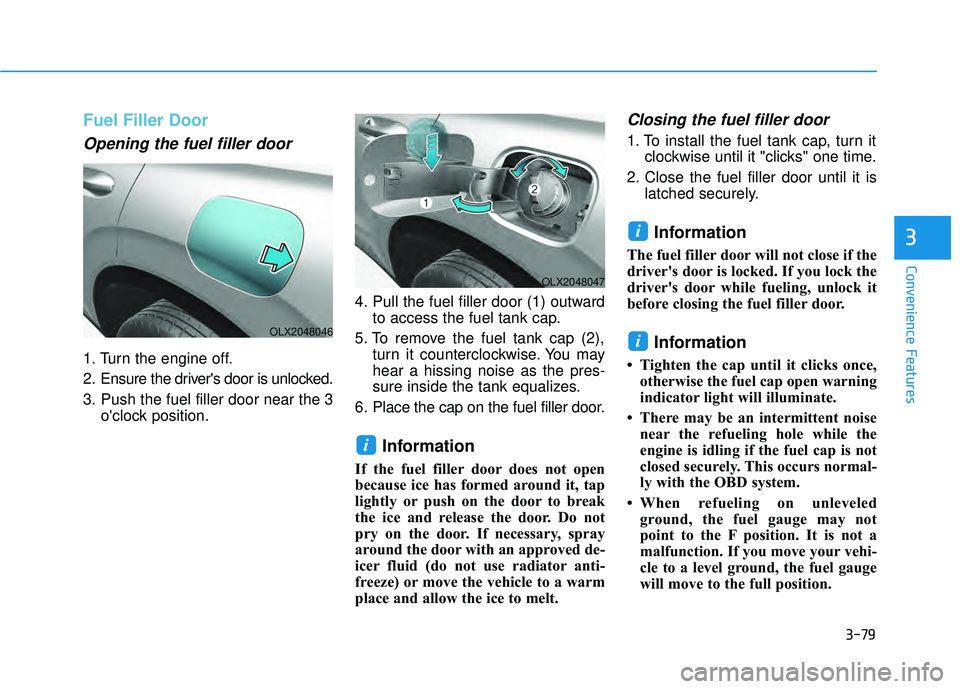
Opening the fuel filler door
1. Turn the engine off.
2. Ensure the driver's door is unlocked.
3. Push the fuel filler door near the 3o'clock position. 4. Pull the fuel filler door (1) outward
to access the fuel tank cap.
5. To remove the fuel tank cap (2), turn it counterclockwise. You may
hear a hissing noise as the pres-
sure inside the tank equalizes.
6. Place the cap on the fuel filler door.
Information
If the fuel filler door does not open
because ice has formed around it, tap
lightly or push on the door to break
the ice and release the door. Do not
pry on the door. If necessary, spray
around the door with an approved de-
icer fluid (do not use radiator anti-
freeze) or move the vehicle to a warm
place and allow the ice to melt.
Closing the fuel filler door
1. To install the fuel tank cap, turn it clockwise until it "clicks" one time.
2. Close the fuel filler door until it is latched securely.
Information
The fuel filler door will not close if the
driver's door is locked. If you lock the
driver's door while fueling, unlock it
before closing the fuel filler door.
Information
• Tighten the cap until it clicks once,otherwise the fuel cap open warning
indicator light will illuminate.
• There may be an intermittent noise near the refueling hole while the
engine is idling if the fuel cap is not
closed securely. This occurs normal-
ly with the OBD system.
• When refueling on unleveled ground, the fuel gauge may not
point to the F position. It is not a
malfunction. If you move your vehi-
cle to a level ground, the fuel gauge
will move to the full position.
i
i
i
OLX2048046
OLX2048047
Page 177 of 663
3-81
Convenience Features
3
Information
Make sure to refuel your vehicle
according to the "Fuel Requirements"
suggested in the Introduction chapter.
Do not spill fuel on the exteriorsurfaces of the vehicle. Any type
of fuel spilled on painted sur-
faces may damage the paint.
If the fuel filler cap requires replacement, use only a genuine
HYUNDAI cap or the equivalent
specified for your vehicle. An
incorrect fuel filler cap can
result in a serious malfunction
of the fuel system or emission
control system.
NOTICE
iDo not over-fill or top-off your
vehicle tank, which can cause
gasoline spillage.
If a fire breaks out during refu-
eling, leave the vicinity of the
vehicle, and immediately con-
tact the manager of the gas
station and then contact the
local fire department. Follow
any safety instructions they
provide.
If pressurized fuel sprays out,
it can cover your clothes or
skin and thus subject you to
the risk of fire and burns.
Always remove the fuel cap
carefully and slowly. If the cap
is venting fuel or if you hear a
hissing sound, wait until the
condition stops before com-
pletely removing the cap.
Always check that the fuel cap
is installed securely to pre-
vent fuel spillage in the event
of an accident.
Page 201 of 663
3-105
Convenience Features
3
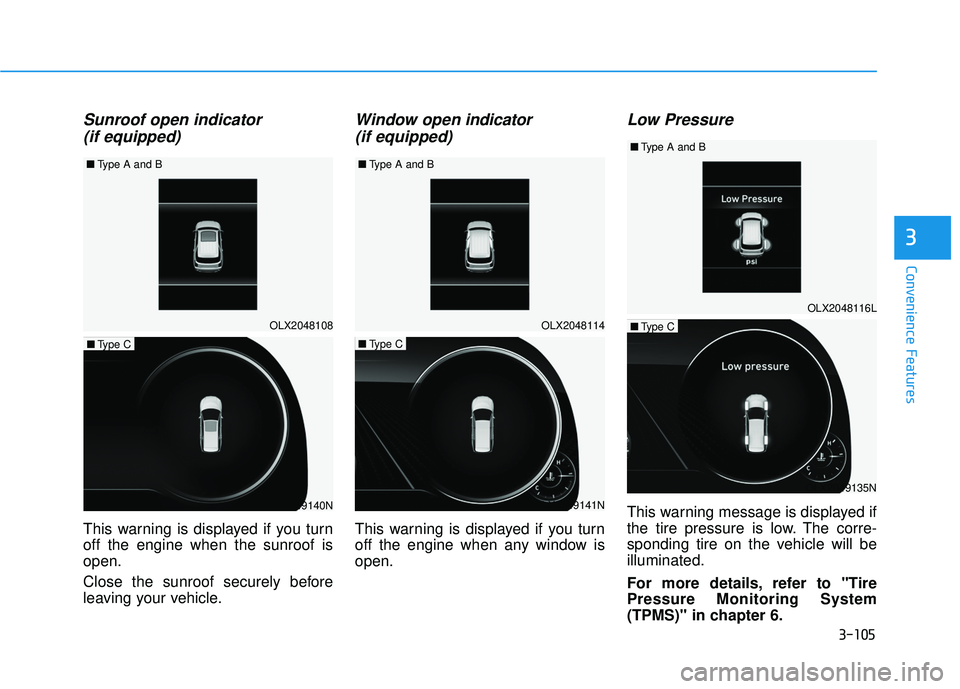
Sunroof open indicator (if equipped)
This warning is displayed if you turn
off the engine when the sunroof is
open.
Close the sunroof securely before
leaving your vehicle.
Window open indicator
(if equipped)
This warning is displayed if you turn
off the engine when any window is
open.
Low Pressure
This warning message is displayed if
the tire pressure is low. The corre-
sponding tire on the vehicle will be
illuminated.
For more details, refer to "Tire
Pressure Monitoring System
(TPMS)" in chapter 6.
OLX2048108
■
Type A and B
OLX2049140N
■Type C
OLX2049141N
■Type C
OLX2049135N
■Type COLX2048114
OLX2048116L
■
Type A and B ■
Type A and B