ignition HYUNDAI PALISADE 2022 Owner's Manual
[x] Cancel search | Manufacturer: HYUNDAI, Model Year: 2022, Model line: PALISADE, Model: HYUNDAI PALISADE 2022Pages: 663, PDF Size: 15.74 MB
Page 134 of 663
3-38
Convenience Features
Heated Steering Wheel
(if equipped)
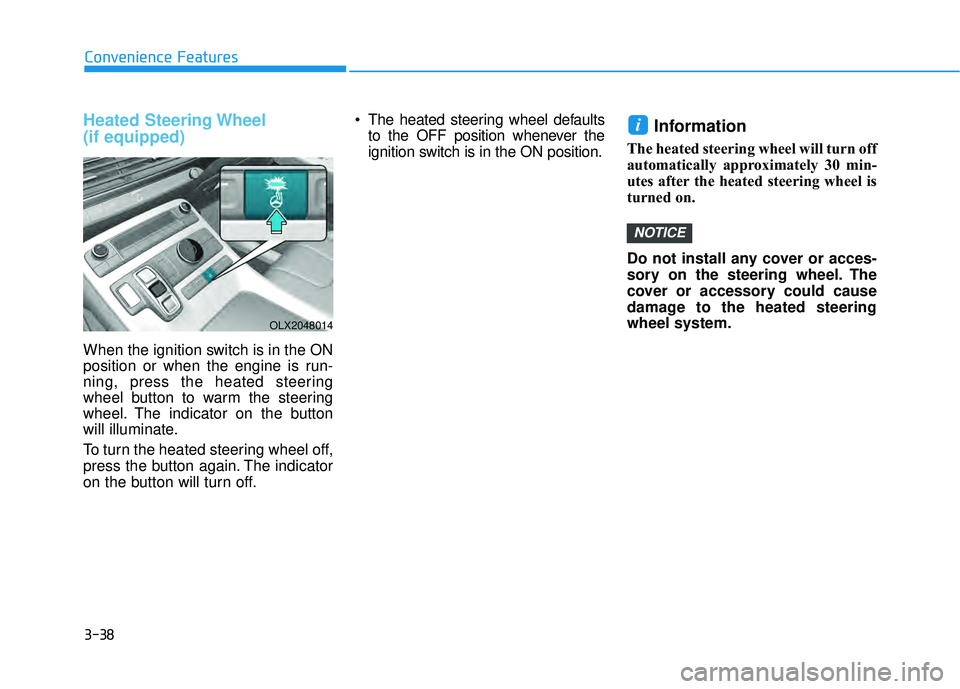
When the ignition switch is in the ON
position or when the engine is run-
ning, press the heated steering
wheel button to warm the steering
wheel. The indicator on the button
will illuminate.
To turn the heated steering wheel off,
press the button again. The indicator
on the button will turn off. The heated steering wheel defaults
to the OFF position whenever the
ignition switch is in the ON position.
Information
The heated steering wheel will turn off
automatically approximately 30 min-
utes after the heated steering wheel is
turned on.
Do not install any cover or acces-
sory on the steering wheel. The
cover or accessory could cause
damage to the heated steering
wheel system.
NOTICE
i
OLX2048014
Page 137 of 663
3-41
Convenience Features
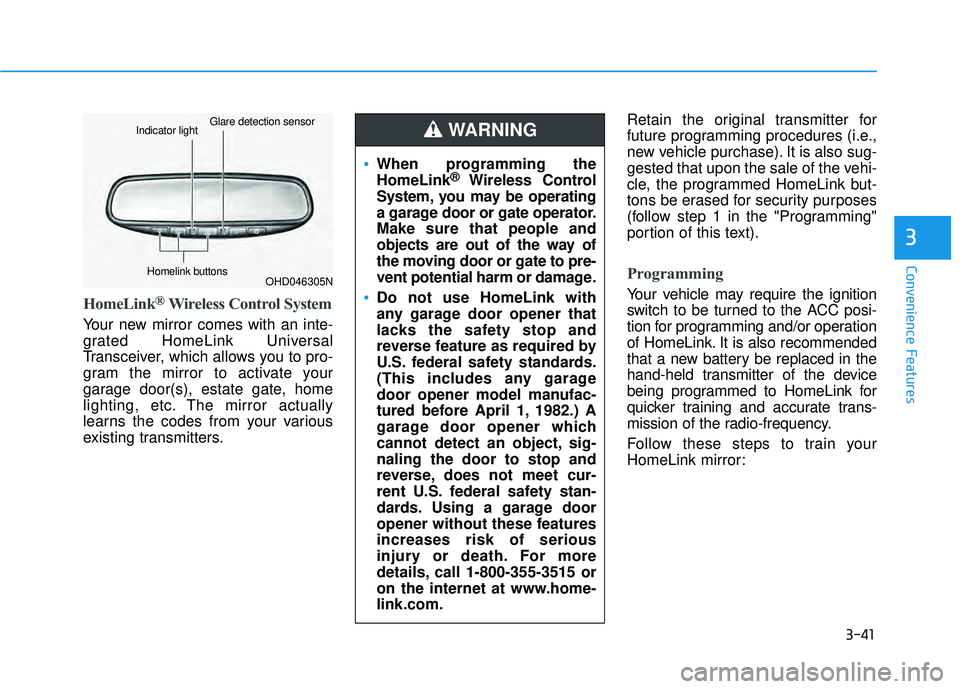
HomeLink®Wireless Control System
Your new mirror comes with an inte-
grated HomeLink Universal
Transceiver, which allows you to pro-
gram the mirror to activate your
garage door(s), estate gate, home
lighting, etc. The mirror actually
learns the codes from your various
existing transmitters.Retain the original transmitter for
future programming procedures (i.e.,
new vehicle purchase). It is also sug-
gested that upon the sale of the vehi-
cle, the programmed HomeLink but-
tons be erased for security purposes
(follow step 1 in the "Programming"
portion of this text).
Programming
Your vehicle may require the ignition
switch to be turned to the ACC posi-
tion for programming and/or operation
of HomeLink. It is also recommended
that a new battery be replaced in the
hand-held transmitter of the device
being programmed to HomeLink for
quicker training and accurate trans-
mission of the radio-frequency.
Follow these steps to train your
HomeLink mirror:
3
OHD046305N
Glare detection sensorIndicator light
Homelink buttons
When programming the
HomeLink®Wireless Control
System, you may be operating
a garage door or gate operator.
Make sure that people and
objects are out of the way of
the moving door or gate to pre-
vent potential harm or damage.
Do not use HomeLink with
any garage door opener that
lacks the safety stop and
reverse feature as required by
U.S. federal safety standards.
(This includes any garage
door opener model manufac-
tured before April 1, 1982.) A
garage door opener which
cannot detect an object, sig-
naling the door to stop and
reverse, does not meet cur-
rent U.S. federal safety stan-
dards. Using a garage door
opener without these features
increases risk of serious
injury or death. For more
details, call 1-800-355-3515 or
on the internet at www.home-
link.com.
WARNING
Page 141 of 663
3-45
Convenience Features
Integrated HomeLink®Wireless
Control System
The HomeLink®Wireless Control
System provides a convenient way to
replace up to three handheld radio-
frequency (RF) transmitters used to
activate compatible devices such as
gate operators, garage door open-
ers, entry door locks, security sys-
tems, and home lighting.
Considering the Home Security
when the vehicle is parked out-
side the garage, the HomeLink will
ONLY work when the ignition
switch is in ACC position or ON
position.
NOTICE
3
Before programming HomeLink
to a garage door opener or gate
operator, make sure that people
and objects are out of the way
of the device to prevent poten-
tial harm or damage. When pro-
gramming a garage door open-
er, it is advised to park outside
of the garage.
Do not use HomeLink with any
garage door opener that lacks
safety stop and reverse features
as required by U.S. federal safe-
ty standards (this includes any
garage door opener model man-
ufactured before April 1, 1982).
A garage door that cannot
detect an object signaling the
door to stop and reverse - does
not meet current U.S. federal
safety standards. For more
information, contact HomeLink
at www.homelink.com, or call
HomeLink customer support at
1-800-355-3515.
(Continued)
(Continued)
It is also recommended that a
new battery be replaced in the
hand-held transmitter of the
device being trained to
HomeLink for quicker training
and accurate transmission of
the radio frequency.WARNING
Page 142 of 663
3-46
1. Programming homelink®
The following steps show how to pro-
gram HomeLink. If you have any
questions or are having difficulty pro-
gramming your HomeLink buttons,
refer o the HomeLink website or call
the HomeLink customer support toll-
free number. Do this, before going
back to the dealer who sold you the
car.
Visit the HomeLink website at:www.homelink.com. Then at the
top of the page, choose your vehi-
cle make. Then watch the You Tube
video, and/or access additional
website information.
If you choose to access the website via your cell
phone, scan the QR
code.
Or, call HomeLink customer sup- port at 1-800-355-3515 (Please
have the vehicle make/model AND
the opener device make/model
readily available.) 1) Programming Preparation
1. When programming a garage door
opener, it is advised to park the
vehicle outside of the garage.
2. It is recommended that a new bat- tery be placed in the hand-held
transmitter of the device being
programmed to HomeLink for
quicker training and accurate
transmission of the radio-frequen-
cy signal.
3. Place the ignition switch to the ACC(Accessory) position for pro-
gramming of HomeLink. 2) Programming a New HomeLink
Button
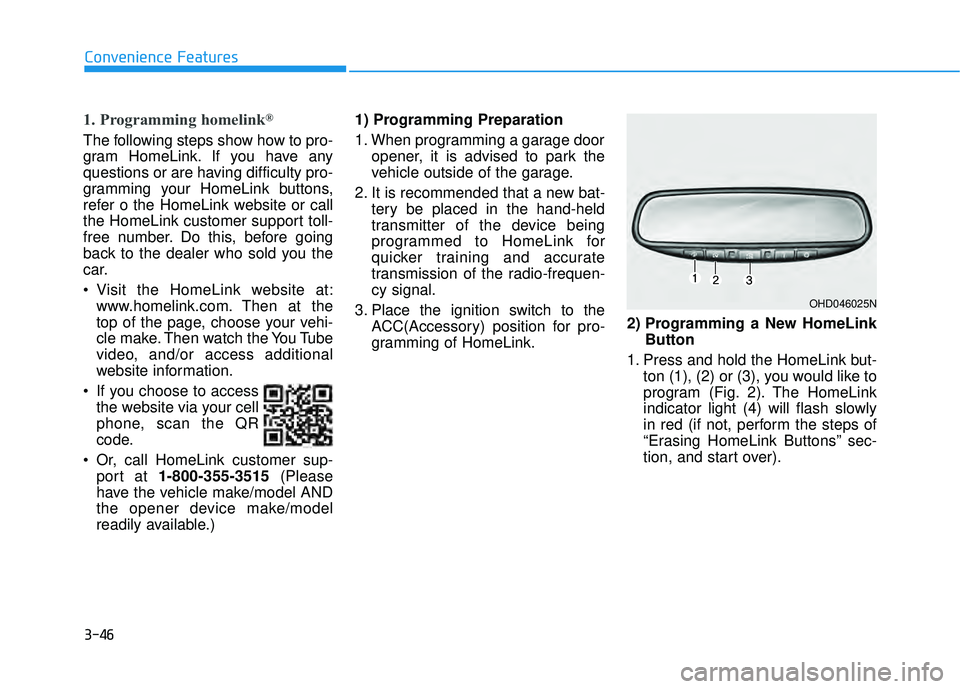
1. Press and hold the HomeLink but- ton (1), (2) or (3), you would like to
program (Fig. 2). The HomeLink
indicator light (4) will flash slowly
in red (if not, perform the steps of
“Erasing HomeLink Buttons” sec-
tion, and start over).
Convenience Features
OHD046025N
Page 150 of 663
3-54
Convenience Features
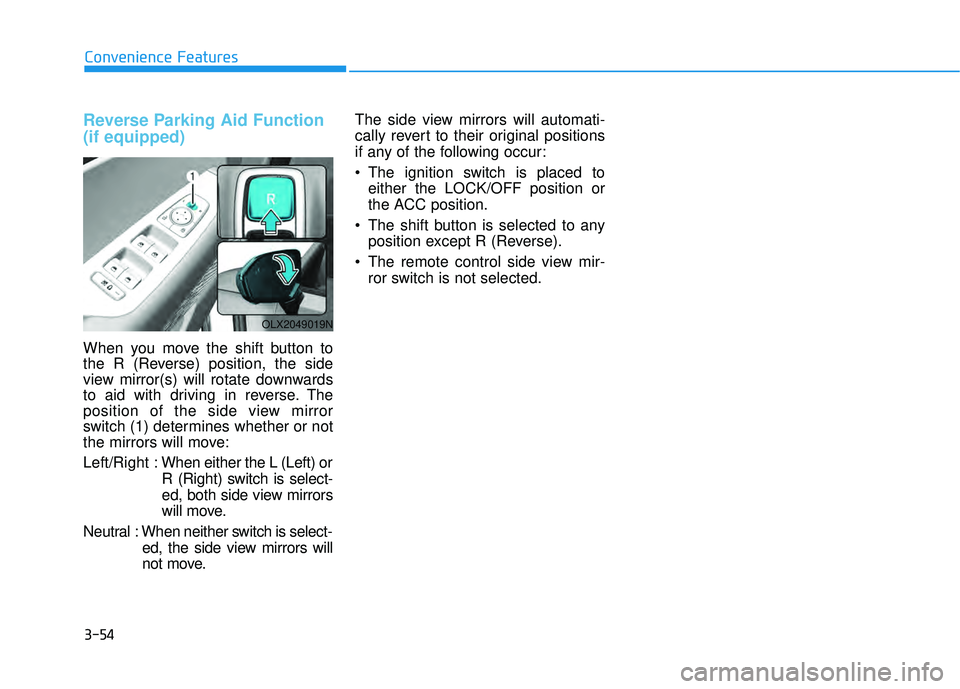
Reverse Parking Aid Function
(if equipped)
When you move the shift button to
the R (Reverse) position, the side
view mirror(s) will rotate downwards
to aid with driving in reverse. The
position of the side view mirror
switch (1) determines whether or not
the mirrors will move:
Left/Right :When either the L (Left) or
R (Right) switch is select-
ed, both side view mirrors
will move.
Neutral : When neither switch is select- ed, the side view mirrors will
not move. The side view mirrors will automati-
cally revert to their original positions
if any of the following occur:
The ignition switch is placed to
either the LOCK/OFF position or
the ACC position.
The shift button is selected to any position except R (Reverse).
The remote control side view mir- ror switch is not selected.
OLX2049019N
Page 152 of 663
3-56
Convenience Features
Power Windows
The ignition switch must be in the ON
position to be able to raise or lower
the windows. Each door has a Power
Window switch to control that door’s
window. The driver has a Power
Window Lock switch which can block
the operation of passenger windows.
The power windows will operate for
approximately 10 minutes after the
ignition switch is placed in the ACC
or LOCK/OFF position. However, if
the front doors are opened, the
Power Windows will not operate even
within the 10 minute period.
Information
• In cold and wet climates, power win-dows may not work properly due to
freezing conditions.
• While driving with the rear win- dows down or with the sunroof (if
equipped) opened (or partially
opened), your vehicle may demon-
strate a wind buffeting or pulsation
noise. This noise is normal and can
be reduced or eliminated by taking
the following actions. If the noise
occurs with one or both of the rear
windows down, partially lower both
front windows approximately one
inch. If you experience the noise
with the sunroof open, slightly close
the sunroof.
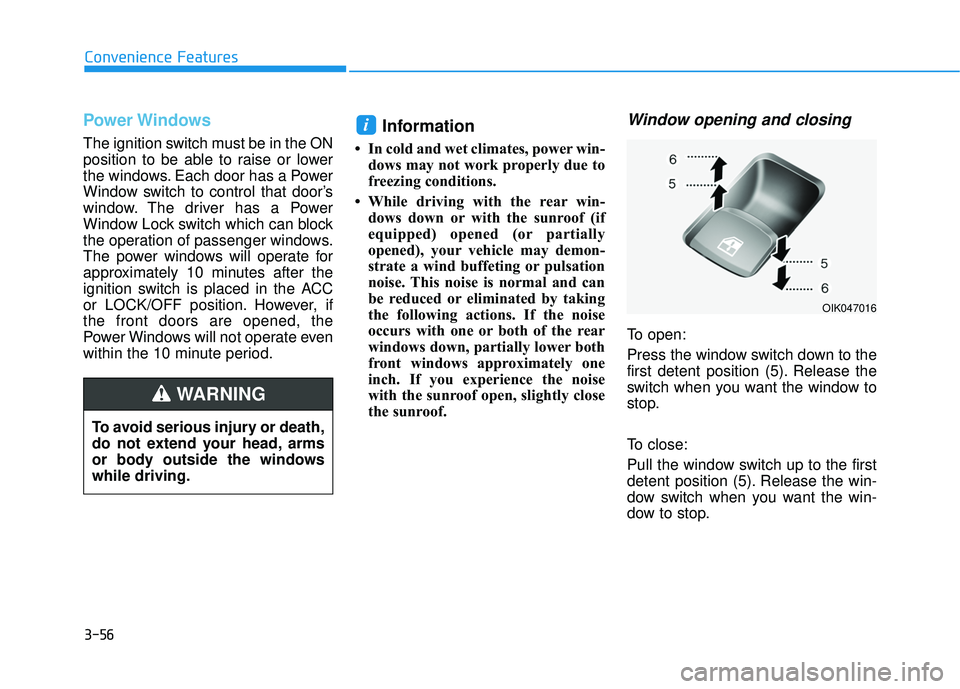
Window opening and closing
To open:
Press the window switch down to the
first detent position (5). Release the
switch when you want the window to
stop.
To close:
Pull the window switch up to the first
detent position (5). Release the win-
dow switch when you want the win-
dow to stop.
i
To avoid serious injury or death,
do not extend your head, arms
or body outside the windows
while driving.
WARNING
OIK047016
Page 153 of 663
3-57
Convenience Features
3
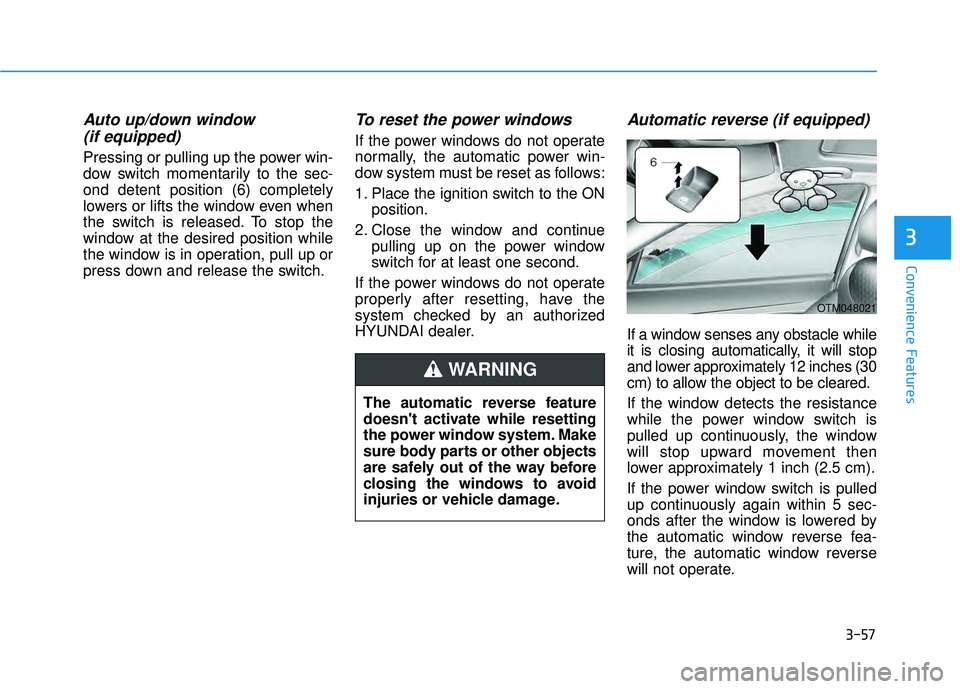
Auto up/down window (if equipped)
Pressing or pulling up the power win-
dow switch momentarily to the sec-
ond detent position (6) completely
lowers or lifts the window even when
the switch is released. To stop the
window at the desired position while
the window is in operation, pull up or
press down and release the switch.
To reset the power windows
If the power windows do not operate
normally, the automatic power win-
dow system must be reset as follows:
1. Place the ignition switch to the ON
position.
2. Close the window and continue pulling up on the power window
switch for at least one second.
If the power windows do not operate
properly after resetting, have the
system checked by an authorized
HYUNDAI dealer.
Automatic reverse (if equipped)
If a window senses any obstacle while
it is closing automatically, it will stop
and lower approximately 12 inches (30
cm) to allow the object to be cleared.
If the window detects the resistance
while the power window switch is
pulled up continuously, the window
will stop upward movement then
lower approximately 1 inch (2.5 cm).
If the power window switch is pulled
up continuously again within 5 sec-
onds after the window is lowered by
the automatic window reverse fea-
ture, the automatic window reverse
will not operate.
The automatic reverse feature
doesn't activate while resetting
the power window system. Make
sure body parts or other objects
are safely out of the way before
closing the windows to avoid
injuries or vehicle damage.
WARNING
OTM048021
Page 155 of 663
3-59
Convenience Features
3
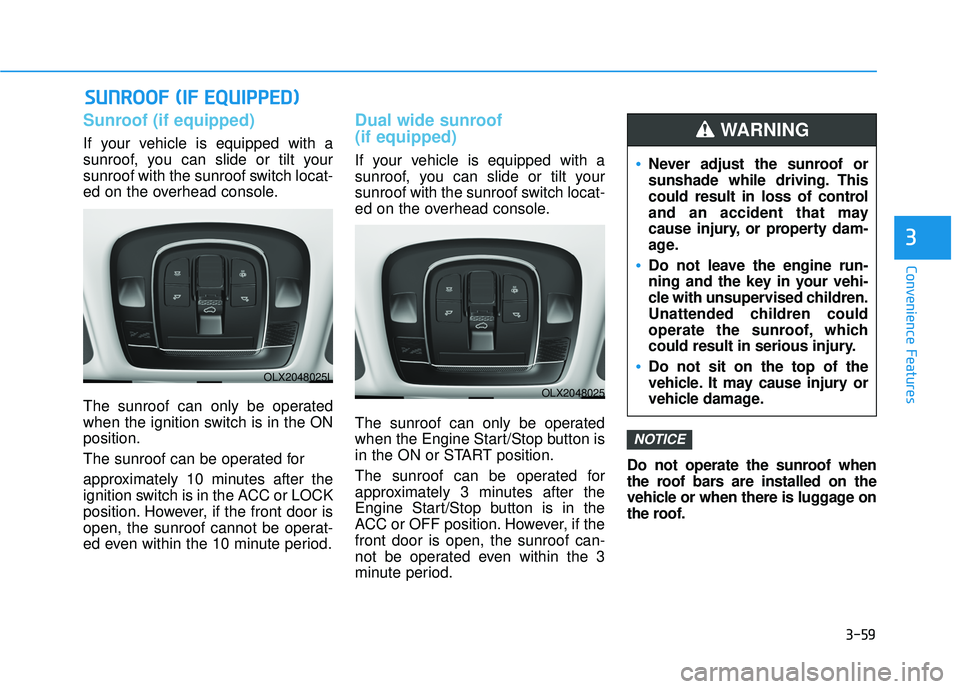
Sunroof (if equipped)
If your vehicle is equipped with a
sunroof, you can slide or tilt your
sunroof with the sunroof switch locat-
ed on the overhead console.
The sunroof can only be operated
when the ignition switch is in the ON
position.
The sunroof can be operated for
approximately 10 minutes after the
ignition switch is in the ACC or LOCK
position. However, if the front door is
open, the sunroof cannot be operat-
ed even within the 10 minute period.
Dual wide sunroof
(if equipped)
If your vehicle is equipped with a
sunroof, you can slide or tilt your
sunroof with the sunroof switch locat-
ed on the overhead console.
The sunroof can only be operated
when the Engine Start/Stop button is
in the ON or START position.
The sunroof can be operated for
approximately 3 minutes after the
Engine Start/Stop button is in the
ACC or OFF position. However, if the
front door is open, the sunroof can-
not be operated even within the 3
minute period.Do not operate the sunroof when
the roof bars are installed on the
vehicle or when there is luggage on
the roof.
NOTICE
S S
U U N NR RO O O OF F ( ( I IF F E E Q Q U UI IP P P PE ED D ) )
Never adjust the sunroof or
sunshade while driving. This
could result in loss of control
and an accident that may
cause injury, or property dam-
age.
Do not leave the engine run-
ning and the key in your vehi-
cle with unsupervised children.
Unattended children could
operate the sunroof, which
could result in serious injury.
Do not sit on the top of the
vehicle. It may cause injury or
vehicle damage.
WARNING
OLX2048025L
OLX2048025
Page 165 of 663
3-69
Convenience Features
3
Power Liftgate (if equipped)
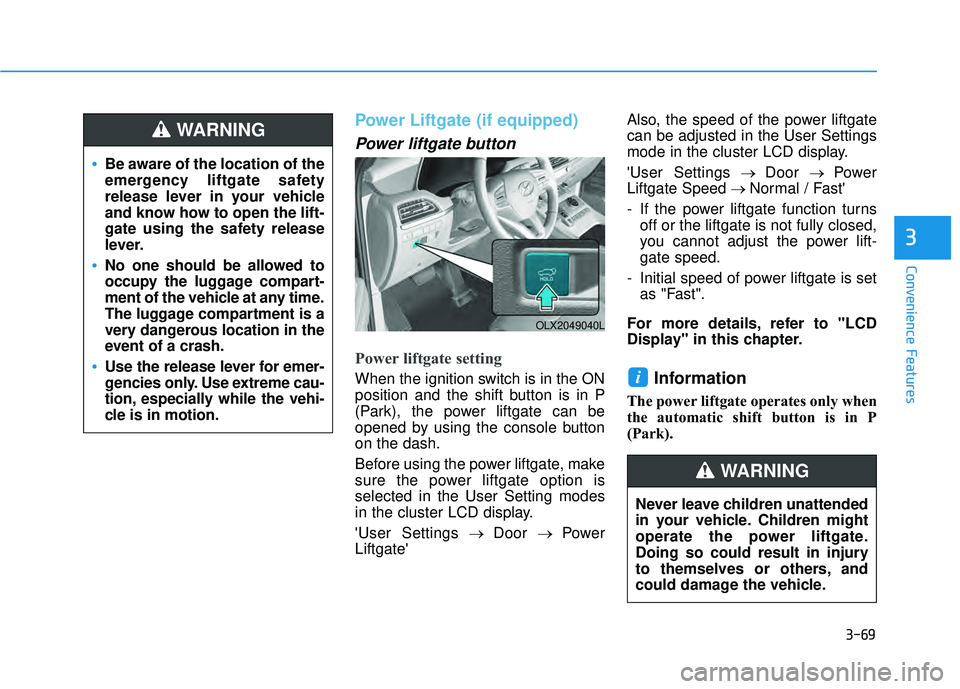
Power liftgate button
Power liftgate setting
When the ignition switch is in the ON
position and the shift button is in P
(Park), the power liftgate can be
opened by using the console button
on the dash.
Before using the power liftgate, make
sure the power liftgate option is
selected in the User Setting modes
in the cluster LCD display.
'User Settings→ Door → Power
Liftgate' Also, the speed of the power liftgate
can be adjusted in the User Settings
mode in the cluster LCD display.
'User Settings
→ Door → Power
Liftgate Speed → Normal / Fast'
- If the power liftgate function turns off or the liftgate is not fully closed,
you cannot adjust the power lift-
gate speed.
- Initial speed of power liftgate is set as "Fast".
For more details, refer to "LCD
Display" in this chapter.Information
The power liftgate operates only when
the automatic shift button is in P
(Park).
i
Be aware of the location of the
emergency liftgate safety
release lever in your vehicle
and know how to open the lift-
gate using the safety release
lever.
No one should be allowed to
occupy the luggage compart-
ment of the vehicle at any time.
The luggage compartment is a
very dangerous location in the
event of a crash.
Use the release lever for emer-
gencies only. Use extreme cau-
tion, especially while the vehi-
cle is in motion.
WARNING
OLX2049040L
Never leave children unattended
in your vehicle. Children might
operate the power liftgate.
Doing so could result in injury
to themselves or others, and
could damage the vehicle.
WARNING
Page 176 of 663
3-80
Convenience Features
Do not get back into a vehicle
once you have begun refuel-
ing. You can generate a build-
up of static electricity by
touching, rubbing or sliding
against any item or fabric
capable of producing static
electricity. Static electricity
discharge can ignite fuel
vapors causing a fire. If you
must re-enter the vehicle, you
should once again eliminate
potentially dangerous static
electricity discharge by touch-
ing a metal part of the vehicle,
away from the fuel filler neck,
nozzle or other gasoline
source, with your bare hand.
When using an approved
portable fuel container, be
sure to place the container on
the ground prior to refueling.
Static electricity discharge
from the container can ignite
fuel vapors causing a fire.
Once refueling has begun,
contact between your bare
hand and the vehicle should
be maintained until the filling
is complete.
Use only approved portable
plastic fuel containers designed
to carry and store gasoline.
When refueling, always move
the shift button to the P (Park)
position, set the parking
brake, and place the ignition
switch to the LOCK/OFF posi-
tion. Sparks produced by
electrical components related
to the engine can ignite fuel
vapors causing a fire.
Do not use matches or a
lighter and do not smoke or
leave a lit cigarette in your
vehicle while at a gas station,
especially during refueling.
Gasoline is highly flammable
and explosive. Failure to follow
these guidelines may result in
SERIOUS INJURY or DEATH:
Read and follow all warnings
posted at the gas station.
Before refueling, note the
location of the Emergency
Gasoline Shut-Off, if available,
at the gas station.
Before touching the fuel noz-
zle, you should eliminate the
potential build-up of static
electricity by touching a metal
part of the vehicle, a safe dis-
tance away from the fuel filler
neck, nozzle, or other gas
source, with your bare hand.
Do not use cellular phones
while refueling. Electric cur-
rent and/or electronic interfer-
ence from cellular phones can
potentially ignite fuel vapors
and cause a fire.
WARNING