climate control HYUNDAI PALISADE 2022 Owners Manual
[x] Cancel search | Manufacturer: HYUNDAI, Model Year: 2022, Model line: PALISADE, Model: HYUNDAI PALISADE 2022Pages: 663, PDF Size: 15.74 MB
Page 16 of 663
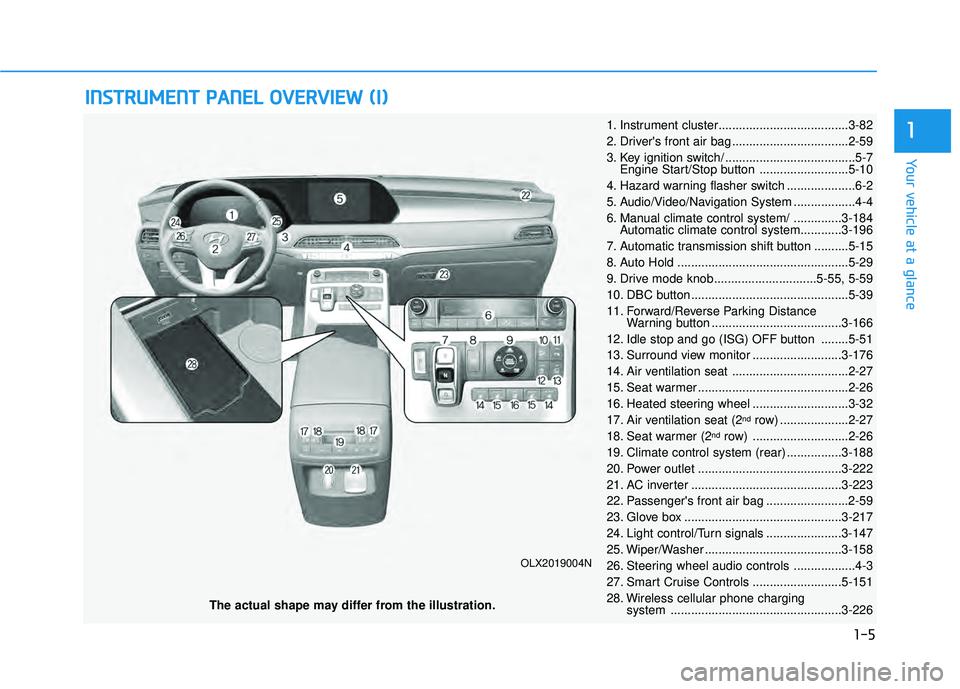
I IN N S ST T R R U U M M E EN N T T P P A A N N E EL L O O V VE ER R V V I IE E W W ( ( I I) )
The actual shape may differ from the illustration.
1-5
Your vehicle at a glance
1
OLX2019004N
1. Instrument cluster......................................3-82
2. Driver's front air bag ..................................2-59
3. Key ignition switch/ ......................................5-7
Engine Start/Stop button ..........................5-10
4. Hazard warning flasher switch ....................6-2
5. Audio/Video/Navigation System ..................4-4
6. Manual climate control system/ ..............3-184 Automatic climate control system............3-196
7. Automatic transmission shift button ..........5-15
8. Auto Hold ..................................................5-29
9. Drive mode knob..............................5-55, 5-59
10. DBC button ..............................................5-39
11. Forward/Reverse Parking Distance Warning button ......................................3-166
12. Idle stop and go (ISG) OFF button ........5-51
13. Surround view monitor ..........................3-176
14. Air ventilation seat ..................................2-27
15. Seat warmer ............................................2-26
16. Heated steering wheel ............................3-32
17. Air ventilation seat (2
ndrow) ....................2-27
18. Seat warmer (2ndrow) ............................2-26
19. Climate control system (rear) ................3-188
20. Power outlet ..........................................3-222
21. AC inverter ............................................3-223
22. Passenger's front air bag ........................2-59
23. Glove box ..............................................3-217
24. Light control/Turn signals ......................3-147
25. Wiper/Washer ........................................3-158
26. Steering wheel audio controls ..................4-3
27. Smart Cruise Controls ..........................5-151
28. Wireless cellular phone charging system ..................................................3-226
Page 45 of 663
2-28
Safety system of your vehicle
The air ventilation seat defaults to the OFF position whenever the
vehicle is turned on.
Information
• If the outside temperature is underapproximately 33°F (2°C), the air
ventilation seat may not operate.
• Use the air ventilation seat when the climate control system is on. Using
the air ventilation seat for prolonged
periods of time with the climate con-
trol system off could cause the cli-
mate control seat performance to be
reduced.
To prevent damage to the air ven-
tilation seat:
Use the air ventilation seat ONLY when the climate control system
is on. Using the air ventilation
seat for prolonged periods of
time with the climate control
system off could cause the air
ventilation seat to malfunction.
Never use a solvent such as paint thinner, benzene, alcohol
or gasoline to clean the seats. Avoid spilling liquids on the sur-
face of the front seats and seat-
backs; this may cause the air
vent holes to become blocked
and not work properly.
Do not place materials such as plastic bags or newspapers
under the seats. They may block
the air intake causing the air
vents to not work properly.
Do not change the seat covers. It may damage the air ventilation
seat.
If the air vents do not operate, restart the vehicle. If there is no
change, have the vehicle
inspected by an authorized
HYUNDAI dealer.
NOTICE
i
Page 99 of 663
Convenience Features
Blind-Spot View Monitor (BVM) .....................3-182
Blind-Spot View Monitor settings ............................3-182
Blind-Spot View Monitor operation .........................3-183
Blind-Spot View Monitor malfunction.....................3-183
Manual climate control system........................3-184
Heating and Air Conditioning .....................................3-185
Rear climate control .....................................................3-189
System Operation .........................................................3-192
System Maintenance....................................................3-194
Automatic climate control system ...................3-196
Automatic Temperature Control Mode ....................3-197
Manual Temperature Control Mode .........................3-198
Rear climate control .....................................................3-204
System Operation .........................................................3-207
System Maintenance....................................................3-209
Windshield defrosting and defogging ............3-211
Auto Defogging System (Additional Feature with
Automatic Temperature Control System)................3-213
Rear Window Defroster ..............................................3-215
Climate control additional features.................3-216
Cluster ionizer ................................................................3-216
Automatic Ventilation ...................................................3-216
Sunroof Inside Air Recirculation ...............................3-216
Storage compartment ........................................3-217
Center Console Storage ..............................................3-217
Glove Box ........................................................................\
3-217
Luggage Tray .................................................................3-218
Interior features.................................................3-219
Cup Holder ......................................................................3-\
219
Conversation mirror......................................................3-221
Sunvisor ........................................................................\
...3-221
Power Outlet ..................................................................3-222
AC Inverter......................................................................3-\
223
USB Charger ...................................................................3-225\
Wireless Cellular Phone Charging System..............3-226
Clock ........................................................................\
.........3-228
Coat Hook .......................................................................3\
-228
Floor Mat Anchor(s).....................................................3-229
Luggage Net Holder .....................................................3-230
Cargo Security Screen .................................................3-230
Side Curtain ....................................................................3-23\
2
Exterior features ...............................................3-234
Roof Side Rails ..............................................................3-234
3
Page 152 of 663
3-56
Convenience Features
Power Windows
The ignition switch must be in the ON
position to be able to raise or lower
the windows. Each door has a Power
Window switch to control that door’s
window. The driver has a Power
Window Lock switch which can block
the operation of passenger windows.
The power windows will operate for
approximately 10 minutes after the
ignition switch is placed in the ACC
or LOCK/OFF position. However, if
the front doors are opened, the
Power Windows will not operate even
within the 10 minute period.
Information
• In cold and wet climates, power win-dows may not work properly due to
freezing conditions.
• While driving with the rear win- dows down or with the sunroof (if
equipped) opened (or partially
opened), your vehicle may demon-
strate a wind buffeting or pulsation
noise. This noise is normal and can
be reduced or eliminated by taking
the following actions. If the noise
occurs with one or both of the rear
windows down, partially lower both
front windows approximately one
inch. If you experience the noise
with the sunroof open, slightly close
the sunroof.
Window opening and closing
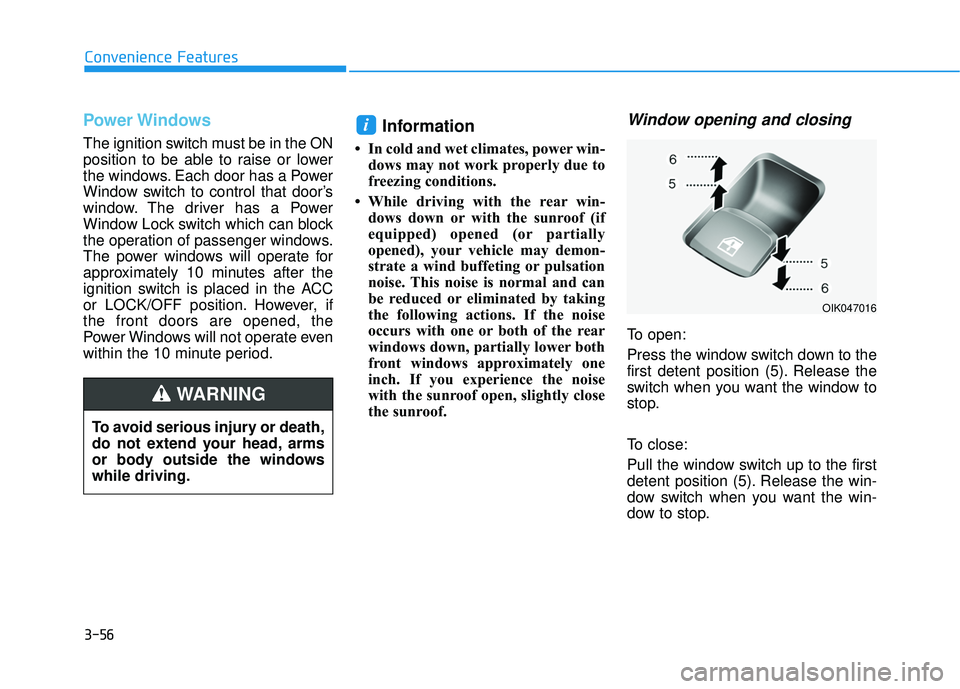
To open:
Press the window switch down to the
first detent position (5). Release the
switch when you want the window to
stop.
To close:
Pull the window switch up to the first
detent position (5). Release the win-
dow switch when you want the win-
dow to stop.
i
To avoid serious injury or death,
do not extend your head, arms
or body outside the windows
while driving.
WARNING
OIK047016
Page 183 of 663
3-87
Convenience Features
3
Avoid driving with an extremely
low fuel level. Running out of fuel
could cause the engine to misfire
damaging the catalytic converter.
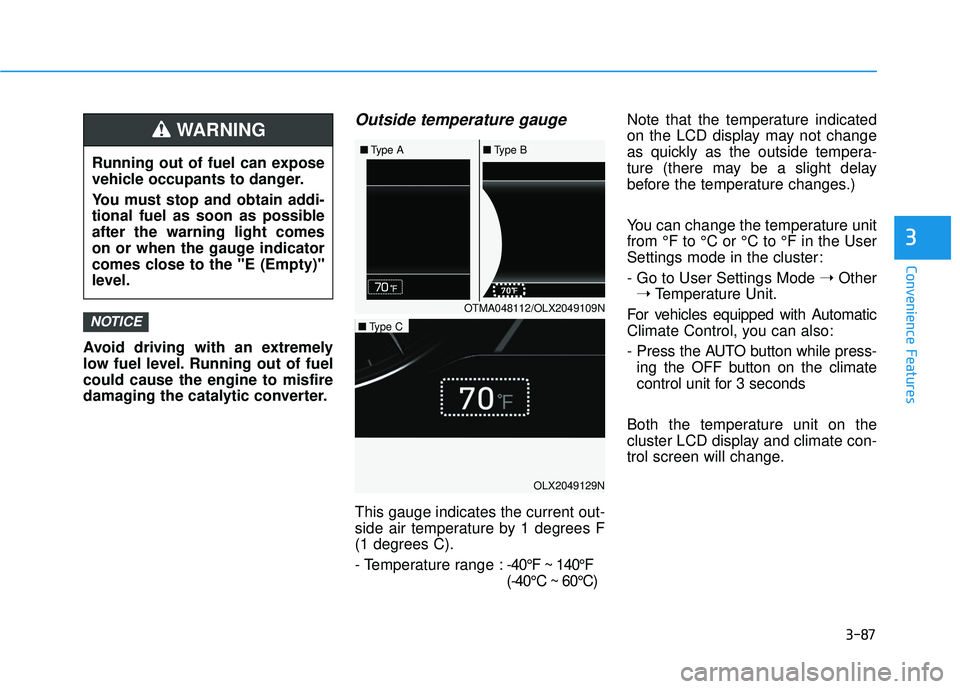
Outside temperature gauge
This gauge indicates the current out-
side air temperature by 1 degrees F
(1 degrees C).
- Temperature range :-40°F ~ 140°F
(-40°C ~ 60°C)Note that the temperature indicated
on the LCD display may not change
as quickly as the outside tempera-
ture (there may be a slight delay
before the temperature changes.)
You can change the temperature unit
from °F to °C or °C to °F in the User
Settings mode in the cluster:
- Go to User Settings Mode
➝Other
➝ Temperature Unit.
For vehicles equipped with Automatic
Climate Control, you can also:
- Press the AUTO button while press- ing the OFF button on the climate
control unit for 3 seconds
Both the temperature unit on the
cluster LCD display and climate con-
trol screen will change.
NOTICE
Running out of fuel can expose
vehicle occupants to danger.
You must stop and obtain addi-
tional fuel as soon as possible
after the warning light comes
on or when the gauge indicator
comes close to the "E (Empty)"
level.
WARNING
OTMA048112/OLX2049109N
■
Type A ■Type B
OLX2049129N
■Type C
Page 280 of 663
3-184
Convenience Features
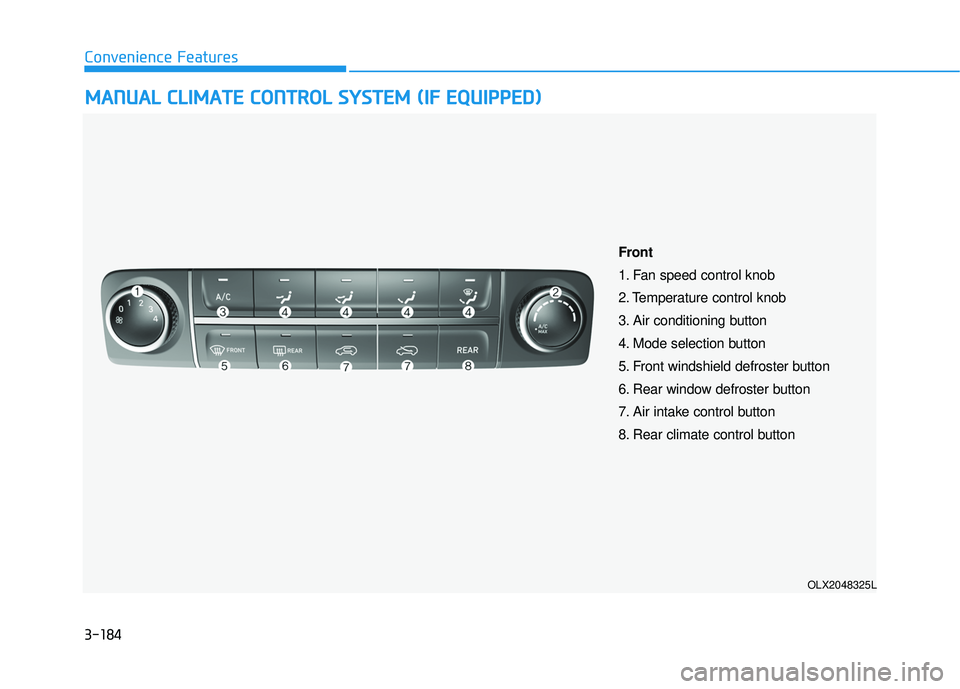
M MA AN N U U A AL L C C L LI IM M A AT TE E C C O O N NT TR R O O L L S S Y Y S ST T E EM M ( ( I IF F E E Q Q U UI IP P P PE ED D ) )
OLX2048325L
Front
1. Fan speed control knob
2. Temperature control knob
3. Air conditioning button
4. Mode selection button
5. Front windshield defroster button
6. Rear window defroster button
7. Air intake control button
8. Rear climate control button
Page 284 of 663
3-188
Convenience Features
Fan speed control (1)
Turn the knob to the right to increase
the fan speed and airflow. Turn the
knob to the left to decrease fan
speed and airflow.
Setting the fan speed control knob to
the "0" position turns off the fan.
Operating the fan speed when the
ignition switch is in the ON posi-
tion could cause the battery to
discharge. Operate the fan speed
when the engine is running.
Air conditioning (3)
Push the A/C button to turn the sys-
tem on (indicator light will illuminate)
and off.
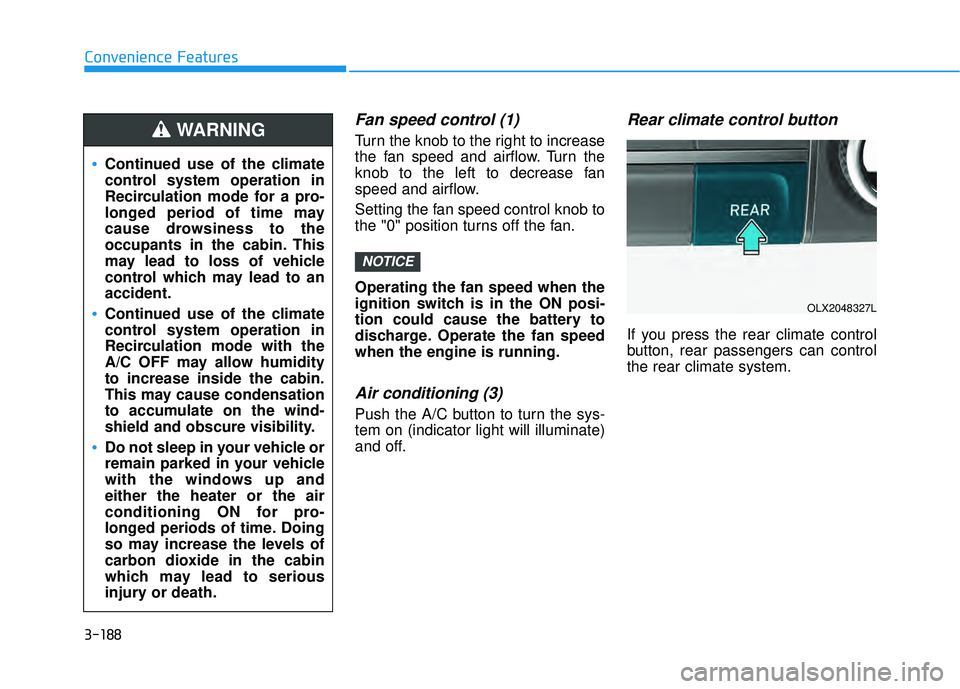
Rear climate control button
If you press the rear climate control
button, rear passengers can control
the rear climate system.
NOTICE
Continued use of the climate
control system operation in
Recirculation mode for a pro-
longed period of time may
cause drowsiness to the
occupants in the cabin. This
may lead to loss of vehicle
control which may lead to an
accident.
Continued use of the climate
control system operation in
Recirculation mode with the
A/C OFF may allow humidity
to increase inside the cabin.
This may cause condensation
to accumulate on the wind-
shield and obscure visibility.
Do not sleep in your vehicle or
remain parked in your vehicle
with the windows up and
either the heater or the air
conditioning ON for pro-
longed periods of time. Doing
so may increase the levels of
carbon dioxide in the cabin
which may lead to serious
injury or death.
WARNING
OLX2048327L
Page 285 of 663
3-189
Convenience Features
3
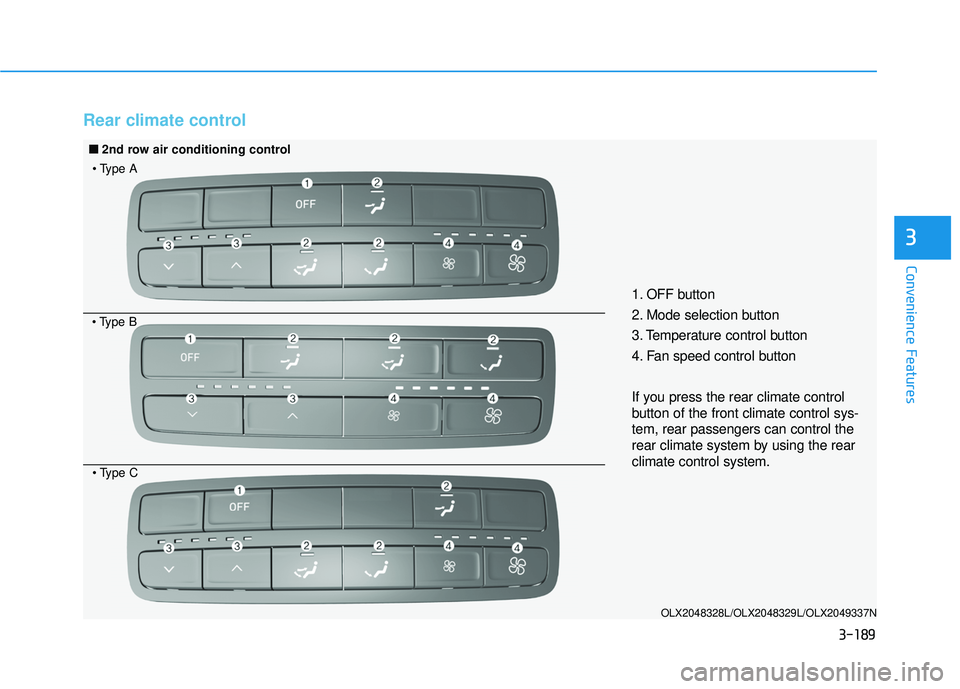
Rear climate control
OLX2048328L/OLX2048329L/OLX2049337N
1. OFF button
2. Mode selection button
3. Temperature control button
4. Fan speed control button
If you press the rear climate control
button of the front climate control sys-
tem, rear passengers can control the
rear climate system by using the rear
climate control system.
■ ■2nd row air conditioning control
Page 286 of 663
3-190
Convenience Features
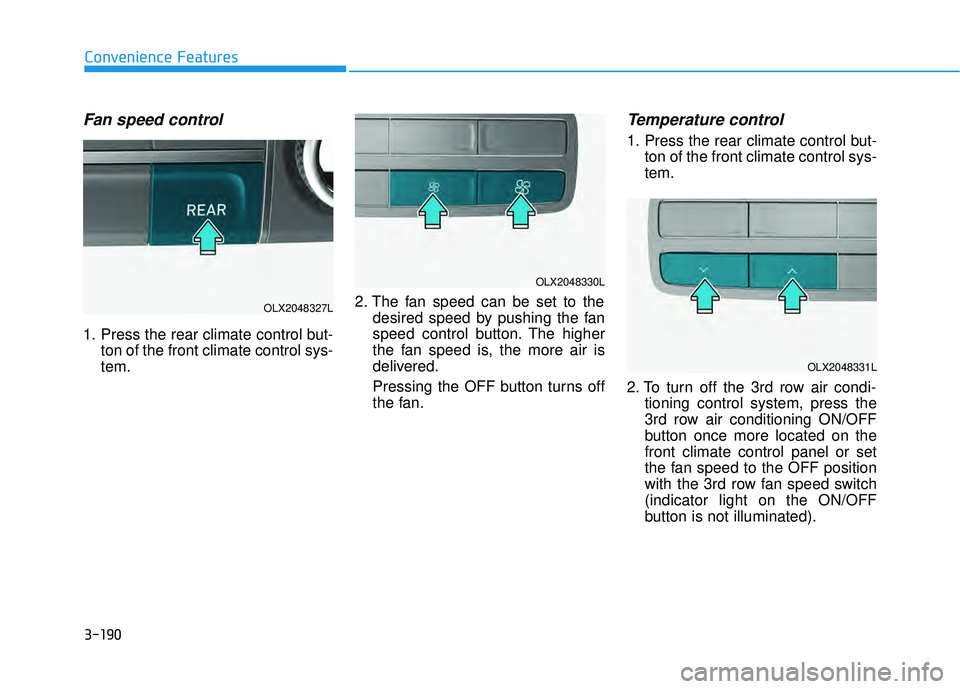
Fan speed control
1. Press the rear climate control but-ton of the front climate control sys-
tem. 2. The fan speed can be set to the
desired speed by pushing the fan
speed control button. The higher
the fan speed is, the more air is
delivered.
Pressing the OFF button turns off
the fan.
Temperature control
1. Press the rear climate control but-ton of the front climate control sys-
tem.
2. To turn off the 3rd row air condi- tioning control system, press the
3rd row air conditioning ON/OFF
button once more located on the
front climate control panel or set
the fan speed to the OFF position
with the 3rd row fan speed switch
(indicator light on the ON/OFF
button is not illuminated).
OLX2048327L
OLX2048330L
OLX2048331L
Page 287 of 663
3-191
Convenience Features
3
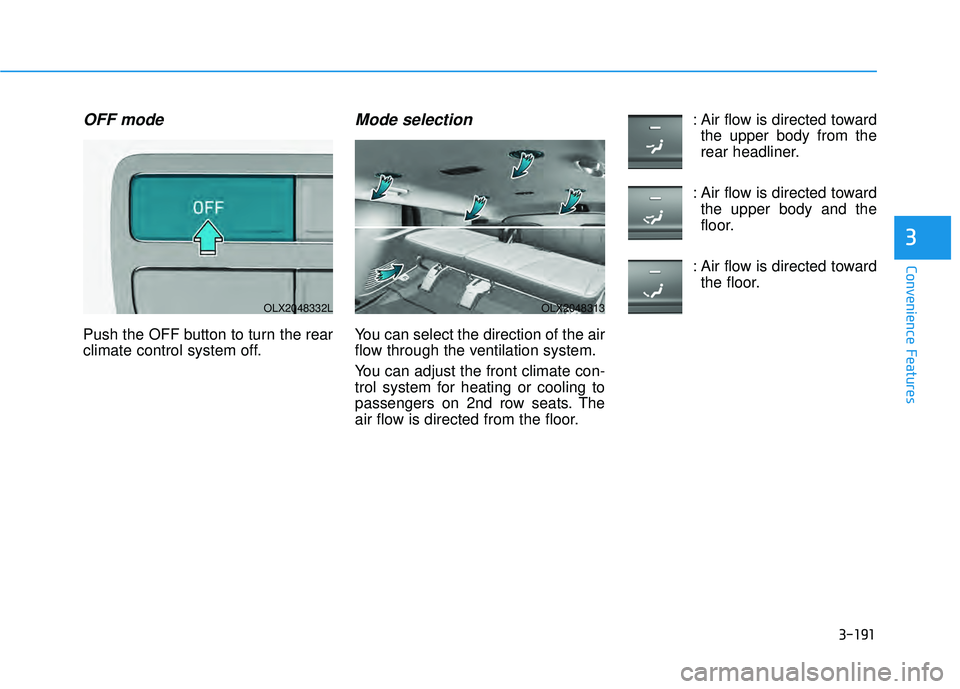
OFF mode
Push the OFF button to turn the rear
climate control system off.
Mode selection
You can select the direction of the air
flow through the ventilation system.
You can adjust the front climate con-
trol system for heating or cooling to
passengers on 2nd row seats. The
air flow is directed from the floor.: Air flow is directed toward
the upper body from the
rear headliner.
: Air flow is directed toward the upper body and the
floor.
: Air flow is directed toward the floor.
OLX2048332LOLX2048313