ECU Hyundai Santa Fe 2008 User Guide
[x] Cancel search | Manufacturer: HYUNDAI, Model Year: 2008, Model line: Santa Fe, Model: Hyundai Santa Fe 2008Pages: 355, PDF Size: 12.36 MB
Page 47 of 355
1
FEATURES OF YOUR HYUNDAI
35
!
WARNING:
o Never allow a child to stand-up or
kneel on the seat or floorboard of a
moving vehicle. During a collision or
sudden stop, the child can be violently
thrown against the vehicles interior,
resulting in serious injury.
o Never use an infant carrier or a child
safety seat that "hooks" over a
seatback, it may not provide adequate
security in an accident.
o Seat belts can become very hot, es-
pecially when the car is parked in
direct sunlight. Always check seat
belt buckles before fastening them
over a child.
o Always store or secure a child seat,
even when it is not in use. During a
collision or sudden stop, the child seat
could be thrown inside the vehicle.
B230C01CM-AATInstalling a Child Restraint Seat
with the "Tether Anchorage"
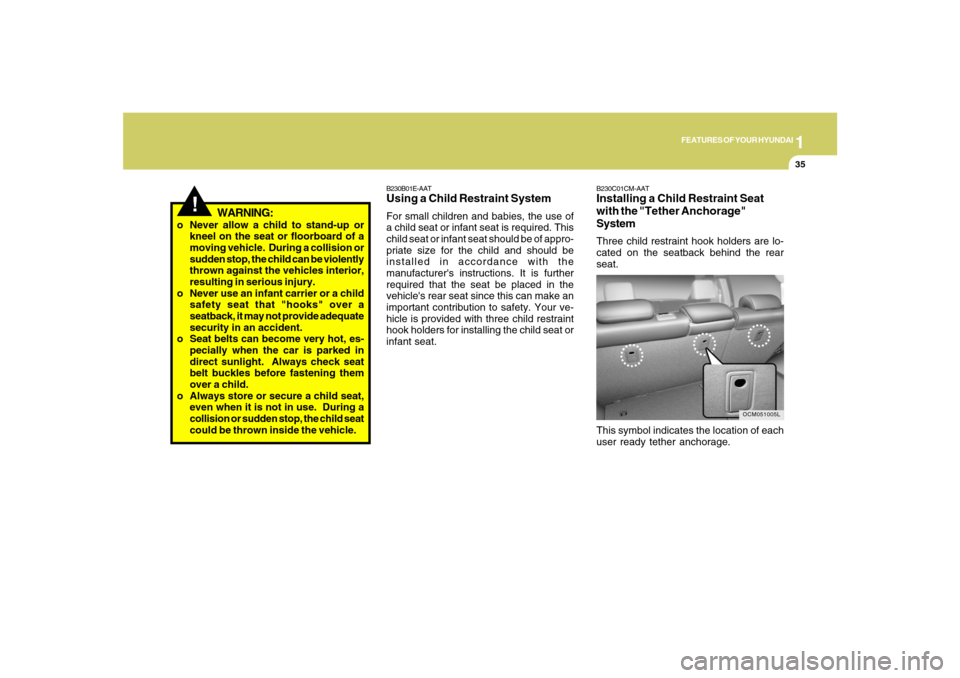
SystemThree child restraint hook holders are lo-
cated on the seatback behind the rear
seat.
This symbol indicates the location of each
user ready tether anchorage.
OCM051005L
B230B01E-AATUsing a Child Restraint SystemFor small children and babies, the use of
a child seat or infant seat is required. This
child seat or infant seat should be of appro-
priate size for the child and should be
installed in accordance with the
manufacturer's instructions. It is further
required that the seat be placed in the
vehicle's rear seat since this can make an
important contribution to safety. Your ve-
hicle is provided with three child restraint
hook holders for installing the child seat or
infant seat.
Page 48 of 355
1FEATURES OF YOUR HYUNDAI36
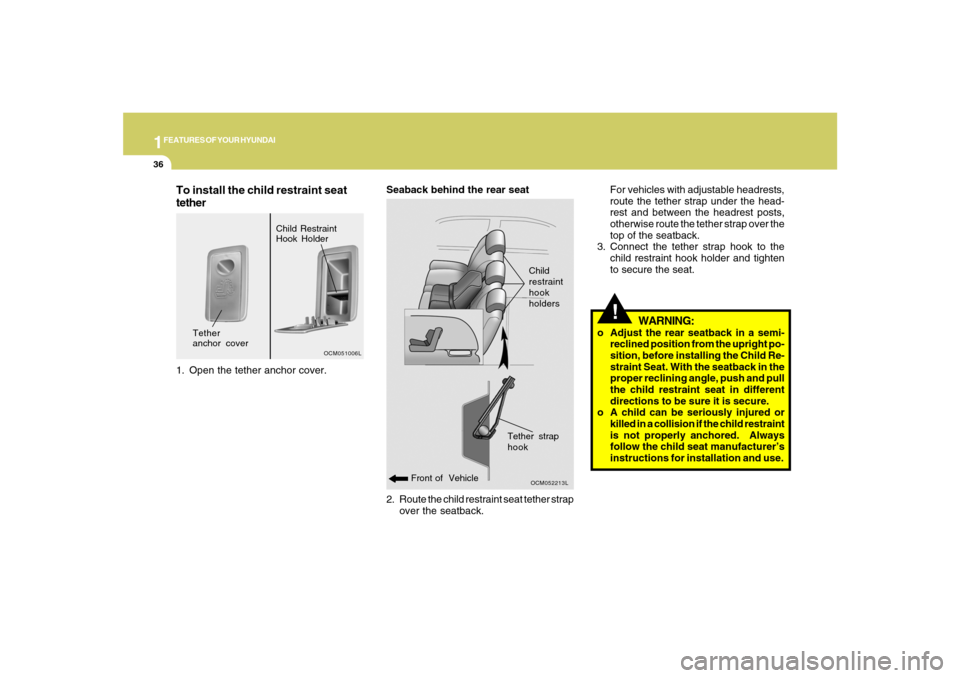
2. Route the child restraint seat tether strap
over the seatback. Seaback behind the rear seat
OCM052213L
Front of VehicleChild
restraint
hook
holders
!For vehicles with adjustable headrests,
route the tether strap under the head-
rest and between the headrest posts,
otherwise route the tether strap over the
top of the seatback.
3. Connect the tether strap hook to the
child restraint hook holder and tighten
to secure the seat.
WARNING:
o Adjust the rear seatback in a semi-
reclined position from the upright po-
sition, before installing the Child Re-
straint Seat. With the seatback in the
proper reclining angle, push and pull
the child restraint seat in different
directions to be sure it is secure.
o A child can be seriously injured or
killed in a collision if the child restraint
is not properly anchored. Always
follow the child seat manufacturer’s
instructions for installation and use.
Tether strap
hook
To install the child restraint seat
tether1. Open the tether anchor cover.
OCM051006L
Tether
anchor coverChild Restraint
Hook Holder
Page 49 of 355
1
FEATURES OF YOUR HYUNDAI
37
!
WARNING:
o Never mount more than one child re-
straint to a single tether or to a single
lower anchorage point. The increased
load caused by multiple seats may
cause the tethers or anchorage points
to break, causing serious injury or
death.
!
WARNING:
o A child can be seriously injured or
killed in a collision if the child restraint
is not properly anchored. Always
follow the child seat manufacturer’s
instructions for installation and use.
o Never install a child restraint using
the lower anchors at the center posi-
tion of the rear seat. In a crash, the
LATCH anchors may break if a car
seat is improperly placed in the cen-
ter position resulting in serious or
fatal injuries. Only place a LATCH or
LATCH-compatible child seat in the
left or right out-board rear seating
positions (as shown) to the appropri-
ate LATCH anchors provided.
B230D03CM-AATSecuring the Child Restraint Seat
with the "LATCH" systemSome child seat manufacturers make safety
seats that are labeled as LATCH or LATCH-
compatible child seats. These seats in-
clude two rigid or webbing mounted at-
tachments that connect to two lower an-
chors at specific seating positions in your
vehicle. This type of child seat eliminates
the need to use seat belts to attach the child
seat; the tether strap must also be attached
to the proper tether anchor point. For infor-
mation on using tether straps, refer to “In-
stalling a Child Restraint Seat with the
“Tether Anchorage” system”.
OCM051007L
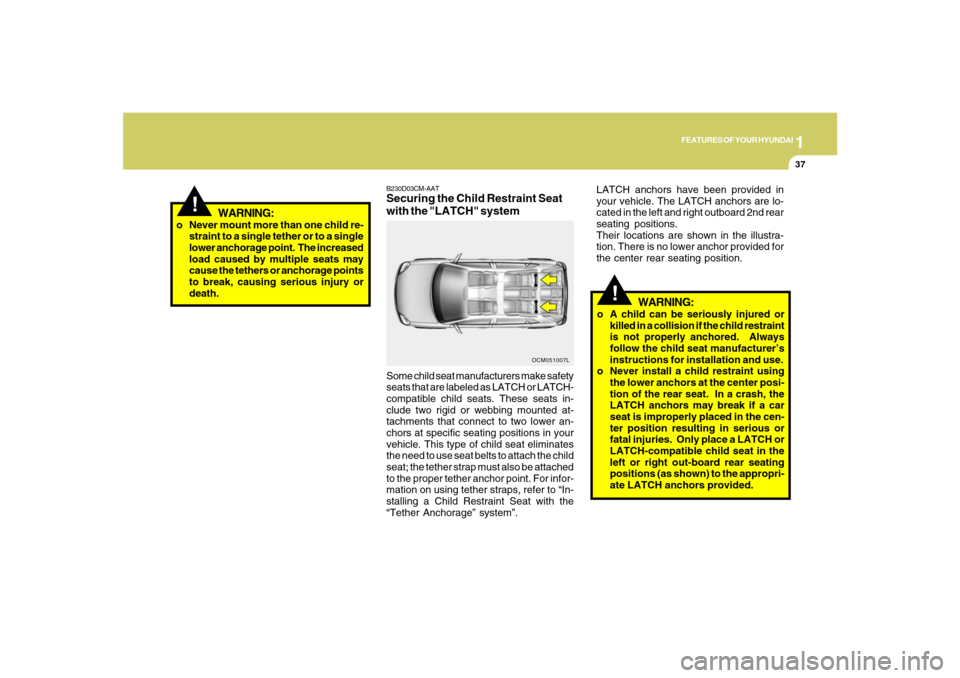
LATCH anchors have been provided in
your vehicle. The LATCH anchors are lo-
cated in the left and right outboard 2nd rear
seating positions.
Their locations are shown in the illustra-
tion. There is no lower anchor provided for
the center rear seating position.
Page 50 of 355
1FEATURES OF YOUR HYUNDAI38
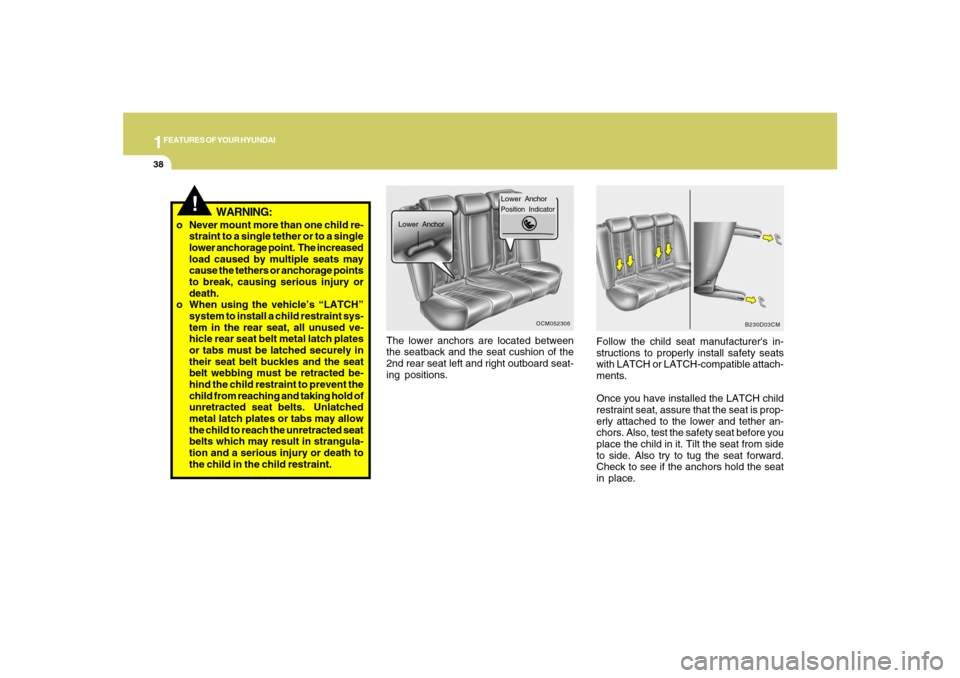
The lower anchors are located between
the seatback and the seat cushion of the
2nd rear seat left and right outboard seat-
ing positions.Follow the child seat manufacturer's in-
structions to properly install safety seats
with LATCH or LATCH-compatible attach-
ments.
Once you have installed the LATCH child
restraint seat, assure that the seat is prop-
erly attached to the lower and tether an-
chors. Also, test the safety seat before you
place the child in it. Tilt the seat from side
to side. Also try to tug the seat forward.
Check to see if the anchors hold the seat
in place.
Lower AnchorPosition Indicator
Lower Anchor
OCM052306
B230D03CM
!
o Never mount more than one child re-
straint to a single tether or to a single
lower anchorage point. The increased
load caused by multiple seats may
cause the tethers or anchorage points
to break, causing serious injury or
death.
o When using the vehicle’s “LATCH”
system to install a child restraint sys-
tem in the rear seat, all unused ve-
hicle rear seat belt metal latch plates
or tabs must be latched securely in
their seat belt buckles and the seat
belt webbing must be retracted be-
hind the child restraint to prevent the
child from reaching and taking hold of
unretracted seat belts. Unlatched
metal latch plates or tabs may allow
the child to reach the unretracted seat
belts which may result in strangula-
tion and a serious injury or death to
the child in the child restraint.
WARNING:
Page 51 of 355
1
FEATURES OF YOUR HYUNDAI
39
!
WARNING:
o A child can be seriously injured or
killed in a collision if the child restraint
is not properly anchored to the car
and the child is not properly restrained
in the child restraint. Always follow
the child seat manufacturer’s instruc-
tions for installation and use.
o Adjust the rear seatback in a semi-
reclined position from the upright po-
sition, before installing the Child Re-
straint Seat. With the seatback in the
proper reclining angle, push and pull
the child restraint seat in different
directions to be sure it is secure.
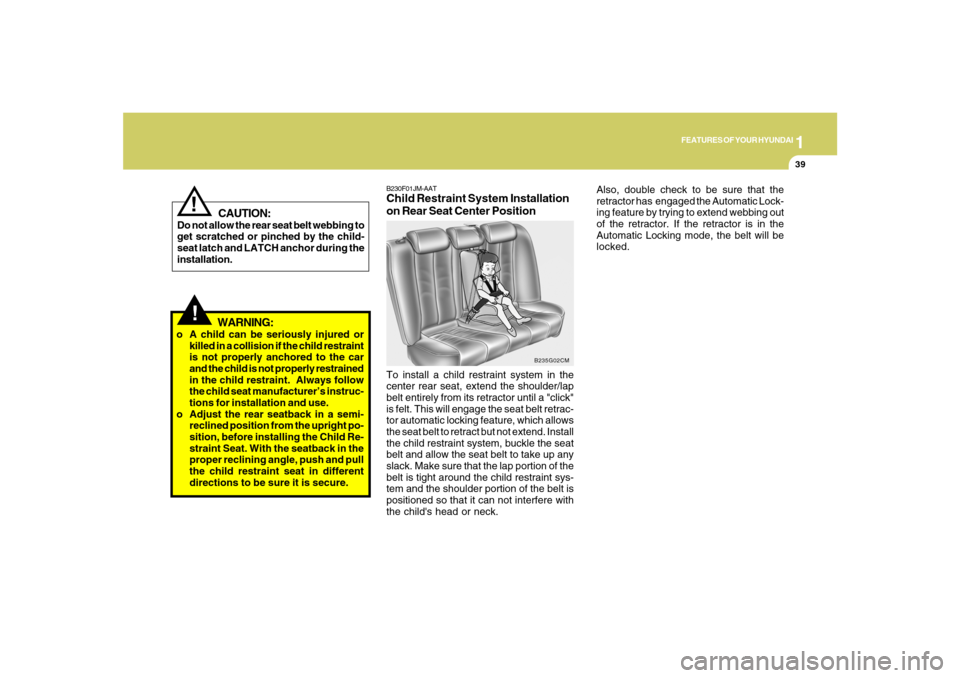
B230F01JM-AATChild Restraint System Installation
on Rear Seat Center PositionTo install a child restraint system in the
center rear seat, extend the shoulder/lap
belt entirely from its retractor until a "click"
is felt. This will engage the seat belt retrac-
tor automatic locking feature, which allows
the seat belt to retract but not extend. Install
the child restraint system, buckle the seat
belt and allow the seat belt to take up any
slack. Make sure that the lap portion of the
belt is tight around the child restraint sys-
tem and the shoulder portion of the belt is
positioned so that it can not interfere with
the child's head or neck.
B235G02CM
Also, double check to be sure that the
retractor has engaged the Automatic Lock-
ing feature by trying to extend webbing out
of the retractor. If the retractor is in the
Automatic Locking mode, the belt will be
locked.
CAUTION:
Do not allow the rear seat belt webbing to
get scratched or pinched by the child-
seat latch and LATCH anchor during the
installation.
!
Page 68 of 355
1FEATURES OF YOUR HYUNDAI56
!
WARNING:
o Accident statistics show that children
are safer if they are restrained in the
rear, as opposed to the front seat. It is
recommended that child restraints
be secured in a rear seat, including an
infant riding in a rear-facing infant
seat, a child riding in a forward-facing
child seat and an older child riding in
a booster seat.
o Air bags can only be used once – have
an authorized Hyundai dealer replace
the air bag immediately after deploy-
ment.
!
WARNING:
o If you change the weight on the front
passenger seat just after sit-in or re-
start of the engine, the "PASSENGER
AIR BAG OFF" indicator may be
turned on or off for a few seconds,
disabling or enabling the passenger
air bags. After the initial stage of about
30 seconds, the "PASSENGER AIR
BAG OFF" indicator will not toggle on
and off.
o Do not modify or replace the front
passenger seat. Don't place anything
on or attach anything such as a blan-
ket or after market seat heater to the
front passenger seat. This can ad-
versely affect the occupant classifi-
cation system.
o Do not sit on sharp objects such as
tools when occupying the front pas-
senger seat. This can adversely af-
fect the occupant classification sys-
tem.
o Do not use accessory seat covers on
the front seats.
!
WARNING:
o Even though your vehicle is equipped
with the occupation classification
system, never install a child restraint
system in the front passenger's seat.
A deploying air bag can forcefully
strike a child resulting in serious inju-
ries or death. Any child under 13
years of age should ride in the rear
seat. Children too large for child re-
straints should use the available lap/
shoulder belts. No matter what type
of crash, children of all ages are safer
when restrained in the rear seat.
o If the "PASSENGER AIR BAG OFF"
indicator is illuminated when the front
passenger's seat is occupied by an
adult and he/she sits properly (sitting
upright with the seatback in an upright
position, centered on the seat cush-
ion with their seat belt on, legs com-
fortably extended and their feet on the
floor), have that person sit in the rear
seat.
Page 117 of 355
1
FEATURES OF YOUR HYUNDAI
105
1. Press and hold the
button for more
than 6 seconds. When the compass
memory is cleared a "C" will appear in
the display.
2. To calibrate the compass, drive the
vehicle in 2 complete circles at less than
5 MPH (8 Km/h) or until the compass
heading appears.
!
Integrated HomeLink
® Wireless
Control System
The HomeLink
® Wireless Control System
provides a convenient way to replace up to
three hand-held radio-frequency (RF)
transmitters with a single built-in device.
This innovative feature will learn the radio
frequency codes of most current transmit-
ters to operate devices such as gate op-
erators, garage door openers, entry door
locks, security systems, even home light-
ing. Both standard and rolling code-
equipped transmitters can be programmed
by following the outlined procedures.
CAUTION:
Before programming HomeLink
® to a
garage door opener or gate operator,
make sure that people and objects are
out of the way of the device to prevent
potential harm or damage. Do not use
HomeLink
® with any garage door opener
that lacks the safety stop and reverse
features as required by U.S. federal
safety standards (this includes any ga-
rage door opener model manufactured
before April 1, 1982). A garage door that
cannot detect an object - signaling the
door to stop and reverse - does not meet
current U.S. federal safety standards.
Using a garage door opener without these
features increases the risk of serious
injury or death.Programming HomeLink
®
NOTE:o When programming a garage door
opener, it is advised to park the ve-
hicle outside of the garage.
o It is recommended that a new battery
be placed in the hand-held transmit-
ter of the device being programmed
to HomeLink
® for quicker training and
accurate transmission of the radio-
frequency signal.
o Some vehicles may require the igni-
tion switch to be turned to the second
(or "accessories") position for pro-
gramming and/or operation of
HomeLink.
o In the event that there are still pro-
gramming difficulties or questions
after following the programming steps
listed below, contact HomeLink
® at:
www.homelink.com or 1-800-355-
3515.
Retain the original transmitter of the RF
device you are programming for use in
other vehicles as well as for future
HomeLink
® programming. It is also sug-
gested that upon the sale of the vehicle, the
programmed HomeLink
® buttons be
erased for security purposes.
CAUTION:
Be sure the area is free of traffic, pedes-
trians, and obstructions.
!
Additional HomeLink
® information can be
found at: www.homelink.com or by calling
1-800-355-3515.
Page 119 of 355

1
FEATURES OF YOUR HYUNDAI
107
4. Press and hold the just-trained
HomeLink
® button and observe the red
Status Indicator LED. If the indicator
light stays on constantly, programming
is complete and your device should
activate.
5. To program the remaining two
HomeLink® buttons, follow either steps
1 through 4 above for other Rolling
Code devices or steps 2 through 5 in
Standard Programming for standard
devices.
Gate Operator & Canadian Programming
During programming, your handheld trans-
mitter may automatically stop transmitting.
Continue to press the Integrated
HomeLink
® Wireless Control System but-
ton (note steps 2 through 4 in the Standard
Programming portion of this document)
while you press and re-press ("cycle") your
handheld transmitter every two seconds
until the frequency signal has been learned.
The indicator light will flash slowly and
then rapidly after several seconds upon
successful training.Operating HomeLink
®
To operate, simply press and release the
programmed HomeLink
® button. Activa-
tion will now occur for the trained device
(i.e. garage door opener, gate operator,
security system, entry door lock, home/
office lighting, etc.). For convenience, the
hand-held transmitter of the device may
also be used at any time.
Reprogramming a Single HomeLink
®
Button
To program a new device to a previously
trained HomeLink
® button, follow these
steps:
1. Press and hold the desired HomeLink
®
button. Do NOT release until step 4 has
been completed.
2. When the indicator light begins to flash
slowly (after 20 seconds), position the
handheld transmitter 1 to 3 inches away
from the HomeLink
® surface.
3. Press and hold the handheld transmit-
ter button. The HomeLink
® indicator light
will flash, first slowly and then rapidly.
4. When the indicator light begins to flash
rapidly, release both buttons.5. Press and hold the just-trained
HomeLink
® button and observe the red
Status Indicator LED. If the indicator
light stays on constantly, programming
is complete and your new device should
activate.
Erasing HomeLink
® Buttons
Individual buttons cannot be erased. How-
ever, to erase all three programmed but-
tons:
1. Press and hold the two outer HomeLink
®
buttons until the indicator light begins to
flash-after 20 seconds.
2. Release both buttons. Do not hold for
longer than 30 seconds.
The Integrated HomeLink
® Wireless Con-
trol System is now in the training (learn)
mode and can be programmed at any time
following the appropriate steps in the Pro-
gramming sections above.
Page 121 of 355
1
FEATURES OF YOUR HYUNDAI
109
!
!TAIL GATEB540A01CM-AAT
WARNING:
The tail gate should always be kept com-
pletely closed while the vehicle is in
motion. If it is left open or ajar, poisonous
exhaust gases may enter the car result-
ing in serious illness or death to the
occupants. See additional warnings con-
cerning exhaust gases on page 2-2.
o The tail gate is opened by pulling the
outside handle up, raising the tail gate
manually.
o To close, lower the tail gate, then press
down on it until it is closed. To be sure
the tail gate is fully closed, always try to
pull it up again without using the outside
handle.
WARNING:
o Whenever leaving vehicle or parking
always set the parking brake as far as
possible and fully engage the vehicle's
transaxle into the park position. Ve-
hicles not fully engaged in park with
the parking brake set are at risk for
moving inadvertently and injuring
yourself or others.
o To prevent unintentional movement
when stopped and leaving the vehicle,
do not use the gearshift lever in place
of the parking brake. Set the parking
brake AND make sure the gearshift
lever is securely positioned in 1st
(First) gear or R (Reverse) for manual
transaxle equipped vehicles and in P
(Park) for automatic transaxle
equipped vehicles.
o Never allow a person who is unfamil-
iar with the vehicle or children to touch
the parking brake. If the parking brake
is released unintentionally, serious
injury may occur.
LUGGAGE COMPARTMENT
OCM052123L
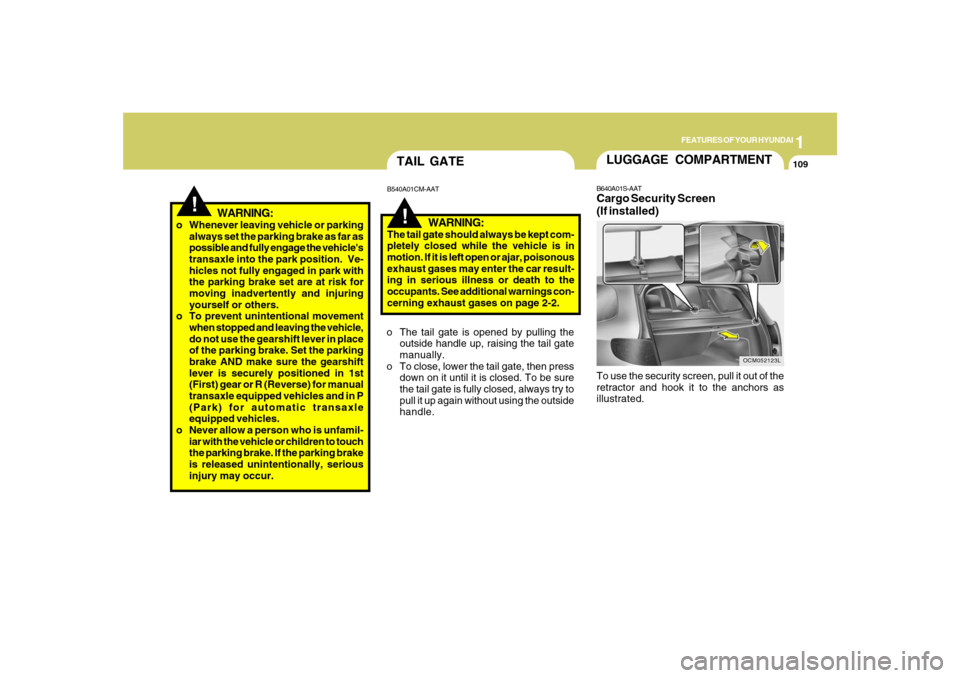
B640A01S-AATCargo Security Screen
(If installed)To use the security screen, pull it out of the
retractor and hook it to the anchors as
illustrated.
Page 122 of 355
1FEATURES OF YOUR HYUNDAI
110
!
CAUTION:
To prevent damage to the goods or the
vehicle, care should be taken when car-
rying fragile or bulky objects in the lug-
gage compartment.
!
WARNING:
Avoid eye injury. DO NOT overstretch.
The luggage net ALWAYS keep your
face and body out of its recoil path. DO
NOT use when the strap has visible signs
of wear or damage.
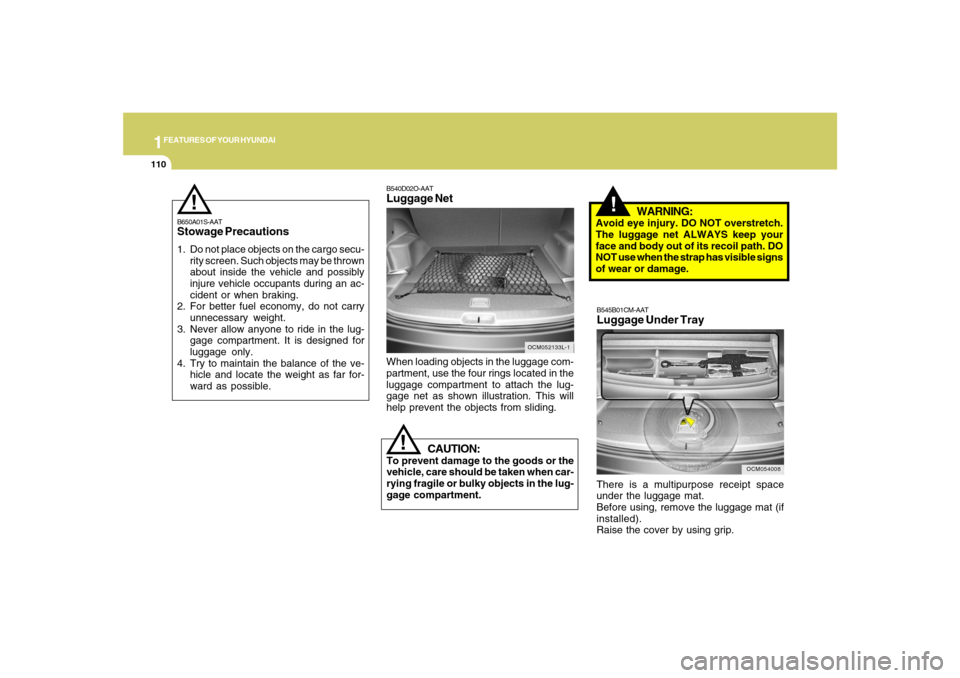
When loading objects in the luggage com-
partment, use the four rings located in the
luggage compartment to attach the lug-
gage net as shown illustration. This will
help prevent the objects from sliding.
OCM052133L-1
B540D02O-AATLuggage Net
B650A01S-AATStowage Precautions1. Do not place objects on the cargo secu-
rity screen. Such objects may be thrown
about inside the vehicle and possibly
injure vehicle occupants during an ac-
cident or when braking.
2. For better fuel economy, do not carry
unnecessary weight.
3. Never allow anyone to ride in the lug-
gage compartment. It is designed for
luggage only.
4. Try to maintain the balance of the ve-
hicle and locate the weight as far for-
ward as possible.
!
OCM054008
B545B01CM-AATLuggage Under TrayThere is a multipurpose receipt space
under the luggage mat.
Before using, remove the luggage mat (if
installed).
Raise the cover by using grip.