ignition Hyundai Santa Fe 2008 Owner's Guide
[x] Cancel search | Manufacturer: HYUNDAI, Model Year: 2008, Model line: Santa Fe, Model: Hyundai Santa Fe 2008Pages: 355, PDF Size: 12.36 MB
Page 105 of 355
1
FEATURES OF YOUR HYUNDAI
93
INTERIOR LIGHT
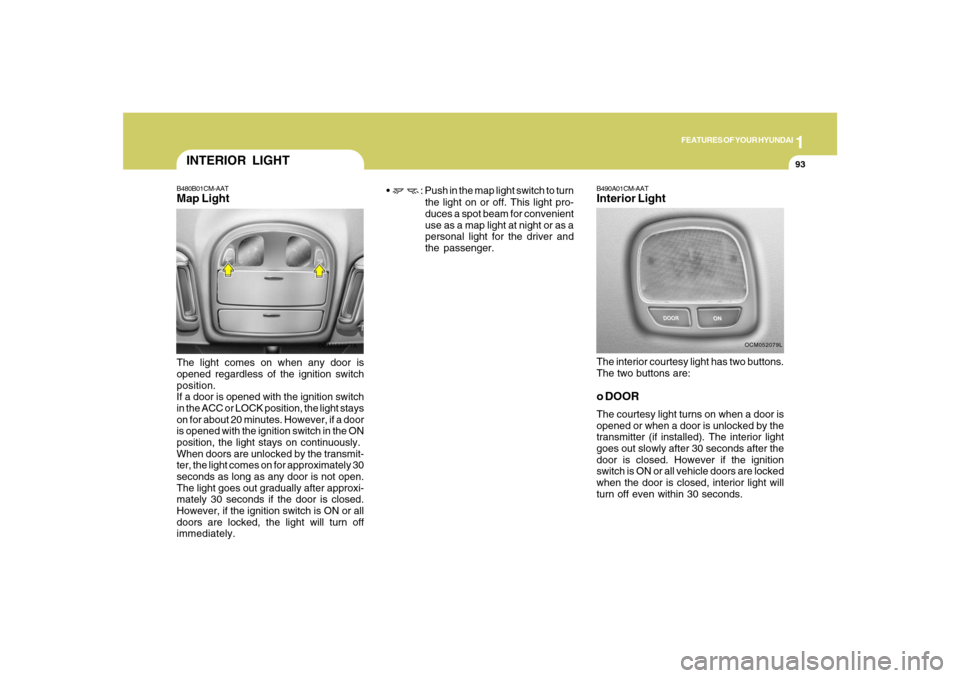
B490A01CM-AATInterior LightThe interior courtesy light has two buttons.
The two buttons are:o DOORThe courtesy light turns on when a door is
opened or when a door is unlocked by the
transmitter (if installed). The interior light
goes out slowly after 30 seconds after the
door is closed. However if the ignition
switch is ON or all vehicle doors are locked
when the door is closed, interior light will
turn off even within 30 seconds.
OCM052079L
B480B01CM-AATMap LightThe light comes on when any door is
opened regardless of the ignition switch
position.
If a door is opened with the ignition switch
in the ACC or LOCK position, the light stays
on for about 20 minutes. However, if a door
is opened with the ignition switch in the ON
position, the light stays on continuously.
When doors are unlocked by the transmit-
ter, the light comes on for approximately 30
seconds as long as any door is not open.
The light goes out gradually after approxi-
mately 30 seconds if the door is closed.
However, if the ignition switch is ON or all
doors are locked, the light will turn off
immediately.
OCM052077A
: Push in the map light switch to turn
the light on or off. This light pro-
duces a spot beam for convenient
use as a map light at night or as a
personal light for the driver and
the passenger.
Page 115 of 355
1
FEATURES OF YOUR HYUNDAI
103
Automatic-Dimming Night Vision
Safety™ (NVS
®) Mirror
The NVS
® Mirror in your vehicle is the most
advanced way to reduce glare in the rear-
view mirror during any driving situation.
For more information regarding NVS
® mir-
rors and other applications, please refer to
the Gentex website:
www.gentex.com.
CAUTION:
Too close the NVS
® Mirror automatically
reduces glare during driving conditions
based upon light levels monitored in front
of the vehicle and from the rear of the
vehicle. These light sensors are visible
through openings in the front and rear of
the mirror case. Any object that would
obstruct either light sensor will degrade
the automatic dimming control feature.
!
Automatic-Dimming Function
Your mirror will automatically dim upon
detecting glare from the vehicles traveling
behind you. The auto-dimming function
can be controlled by the Dimming ON/OFF
Button:
1. Pressing the
button turns the auto-
dimming function OFF which is indi-
cated by the green Status Indicator LED
turning off.
2. Pressing the button again turns the
auto-dimming function ON which is in-
dicated by the green Status Indicator
LED turning on.
NOTE:The mirror defaults to the "ON" position
each time the vehicle is started.Compass Function
The Compass can be turned ON and OFF
and will remember the last state when the
ignition is cycled. To turn the display fea-
ture ON/OFF:
1. Press and release the
button to turn
the display feature OFF.
2. Press and release the button again
to turn the display back ON.
Additional options can be set with press
and hold sequences of the button and
are detailed below.
There is a difference between magnetic
north and true north. The compass in the
mirror can compensate for this difference
when it knows the Magnetic Zone in which
it is operating. This is set either by the
dealer or by the user. The operating Zone
Numbers for North America are shown in
the figure on the following section.
Z-Nav™ Compass DisplayThe NVS™ Mirror in your vehicle is also
equipped with a Z-Nav™ Compass that
shows the vehicle Compass heading in
the Display Window using the 8 basic
cardinal headings (N, NE, E, SE, etc.).
Page 138 of 355
1FEATURES OF YOUR HYUNDAI
126
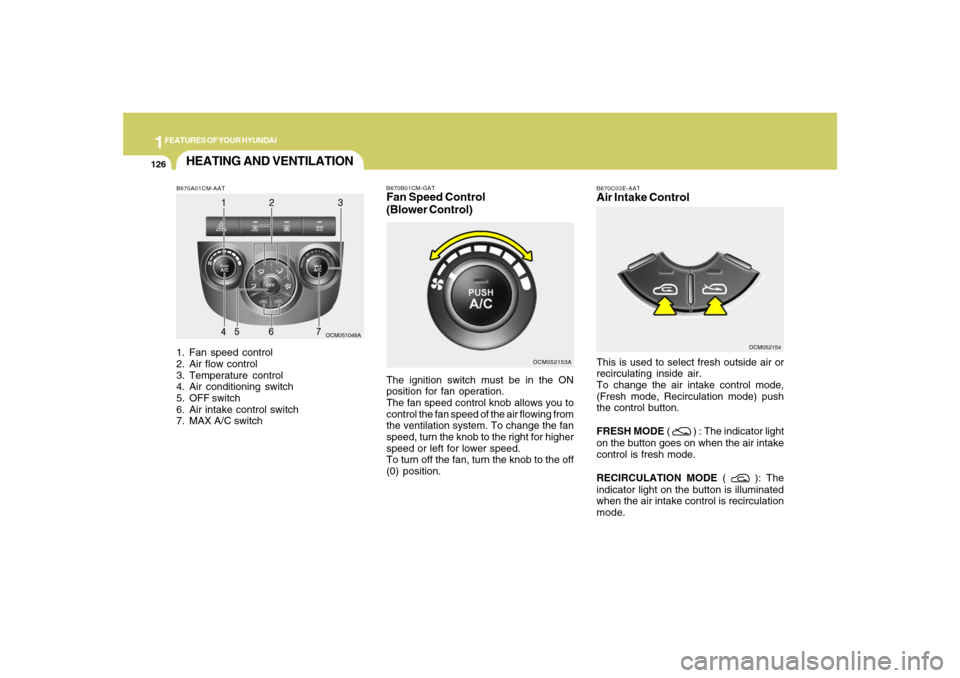
B670A01CM-AAT1. Fan speed control
2. Air flow control
3. Temperature control
4. Air conditioning switch
5. OFF switch
6. Air intake control switch
7. MAX A/C switch
OCM051048A
HEATING AND VENTILATION
B670C03E-AATAir Intake ControlThis is used to select fresh outside air or
recirculating inside air.
To change the air intake control mode,
(Fresh mode, Recirculation mode) push
the control button.
FRESH MODE (
) : The indicator light
on the button goes on when the air intake
control is fresh mode.
RECIRCULATION MODE (
): The
indicator light on the button is illuminated
when the air intake control is recirculation
mode.OCM052154
OCM052153A B670B01CM-GAT
Fan Speed Control
(Blower Control)The ignition switch must be in the ON
position for fan operation.
The fan speed control knob allows you to
control the fan speed of the air flowing from
the ventilation system. To change the fan
speed, turn the knob to the right for higher
speed or left for lower speed.
To turn off the fan, turn the knob to the off
(0) position.
Page 141 of 355
1
FEATURES OF YOUR HYUNDAI
129
FEATURES OF YOUR HYUNDAI
129129129129
OCM052111
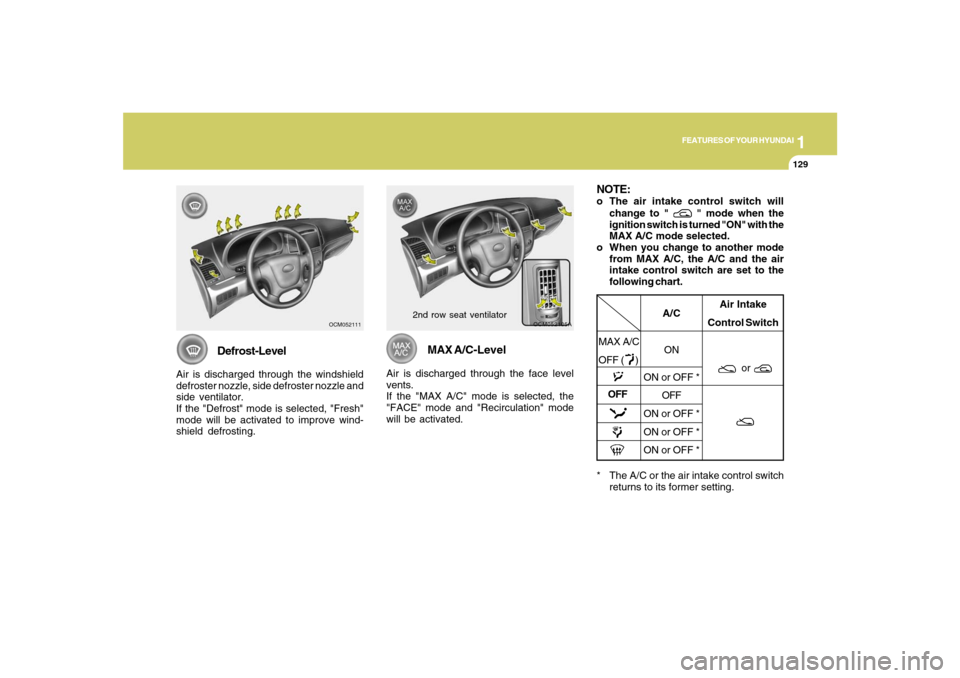
Defrost-Level
Air is discharged through the windshield
defroster nozzle, side defroster nozzle and
side ventilator.
If the "Defrost" mode is selected, "Fresh"
mode will be activated to improve wind-
shield defrosting.
OCM052105A
MAX A/C-Level
Air is discharged through the face level
vents.
If the "MAX A/C" mode is selected, the
"FACE" mode and "Recirculation" mode
will be activated.
* The A/C or the air intake control switch
returns to its former setting.
A/C
ON
ON or OFF *
OFF
ON or OFF *
ON or OFF *
ON or OFF *Air Intake
Control Switch
or
OFFNOTE:o The air intake control switch will
change to "
" mode when the
ignition switch is turned "ON" with the
MAX A/C mode selected.
o When you change to another mode
from MAX A/C, the A/C and the air
intake control switch are set to the
following chart.
MAX A/C
OFF ( )
2nd row seat ventilator
Page 191 of 355
1
FEATURES OF YOUR HYUNDAI
179
FEATURES OF YOUR HYUNDAI
179179179179
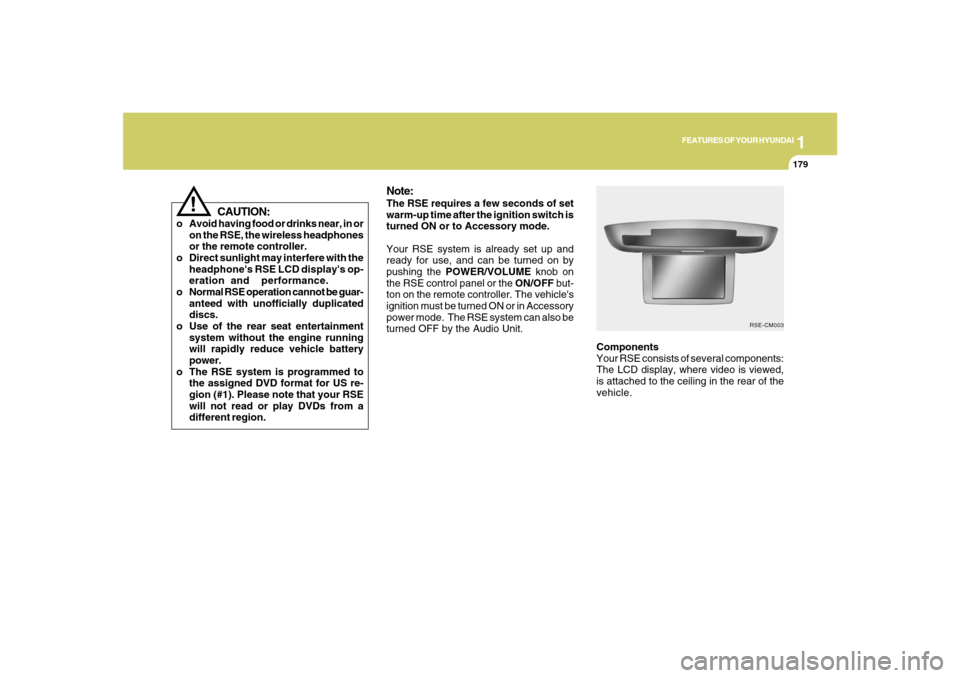
Components
Your RSE consists of several components:
The LCD display, where video is viewed,
is attached to the ceiling in the rear of the
vehicle.
Note:The RSE requires a few seconds of set
warm-up time after the ignition switch is
turned ON or to Accessory mode.
Your RSE system is already set up and
ready for use, and can be turned on by
pushing the POWER/VOLUME knob on
the RSE control panel or the ON/OFF but-
ton on the remote controller. The vehicle's
ignition must be turned ON or in Accessory
power mode. The RSE system can also be
turned OFF by the Audio Unit.
RSE-CM003
!
CAUTION:
o Avoid having food or drinks near, in or
on the RSE, the wireless headphones
or the remote controller.
o Direct sunlight may interfere with the
headphone's RSE LCD display's op-
eration and performance.
o Normal RSE operation cannot be guar-
anteed with unofficially duplicated
discs.
o Use of the rear seat entertainment
system without the engine running
will rapidly reduce vehicle battery
power.
o The RSE system is programmed to
the assigned DVD format for US re-
gion (#1). Please note that your RSE
will not read or play DVDs from a
different region.
Page 196 of 355
1FEATURES OF YOUR HYUNDAI
184
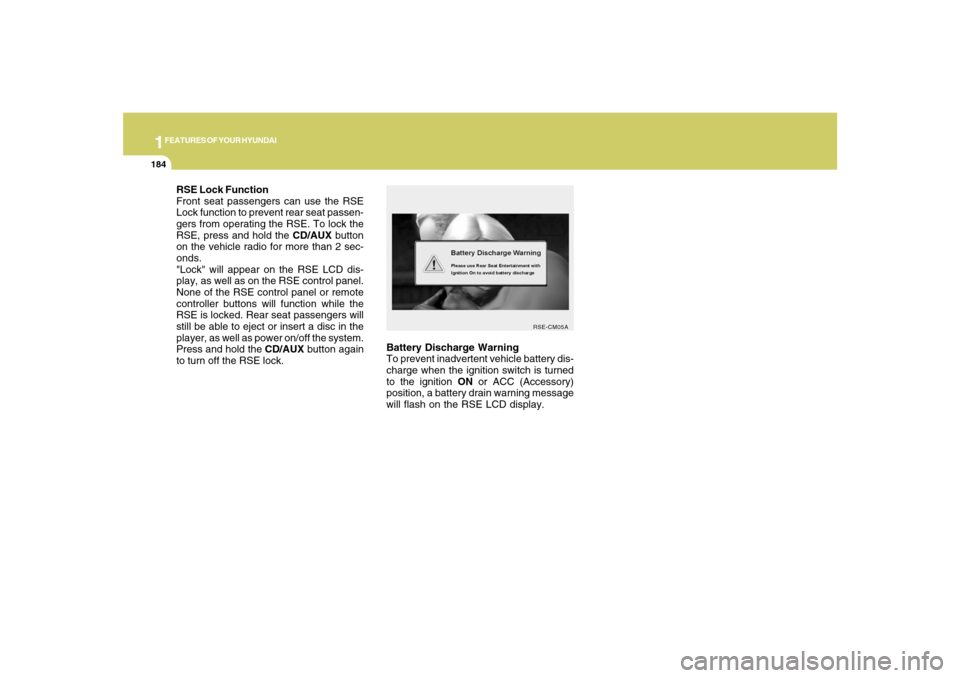
Battery Discharge Warning
To prevent inadvertent vehicle battery dis-
charge when the ignition switch is turned
to the ignition ON or ACC (Accessory)
position, a battery drain warning message
will flash on the RSE LCD display.
RSE-CM05A
RSE Lock Function
Front seat passengers can use the RSE
Lock function to prevent rear seat passen-
gers from operating the RSE. To lock the
RSE, press and hold the CD/AUX button
on the vehicle radio for more than 2 sec-
onds.
"Lock" will appear on the RSE LCD dis-
play, as well as on the RSE control panel.
None of the RSE control panel or remote
controller buttons will function while the
RSE is locked. Rear seat passengers will
still be able to eject or insert a disc in the
player, as well as power on/off the system.
Press and hold the CD/AUX button again
to turn off the RSE lock.
Page 199 of 355
1
FEATURES OF YOUR HYUNDAI
187
FEATURES OF YOUR HYUNDAI
187187187187
5. SRC(Source) Button
After inserting a disc in the RSE, it will
automatically use that as the source and
begin playing that disc. The RSE control
panel will display "DISC IN" when there is
disc loaded in the player.
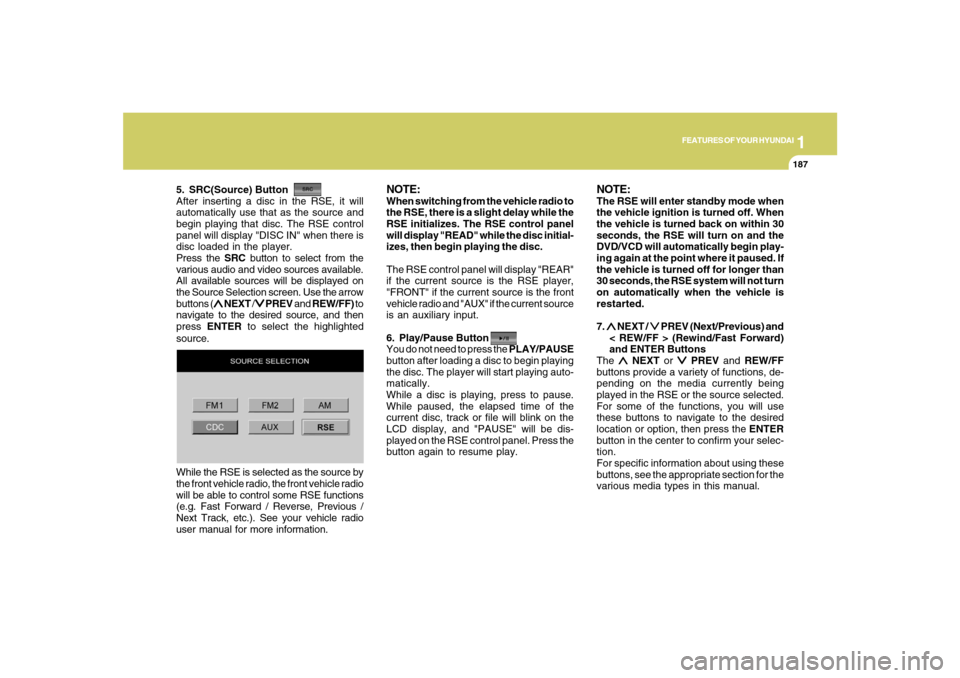
Press the SRC button to select from the
various audio and video sources available.
All available sources will be displayed on
the Source Selection screen. Use the arrow
buttons (
∧ ∧∧ ∧
∧ NEXT /
∨ ∨∨ ∨
∨ PREV and REW/FF) to
navigate to the desired source, and then
press ENTER to select the highlighted
source.
NOTE:When switching from the vehicle radio to
the RSE, there is a slight delay while the
RSE initializes. The RSE control panel
will display "READ" while the disc initial-
izes, then begin playing the disc.
The RSE control panel will display "REAR"
if the current source is the RSE player,
"FRONT" if the current source is the front
vehicle radio and "AUX" if the current source
is an auxiliary input.
6. Play/Pause Button
You do not need to press the PLAY/PAUSE
button after loading a disc to begin playing
the disc. The player will start playing auto-
matically.
While a disc is playing, press to pause.
While paused, the elapsed time of the
current disc, track or file will blink on the
LCD display, and "PAUSE" will be dis-
played on the RSE control panel. Press the
button again to resume play.
NOTE:The RSE will enter standby mode when
the vehicle ignition is turned off. When
the vehicle is turned back on within 30
seconds, the RSE will turn on and the
DVD/VCD will automatically begin play-
ing again at the point where it paused. If
the vehicle is turned off for longer than
30 seconds, the RSE system will not turn
on automatically when the vehicle is
restarted.
7. ∧ ∧∧ ∧
∧ NEXT /
∨ ∨∨ ∨
∨ PREV (Next/Previous) and
< REW/FF > (Rewind/Fast Forward)
and ENTER Buttons
The
∧ ∧∧ ∧
∧ NEXT or
∨ ∨∨ ∨
∨ PREV and REW/FF
buttons provide a variety of functions, de-
pending on the media currently being
played in the RSE or the source selected.
For some of the functions, you will use
these buttons to navigate to the desired
location or option, then press the ENTER
button in the center to confirm your selec-
tion.
For specific information about using these
buttons, see the appropriate section for the
various media types in this manual. While the RSE is selected as the source by
the front vehicle radio, the front vehicle radio
will be able to control some RSE functions
(e.g. Fast Forward / Reverse, Previous /
Next Track, etc.). See your vehicle radio
user manual for more information.
Page 201 of 355
1
FEATURES OF YOUR HYUNDAI
189
FEATURES OF YOUR HYUNDAI
189189189189
Playing a DVD/VCD
You can control your DVD or VCD by using
the buttons on the RSE control panel or by
using the remote controller. Instructions
for the controls listed below are the same
whether using the RSE control panel or the
remote controller. However, there are some
additional functions that are only available
from the remote controller. These buttons
and their functions are discussed in the
"Remote Controller" section of this manual.
1. Play/Pause Button
You do not need to press the PLAY/PAUSE
button after loading a disc to begin playing
the disc. The player will start playing auto-
matically.
While a disc is playing, press PLAY/PAUSE
to pause. While paused, the elapsed time
of the current disc, track or file will blink on
the LCD display, and "PAUSE" will be
displayed on the RSE control panel. Press
the button again to resume play.
NOTE:The RSE will enter standby mode when
the vehicle ignition is turned off. When
the vehicle is turned back on within 30
seconds, the RSE will turn on and the CD
will automatically begin playing again at
the point where it paused. If the vehicle
is turned off for longer than 30 seconds,
the RSE system will not turn on auto-
matically when the vehicle is restarted.
2. Fast Forward/Reverse
Press and hold the FF > or < REW button
and the player will fast forward or reverse
at 32 times the normal speed. Release the
FWD or < REW button to return to normal
speed play.3. Previous/Next Chapter
While a DVD/VCD is playing, press the
∧ ∧∧ ∧
∧
NEXT button to skip to the next chapter.
Press the
∨ ∨∨ ∨
∨ PREV button to jump to the
beginning of the current chapter. Press
∨ ∨ ∨ ∨
∨
PREV again to go move through earlier
chapters. Press the button repeatedly to
move quickly through chapters.NOTE:Some VCDs do not have track informa-
tion. If the VCD has no chapter informa-
tion, pressing either of these buttons will
restart the VCD.
While pressing the
∧ ∧∧ ∧
∧ NEXT or
∨ ∨∨ ∨
∨ PREV
buttons, the Status Display, including the
current medium (DVD or VCD), chapter
and title information is displayed. It will
automatically disappear after five seconds.
Page 211 of 355
1
FEATURES OF YOUR HYUNDAI
199
FEATURES OF YOUR HYUNDAI
199199199199
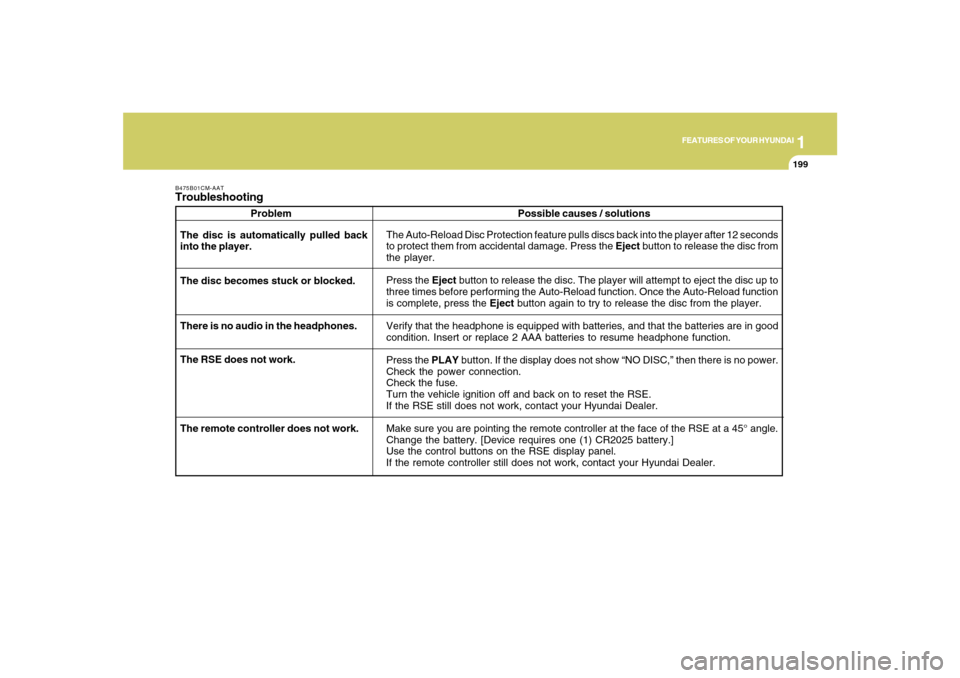
B475B01CM-AATTroubleshooting
Problem
The Auto-Reload Disc Protection feature pulls discs back into the player after 12 seconds
to protect them from accidental damage. Press the Eject button to release the disc from
the player.
Press the Eject button to release the disc. The player will attempt to eject the disc up to
three times before performing the Auto-Reload function. Once the Auto-Reload function
is complete, press the Eject button again to try to release the disc from the player.
Verify that the headphone is equipped with batteries, and that the batteries are in good
condition. Insert or replace 2 AAA batteries to resume headphone function.
Press the PLAY button. If the display does not show “NO DISC,” then there is no power.
Check the power connection.
Check the fuse.
Turn the vehicle ignition off and back on to reset the RSE.
If the RSE still does not work, contact your Hyundai Dealer.
Make sure you are pointing the remote controller at the face of the RSE at a 45° angle.
Change the battery. [Device requires one (1) CR2025 battery.]
Use the control buttons on the RSE display panel.
If the remote controller still does not work, contact your Hyundai Dealer. The disc is automatically pulled back
into the player.
The disc becomes stuck or blocked.
There is no audio in the headphones.
The RSE does not work.Possible causes / solutions
The remote controller does not work.
Page 215 of 355
2
DRIVING YOUR HYUNDAI
4
!
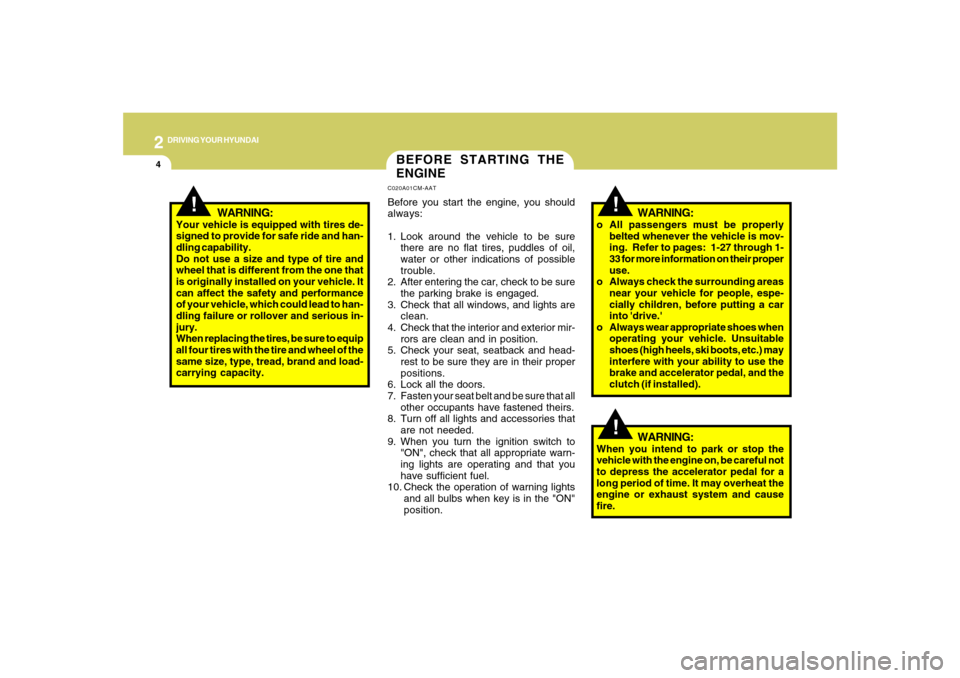
BEFORE STARTING THE
ENGINEC020A01CM-AATBefore you start the engine, you should
always:
1. Look around the vehicle to be sure
there are no flat tires, puddles of oil,
water or other indications of possible
trouble.
2. After entering the car, check to be sure
the parking brake is engaged.
3. Check that all windows, and lights are
clean.
4. Check that the interior and exterior mir-
rors are clean and in position.
5. Check your seat, seatback and head-
rest to be sure they are in their proper
positions.
6. Lock all the doors.
7. Fasten your seat belt and be sure that all
other occupants have fastened theirs.
8. Turn off all lights and accessories that
are not needed.
9. When you turn the ignition switch to
"ON", check that all appropriate warn-
ing lights are operating and that you
have sufficient fuel.
10. Check the operation of warning lights
and all bulbs when key is in the "ON"
position.
!
WARNING:
Your vehicle is equipped with tires de-
signed to provide for safe ride and han-
dling capability.
Do not use a size and type of tire and
wheel that is different from the one that
is originally installed on your vehicle. It
can affect the safety and performance
of your vehicle, which could lead to han-
dling failure or rollover and serious in-
jury.
When replacing the tires, be sure to equip
all four tires with the tire and wheel of the
same size, type, tread, brand and load-
carrying capacity.
WARNING:
o All passengers must be properly
belted whenever the vehicle is mov-
ing. Refer to pages: 1-27 through 1-
33 for more information on their proper
use.
o Always check the surrounding areas
near your vehicle for people, espe-
cially children, before putting a car
into 'drive.'
o Always wear appropriate shoes when
operating your vehicle. Unsuitable
shoes (high heels, ski boots, etc.) may
interfere with your ability to use the
brake and accelerator pedal, and the
clutch (if installed).
!
WARNING:
When you intend to park or stop the
vehicle with the engine on, be careful not
to depress the accelerator pedal for a
long period of time. It may overheat the
engine or exhaust system and cause
fire.