display Hyundai Santa Fe 2009 Owner's Guide
[x] Cancel search | Manufacturer: HYUNDAI, Model Year: 2009, Model line: Santa Fe, Model: Hyundai Santa Fe 2009Pages: 353, PDF Size: 10.86 MB
Page 171 of 353
1FEATURES OF YOUR HYUNDAI
160
B445G02CM-AAT1. SCAN buttonDisc Scan function
During CD playback, press the SCAN
button to play the first 10 seconds (pre-
view) of all tracks on the current CD.
Once you hear a track you want, press the
SCAN button again to resume normal play-
back2. Track UP '
∧ ∧∧ ∧
∧' and DOWN '
∨ ∨∨ ∨
∨' but-
tons
During CD playback, press the
∧ and
∨
buttons to select and play the next or pre-
vious track on the current disc. The LCD
screen displays the track number as you
press the buttons. You can press the but-
ton several times to select the track you
want.
3. CD selector buttons (1~6)Model D445S:
The CD selector buttons are not used with
Model D445.
Models D465S and D466S:
Press the CD selector button correspond-
ing to the CD you want. The CD player
automatically interrupts playback and loads
the selected CD.NOTE:If no CD is loaded in the selected posi-
tion, the LCD screen displays the No
Disc indicator.4. Rewind << and Fast Forward >>
buttonsDuring CD playback, press and hold the
<< or >> buttons to rewind or fast-forward
playback of the current track. The LCD
screen displays the elapsed time of the
track you are rewinding or fast-forwarding.
Release the << or >> button when you
have reached the point you want. Play-
back resumes automatically at the selected
point.
5. DIR '
∧ ∧∧ ∧
∧' and '
∨ ∨∨ ∨
∨' buttons (MP3 and
WMA discs)
During MP3/WMA CD playback, press the
DIR '
∧ ∧∧ ∧
∧' or '
∨ ∨∨ ∨
∨' buttons to switch to the next
or previous directory on the CD. The LCD
screen displays the name of the directory
you have switched to. You can press the
button several times to search for the direc-
tory you want. The directories are dis-
played in sequence (i.e. ascending or
descending alphabetical order).
To access the directory displayed, press
the File Search knob to ENTER your se-
lection.
NOTE:The Directory UP and DOWN buttons
can only be used when you are playing a
CD which has organized its tracks in the
form of directories. Normally, only MP3
or WMA CDs will contain a directory tree
which you can navigate using these but-
tons.
Page 172 of 353
1161161161161161161
FEATURES OF YOUR HYUNDAI
6. File Search KnobRotate the knob clockwise or counter-clock-
wise to manually advance up or down the
track list of the CD currently played. This
function allows you to quickly scroll to a
specific track number. It is especially use-
ful if you are playing an MP3 or WMA CD
which contains many directories and
tracks. The LCD screen displays the track
number you have scrolled to.
Once the track number you want is dis-
played, press the File Search knob to
ENTER your selection and begin play-
back of the selected track.
NOTE:You must push the File Search knob to
select the track for playback. Other-
wise, the CD player will not jump to the
track number displayed in the number
counter.
Use the File Search knob and the DIR '
∧ ∧∧ ∧
∧'
and '
∨ ∨∨ ∨
∨' buttons in together to quickly
search for a track you want on an MP3
CD with many directories and tracks.
7. RPT, RDM, MARK & INFO buttonsThese buttons correspond to the Repeat,
Random Playback, Marklist and Disc In-
formation functions.
Turn to the next section of your handbook
for detailed instructions.
Page 174 of 353
1163163163163163163
FEATURES OF YOUR HYUNDAI
B445G02CM-AAT1. Loading CDsModel D445S:
Only one CD can be loaded at any one
time. If there is already a disc inserted in
the CD player, eject the disc before load-
ing a new CD.
To load a CD, gently insert the CD into the
CD slot. The CD will be automatically
loaded. The CD player then starts to play
the CD.NOTE:o Do not force-load the CD as it will
damage the loading mechanism and
cause your disc to jam in the player.
o If a CD cannot be loaded, check if
there is already a disc in the player
and eject it first.
Only one CD can be loaded at any one
time.Models D465S and D466S:
You can load one or more CDs (maximum
of 6) into the CD changer through the CD
loading slot. To do so:
1. Press the LOAD button to load 1 CD.
The LCD screen displays the number
assigned to the CD as a flashing num-
ber. For example, if the CD changer
currently contains 4 CDs, the loaded
disc will be CD 5.
OR
Press and hold the LOAD button for
more than 2 seconds to load more than
1 CD.
The LCD screen displays empty slots in
the CD changer as flashing numbers.
2. The LCD screen displays the instruc-
tions for loading one or more CDs. Fol-
low the instructions - "Wait, Insert CD1,
Loading CD 1, Reading CD1,… Read-
ing CD6".3. Once you have finished loading the CD
or CDs, the CD player automatically
plays the first track of the last CD loaded.
If the audio system was in Radio mode
while you were loading the CDs, it au-
tomatically switches to CD player mode.
NOTE:The LCD screen displays Changer Full
to indicate that the CD changer is full. Do
not try to load any other disc.
Page 175 of 353
1FEATURES OF YOUR HYUNDAI
164
2. Ejecting CDsModel D445S
Press the CD EJECT ( ) button to eject
the CD in the CD player.
Models D465S and D466S
Press the button once to eject the last
CD played.
Press and hold button for more than 2
seconds to eject all the CDs in the changer
in sequence beginning with the last CD
played.NOTE:You can eject discs without switching on
the audio system using the Power ON-
OFF knob.
To eject 1 CD:
Press the EJECT button once.
If you are playing a CD, playback will
automatically switch to the next available
CD.
The LCD screen displays the number of
the CD ejected as a flashing number.
If there are no other disc left in the CD
changer, the audio system automatically
switches to Radio mode and resumes with
the last channel or frequency selected.
OR
If the audio system is in Radio mode, the
last CD played will be ejected.
The LCD screen displays the number of
the CD ejected as a flashing number.To eject all CDs:
Press and hold the EJECT button for more
than 2 seconds to eject all the CDs in the
CD changer.
The LCD screen displays the CDs being
ejected in the CD changer as flashing
numbers. The CDs are ejected in se-
quence. Follow the instructions displayed
on the LCD screen to remove all CDs from
the changer.
NOTE:If the audio system is in Radio mode, you
can eject CDs without interrupting the
operation of the radio.
Page 176 of 353
1165165165165165165
FEATURES OF YOUR HYUNDAI
3. Selecting a disc to playModel D445S
Only the CD loaded in the player can be
played.
Models D465S and D466S
You can select any disc loaded in the CD
changer for playback.
To do so:
Press the corresponding CD selector
button (1 – 6).
The CD changer automatically loads the
selected CD and begins playback of the
first track.
The LCD screen displays the selected CD
as a flashing number.
4. Selecting and playing tracks
(songs)To select tracks, you can use one of 3
methods:
Method 1:
Press the Track Up or Track Down
button repeatedly until you find the track
you want.
Method 2:
Rotate the File Search knob to scroll to
the track you want. The number counter
in the LCD screen shows you the track
number.
Press the File Search knob to ENTER
your selection and begin playback.
Method 3 (only for MP3 and WMA CDs):
Press the DIR Up or Down buttons re-
peatedly to switch to the directory you
want on the CD.
The LCD screen displays the name of
the directory you have switched to.Rotate the File Search knob to scroll to the
track you want in the selected directory.
The number counter in the LCD screen
shows you the track number. Press the File
Search knob to ENTER your selection and
begin playback.
NOTE:You may notice that the track number
counter on the LCD screen matches the
track list on audio CDs exactly while that
may not be the case for MP3 or WMA
CDs. This is because WMA and MP3 CDs
typically contain multiple tracks (files)
that are organized on the CD as directo-
ries. The number counter displays the
track number of the track being played
in relation to the numbering system on
the MP3 or WMA CD. Depending on the
sequence in which the files and directo-
ries were added to the CD, the track
number sequence displayed on the
screen may not match the playback
sequence. This is due to the MP3 and
WMA encoding process and does not
mean that your CD player is defective.
Page 177 of 353
1FEATURES OF YOUR HYUNDAI
166
5. Using the Repeat function (RPT
button)To repeat playback of the current track:
Press the RPT button once. The LCD
screen displays RPT to indicate that it is
in REPEAT mode. Playback of the cur-
rent track will be repeated.
Press the RPT button again to resume
normal playback. The RPT indicator is
cleared.
To repeat playback of all tracks on the
current CD/File Directory:
Press and hold the RPT button for more
than 2 seconds. The LCD screen dis-
plays RPT ALL to indicate that it is in
REPEAT ALL mode. The tracks of the
current audio CD or the tracks in the
current MP3 file directory will be re-
peated.
Press the RPT button again to resume
normal playback. The RPT ALL indica-
tor is cleared.
6. Using the Random playback func-
tion (RDM button)For random playback in audio CDs (also
applies to current MP3 file directory):
Press the RDM button once. The LCD
screen displays RDM to indicate that it
is in RANDOM mode. Tracks on the
current audio CD/MP3 directory will be
randomly selected and played.
Press the RDM button again to resume
normal playback. The RDM indicator is
cleared. Normal playback resumes.
For random playback of all tracks on a
CD (only for MP3 and WMA CDs):
Press and hold the RDM button for more
than 2 seconds. The LCD screen dis-
plays RDM ALL to indicate that it is in
RANDOM ALL mode. Tracks from all
directories in the MP3/WMA CD will be
randomly selected and played.
Press the RDM button again to resume
normal playback. The RDM ALL indica-
tor is cleared.
7. Using the Bookmark function
(MARK button)The Bookmark function allows you to se-
lect and add up to 20 tracks from any CD
in the CD changer to a playlist (marklist).
You can then play the tracks on the playlist
whenever you want.
Adding tracks to the playlist (marklist):
1. Play the track you want.
2. Press and hold the MARK button for
more than 2 seconds to add the current
track to the playlist (marklist). The LCD
screen displays MARK to indicate that
the track has been added to the playlist
(marklist).
3. Repeat steps 1 & 2 to add more tracks
to the marklist (maximum of 20 book-
marks.)
Page 178 of 353
1167167167167167167
FEATURES OF YOUR HYUNDAI
Playing tracks on the playlist (marklist):
1. Press the MARK button once. The LCD
screen displays MARK to indicate that
it is in bookmark mode and automati-
cally begins playback of the tracks saved
on the playlist (marklist) in sequence.
2. Press the MARK button again to re-
sume normal playback. The MARK in-
dicator is cleared. Normal playback
resumes.
Deleting tracks from the playlist
(marklist):
1. Press the MARK button once. The LCD
screen displays MARK to indicate that
it is in bookmark mode and automati-
cally begins playback of the tracks saved
on the playlist (marklist) in sequence.
2. Select the track you want to remove.
(See Selecting and playing tracks
(songs))
3. Press and hold the MARK button for
more than 2 seconds. The LCD screen
displays TRACK DELETED to confirm
that the bookmark has been deleted.Deleting all tracks from the playlist
(marklist):
1. Press the MARK button once. The LCD
screen displays MARK to indicate that
it is in bookmark mode and automati-
cally begins playback of the tracks saved
on the playlist (marklist) in sequence.
2. Press and hold the MARK button for
more than 4 seconds. The LCD screen
displays MARKLIST EMPTY to confirm
that all the bookmarks in the playlist
(marklist) have been deleted.
8. Using the file information func-
tion* (INFO button)* This function can only be used with
MP3/WMA tracks
Press the INFO button repeatedly to dis-
play information about the track. The LCD
screen displays the File Name, Artiste
Name and Song Title in sequence.
Note:
The information (File Name, Artiste Name
and Song Title) available for display de-
pends on the information the MP3/WMA
file was encoded with. If the relevant infor-
mation was not included when the file was
encoded, you will not be able to see it.
Page 180 of 353
1169169169169169169
FEATURES OF YOUR HYUNDAI
1. CAT UP '
∧ ∧∧ ∧
∧' / DOWN '
∨ ∨∨ ∨
∨' buttons
Press CAT UP '
∧ ∧∧ ∧
∧' / DOWN '
∨ ∨∨ ∨
∨' buttons to
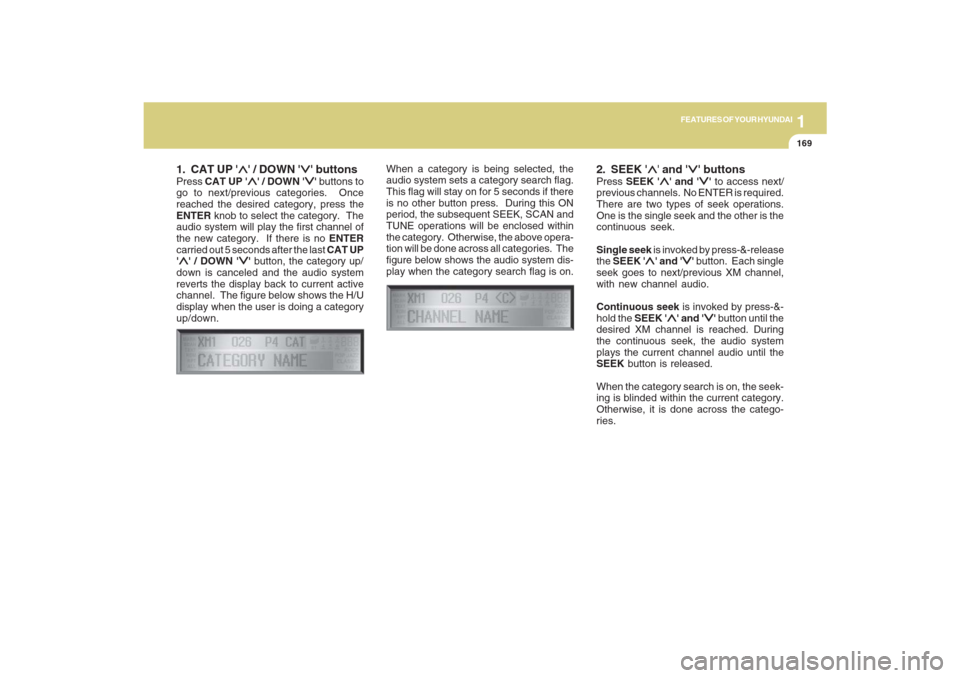
go to next/previous categories. Once
reached the desired category, press the
ENTER knob to select the category. The
audio system will play the first channel of
the new category. If there is no ENTER
carried out 5 seconds after the last CAT UP
'
∧ ∧∧ ∧
∧' / DOWN '
∨ ∨∨ ∨
∨' button, the category up/
down is canceled and the audio system
reverts the display back to current active
channel. The figure below shows the H/U
display when the user is doing a category
up/down.When a category is being selected, the
audio system sets a category search flag.
This flag will stay on for 5 seconds if there
is no other button press. During this ON
period, the subsequent SEEK, SCAN and
TUNE operations will be enclosed within
the category. Otherwise, the above opera-
tion will be done across all categories. The
figure below shows the audio system dis-
play when the category search flag is on.
2. SEEK '
∧ ∧∧ ∧
∧' and '
∨ ∨∨ ∨
∨' buttons
Press SEEK '
∧ ∧∧ ∧
∧' and '
∨ ∨∨ ∨
∨' to access next/
previous channels. No ENTER is required.
There are two types of seek operations.
One is the single seek and the other is the
continuous seek.
Single seek is invoked by press-&-release
the SEEK '
∧ ∧∧ ∧
∧' and '
∨ ∨∨ ∨
∨' button. Each single
seek goes to next/previous XM channel,
with new channel audio.
Continuous seek is invoked by press-&-
hold the SEEK '
∧ ∧∧ ∧
∧' and '
∨ ∨∨ ∨
∨' button until the
desired XM channel is reached. During
the continuous seek, the audio system
plays the current channel audio until the
SEEK button is released.
When the category search is on, the seek-
ing is blinded within the current category.
Otherwise, it is done across the catego-
ries.
Page 181 of 353
1FEATURES OF YOUR HYUNDAI
170
3. TUNE KnobTurn the TUNE knob to scroll through the
XM channels. This is called manual tun-
ing. Upon reaching the desired channel,
press the knob (ENTER) to make a selec-
tion. During manual tuning, the audio sys-
tem plays the current channel audio until
a selection is made.
If there is no ENTER being pressed 5
seconds after stopped turning the TUNE
knob, the manual tune will be canceled.
The audio system then reverts the display
back to its current channel.
When the category search is on, the manual
tuning is blinded within the current cat-
egory. Otherwise, it is done across the
categories.
4. Channel Preset buttons (1~6)There are 6 Preset buttons in each XM
band you can use to store your favorite XM
channels. Saving a channel as a preset
gives you one-touch access to the channel
you want. Remember that the 6 presets
channels you stored are for the specific XM
band mode you are in. There are a total of
3 XM bands. That means you can store up
to 18 of your favorite channels in the preset
memory.NOTE:Remember that if you store a channel as
preset 3 in XM2 mode, you must first
select XM2 mode before you can use
that preset button.
Using PresetsTo save a XM channel as a preset:
1. Take note of the band selection dis-
played on the LCD screen (XM1, XM2
or XM3)
2. Select a XM channel you want using
either the SEEK '
∧ ∧∧ ∧
∧' and '
∨ ∨∨ ∨
∨' buttons or
the TUNE Knob.
3. Choose the preset button (1 – 6) you
want to store that channel.
4. Press and hold the Preset button for
more than 2 seconds.
The system beeps to indicate that it has
saved the new channel and displays
the preset number on the LCD screen.
NOTE:Saving a new channel erases the previ-
ous setting saved in that preset.
Page 182 of 353
1171171171171171171
FEATURES OF YOUR HYUNDAI
To call back a preset channel:
1. Select the band (XM1, XM2 or XM3) you
want using the XM button.
2. Press the preset button you want.
The system automatically jumps to the
preset channel. The channel informa-
tion and preset number are displayed
on the LCD screen.5. SCAN buttonChannel scan function
Press the SCAN button to scan all the
channels in XM. The audio system plays
the audio of a channel for 10 seconds
before scanning for the next channel. When
the category search is on, the channel
scan is blinded within the current category.
Otherwise, it is done across the catego-
ries.
If you want to keep listening to a particular
channel and want to stop the scanning,
press the SCAN button again.
This function is useful for providing you
with a good overview of all the radio sta-
tions within range of your tuner.Preset scan function
Press and hold the SCAN button for more
than 2 seconds. Each preset channel will
be automatically played for 10 seconds. If
you want to keep listening to a particular
preset channel and want to stop the scan-
ning, press the SCAN button again.
6. INFO buttonINFO button brings out the extra channel
info of the current played channel. The
audio system shows the following extra
channel info in sequence when the INFO
is pressed several times. First, it shows the
song/program title. Then, it follows by the
name of the artist/feature. The last one is
the category name. Another press of INFO
button brings the display back to the status
of the current played channel.Checking RADIO IDEvery SDAR box comes with one unique
RADIO ID. You need ID to make subscrip-
tion with XM service provider. Do single
seek to channel 0 using SEEK '
∧ ∧∧ ∧
∧' and '
∨ ∨∨ ∨
∨'
buttons. The audio system will then dis-
play the RADIO ID of the SDAR box.
Buttons not in use in tuner modeThe following buttons and functions are
not used in XM mode.
-<< button
->> button
-RPT button
-RDM button
-MARK button