clock Hyundai Santa Fe 2011 Owner's Guide
[x] Cancel search | Manufacturer: HYUNDAI, Model Year: 2011, Model line: Santa Fe, Model: Hyundai Santa Fe 2011Pages: 408, PDF Size: 8.63 MB
Page 376 of 408
757
Maintenance
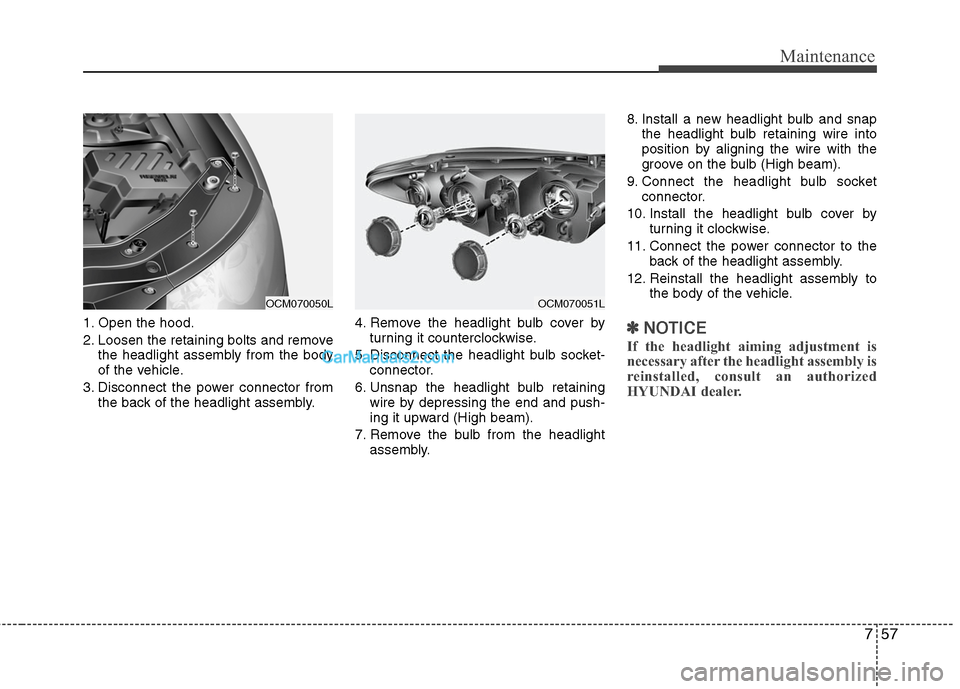
1. Open the hood.
2. Loosen the retaining bolts and removethe headlight assembly from the body
of the vehicle.
3. Disconnect the power connector from the back of the headlight assembly. 4. Remove the headlight bulb cover by
turning it counterclockwise.
5. Disconnect the headlight bulb socket- connector.
6. Unsnap the headlight bulb retaining wire by depressing the end and push-
ing it upward (High beam).
7. Remove the bulb from the headlight assembly. 8. Install a new headlight bulb and snap
the headlight bulb retaining wire into
position by aligning the wire with the
groove on the bulb (High beam).
9. Connect the headlight bulb socket connector.
10. Install the headlight bulb cover by turning it clockwise.
11. Connect the power connector to the back of the headlight assembly.
12. Reinstall the headlight assembly to the body of the vehicle.✽ ✽NOTICE
If the headlight aiming adjustment is
necessary after the headlight assembly is
reinstalled, consult an authorized
HYUNDAI dealer.
OCM070051L
OCM070050L
Page 377 of 408
Maintenance
58
7
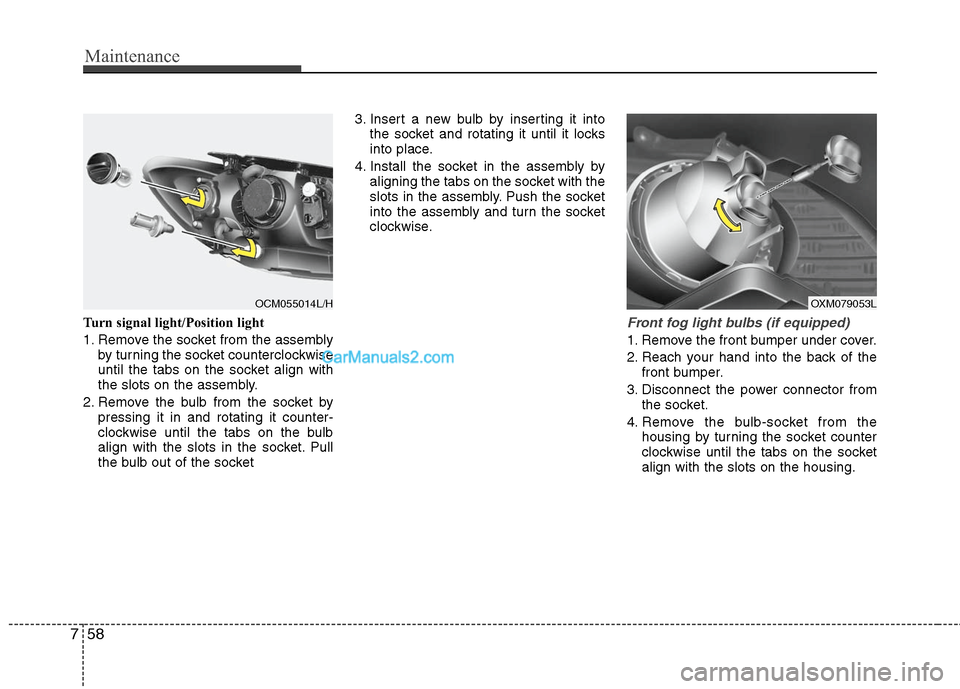
Turn signal light/Position light
1. Remove the socket from the assembly
by turning the socket counterclockwise
until the tabs on the socket align with
the slots on the assembly.
2. Remove the bulb from the socket by pressing it in and rotating it counter-
clockwise until the tabs on the bulb
align with the slots in the socket. Pull
the bulb out of the socket 3. Insert a new bulb by inserting it into
the socket and rotating it until it locks
into place.
4. Install the socket in the assembly by aligning the tabs on the socket with the
slots in the assembly. Push the socket
into the assembly and turn the socket
clockwise.Front fog light bulbs (if equipped)
1. Remove the front bumper under cover.
2. Reach your hand into the back of thefront bumper.
3. Disconnect the power connector from the socket.
4. Remove the bulb-socket from the housing by turning the socket counter
clockwise until the tabs on the socket
align with the slots on the housing.
OXM079053L
OCM055014L/H
Page 378 of 408
759
Maintenance
5. Install the new bulb-socket into thehousing by aligning the tabs on the
socket with the slots in the housing.
Push the socket into the housing and
turn the socket clockwise.
6. Connect the power connector to the socket.
7. Reinstall the front bumper under cover.
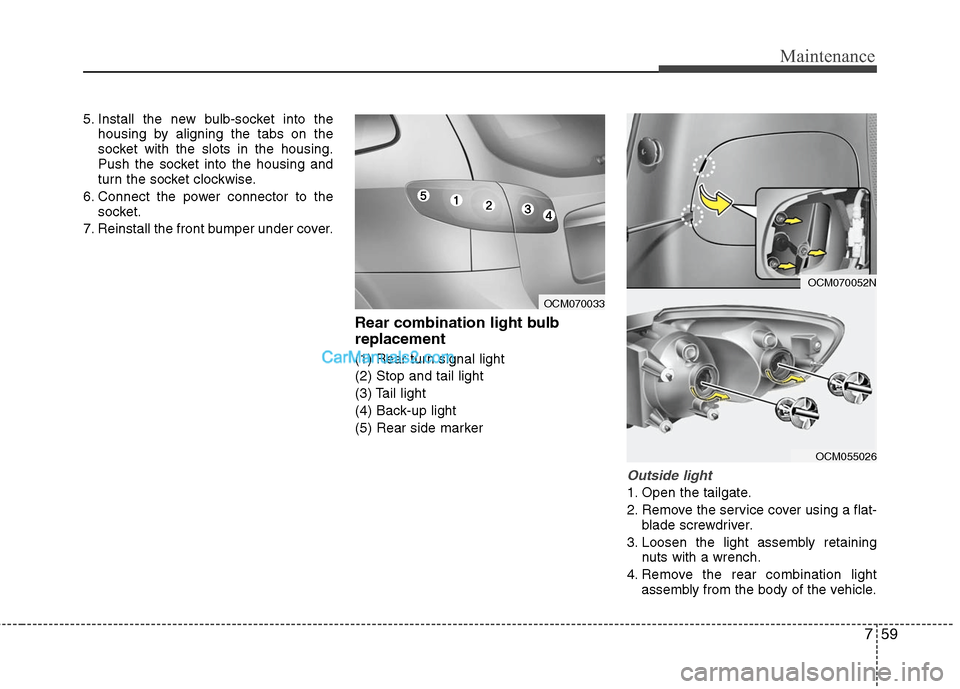
Rear combination light bulb
replacement
(1) Rear turn signal light
(2) Stop and tail light
(3) Tail light
(4) Back-up light
(5) Rear side marker
Outside light
1. Open the tailgate.
2. Remove the service cover using a flat- blade screwdriver.
3. Loosen the light assembly retaining nuts with a wrench.
4. Remove the rear combination light assembly from the body of the vehicle.
OCM055026
OCM070033
OCM070052N
Page 379 of 408
Maintenance
60
7
5. Remove the socket from the assembly
by turning the socket counterclockwise
until the tabs on the socket align with
the slots on the assembly.
6. Remove the bulb from the socket by pressing it in and rotating it counter-
clockwise until the tabs on the bulb align
with the slots in the socket. Pull the bulb
out of the socket. (Side marker :
Remove the bulb from the socket by
pulling it out)
7. Insert a new bulb by inserting it into the socket and rotating it until it locks
into place.
8. Install the socket in the assembly by aligning the tabs on the socket with the
slots in the assembly. Push the socket
into the assembly and turn the socket
clockwise.
9. Reinstall the light assembly to the body of the vehicle.
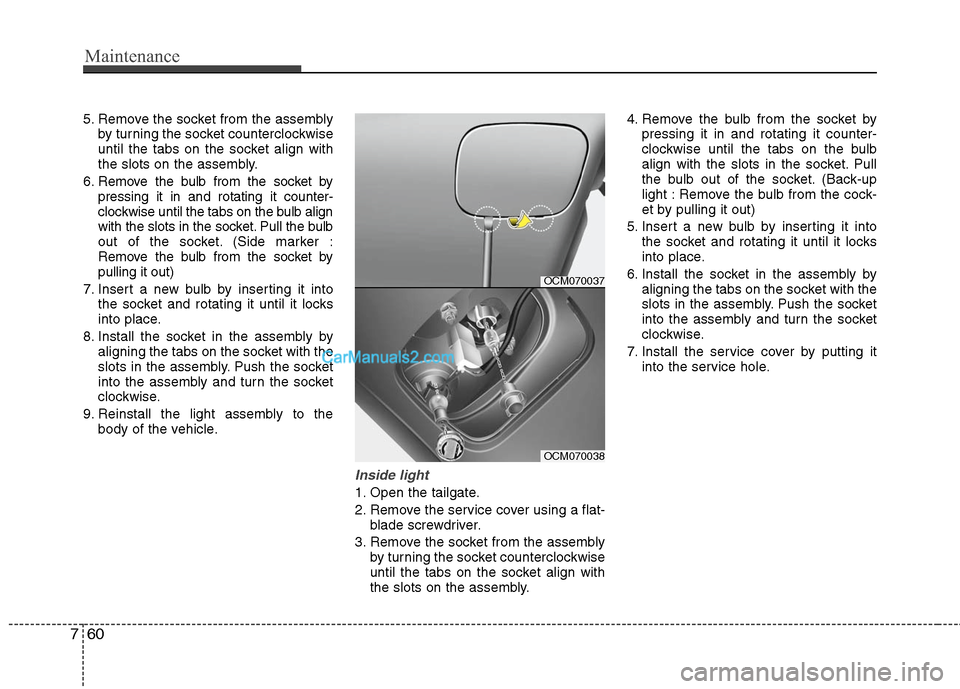
Inside light
1. Open the tailgate.
2. Remove the service cover using a flat-blade screwdriver.
3. Remove the socket from the assembly by turning the socket counterclockwise
until the tabs on the socket align with
the slots on the assembly. 4. Remove the bulb from the socket by
pressing it in and rotating it counter-
clockwise until the tabs on the bulb
align with the slots in the socket. Pull
the bulb out of the socket. (Back-up
light : Remove the bulb from the cock-
et by pulling it out)
5. Insert a new bulb by inserting it into the socket and rotating it until it locks
into place.
6. Install the socket in the assembly by aligning the tabs on the socket with the
slots in the assembly. Push the socket
into the assembly and turn the socket
clockwise.
7. Install the service cover by putting it into the service hole.
OCM070037
OCM070038
Page 405 of 408

Index
4I
In case of an emergency while driving ··················\
··········6-2
Indicator symbols on the instrument cluster ··················\
·1-6
Instrument cluster ··················\
··················\
··················\
····4-40Engine temperature gauge ··················\
··················\
·······4-42
Fuel gauge ··················\
··················\
··················\
·············4-43
Instrument panel illumination ··················\
··················\
·4-41
Odometer/Tripmeter ··················\
··················\
················4-43
Speedometer ··················\
··················\
··················\
··········4-41
Tachometer ··················\
··················\
··················\
············4-41
Trip computer ··················\
··················\
··················\
········4-45
Warning and indicators ··················\
··················\
············4-48
Instrument panel overview··················\
··················\
···········2-3
Interior features··················\
··················\
··················\
········4-89 AC inverter ··················\
··················\
··················\
············4-93
Ashtray ··················\
··················\
··················\
··················\
4-89
Aux, USB and iPod ··················\
··················\
·················4-95\
Cargo security screen ··················\
··················\
·············4- 96
Cigarette lighter ··················\
··················\
··················\
·····4-89
Clothes hanger ··················\
··················\
··················\
·······4-95
Cup holder ··················\
··················\
··················\
·············4-90
Digital clock ··················\
··················\
··················\
··········4-94
Floor mat anchor(s) ··················\
··················\
·················4-95\
Luggage net (holder) ··················\
··················\
·············4-119
Outside thermometer ··················\
··················\
···············4-80
Power outlet ··················\
··················\
··················\
···········4-92
Sunvisor ··················\
··················\
··················\
·················4-91\
Interior light ··················\
··················\
··················\
·············4-63
Interior overview··················\
··················\
··················\
········2-2 Key positions ··················\
··················\
··················\
·············5-4
Illuminated ignition switch··················\
··················\
········5-4
Keys ··················\
··················\
··················\
··················\
·········4-2
Light bulbs ··················\
··················\
··················\
···············7-55
Headlight, position light, turn signal light, side marker light and front fog light bulb replacement ····7-56
High mounted stop light replacement ··················\
·······7-61
Interior light bulb replacement ··················\
··················\
7-62
License plate light bulb replacement··················\
·········7-61
Door courtesy lamp bulb replacement ··················\
······7-61
Rear combination light bulb replacement ··················\
·7-59
Lighting··················\
··················\
··················\
··················\
··4-57 Battery saver function··················\
··················\
··············4-57K
L