ESP Hyundai Santa Fe 2016 - RHD (UK, Australia) Owner's Guide
[x] Cancel search | Manufacturer: HYUNDAI, Model Year: 2016, Model line: Santa Fe, Model: Hyundai Santa Fe 2016Pages: 699, PDF Size: 15.65 MB
Page 238 of 699
Features of your vehicle
140 4
Rear fog light (if equipped)
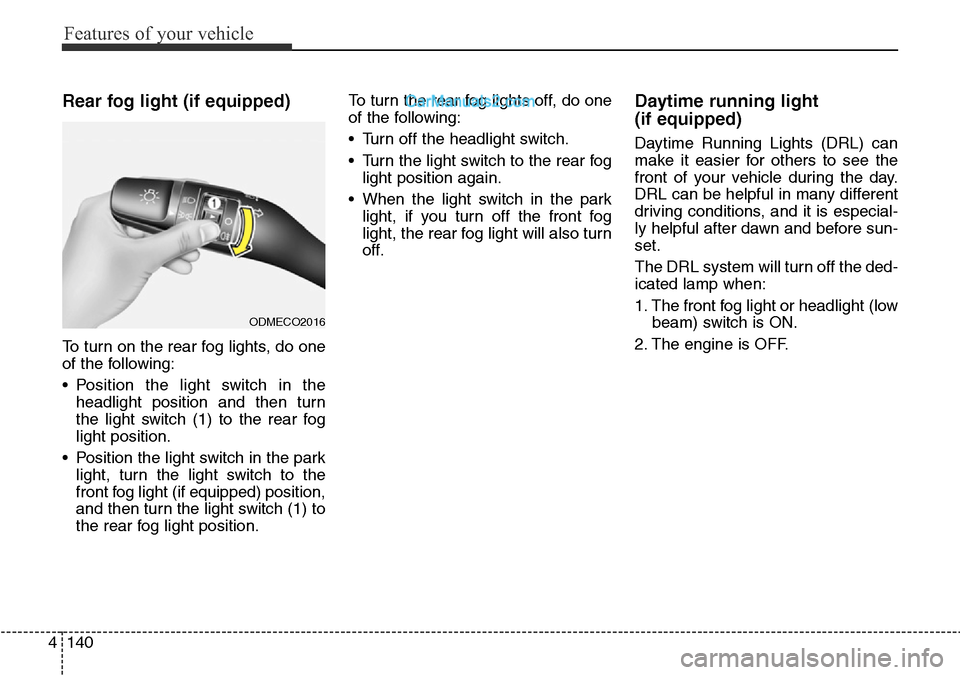
To turn on the rear fog lights, do one
of the following:
• Position the light switch in the
headlight position and then turn
the light switch (1) to the rear fog
light position.
• Position the light switch in the park
light, turn the light switch to the
front fog light (if equipped) position,
and then turn the light switch (1) to
the rear fog light position.To turn the rear fog lights off, do one
of the following:
• Turn off the headlight switch.
• Turn the light switch to the rear fog
light position again.
• When the light switch in the park
light, if you turn off the front fog
light, the rear fog light will also turn
off.
Daytime running light
(if equipped)
Daytime Running Lights (DRL) can
make it easier for others to see the
front of your vehicle during the day.
DRL can be helpful in many different
driving conditions, and it is especial-
ly helpful after dawn and before sun-
set.
The DRL system will turn off the ded-
icated lamp when:
1. The front fog light or headlight (low
beam) switch is ON.
2. The engine is OFF.
ODMECO2016
Page 280 of 699
Features of your vehicle
182 4
• For maximum defrosting, set the
temperature control to the extreme
right/hot position and the fan speed
control to the highest speed.
• If warm air to the floor is desired
whilst defrosting or defogging, set
the mode to the floor-defrost posi-
tion.
• Before driving, clear all snow and
ice from the windscreen, rear win-
dow, outside rear view mirrors, and
all side windows.
• Clear all snow and ice from the
bonnet and air inlet in the cowl grill
to improve heater and defroster
efficiency and to reduce the proba-
bility of fogging up the inside of the
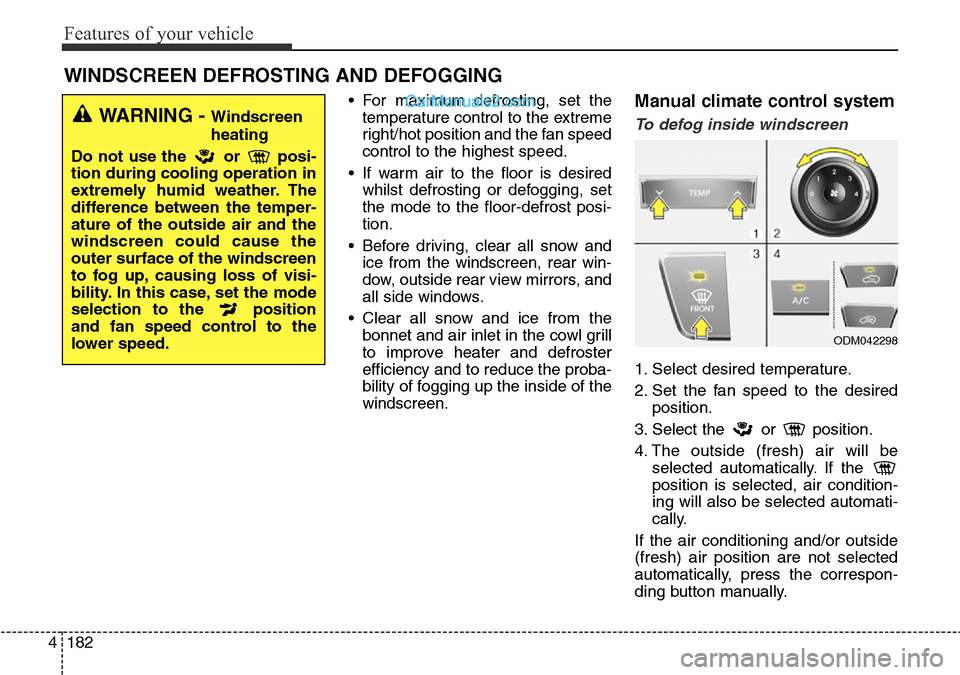
windscreen.Manual climate control system
To defog inside windscreen
1. Select desired temperature.
2. Set the fan speed to the desired
position.
3. Select the or position.
4. The outside (fresh) air will be
selected automatically. If the
position is selected, air condition-
ing will also be selected automati-
cally.
If the air conditioning and/or outside
(fresh) air position are not selected
automatically, press the correspon-
ding button manually.
WINDSCREEN DEFROSTING AND DEFOGGING
WARNING - Windscreen
heating
Do not use the or posi-
tion during cooling operation in
extremely humid weather. The
difference between the temper-
ature of the outside air and the
windscreen could cause the
outer surface of the windscreen
to fog up, causing loss of visi-
bility. In this case, set the mode
selection to the position
and fan speed control to the
lower speed.
ODM042298
Page 281 of 699
4183
Features of your vehicle
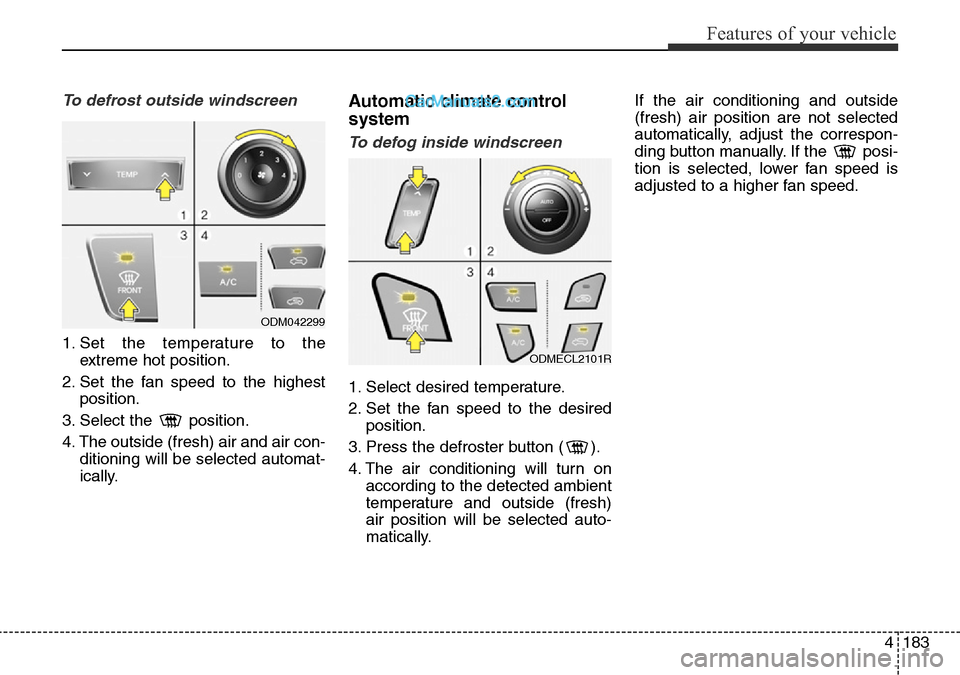
To defrost outside windscreen
1. Set the temperature to the
extreme hot position.
2. Set the fan speed to the highest
position.
3. Select the position.
4. The outside (fresh) air and air con-
ditioning will be selected automat-
ically.
Automatic climate control
system
To defog inside windscreen
1. Select desired temperature.
2. Set the fan speed to the desired
position.
3. Press the defroster button ( ).
4. The air conditioning will turn on
according to the detected ambient
temperature and outside (fresh)
air position will be selected auto-
matically.If the air conditioning and outside
(fresh) air position are not selected
automatically, adjust the correspon-
ding button manually. If the posi-
tion is selected, lower fan speed is
adjusted to a higher fan speed.
ODM042299
ODMECL2101R
Page 299 of 699
4201
Features of your vehicle
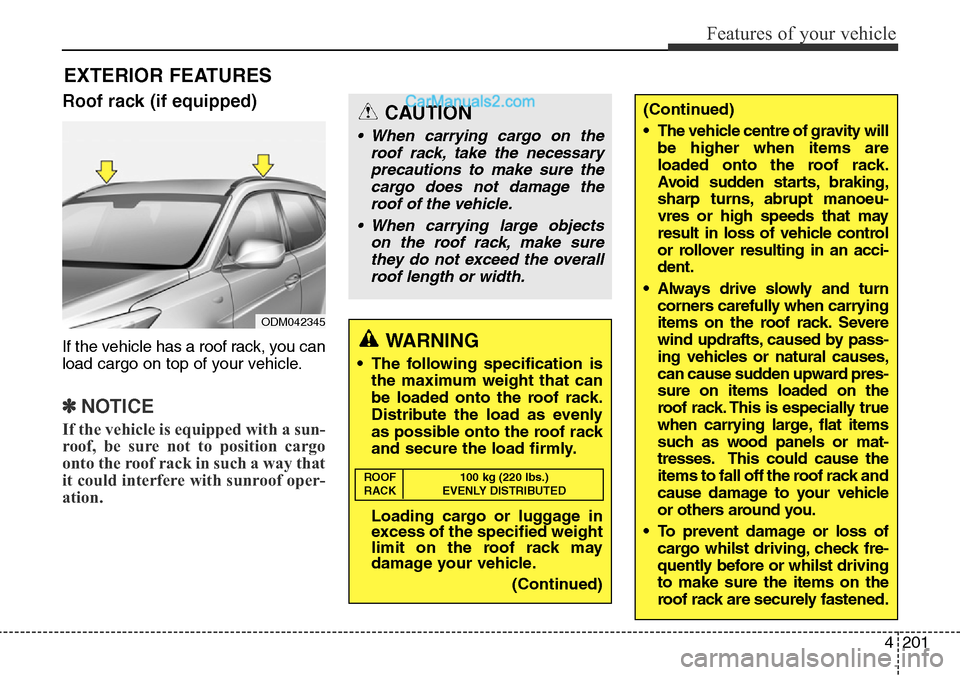
Roof rack (if equipped)
If the vehicle has a roof rack, you can
load cargo on top of your vehicle.
✽NOTICE
If the vehicle is equipped with a sun-
roof, be sure not to position cargo
onto the roof rack in such a way that
it could interfere with sunroof oper-
ation.
EXTERIOR FEATURES
(Continued)
• The vehicle centre of gravity will
be higher when items are
loaded onto the roof rack.
Avoid sudden starts, braking,
sharp turns, abrupt manoeu-
vres or high speeds that may
result in loss of vehicle control
or rollover resulting in an acci-
dent.
• Always drive slowly and turn
corners carefully when carrying
items on the roof rack. Severe
wind updrafts, caused by pass-
ing vehicles or natural causes,
can cause sudden upward pres-
sure on items loaded on the
roof rack. This is especially true
when carrying large, flat items
such as wood panels or mat-
tresses. This could cause the
items to fall off the roof rack and
cause damage to your vehicle
or others around you.
• To prevent damage or loss of
cargo whilst driving, check fre-
quently before or whilst driving
to make sure the items on the
roof rack are securely fastened.CAUTION
• When carrying cargo on the
roof rack, take the necessary
precautions to make sure the
cargo does not damage the
roof of the vehicle.
• When carrying large objects
on the roof rack, make sure
they do not exceed the overall
roof length or width.
WARNING
• The following specification is
the maximum weight that can
be loaded onto the roof rack.
Distribute the load as evenly
as possible onto the roof rack
and secure the load firmly.
Loading cargo or luggage in
excess of the specified weight
limit on the roof rack may
damage your vehicle.
(Continued)
ROOF 100 kg (220 lbs.)
RACK EVENLY DISTRIBUTED
ODM042345
Page 339 of 699
4241
Features of your vehicle
RADIO (for RDS model)
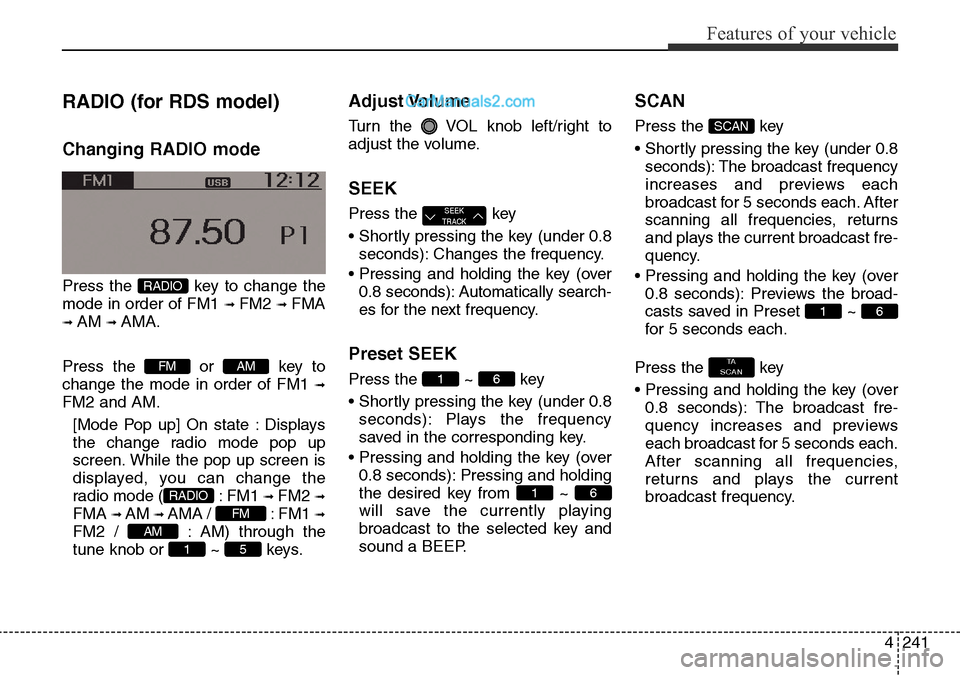
Changing RADIO mode
Press the key to change the
mode in order of FM1
➟ FM2 ➟ FMA
➟ AM ➟ AMA.
Press the or key to
change the mode in order of FM1
➟
FM2 and AM.
[Mode Pop up] On state : Displays
the change radio mode pop up
screen. While the pop up screen is
displayed, you can change the
radio mode ( : FM1
➟ FM2 ➟
FMA ➟ AM ➟ AMA / : FM1 ➟
FM2 / : AM) through the
tune knob or ~ keys.
Adjust Volume
Turn the VOL knob left/right to
adjust the volume.
SEEK
Press the key
• Shortly pressing the key (under 0.8
seconds): Changes the frequency.
• Pressing and holding the key (over
0.8 seconds): Automatically search-
es for the next frequency.
Preset SEEK
Press the ~ key
• Shortly pressing the key (under 0.8
seconds): Plays the frequency
saved in the corresponding key.
• Pressing and holding the key (over
0.8 seconds): Pressing and holding
the desired key from ~
will save the currently playing
broadcast to the selected key and
sound a BEEP.
SCAN
Press the key
• Shortly pressing the key (under 0.8
seconds): The broadcast frequency
increases and previews each
broadcast for 5 seconds each. After
scanning all frequencies, returns
and plays the current broadcast fre-
quency.
• Pressing and holding the key (over
0.8 seconds): Previews the broad-
casts saved in Preset ~
for 5 seconds each.
Press the key
• Pressing and holding the key (over
0.8 seconds): The broadcast fre-
quency increases and previews
each broadcast for 5 seconds each.
After scanning all frequencies,
returns and plays the current
broadcast frequency.
TA
SCAN
61
SCAN
61
61
SEEK
TRACK
51
AM
FM
RADIO
AMFM
RADIO
Page 341 of 699

4243
Features of your vehicle
RADIO
Changing RADIO mode
Changing RADIO mode
Press the key to change the
mode in order of FM1
➟ FM2 ➟ AM.
Press the or key to
change the mode in order of FM1
➟
FM2 and AM.
• When the power is off, press the
or key to
turn on the audio system and
receive radio broadcasts.
[Mode Pop up] On state : Displays
the change radio mode pop up
screen. While the pop up screen is
displayed, you can change the radio
mode ( : FM1 ➟ FM2 ➟ AM
/ : FM1 ➟FM2 / : AM)
through the tune knob or ~
keys.
Adjust Volume
Turn the VOL knob left/right to
adjust the volume.
SEEK
Press the key
• Shortly pressing the key (under 0.8
seconds): Changes the frequency.
• Pressing and holding the key (over
0.8 seconds): Automatically search-
es for the next frequency.
Preset SEEK
Press the ~ key
• Shortly pressing the key (under 0.8
seconds): Plays the frequency
saved in the corresponding key.
• Pressing and holding the key (over
0.8 seconds): Pressing and holding
the desired key from ~
will save the currently playing
broadcast to the selected key and
sound a BEEP.
SCAN
Press the key
• Shortly pressing the key (under 0.8
seconds): The broadcast frequen-
cy increases and previews each
broadcast for 5 seconds each.
After scanning all frequencies,
returns and plays the current
broadcast frequency.
• Pressing and holding the key (over
0.8 seconds): Previews the broad-
casts saved in Preset ~
for 5 seconds each.
61
SCAN
61
61
SEEK
TRACK
5
1
AMFM
RADIO
AMFMRADIO
AMFM
RADIO
Page 359 of 699

4261
Features of your vehicle
Voice Command List
• Common Commands: These are commands that can be used in all situations. (However, some commands may not
be supported in special circumstances.)
Command Function
More Help Provides guidance on commands that can be
used anywhere in the system.
Help Provides guidance on commands that can be
used within the current mode.
Call
phone book
Ex) Call “John”
Phone Provides guidance on Phone related com-
mands. After saying this command, say “Call
History”, “
Phone book”, “Dial Number” to exe-
cute corresponding functions.
Call History Displays the Call History screen.
Phone bookDisplays the phone bookscreen. After saying
this command, say the name of a
phone book
saved in the phone bookto automatically con-
nect the call.
Dial Number Display the Dial number screen. After saying
this command, you can say the number what
you want to call.
Redial Connects the most recently called number.
Radio
• When listening to the radio, displays the next
radio screen. (FM1➟FM2➟FMA➟AM➟AMA)
• When listening to a different mode, displays
the most recently played radio screen.
Command Function
FM
• When currently listening to the FM radio,
maintains the current state.
• When listening to a different mode, displays
the most recently played FM screen.
FM1(FM One) Displays the FM1 screen.
FM2(FM Two) Displays the FM2 screen.
FMA Displays the FMA screen.
AM Displays the AM screen.
AMA Displays the AMA screen.
FM Preset 1~6 Plays the most recently played broadcast
saved in FM Preset 1~6.
AM Preset 1~6 Plays the broadcast saved in AM Preset 1~6.
FM 87.5~107.9 Plays the FM broadcast of the corresponding
frequency.
AM 530~1710 Plays the AM broadcast of the corresponding
frequency.
TA on Enable Traffic Announcement
TA off Disable Traffic Announcement
News on Enable RDS News feature
News off Disable RDS News feature
Page 360 of 699

Features of your vehicle
262 4
Command Function
Media Moves to the most recently played media
screen.
Play Track 1~30 If a music CD has been inserted, plays the
corresponding track.
CD Plays the music saved in the CD.
Search CD Moves to the CD track or file selection screen.
•For audio CDs, move to the screen and say
the track number to play the corresponding
track.
• Moves to MP3 CD file selection screen.
After manually operate the device to select
and play music.
USB Plays USB music.
Search USB Moves to USB file selection screen. After
manually operate the device to select and play
music.
iPod Plays iPod music.
Search iPod Moves to the iPod file selection screen. After,
manually operate the device to select and play
music.
My Music Plays the music saved in My Music.
Search My Music Moves to My Music file selection screen. After
manually operate the device to select and play
music.
Command Function
AUX (Auxiliary) Plays the connected external device.
Bluetooth Audio Plays the music saved in connected
Bluetooth®Wireless Technologydevice.
Mute Mutes the radio or music volume.
Pardon? Repeats the most recent comment.
Cancel (Exit) Ends voice command.
Page 361 of 699
4263
Features of your vehicle
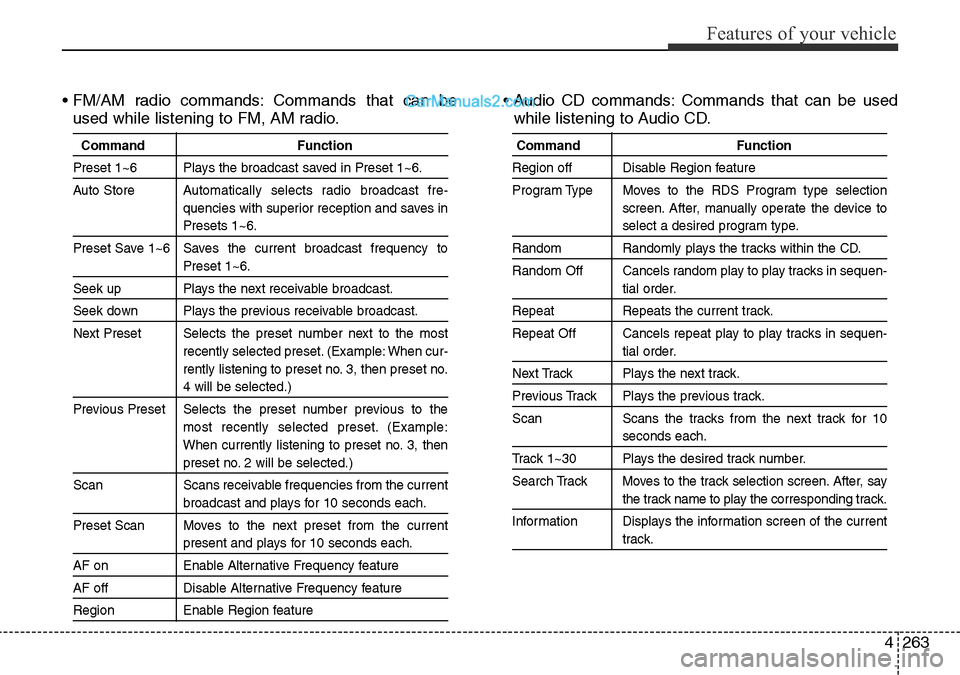
• FM/AM radio commands: Commands that can be
used while listening to FM, AM radio.• Audio CD commands: Commands that can be used
while listening to Audio CD.
Command Function
Preset 1~6 Plays the broadcast saved in Preset 1~6.
Auto StoreAutomatically selects radio broadcast fre-
quencies with superior reception and saves in
Presets 1~6.
Preset Save 1~6 Saves the current broadcast frequency to
Preset 1~6.
Seek up Plays the next receivable broadcast.
Seek down Plays the previous receivable broadcast.
Next Preset Selects the preset number next to the most
recently selected preset. (Example: When cur-
rently listening to preset no. 3, then preset no.
4 will be selected.)
Previous Preset Selects the preset number previous to the
most recently selected preset. (Example:
When currently listening to preset no. 3, then
preset no. 2 will be selected.)
Scan Scans receivable frequencies from the current
broadcast and plays for 10 seconds each.
Preset Scan Moves to the next preset from the current
present and plays for 10 seconds each.
AF on Enable Alternative Frequency feature
AF off Disable Alternative Frequency feature
Region Enable Region feature
Command Function
Region off Disable Region feature
Program Type Moves to the RDS Program type selection
screen. After, manually operate the device to
select a desired program type.
Random Randomly plays the tracks within the CD.
Random Off Cancels random play to play tracks in sequen-
tial order.
Repeat Repeats the current track.
Repeat Off Cancels repeat play to play tracks in sequen-
tial order.
Next Track Plays the next track.
Previous Track Plays the previous track.
Scan Scans the tracks from the next track for 10
seconds each.
Track 1~30 Plays the desired track number.
Search Track Moves to the track selection screen. After, say
the track name to play the corresponding track.
Information Displays the information screen of the current
track.
Page 372 of 699

Features of your vehicle
274 4
Steering remote controller
1. VOLUME
• Used to control volume.
2. MUTE
• Mutes audio volume.3. SEEK
• When pressed shortly (under 0.8
seconds)
- Radio mode : searches broadcast
frequencies saved to presets.
- Media(CD/USB/iPod/My Music/BT
Audio) modes : changes the track,
file or chapter.
• When pressed and held (over 0.8
seconds)
- Radio mode, automatically search-
es broadcast frequencies and
channels
- Media(CD/USB/iPod/My Music)
modes, rewinds or fast forwards
the track or song(file)
- BT Audio mode may not be sup-
ported in some mobile phones.4. MODE
• Each time this key is pressed, the
mode is changed in order of FM1➟
FM2 ➟ FMA➟AM ➟ AMA ➟ USB or
iPod ➟ AUX ➟ My Music➟ BT Audio
• If the media is not connected or a
disc is not inserted, corresponding
modes will be disabled.
5. (if equipped)
• When pressed shortly (under 0.8
seconds)
- Starts voice recognition
- When selecting during a voice
prompt, stops the prompt and
converts to voice command wait-
ing state
• When pressed and held (over 0.8
seconds)
- Ends voice recognition
.