lock Hyundai Santa Fe 2016 Owner's Manual
[x] Cancel search | Manufacturer: HYUNDAI, Model Year: 2016, Model line: Santa Fe, Model: Hyundai Santa Fe 2016Pages: 759, PDF Size: 29.36 MB
Page 477 of 759
Features of your vehicle
380
4
(Continued)
• Avoid use of USB
memory products
that can also be used
as key chains or
mobile phone acces-
sories. Use of such products may
cause damage to the USB jack.
• Connecting an MP3 device or phone through various chan-
nels, such as AUX/BT or Audio/
USB mode may result in pop
noises or abnormal operation.
(Continued)
• Charging through the USB may
not work for some mobile
devices.
• The device may not support normal operation when using a
USB memory type besides
(Metal Cover Type) USB
Memory.
• The device may not support normal operation when using
formats such as HDD Type, CF,
or SD Memory.
• The device will not support files locked by DRM (Digital Rights
Management.)
• USB memory sticks used by connecting an Adaptor (SD
Type or CF Type) may not be
properly recognized.
• The device may not operate properly when using USB HDDs
or USBs subject to connection
failures caused by vehicle vibra-
tions. (e.g. i-stick type) (Continued)
Page 515 of 759
![Hyundai Santa Fe 2016 Owners Manual Features of your vehicle
418
4
SETUP
Starting Mode
Press the key to display the
Setup screen.
You can select and control options
related to [Display], [Sound],
[Clock/Calendar], [Phone] and
[System].](/img/35/16331/w960_16331-514.png "Hyundai Santa Fe 2016 Owners Manual Features of your vehicle
418
4
SETUP
Starting Mode
Press the key to display the
Setup screen.
You can select and control options
related to [Display], [Sound],
[Clock/Calendar], [Phone] and
[System].")
Features of your vehicle
418
4
SETUP
Starting Mode
Press the key to display the
Setup screen.
You can select and control options
related to [Display], [Sound],
[Clock/Calendar], [Phone] and
[System].
Display Settings
Adjusting the Brightness
Press the key Select
[Display] Select [Brightness]
Use the , buttons to adjust the
screen brightness or set the
Brightness on Automatic, Daylight, or
Night mode.
Press the button to reset.
1) Automatic : Adjusts the brightness
automatically
2) Daylight : Always maintains the brightness on high
3) Night : Always maintains the
brightness on low
Mode Pop-up
Press the key Select
[Display] Select [Mode Pop up]
This feature is used to display the
Mode Pop-up screen when entering
radio and media modes.
When this feature is turned on,
pressing the or key
will display the Mode Pop-up screen.
✽ ✽ NOTICE
The media Mode Pop-up screen can
be displayed only when two or more
media modes have been connected.
MEDIA RADIO
SETUP
Default
SETUP SETUP
Page 518 of 759
![Hyundai Santa Fe 2016 Owners Manual 4421
Features of your vehicle
Touch Screen Beep
Press the key Select
[Sound] Select [Touch Screen
Beep]
This feature is used to turn the touch
screen beep on/off.
Blue Link Voice Volume
Press the k](/img/35/16331/w960_16331-517.png "Hyundai Santa Fe 2016 Owners Manual 4421
Features of your vehicle
Touch Screen Beep
Press the key Select
[Sound] Select [Touch Screen
Beep]
This feature is used to turn the touch
screen beep on/off.
Blue Link Voice Volume
Press the k")
4421
Features of your vehicle
Touch Screen Beep
Press the key Select
[Sound] Select [Touch Screen
Beep]
This feature is used to turn the touch
screen beep on/off.
Blue Link Voice Volume
Press the key Select
[Sound] Select [Blue Link Voice
Vol.]
Turn the TUNE knob to adjust the
Blue Link Voice Volume.
❈Blue Link
®may differ depending
on the selected audio.
Clock/Calendar Setting
Clock Setting
Press the key Select
[Clock/Calendar] Select [Clock
Settings]
Use the , buttons to set the
Hour, Minutes setting and select
AM/PM.
✽ ✽ NOTICE
Press and hold the key (over
0.8 seconds) to set the Clock/
Calendar screen.CLOCK
SETUP
SETUP SETUP
Page 519 of 759
![Hyundai Santa Fe 2016 Owners Manual Features of your vehicle
422
4
Calendar Setting
Press the key Select
[Clock/Calendar] Select [Calendar
Settings]
Use the , buttons to set the
Month, Day and Year setting.
Time Format
Press the key](/img/35/16331/w960_16331-518.png "Hyundai Santa Fe 2016 Owners Manual Features of your vehicle
422
4
Calendar Setting
Press the key Select
[Clock/Calendar] Select [Calendar
Settings]
Use the , buttons to set the
Month, Day and Year setting.
Time Format
Press the key")
Features of your vehicle
422
4
Calendar Setting
Press the key Select
[Clock/Calendar] Select [Calendar
Settings]
Use the , buttons to set the
Month, Day and Year setting.
Time Format
Press the key Select
[Clock/Calendar] Select [Time Format]
This feature is used to change the
clock format between 12hr or 24hr.
Clock Display
Press the key Select
[Clock/Calendar] Select [Clock
Display (Power off)]
This feature is used to display a clock
on the screen when the audio sys-
tem is turned off.SETUP SETUP SETUP
Page 526 of 759

Driving your vehicle
Before driving . . . . . . . . . . . . . . . . . . . . . . . . . . . . . . 5-3
Key . . . . . . . . . . . . . . . . . . . . . . . . . . . . . . . . . . . . \
. . . 5-6
Engine start/stop button . . . . . . . . . . . . . . . . . . . . . 5-9
Automatic transaxle . . . . . . . . . . . . . . . . . . . . . . . . 5-14
• Automatic transaxle operation . . . . . . . . . . . . . . . . . . 5-14
All wheel drive (AWD) . . . . . . . . . . . . . . . . . . . . . . 5-21
Brake system . . . . . . . . . . . . . . . . . . . . . . . . . . . . . . 5-28
• Power brakes . . . . . . . . . . . . . . . . . . . . . . . . . . . . . . . 5-28
• Parking brake . . . . . . . . . . . . . . . . . . . . . . . . . . . . . . . 5-30
• Anti-lock brake system (ABS) . . . . . . . . . . . . . . . . . . 5-32
• Electronic stability control (ESC) . . . . . . . . . . . . . . . 5-35
• Vehicle stability management (VSM) . . . . . . . . . . . . 5-39
• Downhill brake control (DBC) . . . . . . . . . . . . . . . . . . 5-40
• Hill-start assist control (HAC) . . . . . . . . . . . . . . . . . . 5-42
Cruise control system. . . . . . . . . . . . . . . . . . . . . . . 5-45
Blind spot detection system (BSD) . . . . . . . . . . . . 5-50
Active ECO system. . . . . . . . . . . . . . . . . . . . . . . . . 5-56
Economical operation . . . . . . . . . . . . . . . . . . . . . . 5-57Special driving conditions . . . . . . . . . . . . . . . . . . . 5-59
• Hazardous driving conditions . . . . . . . . . . . . . . . . . . 5-59
• Rocking the vehicle . . . . . . . . . . . . . . . . . . . . . . . . . . . 5-60
• Smooth cornering . . . . . . . . . . . . . . . . . . . . . . . . . . . . 5-61
• Driving at night . . . . . . . . . . . . . . . . . . . . . . . . . . . . . . 5-61
• Driving in the rain . . . . . . . . . . . . . . . . . . . . . . . . . . . . 5-62
• Driving in flooded areas . . . . . . . . . . . . . . . . . . . . . . . 5-63
• Driving off-road . . . . . . . . . . . . . . . . . . . . . . . . . . . . . . 5-63
• Highway driving . . . . . . . . . . . . . . . . . . . . . . . . . . . . . 5-63
Winter driving . . . . . . . . . . . . . . . . . . . . . . . . . . . . 5-65
Trailer towing . . . . . . . . . . . . . . . . . . . . . . . . . . . . . 5-70
Vehicle load limit . . . . . . . . . . . . . . . . . . . . . . . . . . 5-79
Vehicle weight . . . . . . . . . . . . . . . . . . . . . . . . . . . . . 5-84
• Base curb weight . . . . . . . . . . . . . . . . . . . . . . . . . . . . . 5-84
• Vehicle curb weight . . . . . . . . . . . . . . . . . . . . . . . . . . . 5-84
• Cargo weight . . . . . . . . . . . . . . . . . . . . . . . . . . . . . . . . 5-84
• GAW (Gross axle weight) . . . . . . . . . . . . . . . . . . . . . . 5-84
• GAWR (Gross axle weight rating) . . . . . . . . . . . . . . . 5-84
• GVW (Gross vehicle weight) . . . . . . . . . . . . . . . . . . . 5-84
• GVWR (Gross vehicle weight rating) . . . . . . . . . . . . 5-845
Page 529 of 759
Driving your vehicle
45
Before starting
Close and lock all doors.
Position the seat so that all con-trols are easily reached.
Adjust the inside and outside rearview mirrors.
Be sure that all lights work.
Check all gauges.
Check the operation of warning lights when the ignition switch is
turned to the ON position.
Release the parking brake and make sure the brake warning light
goes out.
For safe operation, be sure you are
familiar with your vehicle and its
equipment.WARNING- Driving under
the influence of alcohol or
drugs
Drinking and driving is danger-
ous. Drunk driving is the num-
ber one contributor to the high-
way death toll each year. Even a
small amount of alcohol will
affect your reflexes, percep-
tions and judgement. Driving
while under the influence of
drugs is as dangerous or more
dangerous than driving drunk.
You are much more likely to
have a serious accident if you
drink or take drugs and drive.
If you are drinking or taking
drugs, do not drive. Do not ride
with a driver who has been drink-
ing or taking drugs. Choose a
designated driver or call a cab.WARNING
All passengers must be proper-
ly belted whenever the vehicle
is moving. Refer to “Seat belts”
in section 3 for more informa-
tion on their proper use.
WARNING
Always check the surrounding
areas near your vehicle for peo-
ple, especially children, before
putting a vehicle into D (Drive)
or R (Reverse).
Page 531 of 759
Driving your vehicle
65
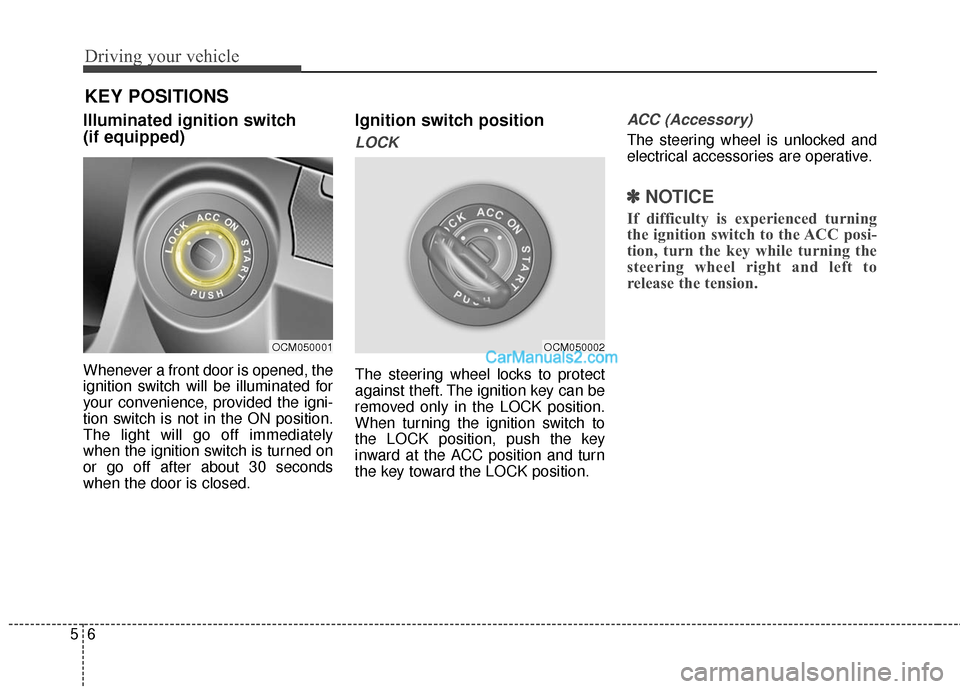
Illuminated ignition switch
(if equipped)
Whenever a front door is opened, the
ignition switch will be illuminated for
your convenience, provided the igni-
tion switch is not in the ON position.
The light will go off immediately
when the ignition switch is turned on
or go off after about 30 seconds
when the door is closed.
Ignition switch position
LOCK
The steering wheel locks to protect
against theft. The ignition key can be
removed only in the LOCK position.
When turning the ignition switch to
the LOCK position, push the key
inward at the ACC position and turn
the key toward the LOCK position.
ACC (Accessory)
The steering wheel is unlocked and
electrical accessories are operative.
✽ ✽NOTICE
If difficulty is experienced turning
the ignition switch to the ACC posi-
tion, turn the key while turning the
steering wheel right and left to
release the tension.
OCM050001OCM050002
KEY POSITIONS
Page 532 of 759
57
Driving your vehicle
ON
The warning lights can be checked
before the engine is started. This is
the normal running position after the
engine is started.
Do not leave the ignition switch ON ifthe engine is not running to preventbattery discharge.
START
Turn the ignition switch to the START
position to start the engine. The
engine will crank until you release
the key; then it returns to the ON
position. The brake warning light can
be checked in this position.
WARNING - Ignition key
Never turn the ignition switch to LOCK or ACC while the vehi-
cle is moving. This would result
in loss of directional control
and braking function, which
could cause an accident.
The anti-theft steering column lock is not a substitute for the
parking brake. Before leaving
the driver’s seat, always make
sure the shift lever is engaged
in P (Park), set the parking
brake fully and shut the engine
off. Unexpected and sudden
vehicle movement may occur if
these precautions are not
taken.
(Continued)(Continued)
Never reach for the ignitionswitch, or any other controls
through the steering wheel
while the vehicle is in motion.
The presence of your hand or
arm in this area could cause a
loss of vehicle control, an acci-
dent and serious bodily injury
or death.
Do not place any movable objects around the driver’s seat
as they may move while driving,
interfere with the driver and lead
to an accident.
Page 538 of 759
513
Driving your vehicle
✽
✽
NOTICE
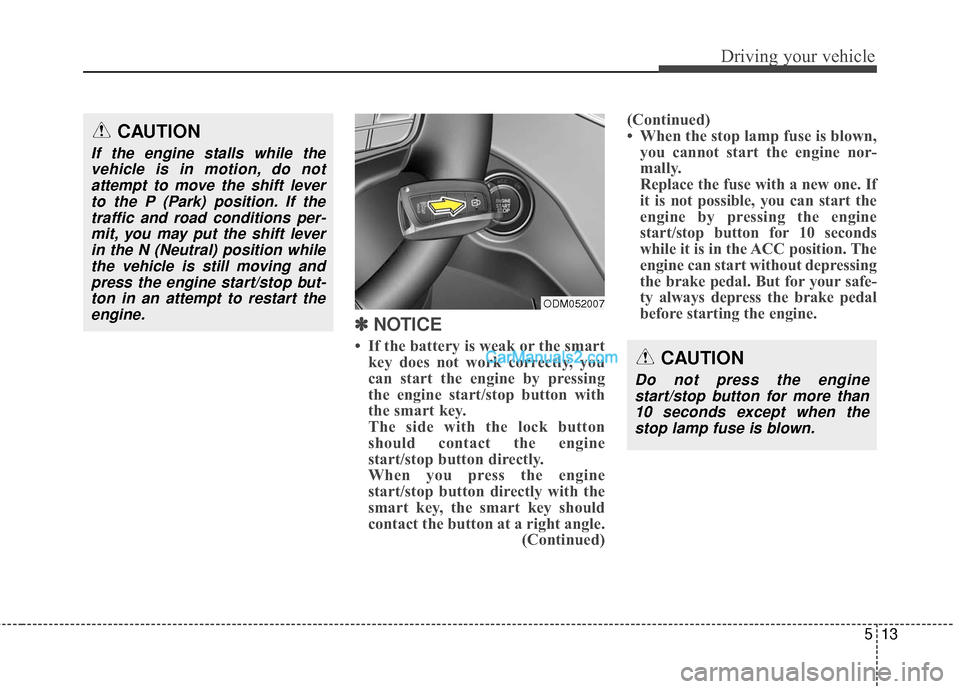
• If the battery is weak or the smart
key does not work correctly, you
can start the engine by pressing
the engine start/stop button with
the smart key.
The side with the lock button
should contact the engine
start/stop button directly.
When you press the engine
start/stop button directly with the
smart key, the smart key should
contact the button at a right angle. (Continued)(Continued)
• When the stop lamp fuse is blown,
you cannot start the engine nor-
mally.
Replace the fuse with a new one. If
it is not possible, you can start the
engine by pressing the engine
start/stop button for 10 seconds
while it is in the ACC position. The
engine can start without depressing
the brake pedal. But for your safe-
ty always depress the brake pedal
before starting the engine.
CAUTION
If the engine stalls while the
vehicle is in motion, do notattempt to move the shift leverto the P (Park) position. If thetraffic and road conditions per-mit, you may put the shift leverin the N (Neutral) position whilethe vehicle is still moving andpress the engine start/stop but-ton in an attempt to restart theengine.
CAUTION
Do not press the enginestart/stop button for more than10 seconds except when thestop lamp fuse is blown.
ODM052007
Page 540 of 759
515
Driving your vehicle
For smooth operation, depress thebrake pedal when shifting from N(Neutral) to a forward or reverse gear. Transaxle ranges
The indicator lights in the instrument
cluster displays the shift lever posi-
tion when the ignition switch is in the
ON position.
P (Park)
Always come to a complete stop
before shifting into P (Park). This
position locks the transaxle and pre-
vents the front wheels from rotating.
WARNING - Automatic
transaxle
Always check the surrounding areas near your vehicle for
people, especially children,
before shifting a vehicle into
D (Drive) or R (Reverse).
Before leaving the driver’s seat, always make sure the
shift lever is in the P (Park)
position; then set the parking
brake fully and shut the
engine off. Unexpected and
sudden vehicle movement
can occur if these precautions
are not followed in the order
identified.
CAUTION
To avoid damage to your transaxle, do not acceleratethe engine in R (Reverse) orany forward gear position withthe brakes on.
When stopped on an incline, do not hold the vehicle sta-tionary with engine power.Use the service brake or theparking brake.
Do not shift from N (Neutral) or P (Park) into D (Drive), or R(Reverse) when the engine isabove idle speed.