climate control Hyundai Santa Fe 2016 User Guide
[x] Cancel search | Manufacturer: HYUNDAI, Model Year: 2016, Model line: Santa Fe, Model: Hyundai Santa Fe 2016Pages: 759, PDF Size: 29.36 MB
Page 233 of 759
Features of your vehicle
136
4
ODMECL2010/OANNMM2002
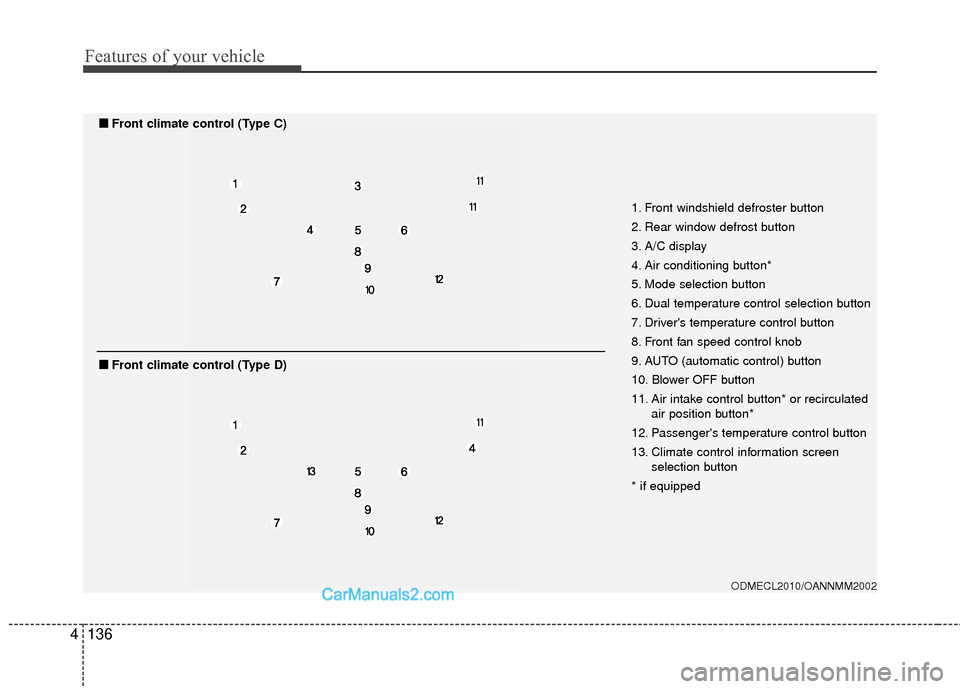
1. Front windshield defroster button
2. Rear window defrost button
3. A/C display
4. Air conditioning button*
5. Mode selection button
6. Dual temperature control selection button
7. Driver's temperature control button
8. Front fan speed control knob
9. AUTO (automatic control) button
10. Blower OFF button
11. Air intake control button* or recirculated
air position button*
12. Passenger's temperature control button
13. Climate control information screen selection button
* if equipped
■
■ Front climate control (Type C)
■
■Front climate control (Type D)
Page 234 of 759
4137
Features of your vehicle
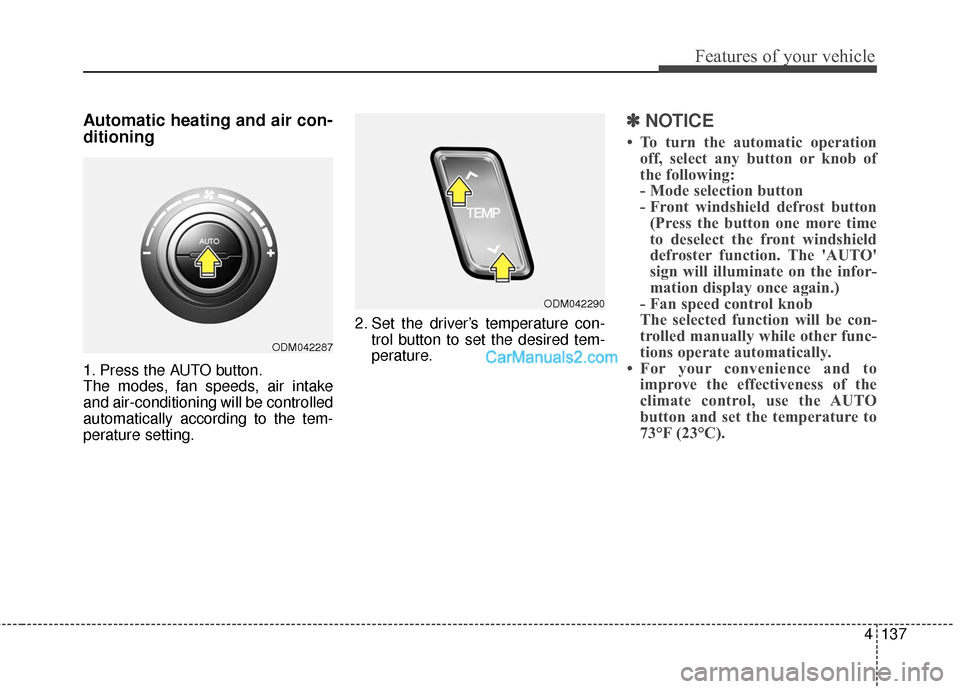
Automatic heating and air con-
ditioning
1. Press the AUTO button.
The modes, fan speeds, air intake
and air-conditioning will be controlled
automatically according to the tem-
perature setting.2. Set the driver’s temperature con-
trol button to set the desired tem-
perature.
✽ ✽NOTICE
• To turn the automatic operation
off, select any button or knob of
the following:
- Mode selection button
- Front windshield defrost button(Press the button one more time
to deselect the front windshield
defroster function. The 'AUTO'
sign will illuminate on the infor-
mation display once again.)
- Fan speed control knob
The selected function will be con-
trolled manually while other func-
tions operate automatically.
• For your convenience and to improve the effectiveness of the
climate control, use the AUTO
button and set the temperature to
73°F (23°C).
ODM042287
ODM042290
Page 235 of 759
Features of your vehicle
138
4
✽
✽
NOTICE
Never place anything over the sen-
sor located on the instrument panel
to ensure better control of the heat-
ing and cooling system.
Manual heating and air condi-
tioning
The heating and cooling system can
be controlled manually by pressing
buttons or turning knob(s) other than
the AUTO button. In this case, the
system works sequentially according
to the order of buttons or knob(s)
selected.
1. Start the engine.
2. Set the mode to the desired posi-
tion.
For improving the effectiveness of
heating and cooling;- Heating:
- Cooling:
3. Set the temperature control to the desired position.
4. Set the air intake control to the outside (fresh) air position.
5. Set the fan speed control to the desired speed.
6. If air conditioning is desired, turn the air conditioning system on.
Press the AUTO button in order to
convert to full automatic control of
the system.
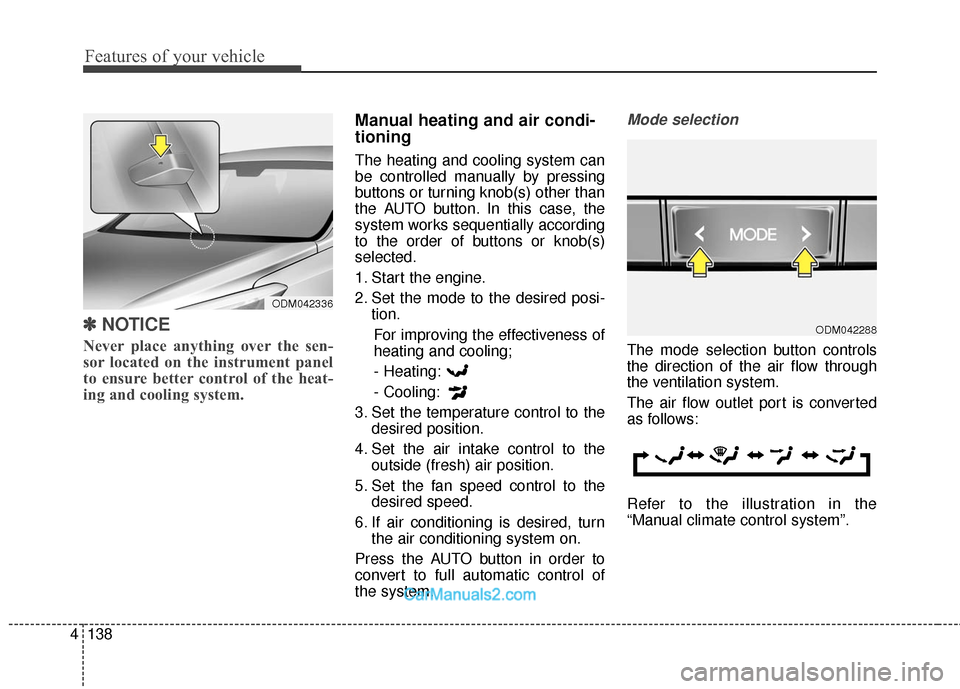
Mode selection
The mode selection button controls
the direction of the air flow through
the ventilation system.
The air flow outlet port is converted
as follows:
Refer to the illustration in the
“Manual climate control system”.
ODM042288
ODM042336
Page 238 of 759
4141
Features of your vehicle
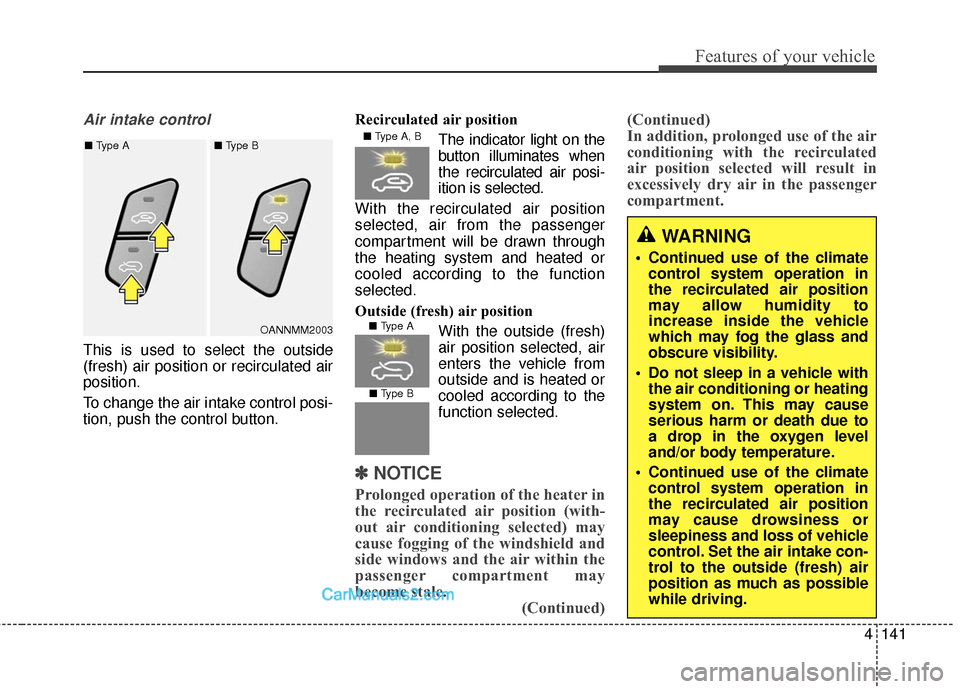
Air intake control
This is used to select the outside
(fresh) air position or recirculated air
position.
To change the air intake control posi-
tion, push the control button.Recirculated air position
The indicator light on the
button illuminates when
the recirculated air posi-
ition is selected.
With the recirculated air position
selected, air from the passenger
compartment will be drawn through
the heating system and heated or
cooled according to the function
selected.
Outside (fresh) air position With the outside (fresh)
air position selected, air
enters the vehicle from
outside and is heated orcooled according to the
function selected.
✽ ✽ NOTICE
Prolonged operation of the heater in
the recirculated air position (with-
out air conditioning selected) may
cause fogging of the windshield and
side windows and the air within the
passenger compartment may
become stale.
(Continued)(Continued)
In addition, prolonged use of the air
conditioning with the recirculated
air position selected will result in
excessively dry air in the passenger
compartment.
WARNING
Continued use of the climate
control system operation in
the recirculated air position
may allow humidity to
increase inside the vehicle
which may fog the glass and
obscure visibility.
Do not sleep in a vehicle with the air conditioning or heating
system on. This may cause
serious harm or death due to
a drop in the oxygen level
and/or body temperature.
Continued use of the climate control system operation in
the recirculated air position
may cause drowsiness or
sleepiness and loss of vehicle
control. Set the air intake con-
trol to the outside (fresh) air
position as much as possible
while driving.
■ Type A, B
■ Type A
■ Type B
OANNMM2003
■
Type A ■ Type B
Page 239 of 759
Features of your vehicle
142
4
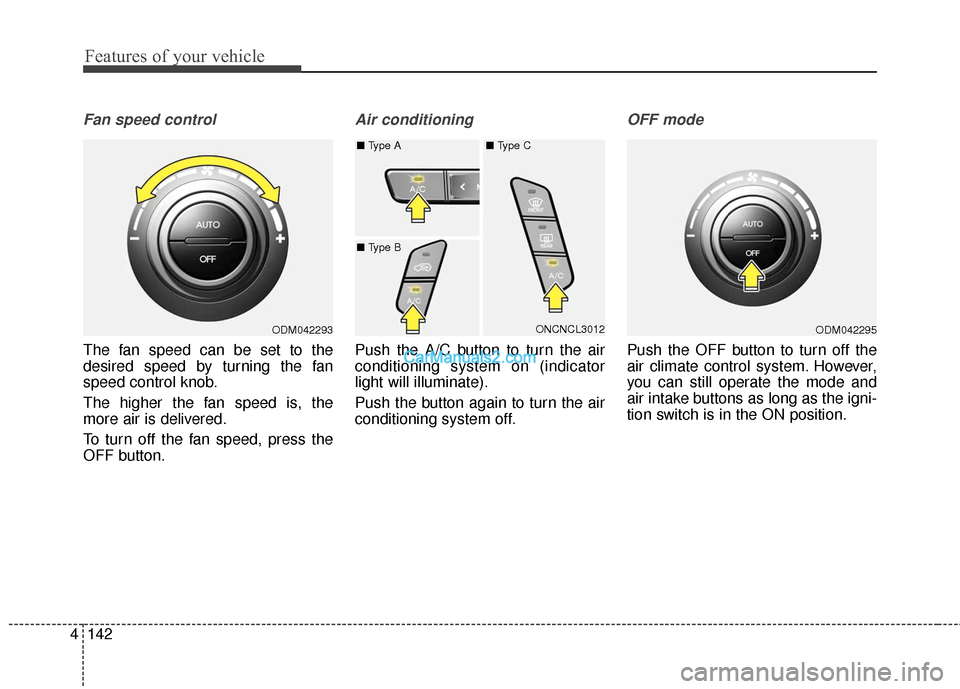
Fan speed control
The fan speed can be set to the
desired speed by turning the fan
speed control knob.
The higher the fan speed is, the
more air is delivered.
To turn off the fan speed, press the
OFF button.
Air conditioning
Push the A/C button to turn the air
conditioning system on (indicator
light will illuminate).
Push the button again to turn the air
conditioning system off.
OFF mode
Push the OFF button to turn off the
air climate control system. However,
you can still operate the mode and
air intake buttons as long as the igni-
tion switch is in the ON position.
ODM042293ONCNCL3012
■
Type A ■ Type C
■ Type BODM042295
Page 240 of 759
4143
Features of your vehicle
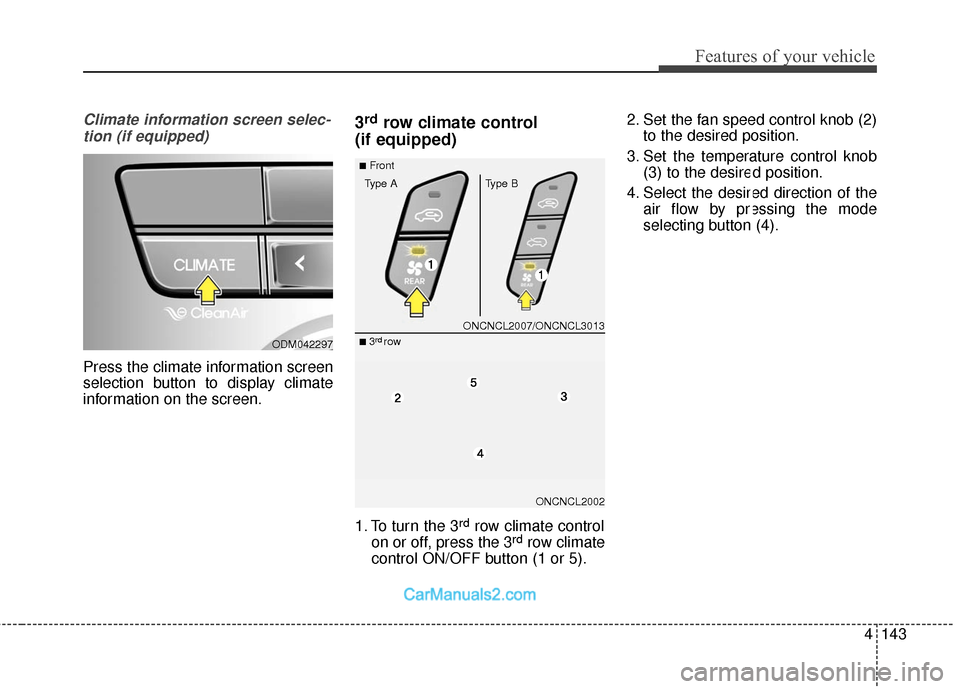
Climate information screen selec-tion (if equipped)
Press the climate information screen
selection button to display climate
information on the screen.
3rdrow climate control
(if equipped)
1. To turn the 3rdrow climate control
on or off, press the 3rdrow climate
control ON/OFF button (1 or 5). 2. Set the fan speed control knob (2)
to the desired position.
3. Set the temperature control knob (3) to the desired position.
4. Select the desired direction of the air flow by pressing the mode
selecting button (4).
ODM042297
ONCNCL2007/ONCNCL3013
ONCNCL2002
■Front
Type A Type B
■ 3rdrow
Page 241 of 759
Features of your vehicle
144
4
For maximum defrosting, set the
temperature control to the extreme
right/hot position and the fan speed
control to the highest speed.
If warm air to the floor is desired while defrosting or defogging, set
the mode to the floor-defrost posi-
tion.
Before driving, clear all snow and ice from the windshield, rear win-
dow, outside rear view mirrors, and
all side windows.
Clear all snow and ice from the hood and air inlet in the cowl grill to
improve heater and defroster effi-
ciency and to reduce the probabili-
ty of fogging up the inside of the
windshield.
✽ ✽ NOTICE
Be sure to keep the interior surface
of the windshield clean by wiping it
with a clean cloth and glass cleaner.
This will help reduce the tendency of
the glass fogging and also improve
visibility.
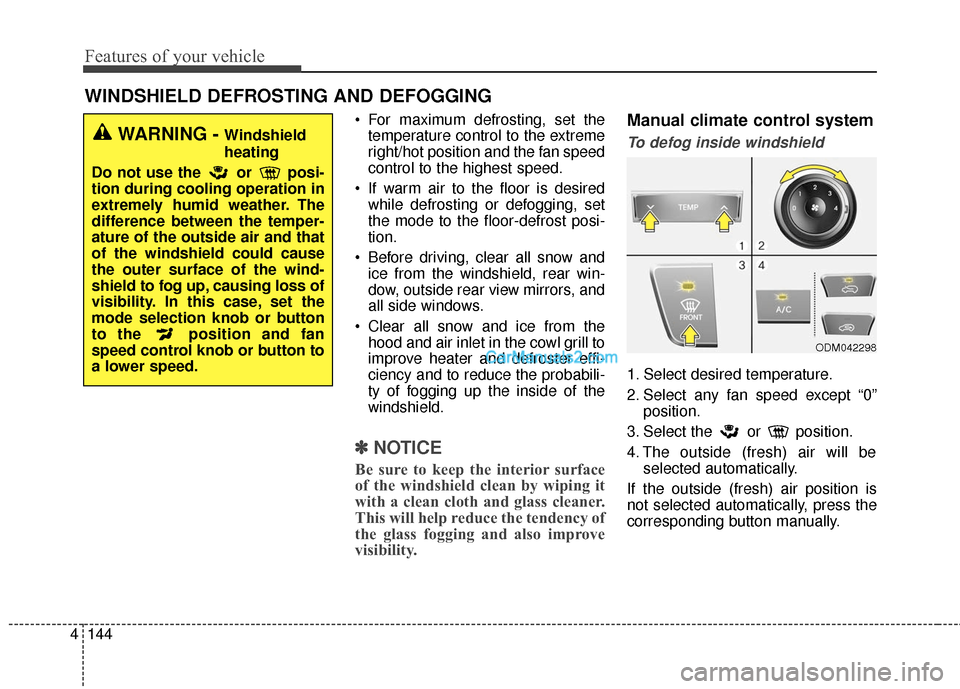
Manual climate control system
To defog inside windshield
1. Select desired temperature.
2. Select any fan speed except “0”
position.
3. Select the or position.
4. The outside (fresh) air will be selected automatically.
If the outside (fresh) air position is
not selected automatically, press the
corresponding button manually.
WINDSHIELD DEFROSTING AND DEFOGGING
WARNING - Windshield
heating
Do not use the or posi-
tion during cooling operation in
extremely humid weather. The
difference between the temper-
ature of the outside air and that
of the windshield could cause
the outer surface of the wind-
shield to fog up, causing loss of
visibility. In this case, set the
mode selection knob or button
to the position and fan
speed control knob or button to
a lower speed.
ODM042298
Page 242 of 759
4145
Features of your vehicle
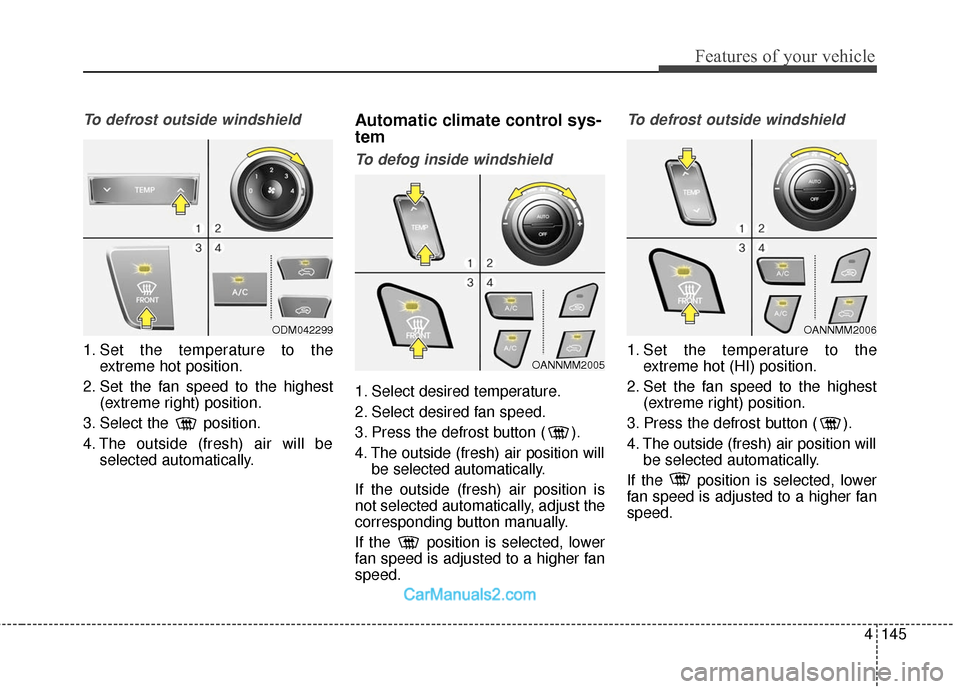
To defrost outside windshield
1. Set the temperature to theextreme hot position.
2. Set the fan speed to the highest (extreme right) position.
3. Select the position.
4. The outside (fresh) air will be selected automatically.
Automatic climate control sys-
tem
To defog inside windshield
1. Select desired temperature.
2. Select desired fan speed.
3. Press the defrost button ( ).
4. The outside (fresh) air position willbe selected automatically.
If the outside (fresh) air position is
not selected automatically, adjust the
corresponding button manually.
If the position is selected, lower
fan speed is adjusted to a higher fan
speed.
To defrost outside windshield
1. Set the temperature to the extreme hot (HI) position.
2. Set the fan speed to the highest (extreme right) position.
3. Press the defrost button ( ).
4. The outside (fresh) air position will be selected automatically.
If the position is selected, lower
fan speed is adjusted to a higher fan
speed.
ODM042299
OANNMM2005
OANNMM2006
Page 554 of 759
529
Driving your vehicle
In the event of brake failure
If service brakes fail to operate while
the vehicle is in motion, you can
make an emergency stop with the
parking brake. The stopping dis-
tance, however, will be much greater
than normal.
Disc brakes wear indicator
When your brake pads are worn and
new pads are required, you will hear
a high-pitched warning sound from
your front brakes or rear brakes (if
equipped). You may hear this sound
come and go or it may occur when-
ever you depress the brake pedal.
Please remember that some driving
conditions or climates may cause a
brake squeal when you first apply (or
lightly apply) the brakes. This is nor-
mal and does not indicate a problem
with your brakes.
WARNING - Parking
brake
Applying the parking brake
while the vehicle is moving at
normal speeds can cause a
sudden loss of control of the
vehicle. If you must use the
parking brake to stop the vehi-
cle, use great caution in apply-
ing the brake.WARNING - Brake wear
This brake wear warning sound
means your vehicle needs serv-
ice. If you ignore this audible
warning, you will eventually
lose braking performance,
which could lead to a serious
accident.
CAUTION
To avoid costly brake repairs, do not continue to drive withworn brake pads.
Always replace the front or rear brake pads as pairs.
Page 643 of 759
Maintenance
Engine compartment . . . . . . . . . . . . . . . . . . . . . . . . 7-3
Maintenance services . . . . . . . . . . . . . . . . . . . . . . . . 7-4
• Owner’s responsibility . . . . . . . . . . . . . . . . . . . . . . . . . 7-4
. . . . . . . . . . . . . . . . . 7-5
Owner maintenance . . . . . . . . . . . . . . . . . . . . . . . . . 7-6
Scheduled maintenance service. . . . . . . . . . . . . . . . 7-8
Explanation of scheduled maintenance items . . . 7-26
Engine oil. . . . . . . . . . . . . . . . . . . . . . . . . . . . . . . . . 7-30
. . . . . . . . . . . . . . . . . . . 7-30
. . . . . . . . . . . . . . . 7-31
Engine coolant . . . . . . . . . . . . . . . . . . . . . . . . . . . . 7-32
. . . . . . . . . . . . . . . . . . . . . 7-32
. . . . . . . . . . . . . . . . . . . . . . . . . 7-34
Brake fluid . . . . . . . . . . . . . . . . . . . . . . . . . . . . . . . 7-35
. . . . . . . . . . . . . . . . . . 7-35
Washer fluid . . . . . . . . . . . . . . . . . . . . . . . . . . . . . . 7-37
. . . . . . . . . . . . . . . . . 7-37
Parking brake . . . . . . . . . . . . . . . . . . . . . . . . . . . . . 7-37
Air cleaner. . . . . . . . . . . . . . . . . . . . . . . . . . . . . . . . 7-38
. . . . . . . . . . . . . . . . . . . . . . . . . . . . 7-38
Climate control air filter . . . . . . . . . . . . . . . . . . . . 7-40
. . . . . . . . . . . . . . . . . . . . . . . . . . . . . . 7-40
. . . . . . . . . . . . . . . . . . . . . . . . . . . . 7-40
Wiper blades . . . . . . . . . . . . . . . . . . . . . . . . . . . . . . 7-42
. . . . . . . . . . . . . . . . . . . . . . . . . . . . . . 7-42
. . . . . . . . . . . . . . . . . . . . . . . . . . . . 7-42
Battery . . . . . . . . . . . . . . . . . . . . . . . . . . . . . . . . . . . 7-\
45
. . . . . . . . . . . . . . . . . . . . . . . 7-45
. . . . . . . . . . . . . . . . . . . . . . . . . . . 7-46
. . . . . . . . . . . . . . . . . . . . . . . . . . . . . . . . . . 7-47\
Tires and wheels . . . . . . . . . . . . . . . . . . . . . . . . . . . 7-48
. . . . . . . . . . . . . . . . . . . . . . . . . . . . . . . . . . . . \
7-48
. . . . . . . 7-48
. . . . . . . . . . . . . . . . . . . . . . . . . . . . . . . . . 7-50
. . . . . . . . . . . . . . . 7-51
. . . . . . . . . . . . . . . . . . . . . . . . . . . . . 7-52
. . . . . . . . . . . . . . . . . . . . . . . . . . . 7-53
. . . . . . . . . . . . . . . . . . . . . . . . . . . . . . . . . 7-53
. . . . . . . . . . . . . . . . . . . . . . . . . . . . . 7-54
. . . . . . . . . . . . . . . . . . . . . . . . . 7-54
Fuses . . . . . . . . . . . . . . . . . . . . . . . . . . . . . . . . . . . . \
7-62
Light bulbs . . . . . . . . . . . . . . . . . . . . . . . . . . . . . . . 7-74
. . . . . . . . . . . . . . . . . . . . . . . 7-75
. . . . . . . . . . . . 7-78
. . . . . . . . 7-79
. . . . . . . 7-81
7