Lift button Hyundai Santa Fe 2018 User Guide
[x] Cancel search | Manufacturer: HYUNDAI, Model Year: 2018, Model line: Santa Fe, Model: Hyundai Santa Fe 2018Pages: 570, PDF Size: 16.8 MB
Page 131 of 570
Features of your vehicle
28
4
✽
✽
NOTICE
When the engine is not running, the
power liftgate (power tailgate) can
be operated regardless of gear posi-
tion.
However, if ignition switch is ON
position, the power liftgate (power
tailgate) can operate when the auto-
matic shift lever is in P (Park).
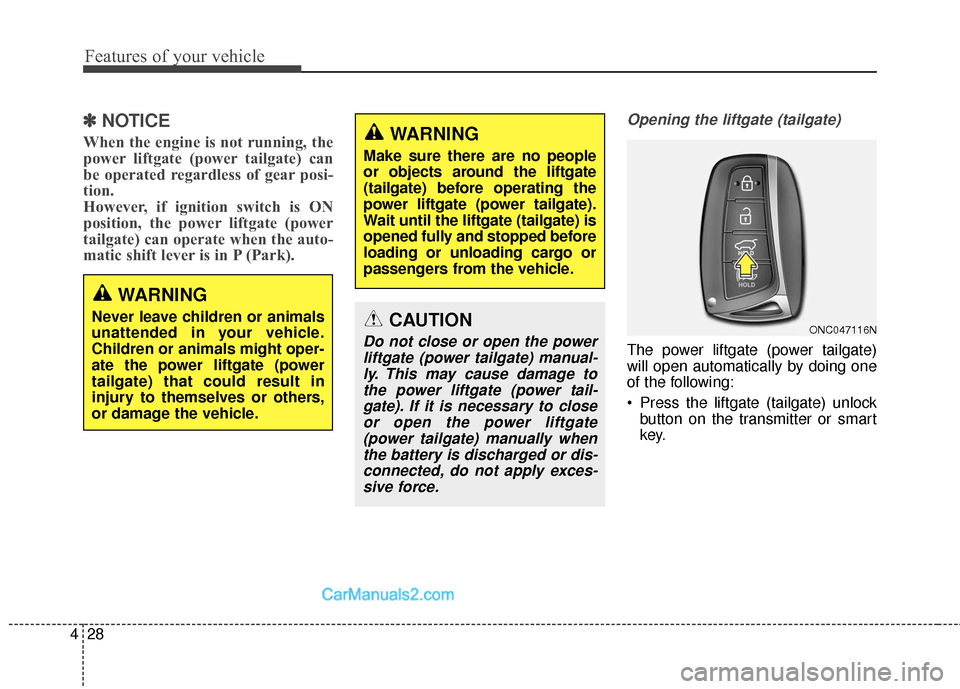
Opening the liftgate (tailgate)
The power liftgate (power tailgate)
will open automatically by doing one
of the following:
Press the liftgate (tailgate) unlock
button on the transmitter or smart
key.
CAUTION
Do not close or open the powerliftgate (power tailgate) manual-ly. This may cause damage tothe power liftgate (power tail-gate). If it is necessary to closeor open the power liftgate(power tailgate) manually whenthe battery is discharged or dis-connected, do not apply exces-sive force.
WARNING
Make sure there are no people
or objects around the liftgate
(tailgate) before operating the
power liftgate (power tailgate).
Wait until the liftgate (tailgate) is
opened fully and stopped before
loading or unloading cargo or
passengers from the vehicle.
WARNING
Never leave children or animals
unattended in your vehicle.
Children or animals might oper-
ate the power liftgate (power
tailgate) that could result in
injury to themselves or others,
or damage the vehicle.ONC047116N
Page 132 of 570
429
Features of your vehicle
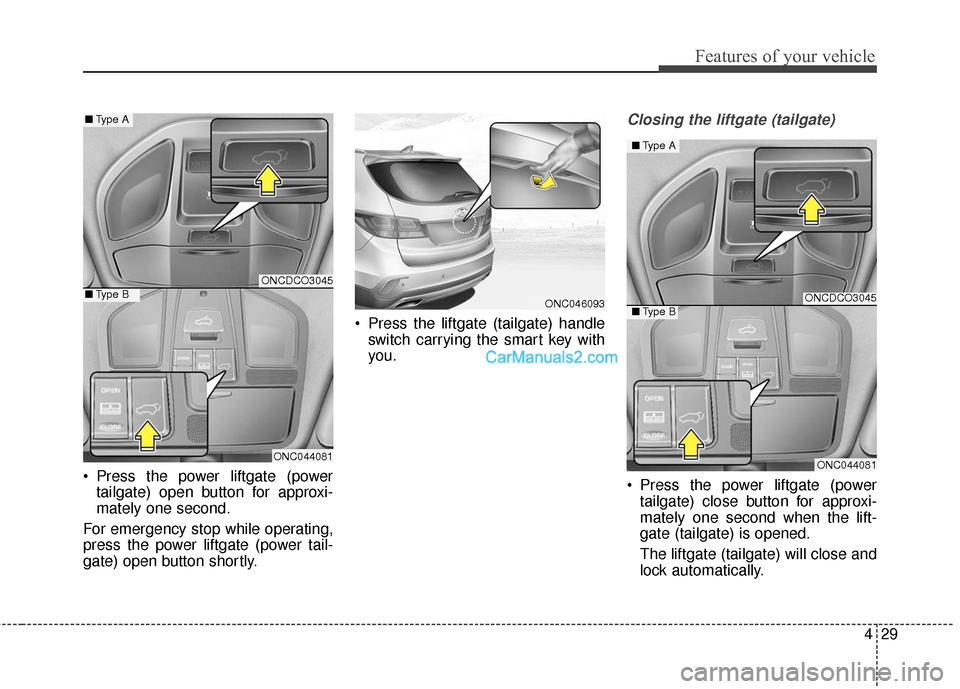
Press the power liftgate (powertailgate) open button for approxi-
mately one second.
For emergency stop while operating,
press the power liftgate (power tail-
gate) open button shortly. Press the liftgate (tailgate) handle
switch carrying the smart key with
you.
Closing the liftgate (tailgate)
Press the power liftgate (powertailgate) close button for approxi-
mately one second when the lift-
gate (tailgate) is opened.
The liftgate (tailgate) will close and
lock automatically.
ONC046093
ONCDCO3045
ONC044081
■ Type A
■Type BONCDCO3045
ONC044081
■Type A
■Type B
Page 133 of 570
Features of your vehicle
30
4
For emergency stop while operating,
press the power liftgate (power tail-
gate) close button shortly.
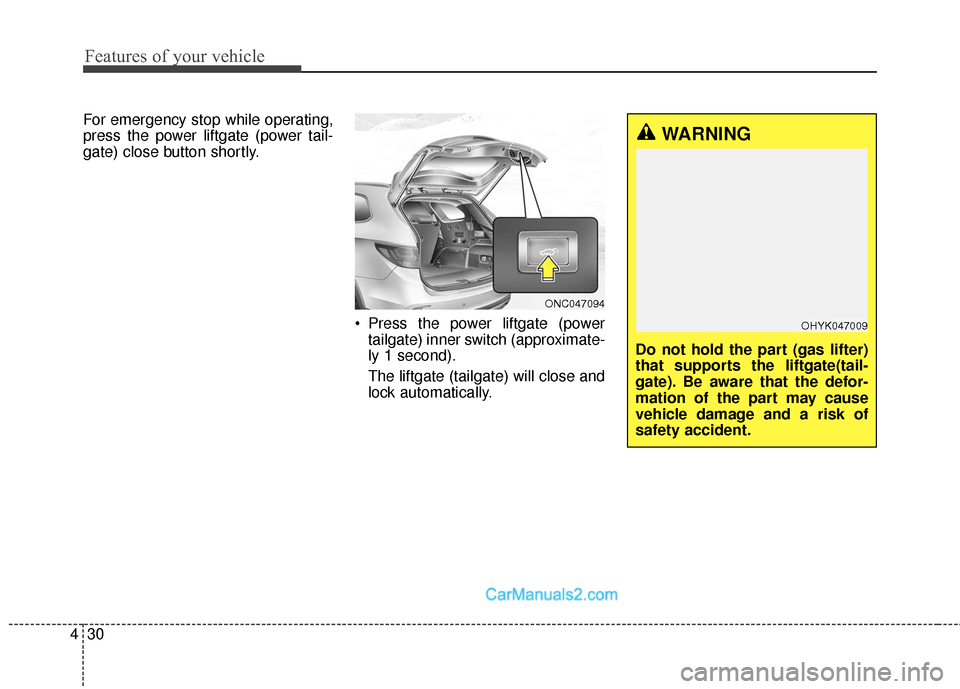
Press the power liftgate (powertailgate) inner switch (approximate-
ly 1 second).
The liftgate (tailgate) will close and
lock automatically.
ONC047094
WARNING
Do not hold the part (gas lifter)
that supports the liftgate(tail-
gate). Be aware that the defor-
mation of the part may cause
vehicle damage and a risk of
safety accident.
OHYK047009
Page 139 of 570
Features of your vehicle
36
4
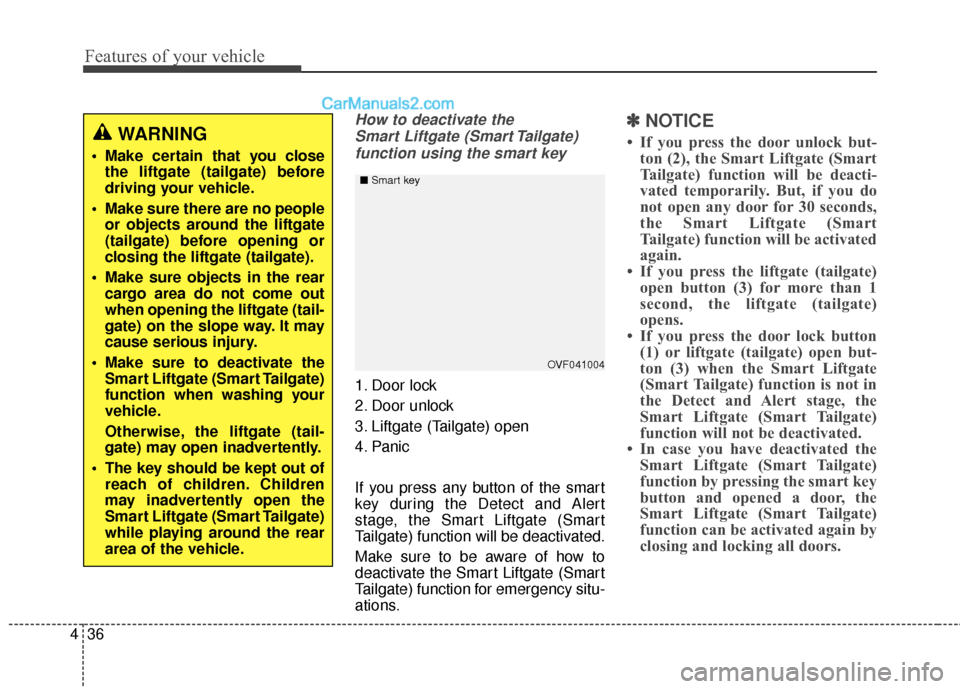
How to deactivate the
Smart Liftgate (Smart Tailgate)function using the smart key
1. Door lock
2. Door unlock
3. Liftgate (Tailgate) open
4. Panic
If you press any button of the smart
key during the Detect and Alert
stage, the Smart Liftgate (Smart
Tailgate) function will be deactivated.
Make sure to be aware of how to
deactivate the Smart Liftgate (Smart
Tailgate) function for emergency situ-
ations.
✽ ✽ NOTICE
• If you press the door unlock but-
ton (2), the Smart Liftgate (Smart
Tailgate) function will be deacti-
vated temporarily. But, if you do
not open any door for 30 seconds,
the Smart Liftgate (Smart
Tailgate) function will be activated
again.
• If you press the liftgate (tailgate) open button (3) for more than 1
second, the liftgate (tailgate)
opens.
• If you press the door lock button (1) or liftgate (tailgate) open but-
ton (3) when the Smart Liftgate
(Smart Tailgate) function is not in
the Detect and Alert stage, the
Smart Liftgate (Smart Tailgate)
function will not be deactivated.
• In case you have deactivated the Smart Liftgate (Smart Tailgate)
function by pressing the smart key
button and opened a door, the
Smart Liftgate (Smart Tailgate)
function can be activated again by
closing and locking all doors.
OVF041004
■
Smart key
WARNING
Make certain that you close
the liftgate (tailgate) before
driving your vehicle.
Make sure there are no people or objects around the liftgate
(tailgate) before opening or
closing the liftgate (tailgate).
Make sure objects in the rear cargo area do not come out
when opening the liftgate (tail-
gate) on the slope way. It may
cause serious injury.
Make sure to deactivate the Smart Liftgate (Smart Tailgate)
function when washing your
vehicle.
Otherwise, the liftgate (tail-
gate) may open inadvertently.
The key should be kept out of reach of children. Children
may inadvertently open the
Smart Liftgate (Smart Tailgate)
while playing around the rear
area of the vehicle.
Page 185 of 570
Features of your vehicle
82
4
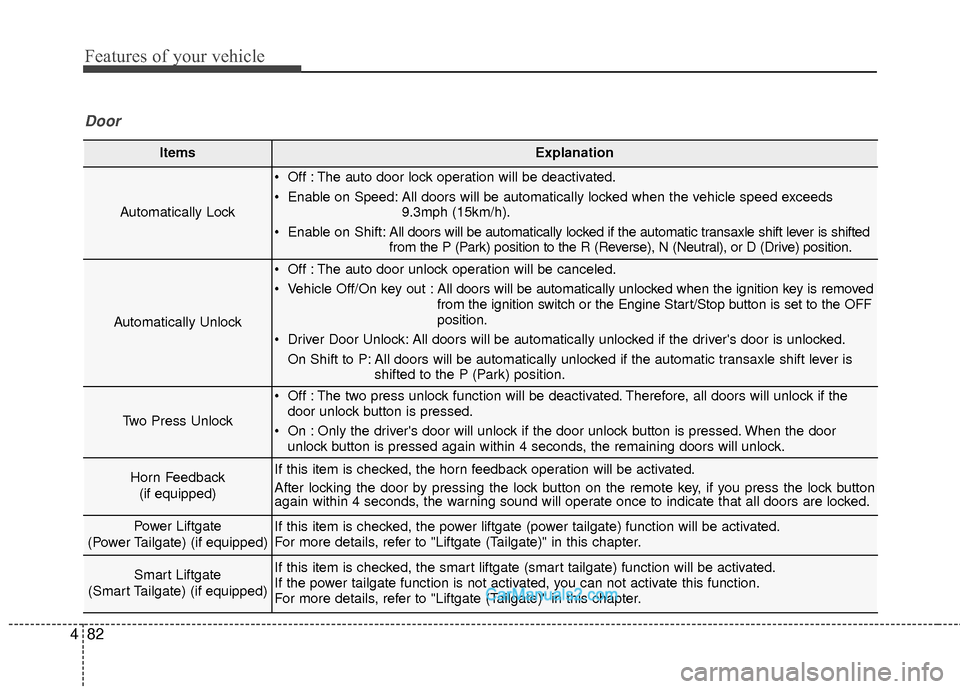
ItemsExplanation
Automatically Lock
Off : The auto door lock operation will be deactivated.
Enable on Speed: All doors will be automatically locked when the vehicle speed exceeds
9.3mph (15km/h).
Enable on Shift: All doors will be automatically locked if the automatic transaxle shift lever is shifted
from the P (Park) position to the R (Reverse), N (Neutral), or D (Drive) position.
Automatically Unlock
Off : The auto door unlock operation will be canceled.
Vehicle Off/On key out : All doors will be automatically unlocked when the ignition key is removed
from the ignition switch or the Engine Start/Stop button is set to the OFF
position.
Driver Door Unlock: All doors will be automatically unlocked if the driver's door is unlocked. On Shift to P: All doors will be automatically unlocked if the automatic transaxle shift lever is shifted to the P (Park) position.
Two Press Unlock
Off : The two press unlock function will be deactivated. Therefore, all doors will unlock if thedoor unlock button is pressed.
On : Only the driver's door will unlock if the door unlock button is pressed. When the door unlock button is pressed again within 4 seconds, the remaining doors will unlock.
Horn Feedback
(if equipped)If this item is checked, the horn feedback operation will be activated.
After locking the door by pressing the lock button on the remote key, if you press the lock button
again within 4 seconds, the warning sound will operate once to indicate that all doors are locked.
Power Liftgate
(Power Tailgate) (if equipped)If this item is checked, the power liftgate (power tailgate) function will be activated.
For more details, refer to "Liftgate (Tailgate)" in this chapter.
Smart Liftgate
(Smart Tailgate) (if equipped)If this item is checked, the smart liftgate (smart tailgate) function will be activated.
If the power tailgate function is not activated, you can not activate this function.
For more details, refer to "Liftgate (Tailgate)" in this chapter.
Door
Page 221 of 570
Features of your vehicle
118
4
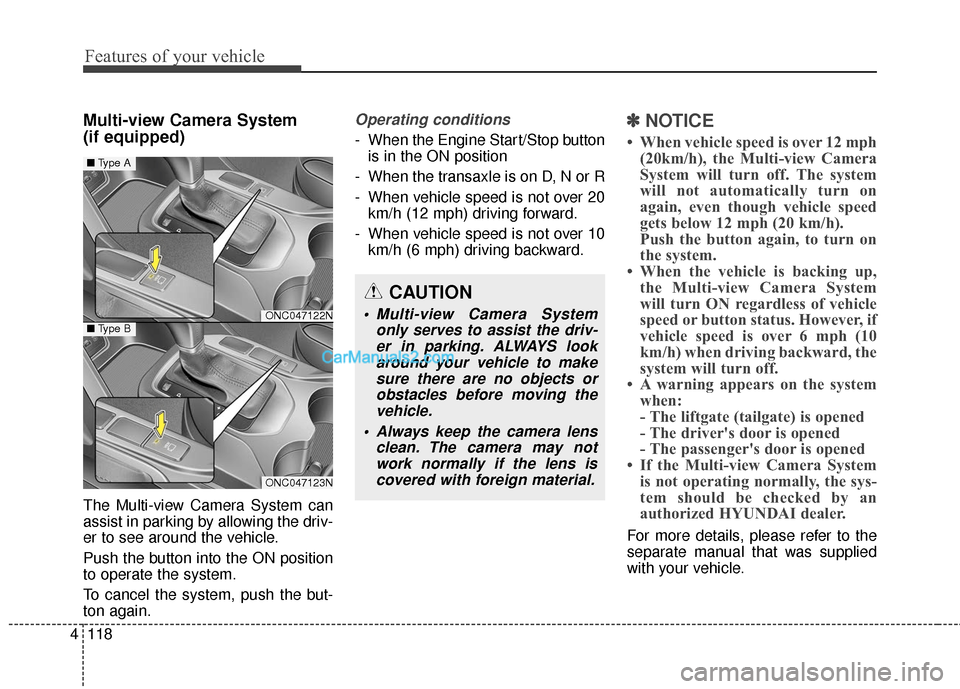
Multi-view Camera System
(if equipped)
The Multi-view Camera System can
assist in parking by allowing the driv-
er to see around the vehicle.
Push the button into the ON position
to operate the system.
To cancel the system, push the but-
ton again.
Operating conditions
- When the Engine Start/Stop button
is in the ON position
- When the transaxle is on D, N or R
- When vehicle speed is not over 20 km/h (12 mph) driving forward.
- When vehicle speed is not over 10 km/h (6 mph) driving backward.
✽ ✽ NOTICE
• When vehicle speed is over 12 mph
(20km/h), the Multi-view Camera
System will turn off. The system
will not automatically turn on
again, even though vehicle speed
gets below 12 mph (20 km/h).
Push the button again, to turn on
the system.
• When the vehicle is backing up, the Multi-view Camera System
will turn ON regardless of vehicle
speed or button status. However, if
vehicle speed is over 6 mph (10
km/h) when driving backward, the
system will turn off.
• A warning appears on the system when:
- The liftgate (tailgate) is opened
- The driver's door is opened
- The passenger's door is opened
• If the Multi-view Camera System is not operating normally, the sys-
tem should be checked by an
authorized HYUNDAI dealer.
For more details, please refer to the
separate manual that was supplied
with your vehicle.
CAUTION
Multi-view Camera System
only serves to assist the driv-er in parking. ALWAYS lookaround your vehicle to makesure there are no objects orobstacles before moving thevehicle.
Always keep the camera lens clean. The camera may notwork normally if the lens iscovered with foreign material.ONC047122N
ONC047123N
■ Type A
■Type B
Page 239 of 570
Features of your vehicle
136
4
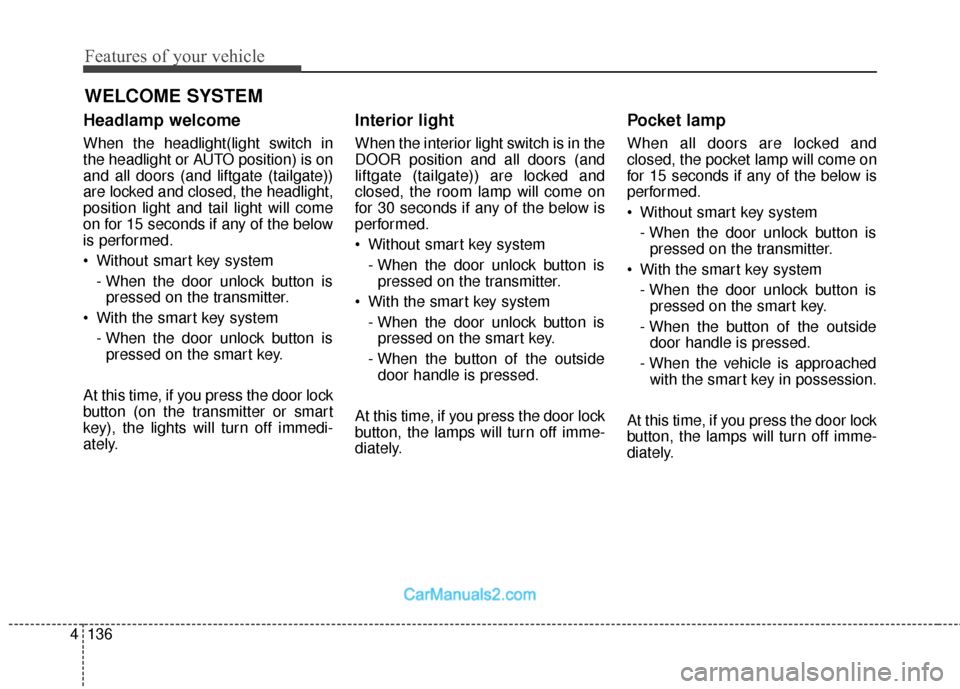
Headlamp welcome
When the headlight(light switch in
the headlight or AUTO position) is on
and all doors (and liftgate (tailgate))
are locked and closed, the headlight,
position light and tail light will come
on for 15 seconds if any of the below
is performed.
Without smart key system
- When the door unlock button ispressed on the transmitter.
With the smart key system - When the door unlock button ispressed on the smart key.
At this time, if you press the door lock
button (on the transmitter or smart
key), the lights will turn off immedi-
ately.
Interior light
When the interior light switch is in the
DOOR position and all doors (and
liftgate (tailgate)) are locked and
closed, the room lamp will come on
for 30 seconds if any of the below is
performed.
Without smart key system - When the door unlock button ispressed on the transmitter.
With the smart key system - When the door unlock button ispressed on the smart key.
- When the button of the outside door handle is pressed.
At this time, if you press the door lock
button, the lamps will turn off imme-
diately.
Pocket lamp
When all doors are locked and
closed, the pocket lamp will come on
for 15 seconds if any of the below is
performed.
Without smart key system - When the door unlock button ispressed on the transmitter.
With the smart key system - When the door unlock button ispressed on the smart key.
- When the button of the outside door handle is pressed.
- When the vehicle is approached with the smart key in possession.
At this time, if you press the door lock
button, the lamps will turn off imme-
diately.
WELCOME SYSTEM
Page 328 of 570
Driving your vehicle
36
5
Releasing the parking brake
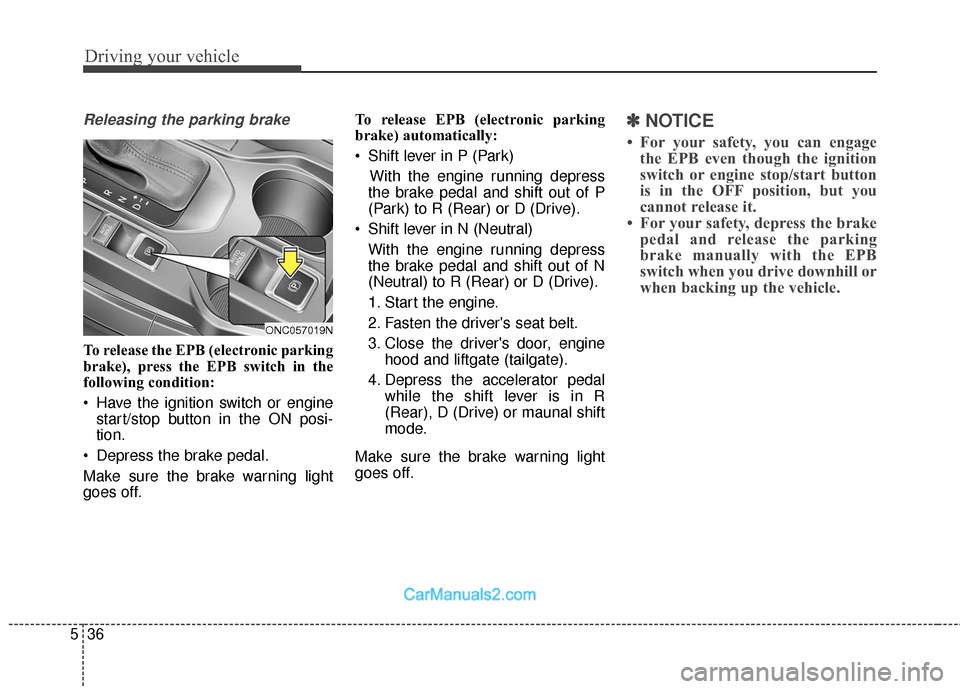
To release the EPB (electronic parking
brake), press the EPB switch in the
following condition:
Have the ignition switch or engine
start/stop button in the ON posi-
tion.
Depress the brake pedal.
Make sure the brake warning light
goes off. To release EPB (electronic parking
brake) automatically:
Shift lever in P (Park)
With the engine running depress
the brake pedal and shift out of P
(Park) to R (Rear) or D (Drive).
Shift lever in N (Neutral) With the engine running depress
the brake pedal and shift out of N
(Neutral) to R (Rear) or D (Drive).
1. Start the engine.
2. Fasten the driver's seat belt.
3. Close the driver's door, engine hood and liftgate (tailgate).
4. Depress the accelerator pedal while the shift lever is in R
(Rear), D (Drive) or maunal shift
mode.
Make sure the brake warning light
goes off.
✽ ✽ NOTICE
• For your safety, you can engage
the EPB even though the ignition
switch or engine stop/start button
is in the OFF position, but you
cannot release it.
• For your safety, depress the brake pedal and release the parking
brake manually with the EPB
switch when you drive downhill or
when backing up the vehicle.
ONC057019N
Page 333 of 570
541
Driving your vehicle
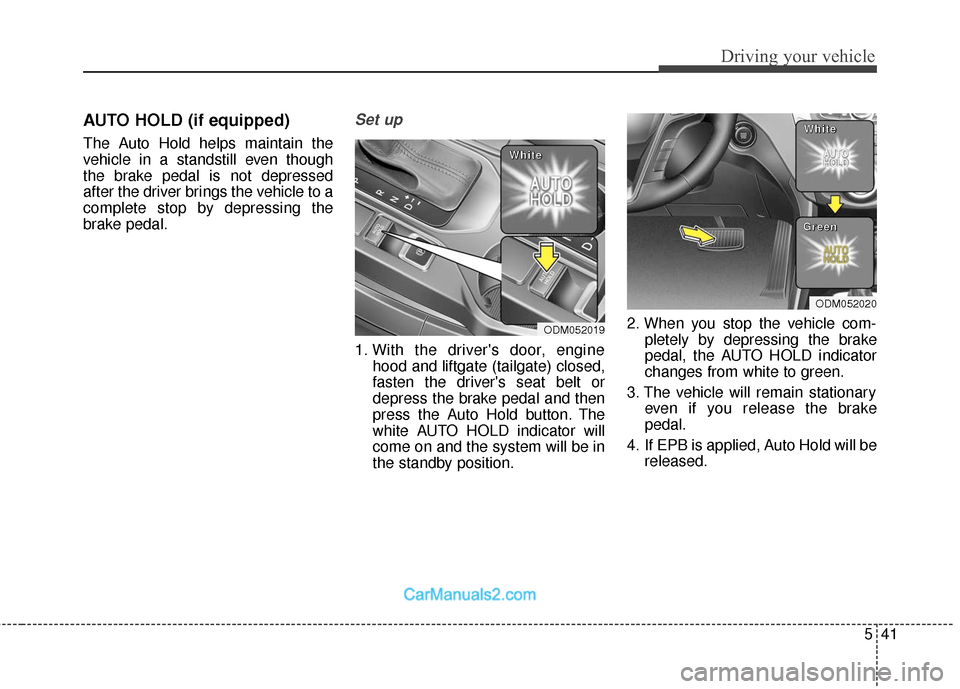
AUTO HOLD (if equipped)
The Auto Hold helps maintain the
vehicle in a standstill even though
the brake pedal is not depressed
after the driver brings the vehicle to a
complete stop by depressing the
brake pedal.
Set up
1. With the driver's door, enginehood and liftgate (tailgate) closed,
fasten the driver's seat belt or
depress the brake pedal and then
press the Auto Hold button. The
white AUTO HOLD indicator will
come on and the system will be in
the standby position. 2. When you stop the vehicle com-
pletely by depressing the brake
pedal, the AUTO HOLD indicator
changes from white to green.
3. The vehicle will remain stationary even if you release the brake
pedal.
4. If EPB is applied, Auto Hold will be released.
ODM052019
W
W
W
W
h
h
h
h
i
i
i
i
t
t
t
t
e
e
e
e
ODM052020
W
W
W
W
h
h
h
h
i
i
i
i
t
t
t
t
e
e
e
e
G
G
G
G
r
r
r
r
e
e
e
e
e
e
e
e
n
n
n
n