window Hyundai Santa Fe 2018 User Guide
[x] Cancel search | Manufacturer: HYUNDAI, Model Year: 2018, Model line: Santa Fe, Model: Hyundai Santa Fe 2018Pages: 570, PDF Size: 16.8 MB
Page 142 of 570
439
Features of your vehicle
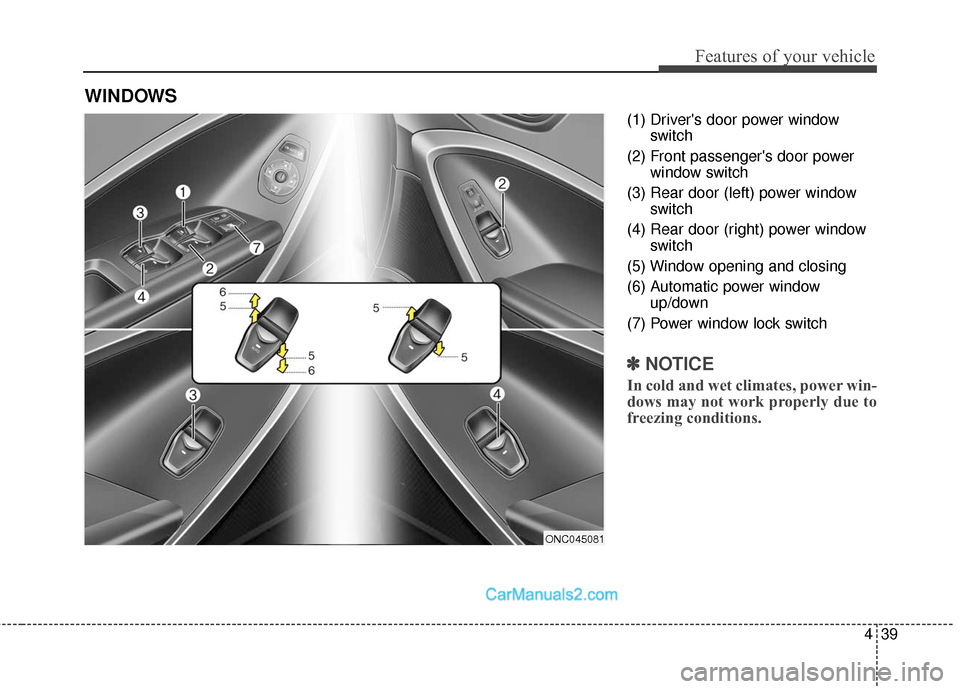
(1) Driver's door power windowswitch
(2) Front passenger's door power window switch
(3) Rear door (left) power window switch
(4) Rear door (right) power window switch
(5) Window opening and closing
(6) Automatic power window up/down
(7) Power window lock switch
✽ ✽ NOTICE
In cold and wet climates, power win-
dows may not work properly due to
freezing conditions.
WINDOWS
ONC045081
Page 143 of 570
Features of your vehicle
40
4
Power windows
The ignition switch must be in the ON
position for power windows to operate.
Each door has a power window
switch that controls that door's win-
dow. The driver has a power window
lock switch which can block the oper-
ation of passenger windows. The dri-
ver’s door has a master power win-
dow switch that controls all the win-
dows in the vehicle. The power win-
dows can be operated for approxi-
mately 30 seconds after the ignition
key is removed or turned to the ACC
or LOCK position. However, if the
front doors open, the power windows
cannot be operated within the 30
second period.
✽ ✽
NOTICE
• In cold and wet climates, power
windows may not work properly
due to freezing conditions.
• While driving with the rear win- dows down or with the sunroof (if
equipped) in an open (or partially
open) position, your vehicle may
demonstrate a wind buffeting or
pulsation noise. This noise is a
normal occurrence and can be
reduced or eliminated by taking
the following actions. If the noise
occurs with one or both of the
rear windows down, partially
lower both front windows
approximately one inch. If you
experience the noise with the sun-
roof open, slightly reduce the size
of the sunroof opening.
Window opening and closing
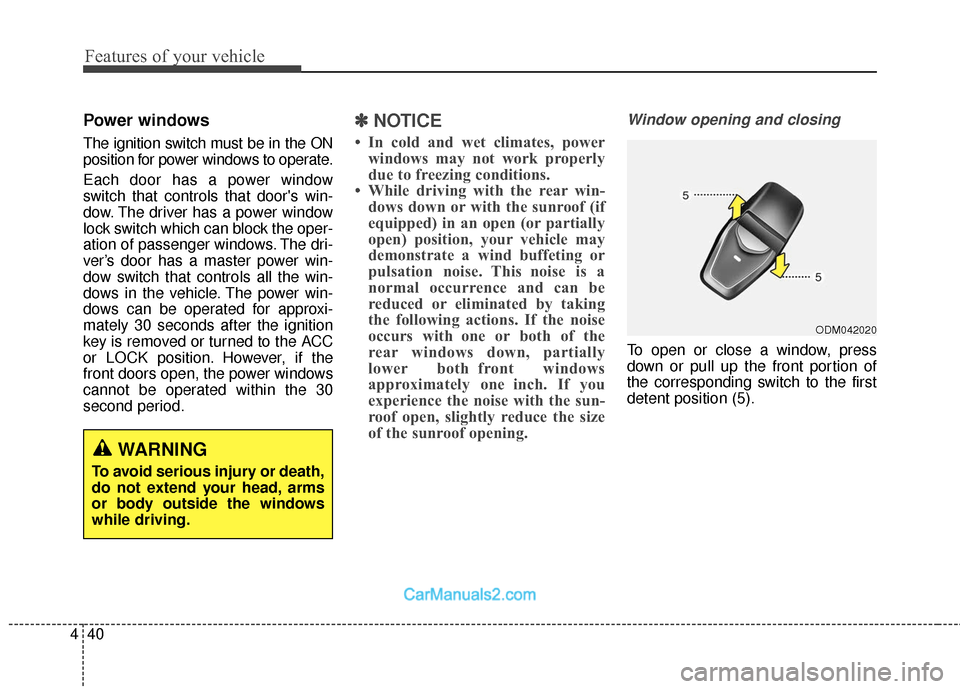
To open or close a window, press
down or pull up the front portion of
the corresponding switch to the first
detent position (5).
ODM042020
WARNING
To avoid serious injury or death,
do not extend your head, arms
or body outside the windows
while driving.
Page 144 of 570
441
Features of your vehicle
Auto up/down window (front seat)(if equipped)
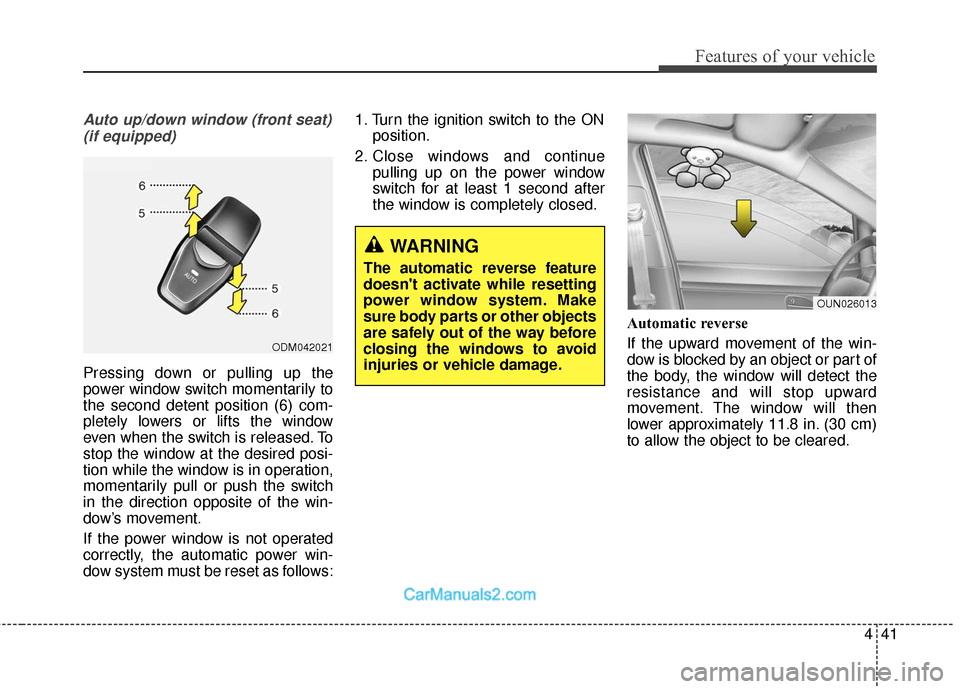
Pressing down or pulling up the
power window switch momentarily to
the second detent position (6) com-
pletely lowers or lifts the window
even when the switch is released. To
stop the window at the desired posi-
tion while the window is in operation,
momentarily pull or push the switch
in the direction opposite of the win-
dow’s movement.
If the power window is not operated
correctly, the automatic power win-
dow system must be reset as follows: 1. Turn the ignition switch to the ON
position.
2. Close windows and continue pulling up on the power window
switch for at least 1 second after
the window is completely closed.
Automatic reverse
If the upward movement of the win-
dow is blocked by an object or part of
the body, the window will detect the
resistance and will stop upward
movement. The window will then
lower approximately 11.8 in. (30 cm)
to allow the object to be cleared.
ODM042021
OUN026013
WARNING
The automatic reverse feature
doesn't activate while resetting
power window system. Make
sure body parts or other objects
are safely out of the way before
closing the windows to avoid
injuries or vehicle damage.
Page 145 of 570
Features of your vehicle
42
4
If the window detects the resistance
while the power window switch is
pulled up continuously, the window
will stop upward movement then
lower approximately 1 in. (2.5 cm). If
the power window switch is pulled up
continuously again within 5 seconds
after the window is lowered by the
automatic window reverse feature,
the automatic window reverse will
not operate.✽ ✽
NOTICE
The automatic reverse feature for
the driver's window is only active
when the "auto up" feature is used
by fully pulling up the switch. The
automatic reverse feature will not
operate if the window is raised using
the halfway position on the power
window switch.
✽ ✽NOTICE
Do not install any accessories on the
windows. The automatic reverse fea-
ture may not operate.
WARNING
Always check for obstructions
before raising any window to
avoid injuries or vehicle damage.
If an object less than 0.16 in. (4
mm) in diameter is caught
between the window glass and
the upper window channel, the
automatic reverse window may
not detect the resistance and will
not stop and reverse direction.
WARNING
Make sure body parts or other
objects are safely out of the way
before closing the windows to
avoid injuries or vehicle damage.
Objects less than 4 mm (0.16
inch) in diameter caught
between the window glass and
the upper window channel may
not be detected by the automat-
ic reverse window and the win-
dow will not stop and reverse
direction.
Page 146 of 570
443
Features of your vehicle
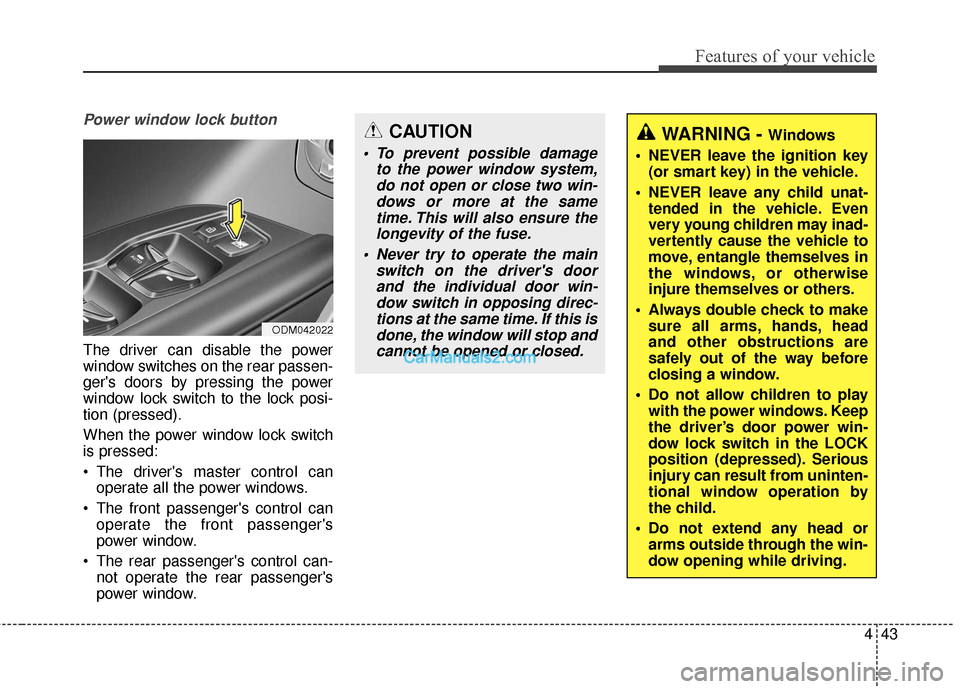
Power window lock button
The driver can disable the power
window switches on the rear passen-
ger's doors by pressing the power
window lock switch to the lock posi-
tion (pressed).
When the power window lock switch
is pressed:
The driver's master control canoperate all the power windows.
The front passenger's control can operate the front passenger's
power window.
The rear passenger's control can- not operate the rear passenger's
power window.
CAUTION
To prevent possible damage to the power window system,do not open or close two win-dows or more at the sametime. This will also ensure thelongevity of the fuse.
Never try to operate the main switch on the driver's doorand the individual door win-dow switch in opposing direc-tions at the same time. If this isdone, the window will stop andcannot be opened or closed.
WARNING - Windows
NEVER leave the ignition key (or smart key) in the vehicle.
NEVER leave any child unat- tended in the vehicle. Even
very young children may inad-
vertently cause the vehicle to
move, entangle themselves in
the windows, or otherwise
injure themselves or others.
Always double check to make sure all arms, hands, head
and other obstructions are
safely out of the way before
closing a window.
Do not allow children to play with the power windows. Keep
the driver’s door power win-
dow lock switch in the LOCK
position (depressed). Serious
injury can result from uninten-
tional window operation by
the child.
Do not extend any head or arms outside through the win-
dow opening while driving.
ODM042022
Page 163 of 570
Features of your vehicle
60
4
MIRRORS
Inside rearview mirror
Adjust the rearview mirror so that the
center view through the rear window
is seen. Make this adjustment before
you start driving.
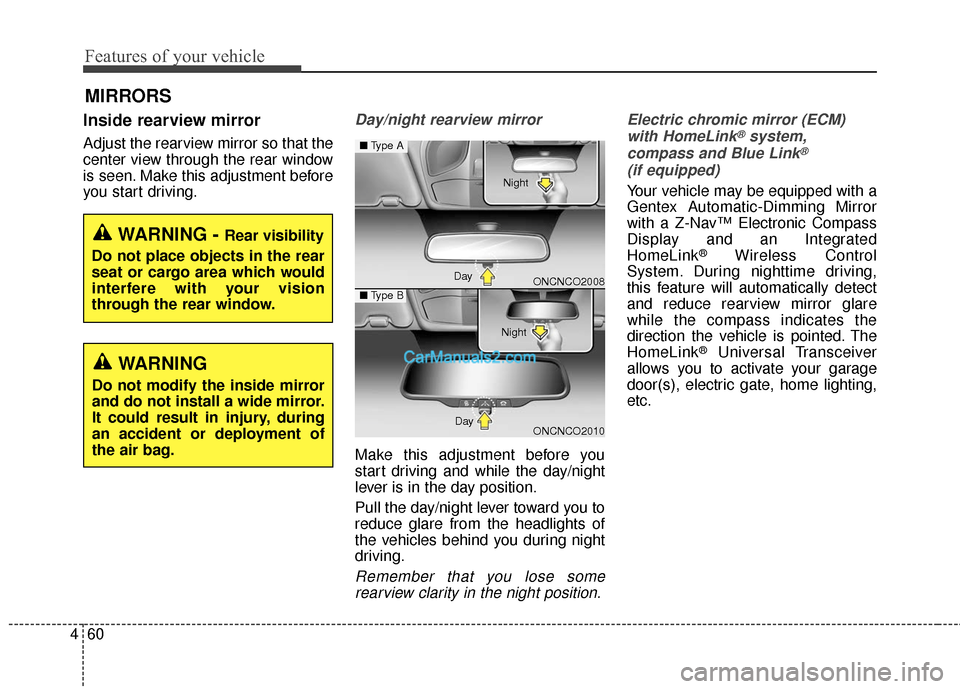
Day/night rearview mirror
Make this adjustment before you
start driving and while the day/night
lever is in the day position.
Pull the day/night lever toward you to
reduce glare from the headlights of
the vehicles behind you during night
driving.
Remember that you lose some
rearview clarity in the night position. Electric chromic mirror (ECM)
with HomeLink
®system,
compass and Blue Link®
(if equipped)
Your vehicle may be equipped with a
Gentex Automatic-Dimming Mirror
with a Z-Nav™ Electronic Compass
Display and an Integrated
HomeLink
®Wireless Control
System. During nighttime driving,
this feature will automatically detect
and reduce rearview mirror glare
while the compass indicates the
direction the vehicle is pointed. The
HomeLink
®Universal Transceiver
allows you to activate your garage
door(s), electric gate, home lighting,
etc.
WARNING - Rear visibility
Do not place objects in the rear
seat or cargo area which would
interfere with your vision
through the rear window.
WARNING
Do not modify the inside mirror
and do not install a wide mirror.
It could result in injury, during
an accident or deployment of
the air bag.
ONCNCO2008
ONCNCO2010
■ Type A
■Type B
Day Night
Day Night
Page 164 of 570
461
Features of your vehicle
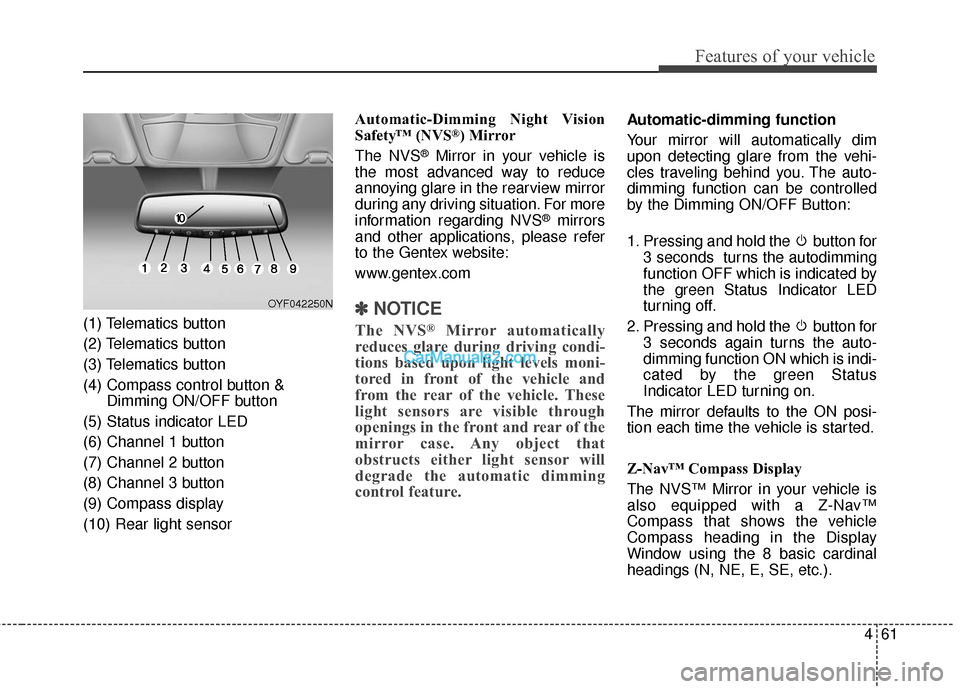
(1) Telematics button
(2) Telematics button
(3) Telematics button
(4) Compass control button &Dimming ON/OFF button
(5) Status indicator LED
(6) Channel 1 button
(7) Channel 2 button
(8) Channel 3 button
(9) Compass display
(10) Rear light sensor Automatic-Dimming Night Vision
Safety™ (NVS
®) Mirror
The NVS
®Mirror in your vehicle is
the most advanced way to reduce
annoying glare in the rearview mirror
during any driving situation. For more
information regarding NVS
®mirrors
and other applications, please refer
to the Gentex website:
www.gentex.com
✽ ✽ NOTICE
The NVS®Mirror automatically
reduces glare during driving condi-
tions based upon light levels moni-
tored in front of the vehicle and
from the rear of the vehicle. These
light sensors are visible through
openings in the front and rear of the
mirror case. Any object that
obstructs either light sensor will
degrade the automatic dimming
control feature.
Automatic-dimming function
Your mirror will automatically dim
upon detecting glare from the vehi-
cles traveling behind you. The auto-
dimming function can be controlled
by the Dimming ON/OFF Button:
1. Pressing and hold the button for
3 seconds turns the autodimming
function OFF which is indicated by
the green Status Indicator LED
turning off.
2. Pressing and hold the button for 3 seconds again turns the auto-
dimming function ON which is indi-
cated by the green Status
Indicator LED turning on.
The mirror defaults to the ON posi-
tion each time the vehicle is started.
Z-Nav™ Compass Display
The NVS™ Mirror in your vehicle is
also equipped with a Z-Nav™
Compass that shows the vehicle
Compass heading in the Display
Window using the 8 basic cardinal
headings (N, NE, E, SE, etc.).
OYF042250N
Page 202 of 570
499
Features of your vehicle
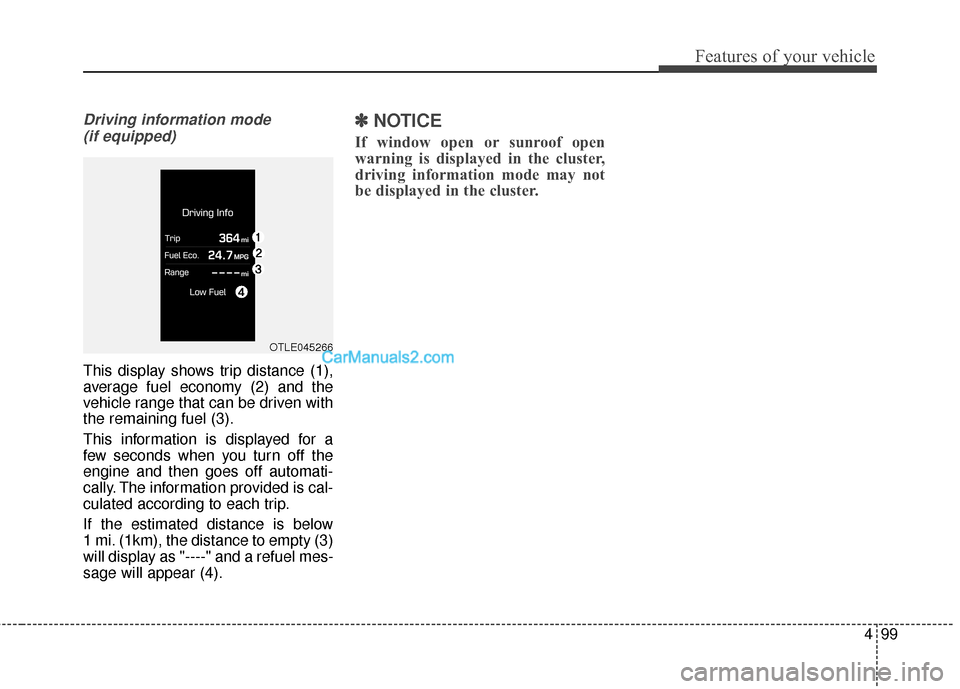
Driving information mode (if equipped)
This display shows trip distance (1),
average fuel economy (2) and the
vehicle range that can be driven with
the remaining fuel (3).
This information is displayed for a
few seconds when you turn off the
engine and then goes off automati-
cally. The information provided is cal-
culated according to each trip.
If the estimated distance is below
1 mi. (1km), the distance to empty (3)
will display as "----" and a refuel mes-
sage will appear (4).
✽ ✽ NOTICE
If window open or sunroof open
warning is displayed in the cluster,
driving information mode may not
be displayed in the cluster.
OTLE045266
Page 225 of 570
Features of your vehicle
122
4
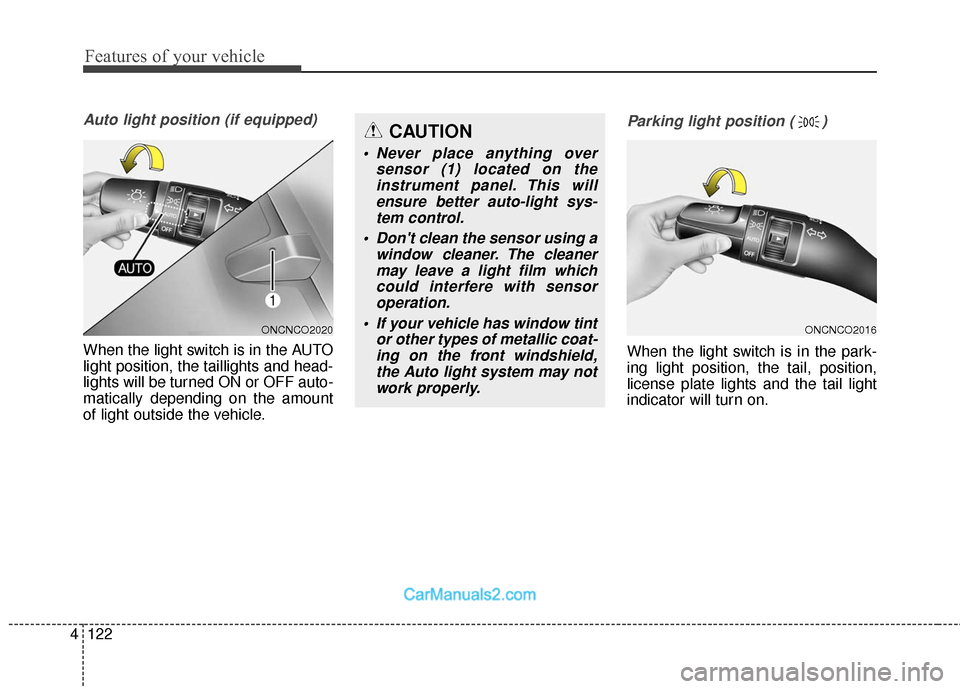
Auto light position (if equipped)
When the light switch is in the AUTO
light position, the taillights and head-
lights will be turned ON or OFF auto-
matically depending on the amount
of light outside the vehicle.
Parking light position ( )
When the light switch is in the park-
ing light position, the tail, position,
license plate lights and the tail light
indicator will turn on.
ONCNCO2016ONCNCO2020
CAUTION
• Never place anything over
sensor (1) located on theinstrument panel. This willensure better auto-light sys-tem control.
Don't clean the sensor using a window cleaner. The cleanermay leave a light film whichcould interfere with sensoroperation.
If your vehicle has window tint or other types of metallic coat-ing on the front windshield,the Auto light system may notwork properly.
Page 230 of 570
4127
Features of your vehicle
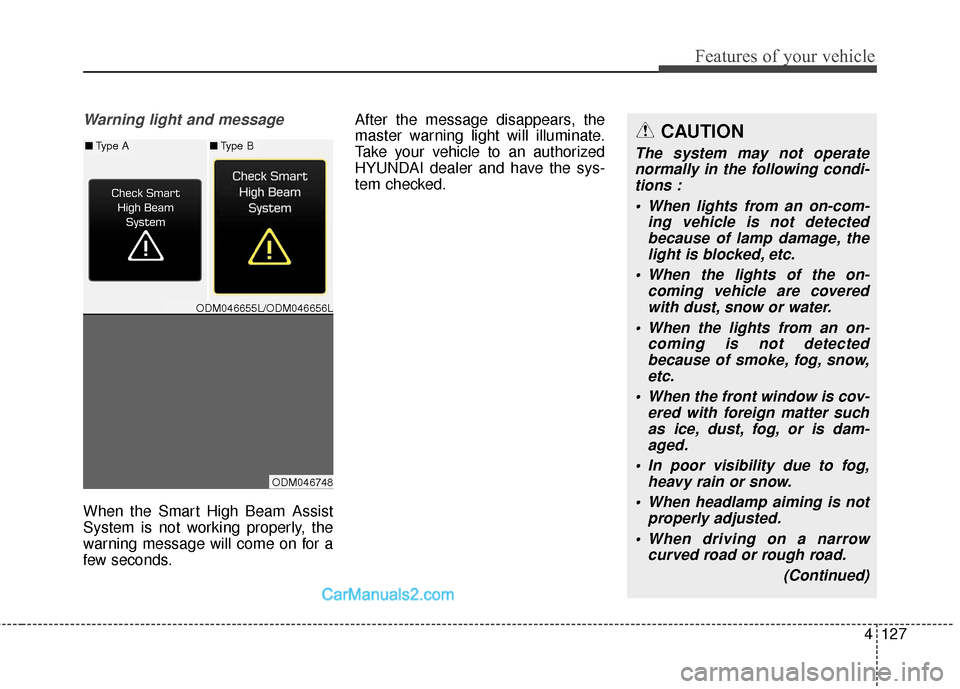
Warning light and message
When the Smart High Beam Assist
System is not working properly, the
warning message will come on for a
few seconds.After the message disappears, the
master warning light will illuminate.
Take your vehicle to an authorized
HYUNDAI dealer and have the sys-
tem checked.
CAUTION
The system may not operate
normally in the following condi-tions :
When lights from an on-com- ing vehicle is not detectedbecause of lamp damage, thelight is blocked, etc.
When the lights of the on- coming vehicle are coveredwith dust, snow or water.
When the lights from an on- coming is not detectedbecause of smoke, fog, snow,etc.
When the front window is cov- ered with foreign matter suchas ice, dust, fog, or is dam-aged.
In poor visibility due to fog, heavy rain or snow.
When headlamp aiming is not properly adjusted.
When driving on a narrow curved road or rough road.
(Continued)■Type A■Type B
ODM046655L/ODM046656L
ODM046748