Lane departure warning Hyundai Santa Fe 2018 Owner's Manual
[x] Cancel search | Manufacturer: HYUNDAI, Model Year: 2018, Model line: Santa Fe, Model: Hyundai Santa Fe 2018Pages: 570, PDF Size: 16.8 MB
Page 180 of 570
477
Features of your vehicle
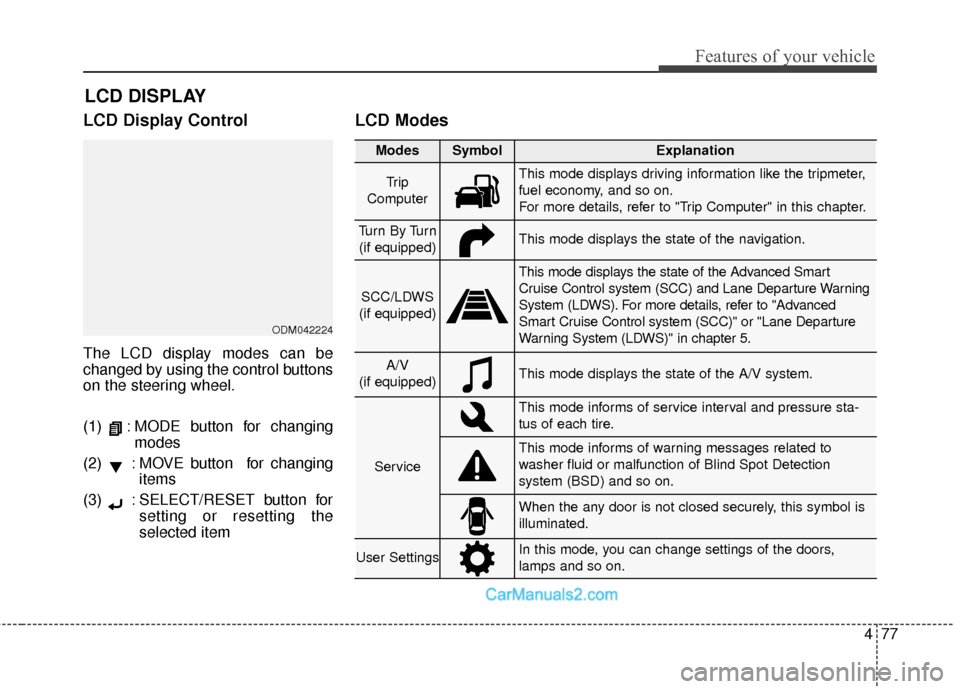
LCD Display Control
The LCD display modes can be
changed by using the control buttons
on the steering wheel.
(1) : MODE button for changingmodes
(2) : MOVE button for changing items
(3) : SELECT/RESET button for setting or resetting the
selected item
LCD Modes
LCD DISPLAY
Modes SymbolExplanation
Tr i p
ComputerThis mode displays driving information like the tripmeter,
fuel economy, and so on.
For more details, refer to "Trip Computer" in this chapter.
Tu r n B y Tu r n (if equipped)This mode displays the state of the navigation.
SCC/LDWS
(if equipped)
This mode displays the state of the Advanced Smart
Cruise Control system (SCC) and Lane Departure Warning
System (LDWS). For more details, refer to "Advanced
Smart Cruise Control system (SCC)" or "Lane Departure
Warning System (LDWS)" in chapter 5.
A/V
(if equipped)This mode displays the state of the A/V system.
Service
This mode informs of service interval and pressure sta-
tus of each tire.
This mode informs of warning messages related to
washer fluid or malfunction of Blind Spot Detection
system (BSD) and so on.
When the any door is not closed securely, this symbol is
illuminated.
User SettingsIn this mode, you can change settings of the doors,
lamps and so on.
ODM042224
Page 181 of 570
Features of your vehicle
78
4
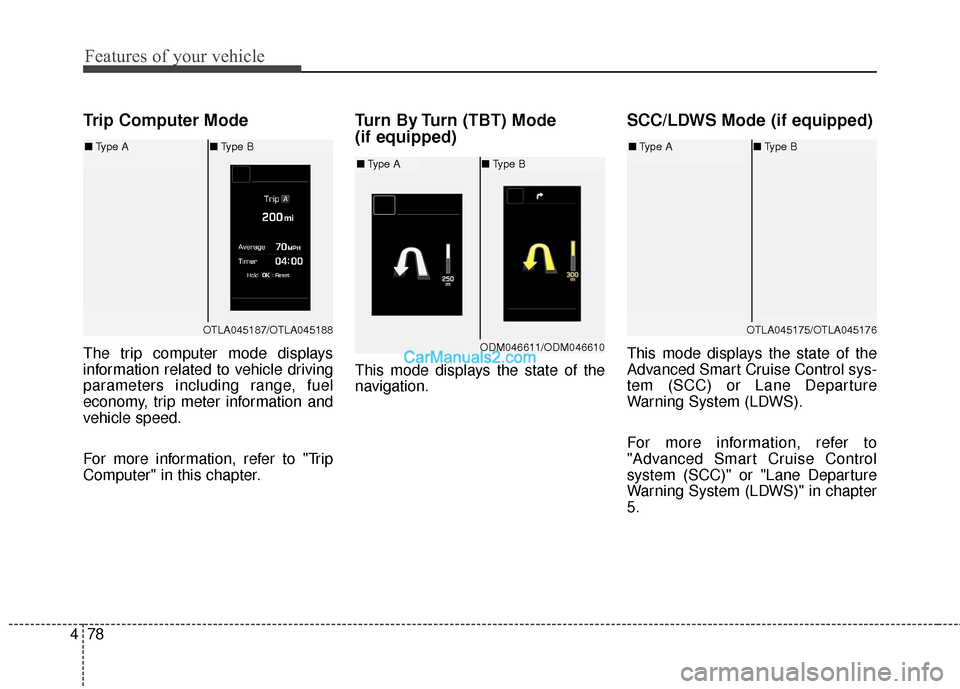
Trip Computer Mode
The trip computer mode displays
information related to vehicle driving
parameters including range, fuel
economy, trip meter information and
vehicle speed.
For more information, refer to "Trip
Computer" in this chapter.
Turn By Turn (TBT) Mode
(if equipped)
This mode displays the state of the
navigation.
SCC/LDWS Mode (if equipped)
This mode displays the state of the
Advanced Smart Cruise Control sys-
tem (SCC) or Lane Departure
Warning System (LDWS).
For more information, refer to
"Advanced Smart Cruise Control
system (SCC)" or "Lane Departure
Warning System (LDWS)" in chapter
5.
OTLA045187/OTLA045188
■ Type A ■Type B
ODM046611/ODM046610
■Type A ■Type B
OTLA045175/OTLA045176
■Type A ■Type B
Page 183 of 570
Features of your vehicle
80
4
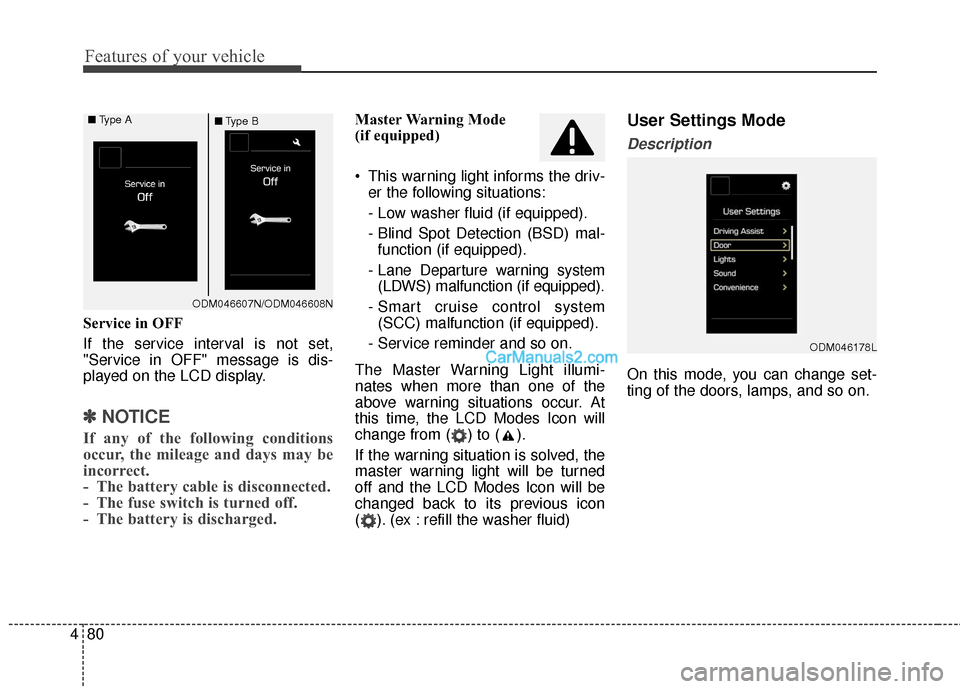
Service in OFF
If the service interval is not set,
"Service in OFF" message is dis-
played on the LCD display.
✽ ✽
NOTICE
If any of the following conditions
occur, the mileage and days may be
incorrect.
- The battery cable is disconnected.
- The fuse switch is turned off.
- The battery is discharged.
Master Warning Mode
(if equipped)
This warning light informs the driv-
er the following situations:
- Low washer fluid (if equipped).
- Blind Spot Detection (BSD) mal-function (if equipped).
- Lane Departure warning system (LDWS) malfunction (if equipped).
- Smart cruise control system (SCC) malfunction (if equipped).
- Service reminder and so on.
The Master Warning Light illumi-
nates when more than one of the
above warning situations occur. At
this time, the LCD Modes Icon will
change from ( ) to ( ).
If the warning situation is solved, the
master warning light will be turned
off and the LCD Modes Icon will be
changed back to its previous icon
( ). (ex : refill the washer fluid)User Settings Mode
Description
On this mode, you can change set-
ting of the doors, lamps, and so on.
ODM046178L
ODM046607N/ODM046608N
■
Type A
■Type B
Page 231 of 570
Features of your vehicle
128
4
(Continued)
When driving downhill or uphill.
When only part of the on com- ing vehicle is visible on acrossroad or curved road.
When there is a traffic light, reflecting sign, flashing signor mirror.
When the road conditions are poor such as being wet orcovered with snow.
When the on coming vehicle’s headlamps are off but the foglamps on.
When a vehicle suddenly appears from a curve.
(Continued)(Continued) When the on coming vehicle is tilted from a flat tire is beingtowed.
When the LDWS (Lane Departure Warning System)warning light illuminates. (ifequipped)WARNING
Do not place any accessories, stickers or tint the windshield.
Have the windshield glass replaced from an authorized
dealer.
Do not remove or impact relat- ed parts of the Smart High
Beam system.
Be careful that water doesn't get into the Smart High Beam
unit.
Do not place objects on the dashboard that reflect light
such as mirrors, white paper,
etc. The system may malfunc-
tion if sunlight is reflected.
At times, the Smart High Beam system may not work
properly, always check the
road conditions for your safe-
ty. When the system does not
operate normally, manually
change between the high
beam and low beam.
Page 293 of 570
Driving your vehicle
Before driving . . . . . . . . . . . . . . . . . . . . . . . . . . . . . . 5-4
• Before entering vehicle . . . . . . . . . . . . . . . . . . . . . . . . . 5-4
. . . . . . . . . . . . . . . . . . . . . . . . . . 5-4
. . . . . . . . . . . . . . . . . . . . . . . . . . . . . . . . 5-5
Key positions . . . . . . . . . . . . . . . . . . . . . . . . . . . . . . . 5-7
. . . . . . . . . . . . . . . . . . . . . . 5-7
. . . . . . . . . . . . . . . . . . . . . . . . . 5-7
. . . . . . . . . . . . . . . . . . . . . . . . . . . . 5-9
Engine start/stop button . . . . . . . . . . . . . . . . . . . . 5-10
. . . . . . . . . . . . . 5-10
. . . . . . . . . . . . . . . . . . . . . . . . . . . 5-13
Automatic transaxle . . . . . . . . . . . . . . . . . . . . . . . . 5-15
. . . . . . . . . . . . . . . . . . 5-15
. . . . . . . . . . . . . . . . . . . . . . . . 5-20
All Wheel Drive (AWD) . . . . . . . . . . . . . . . . . . . . . 5-22
. . . . . . . . . . . . . . . . . . . . . . 5-22
. . . 5-23
. . . . . . . . . . . . . . . 5-24
. . . . . . . . . . . . . . . . . 5-27
Drive mode integrated control system . . . . . . . . . 5-29
Brake system . . . . . . . . . . . . . . . . . . . . . . . . . . . . . . 5-31
. . . . . . . . . . . . . . . . . . . . . . . . . . . . . . . . 5-31
. . . . . . . . . . . . . . . . . . . . 5-32 . . . . . . . . . . . . . . . . . . . . . . . . . . . . . . . 5-33
. . . . . . . . . . . . . . . . 5-35
. . . . . . . . . . . . . . . . . . . . . . . . . . . 5-40
. . . . . . . . . . . . . . . . . . . . . . . . . . . . . . . . . . . 5-\
41
. . . . . . . . . . . . . . . . . 5-44
. . . . . . . . . . . . . . 5-46
. . . . . . . . . . . . 5-50
. . . . . . . . . . . . . . . . . 5-51
. . . . . . . . . . . . . . . . . 5-53
Automatic emergency braking (AEB) . . . . . . . . . 5-56
Cruise control system. . . . . . . . . . . . . . . . . . . . . . . 5-67
Advanced smart cruise control system. . . . . . . . . 5-72
Blind spot detection system (BSD) . . . . . . . . . . . . 5-88
LCA (Lane Change Assist) . . . . . . . . . . . . . . . . . . . 5-89
Lane departure warning system (LDWS) . . . . . . 5-96
Active ECO system. . . . . . . . . . . . . . . . . . . . . . . . 5-100
Economical operation . . . . . . . . . . . . . . . . . . . . . 5-101
5
Page 388 of 570
Driving your vehicle
96
5
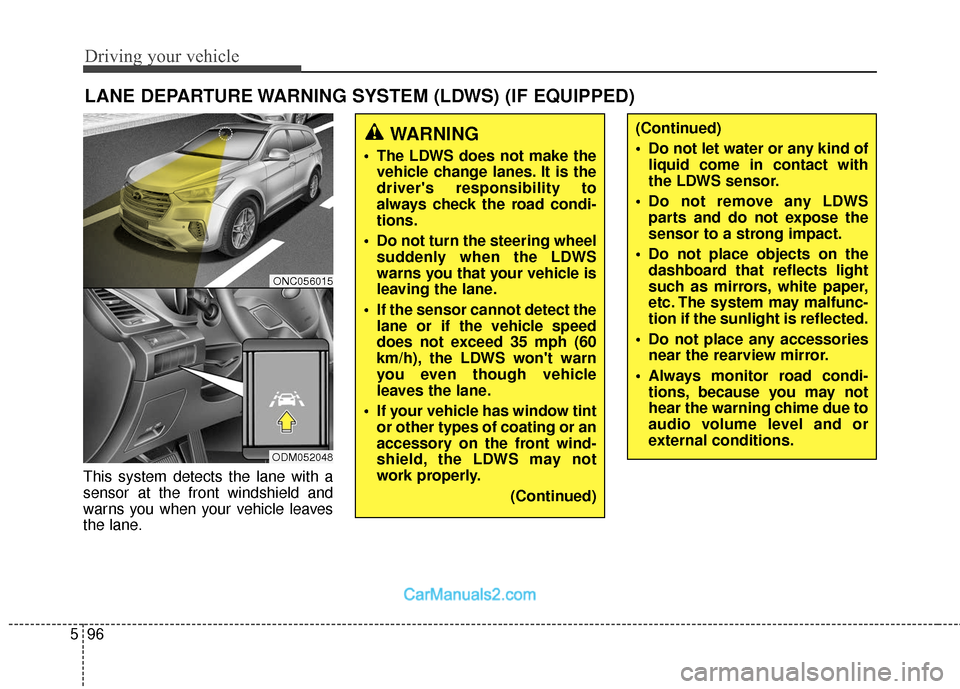
This system detects the lane with a
sensor at the front windshield and
warns you when your vehicle leaves
the lane.
LANE DEPARTURE WARNING SYSTEM (LDWS) (IF EQUIPPED)
WARNING
The LDWS does not make the
vehicle change lanes. It is the
driver's responsibility to
always check the road condi-
tions.
Do not turn the steering wheel suddenly when the LDWS
warns you that your vehicle is
leaving the lane.
If the sensor cannot detect the lane or if the vehicle speed
does not exceed 35 mph (60
km/h), the LDWS won't warn
you even though vehicle
leaves the lane.
If your vehicle has window tint or other types of coating or an
accessory on the front wind-
shield, the LDWS may not
work properly.
(Continued)
(Continued)
Do not let water or any kind ofliquid come in contact with
the LDWS sensor.
Do not remove any LDWS parts and do not expose the
sensor to a strong impact.
Do not place objects on the dashboard that reflects light
such as mirrors, white paper,
etc. The system may malfunc-
tion if the sunlight is reflected.
Do not place any accessories near the rearview mirror.
Always monitor road condi- tions, because you may not
hear the warning chime due to
audio volume level and or
external conditions.
ONC056015
ODM052048
Page 389 of 570
597
Driving your vehicle
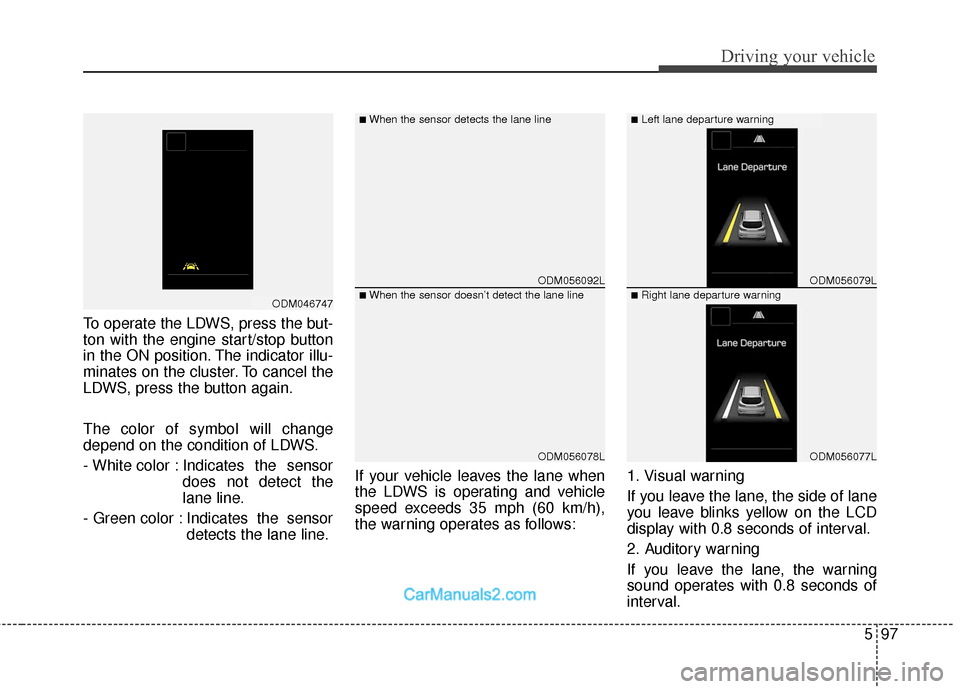
To operate the LDWS, press the but-
ton with the engine start/stop button
in the ON position. The indicator illu-
minates on the cluster. To cancel the
LDWS, press the button again.
The color of symbol will change
depend on the condition of LDWS.
- White color : Indicates the sensordoes not detect the
lane line.
- Green color : Indicates the sensor detects the lane line. If your vehicle leaves the lane when
the LDWS is operating and vehicle
speed exceeds 35 mph (60 km/h),
the warning operates as follows:
1. Visual warning
If you leave the lane, the side of lane
you leave blinks yellow on the LCD
display with 0.8 seconds of interval.
2. Auditory warning
If you leave the lane, the warning
sound operates with 0.8 seconds of
interval.
ODM056092L
ODM056078L
ODM056079L
ODM056077L
■When the sensor detects the lane line■Left lane departure warning
■When the sensor doesn’t detect the lane line■Right lane departure warningODM046747
Page 565 of 570
Index
6I
Power outlet ............................................................4-167
Side curtain..............................................................4-175
Sunvisor...................................................................4-166\
USB Charger ...........................................................4-172
Interior light ................................................................4-133 Automatic turn off function ....................................4-133
Glove box lamp .......................................................4-135
Luggage room lamp ................................................4-135
Map lamp ................................................................4-133
Room lamp ..............................................................4-134
Vanity mirror lamp ..................................................4-135
Interior overview (I) .......................................................2-4
Interior overview (II) ......................................................2-5
Jack and tools ...............................................................6-15
Jack label ......................................................................6-\
24
Jump starting...........................................................\
........6-5
Key operations ................................................................4-4
Key positions ..................................................................5-7 Lane departure warning system (LDWS).....................5-96
LCD display..................................................................4-77
A/V Mode..................................................................4-79
Advanced Smart Cruise Control/Lane Departure Warning System (SCC/LDWS) Mode ...................4-78
LCD Display Control ................................................4-77
LCD Modes ...............................................................4-77
Service Mode ............................................................4-79
Trip Computer Mode.................................................4-78
Turn By Turn (TBT) Mode .......................................4-78
User Settings Mode ...................................................4-80
Warning Messages.....................................................4-86
LCD Display Control ...................................................4-77
LCD Modes ..................................................................4-77
Liftgate (Tailgate) .........................................................4-26 Emergency liftgate (tailgate) safety release ..............4-37
Non-Powered liftgate (tailgate).................................4-26
Power liftgate (Power tailgate) .................................4-27
Smart Liftgate (Smart Tailgate) ................................4-34
Light bulbs ....................................................................7-76\
Headlamp, Front position lamp, Front turn signal lamp, Front fog lamp bulb replacement ................7-77
High mounted stop lamp replacement ......................7-84
Interior lamp bulb replacement .................................7-86
J
K
L