drive assist Hyundai Santa Fe 2018 Owner's Manual
[x] Cancel search | Manufacturer: HYUNDAI, Model Year: 2018, Model line: Santa Fe, Model: Hyundai Santa Fe 2018Pages: 570, PDF Size: 16.8 MB
Page 14 of 570
17
Introduction
This vehicle is equipped with an
event data recorder (EDR). The
main purpose of an EDR is to
record, in certain crash or near
crash-like situations, such as an
air bag deployment or hitting a
road obstacle, data that will assist
in understanding how a vehicle's
systems performed. The EDR is
designed to record data related to
vehicle dynamics and safety sys-
tems for a short period of time,
typically 30 seconds or less. The
EDR in this vehicle is designed to
record such data as:
How various systems in yourvehicle were operating;
Whether or not the driver and passenger safety belts were
buckled/fastened;
How far (if at all) the driver was depressing the accelerator
and/or brake pedal; and,
How fast the vehicle was travel- ing. These data can help provide a bet-
ter understanding of the circum-
stances in which crashes and
injuries occur. NOTE: EDR data are
recorded by your vehicle only if a
non-trivial crash situation occurs;
no data are recorded by the EDR
under normal driving conditions
and no personal data (e.g., name,
gender, age, and crash location)
are recorded. However, other par-
ties, such as law enforcement,
could combine the EDR data with
the type of personally identifying
data routinely acquired during a
crash investigation.
To read data recorded by an EDR,
special equipment is required, and
access to the vehicle or the EDR is
needed. In addition to the vehicle
manufacturer, other parties, such
as law enforcement, that have the
special equipment, can read the
information if they have access to
the vehicle or the EDR.
VEHICLE DATA COLLECTION AND EVENT DATA RECORDERS
Page 105 of 570

Mirrors . . . . . . . . . . . . . . . . . . . . . . . . . . . . . . . . . . 4-60\
. . . . . . . . . . . . . . . . . . . . . . . . 4-60
. . . . . . . . . . . . . . . . . . . . . . . . . . . . 4-68
Instrument cluster . . . . . . . . . . . . . . . . . . . . . . . . . 4-72
. . . . . . . . . . . . . . . . . . . . . 4-73
. . . . . . . . . . . . . . . . . . . . . . . . . . . . . . . . . . . . \
. 4-73
. . . . . . . . . . . . . . . . . . . . . . 4-76
LCD display . . . . . . . . . . . . . . . . . . . . . . . . . . . . . . 4-77
. . . . . . . . . . . . . . . . . . . . . . . . . 4-77
. . . . . . . . . . . . . . . . . . . . . . . . . . . . . . . . . 4-77
. . . . . . . . . . . . . . . . . . . . . . . . . 4-78
Warning System (SCC/LDWS) Mode . . . . . . . . . . 4-78
. . . . . . . . . . . . . . . . . . . . . . . . . . . . . . . . . . . 4-\
79
. . . . . . . . . . . . . . . . . . . . . . . . . . . . . . . . 4-79
. . . . . . . . . . . . . . . . . . . . . . . . . . . 4-80
. . . . . . . . . . . . . . . . . . . . . . . . . . . . 4-86
Trip computer . . . . . . . . . . . . . . . . . . . . . . . . . . . . . 4-95
. . . . . . . . . . . . . . . . . . . . . . . . . . . . . . . 4-96
. . . . . . . . . . . . . . . . . . . . . . . . . . . . . . . . . . . . \
4-97
. . . . . . . . . . . . . . . . . . . . . . . . . . 4-98
Warning and indicator lights . . . . . . . . . . . . . . . 4-100
. . . . . . . . . . . . . . . . . . . . . . . . . . . . . . 4-100
. . . . . . . . . . . . . . . . . . . . . . . . . . . . . 4-108
Driver assist system . . . . . . . . . . . . . . . . . . . . . . . 4-113
. . . . . . . . . . . . . . . . . . . . 4-113
. . . . . . . . . . . . . . . . . . . . . . . . . . 4-117
. . . . . . . . . . . . . . . . . . . 4-118
Hazard warning flasher . . . . . . . . . . . . . . . . . . . . 4-119
Lighting . . . . . . . . . . . . . . . . . . . . . . . . . . . . . . . . . 4-120
. . . . . . . . . . . . . . . . . . . . . . . . . . . . . 4-120
. . . . . . . . . . . . . . . . . . . . . . . . . . . . . 4-121
. . . . . . . . . . . . . . . . . . . . . . . . . . . 4-126
. . . . . . . . 4-129
Wipers and washers . . . . . . . . . . . . . . . . . . . . . . . 4-130
. . . . . . . . . . . . . . . . . . . . . . . . . . . 4-130
. . . . . . . . . 4-132
Interior light . . . . . . . . . . . . . . . . . . . . . . . . . . . . . 4-133
. . . . . . . . . . . . . . . . . . . 4-133
. . . . . . . . . . . . . . . . . . . . . . . . . . . . . . . . . . 4-13\
3
. . . . . . . . . . . . . . . . . . . . . . . . . . . . . . . . . 4-134
. . . . . . . . . . . . . . . . . . . . . . . . . 4-135
. . . . . . . . . . . . . . . . . . . . . . . . . . 4-135
. . . . . . . . . . . . . . . . . . . . . . . . . . . . . 4-135
4
Page 159 of 570
Features of your vehicle
56
4
Electric power steering (EPS)
The power steering uses a motor to
assist you in steering the vehicle. If
the engine is off or if the power steer-
ing system becomes inoperative, the
vehicle may still be steered, but it will
require increased steering effort.
The motor driven power steering is
controlled by a power steering con-
trol unit which senses the steering
wheel torque and vehicle speed to
command the motor.
The steering becomes heavier as
the vehicle’s speed increases and
becomes lighter as the vehicle’s
speed decreases for optimum steer-
ing control.
Should you notice any change in the
effort required to steer during normal
vehicle operation, have the power
steering checked by an authorized
HYUNDAI dealer.
✽ ✽
NOTICE
The following symptoms may occur
during normal vehicle operation:
• The EPS warning light does not
illuminate.
• The steering gets heavy immedi- ately after turning the ignition
switch on. This happens as the sys-
tem performs the EPS system
diagnostics. When the diagnostics
is completed, the steering wheel
will return to its normal condition.
• A click noise may be heard from the EPS relay after the ignition
switch is turned to the ON or
LOCK (OFF) position.
• A motor noise may be heard when the vehicle is at a stop or at a low
driving speed.
• If the Electric Power Steering System does not operate normally,
the warning light will illuminate on
the instrument cluster. The steer-
ing wheel may become difficult to
control or operate abnormally.
Take your vehicle to an authorized
HYUNDAI dealer and have the
vehicle checked as soon as possible. (Continued)
STEERING WHEEL
CAUTION
If the Electric Power Steering
System does not operate nor-mally, the warning light willilluminate on the instrumentcluster. The steering wheelmay become difficult to con-trol or operate abnormally.Take your vehicle to anauthorized HYUNDAI dealerand have the vehicle checkedas soon as possible.
When you operate the steer- ing wheel in low temperature,abnormal noise could occur. Iftemperature rises, the noisewill disappear. This is a normalcondition.
Page 216 of 570
4113
Features of your vehicle
Rear parking assist system
(if equipped)
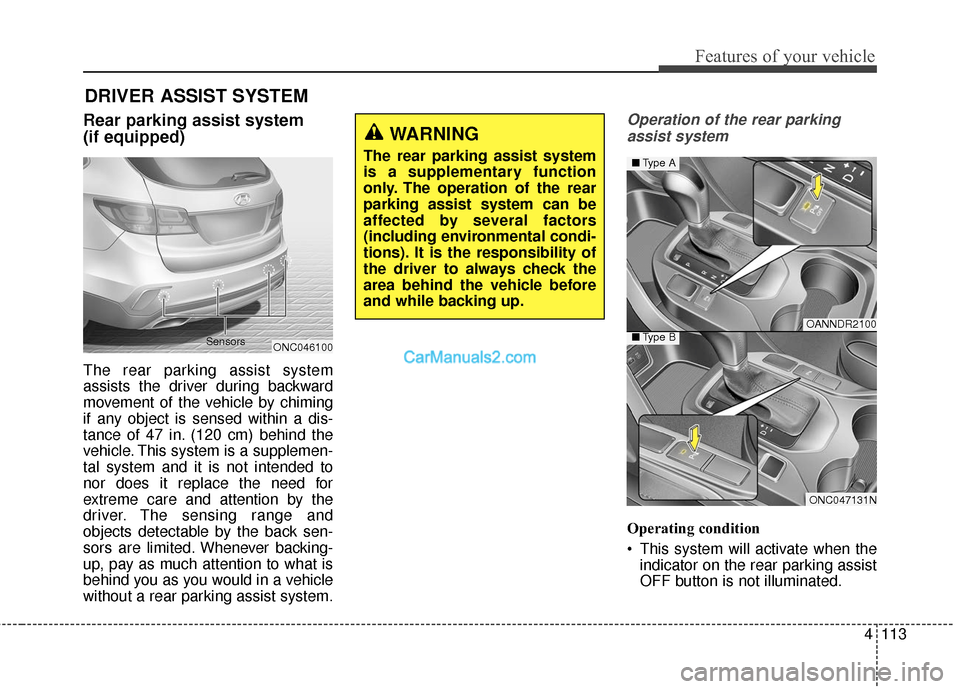
The rear parking assist system
assists the driver during backward
movement of the vehicle by chiming
if any object is sensed within a dis-
tance of 47 in. (120 cm) behind the
vehicle. This system is a supplemen-
tal system and it is not intended to
nor does it replace the need for
extreme care and attention by the
driver. The sensing range and
objects detectable by the back sen-
sors are limited. Whenever backing-
up, pay as much attention to what is
behind you as you would in a vehicle
without a rear parking assist system.
Operation of the rear parkingassist system
Operating condition
This system will activate when the indicator on the rear parking assist
OFF button is not illuminated.
DRIVER ASSIST SYSTEM
WARNING
The rear parking assist system
is a supplementary function
only. The operation of the rear
parking assist system can be
affected by several factors
(including environmental condi-
tions). It is the responsibility of
the driver to always check the
area behind the vehicle before
and while backing up.
ONC046100
Sensors
OANNDR2100
ONC047131N
■
Type A
■Type B
Page 218 of 570
4115
Features of your vehicle
The detecting range may decrease
when:
1. The sensor is covered with foreignmatter such as snow or water.
(The sensing range will return to
normal when removed.)
2. Outside air temperature is extremely hot or cold.
The following objects may not be rec-
ognized by the sensor:
1. Sharp or slim objects such as ropes, chains or small poles.
2. Objects which tend to absorb the sensor frequency such as clothes,
spongy material or snow.
3. Undetectable objects smaller than 40 in. (1 m) and narrower than 6
in. (14 cm) in diameter.Rear parking assist system pre-
cautions
The rear parking assist system may not sound sequentially
depending on the speed and
shapes of the objects detected.
The rear parking assist system may malfunction if the vehicle bumper
height or sensor installation has
been modified or damaged. Any
non-factory installed equipment or
accessories may also interfere with
the sensor performance.
The sensor may not recognize objects less than 15 in. (40 cm)
from the sensor, or it may sense an
incorrect distance. Use caution.
When the sensor is frozen or cov- ered with snow, dirt, or water, the
sensor may be inoperative until the
items are removed and the sen-
sors are cleaned using a soft cloth.
Do not push, scratch or strike the sensor. Sensor damage could occur.
✽ ✽ NOTICE
This system can only sense objects
within the range and location of the
sensors; it can not detect objects in
other areas where sensors are not
installed. Also, small or slim objects,
such as poles or objects located
between sensors may not be detected
by the sensors.
Always visually check behind the
vehicle when backing up.
Be sure to inform any drivers of the
vehicle that may be unfamiliar with
the system regarding the systems
capabilities and limitations.
Page 219 of 570
Features of your vehicle
116
4
Self-diagnosis (if equipped)
When you shift the gear to the R
(Reverse) position and if one or more
of the below occurs you may have a
malfunction in the rear parking assist
system.
You don't hear an audible warning
sound or if the buzzer sounds inter-
mittently.
If this occurs, have your vehicle
checked by an authorized HYUNDAI
dealer as soon as possible.
WARNING
Your new vehicle warranty does
not cover any accidents or dam-
age to the vehicle or injuries to
its occupants due to a rear
parking assist system malfunc-
tion. Always drive safely and
cautiously.
WARNING
Pay close attention when the
vehicle is driven close to
objects on the road, particularly
pedestrians, and especially
children. Be aware that some
objects may not be detected by
the sensors, due to the object’s
distance, size or material, all of
which can limit the effective-
ness of the sensor. Always per-
form a visual inspection to
make sure the vehicle is clear of
all obstructions before moving
the vehicle in any direction.
Page 220 of 570
4117
Features of your vehicle
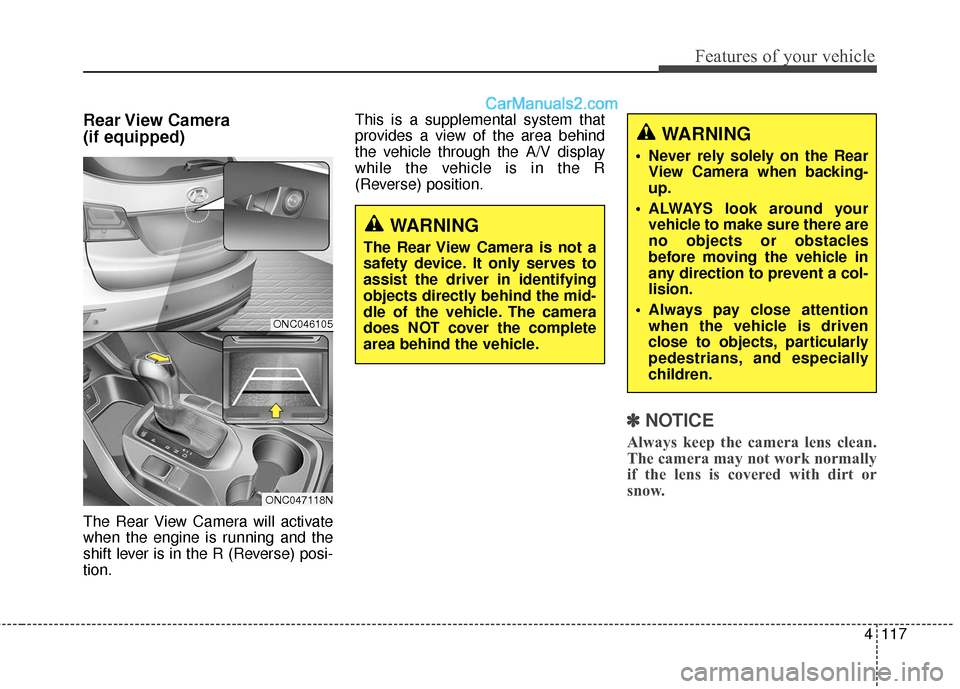
Rear View Camera
(if equipped)
The Rear View Camera will activate
when the engine is running and the
shift lever is in the R (Reverse) posi-
tion.This is a supplemental system that
provides a view of the area behind
the vehicle through the A/V display
while the vehicle is in the R
(Reverse) position.
✽ ✽
NOTICE
Always keep the camera lens clean.
The camera may not work normally
if the lens is covered with dirt or
snow.
WARNING
The Rear View Camera is not a
safety device. It only serves to
assist the driver in identifying
objects directly behind the mid-
dle of the vehicle. The camera
does NOT cover the complete
area behind the vehicle.
WARNING
Never rely solely on the Rear
View Camera when backing-
up.
ALWAYS look around your vehicle to make sure there are
no objects or obstacles
before moving the vehicle in
any direction to prevent a col-
lision.
Always pay close attention when the vehicle is driven
close to objects, particularly
pedestrians, and especially
children.
ONC046105
ONC047118N
Page 221 of 570
Features of your vehicle
118
4
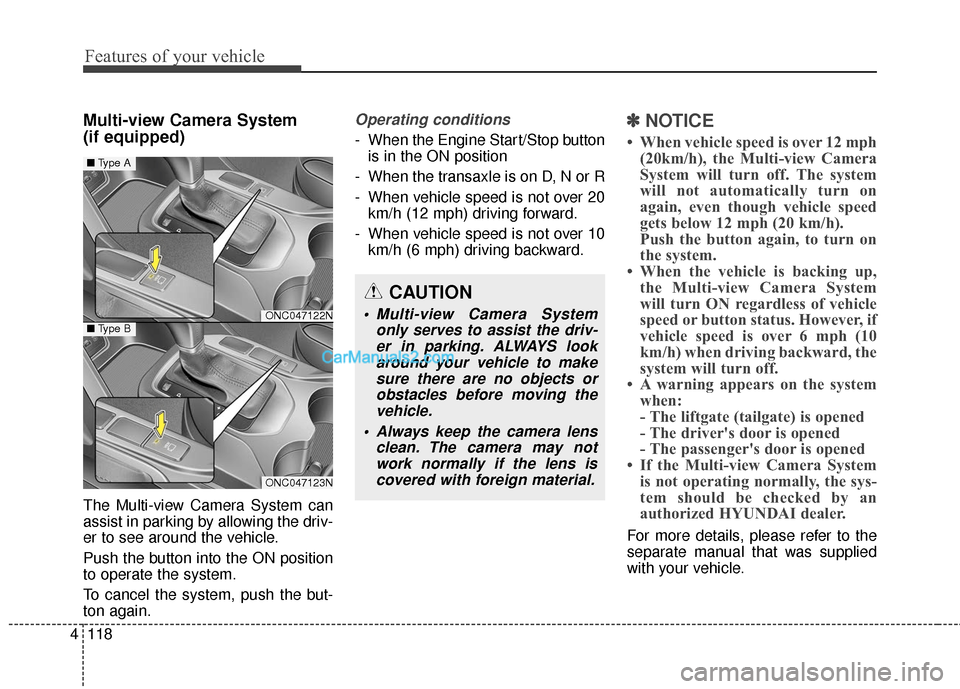
Multi-view Camera System
(if equipped)
The Multi-view Camera System can
assist in parking by allowing the driv-
er to see around the vehicle.
Push the button into the ON position
to operate the system.
To cancel the system, push the but-
ton again.
Operating conditions
- When the Engine Start/Stop button
is in the ON position
- When the transaxle is on D, N or R
- When vehicle speed is not over 20 km/h (12 mph) driving forward.
- When vehicle speed is not over 10 km/h (6 mph) driving backward.
✽ ✽ NOTICE
• When vehicle speed is over 12 mph
(20km/h), the Multi-view Camera
System will turn off. The system
will not automatically turn on
again, even though vehicle speed
gets below 12 mph (20 km/h).
Push the button again, to turn on
the system.
• When the vehicle is backing up, the Multi-view Camera System
will turn ON regardless of vehicle
speed or button status. However, if
vehicle speed is over 6 mph (10
km/h) when driving backward, the
system will turn off.
• A warning appears on the system when:
- The liftgate (tailgate) is opened
- The driver's door is opened
- The passenger's door is opened
• If the Multi-view Camera System is not operating normally, the sys-
tem should be checked by an
authorized HYUNDAI dealer.
For more details, please refer to the
separate manual that was supplied
with your vehicle.
CAUTION
Multi-view Camera System
only serves to assist the driv-er in parking. ALWAYS lookaround your vehicle to makesure there are no objects orobstacles before moving thevehicle.
Always keep the camera lens clean. The camera may notwork normally if the lens iscovered with foreign material.ONC047122N
ONC047123N
■ Type A
■Type B
Page 293 of 570
Driving your vehicle
Before driving . . . . . . . . . . . . . . . . . . . . . . . . . . . . . . 5-4
• Before entering vehicle . . . . . . . . . . . . . . . . . . . . . . . . . 5-4
. . . . . . . . . . . . . . . . . . . . . . . . . . 5-4
. . . . . . . . . . . . . . . . . . . . . . . . . . . . . . . . 5-5
Key positions . . . . . . . . . . . . . . . . . . . . . . . . . . . . . . . 5-7
. . . . . . . . . . . . . . . . . . . . . . 5-7
. . . . . . . . . . . . . . . . . . . . . . . . . 5-7
. . . . . . . . . . . . . . . . . . . . . . . . . . . . 5-9
Engine start/stop button . . . . . . . . . . . . . . . . . . . . 5-10
. . . . . . . . . . . . . 5-10
. . . . . . . . . . . . . . . . . . . . . . . . . . . 5-13
Automatic transaxle . . . . . . . . . . . . . . . . . . . . . . . . 5-15
. . . . . . . . . . . . . . . . . . 5-15
. . . . . . . . . . . . . . . . . . . . . . . . 5-20
All Wheel Drive (AWD) . . . . . . . . . . . . . . . . . . . . . 5-22
. . . . . . . . . . . . . . . . . . . . . . 5-22
. . . 5-23
. . . . . . . . . . . . . . . 5-24
. . . . . . . . . . . . . . . . . 5-27
Drive mode integrated control system . . . . . . . . . 5-29
Brake system . . . . . . . . . . . . . . . . . . . . . . . . . . . . . . 5-31
. . . . . . . . . . . . . . . . . . . . . . . . . . . . . . . . 5-31
. . . . . . . . . . . . . . . . . . . . 5-32 . . . . . . . . . . . . . . . . . . . . . . . . . . . . . . . 5-33
. . . . . . . . . . . . . . . . 5-35
. . . . . . . . . . . . . . . . . . . . . . . . . . . 5-40
. . . . . . . . . . . . . . . . . . . . . . . . . . . . . . . . . . . 5-\
41
. . . . . . . . . . . . . . . . . 5-44
. . . . . . . . . . . . . . 5-46
. . . . . . . . . . . . 5-50
. . . . . . . . . . . . . . . . . 5-51
. . . . . . . . . . . . . . . . . 5-53
Automatic emergency braking (AEB) . . . . . . . . . 5-56
Cruise control system. . . . . . . . . . . . . . . . . . . . . . . 5-67
Advanced smart cruise control system. . . . . . . . . 5-72
Blind spot detection system (BSD) . . . . . . . . . . . . 5-88
LCA (Lane Change Assist) . . . . . . . . . . . . . . . . . . . 5-89
Lane departure warning system (LDWS) . . . . . . 5-96
Active ECO system. . . . . . . . . . . . . . . . . . . . . . . . 5-100
Economical operation . . . . . . . . . . . . . . . . . . . . . 5-101
5
Page 323 of 570
531
Driving your vehicle
BRAKE SYSTEM
Power brakes
Your vehicle has power-assisted
brakes that adjust automatically
through normal usage.
In the event that the power-assisted
brakes lose power because of a
stalled engine or some other reason,
you can still stop your vehicle by
applying greater force to the brake
pedal than you normally would. The
stopping distance, however, will be
longer.
When the engine is not running, the
reserve brake power is partially
depleted each time the brake pedal
is applied. Do not pump the brake
pedal when the power assist has
been interrupted.
Pump the brake pedal only when
necessary to maintain steering con-
trol on slippery surfaces.(Continued)
Wet brakes may impair thevehicle’s ability to safely slow
down; the vehicle may also
pull to one side when the
brakes are applied. Applying
the brakes lightly will indicate
whether they have been affect-
ed in this way. Always test your
brakes in this fashion after
driving through deep water. To
dry the brakes, apply them
lightly while maintaining a safe
forward speed until brake per-
formance returns to normal.
Always, confirm the position of the brake and accelerator
pedal before driving. If you
don't check the position of the
accelerator and brake pedal
before driving, you may
depress the accelerator
instead of the brake pedal. It
may cause a serious accident.WARNING - Brakes
Do not drive with your foot resting on the brake pedal.
This will create abnormal high
brake temperatures, exces-
sive brake lining and pad
wear, and increased stopping
distances.
When descending a long or steep hill, shift to a lower gear
and avoid continuous applica-
tion of the brakes. Continuous
brake application will cause
the brakes to overheat and
could result in a temporary
loss of braking performance.
(Continued)