Wiper Hyundai Santa Fe 2019 Owner's Manual - RHD (UK, Australia)
[x] Cancel search | Manufacturer: HYUNDAI, Model Year: 2019, Model line: Santa Fe, Model: Hyundai Santa Fe 2019Pages: 682, PDF Size: 16.24 MB
Page 15 of 682
1-2
EXTERIOR OVERVIEW (I)
Your vehicle at a glance
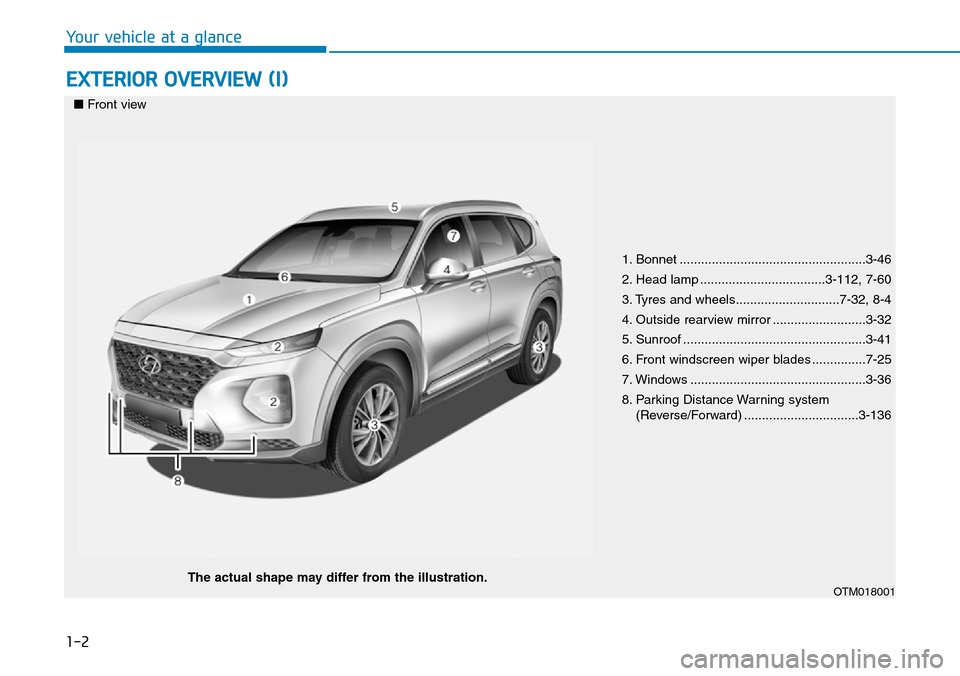
1. Bonnet ....................................................3-46
2. Head lamp ...................................3-112, 7-60
3. Tyres and wheels.............................7-32, 8-4
4. Outside rearview mirror ..........................3-32
5. Sunroof ...................................................3-41
6. Front windscreen wiper blades ...............7-25
7. Windows .................................................3-36
8. Parking Distance Warning system
(Reverse/Forward) ................................3-136
OTM018001
■Front view
The actual shape may differ from the illustration.
Page 16 of 682
1-3
Your vehicle at a glance
EXTERIOR OVERVIEW (II)
1
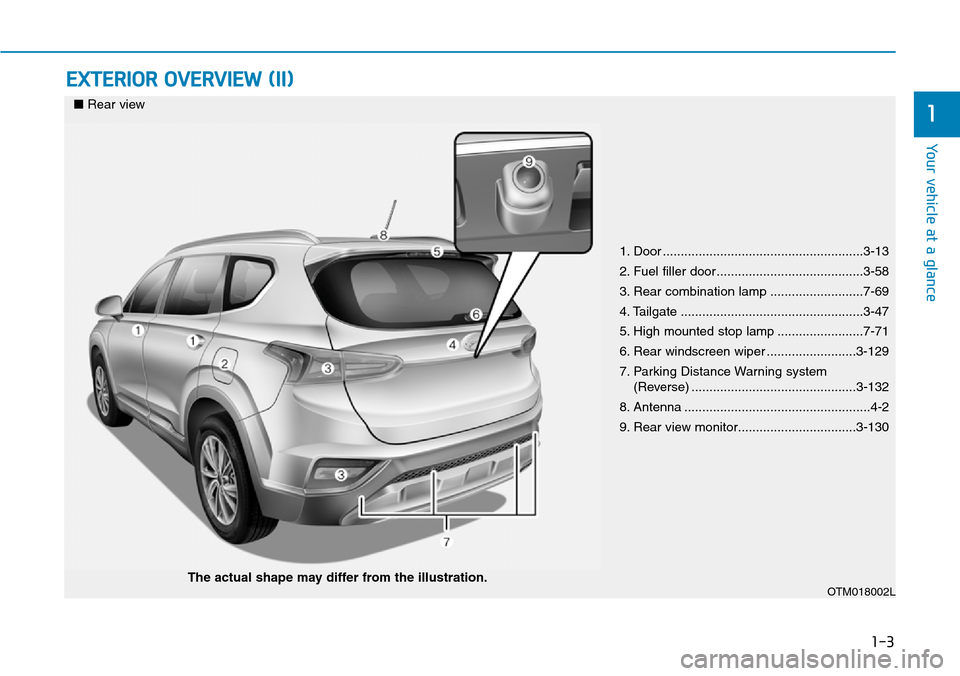
1. Door ........................................................3-13
2. Fuel filler door.........................................3-58
3. Rear combination lamp ..........................7-69
4. Tailgate ...................................................3-47
5. High mounted stop lamp ........................7-71
6. Rear windscreen wiper .........................3-129
7. Parking Distance Warning system
(Reverse) ..............................................3-132
8. Antenna ....................................................4-2
9. Rear view monitor.................................3-130
OTM018002L
■Rear view
The actual shape may differ from the illustration.
Page 93 of 682
Instrument cluster................................................3-61
Instrument cluster control ............................................3-62
Gauges and meters .........................................................3-62
Icy road warning light ....................................................3-66
Transmission shift indicator .........................................3-67
Warning and indicator lights ........................................3-69
LCD display messages ..................................................3-84
LCD display ..........................................................3-91
LCD display control.........................................................3-91
LCD display modes ..........................................................3-92
Trip computer .....................................................3-104
Trip modes ......................................................................3-104
Head up display (HUD)......................................3-108
Lighting................................................................3-111
Exterior lights ................................................................3-111
Welcome system ...........................................................3-121
Interior lights..................................................................3-122
Wipers and washers ..........................................3-126
Windscreen wipers .......................................................3-126
Windscreen washers ....................................................3-128
Rear window wiper and washer switch ..................3-129
Driver assist system ..........................................3-130
Rear view monitor (Type A) .......................................3-130
Rear view monitor (Type B) .......................................3-131
Parking Distance Warning (Reverse) system .........3-132
Parking Distance Warning (Reverse/Forward)
system..............................................................................3-137
Surround view monitor (if equipped).......................3-140
Parking assist
(parallel, perpendicular reverse) .....................3-143
Operating condition ......................................................3-144
Non-operating condition.............................................3-145
How the system works (Parking Mode)..................3-148
Additional instructions (messages) ...........................3-155
System malfunction......................................................3-156
How the system works (Exit mode) .........................3-156
Additional instructions (messages) ...........................3-160
System malfunction......................................................3-160
Defroster .............................................................3-161
Rear window defroster ...............................................3-161
Manual climate control system........................3-162
Heating and air conditioning......................................3-163
3rd row air conditioning ..............................................3-166
System operation ..........................................................3-167
System maintenance ....................................................3-169
3
Page 178 of 682
3-87
Convenient features of your vehicle
3
Window open (if equipped)
This warning is displayed if you turn
off the engine when any window is
open.
Lights mode
This indicator displays which exterior
light is selected using the lighting
control.
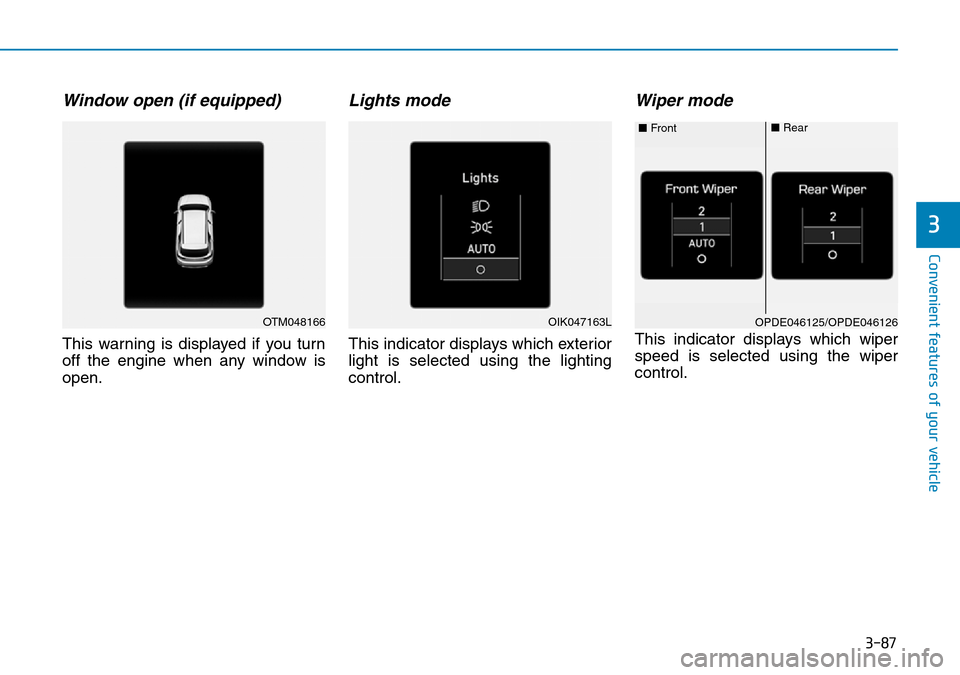
Wiper mode
This indicator displays which wiper
speed is selected using the wiper
control.
OTM048166OPDE046125/OPDE046126 ■Front■RearOIK047163L
Page 192 of 682
3-101
Convenient features of your vehicle
3
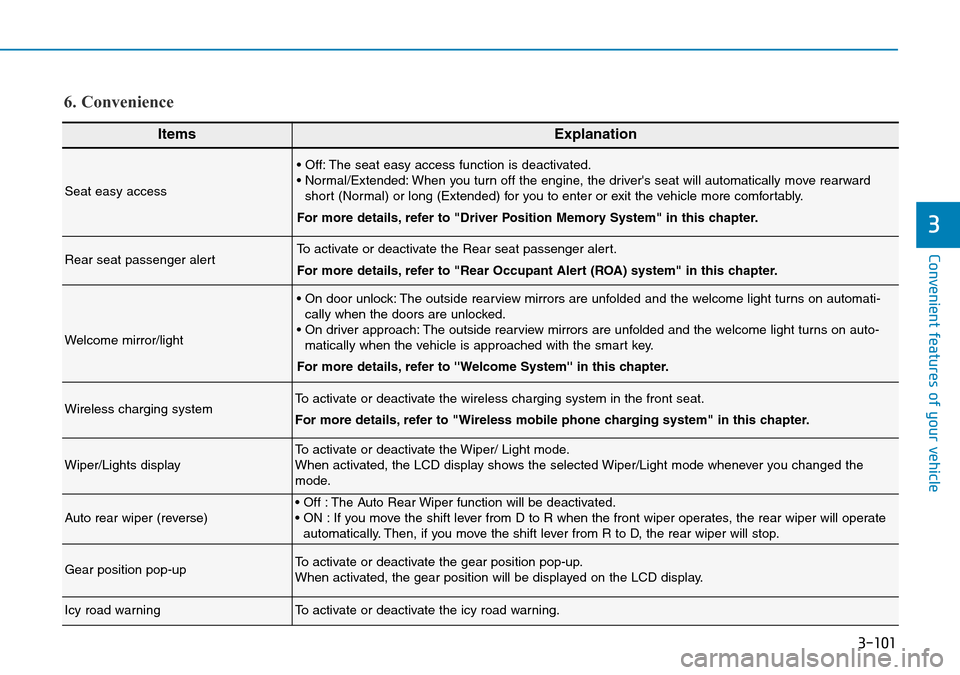
ItemsExplanation
Seat easy access
• Off: The seat easy access function is deactivated.
• Normal/Extended: When you turn off the engine, the driver's seat will automatically move rearward
short (Normal) or long (Extended) for you to enter or exit the vehicle more comfortably.
For more details, refer to "Driver Position Memory System" in this chapter.
Rear seat passenger alertTo activate or deactivate the Rear seat passenger alert.
For more details, refer to "Rear Occupant Alert (ROA) system" in this chapter.
Welcome mirror/light
• On door unlock: The outside rearview mirrors are unfolded and the welcome light turns on automati-
cally when the doors are unlocked.
• On driver approach: The outside rearview mirrors are unfolded and the welcome light turns on auto-
matically when the vehicle is approached with the smart key.
For more details, refer to ''Welcome System'' in this chapter.
Wireless charging systemTo activate or deactivate the wireless charging system in the front seat.
For more details, refer to "Wireless mobile phone charging system" in this chapter.
Wiper/Lights displayTo activate or deactivate the Wiper/ Light mode.
When activated, the LCD display shows the selected Wiper/Light mode whenever you changed the
mode.
Auto rear wiper (reverse)• Off : The Auto Rear Wiper function will be deactivated.
• ON : If you move the shift lever from D to R when the front wiper operates, the rear wiper will operate
automatically. Then, if you move the shift lever from R to D, the rear wiper will stop.
Gear position pop-upTo activate or deactivate the gear position pop-up.
When activated, the gear position will be displayed on the LCD display.
Icy road warningTo activate or deactivate the icy road warning.
6. Convenience
Page 217 of 682
3-126
Convenient features of your vehicle
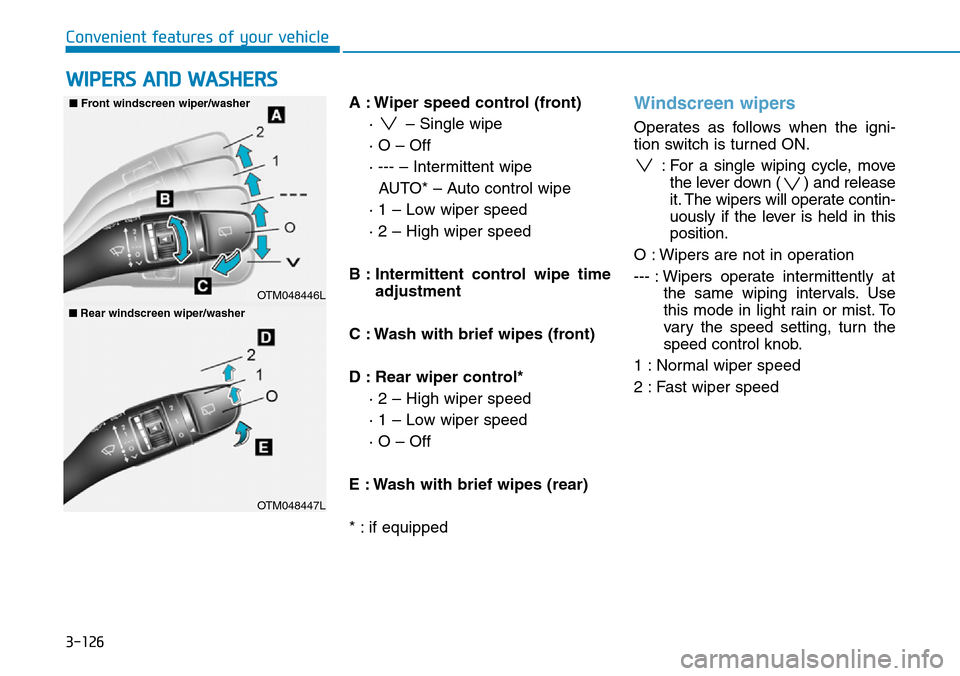
A : Wiper speed control (front)
· – Single wipe
· O – Off
· --- – Intermittent wipe
AUTO* – Auto control wipe
· 1 – Low wiper speed
· 2 – High wiper speed
B : Intermittent control wipe time
adjustment
C : Wash with brief wipes (front)
D : Rear wiper control*
· 2 – High wiper speed
· 1 – Low wiper speed
· O – Off
E : Wash with brief wipes (rear)
* : if equipped
Windscreen wipers
Operates as follows when the igni-
tion switch is turned ON.
: For a single wiping cycle, move
the lever down ( ) and release
it. The wipers will operate contin-
uously if the lever is held in this
position.
O : Wipers are not in operation
--- : Wipers operate intermittently at
the same wiping intervals. Use
this mode in light rain or mist. To
vary the speed setting, turn the
speed control knob.
1 : Normal wiper speed
2 : Fast wiper speed
WIPERS AND WASHERS
OTM048446L
■Front windscreen wiper/washer
OTM048447L
■Rear windscreen wiper/washer
Page 218 of 682
3-127
Convenient features of your vehicle
3
Information
If there is heavy accumulation of snow
or ice on the windscreen, defrost the
windscreen for about 10 minutes, or
until the snow and/or ice is removed
before using the windscreen wipers to
ensure proper operation.
If you do not remove the snow and/or
ice before using the wiper and washer,
it may damage the wiper and washer
system.
AUTO (Automatic) control
(if equipped)
The rain sensor located on the upper
end of the windscreen glass senses
the amount of rainfall and controls
the wiping cycle for the proper inter-
val. The wiper operation time will be
automatically controlled depends on
rainfall.
When the rain stops, the wiper stops.
To vary the sensitivity setting, turn
the sensitivity control knob.
If the wiper switch is set in AUTO
mode when the ignition switch is in
the ON position, the wiper will oper-
ate once to perform a self-check of
the system.
i
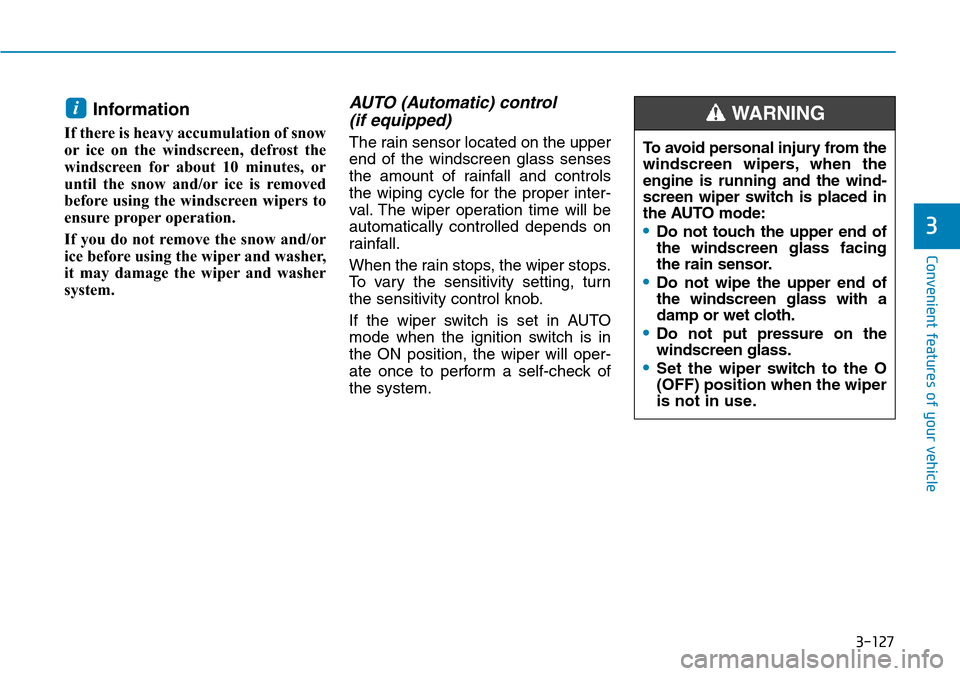
To avoid personal injury from the
windscreen wipers, when the
engine is running and the wind-
screen wiper switch is placed in
the AUTO mode:
•Do not touch the upper end of
the windscreen glass facing
the rain sensor.
•Do not wipe the upper end of
the windscreen glass with a
damp or wet cloth.
•Do not put pressure on the
windscreen glass.
•Set the wiper switch to the O
(OFF) position when the wiper
is not in use.
WARNING
Page 219 of 682
3-128
Convenient features of your vehicle
• When washing the vehicle, set
the wiper switch in the O (OFF)
position to stop the auto wiper
operation. The wiper may oper-
ate and be damaged if the switch
is set in the AUTO mode whilst
washing the vehicle.
• Do not remove the sensor cover
located on the upper end of the
passenger side windscreen
glass. Damage to system parts
could occur and may not be cov-
ered by your vehicle warranty.
• Because of using a photo sen-
sor, temporary malfunction
could occur according to sud-
den ambient light change made
by stone and dust whilst driving.
Windscreen washers
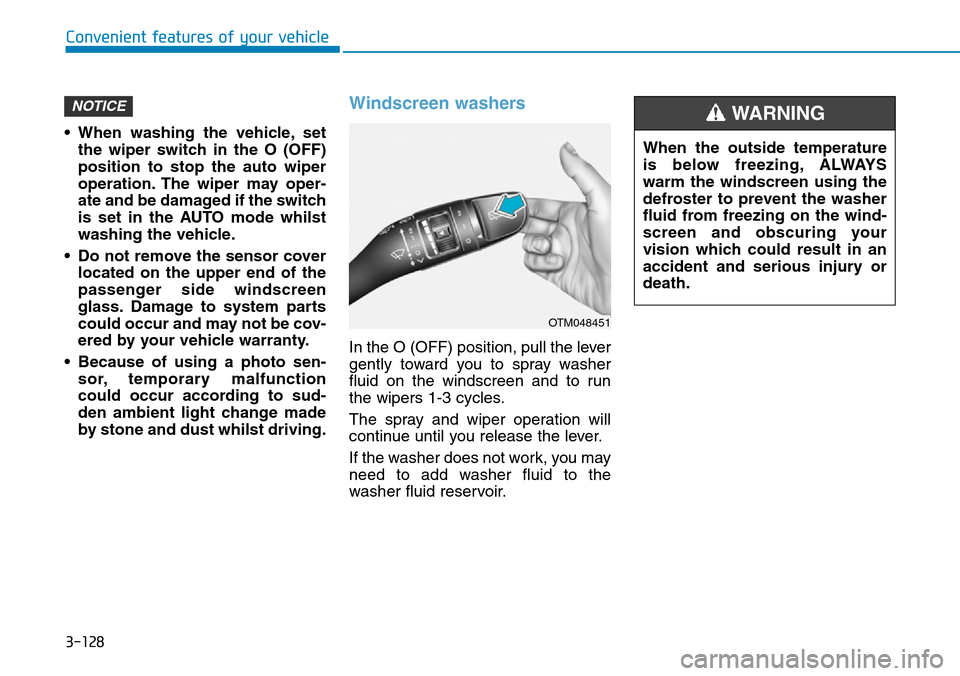
In the O (OFF) position, pull the lever
gently toward you to spray washer
fluid on the windscreen and to run
the wipers 1-3 cycles.
The spray and wiper operation will
continue until you release the lever.
If the washer does not work, you may
need to add washer fluid to the
washer fluid reservoir.
NOTICE
When the outside temperature
is below freezing, ALWAYS
warm the windscreen using the
defroster to prevent the washer
fluid from freezing on the wind-
screen and obscuring your
vision which could result in an
accident and serious injury or
death.
WARNING
OTM048451
Page 220 of 682
3-129
Convenient features of your vehicle
3
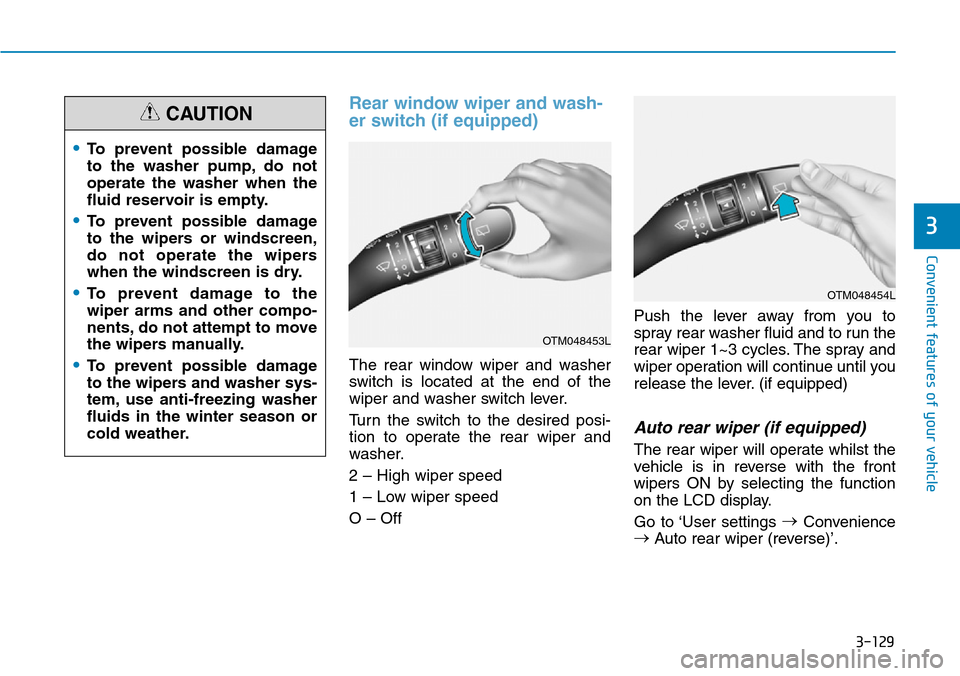
Rear window wiper and wash-
er switch (if equipped)
The rear window wiper and washer
switch is located at the end of the
wiper and washer switch lever.
Turn the switch to the desired posi-
tion to operate the rear wiper and
washer.
2 – High wiper speed
1 – Low wiper speed
O – OffPush the lever away from you to
spray rear washer fluid and to run the
rear wiper 1~3 cycles. The spray and
wiper operation will continue until you
release the lever. (if equipped)
Auto rear wiper (if equipped)
The rear wiper will operate whilst the
vehicle is in reverse with the front
wipers ON by selecting the function
on the LCD display.
Go to ‘User settings →
Convenience
→
Auto rear wiper (reverse)’.
OTM048453L
•To prevent possible damage
to the washer pump, do not
operate the washer when the
fluid reservoir is empty.
•To prevent possible damage
to the wipers or windscreen,
do not operate the wipers
when the windscreen is dry.
•To prevent damage to the
wiper arms and other compo-
nents, do not attempt to move
the wipers manually.
•To prevent possible damage
to the wipers and washer sys-
tem, use anti-freezing washer
fluids in the winter season or
cold weather.
CAUTION
OTM048454L
Page 490 of 682
5-161
Driving your vehicle
5
System setting and activation
System setting
• The driver can activate the Speed
Limit Warning by selecting 'User
Settings →Driver assistance →
Driving assist → ISLW (Speed Limit
Warning)'.
• When the ISLW is activated, the
symbols appear on the instrument
cluster to display the speed limit
information and overtaking restric-
tion.
• When the ISLW is activated in the
navigation setting, the above infor-
mation and the restriction are also
displayed on the navigation.
System activation
• The ISLW displays the speed limit
information and alerts the overtak-
ing restriction, when your vehicle
passes by the relevant traffic signs.
• With the ignition switch in the ON
position, the driver can activate the
ISLW by selecting 'User Settings
→Driving assist →ISLW (Speed
Limit Warning)'.
• The ISLW displays the previous
speed limit information, right after
the ignition switch is placed to the
ON position.
• You may find different speed limit
information for the same road. The
information is displayed depending
on the driving situations. Because,
traffic signs with additional sign
(e.g. rainy, arrow, etc.) are also
detected and compared with vehi-
cle internal data (e.g. wiper opera-
tion, turn signal, etc.).
Information
The speed limit information on the
instrument cluster may differ from
the one on the navigation. In this case,
check the speed unit setting on the
navigation.
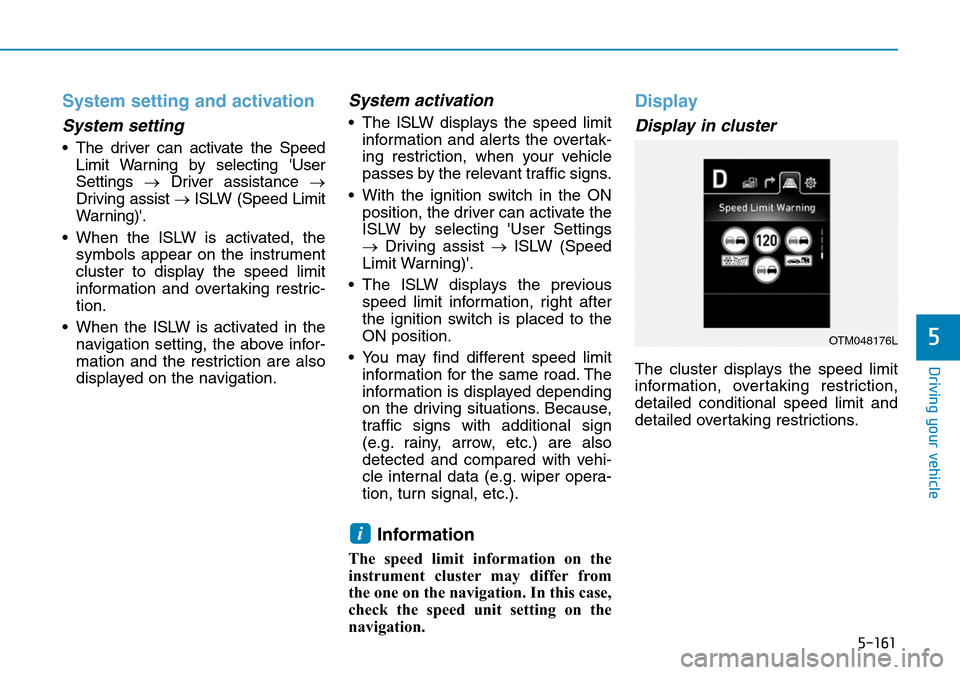
Display
Display in cluster
The cluster displays the speed limit
information, overtaking restriction,
detailed conditional speed limit and
detailed overtaking restrictions.
i
OTM048176L