charging Hyundai Santa Fe 2019 User Guide
[x] Cancel search | Manufacturer: HYUNDAI, Model Year: 2019, Model line: Santa Fe, Model: Hyundai Santa Fe 2019Pages: 557, PDF Size: 14.8 MB
Page 284 of 557
5-10
Driving your vehicle
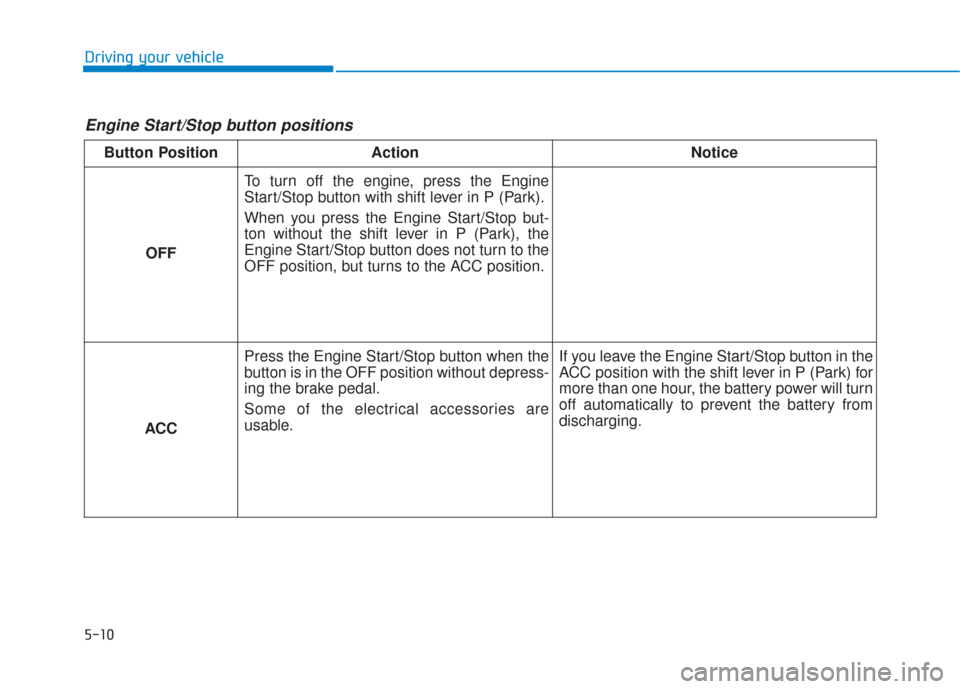
Engine Start/Stop button positions
Button PositionAction Notice
OFF To turn off the engine, press the Engine
Start/Stop button with shift lever in P (Park).
When you press the Engine Start/Stop but-
ton without the shift lever in P (Park), the
Engine Start/Stop button does not turn to the
OFF position, but turns to the ACC position.
ACC Press the Engine Start/Stop button when the
button is in the OFF position without depress-
ing the brake pedal.
Some of the electrical accessories are
usable.
If you leave the Engine Start/Stop button in the
ACC position with the shift lever in P (Park) for
more than one hour, the battery power will turn
off automatically to prevent the battery from
discharging.
Page 285 of 557
5-11
Driving your vehicle
5
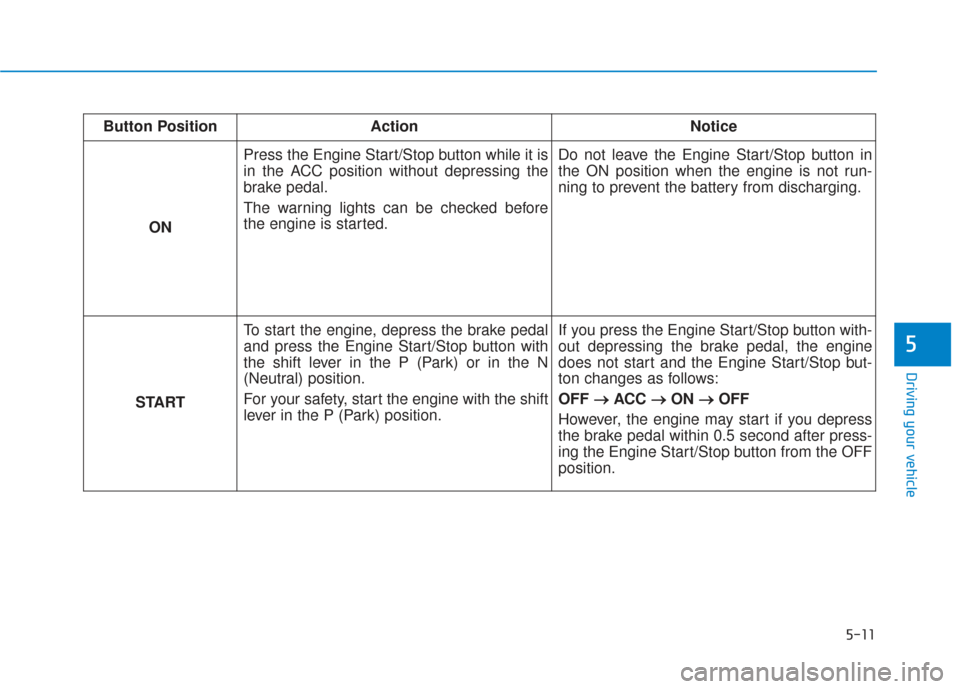
Button PositionAction Notice
ON Press the Engine Start/Stop button while it is
in the ACC position without depressing the
brake pedal.
The warning lights can be checked before
the engine is started.
Do not leave the Engine Start/Stop button in
the ON position when the engine is not run-
ning to prevent the battery from discharging.
START To start the engine, depress the brake pedal
and press the Engine Start/Stop button with
the shift lever in the P (Park) or in the N
(Neutral) position.
For your safety, start the engine with the shift
lever in the P (Park) position. If you press the Engine Start/Stop button with-
out depressing the brake pedal, the engine
does not start and the Engine Start/Stop but-
ton changes as follows:
OFF
→ →
ACC →
→
ON →
→
OFF
However, the engine may start if you depress
the brake pedal within 0.5 second after press-
ing the Engine Start/Stop button from the OFF
position.
Page 426 of 557
6-6
What to do in an emergency
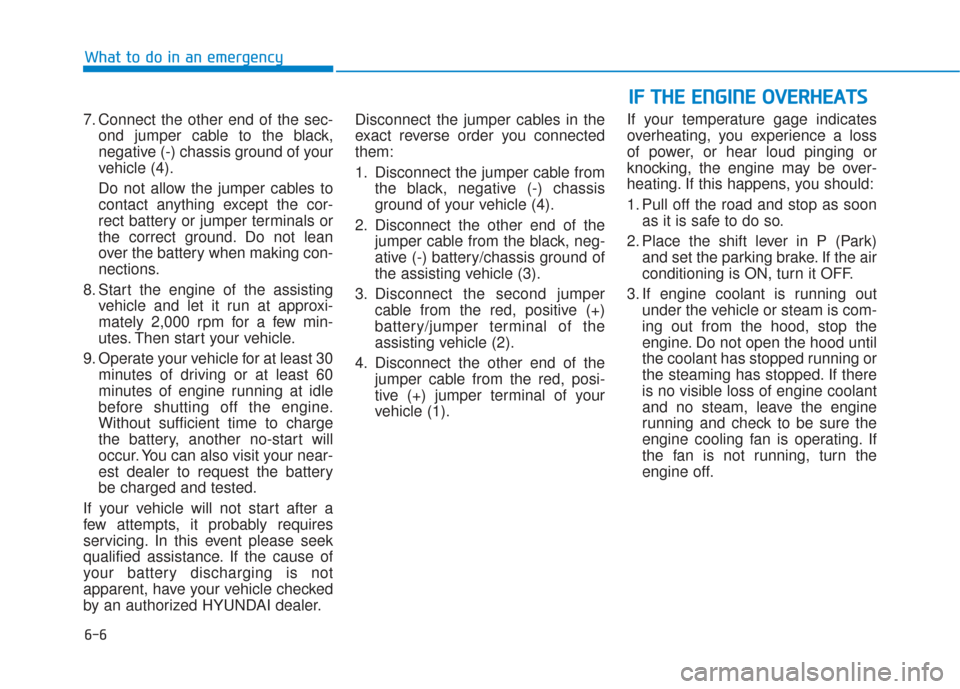
7. Connect the other end of the sec- ond jumper cable to the black,
negative (-) chassis ground of your
vehicle (4).
Do not allow the jumper cables to contact anything except the cor-
rect battery or jumper terminals or
the correct ground. Do not lean
over the battery when making con-
nections.
8. Start the engine of the assisting vehicle and let it run at approxi-
mately 2,000 rpm for a few min-
utes. Then start your vehicle.
9. Operate your vehicle for at least 30 minutes of driving or at least 60
minutes of engine running at idle
before shutting off the engine.
Without sufficient time to charge
the battery, another no-start will
occur. You can also visit your near-
est dealer to request the battery
be charged and tested.
If your vehicle will not start after a
few attempts, it probably requires
servicing. In this event please seek
qualified assistance. If the cause of
your battery discharging is not
apparent, have your vehicle checked
by an authorized HYUNDAI dealer. Disconnect the jumper cables in the
exact reverse order you connected
them:
1. Disconnect the jumper cable from
the black, negative (-) chassis
ground of your vehicle (4).
2. Disconnect the other end of the jumper cable from the black, neg-
ative (-) battery/chassis ground of
the assisting vehicle (3).
3. Disconnect the second jumper cable from the red, positive (+)
battery/jumper terminal of the
assisting vehicle (2).
4. Disconnect the other end of the jumper cable from the red, posi-
tive (+) jumper terminal of your
vehicle (1). If your temperature gage indicates
overheating, you experience a loss
of power, or hear loud pinging or
knocking, the engine may be over-
heating. If this happens, you should:
1. Pull off the road and stop as soon
as it is safe to do so.
2. Place the shift lever in P (Park) and set the parking brake. If the air
conditioning is ON, turn it OFF.
3. If engine coolant is running out under the vehicle or steam is com-
ing out from the hood, stop the
engine. Do not open the hood until
the coolant has stopped running or
the steaming has stopped. If there
is no visible loss of engine coolant
and no steam, leave the engine
running and check to be sure the
engine cooling fan is operating. If
the fan is not running, turn the
engine off.
I IF
F
T
T H
H E
E
E
E N
N G
GI
IN
N E
E
O
O V
VE
ER
R H
H E
EA
A T
TS
S
Page 443 of 557
7
Maintenance
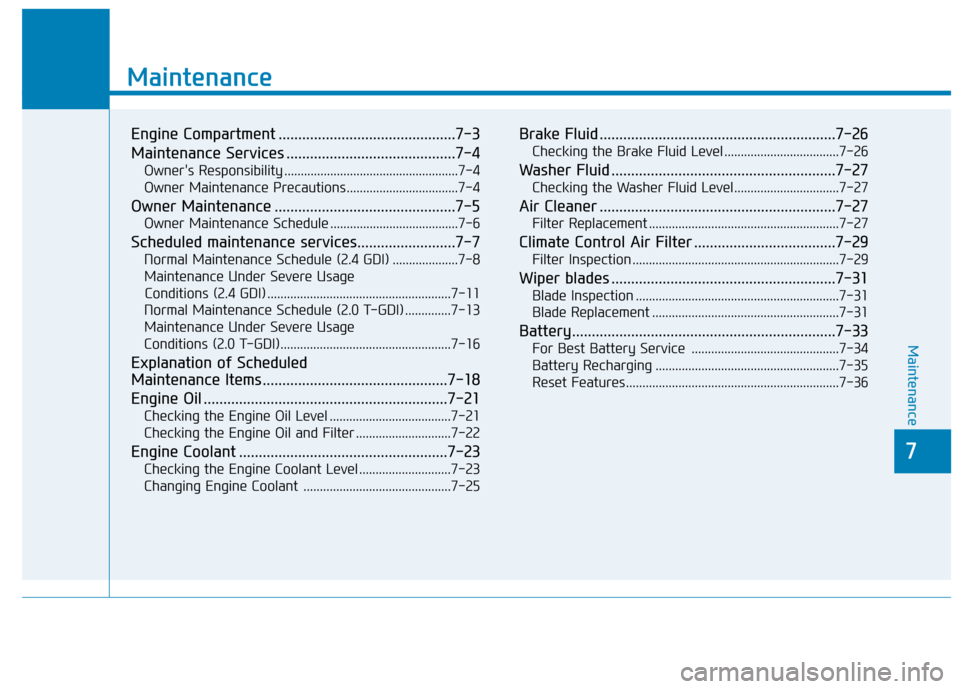
Engine Compartment .............................................7-3
Maintenance Services ...........................................7-4
Owner's Responsibility .....................................................7-4
Owner Maintenance Precautions..................................7-4
Owner Maintenance ..............................................7-5
Owner Maintenance Schedule .......................................7-6
Scheduled maintenance services.........................7-7
Normal Maintenance Schedule (2.4 GDI) ....................7-8
Maintenance Under Severe Usage Conditions (2.4 GDI) ........................................................7-11
Normal Maintenance Schedule (2.0 T-GDI) ..............7-13
Maintenance Under Severe Usage
Conditions (2.0 T-GDI)....................................................7-16
Explanation of Scheduled
Maintenance Items ...............................................7-18
Engine Oil ..............................................................7-21
Checking the Engine Oil Level .....................................7-21
Checking the Engine Oil and Filter .............................7-22
Engine Coolant .....................................................7-23
Checking the Engine Coolant Level ............................7-23
Changing Engine Coolant .............................................7-25
Brake Fluid ............................................................7-26
Checking the Brake Fluid Level ...................................7-26
Washer Fluid .........................................................7-27
Checking the Washer Fluid Level................................7-27
Air Cleaner ............................................................7-27
Filter Replacement ..........................................................7-27
Climate Control Air Filter ....................................7-29
Filter Inspection ...............................................................7-29
Wiper blades .........................................................7-31
Blade Inspection ..............................................................7-31
Blade Replacement .........................................................7-31
Battery...................................................................7-33
For Best Battery Service .............................................7-34
Battery Recharging ........................................................7-35
Reset Features.................................................................7-36
7
Maintenance
7
Page 477 of 557
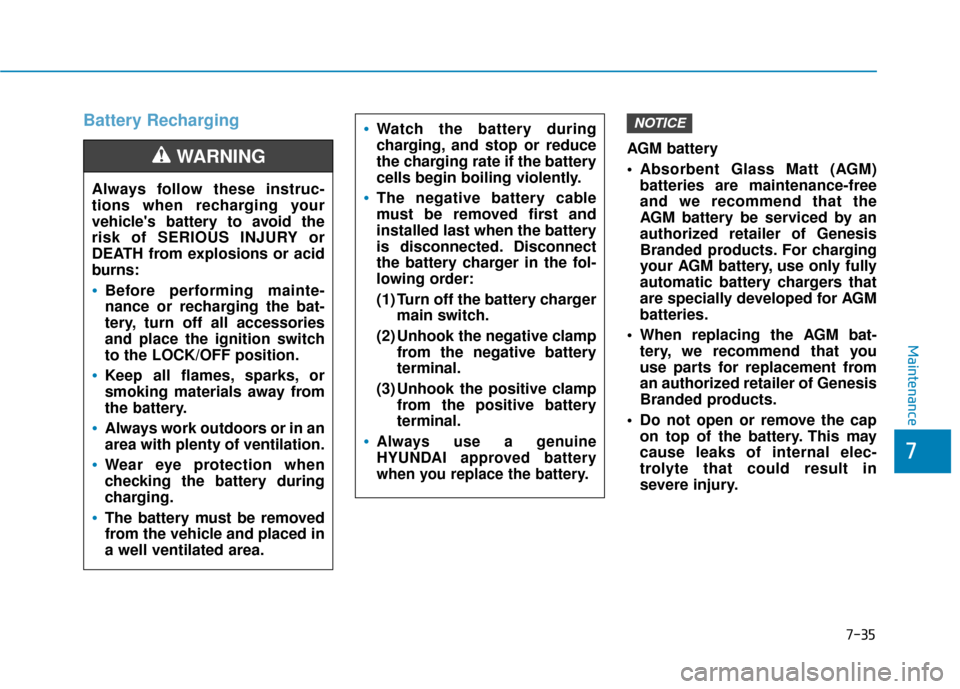
Battery Recharging
AGM battery
Absorbent Glass Matt (AGM)batteries are maintenance-free
and we recommend that the
AGM battery be serviced by an
authorized retailer of Genesis
Branded products. For charging
your AGM battery, use only fully
automatic battery chargers that
are specially developed for AGM
batteries.
When replacing the AGM bat- tery, we recommend that you
use parts for replacement from
an authorized retailer of Genesis
Branded products.
Do not open or remove the cap on top of the battery. This may
cause leaks of internal elec-
trolyte that could result in
severe injury.
NOTICE
Always follow these instruc-
tions when recharging your
vehicle's battery to avoid the
risk of SERIOUS INJURY or
DEATH from explosions or acid
burns:
Before performing mainte-
nance or recharging the bat-
tery, turn off all accessories
and place the ignition switch
to the LOCK/OFF position.
Keep all flames, sparks, or
smoking materials away from
the battery.
Always work outdoors or in an
area with plenty of ventilation.
Wear eye protection when
checking the battery during
charging.
The battery must be removed
from the vehicle and placed in
a well ventilated area.
WARNING
Watch the battery during
charging, and stop or reduce
the charging rate if the battery
cells begin boiling violently.
The negative battery cable
must be removed first and
installed last when the battery
is disconnected. Disconnect
the battery charger in the fol-
lowing order:
(1) Turn off the battery charger main switch.
(2) Unhook the negative clamp from the negative battery
terminal.
(3) Unhook the positive clamp from the positive battery
terminal.
Always use a genuine
HYUNDAI approved battery
when you replace the battery.
Maintenance
7
7-35
Page 545 of 557

I-2
AC inverter ...................................................................3-171\
Air bag warning labels ....................................................2-71
Air bags ........................................................................\
...2-49Additional safety precautions .....................................2-71
Air bag collision sensors ............................................2-65
Air bag inflation conditions .......................................2-67
Air bag non-inflation conditions ................................2-68
Air bag warning labels ...............................................2-71
Curtain air bags ..........................................................2-53
Driver's air bag ...........................................................2-51
How does the air bags system operate? .....................2-54
Occupant Classification System (OCS) .....................2-60
Passenger's front air bag.............................................2-51
Side air bags ...............................................................2-52
SRS Care ....................................................................2-70\
SRS components and functions..................................2-54
SRS warning light ......................................................2-55
What to expect after an air bag inflates .....................2-59
Why didn't my air bag go off in a collision ...............2-65
Air cleaner filter replacement .........................................7-27
Air conditioning system specification ..............................8-6
Air ventilation seats ........................................................2-22
Alarm system ..................................................................3-24
All Wheel Drive (AWD) .................................................5-40
Antenna ........................................................................\
.....4-2
Anti-lock Brake System (ABS) ......................................5-30 Appearance care..............................................................7-76
Exterior care ...............................................................7-76
Interior care ................................................................7-81
Armrest ........................................................................\
...2-16
Ashtray ........................................................................\
..3-168
Audio / Video / Navigation system ..................................4-4
Auto defogging system .................................................3-161
Auto hold ........................................................................\
5-27
Auto light position ........................................................3-114
Automatic climate control system ................................3-147
Automatic transmission ..................................................5-14 Good driving practices ...............................................5-18
Manual shift mode......................................................5-16
Shift lock system ........................................................5-17
Shift-lock release ........................................................5-17
Transmission ranges ...................................................5-15
Automatic ventilation ...................................................3-164
AUX, USB and iPod
®port ...............................................4-2
Battery ........................................................................\
.....7-33 Battery recharging ......................................................7-35
Battery saver function ...................................................3-120
Before driving ...................................................................5-4
Blade type fuse ...............................................................7-54
Blind-Spot Collision Warning (BCW) system ...............5-68
Blind-Spot Collision-Avoidance Assist (BCA) system ..5-68
Bluetooth
®Wireless Technology ......................................4-4
Index
A
B
Page 550 of 557
I-7
Trip computer mode ...................................................3-95
User settings mode .....................................................3-97
Warning and indicator lights ......................................3-74
Instrument panel fuse replacement .................................7-53
Instrument panel overview ...............................................1-5
Interior care .....................................................................7-8\
1
Interior features AC inverter ...............................................................3-171
Ashtray .....................................................................3-1\
68
Bottle holder .............................................................3-168
Cargo security screen ...............................................3-178
Clock ........................................................................\
3-175
Coat hook .................................................................3-176
Cup holder ................................................................3-168
Floor mat anchor(s) ..................................................3-176
Luggage net holder ...................................................3-177
Power outlet..............................................................3-170
Side curtain...............................................................3-180
Sunvisor ....................................................................3-16\
9
USB charger .............................................................3-173
Wireless cellular phone charging system .................3-173
Interior lamp AUTO cut................................................3-122
Interior lights.................................................................3-122 Front lamps...............................................................3-122
Interior lamp AUTO cut ...........................................3-122
Luggage compartment lamp .....................................3-123
Puddle lamp ..............................................................3-124
Rear lamps ................................................................3-123
Vanity mirror lamp ...................................................3-124
Interior overview...............................................................1-4 Jump starting .....................................................................6-4\
Key ignition switch ...........................................................5-6
Label
Refrigerant label .........................................................8-11
Tire sidewall labeling .................................................7-43
Tire specification and pressure label ..........................8-11
Vehicle certification label ...........................................8-10
Lane change signals ......................................................3-119
Lane Keeping Assist (LKA) system ...............................5-93
Lap/shoulder belt ............................................................2-28
LCD display LCD display modes ....................................................3-94
Assist mode ................................................................3-95
Master warning mode .................................................3-96
Quick guide ................................................................3-98
Trip computer mode ...................................................3-95
Turn By Turn (TBT) mode.........................................3-95
User settings mode .....................................................3-97
LCD display messages Check Blind-Spot Collision Warning system ............3-91
Check BRAKE SWITCH fuse ...................................3-88
I
Index
J
K
L
Page 556 of 557
I-13
Warning and indicator lights...........................................3-74Air bag warning light .................................................3-74
All Wheel Drive (AWD) warning light......................3-80
All wheel drive LOCK indicator light .......................3-86
Anti-lock Brake System (ABS) warning light ...........3-76
AUTO HOLD indicator light .....................................3-85
Charging system warning light ..................................3-78
Cruise indicator light ..................................................3-85
Downhill Brake Control (DBC) indicator light .........3-86
Electric Power Steering (EPS) warning light.............3-77
Electronic brake force warning light..........................3-76
Electronic Parking Brake (EPB) warning light..........3-77
Electronic Stability Control (ESC) OFF indicator light ..........................................................3-83
Electronic Stability Control (ESC) indicator light .....3-82
Engine oil pressure warning light ..............................3-78
Forward Collision-Avoidance Assist (FCA) system warning light ...............................................3-81
Front fog indicator light .............................................3-84
High Beam Assist (HBA) indicator light ...................3-85
High beam indicator light ..........................................3-84
Icy road warning light ................................................3-82
Immobilizer indicator light ........................................3-83
Lane Keeping Assist (LKA) system indicator light ...3-81
LED headlight warning light......................................3-81
Light ON indicator light .............................................3-84 Low fuel level warning light ......................................3-79
Low tire pressure warning light .................................3-80
Malfunction Indicator lamp (MIL).............................3-77
Master warning light ..................................................3-79
Parking brake & brake fluid warning light ................3-75
Seat belt warning light ...............................................3-74
SMART mode indicator light .....................................3-86
SPORT mode indicator light ......................................3-85
Turn signal indicator light ..........................................3-84
Washer fluid warning light .........................................3-79
Warning light ..................................................................3-74
Washer fluid ....................................................................7-27\
Welcome system ...........................................................3-125 Headlamp and parking lamp ....................................3-125
Interior lamp .............................................................3-125
Puddle lamp and door handle lamp..........................3-125
Wheel alignment and tire balance ..................................7-40
Wheel replacement .........................................................7-42
Windows ........................................................................\
.3-43 Auto up/down window ...............................................3-45
Automatic reverse ......................................................3-45
Power window lock switch ........................................3-46
Power windows ..........................................................3-44
Resetting the windows ...............................................3-45
Windshield defrosting and defogging ...........................3-159
Windshield washers ......................................................3-126
Windshield wipers........................................................\
.3-126
I
Index
W
Page 557 of 557
I-14
Winter driving ...............................................................5-129Snow tires .................................................................5-129
Tire chains ................................................................5-129
Winter Precautions ........................................................5-131
Wiper blades replacement ...............................................7-31 Front wiper .................................................................7-32
Rear wiper ..................................................................7-32
Wipers and washers ......................................................3-126 Front windshield washers .........................................3-128
Front windshield wipers ...........................................3-126
Rear window wiper and washer ...............................3-129
Wireless cellular phone charging system......................3-173
Index