hill Hyundai Santa Fe 2019 User Guide
[x] Cancel search | Manufacturer: HYUNDAI, Model Year: 2019, Model line: Santa Fe, Model: Hyundai Santa Fe 2019Pages: 557, PDF Size: 14.8 MB
Page 302 of 557
![Hyundai Santa Fe 2019 User Guide 5-28
To cancel :
1. Depress the brake pedal.
2. Press the [AUTO HOLD] switch.
The AUTO HOLD indicator will turn
off.
Information
• The Auto Hold does not operatewhen:
- The drivers door is opened](/img/35/16316/w960_16316-301.png "Hyundai Santa Fe 2019 User Guide 5-28
To cancel :
1. Depress the brake pedal.
2. Press the [AUTO HOLD] switch.
The AUTO HOLD indicator will turn
off.
Information
• The Auto Hold does not operatewhen:
- The drivers door is opened")
5-28
To cancel :
1. Depress the brake pedal.
2. Press the [AUTO HOLD] switch.
The AUTO HOLD indicator will turn
off.
Information
• The Auto Hold does not operatewhen:
- The driver's door is opened
- The engine hood is opened
- The shift lever is in P (Park) or R(Reverse)
- The EPB is applied
• For your safety, the Auto Hold automatically switches to EPB
when:
- The driver's door is opened withthe shift lever in D (Drive) or N
(Neutral)
- The engine hood is opened with the shift lever in D (Drive) or N
(Neutral)
- The vehicle stops for more than 10 minutes
- The vehicle stands on a steep slope
- The vehicle moves several times In these cases, the parking brake
warning light comes on, the AUTO
HOLD indicator changes from
green to white, and a warning
sound and a message will appear to
inform you that EPB has been auto-
matically engaged. Before driving
off again, press foot brake pedal,
check the surrounding area near
your vehicle and release parking
brake manually with the EPB
switch.
• While operating Auto Hold, you may hear mechanical noise.
However, it is normal operating
noise.
If the AUTO HOLD indicator
changes to yellow, the Auto Hold
is not working properly. Contact
an authorized HYUNDAI dealer.
NOTICE
i
Driving your vehicle
OTM058020
To prevent, unexpected and sud-
den vehicle movement, ALWAYS
press your foot on the brake
pedal to cancel the Auto Hold
before you:
- Drive downhill.
- Drive the vehicle in R (Reverse).
- Park the vehicle.
WARNING
Page 303 of 557
5-29
Driving your vehicle
If there is a malfunction with the
driver's door or engine hood open
detection system, the Auto Hold
may not work properly.
Contact an authorized HYUNDAI
dealer.
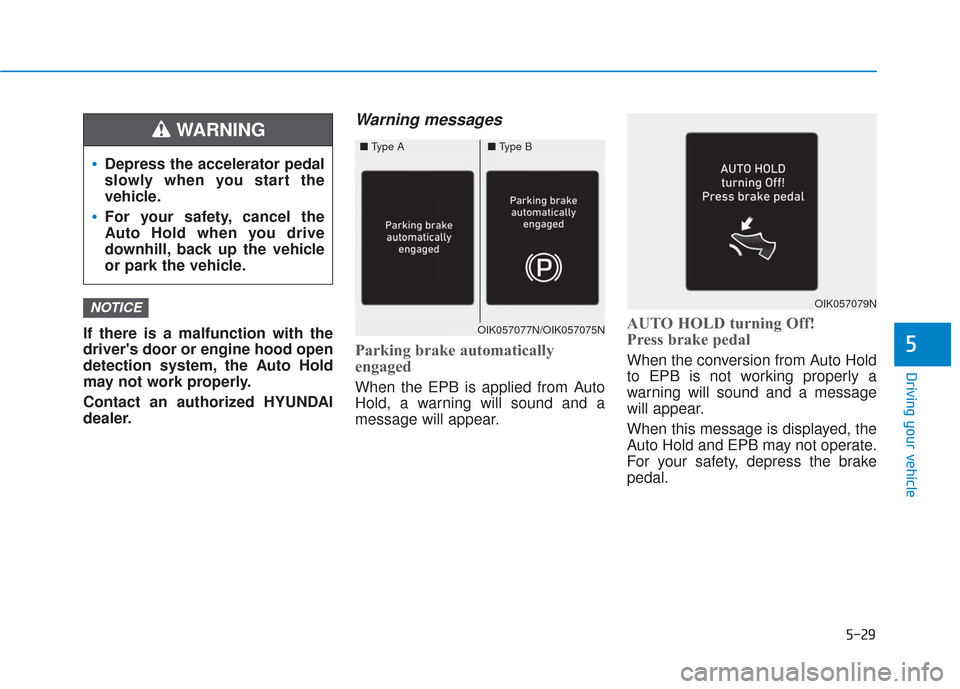
Warning messages
Parking brake automatically
engaged
When the EPB is applied from Auto
Hold, a warning will sound and a
message will appear.
AUTO HOLD turning Off!
Press brake pedal
When the conversion from Auto Hold
to EPB is not working properly a
warning will sound and a message
will appear.
When this message is displayed, the
Auto Hold and EPB may not operate.
For your safety, depress the brake
pedal.
NOTICE
5
Depress the accelerator pedal
slowly when you start the
vehicle.
For your safety, cancel the
Auto Hold when you drive
downhill, back up the vehicle
or park the vehicle.
WARNING
OIK057077N/OIK057075N
OIK057079N
■Type A■Type B
Page 310 of 557
5-36
Driving your vehicle
Driving with wheels and tires with dif-
ferent sizes may cause the ESC sys-
tem to malfunction. Before replacing
tires, make sure all four tires and
wheels are the same size. Never
drive the vehicle with different sized
tires and wheels installed.
Hill-Start Assist Control (HAC)
The Hill-Start Assist Control (HAC)
helps prevent the vehicle from rolling
backwards when starting a vehicle
from a stop on a hill. The system
operates the brakes automatically for
approximately 2 seconds and releas-
es the brake after 2 seconds or when
the accelerator pedal is depressed.
The HAC does not operate when the shift lever is in P (Park) or N
(Neutral)
The HAC activates even though the ESC (Electronic Stability
Control) is off but does not acti-
vate when the ESC has malfunc-
tioned.
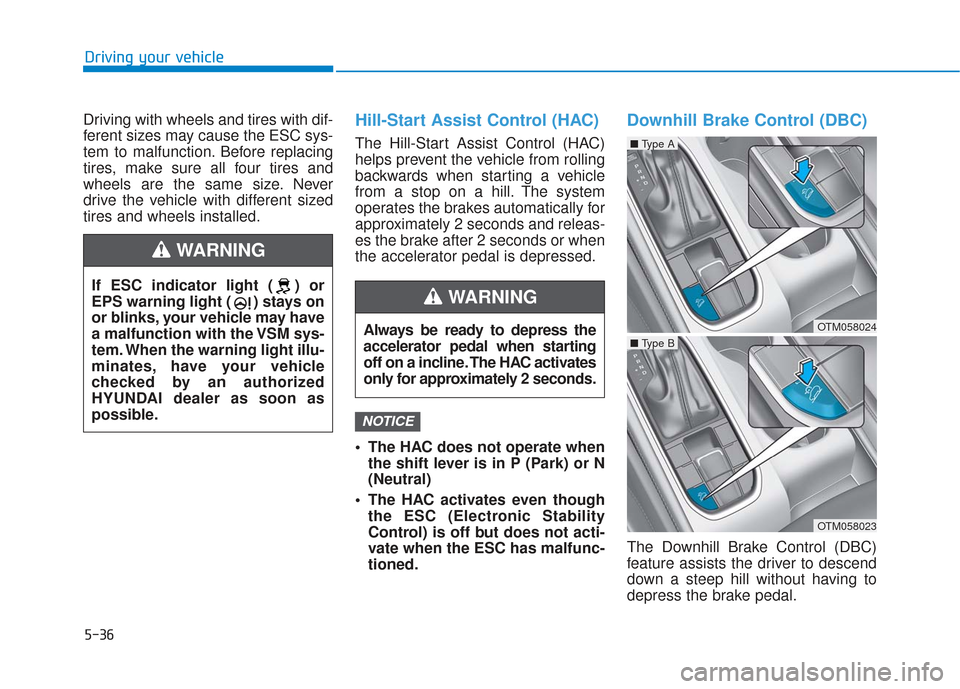
Downhill Brake Control (DBC)
The Downhill Brake Control (DBC)
feature assists the driver to descend
down a steep hill without having to
depress the brake pedal.
NOTICE
If ESC indicator light ( ) or
EPS warning light ( ) stays on
or blinks, your vehicle may have
a malfunction with the VSM sys-
tem. When the warning light illu-
minates, have your vehicle
checked by an authorized
HYUNDAI dealer as soon as
possible.
WARNING
Always be ready to depress the
accelerator pedal when starting
off on a incline. The HAC activates
only for approximately 2 seconds.
WARNING
OTM058024
■ Type A
OTM058023
■ Type B
Page 311 of 557
5-37
Driving your vehicle
5
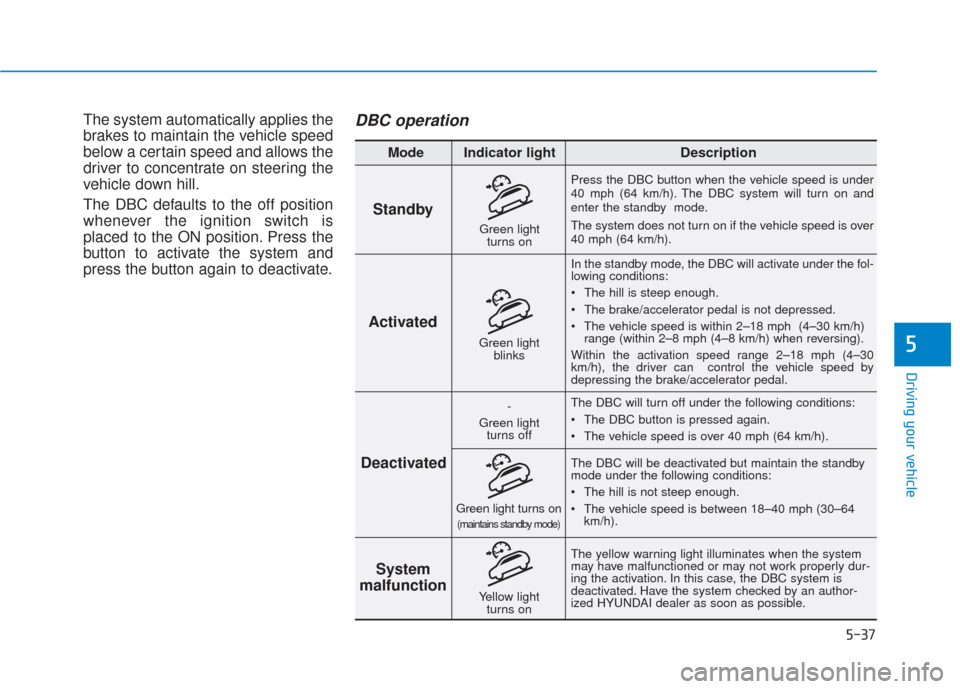
The system automatically applies the
brakes to maintain the vehicle speed
below a certain speed and allows the
driver to concentrate on steering the
vehicle down hill.
The DBC defaults to the off position
whenever the ignition switch is
placed to the ON position. Press the
button to activate the system and
press the button again to deactivate.DBC operation
Standby
Press the DBC button when the vehicle speed is under
40 mph (64 km/h). The DBC system will turn on and
enter the standby mode.
The system does not turn on if the vehicle speed is over
40 mph (64 km/h).In the standby mode, the DBC will activate under the fol-
lowing conditions:
The hill is steep enough.
The brake/accelerator pedal is not depressed.
The vehicle speed is within 2–18 mph (4–30 km/h) range (within 2–8 mph (4–8 km/h) when reversing).
Within the activation speed range 2–18 mph (4–30
km/h), the driver can control the vehicle speed by
depressing the brake/accelerator pedal.
The DBC will turn off under the following conditions:
The DBC button is pressed again.
The vehicle speed is over 40 mph (64 km/h).
The yellow warning light illuminates when the system
may have malfunctioned or may not work properly dur-
ing the activation. In this case, the DBC system is
deactivated. Have the system checked by an author-
ized HYUNDAI dealer as soon as possible. The DBC will be deactivated but maintain the standby
mode under the following conditions:
The hill is not steep enough.
The vehicle speed is between 18–40 mph (30–64
km/h).
Activated
Deactivated System
malfunction
Mode Indicator light Description
Green light
blinks
-
Green light turns off
Green light turns on(maintains standby mode)
Yellow light turns on
Green lightturns on
Page 312 of 557
5-38
Driving your vehicle
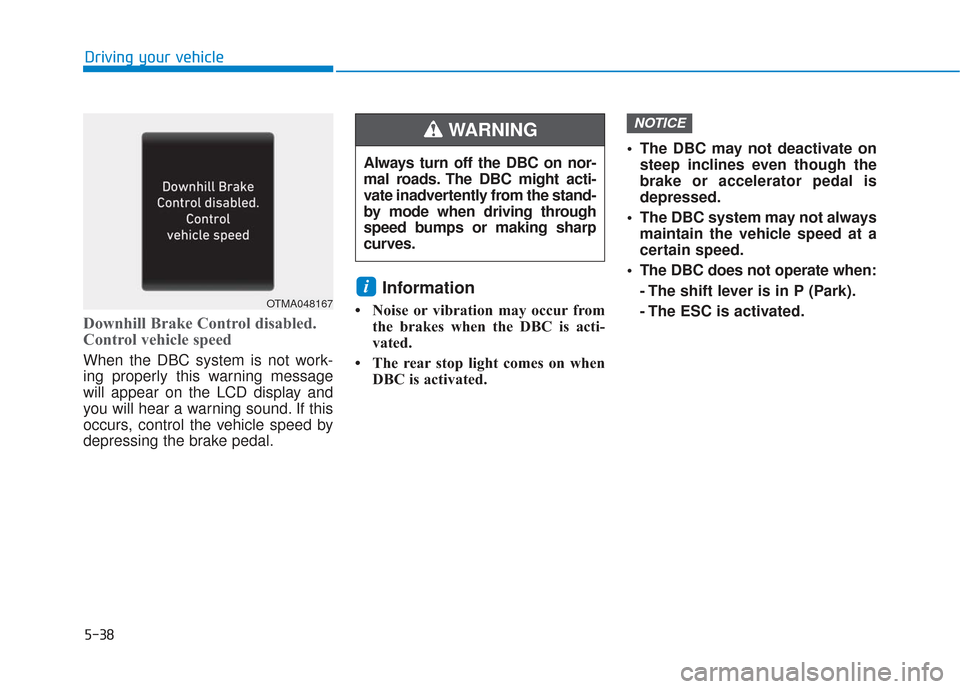
Downhill Brake Control disabled.
Control vehicle speed
When the DBC system is not work-
ing properly this warning message
will appear on the LCD display and
you will hear a warning sound. If this
occurs, control the vehicle speed by
depressing the brake pedal.
Information
• Noise or vibration may occur fromthe brakes when the DBC is acti-
vated.
• The rear stop light comes on when DBC is activated. The DBC may not deactivate on
steep inclines even though the
brake or accelerator pedal is
depressed.
The DBC system may not always maintain the vehicle speed at a
certain speed.
The DBC does not operate when: - The shift lever is in P (Park).
- The ESC is activated.
NOTICE
i
Always turn off the DBC on nor-
mal roads. The DBC might acti-
vate inadvertently from the stand-
by mode when driving through
speed bumps or making sharp
curves.
WARNING
OTMA048167
Page 317 of 557
5-43
Driving your vehicle
5
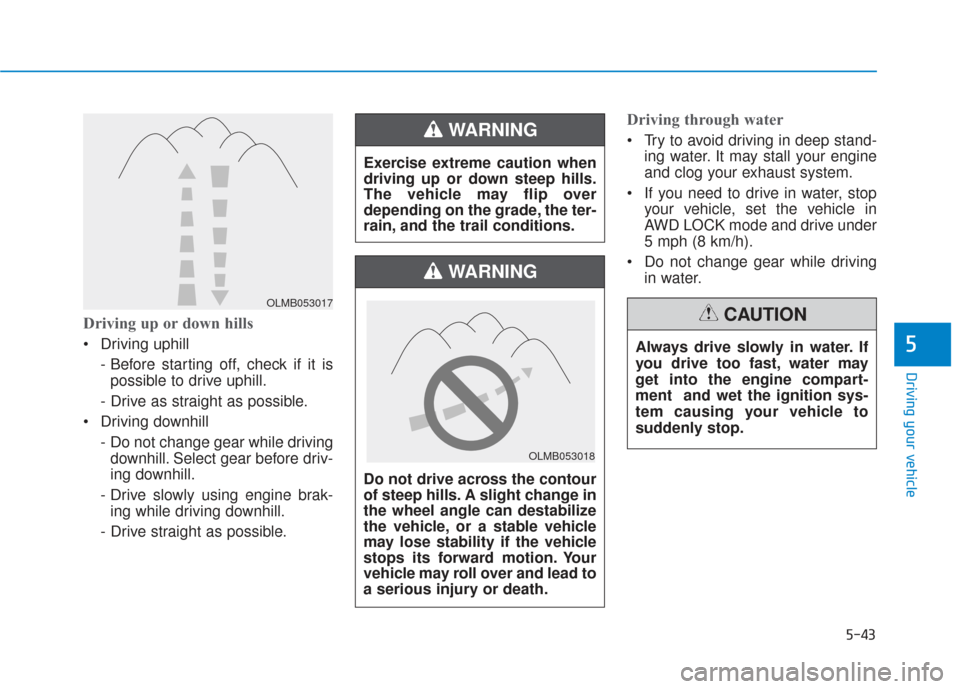
Driving up or down hills
Driving uphill - Before starting off, check if it ispossible to drive uphill.
- Drive as straight as possible.
Driving downhill - Do not change gear while drivingdownhill. Select gear before driv-
ing downhill.
- Drive slowly using engine brak- ing while driving downhill.
- Drive straight as possible.
Driving through water
Try to avoid driving in deep stand- ing water. It may stall your engine
and clog your exhaust system.
If you need to drive in water, stop your vehicle, set the vehicle in
AWD LOCK mode and drive under
5 mph (8 km/h).
Do not change gear while driving in water.
OLMB053017
Exercise extreme caution when
driving up or down steep hills.
The vehicle may flip over
depending on the grade, the ter-
rain, and the trail conditions.
WARNING
Do not drive across the contour
of steep hills. A slight change in
the wheel angle can destabilize
the vehicle, or a stable vehicle
may lose stability if the vehicle
stops its forward motion. Your
vehicle may roll over and lead to
a serious injury or death.
WARNING
Always drive slowly in water. If
you drive too fast, water may
get into the engine compart-
ment and wet the ignition sys-
tem causing your vehicle to
suddenly stop.
CAUTION
OLMB053018
Page 374 of 557
5-100
Driving your vehicle
When external condition is inter-
vened
The brightness outside changes suddenly such as when entering or
exiting a tunnel, or when passing
under a bridge.
The brightness outside is too low such as when the headlamps are
not on at night or the vehicle is
going through a tunnel.
There is a boundary structure in the roadway such as a concrete
barrier, guardrail and reflector post
that is inadvertently being detected
by the camera.
When light coming from a street light or an oncoming vehicle is
reflected on a wet road surface
such as a puddle in the road.
The field of view in front is obstructed by sun glare.
There is not enough distance between you and the vehicle in
front to be able to detect the lane
marker or the vehicle ahead is driv-
ing on the lane marker. Driving on a steep grade, over a
hill, or when driving on a curved
road.
The adverse road conditions cause excessive vehicle vibrations while
driving.
The surrounding of the inside rear view mirror temperature is high
due to direct sunlight, etc. When front visibility is poor
The windshield or the camera lens
is blocked with dirt or debris.
The windshield glass is fogged up; a clear view of the road is obstruct-
ed.
Placing objects on the dashboard, etc.
The sensor cannot detect the lane because of fog, heavy rain or snow.
Page 381 of 557
5-107
Driving your vehicle
5
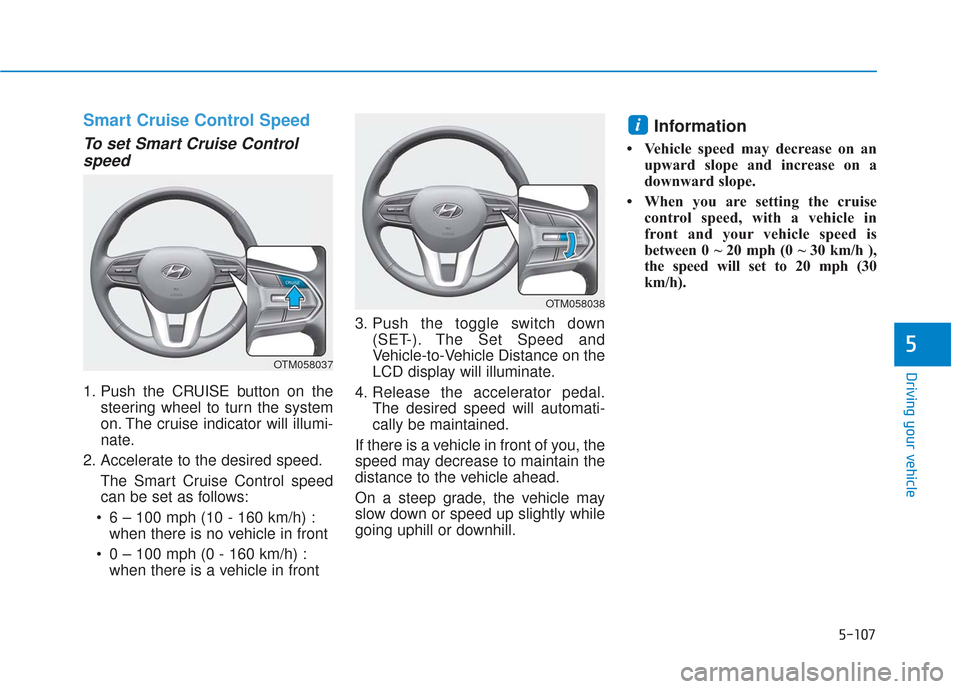
Smart Cruise Control Speed
To set Smart Cruise Controlspeed
1. Push the CRUISE button on the
steering wheel to turn the system
on. The cruise indicator will illumi-
nate.
2. Accelerate to the desired speed. The Smart Cruise Control speedcan be set as follows:
6 – 100 mph (10 - 160 km/h) : when there is no vehicle in front
0 – 100 mph (0 - 160 km/h) : when there is a vehicle in front 3. Push the toggle switch down
(SET-). The Set Speed and
Vehicle-to-Vehicle Distance on the
LCD display will illuminate.
4. Release the accelerator pedal. The desired speed will automati-
cally be maintained.
If there is a vehicle in front of you, the
speed may decrease to maintain the
distance to the vehicle ahead.
On a steep grade, the vehicle may
slow down or speed up slightly while
going uphill or downhill.
Information
• Vehicle speed may decrease on an upward slope and increase on a
downward slope.
• When you are setting the cruise control speed, with a vehicle in
front and your vehicle speed is
between 0 ~ 20 mph (0 ~ 30 km/h ),
the speed will set to 20 mph (30
km/h).
i
OTM058037
OTM058038
Page 388 of 557
5-114
Driving your vehicle
If you push the smart cruise control toggle switch (RES+ or SET-) while
Auto Hold and smart cruise control
is operating the Auto Hold will be
released regardless of accelerator
pedal operation and the vehicle will
start to move. The AUTO HOLD
indicator changes from green to
white. - Driving on rainy, icy, or
snow-covered roads
- Driving on a steep downhill or uphill
- Driving in windy areas
- Driving in parking lots
- Driving near crash barriers
- Driving on a sharp curve
- Driving with limited view (possibly due to bad weath-
er, such as fog, snow, rain or
sandstorm)
- The vehicle's sensing ability decreases due to vehicle
modification, resulting in a
level difference of the vehi-
cle's front and rear
Unexpected situations may
lead to possible accidents.
Pay attention continuously to
road conditions and driving
even when the smart cruise
control system is being oper-
ated.
Take the following precautions :
Always set the vehicle speed
under the speed limit.
If the Smart Cruise Control is
left on, (cruise indicator light
in the instrument cluster is
illuminated) the Smart Cruise
Control can be activated unin-
tentionally. Keep the Smart
Cruise Control system off
(cruise indicator light OFF)
when the Smart Cruise
Control is not in use, to avoid
inadvertently setting a speed.
Use the Smart Cruise Control
system only when traveling
on open highways in good
weather.
Do not use the Smart Cruise
Control when it may not be
safe to keep the vehicle at a
constant speed.
Do not use when:
- Driving in heavy traffic orwhen traffic conditions
make it difficult to drive at a
constant speed
WARNING
Page 393 of 557
5-119
Driving your vehicle
5
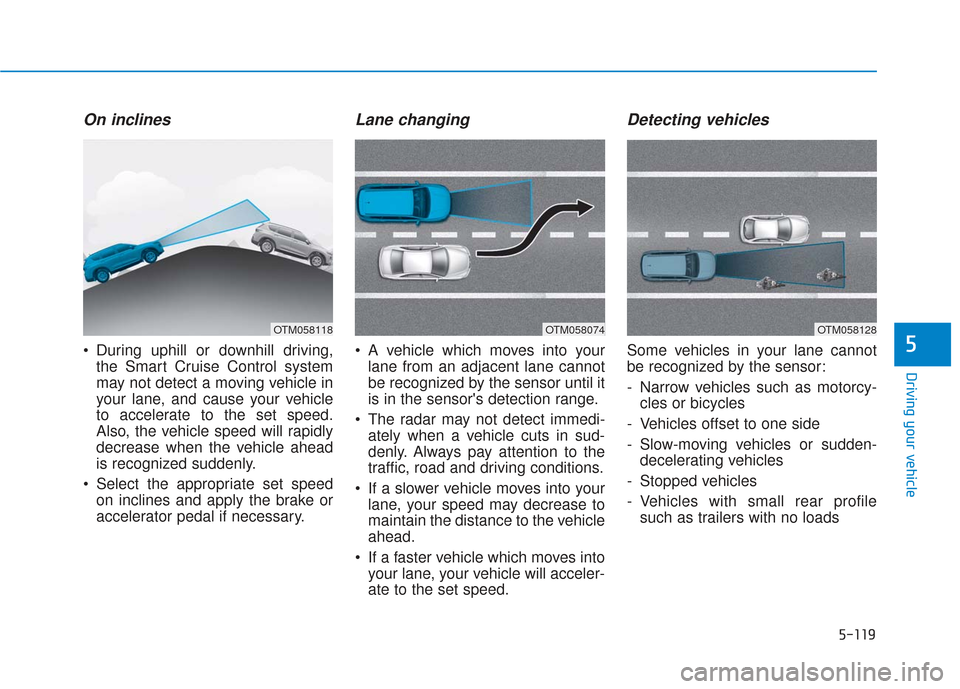
On inclines
During uphill or downhill driving,the Smart Cruise Control system
may not detect a moving vehicle in
your lane, and cause your vehicle
to accelerate to the set speed.
Also, the vehicle speed will rapidly
decrease when the vehicle ahead
is recognized suddenly.
Select the appropriate set speed on inclines and apply the brake or
accelerator pedal if necessary.
Lane changing
A vehicle which moves into yourlane from an adjacent lane cannot
be recognized by the sensor until it
is in the sensor's detection range.
The radar may not detect immedi- ately when a vehicle cuts in sud-
denly. Always pay attention to the
traffic, road and driving conditions.
If a slower vehicle moves into your lane, your speed may decrease to
maintain the distance to the vehicle
ahead.
If a faster vehicle which moves into your lane, your vehicle will acceler-
ate to the set speed.
Detecting vehicles
Some vehicles in your lane cannot
be recognized by the sensor:
- Narrow vehicles such as motorcy-cles or bicycles
- Vehicles offset to one side
- Slow-moving vehicles or sudden- decelerating vehicles
- Stopped vehicles
- Vehicles with small rear profile such as trailers with no loads
OTM058074OTM058118OTM058128