user settings Hyundai Santa Fe 2019 Service Manual
[x] Cancel search | Manufacturer: HYUNDAI, Model Year: 2019, Model line: Santa Fe, Model: Hyundai Santa Fe 2019Pages: 557, PDF Size: 14.8 MB
Page 390 of 557
5-116
Driving your vehicle
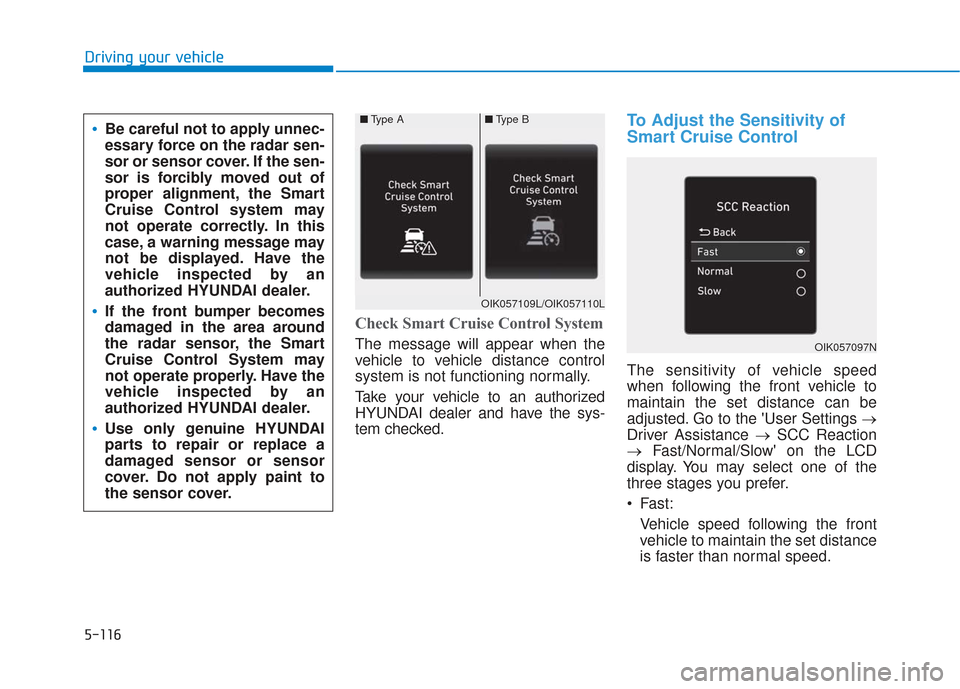
Check Smart Cruise Control System
The message will appear when the
vehicle to vehicle distance control
system is not functioning normally.
Take your vehicle to an authorized
HYUNDAI dealer and have the sys-
tem checked.
To Adjust the Sensitivity of
Smart Cruise Control
The sensitivity of vehicle speed
when following the front vehicle to
maintain the set distance can be
adjusted. Go to the 'User Settings →
Driver Assistance →SCC Reaction
→ Fast/Normal/Slow' on the LCD
display. You may select one of the
three stages you prefer.
Fast:
Vehicle speed following the front
vehicle to maintain the set distance
is faster than normal speed.
OIK057097N
■ Type A■Type B
OIK057109L/OIK057110L
Be careful not to apply unnec-
essary force on the radar sen-
sor or sensor cover. If the sen-
sor is forcibly moved out of
proper alignment, the Smart
Cruise Control system may
not operate correctly. In this
case, a warning message may
not be displayed. Have the
vehicle inspected by an
authorized HYUNDAI dealer.
If the front bumper becomes
damaged in the area around
the radar sensor, the Smart
Cruise Control System may
not operate properly. Have the
vehicle inspected by an
authorized HYUNDAI dealer.
Use only genuine HYUNDAI
parts to repair or replace a
damaged sensor or sensor
cover. Do not apply paint to
the sensor cover.
Page 397 of 557
5-123
Driving your vehicle
5
The Leading Vehicle Departure Alert
system alerts the driver of the depar-
ture of the vehicle in front when the
vehicle is stopped and the Smart
Cruise Control (SCC) system is in
activation.System Setting and Activation
System setting
With the engine ON, the Leading
Vehicle Departure Alert system turns
on and gets ready to be activated
when the 'User Settings →Driver
Assistance →Driving Assist →
Leading vehicle departure alert' is
selected selected in the cluster LCD
display. The system stops operation
when the setting is deactivated.
However, if the engine is turned off
then on again, the system maintains
the previous state.
System standby
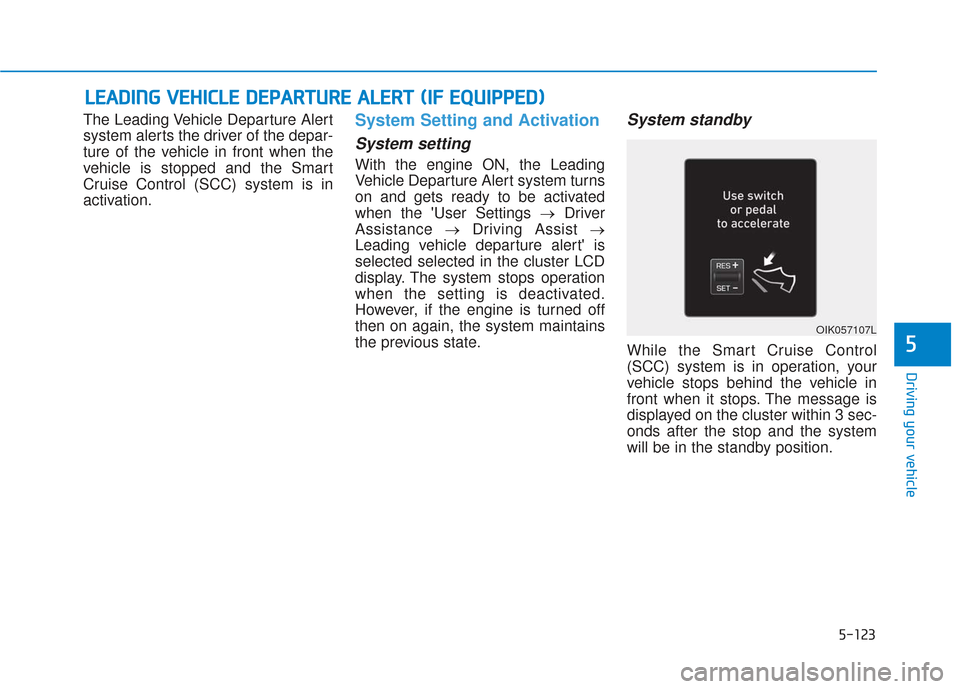
While the Smart Cruise Control
(SCC) system is in operation, your
vehicle stops behind the vehicle in
front when it stops. The message is
displayed on the cluster within 3 sec-
onds after the stop and the system
will be in the standby position.
L L E
E A
A D
DI
IN
N G
G
V
V E
EH
H I
IC
C L
LE
E
D
D E
EP
P A
A R
RT
TU
U R
RE
E
A
A L
LE
E R
R T
T
(
( I
IF
F
E
E Q
Q U
UI
IP
P P
PE
ED
D )
)
OIK057107L
Page 428 of 557
6-8
What to do in an emergency
T
TI
IR
R E
E
P
P R
R E
ES
SS
SU
U R
RE
E
M
M O
ON
NI
IT
T O
O R
RI
IN
N G
G
S
S Y
Y S
ST
T E
EM
M
(
( T
T P
P M
M S
S)
)
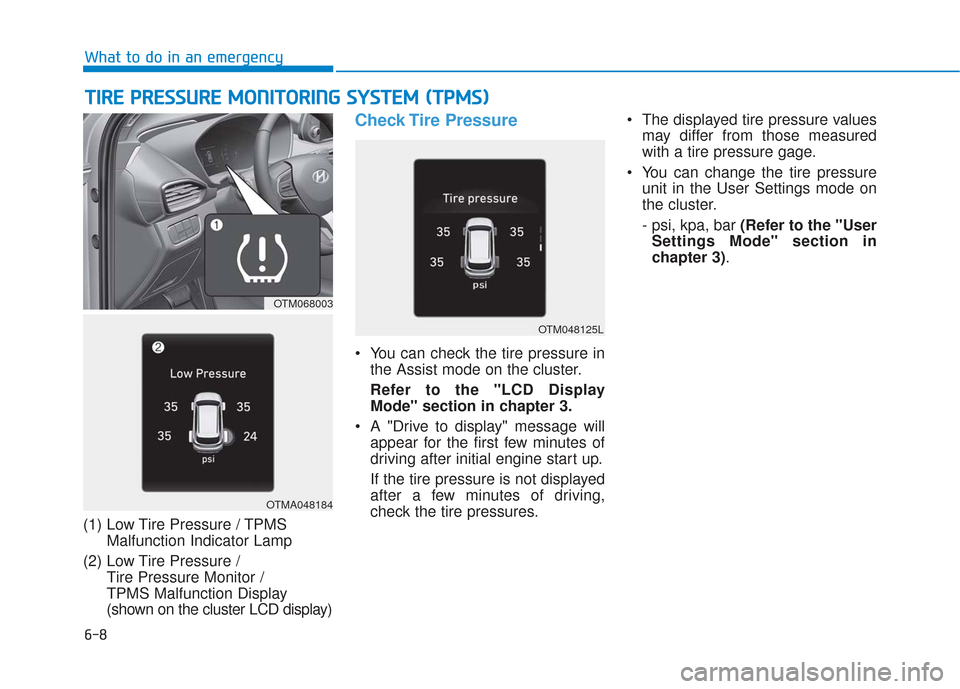
(1) Low Tire Pressure / TPMS
Malfunction Indicator Lamp
(2) Low Tire Pressure / Tire Pressure Monitor /
TPMS Malfunction Display
(shown on the cluster LCD display)
Check Tire Pressure
You can check the tire pressure inthe Assist mode on the cluster.
Refer to the "LCD Display Mode" section in chapter 3.
A "Drive to display" message will appear for the first few minutes of
driving after initial engine start up.
If the tire pressure is not displayed
after a few minutes of driving,
check the tire pressures. The displayed tire pressure values
may differ from those measured
with a tire pressure gage.
You can change the tire pressure unit in the User Settings mode on
the cluster.
- psi, kpa, bar (Refer to the "UserSettings Mode" section in
chapter 3).
OTMA048184
OTM068003
OTM048125L
Page 550 of 557
I-7
Trip computer mode ...................................................3-95
User settings mode .....................................................3-97
Warning and indicator lights ......................................3-74
Instrument panel fuse replacement .................................7-53
Instrument panel overview ...............................................1-5
Interior care .....................................................................7-8\
1
Interior features AC inverter ...............................................................3-171
Ashtray .....................................................................3-1\
68
Bottle holder .............................................................3-168
Cargo security screen ...............................................3-178
Clock ........................................................................\
3-175
Coat hook .................................................................3-176
Cup holder ................................................................3-168
Floor mat anchor(s) ..................................................3-176
Luggage net holder ...................................................3-177
Power outlet..............................................................3-170
Side curtain...............................................................3-180
Sunvisor ....................................................................3-16\
9
USB charger .............................................................3-173
Wireless cellular phone charging system .................3-173
Interior lamp AUTO cut................................................3-122
Interior lights.................................................................3-122 Front lamps...............................................................3-122
Interior lamp AUTO cut ...........................................3-122
Luggage compartment lamp .....................................3-123
Puddle lamp ..............................................................3-124
Rear lamps ................................................................3-123
Vanity mirror lamp ...................................................3-124
Interior overview...............................................................1-4 Jump starting .....................................................................6-4\
Key ignition switch ...........................................................5-6
Label
Refrigerant label .........................................................8-11
Tire sidewall labeling .................................................7-43
Tire specification and pressure label ..........................8-11
Vehicle certification label ...........................................8-10
Lane change signals ......................................................3-119
Lane Keeping Assist (LKA) system ...............................5-93
Lap/shoulder belt ............................................................2-28
LCD display LCD display modes ....................................................3-94
Assist mode ................................................................3-95
Master warning mode .................................................3-96
Quick guide ................................................................3-98
Trip computer mode ...................................................3-95
Turn By Turn (TBT) mode.........................................3-95
User settings mode .....................................................3-97
LCD display messages Check Blind-Spot Collision Warning system ............3-91
Check BRAKE SWITCH fuse ...................................3-88
I
Index
J
K
L
Page 555 of 557

I-12
Tachometer ......................................................................3-\
70
Theft-alarm system .........................................................3-24
Tilt steering/Telescope steering ......................................3-29
Tire chains .....................................................................5-1\
29
Tire pressure monitoring system (TPMS) ........................6-8
Tire rotation ....................................................................7-39\
Tire specification and pressure label ..............................8-11
Tires and wheels .............................................................7-37Check tire inflation pressure ......................................7-39
Compact spare tire replacement .................................7-42
Recommended cold tire inflation pressures ...............7-38
Tire care ......................................................................7-\
37
Tire maintenance ........................................................7-43
Tire replacement .........................................................7-41
Tire rotation ................................................................7-39
Tire sidewall labeling .................................................7-43
Tire terminology and definitions ................................7-47
Tire traction ................................................................7-42
Wheel alignment and tire balance ..............................7-40
Wheel replacement .............................................7-42, 8-5
Towing ........................................................................\
....6-21
Trailer towing................................................................5-133 Reference weight and distance .................................5-135
Tray ........................................................................\
.......3-166 Trip computer................................................................3-108
Accumulated Info display ........................................3-110
Average fuel economy..............................................3-109
Digital speedometer ..................................................3-111
Driving Info display .................................................3-110
Instant fuel economy ................................................3-109
Smart shift.................................................................3-111
Turn signals ...................................................................3-119
USB charger ..................................................................3-173
User settings mode..........................................................3-97
Vanity mirror lamp........................................................3-124
Vehicle break-in process ...................................................F-9
Vehicle certification label ...............................................8-10
Vehicle identification number (VIN) ..............................8-10
Vehicle load limit ..........................................................5-141 Tire loading information label..................................5-142
Vehicle modification .........................................................F-9
Vehicle Stability Management (VSM)............................5-35
Vehicle weight and luggage volume .................................8-6
Index
T
U
V