mph to km Hyundai Santa Fe 2020 User Guide
[x] Cancel search | Manufacturer: HYUNDAI, Model Year: 2020, Model line: Santa Fe, Model: Hyundai Santa Fe 2020Pages: 557, PDF Size: 19.29 MB
Page 218 of 557
3-129
Convenient features of your vehicle
3
Surround View Monitoring
(if equipped)
The Surround View Monitoring sys-
tem can assist in parking by allowing
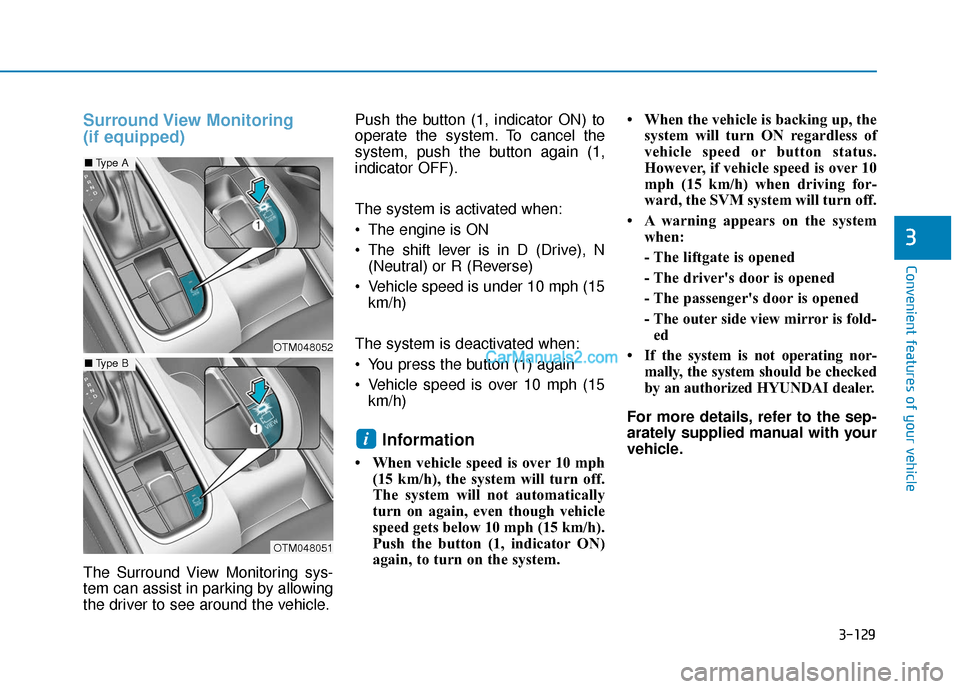
the driver to see around the vehicle.Push the button (1, indicator ON) to
operate the system. To cancel the
system, push the button again (1,
indicator OFF).
The system is activated when:
The engine is ON
The shift lever is in D (Drive), N
(Neutral) or R (Reverse)
Vehicle speed is under 10 mph (15 km/h)
The system is deactivated when:
You press the button (1) again
Vehicle speed is over 10 mph (15 km/h)
Information
• When vehicle speed is over 10 mph (15 km/h), the system will turn off.
The system will not automatically
turn on again, even though vehicle
speed gets below 10 mph (15 km/h).
Push the button (1, indicator ON)
again, to turn on the system. • When the vehicle is backing up, the
system will turn ON regardless of
vehicle speed or button status.
However, if vehicle speed is over 10
mph (15 km/h) when driving for-
ward, the SVM system will turn off.
• A warning appears on the system when:
- The liftgate is opened
- The driver's door is opened
- The passenger's door is opened
- The outer side view mirror is fold-ed
• If the system is not operating nor- mally, the system should be checked
by an authorized HYUNDAI dealer.
For more details, refer to the sep-
arately supplied manual with your
vehicle.
i
OTM048052
OTM048051
■ Type A
■Type B
Page 219 of 557
3-130
Convenient features of your vehicle
Always keep the camera lens
clean. The camera may not work
normally if the lens is covered
with foreign material.
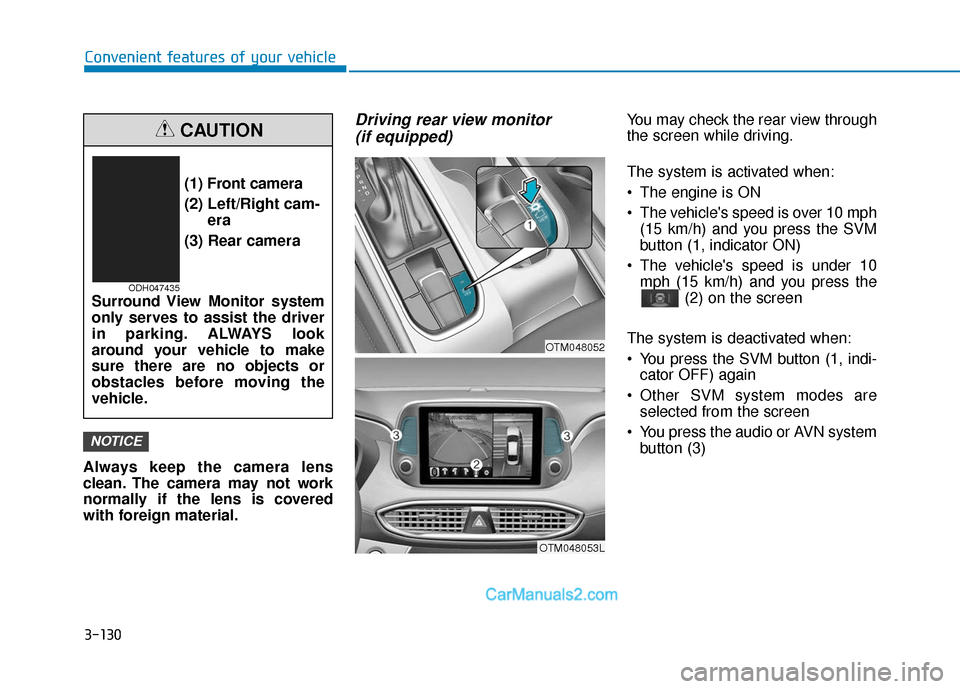
Driving rear view monitor (if equipped)You may check the rear view through
the screen while driving.
The system is activated when:
The engine is ON
The vehicle's speed is over 10 mph
(15 km/h) and you press the SVM
button (1, indicator ON)
The vehicle's speed is under 10 mph (15 km/h) and you press the (2) on the screen
The system is deactivated when:
You press the SVM button (1, indi- cator OFF) again
Other SVM system modes are selected from the screen
You press the audio or AVN system button (3)
NOTICE
(1) Front camera
(2) Left/Right cam- era
(3) Rear camera
Surround View Monitor system
only serves to assist the driver
in parking. ALWAYS look
around your vehicle to make
sure there are no objects or
obstacles before moving the
vehicle.
CAUTION
ODH047435
OTM048053L
OTM048052
Page 220 of 557
3-131
Convenient features of your vehicle
3
Information
• If vehicle speed is over 10 mph (15km/h)
- the rear image stays ON when therear view was on the screen
- screen (top, front wide, front right and front left) of other modes of
SVM system turns OFF and
switches to the original AVN
screen when other modes were on
the screen
• If the SVM system is ON and the vehicle speed is under 10 mph (15
km/h)
- the rear image stays ON when therear view was on the screen
- a pop-up for selecting the SVM mode (top, front wide, front right
and front left) appears when
pressing (2) on the screen • When the vehicle is backing up, the
rear image will appear on the
screen automatically regardless of
vehicle speed or SVM button (1)
status.
- If the rear image was ON, thescreen switches to the parking
assist screen.
- If the screen (top, front wide, front right and front left) of other
modes of SVM system was ON, the
screen for setting the initial rear
view mode appears.
- When the shift lever is moved from R (Reverse) to D (Drive), the
screen of the previous mode is dis-
played.
• A warning appears on the system when:
- The liftgate is opened
- The driver's door is opened
- The passenger's door is opened
- The outer side view mirror is folded
• If the system is not operating nor- mally, the system should be checked
by an authorized HYUNDAI dealer.
For more details, refer to the sep-
arately supplied manual with your
vehicle.
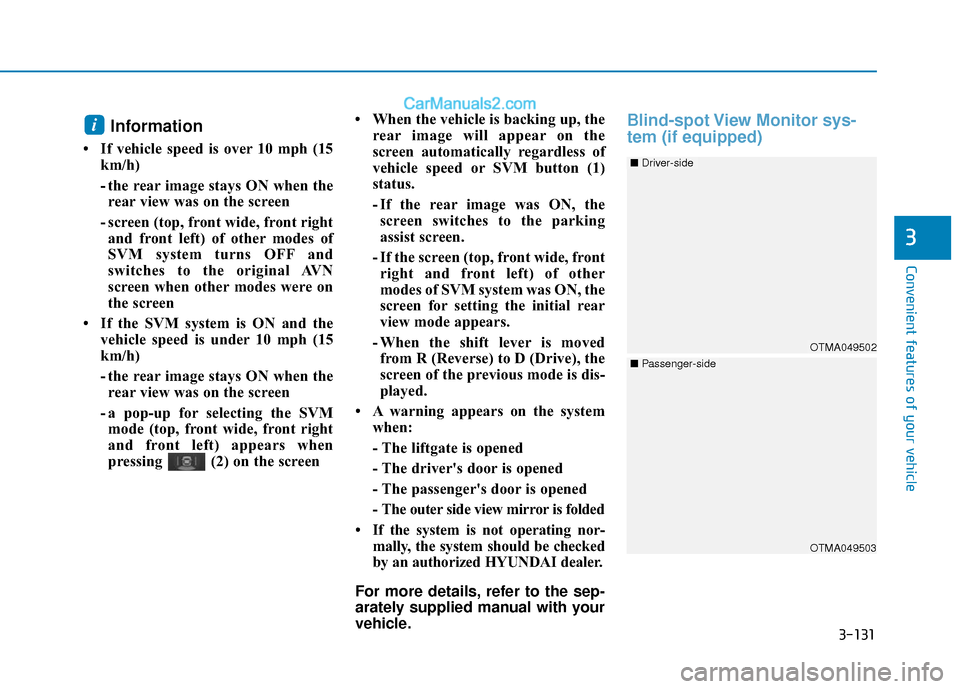
Blind-spot View Monitor sys-
tem (if equipped)i
OTMA049503
OTMA049502
■ Driver-side
■Passenger-side
Page 222 of 557
![Hyundai Santa Fe 2020 User Guide 3-133
Convenient features of your vehicle
3
Reverse Parking Distance
Warning system (if equipped)
[A] : Sensor
The optional Reverse Parking
Distance Warning system assists the
driver during reverse mo](/img/35/16315/w960_16315-221.png "Hyundai Santa Fe 2020 User Guide 3-133
Convenient features of your vehicle
3
Reverse Parking Distance
Warning system (if equipped)
[A] : Sensor
The optional Reverse Parking
Distance Warning system assists the
driver during reverse mo")
3-133
Convenient features of your vehicle
3
Reverse Parking Distance
Warning system (if equipped)
[A] : Sensor
The optional Reverse Parking
Distance Warning system assists the
driver during reverse movement of
the vehicle by chiming if any object is
sensed within approximately 50 in
(120 cm) behind the vehicle.
This system is a supplemental sys-
tem that senses objects within the
range and location of the sensors, it
cannot detect objects in other areas
where sensors are not installed.
Operation of the ReverseParking Distance Warning system
Operating condition
This system will activate when
backing up with the ignition switch
in the ON position. However, if the
vehicle speed exceeds 3 mph (5
km/h), the system may not detect
objects.
If the vehicle speed exceeds 6 mph (10 km/h), the system will not
warn you even though objects are
detected.
When more than two objects are sensed at the same time, the clos-
est one will be recognized first.
ALWAYS look around your vehi-
cle to make sure there are not
any objects or obstacles before
moving the vehicle in any direc-
tion to prevent a collision.
Always pay close attention
when the vehicle is driven close
to objects, particularly pedestri-
ans, and especially children.
Be aware that some objects
may not be visible on the
screen or be detected by the
sensors, due to the objects
distance, size or material, all of
which can limit the effective-
ness of the sensor.
WARNING
OTMA049045
Page 309 of 557
5-35
Driving your vehicle
5
Information
Turning the ESC off does not affect ABS
or standard brake system operation.
Vehicle Stability Management
(VSM)
The Vehicle Stability Management
(VSM) is a function of the Electronic
Stability Control (ESC) system. It
helps ensure the vehicle stays stable
when accelerating or braking sud-
denly on wet, slippery and rough
roads where traction over the four
tires can suddenly become uneven.
VSM operation
VSM ON condition
The VSM operates when:
The Electronic Stability Control(ESC) is on.
Vehicle speed is approximately above 13 mph (22 km/h) on curve
roads.
Vehicle speed is approximately above 6 mph (10 km/h) when the
vehicle is braking on a two surface
road.
✱ The two surface road is made of
surfaces which have different fric-
tion forces.
When operating
When you apply your brakes under
conditions which may activate the
ESC, you may hear sounds from the
brakes, or feel a corresponding sen-
sation in the brake pedal. This is nor-
mal and it means your VSM is active.
Information
The VSM does not operate when:
• Driving on a banked road such as
gradient or incline.
• Driving rearward.
• ESC OFF indicator light is on.
• EPS (Electric Power Steering) warning light ( ) is on or blinks.
i
i
Take the following precautions
when using the Vehicle Stability
Management (VSM):
ALWAYS check the speed and
the distance to the vehicle
ahead. The VSM is not a sub-
stitute for safe driving prac-
tices.
Never drive too fast for the
road conditions. The VSM sys-
tem will not prevent acci-
dents. Excessive speed in bad
weather, slippery and uneven
roads can result in severe
accidents.
WARNING
Page 311 of 557
5-37
Driving your vehicle
5
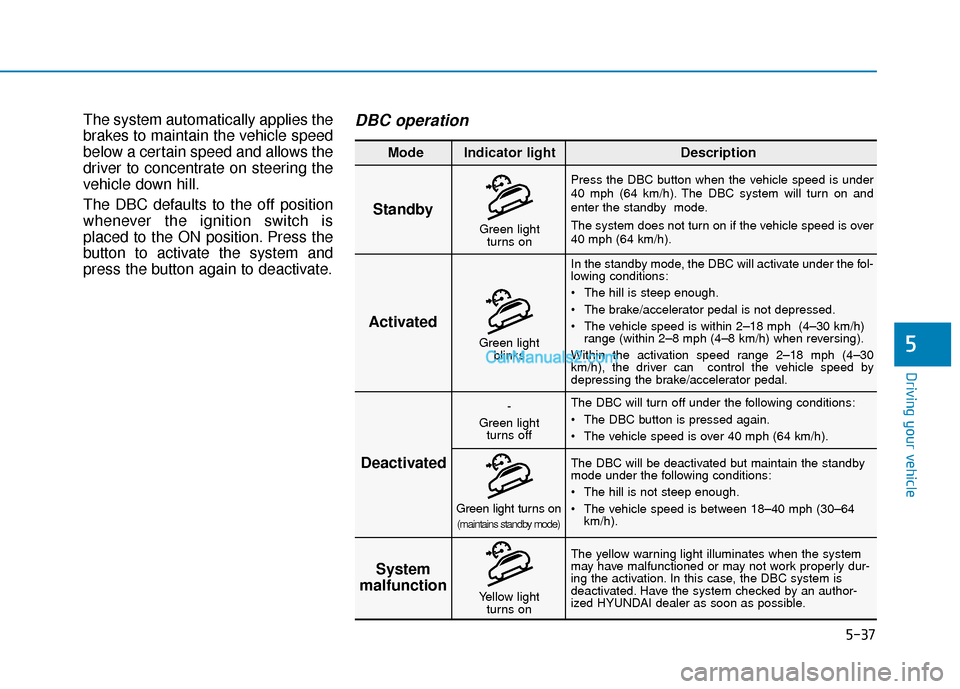
The system automatically applies the
brakes to maintain the vehicle speed
below a certain speed and allows the
driver to concentrate on steering the
vehicle down hill.
The DBC defaults to the off position
whenever the ignition switch is
placed to the ON position. Press the
button to activate the system and
press the button again to deactivate.DBC operation
Standby
Press the DBC button when the vehicle speed is under
40 mph (64 km/h). The DBC system will turn on and
enter the standby mode.
The system does not turn on if the vehicle speed is over
40 mph (64 km/h).In the standby mode, the DBC will activate under the fol-
lowing conditions:
The hill is steep enough.
The brake/accelerator pedal is not depressed.
The vehicle speed is within 2–18 mph (4–30 km/h) range (within 2–8 mph (4–8 km/h) when reversing).
Within the activation speed range 2–18 mph (4–30
km/h), the driver can control the vehicle speed by
depressing the brake/accelerator pedal.
The DBC will turn off under the following conditions:
The DBC button is pressed again.
The vehicle speed is over 40 mph (64 km/h).
The yellow warning light illuminates when the system
may have malfunctioned or may not work properly dur-
ing the activation. In this case, the DBC system is
deactivated. Have the system checked by an author-
ized HYUNDAI dealer as soon as possible. The DBC will be deactivated but maintain the standby
mode under the following conditions:
The hill is not steep enough.
The vehicle speed is between 18–40 mph (30–64
km/h).
Activated
Deactivated System
malfunction
Mode Indicator light Description
Green light
blinks
-
Green light turns off
Green light turns on(maintains standby mode)
Yellow light turns on
Green lightturns on
Page 315 of 557
5-41
Driving your vehicle
5
AWD Operation
If AWD warning light ( ) stays on the instrument cluster, your vehicle may have a malfunction with the
AWD system. When the AWD warning light ( ) illuminates have your vehicle checked by an authorized
HYUNDAI dealer as soon as possible.
WARNING
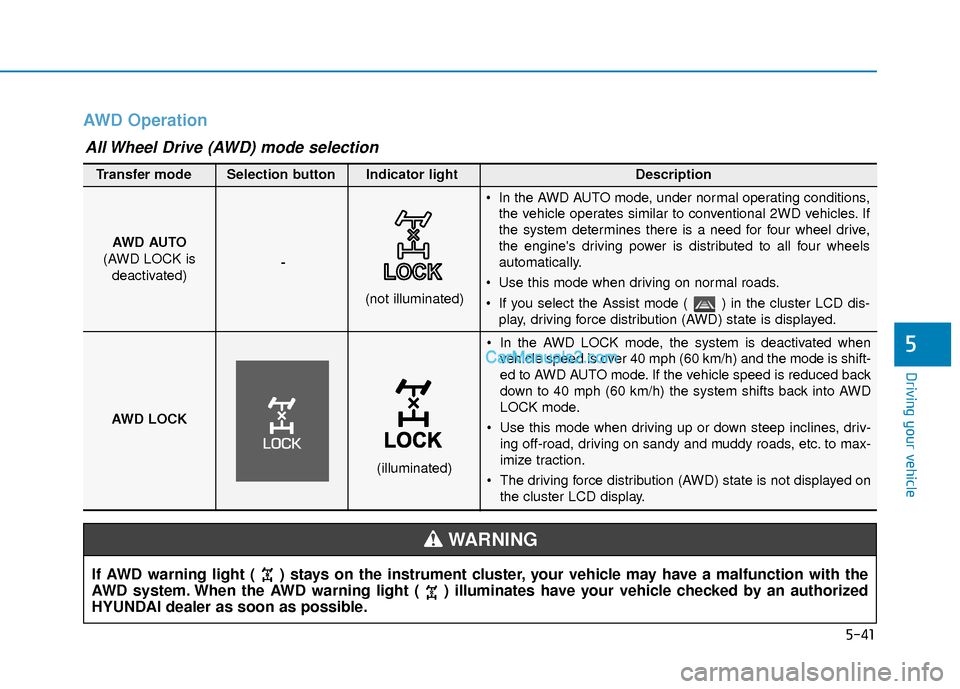
In the AWD LOCK mode, the system is deactivated whenvehicle speed is over 40 mph (60 km/h) and the mode is shift-
ed to AWD AUTO mode. If the vehicle speed is reduced back
down to 40 mph (60 km/h) the system shifts back into AWD
LOCK mode.
Use this mode when driving up or down steep inclines, driv- ing off-road, driving on sandy and muddy roads, etc. to max-
imize traction.
The driving force distribution (AWD) state is not displayed on the cluster LCD display.
AWD AUTO
(AWD LOCK is deactivated) -
(not illuminated)
Transfer mode Selection button Indicator light Description
In the AWD AUTO mode, under normal operating conditions,
the vehicle operates similar to conventional 2WD vehicles. If
the system determines there is a need for four wheel drive,
the engine's driving power is distributed to all four wheels
automatically.
Use this mode when driving on normal roads.
If you select the Assist mode ( ) in the cluster LCD dis- play, driving force distribution (AWD) state is displayed.
AWD LOCK
(illuminated)
All Wheel Drive (AWD) mode selection
Page 317 of 557
5-43
Driving your vehicle
5
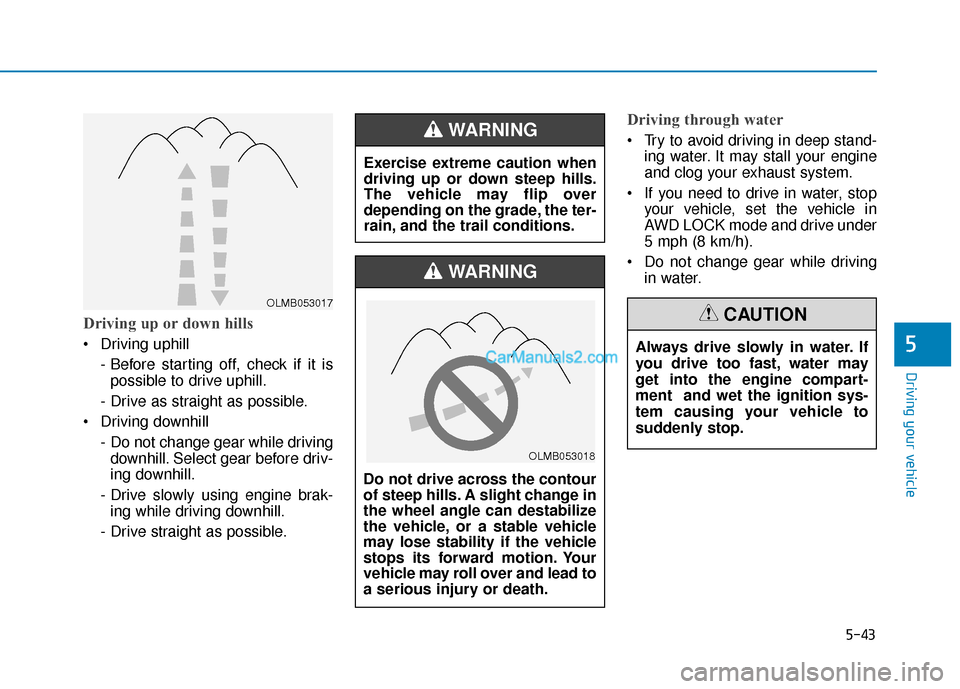
Driving up or down hills
Driving uphill - Before starting off, check if it ispossible to drive uphill.
- Drive as straight as possible.
Driving downhill - Do not change gear while drivingdownhill. Select gear before driv-
ing downhill.
- Drive slowly using engine brak- ing while driving downhill.
- Drive straight as possible.
Driving through water
Try to avoid driving in deep stand- ing water. It may stall your engine
and clog your exhaust system.
If you need to drive in water, stop your vehicle, set the vehicle in
AWD LOCK mode and drive under
5 mph (8 km/h).
Do not change gear while driving in water.
OLMB053017
Exercise extreme caution when
driving up or down steep hills.
The vehicle may flip over
depending on the grade, the ter-
rain, and the trail conditions.
WARNING
Do not drive across the contour
of steep hills. A slight change in
the wheel angle can destabilize
the vehicle, or a stable vehicle
may lose stability if the vehicle
stops its forward motion. Your
vehicle may roll over and lead to
a serious injury or death.
WARNING
Always drive slowly in water. If
you drive too fast, water may
get into the engine compart-
ment and wet the ignition sys-
tem causing your vehicle to
suddenly stop.
CAUTION
OLMB053018
Page 321 of 557
5-47
Driving your vehicle
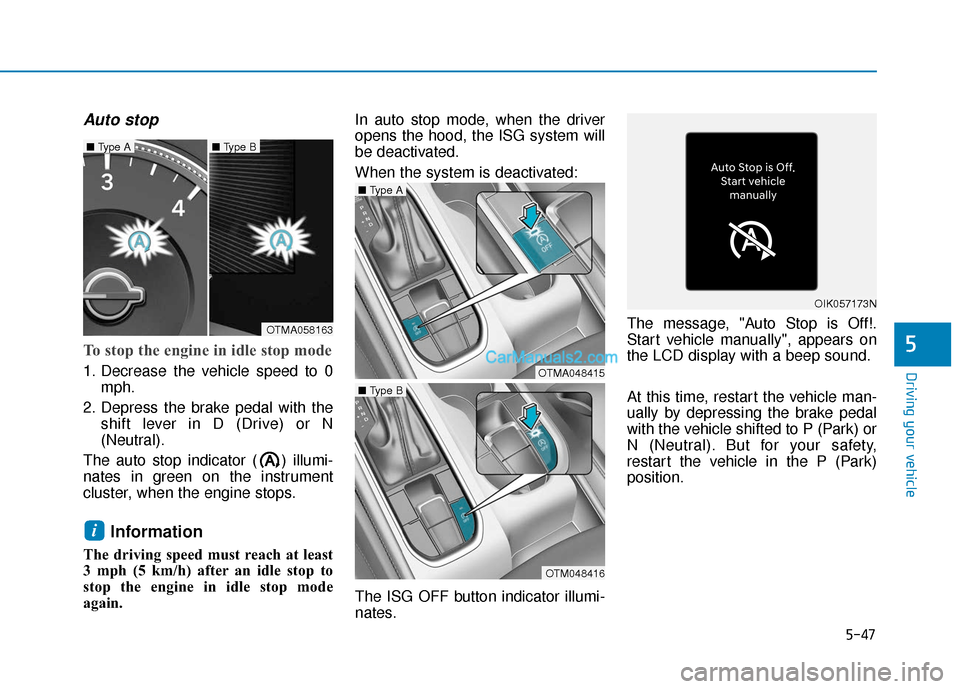
Auto stop
To stop the engine in idle stop mode
1. Decrease the vehicle speed to 0mph.
2. Depress the brake pedal with the shift lever in D (Drive) or N
(Neutral).
The auto stop indicator ( ) illumi-
nates in green on the instrument
cluster, when the engine stops.
Information
The driving speed must reach at least
3 mph (5 km/h) after an idle stop to
stop the engine in idle stop mode
again. In auto stop mode, when the driver
opens the hood, the ISG system will
be deactivated.
When the system is deactivated:
The ISG OFF button indicator illumi-
nates.
The message, "Auto Stop is Off!.
Start vehicle manually", appears on
the LCD display with a beep sound.
At this time, restart the vehicle man-
ually by depressing the brake pedal
with the vehicle shifted to P (Park) or
N (Neutral). But for your safety,
restart the vehicle in the P (Park)
position.
i
5
OTMA058163
■
Type A■ Type B
OTMA048415
■ Type A
OTM048416
■ Type B
OIK057173N
Page 323 of 557
5-49
Driving your vehicle
To Deactivate the ISG System
Press the ISG OFF button to deac-tivate the ISG system. Then, the
ISG OFF button indicator illumi-
nates.
Press the ISG OFF button again to reactivate the ISG system. Then,
the ISG OFF button indicator turns
OFF.
ISG System Malfunction
The ISG system may not operate:
When there is a malfunction with the
ISG sensors or the ISG system.
The followings occur, when there is
a malfunction with the ISG system:
The auto stop indicator ( ) willblink in yellow on the instrument
cluster.
The light on the ISG OFF button will illuminate.
Information
• When you cannot turn OFF the ISG OFF button indicator by pressing
the ISG OFF button, or when the
malfunction with the ISG system
persists, contact an authorized
HYUNDAI dealer.
• You can turn off the ISG OFF but- ton indicator by driving over 50
mph (80 km/h) for up to 2 hours
with the fan speed below the 2nd
position. If the ISG OFF button
indicator remains ON, contact an
authorized HYUNDAI dealer.
i
5
When the engine is in auto stop
mode, the engine may restart.
Before leaving the vehicle or
checking the engine compart-
ment, stop the engine placing
the ignition switch to the
LOCK/OFF position or remove
the ignition key.
WARNING