Key ignition switch Hyundai Santa Fe 2020 Owner's Guide
[x] Cancel search | Manufacturer: HYUNDAI, Model Year: 2020, Model line: Santa Fe, Model: Hyundai Santa Fe 2020Pages: 557, PDF Size: 19.29 MB
Page 297 of 557
5-23
Driving your vehicle
EPB (Electronic Parking Brake)
may be automatically applied
when:
Requested by other systems
The driver turns the engine offwhile Auto Hold is operating.
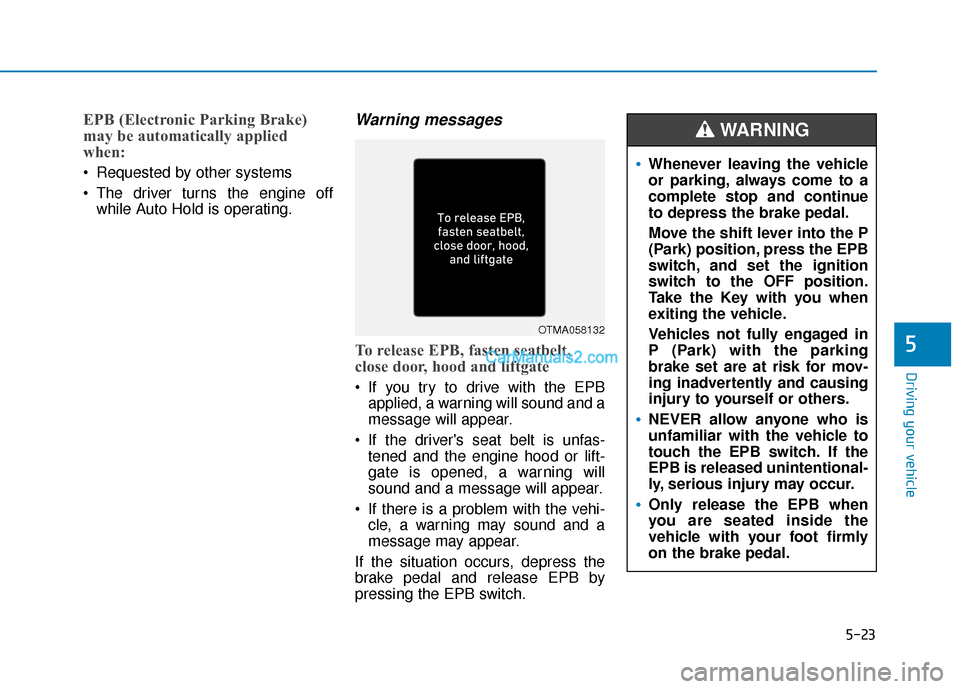
Warning messages
To release EPB, fasten seatbelt,
close door, hood and liftgate
If you try to drive with the EPBapplied, a warning will sound and a
message will appear.
If the driver's seat belt is unfas- tened and the engine hood or lift-
gate is opened, a warning will
sound and a message will appear.
If there is a problem with the vehi- cle, a warning may sound and a
message may appear.
If the situation occurs, depress the
brake pedal and release EPB by
pressing the EPB switch.
5
OTMA058132
Whenever leaving the vehicle
or parking, always come to a
complete stop and continue
to depress the brake pedal.
Move the shift lever into the P
(Park) position, press the EPB
switch, and set the ignition
switch to the OFF position.
Take the Key with you when
exiting the vehicle.
Vehicles not fully engaged in
P (Park) with the parking
brake set are at risk for mov-
ing inadvertently and causing
injury to yourself or others.
NEVER allow anyone who is
unfamiliar with the vehicle to
touch the EPB switch. If the
EPB is released unintentional-
ly, serious injury may occur.
Only release the EPB when
you are seated inside the
vehicle with your foot firmly
on the brake pedal.
WARNING
Page 323 of 557
5-49
Driving your vehicle
To Deactivate the ISG System
Press the ISG OFF button to deac-tivate the ISG system. Then, the
ISG OFF button indicator illumi-
nates.
Press the ISG OFF button again to reactivate the ISG system. Then,
the ISG OFF button indicator turns
OFF.
ISG System Malfunction
The ISG system may not operate:
When there is a malfunction with the
ISG sensors or the ISG system.
The followings occur, when there is
a malfunction with the ISG system:
The auto stop indicator ( ) willblink in yellow on the instrument
cluster.
The light on the ISG OFF button will illuminate.
Information
• When you cannot turn OFF the ISG OFF button indicator by pressing
the ISG OFF button, or when the
malfunction with the ISG system
persists, contact an authorized
HYUNDAI dealer.
• You can turn off the ISG OFF but- ton indicator by driving over 50
mph (80 km/h) for up to 2 hours
with the fan speed below the 2nd
position. If the ISG OFF button
indicator remains ON, contact an
authorized HYUNDAI dealer.
i
5
When the engine is in auto stop
mode, the engine may restart.
Before leaving the vehicle or
checking the engine compart-
ment, stop the engine placing
the ignition switch to the
LOCK/OFF position or remove
the ignition key.
WARNING
Page 507 of 557
L
LI
IG
G H
H T
T
B
B U
U L
LB
B S
S
Consult an authorized HYUNDAI
dealer to replace most vehicle light
bulbs. It is difficult to replace vehicle
light bulbs because other parts of the
vehicle must be removed before you
can get to the bulb. This is especially
true for removing the headlamp
assembly to get to the bulb(s).
Removing/installing the headlamp
assembly can result in damage to
the vehicle.
Information
The headlamp and tail lamp lenses
could appear frosty if the vehicle is
washed after driving or the vehicle is
driven at night in wet weather. This
condition is caused by temperature
difference between the lamp inside
and outside and, it does not indicate a
problem with your vehicle. When
moisture condenses in the lamp, it will
be removed after driving with the
headlamp on. The removable level
may differ depending on lamp size,
lamp position and environmental con-
dition. However, if moisture is not
removed, we recommend that your
vehicle is inspected by an authorized
HYUNDAI dealer.
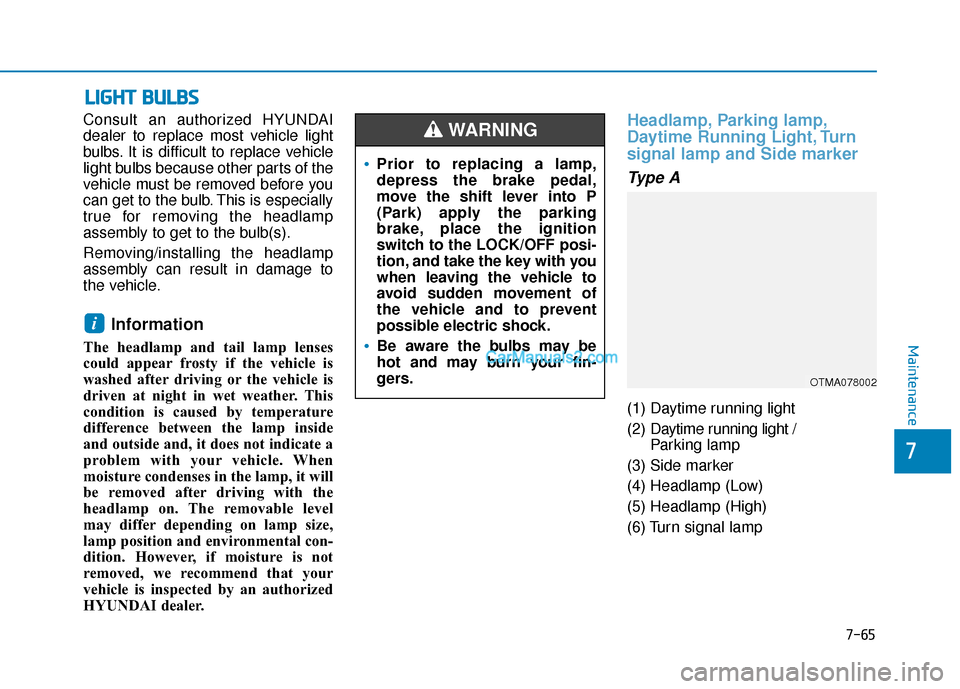
Headlamp, Parking lamp,
Daytime Running Light, Turn
signal lamp and Side marker
Type A
(1) Daytime running light
(2) Daytime running light /
Parking lamp
(3) Side marker
(4) Headlamp (Low)
(5) Headlamp (High)
(6) Turn signal lamp
i
•Prior to replacing a lamp,
depress the brake pedal,
move the shift lever into P
(Park) apply the parking
brake, place the ignition
switch to the LOCK/OFF posi-
tion, and take the key with you
when leaving the vehicle to
avoid sudden movement of
the vehicle and to prevent
possible electric shock.
Be aware the bulbs may be
hot and may burn your fin-
gers.
WARNING
OTMA078002
Maintenance
7-65
7
Page 550 of 557
I-7
If you have a flat tire while driving ..................................6-3
Ignition switchEngine Start/Stop button ..............................................5-9
Key ignition switch ......................................................5-6
Immobilizer system.........................................................3-12
Improtant safety precautions.............................................2-2 Air bag hazards ............................................................2-2
Always wear your seat belt ..........................................2-2
Control your speed .......................................................2-3
Driver distraction..........................................................2-2
Keep your vehicle in safe condition.............................2-3
Restrain all children .....................................................2-2
In case of emergency while driving..................................6-2
Indicator light..................................................................3-74
Inside rearview mirror ....................................................3-30
Instrument cluster ...........................................................3-66 Assist mode ................................................................3-93
Gauges and meters .....................................................3-68
Instrument panel illumination ....................................3-67
LCD display control ...................................................3-91
LCD display messages ...............................................3-85
LCD display modes ....................................................3-92
Shift indicator pop-up ................................................3-72
Transmission shift indicator .......................................3-71
Trip computer mode ...................................................3-93
User settings mode .....................................................3-95
Warning and indicator lights ......................................3-72
Instrument panel fuse replacement .................................7-53
Instrument panel overview ...............................................1-5 Interior care .....................................................................7-8\
1
Interior features
AC inverter ...............................................................3-171
Ashtray .....................................................................3-1\
68
Bottle holder .............................................................3-168
Cargo security screen ...............................................3-178
Clock ........................................................................\
3-175
Coat hook .................................................................3-176
Cup holder ................................................................3-168
Floor mat anchor(s) ..................................................3-176
Luggage net holder ...................................................3-177
Power outlet..............................................................3-170
Side curtain...............................................................3-180
Sunvisor ....................................................................3-16\
9
USB charger .............................................................3-173
Wireless cellular phone charging system .................3-173
Interior lamp AUTO cut................................................3-120
Interior lights.................................................................3-120 Front lamps...............................................................3-120
Interior lamp AUTO cut ...........................................3-120
Luggage compartment lamp .....................................3-121
Puddle lamp ..............................................................3-122
Rear lamps ................................................................3-121
Vanity mirror lamp ...................................................3-122
Interior overview...............................................................1-4
I
Index
Page 551 of 557

I-8
Jump starting .....................................................................6-4\
Key ignition switch ...........................................................5-6
LabelRefrigerant label .........................................................8-11
Tire sidewall labeling .................................................7-43
Tire specification and pressure label ..........................8-11
Vehicle certification label ...........................................8-10
Lane change signals ......................................................3-117
Lane Keeping Assist (LKA) system ...............................5-93
Lap/shoulder belt ............................................................2-28
LCD display LCD display modes ....................................................3-92
Assist mode ................................................................3-93
Master warning mode .................................................3-94
Quick guide ................................................................3-96
Trip computer mode ...................................................3-93
Turn By Turn (TBT) mode.........................................3-93
User settings mode .....................................................3-95
LCD display messages Check Blind-Spot Collision Warning system ............3-89
Check BRAKE SWITCH fuse ...................................3-86 Check Driver Attention Warning system ...................3-90
Check Forward Collision Avoidance Assist system...3-89
Check headlight ..........................................................3-89
Check headlight LED .................................................3-89
Check High Beam Assist (HBA) system ...................3-89
Check Lane Keeping Assist (LKA) system ...............3-90
Check Smart Cruise Control System .........................3-90
Check turn signal........................................................3-89
Door, Hood, Liftgate open indicator ..........................3-86
Engine overheated ......................................................3-88
Key not detected .........................................................3-85
Key not in vehicle ......................................................3-85
Lights mode ................................................................3-88
Low fuel .....................................................................3-8\
8
Low key battery..........................................................3-85
Low pressure ..............................................................3-87
Low washer fluid........................................................3-88
Press brake pedal to start engine ................................3-85
Press START button again .........................................3-85
Press START button with key ....................................3-86
Shift to P.....................................................................3-8\
5
Shift to P or N to start engine ....................................3-85
Sunroof open indicator ...............................................3-87
Window open indicator ..............................................3-87
Wiper mode ................................................................3-88
LCD display modes ........................................................3-92
Leading vehicle departure alert ....................................5-123
Index
J
K
L