112 Hyundai Santa Fe 2020 Owner's Manual
[x] Cancel search | Manufacturer: HYUNDAI, Model Year: 2020, Model line: Santa Fe, Model: Hyundai Santa Fe 2020Pages: 557, PDF Size: 19.29 MB
Page 17 of 557
1-6
Your vehicle at a glance
I
IN
N S
ST
T R
R U
U M
M E
EN
N T
T
P
P A
A N
N E
EL
L
O
O V
VE
ER
R V
V I
IE
E W
W
(
( I
II
I)
)
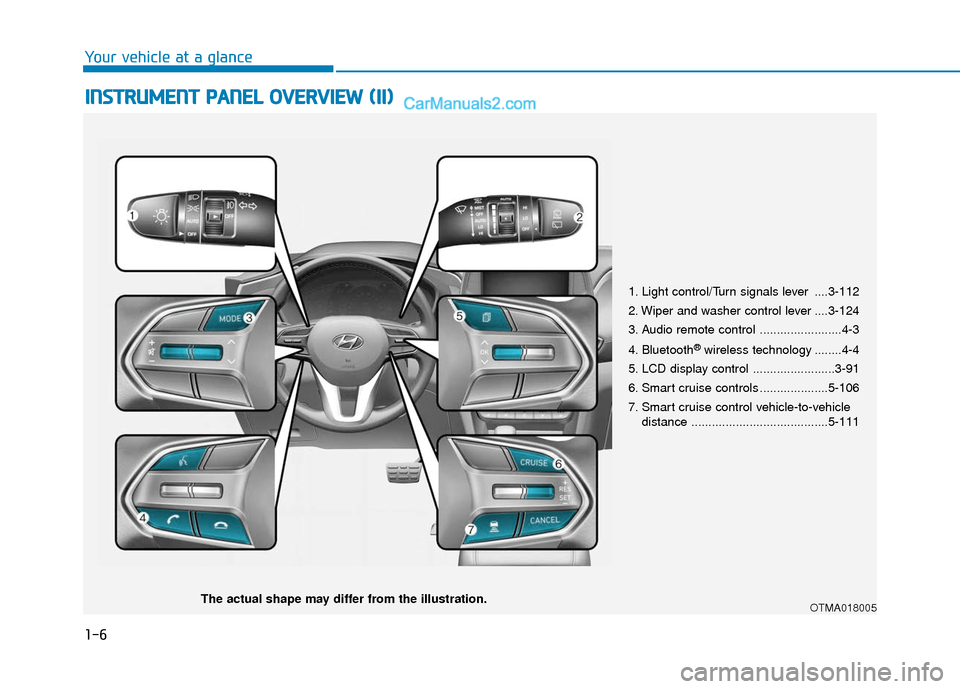
1. Light control/Turn signals lever ....3-112
2. Wiper and washer control lever ....3-124
3. Audio remote control ........................4-3
4. Bluetooth
®wireless technology ........4-4
5. LCD display control ........................3-91
6. Smart cruise controls ....................5-106
7. Smart cruise control vehicle-to-vehicle distance ........................................5-111
OTMA018005The actual shape may differ from the illustration.
Page 91 of 557
LCD Display ...........................................................3-91
LCD Display Control ........................................................3-91
LCD Display Modes .........................................................3-92
Trip Computer .....................................................3-106
Head Up Display (HUD).....................................3-110
Lighting................................................................3-112
Exterior Lights ...............................................................3-112
Interior Lights ................................................................3-120
Welcome System ...........................................................3-123
Wipers And Washers .........................................3-124
Front Windshield Wipers .............................................3-124
Front Windshield Washers ..........................................3-126
Rear Window Wiper and Washer..............................3-127
Driver Assist System .........................................3-128
Rear view monitor ........................................................3-128
Surround View Monitoring .........................................3-129
Blind-spot View Monitor system ..............................3-131
Reverse Parking Distance Warning system............3-133
Manual Climate Control System.......................3-137
Heating and Air Conditioning .....................................3-138
System Operation .........................................................3-142
System Maintenance....................................................3-144
Automatic Climate Control System ..................3-146
Automatic Temperature Control Mode ....................3-147
Manual Temperature Control Mode .........................3-148
System Operation .........................................................3-155
System Maintenance....................................................3-156
Windshield Defrosting and Defogging ............3-158
Auto Defogging System ..............................................3-160
Rear Window Defroster ..............................................3-162
Climate Control Additional Features ...............3-163
Cluster ionizer ................................................................3-163
Automatic Ventilation ...................................................3-163
Sunroof Inside Air Recirculation ...............................3-164
Auto comfort control ...................................................3-164
Storage Compartment .......................................3-165
Center Console Storage ..............................................3-165
Glove Box ........................................................................\
3-165
Sunglass Holder.............................................................3-166
Tray......................................................................\
.............3-166
Luggage Tray .................................................................3-167
3
Page 126 of 557
3-37
Convenient features of your vehicle
3
Gate operator & Canadian program-ming
During programming, your handheld
transmitter may automatically stop
transmitting. Continue to press the
Integrated HomeLink
®Wireless
Control System button (note steps 2
through 3 in the Programming portion
of this document) while you press
and re-press ("cycle") your handheld
transmitter every two seconds until
the frequency signal has been
learned. The indicator light will flash
slowly and then rapidly after several
seconds upon successful training.
Operating HomeLink®
To operate, simply press and release
the programmed HomeLink®button.
Activation will now occur for the
trained device (i.e. garage door
opener, gate operator, security sys-
tem, entry door lock, home/office
lighting, etc.). For convenience, the
hand-held transmitter of the device
may also be used at any time.
Reprogramming a single HomeLink®
button
To program a device to HomeLink®
using a HomeLink®button previously
trained, follow these steps:
1. Press and hold the desired HomeLink
®button. DO NOT
release the button.
2. The indicator light will begin to flash after 20 seconds. Without releasing
the HomeLink
®button, proceed
with "Programming" step 2.
For questions or comments, contact
HomeLink
®at www.homelink.comor
1-800-355-3515.
Erasing HomeLink®buttons
Individual buttons cannot be erased.
However, to erase all three pro-
grammed buttons:
1. Press and hold the two outer HomeLink
®buttons until the indi-
cator light begins to flash after 10
seconds.
2. Release both buttons. Do not hold for longer than 20 seconds.
The Integrated HomeLink
®Wireless
Control System is now in the training
(learn) mode and can be pro-
grammed at any time following the
appropriate steps in the
Programming chapters above.
NVS
®is a registered trademark and
Z-Nav™ is a trademark of the Gentex
Corporation, Zeeland, Michigan.
HomeLink
®is a registered trademark
owned by Johnson Controls,
Incorporated, Milwaukee, Wisconsin.
FCC ID: NZLTLMHL4
IC: 4112A-TLMHL4
Page 159 of 557
3-70
Convenient features of your vehicle
Outside temperature gauge
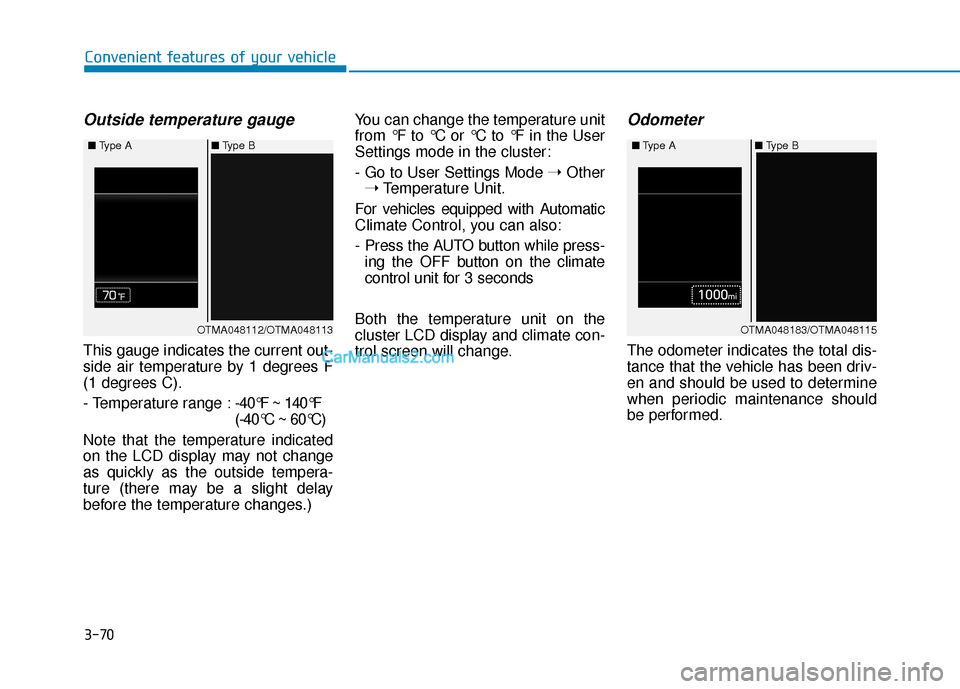
This gauge indicates the current out-
side air temperature by 1 degrees F
(1 degrees C).
- Temperature range :-40°F ~ 140°F
(-40°C ~ 60°C)
Note that the temperature indicated
on the LCD display may not change
as quickly as the outside tempera-
ture (there may be a slight delay
before the temperature changes.) You can change the temperature unit
from °F to °C or °C to °F in the User
Settings mode in the cluster:
- Go to User Settings Mode
➝Other
➝ Temperature Unit.
For vehicles equipped with Automatic
Climate Control, you can also:
- Press the AUTO button while press- ing the OFF button on the climate
control unit for 3 seconds
Both the temperature unit on the
cluster LCD display and climate con-
trol screen will change.
Odometer
The odometer indicates the total dis-
tance that the vehicle has been driv-
en and should be used to determine
when periodic maintenance should
be performed.
OTMA048112/OTMA048113
■
Type A ■Type B OTMA048183/OTMA048115
■
Type A ■Type B
Page 160 of 557
3-71
Convenient features of your vehicle
3
Range
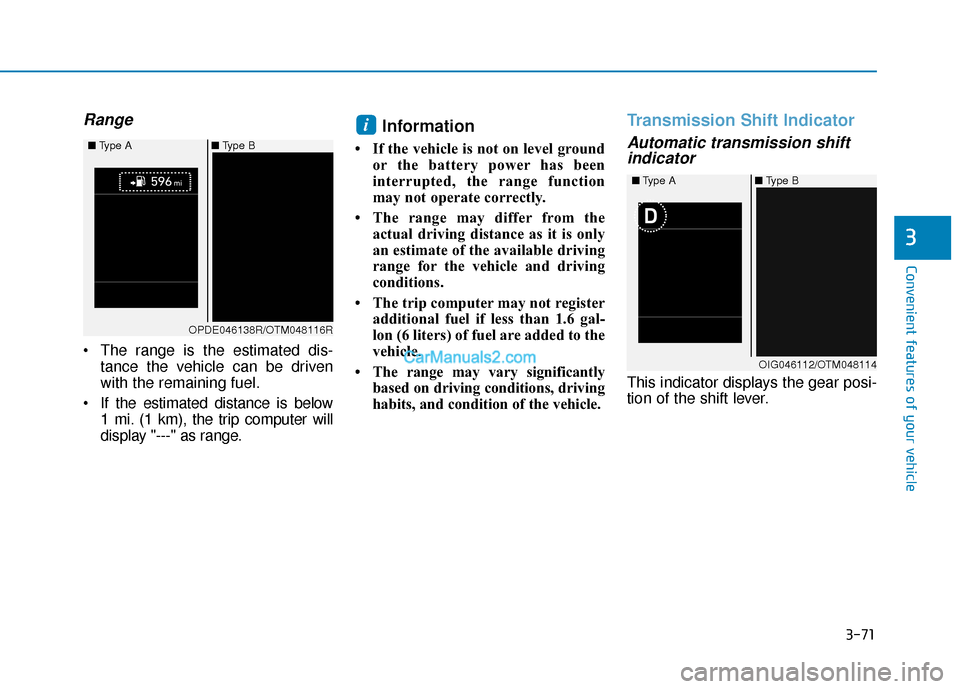
The range is the estimated dis-tance the vehicle can be driven
with the remaining fuel.
If the estimated distance is below 1 mi. (1 km), the trip computer will
display "---" as range.
Information
• If the vehicle is not on level groundor the battery power has been
interrupted, the range function
may not operate correctly.
• The range may differ from the actual driving distance as it is only
an estimate of the available driving
range for the vehicle and driving
conditions.
• The trip computer may not register additional fuel if less than 1.6 gal-
lon (6 liters) of fuel are added to the
vehicle.
• The range may vary significantly based on driving conditions, driving
habits, and condition of the vehicle.
Transmission Shift Indicator
Automatic transmission shiftindicator
This indicator displays the gear posi-
tion of the shift lever.
i
OIG046112/OTM048114
■
Type A ■Type B
OPDE046138R/OTM048116R
■
Type A ■Type B
Page 201 of 557
3-112
Convenient features of your vehicle
L
LI
IG
G H
H T
TI
IN
N G
G
Exterior Lights
Lighting control
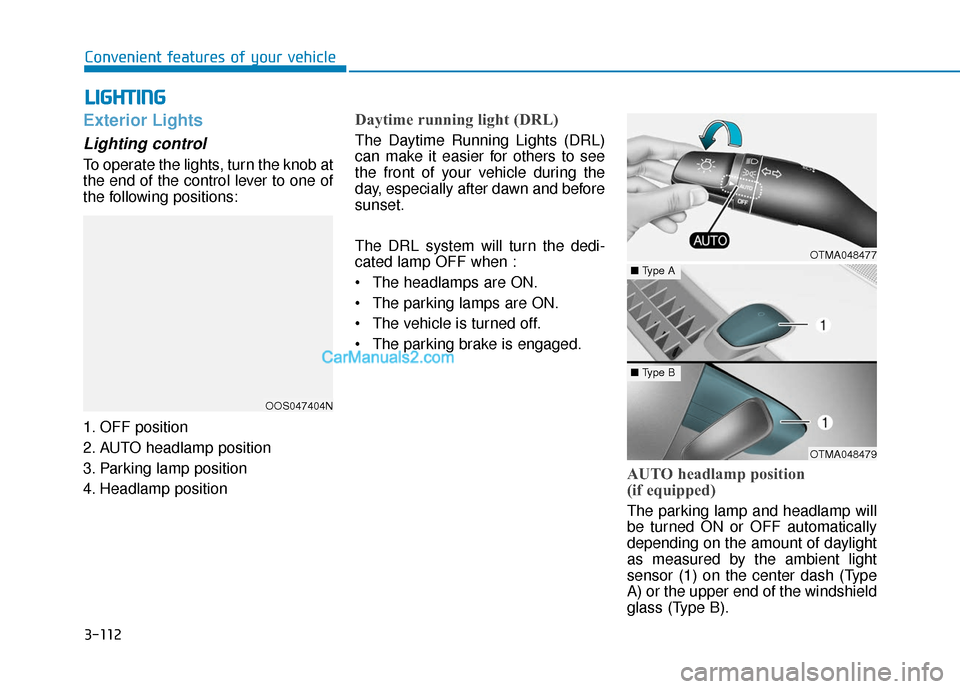
To operate the lights, turn the knob at
the end of the control lever to one of
the following positions:
1. OFF position
2. AUTO headlamp position
3. Parking lamp position
4. Headlamp position
Daytime running light (DRL)
The Daytime Running Lights (DRL)
can make it easier for others to see
the front of your vehicle during the
day, especially after dawn and before
sunset.
The DRL system will turn the dedi-
cated lamp OFF when :
• The headlamps are ON.
The parking lamps are ON.
The vehicle is turned off.
The parking brake is engaged.
AUTO headlamp position
(if equipped)
The parking lamp and headlamp will
be turned ON or OFF automatically
depending on the amount of daylight
as measured by the ambient light
sensor (1) on the center dash (Type
A) or the upper end of the windshield
glass (Type B).
OOS047404N
OTMA048477
OTMA048479
■ Type A
■Type B
Page 354 of 557

5-80
Driving on a slope
The BCW and BCA systems may not
operate properly when driving on a
slope. In certain instances the sys-
tem may not detect the vehicle in the
next lane.
Also, in certain instances, the system
may recognize the ground or struc-
tures.
Always pay attention to road and
driving conditions, while driving. Driving where the heights of the
lanes are different
The BCW and BCA systems may not
operate properly when driving where
the heights of the lanes are different.
In certain instances, the system may
not detect the vehicle on a road with
different lane heights (i.e. underpass
joining section, grade separated
intersections, etc.).
Always pay attention to road and
driving conditions, while driving.[A] : noise barrier, [B] : guardrail
Driving where there is a structure beside the road
The BCW and BCA systems may not
operate properly when driving where
there is structure beside the road.
In certain instances, the system may
recognize the structures (i.e. noise
barriers, guardrail, double guardrail,
median strip, bollard, street light,
road sign, tunnel wall, etc.) beside
the road.
Always pay attention to road and
driving conditions, while driving.
Driving your vehicle
OTM058113OTM058114LOTM058112
Page 386 of 557
5-112
Driving your vehicle
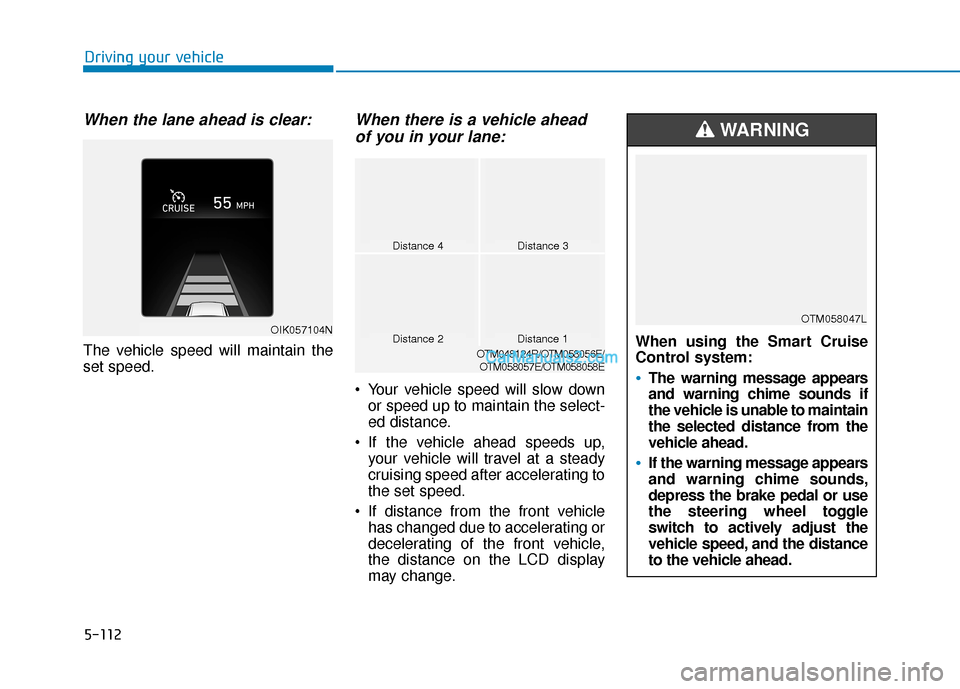
When the lane ahead is clear:
The vehicle speed will maintain the
set speed.
When there is a vehicle aheadof you in your lane:
Your vehicle speed will slow down
or speed up to maintain the select-
ed distance.
If the vehicle ahead speeds up, your vehicle will travel at a steady
cruising speed after accelerating to
the set speed.
If distance from the front vehicle has changed due to accelerating or
decelerating of the front vehicle,
the distance on the LCD display
may change.
Distance 4Distance 3
Distance 1Distance 2OTM048124R/OTM058056E/
OTM058057E/OTM058058E
OIK057104NWhen using the Smart Cruise
Control system:
The warning message appears
and warning chime sounds if
the vehicle is unable to maintain
the selected distance from the
vehicle ahead.
If the warning message appears
and warning chime sounds,
depress the brake pedal or use
the steering wheel toggle
switch to actively adjust the
vehicle speed, and the distance
to the vehicle ahead.
WARNING
OTM058047L
Page 450 of 557
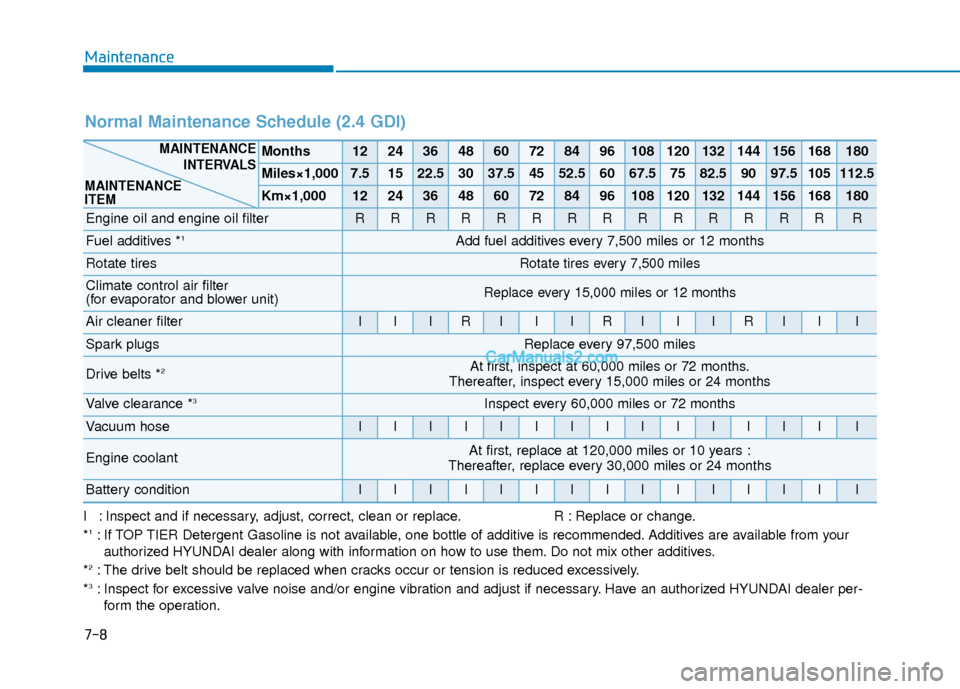
I : Inspect and if necessary, adjust, correct, clean or replace.R : Replace or change.
*1: If TOP TIER Detergent Gasoline is not available, one bottle of additive is recommended. Additives are available from your authorized HYUNDAI dealer along with information on how to use them. Do not mix other additives.
*
2: The drive belt should be replaced when cracks occur or tension is reduced excessively.
*3: Inspect for excessive valve noise and/or engine vibration and adjust if necessary. Have an authorized HYUNDAI dealer per- form the operation.
Normal Maintenance Schedule (2.4 GDI)
Months1224364860728496108120132144156168180
Miles×1,0007.51522.53037.54552.56067.57582.59097.5105112.5
Km×1,0001224364860728496108120132144156168180
Engine oil and engine oil filterRRRRRRRRRRRRRRR
Fuel additives *1Add fuel additives every 7,500 miles or 12 months
Rotate tiresRotate tires every 7,500 miles
Climate control air filter
(for evaporator and blower unit)Replace every 15,000 miles or 12 months
Air cleaner filterIIIRIIIRIIIRIII
Spark plugsReplace every 97,500 miles
Drive belts *2At first, inspect at 60,000 miles or 72 months.
Thereafter, inspect every 15,000 miles or 24 months
Valve clearance *3Inspect every 60,000 miles or 72 months
Vacuum hoseIIIIIIIIIIIIIII
Engine coolantAt first, replace at 120,000 miles or 10 years :
Thereafter, replace every 30,000 miles or 24 months
Battery conditionIIIIIIIIIIIIIII
MAINTENANCE
INTERVALS
MAINTENANCE
ITEM
Maintenance
7-8
Page 451 of 557
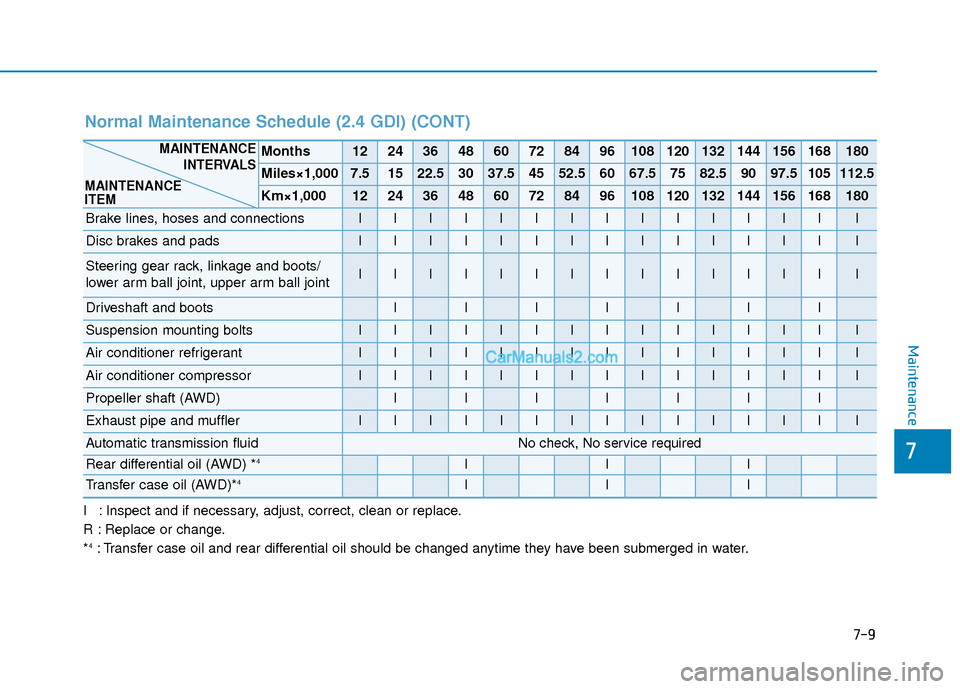
I : Inspect and if necessary, adjust, correct, clean or replace.
R : Replace or change.
*
4: Transfer case oil and rear differential oil should be changed anytime they have been submerged in water.
Normal Maintenance Schedule (2.4 GDI) (CONT)
Months1224364860728496108120132144156168180
Miles×1,0007.51522.53037.54552.56067.57582.59097.5105112.5
Km×1,0001224364860728496108120132144156168180
Brake lines, hoses and connectionsIIIIIIIIIIIIIII
Disc brakes and padsIIIIIIIIIIIIIII
Steering gear rack, linkage and boots/
lower arm ball joint, upper arm ball jointIIIIIIIIIIIIIII
Driveshaft and bootsIIIIIII
Suspension mounting boltsIIIIIIIIIIIIIII
Air conditioner refrigerantIIIIIIIIIIIIIII
Air conditioner compressorIIIIIIIIIIIIIII
Propeller shaft (AWD)IIIIIII
Exhaust pipe and mufflerIIIIIIIIIIIIIII
Automatic transmission fluidNo check, No service required
Rear differential oil (AWD) *4III
Transfer case oil (AWD)*4III
MAINTENANCEINTERVALS
MAINTENANCE
ITEM
Maintenance
7
7-9